
The Best Squarespace Template for Coaches, Scored and Ranked
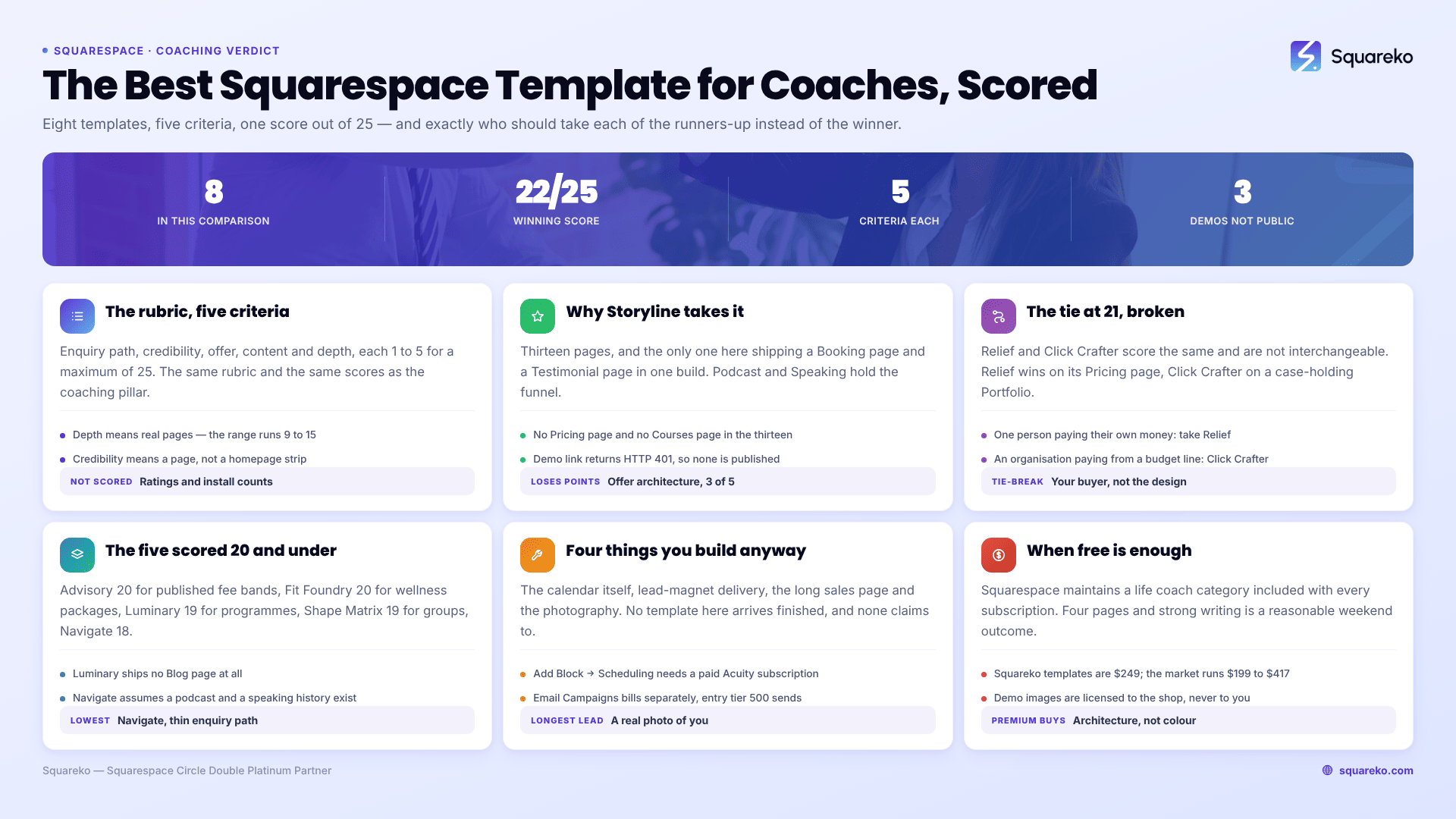
The verdict: Storyline. It scores 22 out of 25 and it wins for one structural reason — it is the only template in this comparison that ships a dedicated Booking page and a dedicated Testimonial page in the same 13-page build. A coaching website converts on a discovery call and on proof, and Storyline is the only one where both already exist as pages rather than as things you build. If you publish your prices, take Relief at 21/25 instead. If you sell to businesses, take Click Crafter, also 21/25.
One caveat, stated up front rather than buried: Storyline has no publicly viewable demo. Its published live-demo link returns HTTP 401, so there is no demo link in this post. Ask for a walkthrough before you buy. If you will not buy a template you cannot click through, Relief is the best template here with a working demo.
The scores in full
Eight templates, one rubric, five criteria scored 1–5 for a maximum of 25. The rubric is the same one published in the coaching templates pillar, and the scores are identical across both posts.
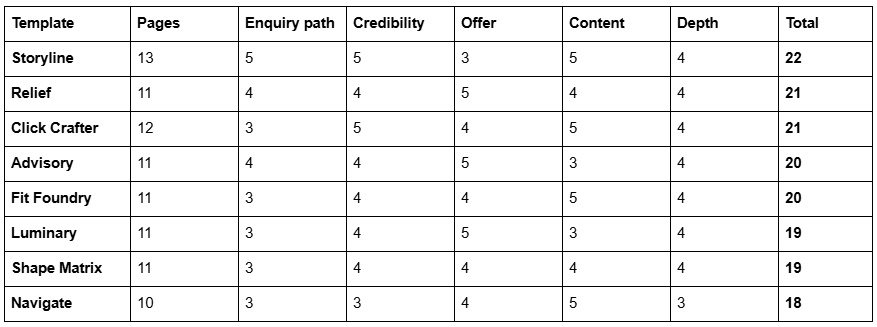
What each criterion measures. Enquiry path — is there a Booking or Pricing-plus-enquiry page you can turn into a discovery-call page without building it from nothing. Credibility — is there a structured home for testimonials or case studies, a page rather than a homepage strip. Offer — is there somewhere to sell packages properly: a Pricing page, a Courses page, or a repeatable service-detail page. Content — is there a Blog, Podcast or Freebie page to fill the top of the funnel. Depth — enough real pages (these run 9 to 15) that you are editing rather than building.
What is not scored: star ratings, review counts and "used by" figures. None of them are verifiable from outside the shop publishing them, and this post does not quote them for its own templates either.
Demo access: Storyline, Navigate and Advisory have no publicly viewable demo — their published live-demo links return 401 and are not linked here. Relief, Click Crafter, Fit Foundry, Luminary and Shape Matrix all have working demos, tested before publication and linked below.
Why Storyline wins
22/25. Storyline is 13 pages, tagged Author & Coach and Speaker. The page set: Home, About, Booking, Testimonial, Podcast, Speaking, Blog, Contact, legal pages, a 404 and a Style Guide.
Two of those pages are the entire argument.
The Booking page. Nearly every coaching business converts on a call, and a Contact page is not a booking page. A Contact page asks a stranger to compose an email, which is work, and work is where enquiries die. A booking page says how long the call is, what happens on it, what happens afterwards, that there is no obligation, and then shows a calendar — usually an Acuity Scheduling block, since Squarespace Scheduling and Acuity are now the same product. Storyline ships the page. Every other template in this table makes you build it, which in Fluid Engine is an afternoon you would rather spend on copy.
The Testimonial page. Coaching is bought on proof, and proof needs room. A homepage carousel holds three quotes; a testimonial page holds fifteen, grouped by the kind of client, each with a role, a situation, what changed and over what period. That level of specificity is what separates a testimonial from decoration, and it needs a page.
The rest is a working coach's site rather than a brochure. Podcast and Speaking give the top of the funnel somewhere to live, which is where most coaching sites stall — there is no page to send an audience to between "has heard of you" and "has booked a call".
Where Storyline loses points. Offer architecture, 3 out of 5. There is no Pricing page and no Courses page, so package pricing and any productised programme are structures you build inside the Booking or Services page. And the demo is not publicly viewable, which is a real cost when a template is a $249 non-refundable purchase.
The tie at 21, broken. Relief and Click Crafter score identically and are not interchangeable. Relief wins on offer architecture because of its Pricing page; Click Crafter wins on credibility because a Portfolio holds case studies and a testimonial strip does not. The tie-break is your buyer, not the template: if one person pays with their own money, take Relief; if an organisation pays with a budget line, take Click Crafter. Buying the wrong one of those two is the most common mistake in this category, and it is not a design mistake — it is an audience mistake that no amount of restyling fixes.
The runners-up, and exactly who should pick them
Choose Relief if you publish your prices — 21/25
Relief is 11 pages tagged Therapist and Wellness Coach, with a Pricing page, an FAQs page and a Blog. Publishing a price or a price band is the single most contested decision in coaching, and it is the most reliable way to raise the proportion of discovery calls that convert — it removes the people who were never going to buy before they take an hour of your week. Relief gives that a page rather than a paragraph. The FAQs page, built with Accordion blocks, renders server-side and is where "how long does this take", "what if it isn't working" and "do you work online" go.
Relief is also the highest-scoring template here with a working demo, which matters if you will not buy sight unseen.
Do not choose Relief if you speak or podcast. It has no Speaking or Podcast page, and its visual register is quiet clinical calm — it undersells a stage-facing business.
Choose Click Crafter if you sell to organisations — 21/25
Click Crafter is a 12-page agency and service-business template with a Portfolio, a Gallery, a Blog, a Shop and a Freebie page. For executive coaching, corporate training or consultancy, the Portfolio structure is the case-study structure — one engagement per URL, with the situation, the approach and the result. The Freebie page is the B2B lead magnet most firms email on request and therefore lose.
Do not choose Click Crafter if you coach individuals. It reads corporate, and corporate reads expensive and impersonal to someone choosing a life coach. The consultant post covers this buyer properly.
Choose Advisory if fees are your qualifier — 20/25
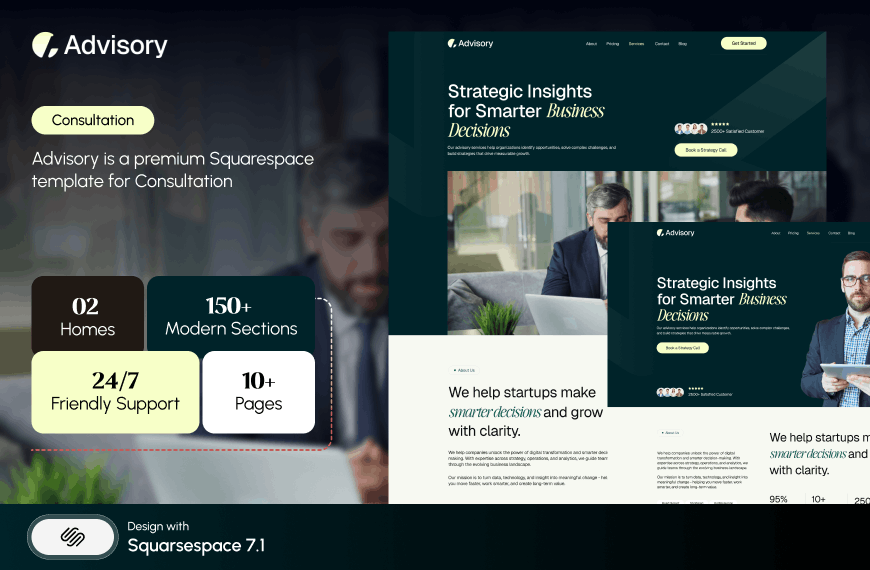
Advisory is 11 pages tagged Consultation and Speaker, with a Pricing page, a Blog and two legal pages. It is built for the advisor-speaker overlap, and the pair of legal pages is genuinely useful to anyone who has to publish terms of engagement. No demo link — Advisory's published live-demo URL also returns 401.
Do not choose Advisory if your proof is visual. There is no portfolio or gallery structure at all.
Choose Fit Foundry if you sell wellness packages — 20/25
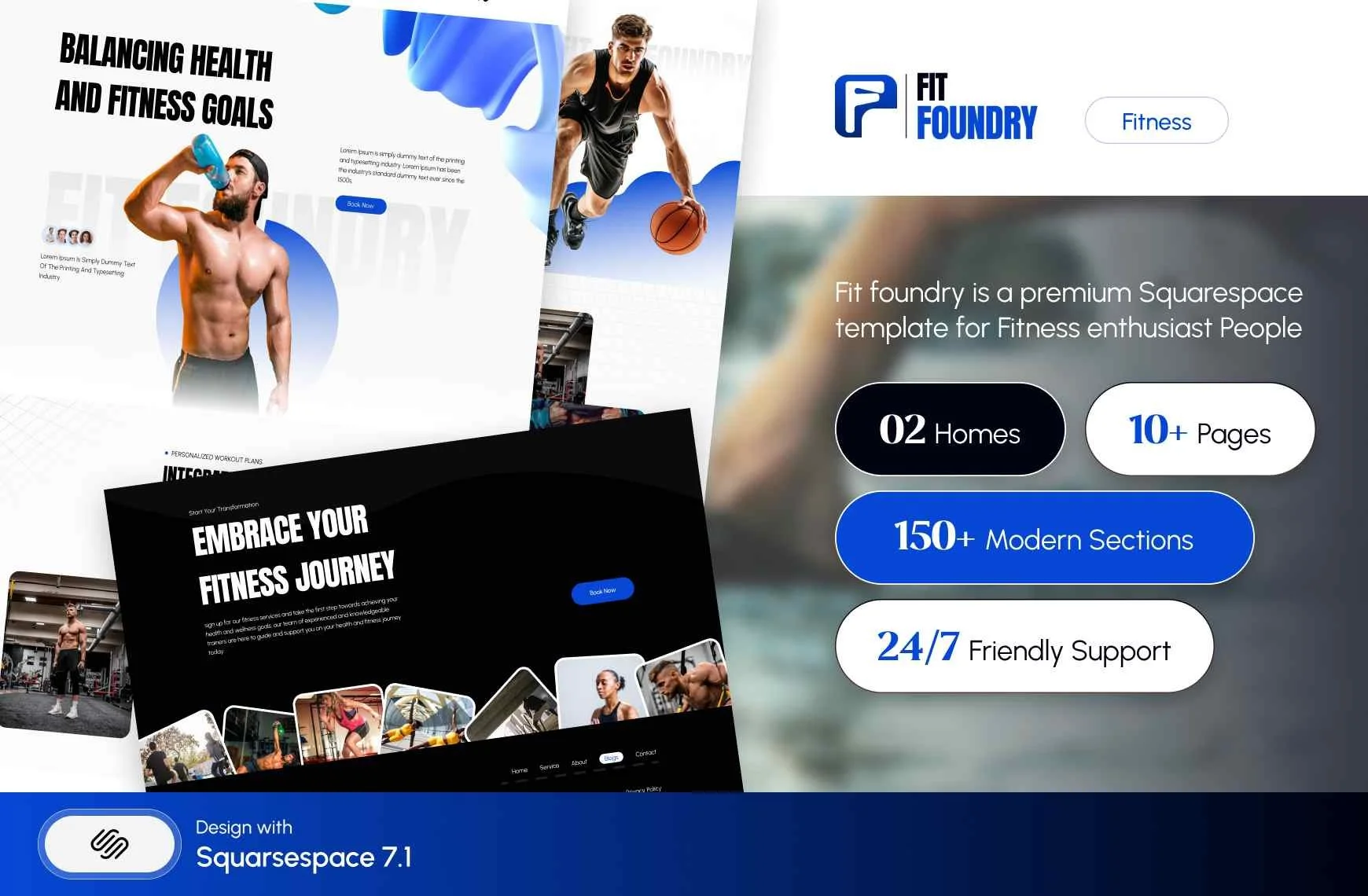
Fit Foundry is 11 pages tagged Fitness & Wellness and Coach, with a Shop, a Blog, an FAQs page and a Freebie page. The Shop earns its place: a nutrition coach selling a meal plan or a wellness coach selling a self-paced reset needs a product page, not an invoice.
Do not choose Fit Foundry if you coach executives. The register is consumer wellness and a CFO will read it that way. Fitness coach templates covers that segment.
Choose Luminary if you sell a course or programme — 19/25
Luminary is 11 pages tagged Service-Based, Course and Speaker, with a Courses page, a Shop, a Portfolio, a Gallery and a Freebie page. The free-asset-to-paid-programme funnel already has pages. Understand what the Courses page is, though: it is a sales page for the programme. The lessons themselves live behind Squarespace Member Sites, which gates blog, course and video pages and is free to build but requires a billing plan including digital products to sell from.
Do not choose Luminary if you write. It ships no Blog page at all.
Choose Shape Matrix if you run groups — 19/25
Shape Matrix is 11 pages with Training and Classes pages, a Portfolio, a Gallery and a Blog. If your delivery model is a recurring cohort, a mastermind or a workshop series rather than a one-to-one calendar, those two pages are the ones you would otherwise build.
Do not choose Shape Matrix if you only sell one-to-one. The class structure is dead weight.
Choose Navigate if you already have an audience — 18/25
Navigate is 10 pages tagged Author & Coach and Speaker, with Course, Podcast and Speaking pages plus a Blog. It is built for the coach whose business runs on published work — a podcast, a book, a keynote. It scores lowest here because the enquiry path is thin: no Booking page, no Pricing page. No demo link; Navigate's published live-demo URL returns 401.
Do not choose Navigate if you are starting out. Its structure assumes a speaking history and a podcast exist. Empty, it looks like a site waiting for a career.


Four things you build yourself whichever template wins
No template in this comparison — or any other — arrives finished. Four pieces of a coaching site are always yours, and knowing that before you buy stops you choosing on the wrong criteria.
1. The booking mechanism. Even Storyline's Booking page is a page, not a calendar. The calendar is Acuity Scheduling, added with Add Block → Scheduling, which requires a paid Acuity subscription — the legacy free plan cannot embed a scheduler. Alternatively a Button block linked to your Acuity scheduling page, which is simpler and survives a template change. Set your availability intervals before launch and book a test appointment on a phone; the most common Squarespace Forum complaint about Acuity is not the embed but availability configuration producing minute-by-minute slots instead of hourly blocks.
2. The lead magnet delivery. Templates ship a Freebie page. Squarespace forms do not attach files. You either redirect the form to an unlisted download page after submission, or store submissions to a Squarespace mailing list and trigger an automated Email Campaign on signup — and Email Campaigns is billed separately from your site plan, with the entry tier capped at 500 sends a month.
3. The long sales page. A programme sold above £1,500 needs 3,000 words of problem, proof, curriculum, objections and price. That page is assembled from Squarespace 7.1 sections — every Squareko template ships 150+ pre-designed ones — and it should be disabled in navigation so it does not compete with your homepage in search.
4. The photography. Demo images are licensed to the template shop, not to the buyer, and every one has to be replaced before launch. For a coach that means a real photograph of yourself, which is a booking rather than a download, and it is usually the longest lead time in the whole build.
What about free Squarespace templates?
Free templates are included with every Squarespace subscription and Squarespace maintains a life coach category. For a four-page coaching site with strong writing and one good photograph of yourself, a free template plus a weekend is a completely reasonable outcome, and anyone telling you otherwise is selling something.
What a premium template buys is page architecture — a Booking page, a Testimonial page, a Pricing page, a Courses page already built and styled — plus a Style Guide page that keeps the site consistent once you start editing it. That is the part that is slow and fiddly to build by hand in Fluid Engine, not the colours. The free versus premium comparison sets out where the line actually falls.
The rest of the premium market is real. Big Cat Creative sells coaching templates at $297 with a notably strong self-service education layer. Applet Studio runs roughly 30 templates at about $225. Hold Space Creative and JPK Design Co both build specifically for coaches and therapists. Prices across the market run roughly $199 to $417. All Squareko templates are $249, and the honest differences are delivery — a Squarespace contributor invitation rather than a file download — and installation onto an existing live site as a manual add-on taking around 48 hours.
Three things apply whoever you buy from. Demo images are licensed to the template shop, not to you, so every one must be replaced before launch. All sales are final on digital products across this market. And a Squarespace subscription is separate and required, as is an Acuity subscription if you want an embedded scheduler — the legacy free Acuity plan cannot embed one.
The decision in one paragraph
If you take discovery calls and lead with proof, buy Storyline and ask for a walkthrough first. If you publish prices and want a demo you can click through today, buy Relief. If your clients are organisations, buy Click Crafter. If you sell a programme rather than your calendar, buy Luminary. Everything else on this list is a narrower version of one of those four.
If you would rather not run the install yourself, the premium Squarespace templates in our range arrive as a contributor invitation and can be installed onto an existing live site without taking it offline — worth knowing if your current site is producing enquiries you cannot afford to pause. Most coaches will do it themselves over a weekend, and the table above is the shortlist worth starting from.
FAQ
-
Storyline, scoring 22 out of 25 on this rubric. It is the only template compared here that ships both a dedicated Booking page and a dedicated Testimonial page in one 13-page build — the two structures a coaching website converts on. Relief at 21/25 is the best option with a publicly viewable demo.
-
Storyline, at 13 pages. Every other template in this comparison requires you to build the booking page yourself, which means adding an Acuity Scheduling block to a new page along with call length, what happens on the call, and a short FAQ. Acuity requires its own paid subscription to embed.
-
It buys page architecture, not looks. A Booking page, a Testimonial page and a Pricing page already built and styled, plus a Style Guide page, save a weekend of Fluid Engine work. If your site is four pages and your writing is strong, a free Squarespace template is a reasonable choice.
-
Advisory is the consultation-tagged template in the Squareko range at 11 pages with a Pricing page and two legal pages. Click Crafter and Cleanko both work well through their Portfolio and Service Details structures. Squarespace also maintains a free consulting template category included with every subscription.
-
All Squareko templates are $249. The wider premium market runs roughly $199 to $417, with most shops between $225 and $299. A Squarespace subscription is separate and required. Acuity Scheduling is a separate subscription again if you want an embedded booking calendar.
-
To the page that matches what your profile says you do — a sector page, a capability page or a case study — not your homepage. Also set a social sharing image under Page Settings → Social Image, or LinkedIn will pick an arbitrary image from the page for your one preview impression.

Author Bio
I'm Walid Hasan, a Certified Squarespace Expert and Squarespace Circle Platinum Partner with over 12 years of hands-on experience designing and optimizing high-performing websites. Over the years, I've had the privilege of building more than 2,000 Squarespace websites for clients around the world, always focusing on clean design, strong user experience, and conversion-driven results.
