
Is the Squarespace 7.1 Upgrade Irreversible?
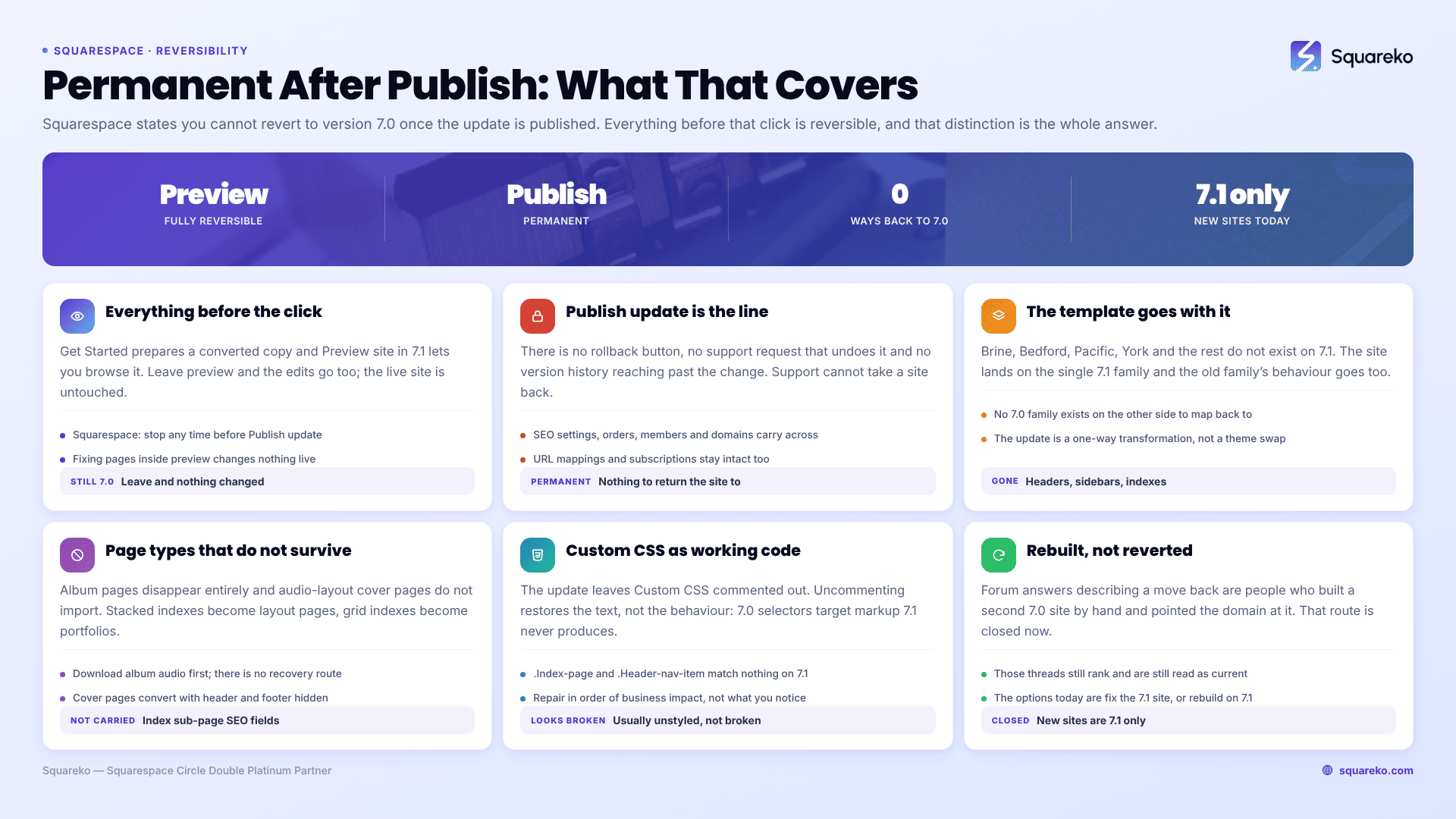
Yes. Once you click Publish update, the move from Squarespace 7.0 to 7.1 is permanent and there is no way back. Squarespace states it directly: after completing the update you cannot revert to version 7.0. There is no rollback button, no support request that undoes it, and no version history that reaches back past the change.
Everything before that click is reversible. That is the distinction worth being precise about.
What is reversible at each stage of the Squarespace 7.1 update
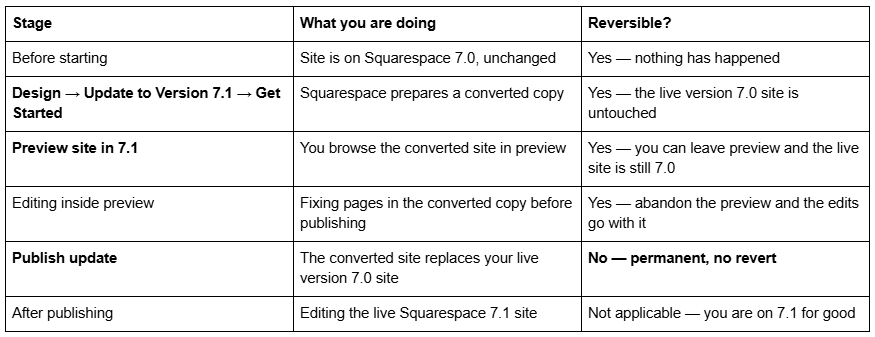
Squarespace's own wording covers the first four rows: updating "is optional, and you can stop at any time before you click Publish update." The fifth row is the one that matters.
What "irreversible" actually covers
It is broader than the version number.
The version itself. There is no downgrade path from Squarespace 7.1 to 7.0. Squarespace does not offer one, and support cannot perform one.
The template. Version 7.0 template families — Brine, Bedford, Pacific, York and the rest — do not exist on Squarespace 7.1. Your site is now on the single 7.1 family, and the old family's specific header layouts, sidebars and index behaviours are gone with it.
The page types that do not survive. Album pages disappear entirely. Audio-layout cover pages do not import. Stacked index pages become layout pages and grid index pages become portfolio pages, and the SEO titles and descriptions on their sub-pages are not carried across.
The Custom CSS as working code. The update leaves your Custom CSS commented out. Uncommenting it restores the text, not the behaviour — version 7.0 selectors such as .Index-page and .Header-nav-item target markup Squarespace 7.1 does not produce.
The ability to start over on 7.0. You cannot create a new Squarespace 7.0 site. New sites are 7.1 only, so "I'll just rebuild it on 7.0" is not available as a fallback.
What is not affected: SEO settings, orders, sales, customer data, members, domains, URL mappings and subscriptions all carry across the update and stay intact.
Why there is no rollback from Squarespace 7.1
It helps to understand what the update actually is, because it explains why "just undo it" is not a feature Squarespace is withholding.
Moving from Squarespace 7.0 to 7.1 is not a theme swap. It is a one-way transformation of your content: pages are restructured into 7.1 sections, page types are remapped — stacked index to layout page, grid index to portfolio page, cover page to a regular page with the header and footer hidden — and template-specific features that have no 7.1 equivalent are dropped rather than stored. There is no version 7.0 template family on the other side to map back onto, because those families do not exist on Squarespace 7.1 at all.
Squarespace support can help with problems on the resulting 7.1 site — galleries throwing a "Couldn't load collection" error after conversion is a documented case worth raising with them. What support cannot do is return the site to version 7.0. That is not a policy position; there is nothing to return it to.
The three things to do before you click Publish update
1. Duplicate the version 7.0 site. From your Account Dashboard, click the ⋯ menu on the site and choose Duplicate Website. This is the only copy of the old design you will ever have. It will not run on sites over 150 pages or on the Developer Platform, and it excludes orders, blog comments, analytics, domains and audio files — so it is a visual reference, not a restore point.
2. Export what can be exported, and screenshot the rest. Settings → Import & Export Content → Export → WordPress icon produces an XML archive of pages, one blog and text and image blocks. It cannot be imported back into any Squarespace site, so treat it as a text record. Then take full-page screenshots of every page at desktop and mobile width, and copy the entire Custom CSS panel into a text file. Screenshots of Site Styles matter too — fonts, sizes, colours and button settings are the details nobody remembers a fortnight later.
3. Work the full pre-flight list, then walk the site inside preview. The complete set of pre-update checks is in the Squarespace 7.0 to 7.1 complete upgrade guide. The preview is a complete working copy and it costs nothing to spend an hour in it. Open every page, check the header and footer, check mobile, check forms and store pages. Anything you find in preview is a decision; the same thing found after publishing is a repair.
The case where people think they reverted, but rebuilt
Search the Squarespace Forum for downgrading and you will find answers along the lines of "You can move back, but there is no switch to do it — start a new trial with a 7.0 site, build it, activate it, move your domain and then cancel the original site."
That was never a revert. It was building a second site by hand and pointing the domain at it — a rebuild with a different ending. And it no longer works at all, because new Squarespace sites can only be created on version 7.1. Those threads are still ranking and still being read as though the route exists.
The honest version today: if you publish the update and hate the result, your options are to fix the Squarespace 7.1 site, or to rebuild it as a new 7.1 site with a design you actually want. Going back to version 7.0 is not among them.
If it is already done
Most sites that feel broken immediately after the update are not broken — they are unstyled, because the Custom CSS is commented out and the version 7.0 selectors inside it no longer match. Work through the post-update repair sequence: uncomment the CSS, rewrite the selectors, restore index sub-page SEO fields, check galleries image by image, and add redirects for any URL that moved.
Do that repair in order of business impact rather than in order of what you notice first. Forms, checkout and any page holding rankings come before typography. And resist making structural changes in the same week — changing a URL slug on Squarespace creates no automatic 301 redirect, so a well-intentioned tidy-up in the days after a permanent migration is the fastest way to turn a cosmetic problem into a traffic one.
If you took a duplicate of the version 7.0 site beforehand, this is the moment it earns its keep: open it side by side and read the original values back rather than reconstructing them from memory.
If the honest verdict after a week is that the converted layout is not worth repairing, the cheaper route is usually a clean rebuild on Squarespace 7.1 rather than continuing to patch the conversion — and starting from a premium Squarespace 7.1 template removes most of the layout work. But work the repair list first. Most converted sites come right in a day, and nobody needs to be involved but you.
FAQ
-
Yes. Once you click Publish update, Squarespace states you cannot revert to version 7.0. There is no rollback, no support-side undo and no version history reaching past the change. Everything before that click, including the entire preview stage, is fully reversible.
-
The tool itself takes one to two hours including preview checks. The repair afterwards takes a day on a lightly customised site and up to a fortnight on one with several hundred lines of layout CSS. Recording the pre-update baseline adds about half a day.
-
Custom CSS is commented out and its 7.0 selectors no longer match. Album pages disappear, audio-layout cover pages do not import, and sidebars, header taglines, blog and store share buttons, custom Adobe fonts and site-wide parallax have no version 7.1 equivalent.
-
No. Both versions expose the same SEO title and description fields, generate the same automatic sitemap, share the same uneditable robots.txt, and neither creates an automatic 301 when a URL slug changes. Ranking differences after a move come from content and structure changes, not the version.
-
Usually yes — you can switch templates and switch back as long as you do not uninstall the original. The exceptions are the 32 discontinued templates, which Squarespace does not offer in the switcher, so they cannot be reinstalled once removed.
-
They start from the same single template family, so an unedited 7.1 site is recognisable. Fluid Engine, per-section colour themes and Site Styles give more design range than version 7.0 ever had — the difference is that the distinctiveness now comes from design work rather than from template choice.

Author Bio
I'm Walid Hasan, a Certified Squarespace Expert and Squarespace Circle Platinum Partner with over 12 years of hands-on experience designing and optimizing high-performing websites. Over the years, I've had the privilege of building more than 2,000 Squarespace websites for clients around the world, always focusing on clean design, strong user experience, and conversion-driven results.
