
Squarespace vs WordPress for Professional Services Firms: The Definitive 2026 Guide
Introduction
In professional services, first impressions and compliance are critical. Squarespace offers security and compliance without technical overhead. WordPress offers customisation and bespoke integrations—if you have developer resources.
The "best" platform depends entirely on your firm's size, technical capacity, compliance burden, and growth trajectory. This guide helps you evaluate both fairly.
Key Takeaways Squarespace vs WordPress for Professional Services Firms: The Definitive 2026 Guide
Squarespace wins for compliance simplicity: Built-in GDPR, SSL, and accessibility compliance features mean professional services firms can launch confidently without extensive security audits.
WordPress requires technical expertise: Self-hosted WordPress demands ongoing maintenance, security patching, and plugin management—expect £2,000–£5,000 annually in developer time.
Squarespace's design quality is superior for professional credibility: Responsive, mobile-first templates are built to exacting standards; WordPress sites often suffer from plugin conflicts and poor mobile rendering.
WordPress offers greater customisation and integration depth: If you need bespoke client portals, advanced practice management integration, or custom workflows, WordPress's flexibility justifies the complexity.
For solo to 10-person firms: Squarespace typically wins. For multi-partner firms with complex business logic: WordPress becomes viable—if you have a developer on staff or budget for ongoing support.
Cost matters more than you think: Squarespace's all-in pricing (£12–£33/month) often costs less over 3 years than WordPress hosting (£6–£15/month) plus plugins (£500–£2,000 annually) plus development (£3,000–£10,000 setup).
Migration from WordPress to Squarespace is feasible but manual: Expect 2–4 weeks of work to transfer content, rebuild custom functionality, and test thoroughly.
Why Professional Services Websites Differ from Other Industries
Law firms, accountants, management consultants, and financial advisors face regulatory and reputational constraints that e-commerce or SaaS companies don't:
Compliance audits: Clients and regulators inspect your data handling practices. A website with poor security or vague privacy policies damages client trust and can trigger formal complaints.
Client confidentiality: You must segregate client information, control who can view case studies or testimonials, and ensure your hosting meets industry standards.
Slow decision cycles: Professional services buyers research thoroughly, spend weeks comparing firms, and share website links internally with other decision-makers. Your site must load fast, present information clearly, and function flawlessly on any device.
Regulated marketing claims: Law, accounting, and financial services operate under strict advertising rules (SRA, FCA, ICAEW). Your website must display credentials, disclaimers, and compliance statements without confusion.
Both Squarespace and WordPress can meet these requirements—but they approach them differently.
Feature Comparison: Squarespace vs WordPress
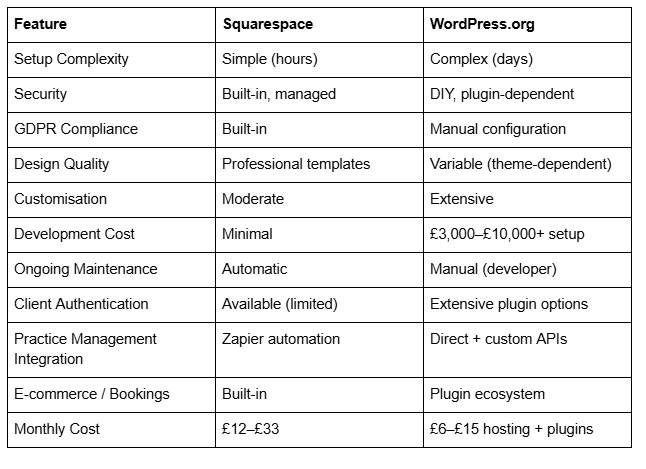
Key Observations from the Comparison### Key Observations from the Comparison
Squarespace dominates on operational friction: Setup, security, compliance, and maintenance are handled by Squarespace. A firm with no developer can launch a professional website in days.
WordPress offers flexibility at a cost: Custom integrations, bespoke client portals, and advanced automation are possible—but only if you have technical expertise or budget for ongoing development.
Total cost of ownership favours Squarespace for most firms: A Squarespace Professional plan (£25/month) over 3 years costs £900. WordPress.org hosting (£100/year) plus essential plugins (£400/year average) plus development (£3,000–5,000 initial, £1,000/year maintenance) totals £7,400–9,400 over 3 years.
Security, Compliance, and Legal Requirements
Is Squarespace GDPR-Compliant for Professional Services?
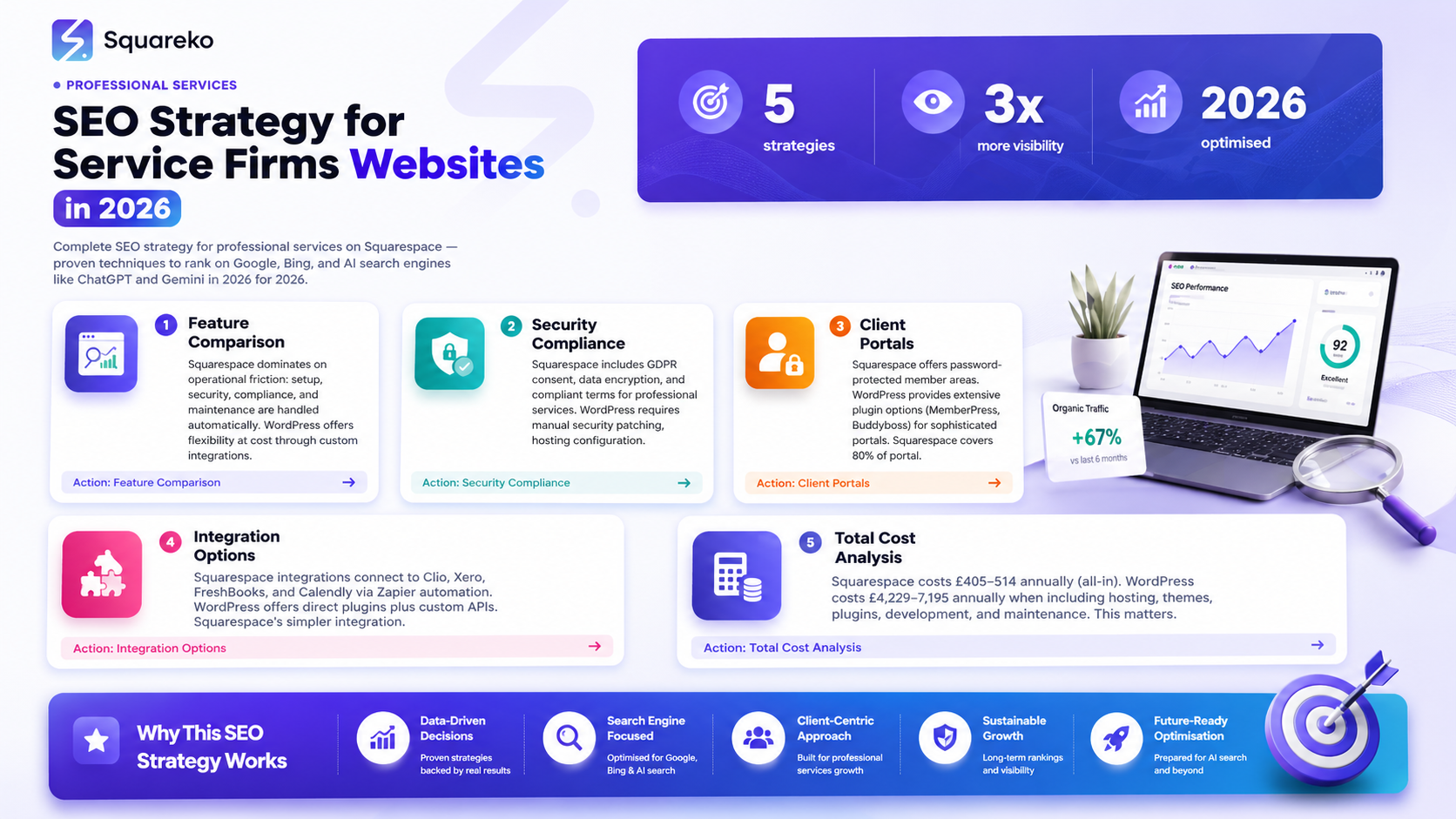
Squarespace includes GDPR consent, data encryption, and compliant terms. Professional services can launch confidently.
Why Design Matters for Professional Services
A law firm, accountancy practice, or management consultancy is judged partly by its website's professionalism. Potential clients spend 2–3 minutes on your homepage deciding whether to trust you. Slow load times, mobile rendering issues, or dated aesthetics undermine your credibility before you've said a word.
Squarespace Design Quality
Strengths:
Every template is professionally designed, mobile-first, and accessible by default.
Responsive design is pixel-perfect across devices; no theme-plugin conflicts.
Image handling is optimised globally; pages load in <1.5 seconds on average.
Templates include sections for team pages, testimonials, case studies, and contact forms.
No "build a landing page from scratch" anxiety—drag-and-drop customisation is visual and intuitive.
Weaknesses:
Design individuality is limited; 5–10% of Squarespace sites look similar because they use the same 100 templates.
Premium customisation (e.g., custom CSS) requires comfort with code.
WordPress Design Quality
Strengths:
Thousands of themes available, many free, many highly customisable.
Full control over design with custom CSS, custom post types, and bespoke layouts.
Popular themes (GeneratePress, OceanWP) support professional services sites well.
Weaknesses:
Quality varies wildly; poorly coded themes slow down pages and introduce compatibility bugs.
Mobile responsiveness isn't guaranteed; outdated themes render poorly on mobile.
Plugin interactions cause layout shifts and broken functionality.
A "professional" WordPress site usually requires paid theme + paid plugins (£500–1,000) plus developer time to configure.
Performance Comparison
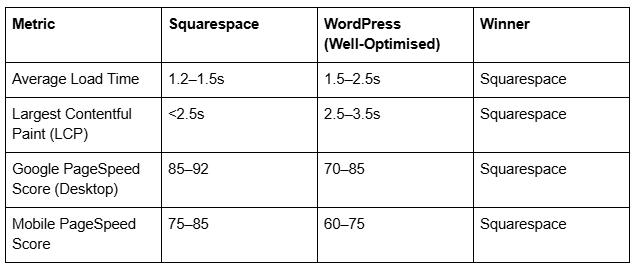
Verdict: Squarespace's globally distributed CDN and automatic image optimisation make it faster out of the box. WordPress requires caching plugins, image optimisation tools, and content delivery networks to match Squarespace's speed.
Client Portals and Authentication
Squarespace Client Login Options
Password-protected pages. Third-party integrations via Zapier for advanced portals.
WordPress Client Portal Options
Extensive plugin options (MemberPress, Buddyboss, Paid Memberships Pro). Can build sophisticated portals but requires developer time.
Integration Capabilities and Practice Management
Squarespace integrations: Zapier automation connects to Clio, Xero, FreshBooks, Calendly. Sufficient for most small-to-medium firms.
WordPress integrations: Direct plugins + custom APIs support. Extensive ecosystem but requires developer maintenance.
Verdict: Squarespace covers 80% of integration needs via Zapier. WordPress required only for complex custom workflows.
Total Cost of Ownership Over 3 Years
Squarespace Cost Breakdown
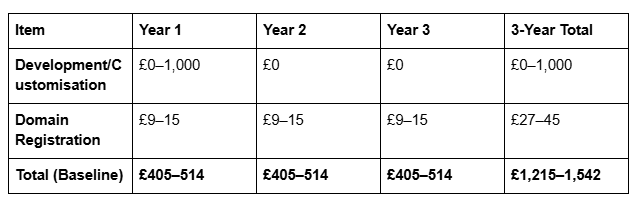
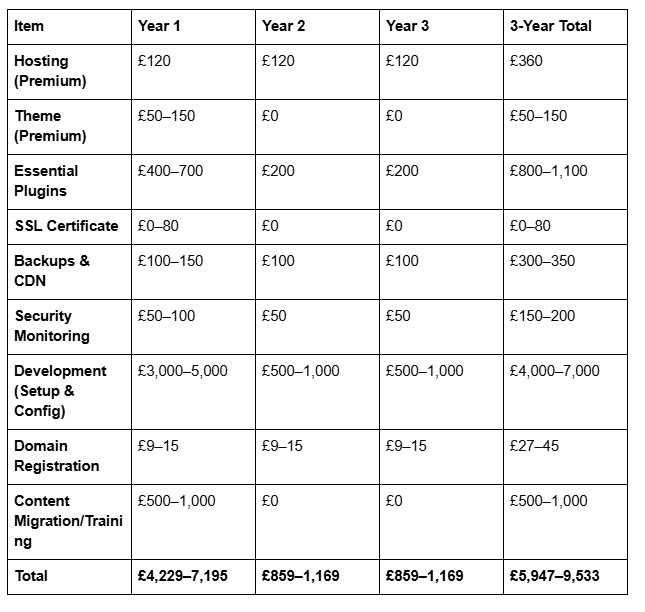
WordPress.org (Self-Hosted) Cost Breakdown
Cost Verdict
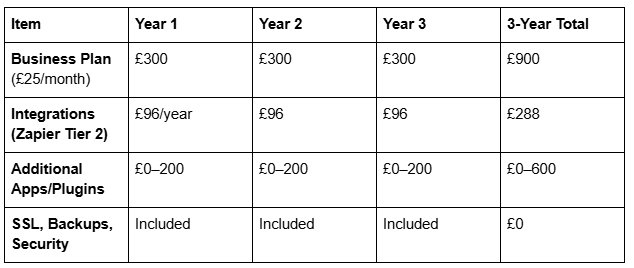
For firms under 25 people: Squarespace is significantly cheaper (£1,215–1,542 vs. £5,947–9,533 over 3 years). The savings justify choosing Squarespace unless you have specific WordPress-only requirements.
For firms with in-house developers: WordPress may be cost-competitive if development is internal and ongoing maintenance is absorbed by staff time. However, the £3,000–7,000 initial setup cost is substantial.
For firms valuing time-to-market: Squarespace's 1–3 day setup beats WordPress's 2–4 week implementation. For professional services, launching quickly and focusing on client work (not website maintenance) has tangible value.
-
A: Yes. Squarespace has a signed Data Processing Agreement (DPA), encrypts all data in transit and at rest, offers EU data residency, and provides built-in GDPR compliance pages and consent tools. However, you (the website owner) remain the data controller; you must document your data processing activities and configure Squarespace's tools correctly.
For firms handling sensitive client information, Squarespace meets standard compliance requirements. Always consult your legal team if you handle exceptionally sensitive data (health records, government-classified information).
-
A: Yes. Squarespace has native password-protected member areas where you can restrict pages or sections to logged-in users. You can create different member levels and display different content accordingly.
However, Squarespace's member areas lack advanced features like task management, file versioning, or real-time messaging. For sophisticated client collaboration, WordPress + a dedicated portal plugin may be necessary. -
A: Absolutely. Squarespace scales well to firms with 50+ staff. You can build team pages, manage permissions for multiple staff editors, and use Squarespace's team collaboration features.
The only limitation is client portals and practice management integration; for firms with complex internal or client-facing portals, WordPress offers more flexibility. -
A: Use a third-party scheduling app integrated via Squarespace's integrations:
Acuity Scheduling: More professional; supports team members, payment processing, and client reminders.
Housecall Pro: Service-based businesses (accountants providing on-site advice).
Embed the booking form or link on your Squarespace site. Clients book directly; appointments sync to your calendar.
WordPress has similar options, but Squarespace's integration is simpler (no plugin installation required).
-
A: Both Squarespace and WordPress rank well in Google, provided you follow basic SEO practices:
Title tags and meta descriptions: Both platforms let you customise these per page.
Content quality: Write detailed, helpful content targeting keywords relevant to your services.
Mobile-friendliness: Squarespace excels here; WordPress requires careful theme selection and plugin management.
Page speed: Squarespace's automatic optimisation beats most WordPress setups.
Backlinks: Build authority by securing mentions and links from relevant publications, Bar Association websites, and industry directories.
For professional services, local search ranking (Google Business Profile, local directories) matters as much as organic search. Keep your Google Business Profile current and encourage client reviews on Trustpilot, Google, and Lawgive (for law firms).
-
A: WordPress Multisite allows you to manage multiple websites from one WordPress installation. It's useful for firms with regional offices or sub-brands.
Advantages: Single dashboard; shared plugins and themes across sites; efficient resource use.
Disadvantages: Complex to set up; requires developer expertise; upgrades affect all sites simultaneously; support is limited.For professional services: Most firms are better served by either:
Squarespace (managing multiple sites under one account).
Separate WordPress instances (if each office has unique branding).
Multisite adds complexity without clear benefit for most professional services firms.
-
A: Essential security features for professional services:
SSL/TLS encryption: All data in transit must be encrypted (HTTPS). Both Squarespace and WordPress provide this.
Data encryption at rest: Client information stored on servers should be encrypted. Squarespace provides this by default; WordPress depends on your hosting provider.
Backups: Automatic, verified, and restorable. Squarespace handles this; WordPress requires manual setup or paid plugins.
Security patching: Automatic updates to fix vulnerabilities. Squarespace applies patches; WordPress.org requires you to patch plugins and the core.
Access controls: Limit who can edit the website. Both platforms offer role-based permissions.
Audit logs: Track who changes what. Squarespace provides basic logs; WordPress requires a plugin.
Recommendation: For professional services, Squarespace's built-in security and audit-ready infrastructure is less risky than self-hosting WordPress.
-
A: It depends on your ambitions:
Squarespace: Usually zero. Drag-and-drop customisation covers 90% of professional services needs.
WordPress: Expect £2,000–5,000 for initial setup (theme selection, plugin configuration, integration setup, content migration). Then £500–2,000/year for maintenance.
If you're not certain you need custom development, start with Squarespace. Most firms find it sufficient. You can always migrate to WordPress later if specific needs emerge.
Conclusion
For the majority of professional services firms—law practices, accountancies, consultancies, and financial advisors—Squarespace is the right choice.
Squarespace wins on operational simplicity, built-in compliance, design quality, security assurance, and total cost of ownership. You'll launch a professional website in days, spend no time on maintenance, and focus on client work rather than website administration.
WordPress is appropriate if:
You have a developer on staff or a dedicated budget for ongoing support.
You require sophisticated client portals or custom practice management integrations.
Your firm values unlimited design flexibility above simplicity.
Even then, consider whether a dedicated practice management platform (Clio, Xero, HubSpot) would better serve your client-facing and internal collaboration needs than a website-based portal.
If you're unsure which platform fits your firm, the question rarely hinges on technical capability. It hinges on this: Do you want to spend time and money managing your website, or do you want a set-it-and-forget-it solution so you can focus on your practice?
For most professional services firms, the answer is the latter. Squarespace delivers that.
Ready to Choose Your Platform?
Squareko has helped over 200 professional services firms build high-performing websites on Squarespace. Whether you're launching a new site or migrating from WordPress, we'll guide you through platform selection, implementation, and ongoing optimisation.
Book A Call We'll review your requirements, show you live examples, and help you make a confident decision.

From custom website design to SEO strategy, we help businesses launch a site that looks professional and performs better.

About the Author
I'm Walid Hasan, a Certified Squarespace Expert and Squarespace Circle Platinum Partner with over 12 years of hands-on experience designing and optimizing high-performing websites. Over the years, I've had the privilege of building more than 2,000 Squarespace websites for clients around the world, always focusing on clean design, strong user experience, and conversion-driven results.
