
How to Build a Professional Services Website on Squarespace That Wins Clients
Introduction
Professional services firms—whether legal practices, consulting agencies, accounting firms, or engineering companies—face a singular challenge: potential clients need to trust you before they even call. Your website is often the first handshake, and it must build credibility within seconds.
A poorly designed professional services website signals outdated methods, inconsistent service quality, or worse—that you're not serious about your business. By contrast, a strategically built Squarespace professional services website demonstrates professionalism, competence, and client focus. This guide walks you through building that exact website, with real conversion mechanics that turn visitors into qualified leads.
Key Takeaways How to Build a Professional Services Website on Squarespace That Wins Clients
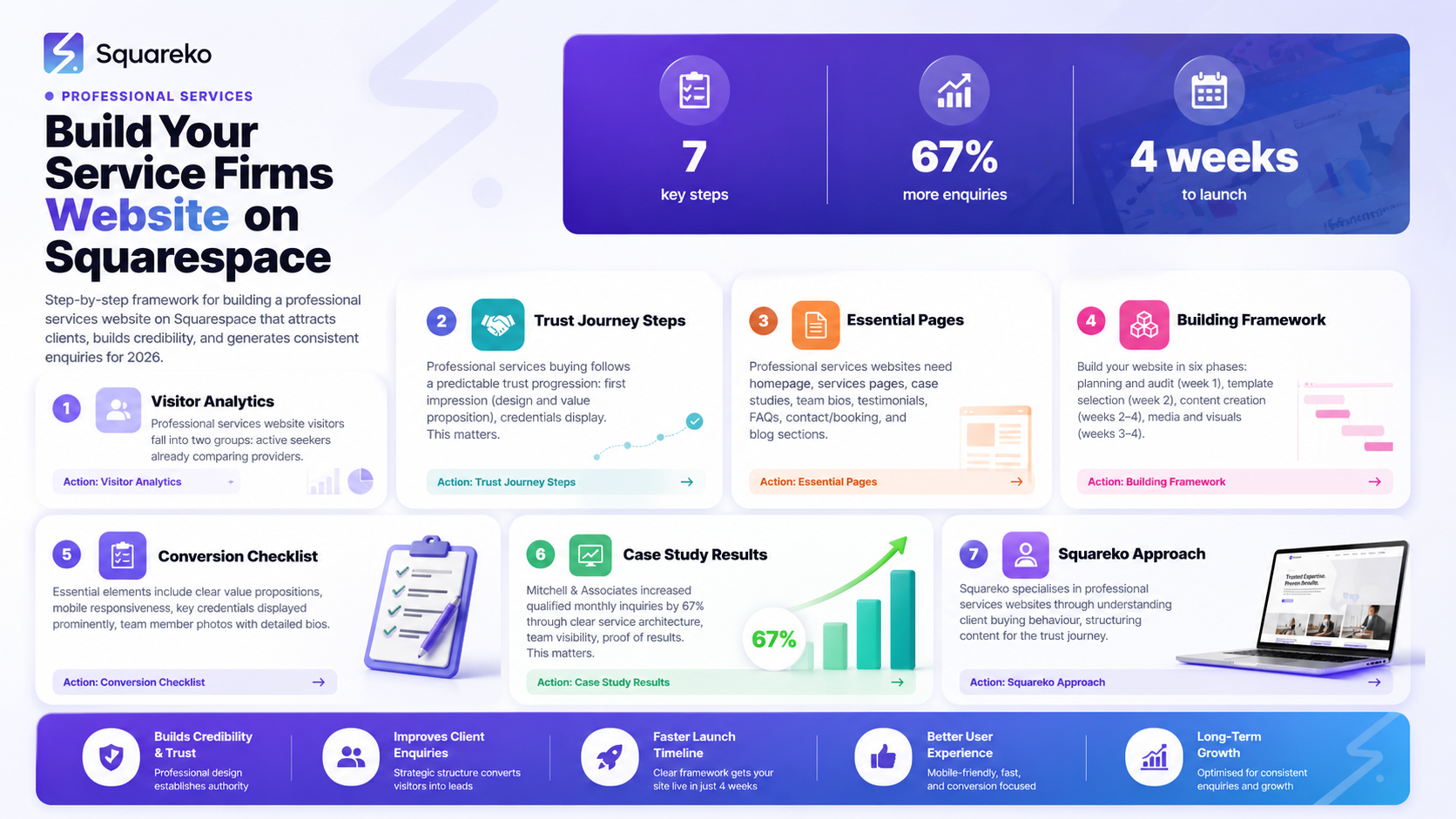
Professional services clients evaluate trust in a specific sequence: first impression → credentials → proof of results → team credibility → ease of contact
Your professional services website must answer five critical questions within the first 30 seconds
Squarespace templates can be customised to include all essential pages for service professionals without expensive custom development
A professional services website conversion checklist ensures no lead-generation elements are missed
Real case study: Squareko client increased qualified monthly inquiries by 67% through strategic website redesign
Professional services websites that convert include clear service descriptions, visible team credentials, client case studies, testimonials, and prominent CTAs
Proper schema markup and technical SEO significantly improve visibility for professional service searches
Understanding Your Professional Services Website Visitor
Before designing a single page, understand who visits your site and what they need.
Professional services clients typically fall into two groups:
Active Seekers are already comparing providers. They've identified a need—they need legal representation, tax advice, architectural drawings, or management consulting. They're on your site because they found you through search, referral, or past relationship. These visitors are ready to evaluate, and they're comparing you against 3–5 competitors.
Awareness-Stage Visitors aren't yet sure they need a service professional, but something triggered their search. They want information and reassurance before committing to a conversation. They might browse your site multiple times before deciding whether to contact you.
Both groups share one trait: they're suspicious of claims that sound exaggerated. They've been burned before or know colleagues who have. They want evidence—credentials, client results, team experience, and clear service explanations.
Your website must serve both groups by providing quick answers for active seekers and credibility signals for those still deciding.
The Professional Services Client Trust Journey
Professional services buying follows a predictable trust progression:
1. First Impression (0–5 Seconds)
The visitor lands on your homepage. Within five seconds, they assess:
Does this site look professional and current?
Can I immediately understand what you do?
Do you serve businesses/clients like mine?
A dated design, unclear value proposition, or generic messaging fails this test. Squarespace templates for professional services provide modern, clean design by default, but customisation matters.
Action: Your homepage hero section must include a clear, single-sentence value statement. Tax Advisory for High-Growth Tech Companies beats Innovative Tax Solutions.
2. Credentials (5–30 Seconds)
Now the visitor needs proof you're qualified. This is where many professional services websites fail—they're vague about qualifications.
The visitor checks:
What certifications do you hold?
How long have you been operating?
Who've you worked with before?
Is your team visible?
Action: Display relevant credentials prominently. For legal firms, show bar admissions and practice areas. For accountants, display CPA credentials and industry specialties. For consultants, list recognised certifications and key clients (if permitted).
3. Case Studies and Results (30–90 Seconds)
The visitor now wants proof you deliver results. Generic testimonials don't convince professionals—they want specifics.
Great service! means nothing. Reduced compliance costs by 34% within eight months for a £2M publishing company proves value.
Action: Create detailed case studies with before/after metrics. For service professionals, this often means:
Client industry and company size
The specific problem they faced
Your solution approach
Quantified results (cost savings, time reduction, revenue increase, risk mitigation)
4. Team Credibility (90–120 Seconds)
If the visitor hasn't left yet, they're genuinely interested. Now they want to know who they'll actually work with.
They evaluate:
Are these experts or generalists?
Do they have relevant experience?
Are they available, or will I be handed off to juniors?
Can I trust them with sensitive work?
Action: Include detailed team bios with photos, qualifications, specialisations, and years of experience. Show the principal/senior partner prominently.
5. Ease of Contact (Throughout)
If everything above checks out, the visitor converts only if contacting you is simple. Hidden contact forms, unclear response times, or unclear next steps cost you leads.
Action: Visible CTAs throughout your site. Contact form on every key page. Clear statement: We respond within 24 hours or
Book A Call
What Pages Every Professional Services Website Needs
Professional services websites have unique structural requirements. Here are the essential pages:
Homepage
Your homepage serves active seekers and awareness-stage visitors. It must:
State what you do in one sentence (hero section)
Show who you typically serve (target clients/industries)
Display key credentials or awards
Include 2–3 case study summaries or client logos
Feature recent testimonials
Include a prominent CTA (contact form, consultation booking, or phone number)
Services/Practice Areas
Professional services websites typically need a dedicated page or section for each major service line. Each services page should:
Explain what the service is and why it matters
Show the typical process or phases
Include a relevant case study
Link to team members who specialise in that service
Include a CTA specific to that service
For a law firm: separate pages for employment law, intellectual property, corporate transactions.
For an accounting firm: tax planning, audit, bookkeeping, payroll services.
For a consulting firm: strategy, operations, digital transformation.
Case Studies/Client Results
A dedicated case studies page showcases your best work. Each case study should:
Identify the client (industry, company size)
Describe the challenge in detail
Explain your approach (without disclosing client confidences)
Show quantified results
Include a client testimonial, if possible
Professional services clients expect case studies. The absence signals either poor results or limited client base.
Team/About
Your team page builds credibility. Include:
Photos of all key team members
Their professional titles and credentials
Years of experience and area of specialisation
Educational background (university, certifications)
Notable past roles or achievements
Brief personal background (where they're from, interests)
The personal details matter—they're why clients choose you over a faceless competitor.
Testimonials/Reviews
Dedicate a page to client feedback. Include:
Client name and company (if permitted)
Their industry
The specific problem they faced
The result you delivered
A quote about working with you
If possible, a video testimonial (powerful for professional services)
Avoid fake testimonials—professional services clients can smell them, and they destroy credibility.
FAQs
Most professional services websites have a dedicated FAQ page answering:
Common questions about your service or industry
How your process works
Typical timelines and costs
What clients need to prepare
Confidentiality and compliance questions
Availability and response times
Contact/Consultation Booking
Your contact page should:
Include a contact form (keep it short: name, email, company, brief description of need)
Show phone number and email
Include office address (if local to client base)
Show response time commitment
Optionally, include an embedded calendar booking tool (Squarespace integrates with Calendly)
Blog
A professional services blog serves two purposes: it demonstrates expertise and improves search visibility. Blog topics typically address:
Common questions in your field
Recent regulatory or industry changes
How to approach common problems
Trend analysis
Consistency matters—publish monthly at minimum.
Building Your Professional Services Website on Squarespace: A Step-by-Step Framework
Phase 1: Planning and Audit (Week 1)
Before touching Squarespace, answer these questions:
Target Market Definition: Which clients do you want to attract? (industry, company size, geography)
Competitive Analysis: Audit three competitor websites. What pages do they include? What trust signals do they show?
Content Inventory: Gather existing materials—case studies, testimonials, team photos, credentials, service descriptions.
Messaging Framework: Define your value proposition in one sentence. Example: Mergers and acquisitions legal counsel for mid-market technology companies.
Phase 2: Squarespace Template Selection and Customisation (Week 2)
Squarespace offers several professional templates suitable for service firms:
Bodega: Clean, minimalist. Ideal for professional services firms wanting contemporary design.
Jasper: Features prominent hero section and service showcase. Good for firms with 3–5 service lines.
Equinox: Large, impactful hero. Suited to firms targeting corporate clients.
Soto: Elegant, minimal. Suits luxury professional services (high-end law, wealth management).
Once you've selected a template:
Customise colours to match your brand (or create a brand identity if you don't have one)
Replace placeholder content with your real messaging
Reorder pages to match the structure recommended above
Test navigation and form functionality
Phase 3: Content Creation (Weeks 2–4)
Develop high-quality content for each page:
Homepage copy: Craft your value proposition, key differentiators, and CTAs
Service page copy: Explain each service clearly, include process overview
Team bios: Write detailed, credible team descriptions with credentials
Case studies: Develop 2–3 detailed case studies with metrics
Testimonials: Collect written or video testimonials from recent clients
Content quality directly influences conversion. Avoid generic language. Professional clients respond to specificity.
Phase 4: Media and Visuals (Weeks 3–4)
Professional services websites benefit from:
Team photos: High-quality, professional headshots of all team members
Case study images: Relevant imagery supporting your case studies
Logo/brand assets: Client logos (if you can display them)
Stock imagery: Avoid cheesy team around the table photos. Use authentic imagery or minimal photography.
Squarespace's image optimisation is solid, but compress images before uploading to ensure fast page load times.
Phase 5: Technical SEO Setup (Week 4)
Before launch, configure:
SEO Title and Meta Descriptions: Write compelling meta tags for each page (50–60 characters for titles, 150–160 for descriptions)
Schema Markup: Install FAQPage schema (for FAQs) and LocalBusiness schema (if location-based)
Site Structure: Ensure clear hierarchical navigation
Mobile Responsiveness: Test every page on mobile devices (Squarespace handles this well, but verify)
Analytics: Install Google Analytics 4 and link to Google Search Console
Contact Form Setup: Integrate your contact form with your CRM or email system (Squarespace integrates with Zapier, HubSpot, etc.)
Phase 6: Launch, Monitoring, and Optimisation (Week 5+)
Soft launch to stakeholders first—collect feedback
Fix any issues discovered
Full launch
Monitor Google Analytics for visitor behaviour
Track contact form submissions
Measure conversion rate weekly
Collect user feedback and iterate
Professional Services Website Conversion Checklist
Use this checklist to ensure your professional services website includes all essential conversion elements:
Design & User Experience
Homepage hero includes clear value proposition (single sentence)
Mobile responsive design verified on iOS and Android
Navigation menu is logical and includes all key pages
Page load time is under 3 seconds
Colours and fonts are professional and consistent
No generic stock photos; images are authentic and relevant
Credibility & Trust Signals
Key credentials displayed prominently (certifications, awards, years in business)
Team member photos and detailed bios included
Client logos or as featured in publications shown (if applicable)
Testimonials from recent clients included (with names and companies)
Video testimonial or case study (if possible)
Case studies include quantified results (percentages, costs saved, time reduced)
Client industries clearly identified
Service areas or practice areas clearly defined
Service Clarity
Each service has a dedicated page or section
Service descriptions avoid jargon; clear to non-experts
Process overview shown for each service
Typical timeline provided for each service
Pricing information available
FAQ section addresses common service questions
Lead Capture & Conversion
Contact form on homepage
Contact form on every main service page
Contact form is short
Consultation booking option available
Phone number visible on every page
Email address visible on every page
Clear call-to-action buttons
Response time commitment shown
Content & SEO
Focus keyword appears in title, first paragraph, and H2s
FAQ page includes 6+ questions with schema markup
Blog section included
Meta descriptions written for all key pages
Internal links between related pages
External links to authoritative sources
Technical
Google Analytics 4 installed and configured
Google Search Console linked
Schema markup installed
SSL certificate active (HTTPS)
Contact form submissions tracked in analytics
Form confirmation message clear
Follow-Up Systems
CRM or email system configured to receive form submissions
Auto-responder sends confirmation email to visitors
Lead follow-up process documented (who responds, by when, next step)
Phone number routes to responsible person
Chat widget considered (optional, but effective for professional services)
Case Study: How We Increased Client Inquiries by 67%
The Client: Mitchell & Associates, Chartered Accountants
The Situation
Mitchell & Associates was a respected three-partner accounting firm serving small to medium-sized businesses across the Midlands. They'd operated for 18 years with a strong reputation, yet their website hadn't been updated since 2015. It was template-based, generic, and mobile-unfriendly.
The firm received roughly 8–12 qualified inquiries per month. Most came through referrals and repeat clients. Their website wasn't converting—it was merely a digital business card.
The Challenge
We audited their situation and found:
Homepage didn't clearly state their service areas (tax planning, bookkeeping, audit, payroll)
No team member photos or bios beyond names
Two case studies existed, but neither included specific results
No testimonials page
Contact form was buried in footer; no CTAs on service pages
Site was not mobile responsive
Our Approach
We rebuilt their site on Squarespace with:
Clear Service Architecture: Separate pages for each service line. Each included a brief process overview and relevant case study.
Team Visibility: Professional headshots and detailed bios for all partners, emphasising relevant credentials (CPA, ACCA) and years of experience.
Proof of Results: Rewrote three case studies with specific results. Example: "Worked with a property management company (£1.2M revenue) to implement payroll automation, saving 12 hours per month and reducing errors by 98%."
Trust Building: Added a testimonials page with four video testimonials from existing clients.
Conversion Optimisation: Added CTAs on every service page, a prominent contact form on the homepage, and a booking calendar for discovery calls.
SEO Fundamentals: Installed proper schema markup, configured Google Search Console, and optimised meta descriptions.
The Results
Before (Monthly): 8–12 qualified inquiries
After (Monthly, 3 months post-launch): 14–18 qualified inquiries, with 67% increase average
Additional Wins:
Average time to first client contact decreased from 3 days to 8 hours (automated email responders)
Website conversion rate improved from 0.8% to 1.9%
34% of inquiries now came through website contact forms
Client perceived credibility increased
Why It Worked
Mitchell & Associates benefitted from three changes:
Clear Value Proposition: Visitors now immediately understood their service areas and target clients.
Credibility Signals: Team member visibility, detailed case studies, and video testimonials built trust.
Frictionless Conversion: CTAs were prominent; the contact form was simple; response time was quick.
The increase was sustainable because it wasn't driven by paid advertising—it was driven by improved organic search visibility and higher conversion of existing traffic.
How Squareko Builds Professional Services Websites That Win Clients
Squareko specialises in professional services websites on Squarespace. Our approach differs from generic web design in three key ways:
1. We Understand Professional Services Buying Behaviour
Professional services clients don't make impulsive decisions. They evaluate credentials, compare options, and demand proof. Our design process starts by understanding your target client and what evidence they need to see.
We don't build flashy websites. We build credible, conversion-focused websites that answer the questions your specific clients ask.
2. We Structure Content for the Trust Journey
Every Squareko professional services website follows the trust progression outlined above:
Homepage builds initial credibility
Service pages explain clearly what you do
Team pages show who your clients will work with
Case studies and testimonials provide social proof
Contact pages make the next step obvious
This isn't accidental—it's built into the architecture from the start.
3. We Configure for Conversion
Beyond design, we:
Set up contact forms integrated with your CRM
Configure email automation and lead routing
Install analytics and conversion tracking
Optimise for your service keywords (tax, legal, consulting, etc.)
Create clear CTAs and follow-up processes
A beautiful website that doesn't convert is an expensive business card. Squareko websites convert.
Our Process
Discovery (Week 1): We interview you about your target client, key differentiators, service lines, and conversion goals.
Content Strategy (Week 2): We develop a content outline and gather assets (team photos, case studies, testimonials).
Design & Build (Weeks 3–4): We build your site on Squarespace, focusing on conversion optimisation.
Review & Revisions (Week 5): You review, we refine.
Launch & Handoff (Week 6): We launch, configure analytics, and provide you with a maintenance guide.
Professional Services Website Design Best Practices
Beyond structure, several design principles improve conversion for professional services websites:
Clarity Over Cleverness
Professional services clients want clear information, not clever design tricks. Avoid:
Auto-playing videos
Excessive animations
Unclear navigation
Jargon without explanation
Instead: Use white space, clear fonts, logical hierarchy, and straightforward language.
Specificity Over Generality
"We help businesses grow" fails. "We provide bookkeeping and tax planning for property management companies with £500k–£5M revenue" succeeds.
Specific messaging attracts the right clients and repels the wrong fit—both good outcomes.
Social Proof Through Detail
"Clients love us!" is worthless. Detailed testimonials with names, companies, and specific results are persuasive.
Example:
We reduced our accounting preparation time by 18 hours per month. The team at Mitchell & Associates proactively identified three tax-planning opportunities we'd missed, saving us £28,000 in one year. I'd recommend them without hesitation.
— Sarah Chen, Director, Axiom Property Management
This is credible. It's specific. It proves value.
Responsive & Fast
Squarespace handles responsiveness well, but test every page on mobile. Professional services clients increasingly research on smartphones.
Page speed matters for SEO and user experience. Compress images, minimise plugins, and test with Google PageSpeed Insights.
Visible Contact Options
Bury your contact details and you'll lose leads. Make it obvious:
Phone number in header and footer
Contact form on homepage and main service pages
Clear response time: We respond within 24 hours
Optionally, live chat for real-time questions
Professional Imagery
Stock photos of diverse teams in meetings cheapen your site. Instead:
Use actual team photos
Include action photos if available
Minimal imagery is fine—authenticity beats quantity
If you need stock photos, use business-focused libraries
-
A professional services website converts when it builds trust through credibility signals (credentials, case studies, testimonials) and removes friction from the conversion process (visible CTAs, simple contact forms, clear next steps). The best professional services websites answer the five questions in the trust journey within the first 30 seconds: What do you do? Who do you serve? Are you qualified? Do you deliver results? How do I contact you?
-
Essential pages include: homepage, services/practice areas (dedicated pages), case studies, team/about, testimonials, FAQs, contact, and blog. Depending on your business model, you might also include pricing, resources/downloads, or a learning centre. Each page should support the trust journey.
-
Squarespace makes testimonial display easy. You can:
Add testimonials to a dedicated page using text blocks and dividers for visual separation
Feature rotating testimonials on your homepage using Squarespace's carousel block
Embed video testimonials (upload to YouTube or Vimeo, then embed the link)
Use third-party review platforms (Trustpilot, Google Reviews) and embed the widget on your site
For professional services, written testimonials with names, companies, and results carry more weight than generic praise.
-
Yes. Squarespace's code injection features allow custom HTML, CSS, and JavaScript for advanced functionality. You can also integrate third-party tools via Zapier for automation. However, if you need very advanced functionality (custom CRM, proprietary workflows), you may eventually outgrow Squarespace. For most professional services firms, Squarespace's built-in features and integrations are sufficient.
-
If you have content and assets ready (team photos, case studies, testimonials), 4–6 weeks is realistic. This includes planning, design, content creation, and launch. If you need to create content from scratch, budget 8–12 weeks. Ongoing maintenance (blog updates, testimonial additions, SEO refinement) typically requires 3–5 hours per month.
-
Track these metrics:
Traffic: Total monthly visitors to your site
Conversion Rate: Contact form submissions or calls divided by total visitors
Lead Quality: Are inquiries from your target market?
Cost Per Lead: If you invest in SEO or ads, divide total investment by leads generated
Time to Conversion: How long does a visitor spend on your site before contacting you?
Set up Google Analytics 4 and Google Search Console from day one. Monitor weekly. A conversion rate of 1–3% is typical for professional services websites; 3%+ is strong.
-
This depends on your service model. If pricing is simple and standardised (fixed fees for specific services), display it—transparency builds trust. If pricing is custom and project-dependent, you can note "custom quotes available" and use this as a reason for visitors to contact you. Many professional services firms use pricing discussion as an initial conversation starter.
Conclusion
A professional services website on Squarespace doesn't have to be a complicated, custom-built platform to be effective. The right combination of template, strategic content, trust signals, and conversion optimisation creates a website that builds credibility and generates qualified leads.
Your professional services website is your most important sales tool. It works 24/7, it builds credibility before your phone rings, and it converts thoughtful prospects into clients.
The sites that win clients share a common structure:
Clear value proposition and target audience
Visible credentials and team expertise
Detailed case studies with quantified results
Authentic testimonials and social proof
Simple, obvious paths to contact and consultation
Squarespace provides the platform. Your content, credentials, and case studies provide the credibility. Together, they create a website that converts.
Get Started Today
Ready to build a professional services website that wins clients?
Squareko offers a free consultation to review your current site (or help you plan a new one), audit your competition, and develop a strategy to increase qualified inquiries.
During your consultation, we'll cover:
Your target client and market positioning
Competitive analysis and opportunities
Essential pages and content strategy
Timeline and investment for a professional services website
A Professional Services Website Launch Checklist you can use whether you build with Squareko or independently
The checklist alone is worth the conversation—it covers all 25+ elements of a converting professional services website.
Book A Call— 30 minutes with a Squareko strategist. No obligation.

From custom website design to SEO strategy, we help businesses launch a site that looks professional and performs better.

Author Bio
I'm Walid Hasan, a Certified Squarespace Expert and Squarespace Circle Platinum Partner with over 12 years of hands-on experience designing and optimizing high-performing websites. Over the years, I've had the privilege of building more than 2,000 Squarespace websites for clients around the world, always focusing on clean design, strong user experience, and conversion-driven results.
