
Squarespace vs WordPress for Coaches: Which Platform Is Better in 2026?
Key Takeaways Squarespace vs WordPress for Coaches: Which Platform Is Better in 2026?
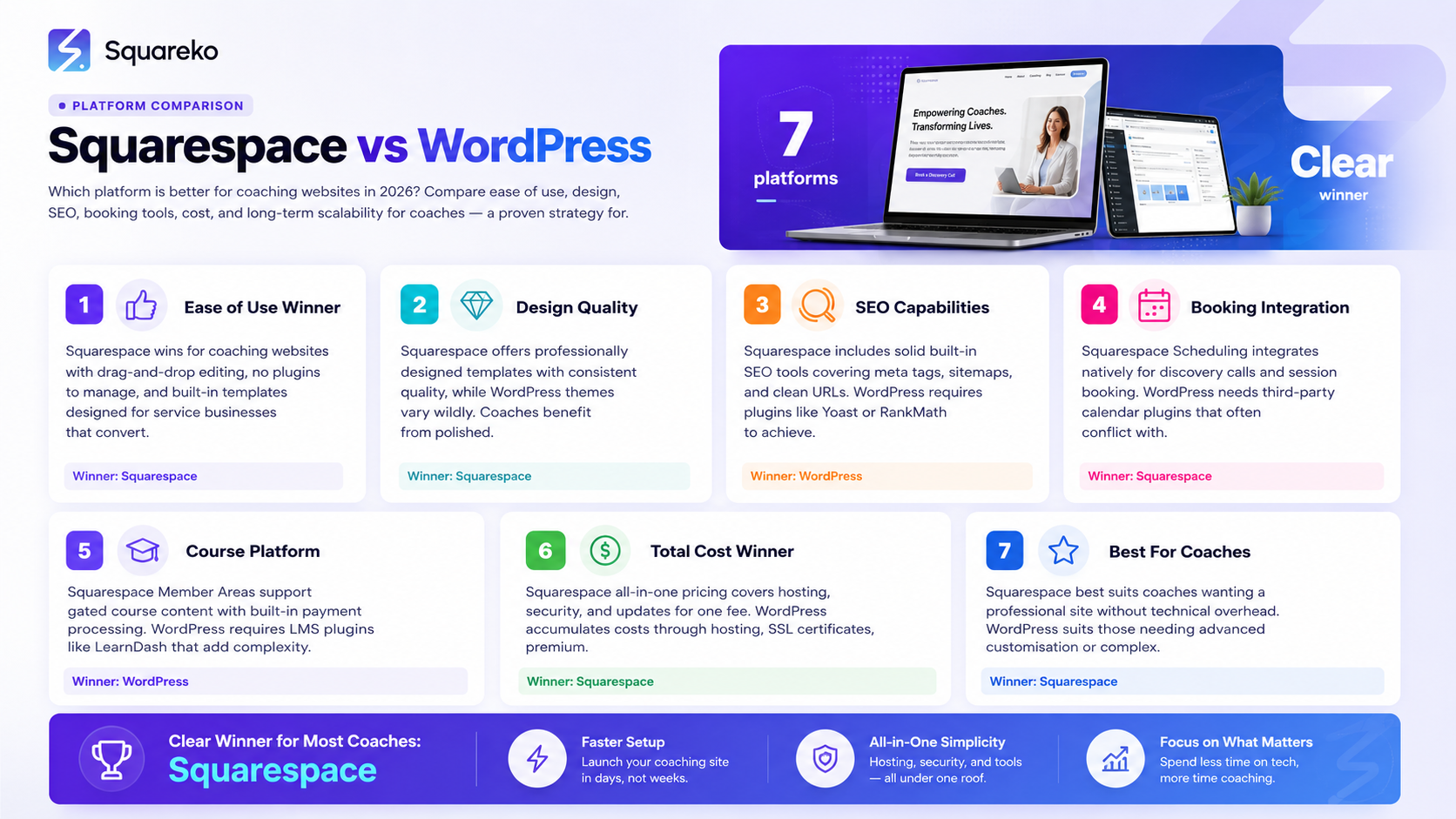
Squarespace wins on ease of use, maintenance, integrated scheduling, and design consistency — all of which matter hugely for solo coaches
WordPress wins on raw flexibility, plugin ecosystem, and scalability — but comes with significant management overhead
Most coaches don't actually need WordPress's advanced capabilities and end up overwhelmed by its complexity
The total cost of ownership for WordPress often equals or exceeds Squarespace's subscription cost
For coaches who want a professional website that works without hiring a developer every time something breaks, Squarespace is the stronger choice in 2026
If you've spent more than five minutes researching coaching website platforms, someone has probably told you just use WordPress. And if you've spent another five minutes looking at Squarespace, someone else has told you WordPress is the only real choice for a serious website.
Both camps are wrong — or rather, both are right in certain situations, and neither is universally correct for coaches.
The truth is that the best platform for your coaching website depends on what you actually need right now, what your technical appetite is, how much time you want to spend managing your website, and what your growth plans look like. This is not a platform war guide. It's a practical comparison designed to help coaches make the right call for their specific situation.
We'll cover the real differences across every dimension that actually matters for coaching businesses — ease of use, design quality, SEO capability, booking tools, e-commerce, maintenance, cost, and long-term scalability. By the end, you'll know which platform is right for you.
The Real Question: What Do Coaches Actually Need From a Website?
Before comparing platforms, it helps to be clear about what a coaching website actually needs to do. Strip away the noise, and it comes down to this:
Communicate your value clearly to your ideal client
Build trust through design, copy, and social proof
Make it easy for visitors to book a discovery call or buy a programme
Show up in search results when your ideal clients are looking for help
Not break or require technical maintenance at inconvenient moments
Most coaches don't need a $10,000 custom web application. They need a clean, fast, professional website that does those five things reliably. That's the lens for this comparison.
Ease of Use: Building and Maintaining Your Site
Squarespace
Squarespace is built for people who are not developers. The editor is visual and intuitive — you drag blocks where you want them, click to edit text, upload images, and publish. Most coaches can build a serviceable website in a weekend without any technical knowledge.
The Fluid Engine layout system is genuinely flexible. You can create complex layouts, overlap elements, and build professional-looking pages without writing a single line of code. When something breaks or looks wrong, it's usually fixable in the editor in minutes — not hours.
Crucially, Squarespace handles hosting, security, updates, and backups automatically. You pay your subscription, and the platform takes care of the infrastructure.
WordPress
WordPress has a steeper learning curve at every level. The basic Gutenberg editor is manageable for simple sites, but most WordPress coaching websites require page builder plugins that add their own complexity. Learning a page builder, managing plugins, and understanding how WordPress themes work takes real time.
More significantly, WordPress requires ongoing maintenance. Plugin updates can break things. Themes need updating. Security vulnerabilities in outdated plugins are a real risk. Hosting — which you arrange separately — has its own management layer. Many coaches who build WordPress sites end up either spending hours maintaining them or paying a developer to do it. Neither is ideal when you're supposed to be focused on coaching.
Winner: Squarespace — for coaches who want to focus on their business, not their website infrastructure.
Design Quality and Flexibility
Squarespace
Squarespace's templates are designed by professionals and are consistently high quality. Even a standard template, used without modification, looks better than most WordPress sites built by non-designers. The typography system is elegant, spacing defaults are sensible, and mobile responsiveness is automatic.
With Fluid Engine, you can customise layouts significantly without code. For more advanced design customisation, Squarespace supports custom CSS — which a designer can use to build something that looks nothing like any template.
The trade-off is that Squarespace has a visual ceiling. There are some design patterns and interactions that you simply cannot achieve on Squarespace without extensive custom code, or at all.
WordPress
WordPress has no ceiling. With the right theme and the right developer, you can build absolutely anything. The design flexibility is essentially unlimited.
But unlimited flexibility is only an advantage if you have the skills or budget to use it. For coaches building their own sites, WordPress's flexibility often manifests as unlimited ways to make design mistakes. Without design training, most self-built WordPress sites look inconsistent and unprofessional — even with premium themes.
Winner: Depends. For coaches building their own site, Squarespace wins on design quality. For coaches with a significant development budget and specific advanced design requirements, WordPress is the more flexible choice.
SEO Capabilities in 2026
This is the area where the WordPress-first crowd is loudest, and it deserves a careful look.
Squarespace SEO
Squarespace has historically had a reputation for weaker SEO, but that reputation is largely outdated. In 2026, Squarespace 7.1 offers:
Customisable page titles, meta descriptions, and URL slugs for every page
Clean, crawlable HTML that search engines read well
Automatic XML sitemaps submitted to Google Search Console
SSL (HTTPS) on all sites by default
Fast page load speeds on a content delivery network
Built-in alt text for images
Schema markup support via code injection
What Squarespace doesn't do natively: structured data markup beyond basic schema, advanced technical SEO configuration, or the kind of granular sitemap control that Yoast SEO provides on WordPress. For most coaching businesses, these advanced capabilities don't matter.
WordPress SEO
WordPress, combined with Yoast SEO or Rank Math, offers more granular SEO control than Squarespace. You can configure schema markup, breadcrumb navigation, advanced sitemap settings, and canonical tags with more precision. For enterprise websites or highly competitive niches, this additional control can matter.
For coaches in most niches, the SEO gap between a well-configured Squarespace site and a well-configured WordPress site is not significant enough to change your platform decision.
Winner: WordPress on raw technical SEO capability. Squarespace on practical SEO for coaching websites — the gap is smaller than most people claim, and Squarespace's clean code and built-in speed advantages offset much of it.
Booking and Scheduling Tools
This is where Squarespace has a decisive advantage for coaches.
Squarespace Scheduling
Squarespace Scheduling (powered by Acuity) is a professional booking tool that integrates natively with Squarespace websites. It handles:
Discovery call bookings and client session scheduling
Automated confirmation and reminder emails
Client intake forms
Calendar sync (Google, Apple, Outlook)
Group bookings and class scheduling
Payment collection at booking
The integration is seamless — you embed a scheduling block on any page, and it looks and functions as part of your website, not a third-party widget.
WordPress Booking
WordPress doesn't have a native booking system. You'll need a plugin — Calendly embed, Amelia, WP Amelia, or another booking plugin. Most work reasonably well, but they add subscription costs, require configuration, and sometimes look visually disconnected from the rest of your site. Managing them adds another maintenance layer.
Winner: Squarespace — the native scheduling integration is a genuine competitive advantage for coaches.
Selling Courses and Programmes
Squarespace
Squarespace has Member Areas — a native feature for selling gated content, online courses, and membership sites. It's improving, but it's not as full-featured as dedicated course platforms. For coaches selling simple video course series or PDF resource libraries, it works well. For complex course experiences with quizzes, certificates, and community features, Squarespace Member Areas is limited.
Squarespace also integrates with third-party course platforms (Kajabi, Teachable, Podia) via embed codes and link integrations — so you can use a dedicated course tool and still have Squarespace as your main marketing website. How to Sell Coaching Programmes and Online Courses on Squarespace
WordPress + LMS Plugins
WordPress with a Learning Management System plugin (LearnDash, LifterLMS, TutorLMS) is genuinely powerful for course creators who need advanced course features. If you're building a complex multi-course platform with community features, gamification, and certificates, WordPress + LearnDash is worth the complexity.
For most coaches selling 1–5 programmes or a simple course, this level of sophistication is overkill.
Winner: WordPress for complex course platforms. Squarespace for coaches selling 1:1 and group programmes with simple digital products.
Cost Comparison: What You Actually Pay
The Squarespace is expensive, WordPress is free argument is one of the most misleading in web development.
Squarespace True Cost
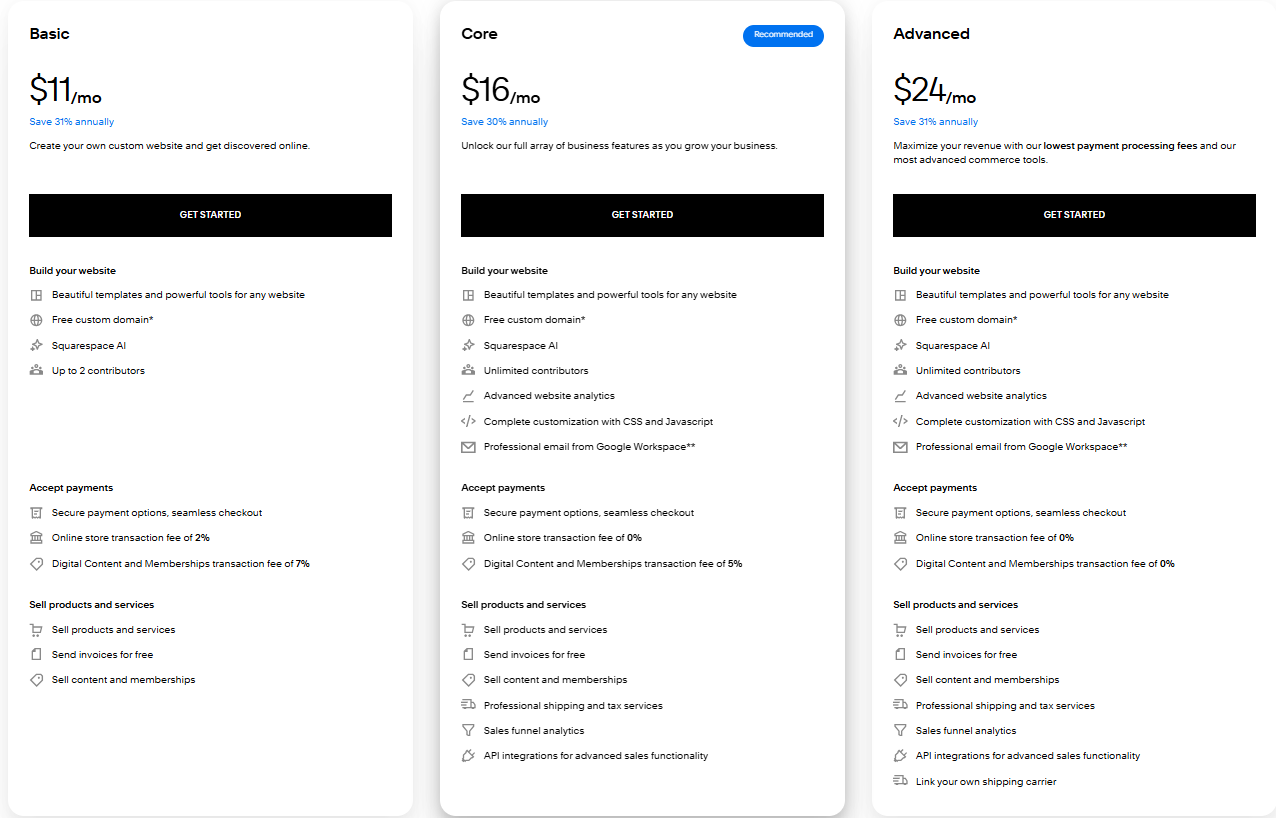
Squarespace subscriptions range from approximately $16–$49/month depending on the plan. That covers hosting, security, the editor, scheduling, and all built-in features. All in, a fully functional Squarespace coaching website typically costs $25–$40/month.
If you hire Squareko to build a custom Squarespace site, you pay a one-time design fee plus your ongoing Squarespace subscription — and then the site is yours to manage without ongoing developer costs.
WordPress True Cost
WordPress software is free. But WordPress websites are not free to run:
Hosting: $20–$80/month for quality managed WordPress hosting (WP Engine, Kinsta, Flywheel)
Premium theme: $50–$200 one-time
Essential plugins: $100–$400/year (Yoast, WooCommerce extensions, booking plugin, backup plugin, security plugin, caching plugin)
Developer time for setup: $500–$2,000+ one-time
Developer time for maintenance and fixes: $75–$150/hour as needed
A well-functioning WordPress coaching website, honestly accounted for, typically costs $150–$400/month when you include hosting, plugins, and the occasional developer hour. That's significantly more than Squarespace for most solo coaching businesses.
Winner: Squarespace — when total cost of ownership is calculated honestly.
Which Platform Should Coaches Choose?
Choose Squarespace If:
You want a professional website without ongoing technical headaches
You're a solo coach or small practice without a dedicated technical team
You want seamless booking integration without adding a separate tool
You value design consistency and a polished visual result
You want predictable costs without surprise developer bills
You're willing to work within some design constraints in exchange for ease and reliability
Choose WordPress If:
You have a dedicated developer or technical team who will manage the site
You're building a complex multi-course platform that needs LMS functionality
You're in a highly competitive niche where advanced technical SEO gives a real edge
You have specific custom functionality requirements that Squarespace cannot support
Your long-term vision involves significant platform integrations and custom development
For the vast majority of coaches — particularly those running solo or small practices — Squarespace is the better choice in 2026. It gives you a professional, high-performing website without the ongoing overhead of WordPress maintenance. The platform has closed most of the capability gaps that used to make WordPress the default recommendation, and the scheduling integration alone is worth a great deal to coaches who live and die by their calendar.
Build Your Coaching Website on the Right Platform
Choosing the right platform is only half the battle. The other half is building a site that actually converts visitors into discovery calls.
Squareko specialises in building Squarespace websites for coaches and educators — sites designed around your specific coaching model, your ideal clients, and your growth goals. We've helped coaches across specialties go from a DIY site that wasn't working to a Squarespace presence they're proud to share.
FAQs
-
For most coaches, Squarespace is the better choice in 2026. It offers integrated scheduling, professional design out of the box, automatic hosting and security management, and lower total cost of ownership. WordPress is more powerful but requires significantly more technical management. Unless you have a dedicated developer or complex platform requirements, Squarespace gives coaches more website for less effort.
-
Yes, for most coaching niches. Squarespace 7.1 offers clean code, fast loading, automatic sitemaps, customisable meta data, and SSL — which covers the SEO foundations that matter most. The technical SEO gap between Squarespace and WordPress + Yoast is real but overstated for coaching businesses. Consistent content production and strong on-page optimisation matter far more than platform-level SEO configuration.
-
Yes, though it requires rebuilding your pages in Squarespace — there's no automated migration tool that preserves your design. Blog posts can be imported via XML export from WordPress. The transition is work, but many coaches find the result worth it for the reduction in maintenance overhead. Squareko can manage this migration process for you.
-
Yes. Squarespace integrates with Google Analytics, Google Search Console, Facebook Pixel, Mailchimp, ConvertKit, Zapier, and many other tools via code injection or native integrations. For most marketing and analytics needs, Squarespace's integration ecosystem is sufficient.
-
Squarespace's Member Areas feature supports basic membership and gated content functionality. You can sell access to video libraries, PDF resources, and simple course content. For more complex membership experiences with community features, tiered access, and advanced course functionality, platforms like Kajabi or Teachable are better suited — and they integrate with your Squarespace marketing site.
-
Yes, significantly. WordPress requires regular plugin updates (which can break site functionality), theme updates, security monitoring, and backup management. Squarespace handles all of this automatically as part of your subscription. For solo coaches who don't want to spend time on website maintenance, this difference is substantial.
-
A professionally designed Squarespace coaching website from a specialist agency typically costs between $2,000–$6,000 for design and build, plus $25–$49/month for your Squarespace subscription. A DIY Squarespace site costs just the subscription — but takes your time and may lack the strategic structure that makes a site perform. Compare this to a professional WordPress site, which typically costs $3,000–$10,000+ to build professionally and $150–$400/month to maintain.
-
For most coaches, the Business plan ($23/month billed annually) is the right starting point — it gives you custom CSS, advanced analytics, and integrations without requiring a commerce plan. If you're selling digital products or programmes directly through Squarespace, the Basic Commerce plan ($27/month) removes transaction fees. For coaches with Squarespace Scheduling, the scheduling subscription is separate from the website plan.

From custom website design to SEO strategy, we help businesses launch a site that looks professional and performs better.

Author Bio
I'm Walid Hasan, a Certified Squarespace Expert and Squarespace Circle Platinum Partner with over 12 years of hands-on experience designing and optimizing high-performing websites. Over the years, I've had the privilege of building more than 2,000 Squarespace websites for clients around the world, always focusing on clean design, strong user experience, and conversion-driven results.
