
Squarespace vs WordPress for Business Agencies: Which Platform Wins in 2026?
Introduction
When you're running a business agency—whether you specialise in management consulting, marketing, PR, or professional services—your website is your most important sales tool. It's where potential clients form their first impression and decide whether to trust you with their business.
But here's the challenge: choosing between Squarespace and WordPress for your agency website isn't straightforward. Both platforms have evolved significantly, and the right choice depends entirely on how your team works, your technical capabilities, and what you need to showcase.
After building websites for 50+ business agencies and consulting firms, we've seen this decision play out repeatedly. Some agencies thrive on Squarespace's simplicity. Others absolutely need WordPress's flexibility. And many get stuck somewhere in the middle, frustrated with their platform choice.
In this guide, we'll compare Squarespace and WordPress directly across the criteria that matter most to business agencies: portfolio management, team collaboration, thought leadership, client case studies, and ease of use for non-technical staff. We'll give you an honest verdict—including when you should actually choose WordPress instead.
Key Takeaways Squarespace vs WordPress for Business Agencies: Which Platform Wins in 2026?
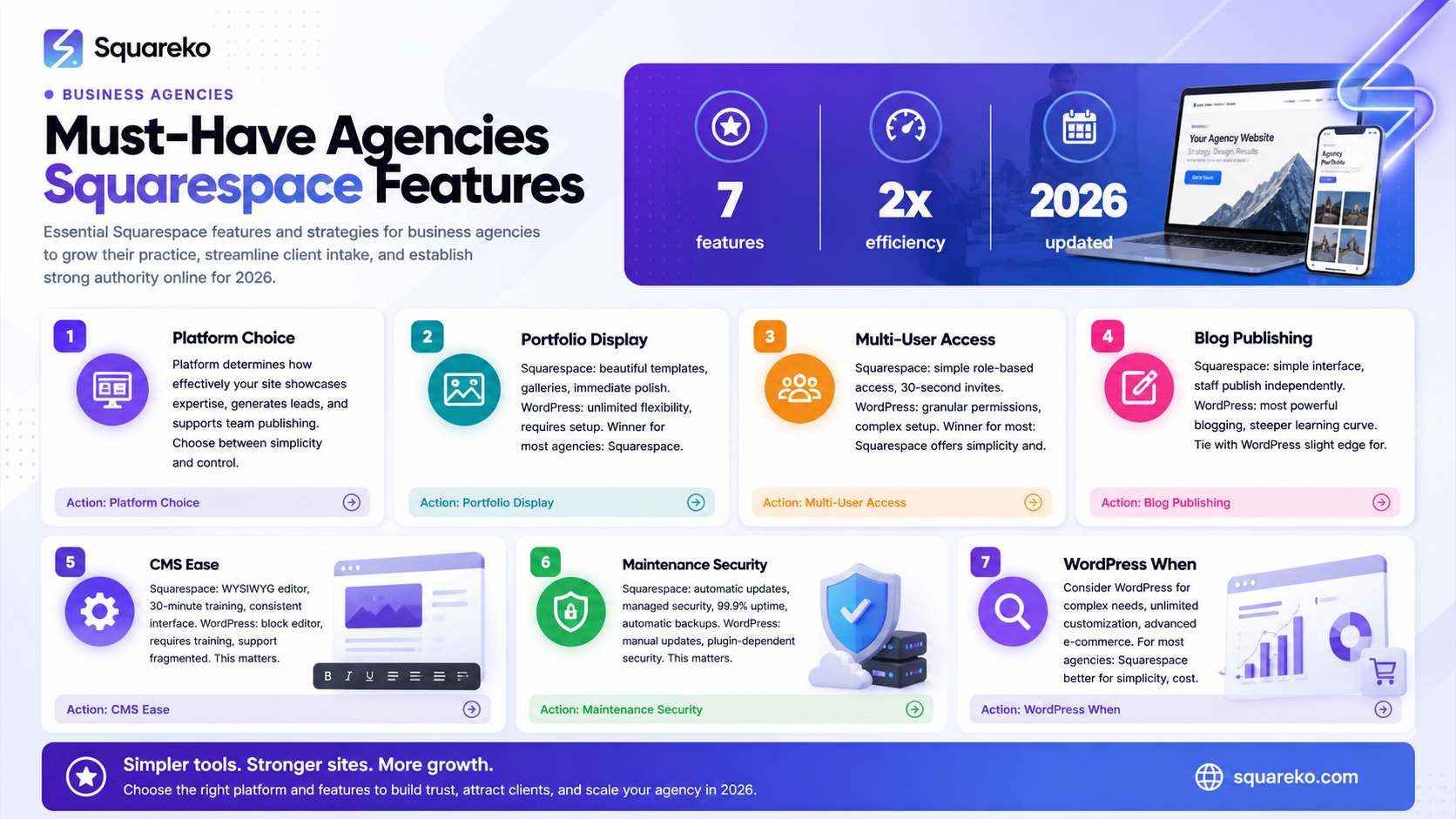
Portfolio and case study display: Squarespace offers superior built-in templates with less customisation required; WordPress offers unlimited flexibility at the cost of setup complexity.
Team collaboration: Squarespace's integrated team access is simpler; WordPress requires additional plugins and more technical oversight.
Blog and thought leadership: Both platforms are strong here, though WordPress has a slight edge for complex content strategies.
CMS ease for non-technical staff: Squarespace wins decisively—staff can publish content without technical knowledge; WordPress requires training.
Maintenance and support: Squarespace handles all updates automatically; WordPress demands ongoing technical maintenance.
Security for client data: Both are secure when properly configured; Squarespace's managed security is more straightforward for agencies.
Long-term cost of ownership: Squarespace is more predictable; WordPress can become expensive when you factor in hosting, plugins, and developer support.
Why Platform Choice Matters for Business Agencies
A business agency's website isn't just a digital brochure. It's your client acquisition machine, your authority builder, and your team's publishing platform.
When clients visit your website, they're assessing whether you understand their business. They're looking at case studies to see if you've solved similar problems. They're reading your blog to decide if you have genuine expertise. They're checking your team page to understand who they'll work with.
A platform that makes it difficult to showcase client success stories, publish thought leadership consistently, or manage team contributions will sabotage these objectives. Conversely, a platform that enables all of this intuitively will accelerate your growth.
The choice between Squarespace and WordPress is fundamentally a choice between simplicity and control. Squarespace prioritises simplicity; WordPress prioritises control. For most business agencies, the simplicity advantage matters more than the flexibility.
Portfolio and Case Study Display
Your case studies are your strongest sales tool. They prove you can deliver results.
Squarespace
Squarespace's portfolio templates are purpose-built for showcasing client work. You get:
Pre-designed case study layouts that look polished immediately
Built-in image galleries with lightbox functionality
Clean typography and whitespace that emphasise your work
Mobile-responsive designs that showcase case studies beautifully on all devices
Simple page creation without touching code
Setup takes hours, not days. Your non-technical team members can add new case studies independently after initial training.
WordPress
WordPress offers unlimited portfolio flexibility. You can:
Create any case study layout you can imagine
Use plugins like Elementor or Divi to build custom designs visually
Integrate advanced portfolio features (client testimonials, project timelines, interactive elements)
Connect your portfolio to other business tools
The trade-off: setup is more complex. You'll likely need developer support to get something truly impressive. If you build it in-house, your team needs technical confidence.
Winner for most agencies: Squarespace. Your case studies look professional immediately, and your team can maintain them.
Team Management and Multi-User Access
Business agencies need multiple team members to contribute content: account managers publishing case studies, marketers writing blog posts, principals approving company announcements.
Squarespace
Squarespace's team access model is straightforward:
Add team members with specific roles (Admin, Editor, Contributor)
Contributors can publish blog posts and portfolio items without reviewing other site sections
Editors have broader access to design and settings
No complex permission hierarchies
Team invitations take 30 seconds
The limitation: you can't create granular permissions. All Editors can access design settings. This works fine for most agencies, but larger teams might find it restricting.
WordPress
WordPress offers granular user roles:
Custom roles for different departments
Plugin-based permission systems for precise control
Multi-site setups for larger organisations
Comprehensive audit logs for compliance
The limitation: setup requires developer time. Without careful configuration, permission management becomes confusing. Most agencies don't need this level of complexity.
Winner for most agencies: Squarespace. Team access is simpler to set up and manage. Your account manager can post case studies today without IT involvement.
Blog and Thought Leadership Capabilities
Publishing content consistently is how business agencies build authority and attract leads.
Squarespace
Squarespace's blogging features include:
Clean, distraction-free editor
Scheduled publishing for planning content calendars
Categories and tags for organising articles
Reader comments (optional)
Social sharing integration
SEO tools built into the editor
Publishing a blog post takes 5 minutes. The editor is intuitive enough that non-technical team members publish independently.
WordPress
WordPress is the world's most powerful blogging platform:
Limitless content organisation options
Advanced scheduling and automation
Plugin ecosystem for guest posts, syndication, and distribution
Powerful comment moderation
Granular SEO control
Integration with advanced marketing automation
The trade-off: the editor has a steeper learning curve. Without proper setup, teams struggle with content organisation across multiple writers.
Winner for most agencies: WordPress has a slight edge for complex content strategies with multiple authors and distribution channels. Squarespace is perfectly adequate for most agencies publishing 2-4 posts monthly and perfectly simpler for smaller teams.
CMS Ease for Non-Technical Staff
Here's the single biggest differentiator: Can your account managers, business developers, and marketing staff publish content without developer support?
Squarespace
Squarespace's interface is designed for non-technical users:
WYSIWYG (What You See Is What You Get) editor—you see the final result as you edit
Consistent interface across all content types
Minimal jargon—buttons say "Publish," not "Change publish status from draft to pending review"
Optional tutorials built into the interface
Reliable customer support when staff get stuck
Your average business development manager can learn Squarespace in one 30-minute training session.
WordPress
WordPress's default editor is more technical:
Block editor (Gutenberg) is intuitive but less visual than Squarespace
Many agencies add page builders (Elementor, Divi) for visual editing
Terminology can be confusing (post types, custom fields, taxonomies)
Staff require genuine training—not just 30 minutes
Support is fragmented across plugins and hosts
Getting a non-technical team member comfortable publishing independently takes multiple training sessions.
Winner: Squarespace decisively. Non-technical staff publish confidently on Squarespace. On WordPress, they struggle without developer support.
Maintenance, Updates, and Security
A platform that requires constant maintenance drains resources. A platform that's secure protects your agency's reputation.
Squarespace
Squarespace handles everything:
Automatic updates with zero downtime
Managed SSL certificates
Regular security patches automatically applied
99.9% uptime guarantee
DDoS protection and spam filtering included
Automatic backups
You literally never think about maintenance. Your team focuses on creating content, not managing server infrastructure.
WordPress
WordPress requires active management:
Core updates available regularly; you decide when to apply them
Each plugin requires updates independently
SSL certificates must be set up (though hosts usually manage this)
Security depends heavily on plugin selection and configuration
Backups require either manual setup or paid plugins
Regular security audits recommended
A neglected WordPress site becomes a security liability. A poorly configured plugin can compromise your entire site.
Winner: Squarespace. You get enterprise-grade security and reliability without technical overhead. For agencies without dedicated IT staff, this is invaluable.
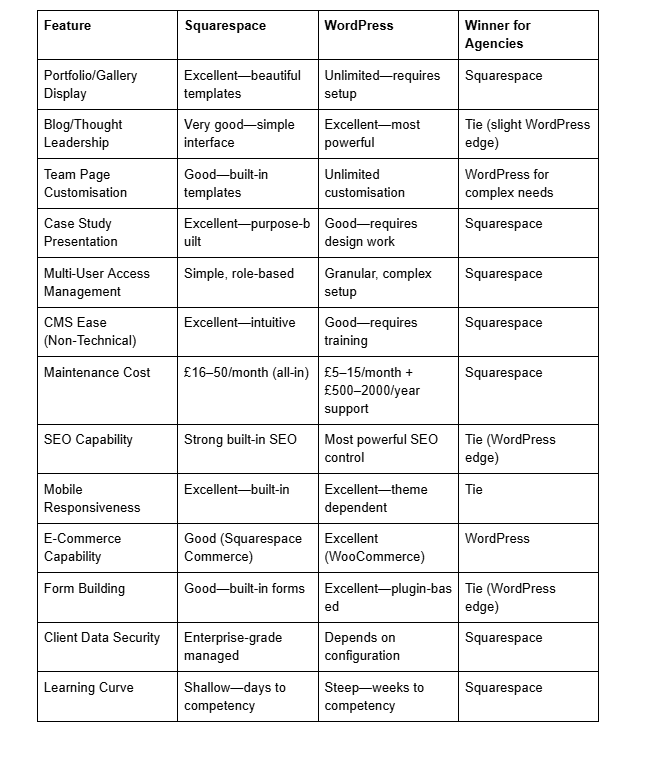
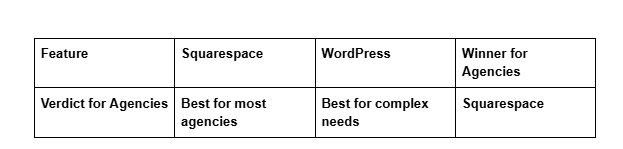
Agency-Specific Feature Comparison Table
When Agencies Should Consider WordPress Instead
Squarespace isn't right for every agency. Consider WordPress if:
You Have Dedicated Technical Resources
If your agency employs a web developer or can afford ongoing technical support, WordPress's flexibility becomes an advantage rather than a burden. You can build truly bespoke solutions that reflect your brand precisely.
You Need Granular User Permissions
If you have large teams with different departments requiring different access levels, WordPress's role system (combined with permission plugins) offers the control you need. Squarespace's simpler roles might feel limiting.
You Require Deep CRM or Marketing Automation Integration
WordPress integrates seamlessly with advanced marketing tools—HubSpot, Marketo, Salesforce. If your agency runs sophisticated marketing automation, WordPress's flexibility helps. Squarespace's integrations are more limited.
You're Building a Multi-Site Network
If you manage websites for multiple client brands or subsidiaries, WordPress Multisite lets you manage everything from one dashboard. Squarespace doesn't support this use case.
You Need Unlimited Customisation
Some agencies have very specific brand requirements that demand custom functionality. WordPress can do anything; Squarespace can do almost anything. If you're in that small percentage requiring true customisation, WordPress is right.
You're Already WordPress-Fluent
If your team knows WordPress and you have processes built around it, switching to Squarespace creates friction. Stay with your strength.
Squareko's Verdict for Business Agencies
After building websites for 50+ business agencies and consulting firms, Squareko recommends Squarespace for the majority of business agencies in 2026.
Here's why: Most business agencies need their website to work seamlessly, look professional immediately, and enable their team to publish content confidently. They don't need unlimited customisation; they need a platform that gets out of the way.
Squarespace delivers all three. Your team publishes case studies and thought leadership without bottlenecks. Your site showcases client work beautifully. You receive enterprise-grade security and reliability without technical overhead. Your long-term costs are predictable.
WordPress remains the right choice for agencies with dedicated technical resources, complex integration requirements, or specific customisation needs. But if you're evaluating platforms as a business owner (not a technologist), Squarespace will serve your agency better.
The best platform is the one your team will actually use consistently. With Squarespace, that's far more likely.
-
Yes. Squarespace is particularly strong for agency websites because it combines beautiful portfolio templates, simple team collaboration tools, and managed security. Your case studies will look professional, your team can publish content independently, and you won't spend time managing server security. If your agency is between 2 and 20 people and doesn't require custom integrations, Squarespace is likely your best platform choice.
-
Absolutely. Squarespace's team access system lets you add multiple users with different roles. Contributors can publish blog posts and portfolio items. Editors can manage more of the site. Admins have full control. Adding a team member takes 30 seconds, and they can begin publishing within minutes of accepting the invitation. No complex permission hierarchies—just straightforward access control.
-
Yes. Squarespace uses enterprise-grade security: SSL encryption, DDoS protection, regular security audits, and automatic backups. Your site meets the security requirements of most clients. If your agency handles genuinely sensitive data (financial records, health information), you should implement additional access controls—but Squarespace's base security is sufficient for standard business agency operations.
-
Squarespace's portfolio templates are customisable within the platform. You can adjust colours, fonts, layouts, and content. What you can't do is build completely custom functionality—custom features require coding. For standard portfolio presentation (images, descriptions, testimonials, project details), Squarespace offers more than enough flexibility. If you need unusual portfolio functionality, WordPress offers more possibilities.
-
Squarespace costs £16–50/month depending on your plan. WordPress hosting starts at £5/month, but adding necessary plugins and professional support typically brings costs to £500–2000+ annually. Squarespace's all-in-one pricing is usually cheaper than WordPress's true total cost of ownership, especially when you factor in developer support.
-
Both platforms can rank excellently in search results. WordPress offers more granular SEO control through plugins, making it slightly better for complex SEO strategies. Squarespace's built-in SEO tools are powerful enough for most business agencies. If your agency specialises in SEO consulting and needs to demonstrate advanced SEO capabilities internally, WordPress's flexibility might appeal. For most agencies, Squarespace's SEO is more than adequate.
-
Yes, but it requires development work. Content can be exported, but design migrations don't happen automatically. Plan to invest £1500–5000+ in migration if your site is substantial. This is why choosing the right platform initially matters—switching costs are significant.
-
Both are strong. WordPress is the most powerful blogging platform overall, with superior content organisation for complex strategies. Squarespace's blog is simpler and more intuitive for non-technical publishers. If your agency publishes 2–4 thought leadership posts monthly, Squarespace's blog is perfectly adequate. If you publish daily or run sophisticated content strategies across multiple channels, WordPress edges ahead.
Conclusion
Choosing between Squarespace and WordPress for your business agency website ultimately comes down to how you work, not just what's technically possible.
Squarespace wins for most agencies because it prioritises the things that matter: beautiful portfolio presentation, simple team collaboration, intuitive content publishing, and enterprise-grade reliability. Your team publishes confidently. Your clients see polished case studies. You sleep well knowing your site is secure and backed up automatically.
WordPress wins for the subset of agencies with dedicated technical resources, complex integration requirements, or very specific customisation needs. If you have a developer on staff or can afford ongoing technical support, WordPress's flexibility becomes an advantage.
But here's what we know from working with 50+ business agencies: most choose Squarespace and never regret it. They're too busy winning clients and serving them well to second-guess their platform decision.
The best platform is the one that gets out of your way and lets you focus on your actual business.
Work With Squareko
If you're building a business agency website and want expert guidance on platform choice, design strategy, or content planning, Squareko specialises in helping professional services firms create websites that attract and convert clients.
We've built agency websites on Squarespace for management consultancies, PR firms, marketing agencies, and professional service businesses across the UK. We understand the specific challenges agencies face—portfolio presentation, team collaboration, thought leadership publishing—and we know how to solve them.
Ready to build your agency website?
Schedule a Free Consultation — we'll discuss your goals, review your current website (if you have one), and recommend the platform and approach that's right for your specific situation.

About Squareko
Squareko.com is the specialist Squarespace agency for professional service businesses. We design and build websites for management consultancies, PR firms, marketing agencies, legal practices, and other professional services companies across the UK.
Our team of designers, developers, and copywriters specialises in creating websites that showcase expertise, build authority, and generate qualified leads. We understand what clients look for when evaluating service providers, and we build websites that answer their questions and build trust.
Squareko has built websites for over 50 business agencies and professional services firms. We focus exclusively on Squarespace because we believe it's the best platform for professional service companies that want beautiful, professional websites without technical complexity.
