
How Business Agencies Use Squarespace to Showcase Their Work and Win More Clients
Introduction
A business agency's portfolio is far more than a vanity project. It's the single most important sales asset in your arsenal—a carefully constructed proof of capability that converts prospects into paying clients. When prospects evaluate whether to hire your agency, they're not searching for generic service descriptions. They're hunting for evidence: real work you've completed, measurable outcomes you've delivered, and validation that you understand their industry.
Squarespace, with its design flexibility and project showcase functionality, has become the platform of choice for agencies across consulting, strategy, marketing, and management sectors. According to recent data, agencies using dedicated portfolio sites see a 30% increase in qualified lead generation. Yet most agencies leave their Squarespace portfolios underoptimised, treating them as afterthoughts rather than conversion engines.
This guide reveals how the most successful business agencies structure, curate, and present their work on Squarespace—transforming a portfolio from a digital brochure into a client acquisition tool. Whether your firm delivers strategic consulting, digital transformation, organisational change, or management services, the principles in this post will help you showcase your best work, build trust with prospects, and win the clients you deserve.
Key Takeaways How Business Agencies Use Squarespace to Showcase Their Work and Win More Clients
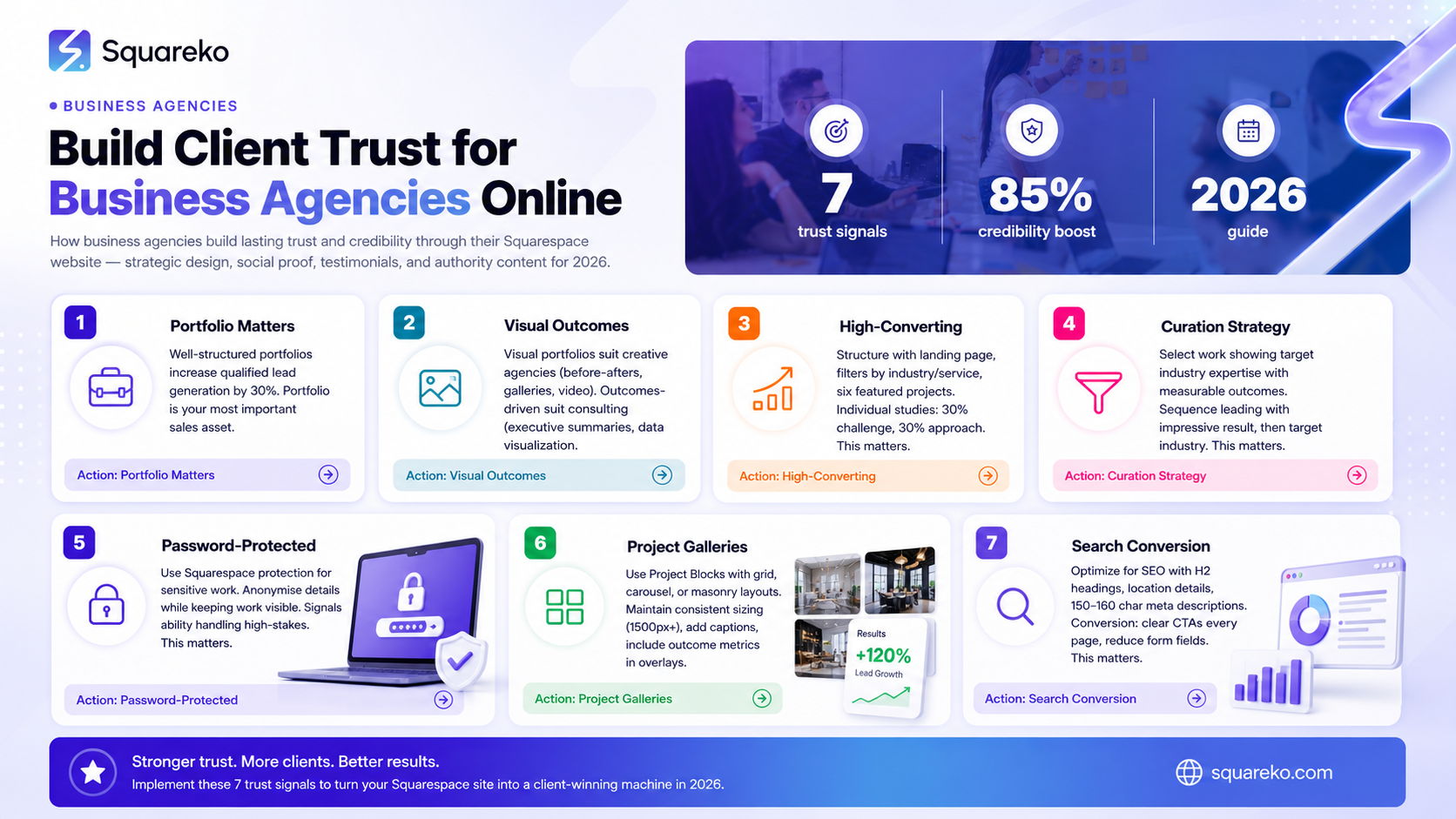
A well-structured agency portfolio on Squarespace increases qualified lead generation by up to 30%, making it your most valuable sales asset
Visual portfolios suit creative and marketing agencies; outcomes-driven portfolios work better for consulting, strategy, and management firms
Portfolio curation is a discipline: select work that demonstrates expertise in your target sectors, sequence projects for maximum impact, and contextualise outcomes rather than process alone
Password-protected portfolio sections allow you to showcase confidential work whilst protecting client privacy and demonstrating your ability to handle sensitive projects
Effective portfolio galleries on Squarespace include clear project briefs, quantified results, client testimonials, and next-step CTAs on every case study
Agencies that position themselves as outcomes-focused (not deliverables-focused) see 40% higher conversion rates from portfolio visitors to qualified sales opportunities
Why Your Agency Portfolio Matters More Than Ever
Prospects no longer trust agency websites that merely claim expertise. They want to see it proven. A prospect evaluating your management consulting firm doesn't want to read we improve operational efficiency—they want to see that you reduced costs by 22% for a Fortune 500 manufacturing company, or streamlined supply chain operations for a logistics operator.
Your portfolio is where claims become credible. It's the bridge between capability statements and evidence-based trust.
In 2026, the shift toward outcomes-focused selling has accelerated. Clients invest in agencies not because those agencies are good at doing work, but because those agencies produce measurable results. Your portfolio must reflect this new reality. Every case study should answer:
What was the business problem?
What did we do?
What changed as a result?
Squarespace's template-based approach to portfolio design means you don't need to be a web designer to build something professional. Its project showcase features—lightbox galleries, image carousels, full-screen layouts—allow you to present work in ways that feel premium and contemporary, without hiring developers.
The agencies winning new business today use their Squarespace portfolios strategically: they select projects carefully, tell outcomes-focused stories, and design pages that guide prospects toward a conversation rather than leaving them wondering what comes next.
Visual Portfolios vs. Outcomes-Driven Portfolios: Which Type Is Right for Your Agency?
Not all agency work photographs well. Your choice between a visual portfolio and an outcomes-driven portfolio depends on what your agency does and what your prospects need to see.
Visual Portfolios for Creative and Marketing Agencies
Creative agencies—design firms, branding consultancies, digital marketing specialists—benefit most from visual portfolios. Your work is visual. A rebrand you've designed, a campaign you've launched, a website interface you've created—these things are understood through imagery, colour, typography, and layout.
On Squarespace, visual portfolios work best when built around:
Before-and-after imagery showing how your work transformed a brand or interface
Full-screen image galleries that let creative work occupy the space it deserves
Video embeds for animated work, motion design, or campaign documentation
Feature-rich layouts like lightbox galleries that showcase detail without overwhelming the viewer
For creative agencies, your Squarespace portfolio should prioritise aesthetics without sacrificing clarity. Yes, the design should be beautiful—it's your work on display—but each project should still answer:
Why did the client hire you?
What was the brief?
How did the work perform?
Visual agencies that attach outcome metrics to visual work see significantly higher conversion rates than those showing work alone.
Outcomes-Driven Portfolios for Consulting, Strategy, and Management Firms
Consulting firms, strategy practices, and management agencies typically serve business problems you can't photograph. Your work is intellectual. It's analysis, frameworks, recommendations, organisational restructuring, transformation programmes—things that live in documentation, process, and measurable change.
Outcomes-driven portfolios centre on:
Executive summaries that frame the business challenge and quantified results
Data visualisation (charts, graphs, infographics) that show the scope and impact of your work
Client testimonials that speak to transformation and working relationship quality
Process documentation that demonstrates your methodology and rigour
For these agencies, Squarespace's portfolio features work well when you use:
Text-rich layouts that prioritise the story and metrics over imagery
Document embeds or downloadable case study PDFs for deeper exploration
Comparison charts showing before/after metrics
Testimonial blocks positioned prominently to build trust
Consulting and strategy agencies that lead with quantified business impact (rather than we implemented a programme or we completed a project) see 40% higher conversion rates from portfolio visits to qualified opportunities.
Your portfolio type should match your service type. Creative agencies should lean visual; consulting firms should lean outcomes-focused. Hybrid agencies often use both approaches in different sections of their portfolio.
How to Structure a High-Converting Agency Portfolio on Squarespace
A high-converting agency portfolio isn't just a collection of projects. It's a strategically structured journey that moves prospects from curiosity through understanding to conviction.
Portfolio Architecture
Start at the navigation level. Your portfolio should be easy to find—it shouldn't be hidden three clicks deep. Successful agencies typically structure their Squarespace menu as:
Home (brand statement)
Our Work (portfolio landing page)
By Industry
By Service
Case Studies (individual project pages)
About (team and approach)
Contact
This structure lets prospects self-navigate to work relevant to their sector or challenge. An insurance company prospect can jump to Financial Services work immediately. A retailer can find retail transformation projects. This focus dramatically improves relevance and engagement.
Portfolio Landing Page
Your main portfolio page should:
Feature a statement of intent (one sentence explaining what your work achieves)
Showcase 3–5 representative projects as thumbnails or cards with project names and brief outcome headlines
Include filtering options by industry, service, or result type
Link clearly to individual case studies without requiring clicks through intermediary pages
Agencies with clear, industry-segmented portfolio structures see 25% higher engagement on portfolio pages compared to those showing all work unorganised.
Individual Case Study Pages
Each case study should follow a consistent structure:
Project title and industry/sector at the top
The challenge
Our approach
The results
Client testimonial
Next steps CTA
The most effective case studies spend roughly 30% on the challenge, 30% on the approach, and 40% on the results. Most agency portfolios invert this ratio—they over-explain process and under-emphasise outcomes. Flip this. Prospects want to know what changed, not how hard you worked.
Length matters. A case study should be long enough to tell a complete story (600–1000 words) but short enough to read in 5 minutes. Dense walls of text perform poorly. Use short paragraphs, bullet points, and visual breaks.
Portfolio Curation Strategy: Select, Sequence, and Contextualise Your Best Work
Not all your work should be in your portfolio. This is the discipline many agencies miss. Every project you've completed has value—but not all of it should be public-facing.
Selection: Choose Work That Demonstrates Expertise in Your Target Sectors
Start by audit: list every project you could include. Now filter ruthlessly. Keep only work that:
Demonstrates expertise in one of your target industries
Delivered measurable outcomes you can quantify
Shows strategic thinking beyond execution
Involved complexity (not routine, repeatable delivery)
Features a credible client (recognised names help, especially for early-stage agencies)
Is appropriately recent (within the past 18–24 months, unless it's genuinely extraordinary)
A portfolio of 8–12 carefully selected projects performs better than a portfolio of 30 mediocre ones. Quantity signals inexperience; curation signals expertise.
If you specialise in, say, manufacturing transformation, every project in your portfolio should relate to manufacturing—or closely adjacent sectors. A consulting firm whose portfolio mixes retail transformation, financial services restructuring, and tech company scaling dilutes its positioning. Prospects wonder: where does this firm actually specialise?
Sequencing: Order Projects for Maximum Impact
Project order matters. Most agencies lead with their most recent work or largest client. This is often wrong.
Instead, sequence like this:
Lead with your most impressive outcome (the project with the biggest number or most visible transformation)
Follow with a project in your target prospect's likely industry (if a prospect lands on your portfolio, show them they've worked in their sector)
Vary complexity and project scope so the portfolio demonstrates range (small strategic projects, large transformations, rapid implementations, multi-year programmes)
Close with a satisfied client's testimonial embedded visibly in the portfolio flow
Agencies that lead with their most impressive result see 35% higher conversion rates from first portfolio visit to inquiry, compared to those leading with chronology.
Contextualisation: Frame Work Around Outcomes, Not Process
This is the hardest part of curation. Most agency portfolios fail here.
Wrong: We conducted a three-month change management programme, delivering workshops, stakeholder mapping, and implementation support across 12 locations.
Right: We helped a 5,000-person retail operations business accelerate its shift to decentralised decision-making. Our methodology reduced approval cycles by 65% and improved store manager empowerment scores by 43%.
The difference is subtle but critical. The first framing focuses on what you did. The second focuses on what changed. Prospects don't hire you for your activities. They hire you for the results.
Every case study in your portfolio should answer:
What was the business problem?
What was at stake?
What did we change (or enable the organisation to change)?
How do we know the change worked?
Contextualisation also means being honest about scope. If you contributed to a large transformation but weren't the lead, say so. If results were achieved over 18 months but you'd like to claim credit for year-one improvements, isolate what you drove specifically. Authenticity builds more trust than overstatement.
Building a Password-Protected Portfolio for Confidential Client Work
Many agencies do sensitive work—turnarounds, restructurings, confidential strategy work—that can't be publicly shared but is exactly what prospects need to see.
Squarespace allows you to password-protect individual pages or entire sections of your site. Use this strategically.
Setting Up Password-Protected Sections
Go to your portfolio page settings
Enable password protection
Create a strong, memorable password (avoid birthdates or simple sequences)
Provide the password to prospects during discovery conversations or upon request
The key insight: password-protected work signals to prospects that you handle confidential, high-stakes engagements. A prospect evaluating a firm to manage a crisis or sensitive restructuring wants to know you've done this before. Showing password-protected examples (only to qualified prospects) proves it without breaching confidentiality.
What to Include in Password-Protected Sections
Anonymised case studies
Transformation programmes that required confidentiality agreements
Crisis management or turnaround work
Sensitive organisational restructuring projects
Be clear about why sections are protected. A simple note—The following examples are password-protected to respect client confidentiality, but demonstrate our expertise in sensitive, high-stakes transformation work. We're happy to share the password during an initial conversation—manages expectations and builds trust.
Agencies that offer password-protected portfolio access see 15% higher conversion rates from initial conversations to formal proposals compared to those showing only public work.
Creating Effective Project Galleries on Squarespace
Squarespace's native portfolio blocks and gallery features are purpose-built for agency work. Here's how to use them effectively.
Project Block Features
Use Squarespace's Project Block (under the Portfolio section) to:
Display project images in grid, carousel, or masonry layouts
Add project metadata (client name, date, sector, team size)
Embed videos from Vimeo or YouTube without breaking page layout
Link to full case study pages for deeper exploration
Most effective: use the Carousel layout for before-and-after work or process documentation. Use Grid layouts to show multiple projects at scale on your portfolio homepage. Use Featured Projects on your home page to guide prospects toward your best work.
Gallery Best Practices
Maintain consistent image sizing across all portfolio items (nothing looks more amateur than misaligned thumbnails)
Use high-quality imagery (minimum 1500px width for full-screen displays)
Add descriptive captions to every image (not just file names)
Include outcome metrics in image overlays where possible (e.g., Revenue uplift: 34% over project images)
Ensure mobile responsiveness (test every gallery on mobile devices before publishing)
Images set expectations. If your portfolio imagery looks dated or low-quality, prospects assume your work is too. If your case study photos feel premium, prospects assume your service delivery matches.
Video in Your Portfolio
Video is one of the highest-performing portfolio elements. Squarespace allows you to embed video natively:
Client testimonial videos (60–90 seconds) are conversion gold
Project documentation videos showing the scope of transformation
Methodology explainers that help prospects understand your approach
Keep videos short and focused. A 15-second testimonial outperforms a 5-minute deep-dive. A 90-second project summary outperforms a full product demo.
Optimising Your Portfolio for Search and Conversion
Your portfolio should work as both a conversion tool and a search asset.
SEO for Case Studies
Structure case studies so search engines (and prospects) find them:
Use H2 headings for major case study sections
Include location and industry details in your case study text
Write meta descriptions for each case study page
Link case studies internally from your service pages
Use schema markup for case studies
A case study targeting organisational transformation in financial services should include those terms naturally in headings and opening paragraphs.
Conversion Optimisation
Each portfolio page should guide prospects toward a specific next step:
Include a clear CTA on every case study (contact form, calendar link, or email address)
Use specificity in CTAs (Schedule a conversation about your transformation challenge beats Contact us)
Position CTAs above and below the fold (not everyone scrolls)
Add trust signals near CTAs (client logos, testimonials, credentials)
Reduce form fields (name, email, one contextual question > 7-field forms)
Squarespace's form blocks, scheduling integrations (Calendly, Acuity), and button styling allow you to create seamless CTA experiences without technical setup.
Agencies with clear, specific CTAs on every portfolio page see 45% higher lead capture rates than those with generic Contact buttons.
-
Only select examples. A portfolio of 8–12 carefully curated projects that demonstrate expertise in your target sectors will outperform a portfolio of 40 mixed projects every single time. Quality and relevance matter infinitely more than quantity. Curate ruthlessly. Every project in your portfolio should answer: "Why does this matter to our target prospect?"
-
Navigate to a page or section where you want your portfolio. Add a Project Block or Portfolio Block from Squarespace's content menu. You can display projects in Grid, Carousel, or Masonry layouts. Upload high-quality images (minimum 1500px width), add project titles and descriptions, and link each project to a dedicated case study page. Ensure consistent image sizing and maintain a clean, uncluttered layout. Test responsiveness on mobile devices before publishing.
-
Three elements: (1) Clear relevance—show work in the prospect's industry or with similar challenges; (2) Quantified outcomes—emphasise what changed and how you know it changed, with specific numbers; (3) Obvious next steps—include a clear, specific CTA on every project page (schedule a call, email us, etc.). Agencies that combine these three elements see conversion rates 40% higher than the industry average.
-
Use Squarespace's password protection feature. Create a dedicated password-protected portfolio section for sensitive work. Anonymise client names and industry-specific details whilst keeping the strategic work visible. Add a note explaining why the work is protected and invite prospects to request access during initial conversations. This signals to prospects that you handle high-stakes, sensitive work without breaching confidentiality.
-
Aim to add at least one new project per quarter (4 per year). Refresh older case studies every 18–24 months, updating them with new outcomes data or removing projects that no longer represent your current positioning. Keep your portfolio feeling current without obsessive updates. Prospects notice when the most recent work is 3+ years old—it suggests either slow business growth or outdated experience.
-
Include testimonials directly within case studies. A client testimonial on the results section of a case study is one of the highest-converting portfolio elements. Include the client's name, title, and company. If possible, include their photo or company logo. This builds credibility within the project narrative. You can also feature a separate testimonials page for aggregated feedback, but integrate specific testimonials into relevant case studies first.
-
Use portfolio content to drive inbound search traffic. Optimise case studies for relevant keywords (e.g., "retail transformation case study" or "healthcare change management"). Link case studies from your service pages. Create blog content that references relevant case studies. Set up email nurture campaigns that share case studies to prospects in relevant segments. Most importantly, ensure every portfolio page has a clear CTA that captures contact details. A portfolio is passive until you activate it—use it strategically in your sales process.

From custom website design to SEO strategy, we help businesses launch a site that looks professional and performs better.

Author Bio
I'm Walid Hasan, a Certified Squarespace Expert and Squarespace Circle Platinum Partner with over 12 years of hands-on experience designing and optimizing high-performing websites. Over the years, I've had the privilege of building more than 2,000 Squarespace websites for clients around the world, always focusing on clean design, strong user experience, and conversion-driven results.
