
Squarespace SEO Guide for Creative Entrepreneurs: Rank on Google and AI Search in 2026
Introduction
SEO in 2026 looks radically different than it did just two years ago. Your Squarespace SEO for creative entrepreneursstrategy can no longer focus solely on Google. Today's search landscape is split between two equally important channels: traditional search engines like Google, and AI-powered search platforms like ChatGPT, Perplexity, Claude, and Gemini.
For creative entrepreneurs—designers, photographers, coaches, musicians, and personal brands—this dual-channel reality changes everything. You now need to optimize not just for algorithms that rank links and keywords, but for AI systems that reward direct answers, expert authority, and comprehensive information architecture.
The challenge? Most Squarespace users don't know where to start. Squarespace's built-in SEO tools are solid for traditional on-page optimization, but they don't address the emerging world of Answer Engine Optimization (AEO) and Generative Engine Optimization (GEO). This guide bridges that gap. We'll walk you through 11 practical steps to optimize your Squarespace website for both Google and AI search engines, so you attract clients through every discovery channel that matters in 2026.
Whether you're a photographer building a portfolio site, a coach launching a personal brand, or a creative freelancer competing in a crowded market, this complete Squarespace SEO guide will show you exactly how to rank, get discovered, and convert visitors into clients.
Key Takeaways Squarespace SEO Guide for Creative Entrepreneurs: Rank on Google and AI Search in 2026
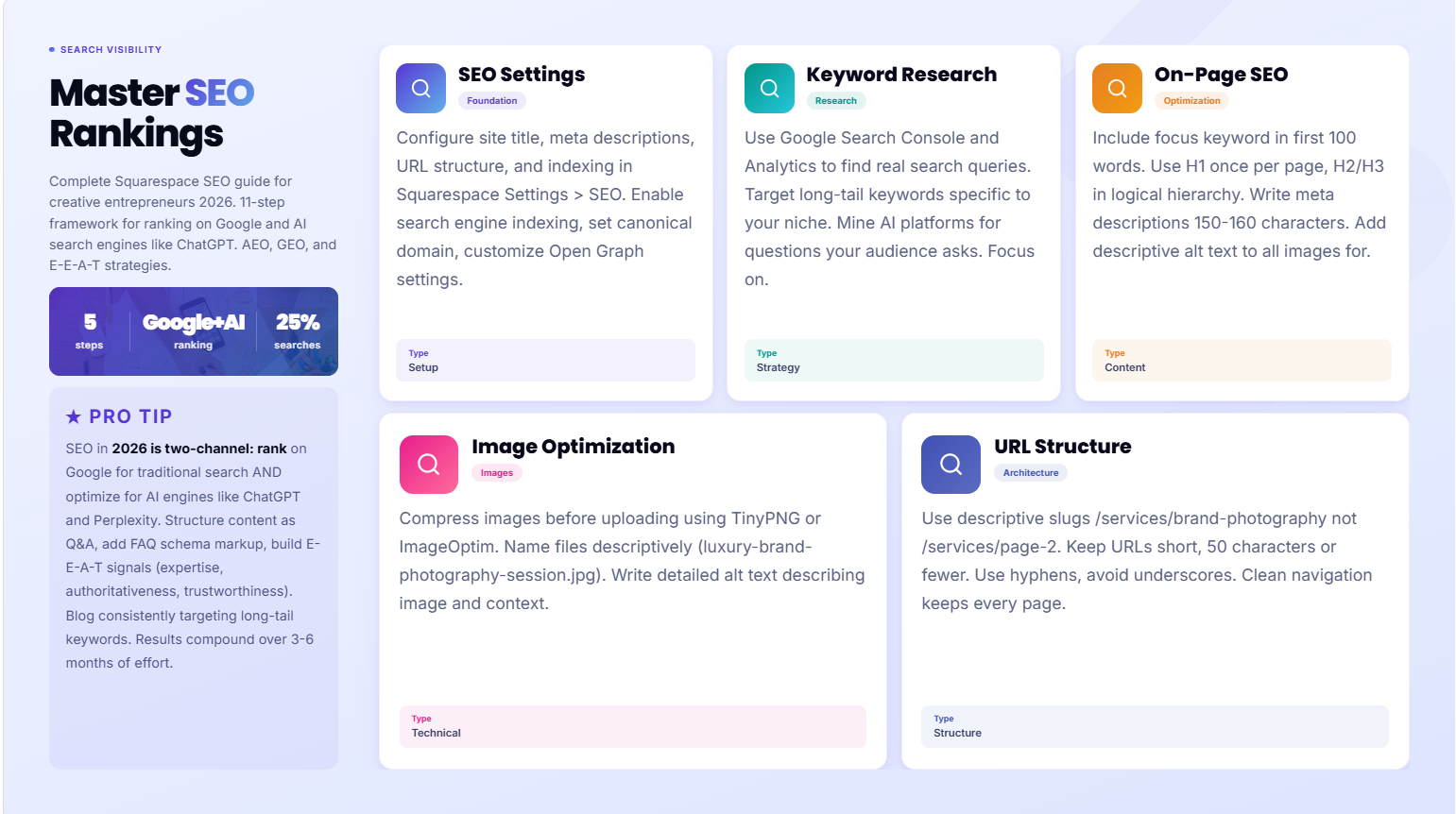
Dual-channel optimization is essential: Ranking on Google alone is no longer enough. You must also optimize for AI search engines like ChatGPT, Perplexity, Claude, and Gemini.
Squarespace has strong native SEO tools: Built-in features like page titles, meta descriptions, URL customization, and mobile responsiveness give you a solid foundation—but you must configure them correctly.
AEO and GEO are the new frontiers: Answer Engine Optimization and Generative Engine Optimization require different strategies than traditional SEO—focus on FAQ schema, direct Q&A formatting, and E-E-A-T signals.
Content architecture matters more than ever: Structured data, clear headings, and internal linking help both Google's crawlers and AI systems understand and cite your expertise.
E-E-A-T builds trust with AI: Experience, expertise, authoritativeness, and trustworthiness are now critical ranking factors—especially for creative entrepreneurs competing on personal brand and credibility.
Why SEO Matters Differently in 2026
For most of the 2010s and early 2020s, SEO meant one thing: rank on Google. Google's search index was the primary path to organic traffic, and winning the SEO game meant understanding Google's algorithm.
That's changing. According to Gartner, more than 25% of searches are now conducted without a traditional search engine, relying instead on AI chatbots and generative search platforms. OpenAI's ChatGPT has over 200 million weekly active users. Perplexity, Claude, and Gemini are growing rapidly
Here's what this means for you as a creative entrepreneur on Squarespace:
Google still matters. It still drives the majority of organic search traffic and will for years. Traditional SEO fundamentals—quality content, site speed, mobile optimization, clean architecture—remain essential.
But AI search is growing faster. Users are increasingly asking questions in ChatGPT, Perplexity, or Claude instead of typing into Google Search. When they do, those AI systems mine sources from across the web to provide answers. If your Squarespace website isn't structured and written in a way that AI systems can easily extract and cite, you're missing visibility.
The solution? Dual-channel SEO. You optimize for Google's ranking algorithm and for AI systems' content extraction and citation logic. Fortunately, these strategies largely complement each other. Better content structure, clearer writing, and stronger authority signals help you rank higher in both channels.
Part 1: Squarespace SEO Foundations
Before you tackle AI search optimization, your Squarespace fundamentals must be solid. These five steps form the bedrock of any successful SEO strategy.
Step 1: Set Up Your SEO Settings Correctly in Squarespace
Squarespace's SEO panel is found in Settings > SEO. Here's what you must configure:
Site title and tagline: Enter your brand name and a clear, keyword-rich tagline. This appears in browser tabs and search results. Example: "Jane Smith | Portrait Photographer Specializing in Brand Photography for Entrepreneurs"
Meta description for your homepage: Write a compelling 150–160 character description. Include your focus keyword and a clear value proposition. This is your first impression in search results.
URL slug customization: By default, Squarespace auto-generates URLs. Change them to be concise and keyword-relevant. Instead of /p/xyz123, use /portrait-photography-for-entrepreneurs.
Enable indexing: Ensure "Allow this site to be indexed by search engines" is toggled on. Check that you're not accidentally blocking important pages in your robots.txt file.
Set a canonical domain: Choose whether your site runs on www.example.com or example.com, then stick with it consistently.
Open Graph settings: Configure how your site appears when shared on social media. Add your logo image, business name, and a description.
This foundational work takes 30 minutes but pays dividends across all your SEO efforts.
Step 2: Keyword Research for Creative Businesses
Keyword research for creative entrepreneurs differs from traditional e-commerce or SaaS. Your audience is smaller and more intent-driven.
Start with these research steps:
Use Google Search Console and Google Analytics: Look at your actual search queries. What are people typing to find businesses like yours? This real data is gold.
Search your own services on Google: Type your service into Google Search (e.g., "photographer in [city]" or "business coach for female entrepreneurs"). Read the top 10 results. What language do competitors use? What questions appear in the "People Also Ask" section?
Mine AI search platforms: Ask ChatGPT, "What questions do people ask when looking for a [your service] in [your location/niche]?" AI systems often surface questions Google doesn't rank directly.
Focus on long-tail keywords: Creative services are local and niche. "Photographer" is too broad. "Luxury brand photographer for female entrepreneurs in Los Angeles" is your sweet spot.
Track intent: Are searchers looking for education ("how to build a personal brand"), validation ("is hiring a designer worth it"), or services ("hire a designer in NYC")? Create content for all three, but prioritize service-intent keywords for conversions.
Target semantic variations: If your focus keyword is "Squarespace SEO for creative entrepreneurs," also target "Squarespace SEO for coaches," "Squarespace SEO for photographers," etc. This helps AI systems understand your expertise breadth.
Spend time here. Better keyword targeting multiplies the ROI of every piece of content you create.
Step 3: On-Page SEO—Titles, Headings, Meta Descriptions
Every page on your Squarespace site is an SEO opportunity. Here's how to optimize:
Page titles (H1 and browser tab title):
Include your focus keyword near the start
Keep it between 50–70 characters
Make it compelling—it's both a ranking factor and a click-through driver
Example: "Portrait Photography for Personal Brands | Jane Smith Studios"
Meta descriptions:
150–160 characters
Include your focus keyword
Include a call-to-action or benefit
Example: "Professional portrait photography for coaches and creators. Book your brand photoshoot today. Free consultation."
Heading hierarchy (H2, H3, H4):
Use only one H1 per page (your page title)
Structure subheadings logically—don't jump from H2 to H4
Include keywords naturally in headings
Use headings to signal content structure to both Google and AI systems
Body content:
Write naturally for humans first, keywords second
Use your focus keyword in the first 100 words
Aim for 500+ words per page (more for pillar content)
Break content into short paragraphs (2–3 sentences each)
Image alt text:
Describe the image accurately
Include keywords where relevant, but don't keyword-stuff
Example good alt text: "Jane Smith photographing a female entrepreneur for her personal brand session"
On-page SEO is the fastest win. Most Squarespace sites miss these basics, so even small improvements push you ahead.
Step 4: Image SEO—Alt Text and File Naming
Creative entrepreneurs rely heavily on images—portfolios, case studies, testimonials. These images can rank on Google Images and fuel both traditional and AI search.
File naming:
Don't use generic names like "IMG_2847.jpg"
Name images descriptively: "luxury-brand-photography-session-sarah-johnson.jpg"
Use hyphens to separate words (underscores don't work as well)
This helps search engines understand what the image shows
Alt text (alternative text):
Describe the image in 8–15 words
Include context: "Female entrepreneur Sarah Johnson in her home office during luxury brand photography session"
For portfolio images, describe what makes them special: "Luxury brand headshot showcasing warm lighting and professional styling"
For decorative images, you can leave alt text blank (use an empty string)
Image compression:
Optimize images before uploading to Squarespace
Use tools like TinyPNG or ImageOptim to reduce file size without losing quality
Smaller files = faster page load = better SEO
Image captions:
When you add a caption in Squarespace, it displays on the page and helps search engines
Use this to add context: "Portrait photography session for tech entrepreneur Lisa Chen"
Images drive traffic from Google Images and Pinterest, and they help AI systems understand your work better. Invest in image SEO.
Step 5: URL Structure and Clean Navigation
A clean URL structure helps both users and search engines navigate your site.
URL best practices:
Use descriptive slugs: /services/brand-photography (not /services/page-2)
Keep URLs short: 50 characters or fewer
Use hyphens to separate words, not underscores
Avoid numbers and dates unless necessary
Make URLs readable—if a human can understand it, search engines will too
Navigation architecture:
Limit main menu to 4–6 items (focus on important pages)
Use clear labels: "Services" not "Offerings," "About" not "Bio"
Create a logical hierarchy: Pages > Collections > Products/Services
Ensure every page is reachable within 3 clicks from the homepage
Breadcrumb navigation:
If you have nested pages, add breadcrumbs: Home > Services > Photography
This helps users and search engines understand page hierarchy
Internal linking:
Link from your homepage to your most important pages
Use descriptive anchor text (linked text that describes the destination)
Avoid linking to unrelated pages
Clean navigation isn't just good SEO—it's good UX. Your visitors will have an easier time finding what they need, which means lower bounce rates and higher conversions.
Part 2: Content SEO for Creatives
Technical SEO gets you in the game, but content wins the game. Creative entrepreneurs win SEO by building an authority moat through consistently published, high-value content.
Step 6: Build a Blog and Publish Consistently
If your Squarespace site doesn't have a blog, start one now. Blogs serve three critical functions:
Feed the algorithm: Google rewards sites that publish fresh, relevant content. A blog signals to Google that your site is active and authoritative.
Address audience questions: Blog posts let you target long-tail keywords and answer the questions your ideal clients are searching for.
Build trust and authority: Blog posts showcase your expertise, methodology, and process. They're proof that you know what you're doing.
For creative entrepreneurs, consistency beats perfection. Here's a realistic publishing cadence:
Minimum: One blog post per month (12 per year). This is enough to signal freshness without overwhelming your schedule.
Optimal: Two blog posts per month. This accelerates ranking and builds a deeper content library.
If you can manage: Weekly. This builds serious authority and traffic.
Start with topics that answer common client questions:
"How do I prepare for a brand photography session?" "What should I include in my personal brand photography?" "How often should I update my website?" "What is personal branding and why does it matter?" "How much does [your service] cost?"
Blog topics addressing these questions will rank, drive traffic, and warm up prospects before they contact you.
Pro tip for creatives: Batch-create content. Spend a Saturday writing 4–6 blog posts, then schedule them to publish weekly. This removes the "I don't have time" excuse and builds momentum.
Step 7: Structure Content for Featured Snippets
Featured snippets are the boxes that appear at the top of Google search results, answering a question directly. Ranking for featured snippets drives traffic and authority.
Here's how to optimize for them:
Target question-based keywords: Search your keywords on Google and look for the "People Also Ask" section. These are prime featured snippet targets.
Structure content with H2 headers: Use H2 headings to signal main topics. Featured snippets often pull from content under H2 headers.
Write direct answers: The first paragraph under an H2 should directly answer the question. Example:
## How do I prepare for a brand photography session?
Preparation is key to a successful brand photography session.
Here are seven steps to get ready...
Use lists and tables: Featured snippets favor:
Numbered lists (steps, rankings)
Bullet lists (tips, features)
Comparison tables
Short paragraphs (1–2 sentences)
Keep answers concise: Featured snippets usually pull 40–60 words. Your answer should be clear and complete in that space.
Use proper formatting: Use the formatting tools in Squarespace to create lists and tables. This helps Google identify snippet-worthy content.
Featured snippet rankings drive high-intent, qualified traffic. Make these a priority.
Step 8: Internal Linking Strategy
Internal links connect your pages together and signal to search engines which pages matter most.
Best practices:
Link from your homepage: Your most important pages (Services, About, Blog) should be one click from the homepage.
Link from blog posts to services pages: Every blog post should link naturally to a relevant service page. Example: A blog post about "brand photography" should link to your "Brand Photography Services" page.
Use descriptive anchor text: The linked text should describe where the link goes. Avoid "click here." Use "Learn more about brand photography for entrepreneurs."
Aim for 2–5 internal links per post: More isn't better. Links should feel natural, not forced.
Link to older content from new posts: This "boosts" older content without creating new pages.
Create pillar content with cluster pages: Your main pillar (this guide) links to related cluster content (individual blog posts on AEO, on-page SEO, etc.). This signals topical authority to Google.
Internal linking is the most underrated SEO tactic. It costs nothing, takes minutes, and dramatically improves both user experience and search rankings.
Part 3: AI Search Optimization (AEO/GEO) for Squarespace
This is where most Squarespace users miss the biggest opportunity. Traditional SEO gets you indexed. AI search optimization gets you cited and recommended by AI systems.
What Is AEO?
Answer Engine Optimization (AEO) is the practice of optimizing your content and website structure so that AI-powered search engines (ChatGPT, Perplexity, Claude, Gemini) can easily extract, understand, and cite your content.
Unlike Google's traditional SEO, which rewards links and keyword density, AEO rewards:
Direct, comprehensive answers to user questions
Clear content structure (headings, lists, tables)
Authorship and credibility signals (author bios, credentials)
Cited sources and references
FAQ schema and structured data
When someone asks ChatGPT, "How do I build a personal brand as a creative entrepreneur?", the AI system scans indexed web pages to find the best answers. If your content is structured and written in a way that's easy to extract and cite, your site gets recommended.
What Is GEO?
Generative Engine Optimization (GEO) is a subset of AEO focused specifically on optimizing for generative AI platforms like ChatGPT and Google Gemini. GEO emphasizes:
Comprehensive, authoritative content (1,500+ words per page)
Direct answers to user intent
Structured data (schema markup)
Clear source attribution
Original insights and research
The difference between AEO and GEO is subtle. AEO is the umbrella strategy; GEO is optimizing specifically for generative AI systems that create original text based on source material.
For a creative entrepreneur, both matter equally.
Step 9: Add FAQ Schema Markup
FAQ schema markup is structured data that tells search engines (and AI systems) which content on your page is a frequently asked question and answer.
Why it matters: Google displays FAQ schema as rich snippets. AI systems use it to identify Q&A content to extract and cite.
How to add it to Squarespace:
Squarespace doesn't have a built-in FAQ schema generator, so you'll need to add JSON-LD code to your page's code injection area.
Go to Settings > Advanced > Code Injection
Paste your FAQ schema JSON in the header
Use a tool like Google's Structured Data Markup Helper to generate valid JSON
Example FAQ schema:
{
"@context": "https://schema.org",
"@type": "FAQPage",
"mainEntity": [
      {
         "@type": "Question",
       "@id": "https://example.com/faq#q1",
       "name": "How do I rank on ChatGPT?",
        "acceptedAnswer": {
         "@type": "Answer",
"text": "To rank on ChatGPT and other AI search engines, you need to optimize for AEO..."
   }
  }
 ]
 }
FAQ schema markup is a direct signal to AI systems that your content answers common questions. Use it on your homepage, service pages, and blog posts.
Step 10: Write in Direct Q&A Format for AI Engines
AI systems are trained to recognize and extract question-and-answer content. By formatting your content as explicit Q&A, you make it easier for AI systems to cite you.
How to structure Q&A content:
Instead of writing: "Many creative entrepreneurs wonder about the best time to update their website...
Write: "When should creative entrepreneurs update their website?"
Then provide a direct answer in the next paragraph.
In practice:
Use H2 headers as questions: "How much does a Squarespace website cost?"
Answer directly in the paragraph below
Use numbered lists when answering "How to..." questions
Use comparison tables when answering "What's the difference..." questions
Example:
## How do I prepare for a brand photography session?
Here are 7 steps to prepare for a successful brand photography session:
1. Plan your outfits at least one week in advance
2. Get a professional hair and makeup appointment the day before
3. Bring 3–5 outfit options
This format is better for Google (featured snippets), better for users (clarity), and better for AI systems (extractability).
Step 11: Build E-E-A-T Signals
E-E-A-T stands for Experience, Expertise, Authoritativeness, Trustworthiness. Google officially uses E-E-A-T as a ranking factor, and AI systems use it to evaluate source credibility.
How to signal E-E-A-T on Squarespace:
Experience
Showcase your portfolio and case studies
Include client testimonials with names and photos
Share behind-the-scenes content showing your process
Document your journey and evolution
Expertise:
Write detailed, comprehensive content
Share your methodology and frameworks
Create original research or insights
Speak at industry events and mention it on your site
Authoritativeness:
Create an author bio that includes credentials and experience
Link to third-party mentions and press coverage
Share your education and certifications
Build backlinks from authoritative industry sites
Trustworthiness:
Display testimonials and reviews prominently
Show who you've worked with (client logos)
Be transparent about your process and pricing
Include your contact information and business details
On your Squarespace site, implement E-E-A-T by:
Creating a detailed About page with your credentials, experience, and why you're qualified
Adding author bios to every blog post (include a photo, title, and link to your profile)
Featuring client testimonials with photos, names, and companies
Displaying certifications, awards, and third-party mentions
Creating a /credentials or /press page linking to media coverage
AI systems evaluate source credibility more aggressively than Google. Strong E-E-A-T signals make AI systems trust and cite your content.
How to Rank on ChatGPT, Perplexity, Gemini, and Claude
Different AI systems have slightly different indexing and citation practices. Here's how to optimize for each:
ChatGPT:
Indexed regularly; content can take 4–12 weeks to appear
Prefers comprehensive, authoritative sources
Cites sources at the bottom of responses
Optimize by building comprehensive pillar content with strong E-E-A-T
Perplexity:
Often cites primary sources and niche blogs
Appreciates detailed, specific information
Indexes quickly (2–4 weeks)
Optimize by publishing unique insights and specific case studies
Google Gemini:
Part of Google Search; similar indexing to Google
Rewards E-E-A-T and topical authority
Indexes quickly
Optimize like you would for traditional Google SEO
Claude:
Indexes more slowly than ChatGPT (can take 3+ months)
Prefers nuanced, detailed content
Values cited sources and attribution
Optimize by including rich citations and references
Across all platforms, the fundamentals remain the same:
Publish comprehensive, original content
Structure content for easy extraction (headings, lists, tables)
Build strong E-E-A-T signals
Include FAQ and other schema markup
Focus on direct answers to user questions
Part 4: Technical SEO
Technical SEO ensures search engines can crawl, index, and rank your site. Squarespace handles much of this automatically, but there are still optimizations you can control.
Site Speed on Squarespace
Site speed is a ranking factor for both Google and AI systems. Faster sites get crawled more efficiently and rank better.
Squarespace speed benchmarks:
Average Squarespace site: 2–4 seconds load time
Target: Under 2 seconds (mobile and desktop)
How to improve speed:
Compress images aggressively: Use TinyPNG or ImageOptim before uploading. Aim for images under 500KB.
Limit heavy plugins: Squarespace apps add functionality but can slow your site. Audit unused apps and disable them.
Reduce font libraries: Loading custom fonts takes time. Stick with Squarespace's native font options or limit to 1–2 external font families.
Minimize background videos: Large video backgrounds slow page load. Limit to one per page and keep video file sizes under 10MB.
Test your speed: Use Google PageSpeed Insights to identify specific bottlenecks. Aim for a mobile score above 80.
Squarespace's infrastructure is generally fast, but these optimizations matter, especially for image-heavy portfolio sites.
Mobile Optimization
Mobile traffic exceeds desktop traffic for most creative businesses. Mobile optimization is non-negotiable.
Squarespace's mobile advantage: Squarespace automatically creates responsive mobile versions of your site. Every template is mobile-optimized.
What you control:
Test on actual devices: Don't just rely on browser emulators. Test your site on an iPhone and Android phone.
Check touch targets: Buttons and links should be at least 48×48 pixels. Small buttons are hard to tap on mobile.
Minimize pop-ups and modals: Intrusive pop-ups harm mobile UX. Squarespace allows pop-ups, but use them sparingly.
Readable text: Font size should be at least 16px on mobile. Short paragraphs and plenty of white space improve readability.
Fast mobile load: Mobile network speeds are slower than desktop. Image optimization is critical for mobile.
Use Google's Mobile-Friendly Test to ensure your site passes mobile requirements.
Google Search Console Setup
Google Search Console is the official way to communicate with Google about your site.
How to set up:
Go to search.google.com/search-console
Click "Start Now" and add your property (your website)
Verify ownership by adding a meta tag to your Squarespace site (Settings > Advanced > Code Injection)
Wait 24–48 hours for Google to verify
Once verified, monitor:
Search Performance: See which keywords you rank for, click-through rates, and impressions
Coverage: Identify indexing errors and warnings
Core Web Vitals: Mobile performance metrics (loading, responsiveness, visual stability)
Mobile Usability: Mobile-specific issues
Google Search Console is free and invaluable. Check it monthly to identify issues and monitor progress.
Squarespace SEO Checklist
Use this checklist to audit and optimize your Squarespace site:
On-Page SEO
Set site title and tagline in Settings > SEO
Write meta descriptions for every page (150–160 characters, include keyword)
Customize URL slugs (no auto-generated URLs)
Use H1 once per page (your page title)
Use H2, H3, H4 headings in logical hierarchy
Include focus keyword in first 100 words
Add alt text to every image
Name image files descriptively (hyphens, no underscores)
Internal links (2–5 per page, descriptive anchor text)
Content
Blog established with at least 10 posts
Publishing schedule set (monthly minimum)
Blog posts target long-tail keywords
Content includes lists, tables, or numbered steps
At least one blog post targets featured snippets
Structure & Schema
FAQ schema markup added to homepage and service pages
Author bio included on every blog post
Testimonials displayed with photos and names
Credentials/certifications visible on About or Press page
E-E-A-T signals present on main pages
Technical
Google Search Console verified and monitored
Page speed tested (aim for <2 seconds on mobile)
Images compressed before upload
Mobile site tested on real devices
No broken links or 404 errors
Robots.txt not blocking important pages
Sitemap auto-generated (Squarespace does this automatically)
AI Search (AEO/GEO)
Content structured in Q&A format (H2 as questions)
Direct answers in opening paragraphs
FAQ schema markup present
Author credentials and bios visible
Comprehensive pillar content (1,500+ words)
Original insights and unique perspectives included
-
SEO in 2026 requires a two-pronged approach: traditional keyword optimization for Google, and structured content optimization for AI search engines. Start by auditing your Squarespace SEO settings (site title, meta descriptions, URL structure). Then publish high-quality blog content targeting long-tail keywords relevant to your creative business. Add FAQ schema markup and structure your content as explicit Q&A to help AI systems extract and cite your work. Finally, build E-E-A-T signals—author bios, client testimonials, credentials—to establish authority with both search engines and AI systems. The fundamentals (speed, mobile optimization, clean navigation) matter as much as ever, but the addition of AEO/GEO strategies is now essential for ranking on ChatGPT, Perplexity, and Gemini alongside Google.
-
Ranking on AI search engines requires optimizing for "Answer Engine Optimization" (AEO). AI systems crawl and index websites to find sources for user queries. To rank, you need: (1) comprehensive, well-researched content that directly answers common questions in your niche, (2) clear structure with headings, lists, and tables that make content easy to extract, (3) strong author credentials and trust signals so AI systems cite you as authoritative, (4) FAQ and schema markup that explicitly label Q&A content, and (5) original insights and data that AI systems don't find elsewhere. Unlike Google, which rewards links, AI systems reward direct answers. Focus on being the most comprehensive, credible source for your topic, and AI systems will cite you.
-
GEO (Generative Engine Optimization) is optimizing your Squarespace site specifically for generative AI platforms like ChatGPT and Google Gemini. GEO emphasizes comprehensive pillar content (1,500+ words), direct Q&A formatting, schema markup, and strong source attribution. It differs from traditional SEO in that it prioritizes clarity of content structure and authorship signals over keyword density or backlinks. For a Squarespace site, GEO means writing comprehensive guides (like this one), adding FAQ schema, including detailed author bios, and structuring content so AI systems can easily extract, understand, and cite your work. GEO is still emerging, but it's rapidly becoming as important as traditional Google SEO.
-
AEO (Answer Engine Optimization) works by making your Squarespace content indexable and citable by AI search engines. AI systems like ChatGPT and Perplexity crawl websites looking for sources to cite when answering user questions. To optimize for AEO on Squarespace: (1) Use clear heading hierarchy (H2 for main topics, H3 for subtopics) so AI systems understand your content structure. (2) Format content as explicit questions and direct answers. (3) Include lists, tables, and numbered steps that are easy to extract. (4) Add FAQ schema markup to flag Q&A content. (5) Build author credibility through bios, credentials, and trust signals. (6) Link to other reputable sources so AI systems see you as part of a credible information network. Squarespace's clean HTML output makes this relatively straightforward compared to other platforms.
-
Yes, Squarespace is very good for SEO, especially for creative entrepreneurs and small businesses. Squarespace provides native SEO tools (meta descriptions, URL customization, mobile optimization, automatic sitemaps) that make traditional SEO straightforward. The platform's clean code and fast hosting infrastructure help with rankings. Squarespace also supports custom code injection, which lets you add FAQ schema, tracking pixels, and other advanced SEO elements. The main limitations are: you can't install SEO plugins (unlike WordPress), and some technical SEO optimizations require code knowledge. But for most creative entrepreneurs, Squarespace's built-in tools are sufficient. Combined with strong content and structure, Squarespace sites rank competitively against WordPress and other platforms. The key is using the tools available and following the steps in this guide.
-
Timeline varies based on competition and effort, but here's a realistic expectation: New Squarespace sites take 4–6 weeks to appear in Google search results at all. Ranking on the first page typically takes 3–6 months for low-to-moderate competition keywords. For highly competitive keywords or local terms, expect 6–12 months. AI search engines move faster—content can appear in ChatGPT or Perplexity within 2–8 weeks. The timeline accelerates if you: publish consistently (blog posts every week or two), target long-tail keywords (lower competition), build backlinks from other sites, and follow all on-page SEO best practices. Geographic and niche services (e.g., "personal brand photographer in Austin") typically rank faster than broad services. Patience and consistency matter more than perfection. One blog post won't move the needle, but three months of weekly posts absolutely will.
-
A blog is not strictly required, but it dramatically improves your SEO and is highly recommended. Here's why: Blog posts target long-tail keywords and answer audience questions, driving organic search traffic. They signal freshness to Google, which rewards sites that update regularly. They provide internal linking opportunities, which boost your authority pages (like service pages). For creative entrepreneurs, blogs build trust by showcasing your expertise and process. They also extend your keyword reach—a blog about "how to prepare for a photoshoot" can drive traffic to your photography services page. That said, a small site with an excellent, optimized homepage and services pages can rank without a blog. The question isn't whether you need a blog, but whether you're willing to invest time in content marketing. If yes, a blog accelerates growth significantly. If not, focus on perfecting your homepage, About page, and service pages.
-
Squarespace integrates with most third-party SEO tools, though some have limitations: Google Search Console (free) tracks rankings and search performance. Google Analytics 4 (free) tracks site traffic and user behavior. Semrush (paid) offers keyword research, backlink analysis, and rank tracking for Squarespace sites. Ahrefs (paid) is another comprehensive SEO platform that tracks Squarespace rankings. Moz (free and paid) provides SEO tips and site audits. Screaming Frog (free version available) crawls your site to identify technical issues. Mobile-Friendly Test (free) checks mobile optimization. For schema markup, use Schema.org Validator or Google's Structured Data Testing Tool (both free). You can't install SEO plugins on Squarespace like you can on WordPress, but these external tools provide the same functionality. Start with Google Search Console and Analytics (free), then add paid tools if needed.
Ready to Rank Your Squarespace Site?
This guide covers everything you need to know to rank on Google and AI search engines in 2026. But understanding SEO is different from implementing it—especially while running a creative business.
That's where we come in.
Squareko specializes in SEO-optimized Squarespace design for creative entrepreneurs. We don't just build beautiful websites; we build websites that rank, convert, and grow your business. From photography and coaching to music and personal brands, we understand what creative entrepreneurs need to succeed.
Our Squarespace SEO services include:
Complete SEO audit and competitive analysis
Keyword research and content strategy
On-page SEO optimization (titles, headings, schema)
Blog setup and editorial calendar
AEO/GEO optimization for AI search
Technical SEO and site speed optimization
Monthly performance tracking and optimization
If you're ready to stop competing on looks alone and start competing on search visibility, let's talk. Contact Squareko today for your free SEO consultation.
Your ideal clients are searching right now. Let's make sure they find you.
From custom website design to SEO strategy, we help businesses launch a site that looks professional and performs better.

About the Author
Walid Hassan is the founder of Squareko, a specialist Squarespace web design agency helping creative professionals build websites that attract clients and grow their brand. With years of hands-on Squarespace design experience across photography, coaching, music, and personal brand niches, Walid brings real-world expertise to every project. He's built hundreds of Squarespace websites, tracked their SEO performance, and refined strategies that work for creative entrepreneurs. When he's not designing websites, Walid writes about Squarespace design, SEO, and personal branding for creative professionals.
