
Squarespace SEO for Yoga and Pilates Studios: Rank in 2026
Key Takeaways for Squarespace SEO for Yoga and Pilates Studios
Build keyword strategy around local searches "hot yoga studio city", class-specific terms "reformer pilates classes", style-specific terms ("Iyengar yoga teacher"), and online variations
E-E-A-T for yoga/pilates means displaying Yoga Alliance, British Wheel of Yoga, or PILATES Foundation credentials prominently
Squarespace SEO fundamentals include site structure, mobile optimization, page speed, and Schema markup — all achievable without code
Create individual pages for each class type, teacher bios, and workshops to capture intent-rich searches
Master local SEO with Google Business Profile, SportsActivityLocation schema, and GEO/AEO (Generative Engine Optimization) for AI-powered recommendations
Yoga and pilates studio owners face a crowded digital marketplace. A potential student searching for "yoga classes near me" or "beginner pilates studio London" needs to find your website, not the generic fitness platform down the street. Squarespace SEO, when properly configured, positions your studio as the local authority in your niche. This guide covers the complete SEO strategy for yoga and pilates businesses on Squarespace — from keyword research tailored to your practice style, through technical setup, to the emerging landscape of AI-powered search.
Understanding the Yoga and Pilates Keyword Landscape
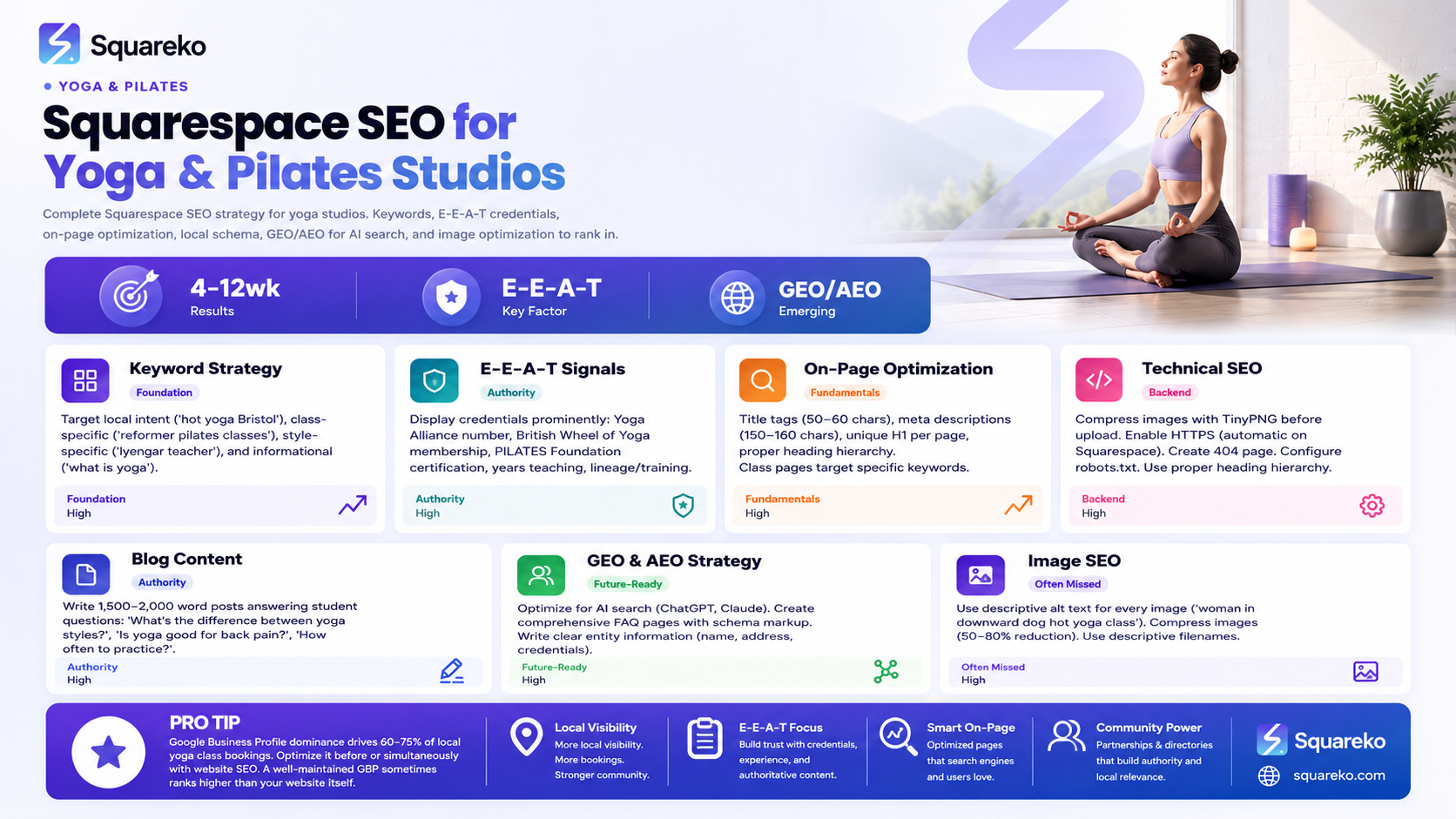
Yoga and pilates searches cluster into four distinct categories. Understanding each helps you target the right students.
Local Intent Searches
These are the most valuable. A potential student is ready to buy:
"Yoga classes near me"
"Yoga studio London"
"Pilates instructor Bristol"
"Hot yoga studio Manchester"
"Reformer pilates classes [city]"
Local searches often include city names, postal codes, or neighbourhood identifiers. If you teach in London, optimizing for "yoga studio Fitzrovia" or "pilates classes Clerkenwell" will pull highly motivated local traffic.
Class-Specific Searches
Students often search for the exact style or format they want:
"Hot yoga classes London"
"Vinyasa flow Tuesday evening"
"Reformer pilates for beginners"
"Yin yoga studio near me"
"Pilates mat classes vs equipment"
These searches indicate intent. Someone looking for "hot yoga" is different from someone searching "gentle hatha yoga" — they want different experiences, different studios. A studio offering both should create separate pages for each.
Style-Specific and Credential Searches
Students with deeper practice knowledge search by lineage, style, or teacher credential:
"Iyengar yoga teacher London"
"Ashtanga yoga authorized teacher"
"Classical Pilates studio city"
"Yoga Alliance certified instructor"
"British Wheel of Yoga registered teacher"
These are high-intent. A student searching "Yoga Alliance certified teacher near me" is seriously committed to qualified instruction.
Informational and Comparison Searches
These are awareness-stage searches that build authority but don't convert immediately:
"What's the difference between yoga and pilates?"
"Beginner yoga tips"
"Which yoga style is best for me?"
"Yin yoga benefits"
Blog content here establishes your expertise and captures students in the research phase.
Building E-E-A-T for Your Studio
E-E-A-T stands for Experience, Expertise, Authoritativeness, and Trustworthiness. For yoga and pilates studios, it means making credentials visible and immediate.
Display Your Credentials Prominently
In your website footer, About page header, and teacher bios, include:
Yoga Alliance or Yoga Alliance Professionals (UK) registration number
British Wheel of Yoga (BWoY) membership
PILATES Foundation or Body Control Pilates registration
Years of teaching experience
Teacher training lineage (e.g., "trained under teacher name" or "200-hour YTT from accredited institution")
Specialisations (e.g., "Trauma-informed yoga", "Pilates for athletes", "Prenatal yoga specialist")
This immediate credibility signal affects both human visitors and search engine trust.
Create Individual Teacher Profiles
Each teacher deserves a dedicated page with:
Photo
Full credentials and qualifications
Specialisations and experience
Classes they teach (linked to class pages)
Personal teaching philosophy in their own words
Years at the studio
Teacher profiles are also content gold for local search. A page titled "Rachel – Yoga Alliance Certified Hatha Yoga Teacher in Bristol" captures local + credential + teacher name searches.
Document Your Studio's History and Philosophy
Create an "Our Story" section explaining:
When the studio was founded
Why the founder started it
The studio's teaching philosophy
Community involvement or local reputation
Notable achievements or milestones
This builds authority through demonstrated experience and community presence.
Squarespace SEO Setup for Yoga and Pilates
Squarespace handles many SEO fundamentals automatically. Here's what you must configure manually:
Enable Automatic Sitemap
Navigate to Settings > SEO and confirm the XML sitemap is enabled. Squarespace auto-generates it at yoursite.com/sitemap.xml. This tells search engines every page on your site.
Configure Your Primary Domain
Use Settings > Domains to set a single primary domain. Choose between www and non-www — consistency matters for consolidating ranking authority.
Write Unique Title Tags and Meta Descriptions
For every page:
Title tag: 50–60 characters, include your primary keyword, mention location for local pages. Example: "Hot Yoga Classes in Bristol | [Studio Name]"
Meta description: 150–160 characters, compelling reason to click. Example: "Beginner-friendly hot yoga in Bristol's city centre. 6 classes weekly, Yoga Alliance certified teachers. Book your first class free."
In Squarespace, edit these under Settings > SEO for the homepage and in the page editor for individual pages (click the SEO icon).
Set Your Homepage Keywords and Description
Your homepage should target your primary keyword and location. Example primary keyword: "yoga studio London" or "pilates classes Manchester". This isn't to over-optimize, but to be clear about your core offering.
Ensure Mobile Optimization
Squarespace templates are mobile-responsive by default, but verify:
Class schedule is readable on mobile
Booking buttons are tap-friendly (large targets)
Images load quickly on mobile
No horizontal scrolling
Test your site on mobile in Squarespace's mobile editor (Settings > Mobile > Mobile Editor).
On-Page SEO: Classes, Teachers, and Workshops
Individual pages capture specific search intent far better than a single catch-all "Classes" page.
Create Individual Class Pages
For each distinct class you offer, create a dedicated page:
Page structure for "Hot Yoga Beginners – Tuesdays":
Class title (H1): "Hot Yoga for Beginners – Tuesday Evenings in Bristol"
Introduction paragraph including keywords: Mention "hot yoga", "beginners", location, and what students can expect
Key details: Duration, schedule, price, what to bring
Who it's for: Directly address beginners — "No experience needed", "All bodies welcome"
What happens in class: Paragraph describing the experience, tempo, and benefits
About the teacher: Link to their profile or embed their bio
FAQ section: Common questions about hot yoga, modifications, what to wear
Call-to-action: "Book this class" button
Why separate pages? A search for "hot yoga beginners London" should land on your hot yoga beginners page, not a generic "classes" page. Specificity increases relevance and click-through rates.
Build Comprehensive Teacher Profile Pages
Each teacher gets their own SEO-optimized page:
URL slug: teachers/rachel-smith-yoga-teacher (semantic, includes name)
H1: "Rachel Smith – Yoga Alliance Certified Hatha Yoga Teacher in Bristol"
Introduction: Rachel's teaching philosophy and experience in 150 words
Credentials: Yoga Alliance number, training background, years of experience
Specialisations: List specific areas (trauma-informed, prenatal, senior yoga)
Classes taught: Link each class to the class page
Student testimonials: 2–3 short quotes from regular students
FAQ: Common questions students ask when choosing a teacher.
Teacher profiles capture "yoga teacher name" searches and build trust through personal connection.
Create Workshop and Event Pages
Each special event (retreats, workshops, intensives) gets a dedicated page:
Full details and schedule
Teacher credentials for facilitators
What experience level is needed
Pricing and registration link
FAQ specific to the event
Testimonials from past attendees (if applicable)
Workshops often rank well locally because they're time-sensitive and specific: "summer yoga retreat Cornwall" or "pilates reformer workshop London March 2026".
Content Strategy That Ranks
Blog content serves dual purposes: ranking for informational searches and positioning your studio as an authority.
Target Questions Your Students Ask
Write blog posts answering:
"What's the difference between yoga and pilates?" — Addresses comparison searches and clarifies your focus
"Is yoga good for back pain?" or "Can pilates fix my posture?" — Health-related queries with high search volume
"What's the best yoga style for beginners?" — Directly helps prospective students
"How often should I do yoga to see results?" — Expectation-setting questions
"What should I wear to my first yoga class?" — Beginner anxiety questions
"Why do I feel sore after my first yoga class?" — Post-class questions that show you understand the student journey
"Can I do yoga if I'm [condition: inflexible, older, injured, pregnant]?" — Specific concern content
Each post should be 1,500–2,000 words, well-researched, and include your personal studio perspective.
Incorporate Personal Stories
A blog post titled "How One Student Went from Yoga Anxiety to Teaching (A Story from Our Studio)" combines narrative interest with credibility. Personal stories also help with E-E-A-T — they prove real experience, not generic advice.
Link Blog Posts to Your Service Pages
In blog content, naturally link to relevant class pages and teacher profiles. Example: "If you're new to hot yoga, our beginner-friendly classes on Tuesday and Thursday evenings are designed exactly for this situation link to Hot Yoga Beginners page."
Update Evergreen Content Annually
Each January, review and update your most-visited blog posts. Refresh statistics, add new insights, and let Google know the content is current. Recent updates signal freshness.
Technical SEO on Squarespace
Squarespace is built with SEO in mind, but these technical elements require attention:
Page Speed and Image Optimization
Yoga and pilates websites rely on high-quality photography. Large image files kill page speed:
Compress images before upload using tools like TinyPNG or Squoosh
Use WebP format where possible (Squarespace supports it)
Set appropriate image dimensions — don't upload a 4000px wide image and shrink it in CSS
Test mobile speed using Google PageSpeed Insights; aim for Core Web Vitals scores of "Good"
Configure Robots.txt and Meta Robots
Squarespace auto-generates appropriate robots.txt. Avoid indexing duplicate pages (like multiple views of the same class schedule). In the Squarespace editor, you can mark pages as "Don't allow search engines to index this page" if needed.
Use Header Tags Correctly
Structure content with proper hierarchy:
H1: One per page, should be the page's primary title
H2: Section headers (e.g., "About the Teacher", "What to Bring")
H3: Subsections only when needed
Correct hierarchy helps search engines and screen readers understand content structure.
Enable HTTPS
Squarespace provides free SSL by default. Verify in Settings > Domains that HTTPS is active. This is now a standard ranking factor.
Create a 404 Page
If a visitor lands on a broken link, your 404 page should guide them back to relevant content. Squarespace allows customization of the 404 page — use it to link to popular pages like your class schedule or homepage.
Local SEO and Google Business Profile
For location-based services, local SEO often outweighs organic ranking.
Create and Optimize Your Google Business Profile
Go to google.com/business and claim or create your profile
Accurate business information: Correct studio name, address, phone, hours
Categories: Select "Yoga Studio", "Pilates Studio", or both
Description: 750 characters explaining your studio's unique approach
Regular posts: Weekly posts about classes, events, or tips keep the profile active
Photos: Upload high-quality images of your studio, classes, and teachers
Encourage reviews: Ask satisfied students to review you on Google
Implement SportsActivityLocation Schema
Add this JSON-LD schema to your Squarespace Code Injection (Settings > Advanced > Code Injection > Header):
<!-- Please remove the commented script wrapper and add this schema inside a proper <script type="application/ld+json"> tag. -->
{
  "@context": "https://schema.org/",
  "@type": "SportsActivityLocation",
  "name": "Your Studio Name",
  "address": {
    "@type": "PostalAddress",
    "streetAddress": "123 Studio Street",
    "addressLocality": "London",
    "addressRegion": "England",
    "postalCode": "E1 1AA",
    "addressCountry": "GB"
  },
  "telephone": "+44 20 XXXX XXXX",
  "url": "https://yourwebsite.com",
  "sportsActivityCategory": ["Yoga", "Pilates"],
  "areaServed": "London",
  "priceRange": "£",
  "image": "https://yourwebsite.com/image.jpg",
  "openingHoursSpecification": [
    {
      "@type": "OpeningHoursSpecification",
      "dayOfWeek": "Monday",
      "opens": "09:00",
      "closes": "20:00"
    }
  ]
}
This schema helps search engines understand what you offer, where you are, and when you're open.
Earn Local Backlinks
Approach local yoga directories, wellness blogs, and community websites about links. Being listed on YogaAlliance.org or local chamber of commerce websites strengthens local authority.
GEO and AEO: Getting Found by AI Search
Generative Engine Optimization (GEO) and Artificial Engine Optimization (AEO) address how AI systems like ChatGPT, Claude, and Perplexity recommend yoga and pilates studios.
How AI Search Recommends Studios
AI systems cite sources based on:
Clear, structured information: Who you are, what you offer, credentials, location
Entity recognition: Yoga Alliance credentials, teacher names, class types
Cited authority: Websites that appear in training data and are cited by other sources
FAQ and comprehensive content: Pages answering common questions
Optimize for AI Visibility
Create a comprehensive FAQ page answering 10–15 questions about your studio, styles, and practices
Make credentials visible as structured data: Use schema markup to mark up credentials
Write comprehensive explainer content: Blog posts on "What is Hatha Yoga?" or "How Pilates Differs from Yoga" serve AI systems
Use natural language: Write for humans first, AI second. Avoid keyword stuffing
Link to authoritative sources: Link to Yoga Alliance, British Wheel of Yoga, and PILATES Foundation websites to build authority
Implement FAQPage Schema
Add this schema for your FAQ page (via Code Injection):
<!-- Please remove the commented script wrapper and add this schema inside a proper <script type="application/ld+json"> tag. -->
{
  "@context": "https://schema.org",
  "@type": "FAQPage",
  "mainEntity": [
    {
      "@type": "Question",
      "name": "What yoga styles do you offer?",
      "acceptedAnswer": {
        "@type": "Answer",
        "text": "We offer Hatha, Vinyasa, Hot Yoga, and Yin Yoga. See our classes page for schedules."
      }
    }
  ]
}
Image SEO for Yoga and Pilates
Yoga and pilates websites feature extensive photography. Optimize it properly:
Use Descriptive Alt Text
Every image needs alt text describing what's in it. Examples:
❌ "yoga.jpg"
✅ "Woman in downward dog pose during hot yoga class at London studio"
Alt text helps visually impaired users and search engines understand images.
Compress Without Losing Quality
Use TinyPNG (free, batch processing available) to reduce file sizes by 50–80% without visible quality loss. This dramatically improves page speed.
Implement Image Sitemap
Squarespace auto-generates an image sitemap. Verify it exists at yoursite.com/sitemap-images.xml. This tells search engines about images on your pages.
Optimize Image Filenames
Use descriptive, keyword-relevant filenames:
❌ IMG_1234.jpg
✅ vinyasa-flow-class-bristol-studio.jpg
Filenames contribute to image SEO and help organize your assets.
Ready to Transform Your Yoga Studio's Online Visibility?
A Squarespace website optimized for SEO becomes your most consistent source of new students. But SEO setup is one thing — strategic, ongoing optimization is another. At Squareko, we specialize in designing and optimizing Squarespace websites specifically for yoga studios and pilates instructors. We handle keyword strategy, credential display, class page optimization, and GEO/AEO setup so you can focus on teaching.
Frequently Asked Questions
-
Most SEO changes take 4–12 weeks to show measurable results. Some quick wins (like fixing page titles and meta descriptions) may improve click-through rates within weeks. However, ranking improvements for competitive keywords typically require 2–3 months of consistent optimization. Local SEO often moves faster than organic.
-
A blog isn't mandatory, but it's highly valuable. Blog content targets informational searches ("What's the difference between yoga and pilates?") that funnel visitors to your service pages. Studios without blogs rank for local and branded searches only; studios with blogs rank across the entire customer journey.
-
Squarespace is excellent for yoga and pilates studios. You don't sacrifice ranking potential — modern Squarespace websites rank as well as WordPress sites when optimized. Squarespace's built-in mobile optimization, automatic sitemap generation, and speed advantages often outweigh WordPress's flexibility. Choose Squarespace if you want a platform designed for creators, not developers.
-
Local yoga directories (YogaAlliance.org, local chamber listings), wellness blogs, and community websites are the easiest sources. Also leverage student networks — ask satisfied students to mention you on their blogs or social media. Press coverage in local publications also generates backlinks.
-
Extremely important. Google Business Profile dominance drives 60–75% of local yoga class bookings. Optimize it before or simultaneously with your website SEO. A well-maintained Google Business Profile sometimes ranks higher than the website itself for local searches.
-
Yes. "Yoga classes near me" and similar searches are some of the highest-intent queries. They indicate someone is ready to visit. Local SEO setup (Google Business Profile, SportsActivityLocation schema) specifically targets these searches.
-
Start with these priority tiers: 1) Local + specific ("hot yoga beginners Bristol") — highest intent, medium competition; 2) Local only ("yoga classes Bristol") — huge volume, variable intent; 3) Class-specific ("hot yoga", "reformer pilates") — high intent, very competitive. Use Google Keyword Planner (free) to see search volume and competition for terms in your area.
-
Yes. In-studio classes benefit from local keywords ("yoga studio London"). Online classes should target broader, non-local keywords ("online hatha yoga classes UK", "virtual pilates classes live") and informational keywords. Some studios offer both — create separate pages and keyword strategies for each.
Transform Your Yoga Studio's Web Presence
Your website is your studio's most valuable digital asset. It's where prospective students form their first impression, where they book their first class, and where they reconnect with your community between visits. An SEO-optimized website brings consistent, qualified traffic — students who are actively searching for exactly what you offer.
At Squareko, we combine SEO strategy with beautiful, conversion-focused design. We understand yoga and pilates culture, student psychology, and the technical details that make Squarespace websites rank and convert.

From custom website design to SEO strategy, we help businesses launch a site that looks professional and performs better.

About the Author
Walid is the founder of Squareko,
I'm Walid Hasan, a Certified Squarespace Expert and Squarespace Circle Platinum Partner with over 12 years of hands-on experience designing and optimizing high-performing websites. Over the years, I've had the privilege of building more than 2,000 Squarespace websites for clients around the world, always focusing on clean design, strong user experience, and conversion-driven results.
