
Squarespace Scheduling for Accounting Practices: How to Automate Client Consultations
Introduction
Tax season doesn't announce itself politely. One day your practice operates at normal capacity; the next, your phone rings constantly with prospects needing urgent consultation appointments, and your email fills with clients requesting their annual accounts review meetings. Without proper scheduling infrastructure, this seasonal surge becomes chaos: missed calls, double-booked appointments, manual email confirmation battles, and your team spending hours playing calendar Tetris.
This is where scheduling automation transforms your practice. By implementing Squarespace Scheduling—or integrating complementary tools—you can eliminate the administrative friction that costs both time and revenue during peak periods. The goal isn't just convenience; it's leveraging your quiet seasons to build systems that let you serve more clients during busy periods without burning out your team.
Accounting practices face specific scheduling challenges that generic scheduling platforms don't always address: managing tax season consultation surges, coordinating recurring monthly bookkeeping appointments, handling document collection workflows, and ensuring appropriate time buffers between complex client meetings. This guide walks through how to implement scheduling systems that work specifically for accounting firms, with practical strategies for the unique operational realities you face.
Key Takeaways Squarespace Scheduling for Accounting Practices: How to Automate Client Consultations
Squarespace Scheduling integrates natively into your website, eliminating the need for third-party platform redirects
Tax season surge management requires advance preparation: setting appointment caps, configuring buffer times, and preparing intake questionnaires
Recurring monthly bookkeeping appointments, annual accounts reviews, and discovery calls each require different scheduling configurations
A comparison of Squarespace Scheduling versus Calendly and Acuity Scheduling shows distinct advantages depending on your practice's size and complexity
Document collection workflows reduce consultation time and improve client preparation, directly increasing consultation effectiveness
Why Scheduling Automation Matters for Accounting Practices
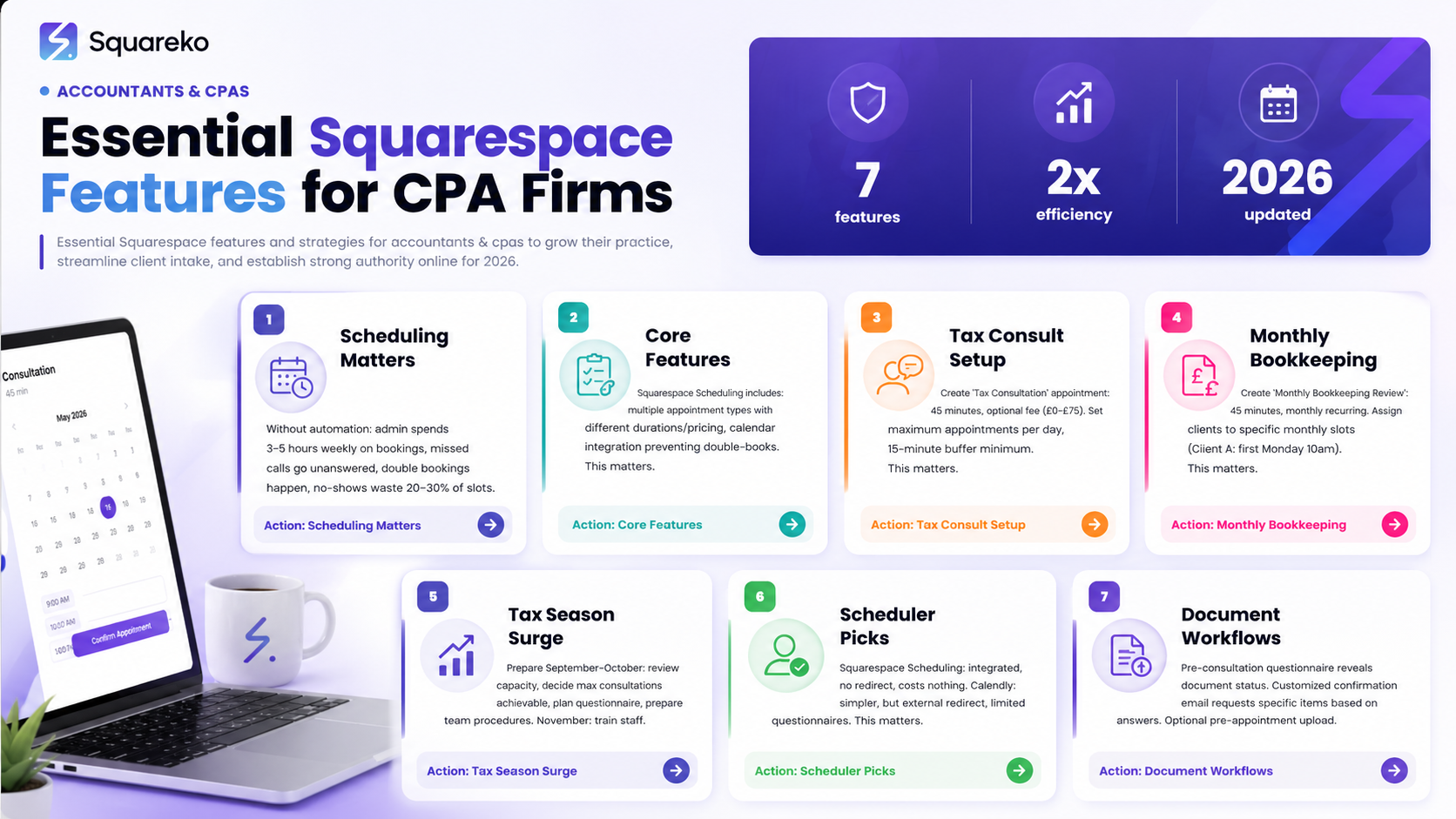
The Cost of Manual Scheduling
Consider what happens without proper scheduling automation:
Time waste: Your admin or senior team member spends 3–5 hours weekly coordinating appointment times via email
Missed opportunities: Prospects calling during busy hours hear voicemail and call competitors instead
Double bookings: Manual calendar systems create overlaps, especially during chaos seasons
No-shows: Without automated reminders, client attendance rates drop 20–30%
Lost follow-ups: Prospects who miss calls don't always circle back—they move to the next accountant
Even a small practice with two accountants and an admin person loses meaningful revenue to scheduling inefficiency. Larger practices lose exponentially more.
How Scheduling Automation Changes Your Practice
Proper scheduling systems do more than save time:
Consistency: Every prospect receives the same professional booking experience
Data capture: Pre-consultation questionnaires gather essential information before meetings begin, making consultations dramatically more efficient
Reduced no-shows: Automated reminders increase attendance rates to 85–95%
Scalability: Your team doesn't need to grow just to handle more appointments—the system scales with you
Professional perception: A polished booking experience enhances your firm's perceived professionalism
For accounting practices specifically, this matters enormously during tax season. The difference between a practice with chaotic scheduling and one with automated systems is often the difference between sustainable seasonal growth and staff burnout.
Understanding Squarespace Scheduling: Core Features
What Squarespace Scheduling Offers
Squarespace Scheduling (available on most current Squarespace plans) includes:
Appointment Types: Create multiple appointment types with different durations, pricing, and availability. You might offer:
15-minute discovery calls (free or charged)
1-hour initial consultation ($150)
Recurring monthly bookkeeping appointments (monthly, same time)
90-minute annual accounts review appointments
Calendar Integration: Your team members can connect personal calendars (Google Calendar, Microsoft Outlook, Apple Calendar) so the booking system sees their real availability, preventing double bookings even when team members use external calendars.
Payment Collection: For appointments with fees, Squarespace Scheduling collects payment at booking. This serves dual purposes: ensuring serious enquiries and starting the engagement with a clear commercial transaction.
Automated Reminders: The system sends email reminders at intervals you configure—typically 24 hours and 1 hour before appointments. For no-show reduction, these reminders are invaluable.
Client Questionnaires: Before each appointment, prospects can answer questions you've written. For accountants, this might be:
Current accounting software they use
Annual turnover estimate
Main challenges or reasons for seeking new accountants
Preferred communication methods
Availability Management: Set operating hours, block times for team members (holidays, training, focus time), and manage capacity during peak seasons.
Confirmation and Rescheduling: Clients receive confirmation emails with meeting details. If they need to reschedule, they can do so directly through the booking portal (within parameters you set) rather than emailing to request changes.
Native Integration Advantage
Unlike third-party solutions like Calendly, Squarespace Scheduling lives on your website. This means:
No redirect to external platforms that might feel less professional
Better brand consistency—the booking experience feels like part of your site
Simplified data flow—everything stays within Squarespace
Reduced friction in the booking path (fewer navigation steps = higher completion)
Scheduling Scenarios Specific to Accounting Practices
Scenario 1: Tax Season Consultation Surge (January–April in UK)
Challenge: Your practice operates normally in summer, but from January through April, phones ring constantly. You need to accommodate perhaps triple the normal consultation volume without overcommitting your team.
Scheduling Configuration:
Create a "Tax Consultation" appointment type: 45 minutes, £0–£75 (optional initial fee)
Set maximum appointments per day for each team member (e.g., maximum 4 tax consultations per team member daily)
Establish minimum buffer times between consultations (15 minutes minimum) to prevent back-to-back exhaustion
Enable a waiting list if appointments fill completely—prospects are added to a list and notified if cancellations create openings
Set date range availability
Pre-Consultation Questionnaire: Ask essential questions before the consultation:
Approximate annual turnover or income
Current accounting arrangements (self-employed with spreadsheets, currently with another accountant, etc.)
Main tax concerns or questions
Preferred month for completing tax return
Are there specific allowances or reliefs they're uncertain about?
These answers let your team review the client's situation before meeting, dramatically improving consultation efficiency. Instead of spending the first 20 minutes gathering basic context, you spend the full 45 minutes on actual tax advice.
Scenario 2: Recurring Monthly Bookkeeping Appointments
Challenge: You have 15 clients on monthly bookkeeping packages. Each month, each client needs a 45-minute appointment to review transactions, discuss accounts, and plan next steps. Coordinating 15 clients × 12 months manually is tedious.
Scheduling Configuration:
Create a Monthly Bookkeeping Review appointment type: 45 minutes, monthly recurring
Assign each bookkeeping client to a specific slot
Set up automatic booking: Instead of clients booking manually each month, assign them to recurring slots and the system automatically schedules them monthly
Enable cancellation flexibility: Clients can request to move their appointment to an alternative time that month if needed
Efficiency Advantage: This eliminates the Can we schedule next month's meeting? conversation that happens at the end of every consultation. The system manages it automatically. Clients appreciate the predictability of standing monthly appointments.
Scenario 3: Annual Accounts and Financial Review Appointments
Challenge: Each year, existing clients need 90–120 minute appointments to discuss annual accounts, financial performance, and forward planning. These appointments require more senior team members and must be scheduled during quieter periods.
Scheduling Configuration:
Create Annual Accounts Review appointment type: 90 minutes, priced if applicable
Limit to specific periods
Assign only to senior team members with authority for strategic discussions
Configure a minimum gap of 4–8 hours between these appointments for preparation time
Include detailed questionnaire: What specific areas do they want to discuss? Any anticipated major changes next year? Concerns about profitability or cash flow?
Preparation Value: The questionnaire tells you whether a client is concerned about specific areas before they arrive. If they mention cashflow challenges, your team can prepare relevant discussion points. If they're asking about business expansion, you can think through associated tax implications. This advanced preparation makes the appointment dramatically more valuable.
Scenario 4: Initial Discovery and Prospect Qualification Calls
Challenge: Not all enquiries are suitable prospects. Some are shopping for rock-bottom prices, others want services you don't offer, others are genuinely good fits. Without a qualifying conversation, you waste time on unsuitable prospects or, conversely, lose good ones to miscommunication.
Scheduling Configuration:
Create Initial Consultation - Discovery Call appointment type: 15–20 minutes, free
Availability: 2–3 slots per week for each team member (prevents overcommitment)
Questionnaire focuses on qualification:
What's your approximate annual turnover?
What services are you looking for specifically?
Are you currently working with another accountant?
What's your main reason for exploring a change?
What's your timeline for making a decision?
Qualification Benefit: These 15-minute calls filter unsuitable prospects cheaply before longer consultations. A practitioner finds quickly that a prospect wants bookkeeping services your firm doesn't offer, or is looking for an accountant 200 miles away, or is price-shopping and won't be happy with your fees. This prevents wasting 60 minutes with a poor-fit prospect.
Scenario 5: Document Collection and Information-Gathering Appointments
Challenge: Before preparing accounts or tax returns, you need client documents: bank statements, invoices, receipts, payroll records. Getting clients to gather and send these is perpetually difficult—they forget, send incomplete sets, send documents in poor formats.
Scheduling Configuration:
Create Document Collection Session appointment type: 30 minutes (can be video call or in-person)
Purpose: Walk through exactly what documents you need, show clients how to organise them, clarify filing systems
Questionnaire includes: What accounting software do you currently use? Are records digital or paper-based? Do you have outstanding invoices outstanding?
Efficiency Gain: A focused 30-minute document collection appointment saves hours of back-and-forth emails requesting Can you send the bank statements for Q3? Clients understand exactly what you need, in what format, and why it matters. You'll receive better-organised documentation, and accounts preparation becomes faster.
Step-by-Step Setup: Configuring Squarespace Scheduling
Step 1: Access Scheduling Settings
In your Squarespace dashboard:
Navigate to Marketing > Scheduling (or Tools > Scheduling depending on your plan)
Click Create Service or Add Appointment Type
You'll see the appointment creation form
Step 2: Create Your First Appointment Type
Basic Details:
Service Name: Tax Consultation or Monthly Bookkeeping Review
Description: Brief description visible to customers
Duration: Set in 15-minute increments
Price: Free, or charge a consultation fee
Example setup for a 45-minute tax consultation:
Service Name: Tax Return Consultation
Description: Comprehensive discussion of your tax position, allowable deductions, and tax-efficient planning for the year ahead
Duration: 45 minutes
Price: £75 (optional—many practices offer free initial consultations)
Step 3: Assign Team Members and Availability
Team Assignment: Select which team members can deliver this service
Weekly Hours: Set when this service is available
Buffer Time: Set minimum gap between appointments
Lead Time: Set how far in advance clients can book
Advance Notice: Set advance notice clients must provide if they want to reschedule
For tax season, you might set:
Service available: January 1–April 30
Maximum 4 appointments per day per team member
20-minute buffer between appointments
48-hour cancellation notice
Step 4: Create Your Questionnaire
Click Add Questions to create a pre-consultation questionnaire. This is crucial for accounting practices.
Sample questions for a tax consultation:
What is your approximate annual taxable income or business turnover?" (Multiple choice: under £50K, £50–100K, £100–250K, etc.)
Are you currently working with an accountant?
What's your main reason for scheduling this consultation?
Do you have self-employed income, business income, or both?
Have you claimed all available allowances and reliefs in previous years?
When do you need to complete your tax return?
Questions can be required or optional. Make critical questions required; nice-to-know questions optional.
Step 5: Configure Confirmation and Reminders
Confirmation Email: Customize the email clients receive when they book (include Zoom/Teams link if virtual, location if in-person, any documents to bring)
Reminder Emails: Set to send 24 hours before and 1 hour before appointment
Cancellation: Allow clients to cancel up to a set time before appointment ( 48 hours)
Rescheduling: Allow clients to reschedule within specific parameters
Example confirmation email for tax consultation: "Thank you for booking your tax consultation with [Your Practice Name]. Your appointment is confirmed for [Date/Time]. Before our meeting, please [specific instruction— 'gather your last year's tax return and any invoices or receipts for business expenses']. You can join the video call here: [Link]. If you need to reschedule, please let us know at least 48 hours in advance."
Step 6: Add Scheduling to Your Website
Once you've created appointment types, Squarespace generates a scheduling page. You can:
Add a booking button to your homepage
Create a dedicated scheduling page
Embed the scheduling widget on your Services page
Link to scheduling from your About page
Step 7: Test the Full Flow
Before launching to clients:
Book an appointment as a test user
Verify the questionnaire appears and functions correctly
Check that confirmation email has correct details (times, links, instructions)
Verify reminder emails arrive 24 hours and 1 hour before
Test rescheduling functionality
Confirm your team member's calendar updated correctly
Managing Tax Season Consultation Surges
Anticipating the Surge
Most accounting practices see demand patterns:
July–December: Quiet season. Existing clients are comfortable, new prospects aren't urgently seeking accountants
January–February: Sharp spike. Tax returns loom, people want professional help, companies are planning year-ahead
March–April: Peak intensity. Deadline pressure creates urgency
May: Rapid drop-off. Post-deadline, fewer people are thinking about accounting
Successful practices prepare for this surge in summer and autumn, not during January.
Advance Preparation Strategy
September–October:
Review current team capacity and workload
Identify how many tax consultations you can handle January–April
Calculate: If each team member can do 4 tax consultations per week, and you have 2 senior accountants available during tax season, that's 8 consultations weekly × 16 weeks = 128 potential tax consultations
Decide: Will you offer consultations at premium rates during peak season? ( £150 vs. £75)
Prepare questionnaire content that captures essential information efficiently
Create client communication template explaining your tax season schedule
November:
Train team members on your booking system (how to handle cancellations, urgent requests, rescheduling)
Create written procedures for tax season: who handles which type of enquiry, escalation paths, document requirements
Brief your website copy with tax season positioning: "Tax season is our peak period. Book early to ensure your preferred appointment time."
Test your scheduling system end-to-end
Set up your tax consultation appointment type in Squarespace Scheduling
December:
Begin soft promotion: update your homepage, social media, newsletter
Launch booking availability for January onwards
Consider offering a week of limited availability (week of December 27) for truly urgent enquiries
During Tax Season (January–April)
Managing Capacity:
Monitor booking patterns weekly
If appointments fill consistently, consider adding a 5th daily slot or raising prices to manage demand
If 3pm–5pm slots remain empty, consider removing them to concentrate availability in peak morning hours (9am–1pm)
Use the questionnaire to filter unsuitable prospects quickly—you can send brief emails declining poor-fit enquiries rather than spending consultation time
Handling Urgent Enquiries: Create a simple rule: prospects can book existing open slots, or if all slots are full, they enter a waiting list. If someone cancels, the waiting list prospect is contacted first. This prevents the chaos of negotiating "squeeze-me-in" consultations.
Maintaining Quality: Don't overcommit your team during tax season. Burned-out accountants make mistakes and hate their jobs. Better to disappoint a few prospects by being fully booked than to overcommit and deliver poor service.
Post-Tax-Season Adjustment
May–June:
Review the tax season: How many consultations did you complete? What was the conversion rate (how many became clients)? What was your revenue?
Did your questionnaire work? Did it actually make consultations more efficient? Adjust for next year.
Gather team feedback: What was hardest? What worked well?
Update your system for next year based on learnings
Squarespace Scheduling vs. Calendly vs. Acuity for Accounting
Feature Comparison Matrix
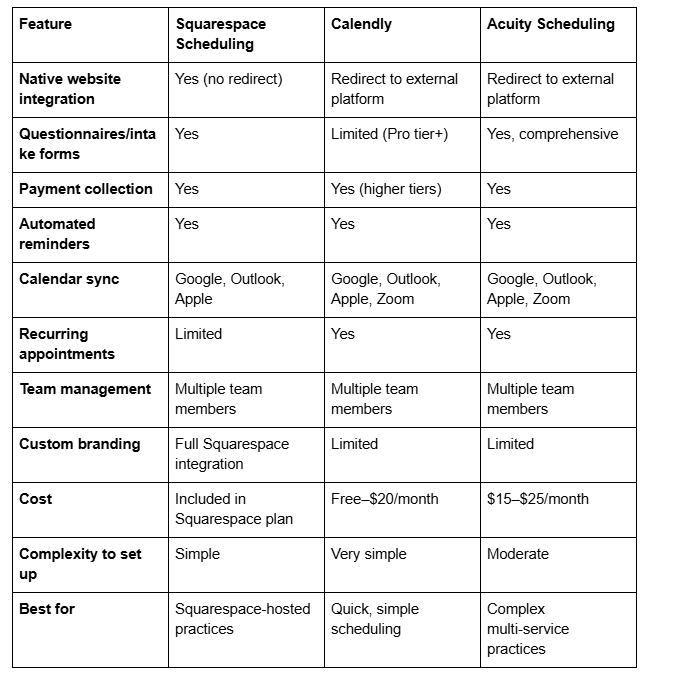
Detailed Comparison
Squarespace Scheduling: Best for Integrated Practices
Advantages:
No external platform redirect means professional appearance
Questionnaires are comprehensive and customizable
Payment integration works smoothly with Squarespace invoicing
All data lives in one platform (easier management)
Included with most Squarespace plans (no additional cost)
Disadvantages:
Recurring appointments are less flexible than Calendly's advanced options
Limited customization compared to Acuity Scheduling
Team member workflows are less sophisticated for very large teams
Best for: Most accounting practices on Squarespace, especially those valuing simplicity, integration, and professional appearance.
Calendly: Best for Simplicity
Advantages:
Extraordinarily easy to set up (literally minutes)
Free tier is functional for small practices
Very familiar interface (many clients already use Calendly)
Excellent for simple, single-duration appointments
Disadvantages:
Questionnaires/intake forms are limited even on paid tiers
Redirect to external platform feels less professional
Weak recurring appointment management
Not ideal for accounting practices with varied appointment types
Best for: Solo practitioners or very small practices with simple scheduling needs (15-minute discovery calls only).
Acuity Scheduling: Best for Complex Practices
Advantages:
Most sophisticated intake form/questionnaire system
Powerful recurring appointment management (exactly what monthly bookkeeping practices need)
Excellent for practices with 10+ appointment types
Advanced reporting and analytics
Can create custom workflows
Disadvantages:
Requires external platform redirect (slightly less professional)
Higher cost
Steeper learning curve
Overkill for small practices
Best for: Larger practices with complex operations (20+ team members, 10+ appointment types, sophisticated intake requirements).
Recommendation for Different Practice Sizes
Solo Practitioner or 1–2 Team Members: Use Squarespace Scheduling. It's integrated, costs nothing extra, and handles your needs perfectly. No need to send clients off-site to Calendly.
3–6 Team Members, 3–5 Appointment Types: Use Squarespace Scheduling with Squarespace's built-in features. Supplement with Calendly only if you need additional flexibility for specific appointments (Calendly for discovery calls, Squarespace Scheduling for formal consultations).
6–15 Team Members, 5+ Appointment Types: Evaluate Acuity Scheduling. The sophisticated recurring appointment management and intake forms justify the additional cost and external platform redirect.
15+ Team Members, Complex Operations: Use Acuity Scheduling with full customization. At this scale, operational sophistication matters more than platform integration.
For most UK accounting practices, Squarespace Scheduling handles everything adequately and keeps clients on-site professionally.
Document Collection and Pre-Consultation Workflows
The Problem: Chaotic Document Collection
Typical workflow without proper systems:
Client books consultation
Confirmation email sent with vague instruction: Please bring relevant documents
Client arrives with random collection of papers, some incomplete, some irrelevant
20 minutes of the scheduled consultation spent identifying what you actually need
Consultant discovers missing bank statements, invoices, or prior-year records
Client promises to send documents next week (often never arrives)
Follow-up email chase ensues
Result: Consultation was ineffective, follow-up work multiplies, timeline stretches.
Effective Document Collection Workflow
Step 1: Pre-Consultation Questionnaire (In Squarespace Scheduling)
When client books, they answer:
What accounting software do you use currently? (QuickBooks, FreeAgent, Xero, spreadsheets, paper records, etc.)
Approximately how many transactions monthly? (1–10, 10–50, 50–100, 100+)
Do you have bank statements? If yes, for how many months back? (Last 3, 6, 12 months)
Do you have invoices and receipts? (Digital, paper, mixed)
Have you ever worked with an accountant before?
These answers tell your team exactly what to expect and what to prepare for.
Step 2: Confirmation Email with Specific Instructions
Don't send generic instructions. Use the questionnaire answers to customize requests:
Example for QuickBooks user: Thanks for booking your consultation. We see you're using QuickBooks. Before we meet, please: (1) Export your last 12 months of transactions as a CSV file; (2) Bring a list of any significant transactions you're uncertain how to categorise; (3) Have your business bank account statements for the last 3 months accessible.
Example for paper-records practitioner: Thanks for booking. We see you're maintaining paper records. Before we meet, please: (1) Gather all invoices from the last 12 months in one folder; (2) Gather all receipts for business expenses in one folder; (3) Bring your last bank statement or recent online banking screenshot.
Specificity transforms compliance. Clients understand exactly what's needed and why.
Step 3: Optional Pre-Consultation Document Upload
For digital-savvy clients, offer a document upload portal:
In Squarespace, create a contact form asking clients to upload documents before their appointment
Make it optional (some clients won't have documents ready)
Include clear file size/format requirements (PDFs or images, max 10MB each)
Confirm receipt in an automated email
This means your team reviews documents before the appointment, not during it.
Step 4: The Consultation Agenda
Send an agenda email 24 hours before the appointment: Your consultation with [Accountant Name] is confirmed for [Date/Time]. Based on your current situation (using QuickBooks, approximately 80 transactions monthly), here's what we'll cover:
Review your chart of accounts structure (10 mins)
Discuss category allocation concerns you raised (15 mins)
Review year-to-date profit/loss and tax position (15 mins)
Discuss next steps and any questions (5 mins)"
This agenda-setting ensures the consultation stays focused. Client knows what to expect, your team knows the timeline.
Step 5: Post-Consultation Follow-Up
After the consultation, send a summary email: It was great meeting you. Based on our discussion, here's what we'll need to proceed: (list specific items from your notes). Please send these by [specific date]. Once we receive them, we'll [next step— 'prepare a proposal'].
This keeps momentum going and manages client expectations clearly.
Scheduling Workflows for Document Collection
You might create a dedicated "Document Collection Session" appointment type:
Duration: 30 minutes
Format: Video call or in-person (client chooses)
Purpose: Walk through exactly what documents you need, show clients where to find them digitally, explain organisation systems.
Questionnaire: What accounting records do you currently have? (Digital/paper/mixed) How organised are they?
Confirmation: We'll spend 30 minutes identifying and organising your documents. Have your computer/files accessible. We'll create a checklist you can work through afterwards.
For clients with chaotic records, this focused 30-minute session saves hours of back-and-forth and ensures you receive usable documentation.
Automated Reminders and Client Communication
The Power of Automated Reminders
No-show rates without reminders: 20–30% No-show rates with automated reminders: 5–10%
That's not just convenience—that's 50% of your consultation slots being wasted without proper reminders.
Configuring Squarespace Reminder Emails
In your Squarespace Scheduling settings:
First Reminder (24 hours before):
Subject: Reminder: Your consultation with [Firm Name] tomorrow
Include: Date, time, location/Zoom link, what to bring, parking/accessibility info
Include: Cancellation link if they need to cancel
Second Reminder (1 hour before):
Subject: "Your consultation is in 1 hour"
Include: Direct Zoom/Teams link if virtual
Include: Parking details if in-person
Include: Contact number if they're running late
These reminders should feel helpful, not annoying. Professional tone, clear information, no sales language.
Advanced Communication: Pre-Consultation Emails
Squarespace Scheduling doesn't offer emails at specific times before booking, but you can automate these through email workflows:
Template: 7 Days Before Consultation Your consultation is coming up! A few things to prepare: [list specific items]. Have questions before we meet? Reply to this email and we'll help.
Template: 3 Days Before Consultation Just a friendly reminder—3 days until your consultation! Do you have everything you need to bring? Here's the checklist again: [checklist]. See you soon!"
These can be sent via email automation tools (like Zapier or IFTTT integrating Squarespace Scheduling with your email platform), or manually for smaller practices.
Communication Best Practices
Tone:
Professional and helpful, not corporate or robotic
Use your firm name consistently
Include a contact number for genuine emergencies
Clarity:
State exactly what documents to bring, not vague relevant documents
Specify format
Explain why it matters: This helps us prepare properly and means your consultation time is spent on strategic advice, not gathering background information
Timing:
24 hours is ideal for first reminder (enough advance notice without being too early)
1 hour is ideal for second reminder (last-minute logistics, not time to cancel)
Don't send more than 2 reminders (more feels pushy)
FAQs
-
Absolutely. When you create a "Tax Return Preparation" appointment type in Squarespace Scheduling, you can set it to charge an upfront fee (e.g., £250 deposit). The fee is collected at booking via Stripe or your payment processor. This serves multiple purposes: it filters serious enquiries from price-shoppers, it ensures you have funds to begin the work, and it clarifies the commercial relationship from the start. You might set up: "Tax Return Preparation: £250 deposit collected at booking, balance due upon completion." The deposit reserves the client's spot in your schedule and demonstrates commitment. For accounting practices specifically, upfront fees reduce no-shows significantly (people are less likely to cancel on something they've paid for) and improve the perceived value of your work.
-
Create an appointment type specifically for recurring bookkeeping: "Monthly Bookkeeping Review - £[price], 45 minutes." In the availability settings, rather than having clients book each month manually, you can assign existing clients to recurring slots. For example, "Client A: First Monday of every month, 10am" and "Client B: Second Tuesday, 2pm." You can configure this through Squarespace's team member scheduling, setting recurring availability windows. For clients who need flexibility (occasionally rescheduling), enable rescheduling within your booking settings. When clients reschedule, they see available alternative times that month, keeping flexibility while maintaining the standing appointment structure. If your practice is very small, you might manually create these recurring bookings once each month in about 15 minutes.
-
Yes. When you set up an appointment type in Squarespace Scheduling, you can configure reminder emails to send automatically 24 hours before and 1 hour before appointments. These are triggered automatically—you don't need to send them manually. You can customise the reminder email content to include specific instructions (e.g., "Please have your QuickBooks file open" or "Bring your bank statements"). Reminders dramatically improve attendance rates. For accounting practices, a key reminder strategy is to remind clients 24 hours in advance what documents to bring, since half of no-shows are actually people forgetting the appointment. The 1-hour reminder serves a logistics function: it's when clients confirm they can make it or cancel if something's come up, giving you time to offer the slot to waiting clients.
-
During peak season, you'll get requests: "Can you squeeze me in this week?" Without a system, these become negotiation battles. Better approach: maintain a small "urgent slots" reserve (perhaps one slot per team member per day) for genuinely time-sensitive enquiries. Alternatively, implement a waiting list feature in Squarespace Scheduling—when tax consultation slots fill, new bookers automatically enter a waiting list and are notified if cancellations open spots. Price these rush slots at a premium (e.g., £200 instead of £75) to manage demand and compensate for the disruption. You might also offer "express discovery calls" (15 minutes, £50) for urgent enquiries, with the option to schedule a full consultation later if appropriate. This gives urgent prospects some access without overstretching your team.
-
This depends on your practice positioning and market. Advantages of charging (£50–£150 for a 30–45 minute consultation): (1) Filters serious enquiries from tire-kickers shopping for the cheapest accountant, (2) Creates perception of value—people value what they pay for, (3) Generates some revenue even from prospects who don't become clients. Advantages of free initial consultations: (1) Lower barrier to booking—more prospects will take the leap, (2) Stronger competitive positioning against accountants who charge, (3) Gives you a chance to demonstrate your expertise and build rapport. Many mid-size practices offer 15-minute free discovery calls to qualify prospects, then charge for full 60-minute consultations. This hybrid approach balances accessibility with qualification. Test both approaches with different services: free discovery calls, paid tax consultations. Track conversion rates and see what works for your market.
-
Squarespace Scheduling doesn't offer native integrations with major email platforms (Mailchimp, ConvertKit, etc.), but you can use automation tools. Zapier connects Squarespace Scheduling to hundreds of platforms, allowing workflows like: "When someone books a tax consultation, add them to a 'Booked Tax Consultation' email list in Mailchimp." This lets you send targeted follow-up emails to people who've booked, distinguishing them from general mailing list subscribers. Another option: use Zapier to create a "booking confirmation checklist" in your team's project management tool, automatically triggering when appointments are booked. These integrations require setting up Zapier accounts and workflows, but they're straightforward and enable powerful automation for growing practices.
-
This is surprisingly common in accounting practices—clients book then get busy and reschedule repeatedly. Solutions: (1) Implement a "reschedule limit"—specify in your booking confirmation: "You can reschedule up to twice; after that, please contact us directly"; (2) Offer a "flexible time window" instead of specific slot (e.g., "We'll confirm your specific time within a 2-week window 48 hours before your appointment"); (3) Charge a reschedule fee after 2 changes (e.g., £25 reschedule fee); (4) Call the client personally if they reschedule a third time and ask what's getting in the way—often they're not ready or their situation has changed. For recurring monthly bookkeeping clients who frequently reschedule, you might offer a tighter window: confirm their slot 72 hours before rather than 2 weeks before, reducing the likelihood they'll reschedule.
Ready to Build Your Accounting Firm Website on Squarespace?
Scheduling automation transforms how accounting practices operate—especially during tax season. Moving from manual email calendars to streamlined booking systems isn't just a convenience; it's the difference between a practice that can scale without adding staff and one that becomes increasingly chaotic as you grow.
Squarespace Scheduling gives you this automation without forcing clients off your website to external platforms. Combined with thoughtful questionnaires, clear document requests, and strategic appointment type configuration, it becomes a genuinely sophisticated client management tool.
The practices that thrive during tax season aren't the ones with the biggest teams—they're the ones with the smartest systems. Squarespace Scheduling, properly configured, is a significant part of those smart systems.
Squareko specialises in building Squarespace websites that work hard for accounting practices. We don't just design beautiful sites; we configure them to operate efficiently with tools like Squarespace Scheduling, intake questionnaires, and client communication systems that reduce administrative friction and let your team focus on actual accounting work.
From discovery calls to tax season consultations to recurring bookkeeping appointments, we help you set up scheduling systems that match your practice's specific operational reality—not generic booking pages, but intelligent workflows that improve both client experience and team efficiency.
Ready to transform how your practice manages consultations and client interactions? Contact Squareko today for a free consultation on implementing Squarespace Scheduling and scheduling workflows tailored to your accounting firm.

From custom website design to SEO strategy, we help businesses launch a site that looks professional and performs better.

Author Bio
I'm Walid Hasan, a Certified Squarespace Expert and Squarespace Circle Platinum Partner with over 12 years of hands-on experience designing and optimizing high-performing websites. Over the years, I've had the privilege of building more than 2,000 Squarespace websites for clients around the world, always focusing on clean design, strong user experience, and conversion-driven results.
