
Can You Edit robots.txt on Squarespace? No — Here's What to Do Instead
Not on Basic, not on Core, not on Advanced, not with code injection, not with an extension. Squarespace serves the same generated file to every site and states plainly that users cannot access or edit it. There are exactly two checkboxes that change its contents, and everything else you might want a Disallow rule for is done somewhere else on the platform.
Below: what the file actually contains, the two switches that alter it, and the correct alternative for each of the four things people are usually trying to achieve.
Where the file is, and what it looks like
Load yourdomain.com/robots.txt in any browser. Every Squarespace site serves one.
Reading a live 7.1 site's file in August 2026, the crawler-facing rules were these:
User-agent: *
Disallow: /config
Disallow: /search
Disallow: /account$
Disallow: /account/
Disallow: /commerce/digital-download/
Disallow: /api/
Allow: /api/ui-extensions/
Disallow: /static/
Disallow:/*?author=*
Disallow:/*&author=*
Disallow:/*?tag=*
Disallow:/*&tag=*
Disallow:/*?month=*
Disallow:/*&month=*
Disallow:/*?view=*
Disallow:/*&view=*
Disallow:/*?format=json
Disallow:/*?format=page-context
Disallow:/*?format=main-content
Disallow:/*?format=json-pretty
Disallow:/*?format=ical
Disallow:/*?reversePaginate=*
Sitemap: https://www.example.com/sitemap.xml
Above that block sits a long list of named AI crawler user-agents — GPTBot, ClaudeBot, Google-Extended, Bytespider, CCBot, Amazonbot, Applebot-Extended, Meta-ExternalAgent and around two dozen more — which is where the AI crawler setting takes effect.
The last line is the one that matters most and that nobody mentions: your sitemap is declared in robots.txt automatically. Search engines that read the file are pointed straight at sitemap.xml without you doing anything.
What each default rule is actually doing
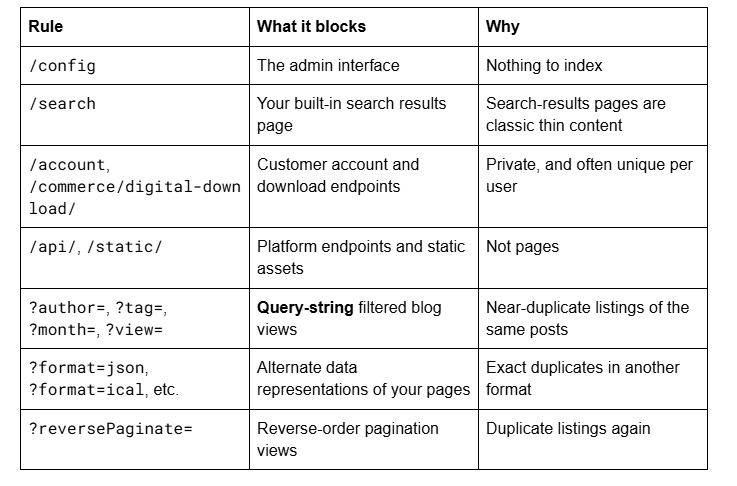
The ?format= family is worth knowing about independently: every Squarespace page will also serve itself as JSON at ?format=json. That is a genuine duplicate-content surface, and Squarespace closes it for you.
The trap: the parameter rules do not cover your tag archives
This is the detail that makes the default file misleading, and it is checkable on your own site in under a minute.
Squarespace disallows ?tag= — the query-string form of a filtered blog view. But 7.1 also generates static archive URLs in the form /blog/tag/Labradoodle and /blog/category/Dogs, and those are not covered by any Disallow rule. They are crawlable, they carry a canonical tag, and Squarespace's own documentation confirms they appear in your sitemap and can appear in search results.
On a live 7.1 site we read in August 2026, 389 of 1,527 sitemap URLs — a quarter of the file — were static /tag/ and /category/ archive URLs. None of them was blocked by robots.txt.
So if you came here wanting to block your tag archives with a Disallow rule, understand what you are actually looking at: the parameter form is already blocked, the static form cannot be blocked, and the only lever you have is generating fewer of them by using fewer tags.
Two further quirks of those static URLs, both confirmed on live sites: they preserve capitalisation (/blog/tag/Live+Chat, not /live-chat), and spaces become + signs. Tags and categories are case-sensitive on Squarespace, so Dogs and dogs are two different archive URLs.
The two switches that do change your robots.txt
Both live in the Settings → Crawlers panel, and they do different jobs.
1. Block search engine crawlers. Ticking this adds Disallow: / for all user-agents, which hides the entire site from Google, Bing and every compliant crawler. It is the only way to write a Disallow rule on Squarespace, it is all-or-nothing, and it is a common accidental cause of a site vanishing from search after a redesign.
2. Block known artificial intelligence crawlers. This targets the named AI user-agent list at the top of the file — GPTBot, ClaudeBot, Google-Extended, CCBot, Bytespider, Applebot-Extended and the rest. It is a request, honoured by crawlers that choose to honour it, and Squarespace notes that it does not retroactively remove content already scraped. Importantly, it does not affect Google Search — Google-Extended governs AI training and Gemini grounding, not the Googlebot that builds the search index.
Think carefully before ticking the second one. If you want to appear in AI-generated answers — and the whole argument for structured, well-organised content on this platform assumes you do — blocking those agents works directly against it.
What you are actually trying to do, and where to do it
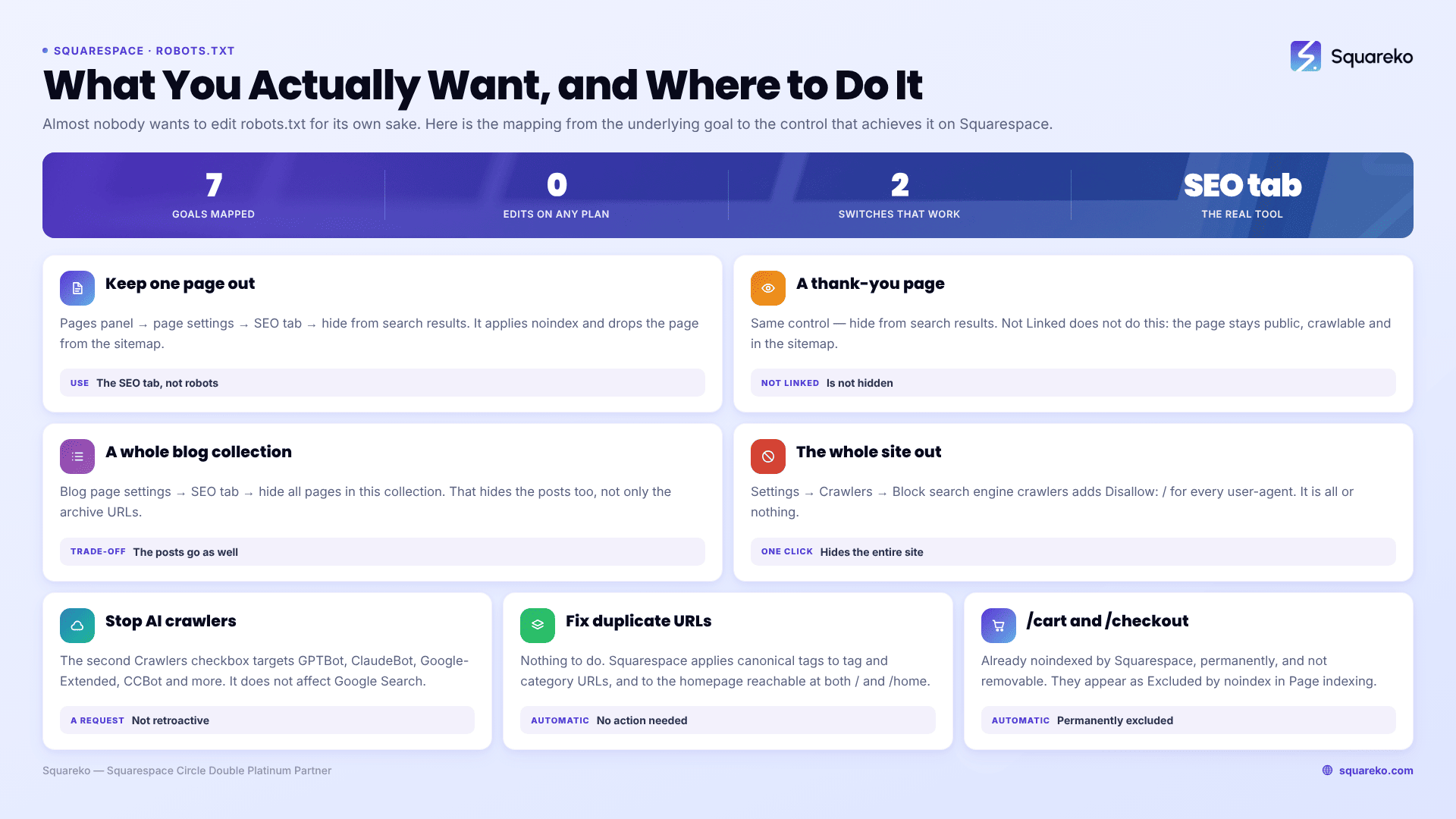
Almost nobody wants to edit robots.txt for its own sake. Here is the mapping from the underlying goal to the control that achieves it on Squarespace.
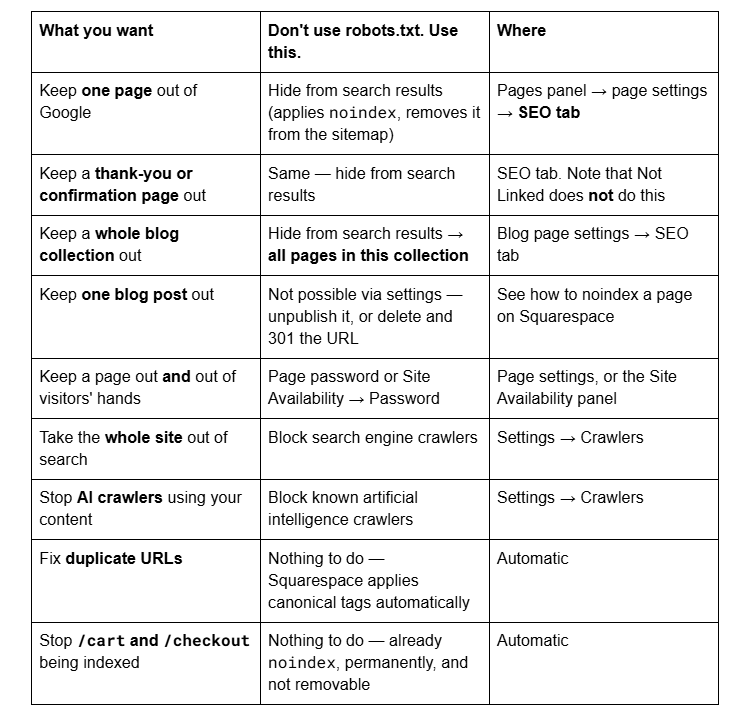
The important distinction underneath that table: robots.txt controls crawling, not indexing. A URL blocked in robots.txt can still appear in search results as a bare link if Google finds it linked elsewhere — Google cannot read the page to see a noindex tag, because you have told it not to fetch the page. Using a crawl block to achieve de-indexing is a category error, and it is why the page-level noindex control is the right tool for almost every goal in that table.
The canonical question: does Squarespace handle duplicates?
Yes, and this removes another common reason for wanting Disallow rules.
Squarespace adds a canonical metadata tag to filtered tag and category URLs, telling search engines which static URL is the one to index. It does the same for the homepage, which is reachable both at the root and at its page slug — commonly /home. Both URLs return a 200 and both carry a canonical pointing at the root, which is why Search Console files the slug version under "Alternate page with proper canonical tag" and why Squarespace's guidance is that no action is needed.
You cannot set a canonical tag manually on Squarespace. You do not need to for these cases.
robots.txt, llms.txt and AI answer engines
A growing share of the people searching for a robots.txt editor on Squarespace are not thinking about Google at all. They want to control how AI systems use their content, and they have read that robots.txt is the lever.
On Squarespace the lever exists, it is the Block known artificial intelligence crawlers checkbox, and it is binary. There is no way to allow ChatGPT and block Claude, or to allow crawling of your blog but not your service pages. You either request that the whole named list stays off the whole site, or you do not.
llms.txt is not the answer either. Squarespace 7.1 does ship an LLMS.txt field in the SEO/AI Visibility panel, and it is disabled by default. Be clear-eyed about what it does: measured request volumes for llms.txt files are effectively zero — no requests at all on the overwhelming majority of sites that publish one. It is a proposed standard, not an implemented one. Enable it if you want; do not treat it as a ranking or citation tactic.
What actually determines whether AI answer engines cite you is not a text file. The strongest measured predictor is fan-out sub-query coverage — how many of the related questions around a topic a single page genuinely answers, with a Spearman correlation of 0.77 in published analysis and citation probability moving from roughly 9% to 57% across the range. The strongest measured negative is promotional tone, at −26.2% across roughly 1.2 million URLs. Neither is controlled by robots.txt.
One Squarespace-specific advantage worth using: Accordion blocks in 7.1 render server-side, so the question and answer text inside an on-page FAQ is in the initial HTML and fully crawlable. That is a real lever, and it costs nothing.
7.0 sites, built-in domains and multi-domain setups
The file is identical across versions. A 7.0 site serves the same generated robots.txt as a 7.1 site, because it is produced by the platform rather than the template engine.
Your built-in domain serves its own copy at sitename.squarespace.com/robots.txt, with the sitemap line pointing at whichever domain is primary. If you have several domains connected, they all serve the file and all point at the primary domain's sitemap — which is part of how Squarespace consolidates signals onto one domain automatically.
Things people try that do not work
Pasting <meta name="robots" content="noindex"> into Code Injection Header to block one page. Site-wide code injection applies to every page. This deindexes the whole site.
Uploading a robots.txt file. You cannot place files at the site root on Squarespace. This is the same limitation that blocks Google's HTML-file verification method.
A robots.txt "editor" extension. None exists, and any tool claiming to offer one is describing a different platform.
Editing the sitemap to remove URLs. Also not possible — the sitemap is generated and cannot be edited. Hiding a page from search results removes it from both.
Using Disallow to fix duplicate content. Blocking the crawl prevents Google from seeing the canonical tag that would have resolved the duplicate.
How to verify what your site is actually serving
Three checks, none of which takes longer than a minute.
Read the file. Load yourdomain.com/robots.txt in a private window. If you see Disallow: / under User-agent: *, someone ticked Block search engine crawlers.
Check whether the AI block is on. In the same file, look at how the named AI user-agents are grouped and what rules follow them. Cross-check against the Settings → Crawlers checkbox, which is the authoritative state.
Test a specific URL. Google Search Console's URL Inspection tool reports whether a URL is allowed by robots.txt and whether it is indexed, which is more reliable than reading rules by eye.
If you are auditing an inherited site, do check one before anything else. A robots.txt reading Disallow: / explains more inherited-site mysteries than any other single line on the platform.
Squarespace's robots.txt is a closed file with sensible defaults, one genuinely useful automatic feature (the sitemap declaration), one significant gap (static tag archives), and two switches. Once you know the mapping in the table above, the inability to edit it stops being a limitation and becomes one less thing to get wrong.
Where it does become a real problem is a large site with an out-of-control tag taxonomy, hundreds of near-duplicate archive URLs in the index, and a Page indexing report nobody can read. Restructuring content so that fewer junk URLs get generated in the first place is a content-architecture job, and it is the first thing our Squarespace SEO service does on an established site. On a small site, the SEO tab and the Crawlers panel are the whole toolkit.
FAQ

Author Bio
I'm Walid Hasan, a Certified Squarespace Expert and Squarespace Circle Platinum Partner with over 12 years of hands-on experience designing and optimizing high-performing websites. Over the years, I've had the privilege of building more than 2,000 Squarespace websites for clients around the world, always focusing on clean design, strong user experience, and conversion-driven results.
