Squarespace "Discovered – Currently Not Indexed": What It Means and What Actually Fixes It
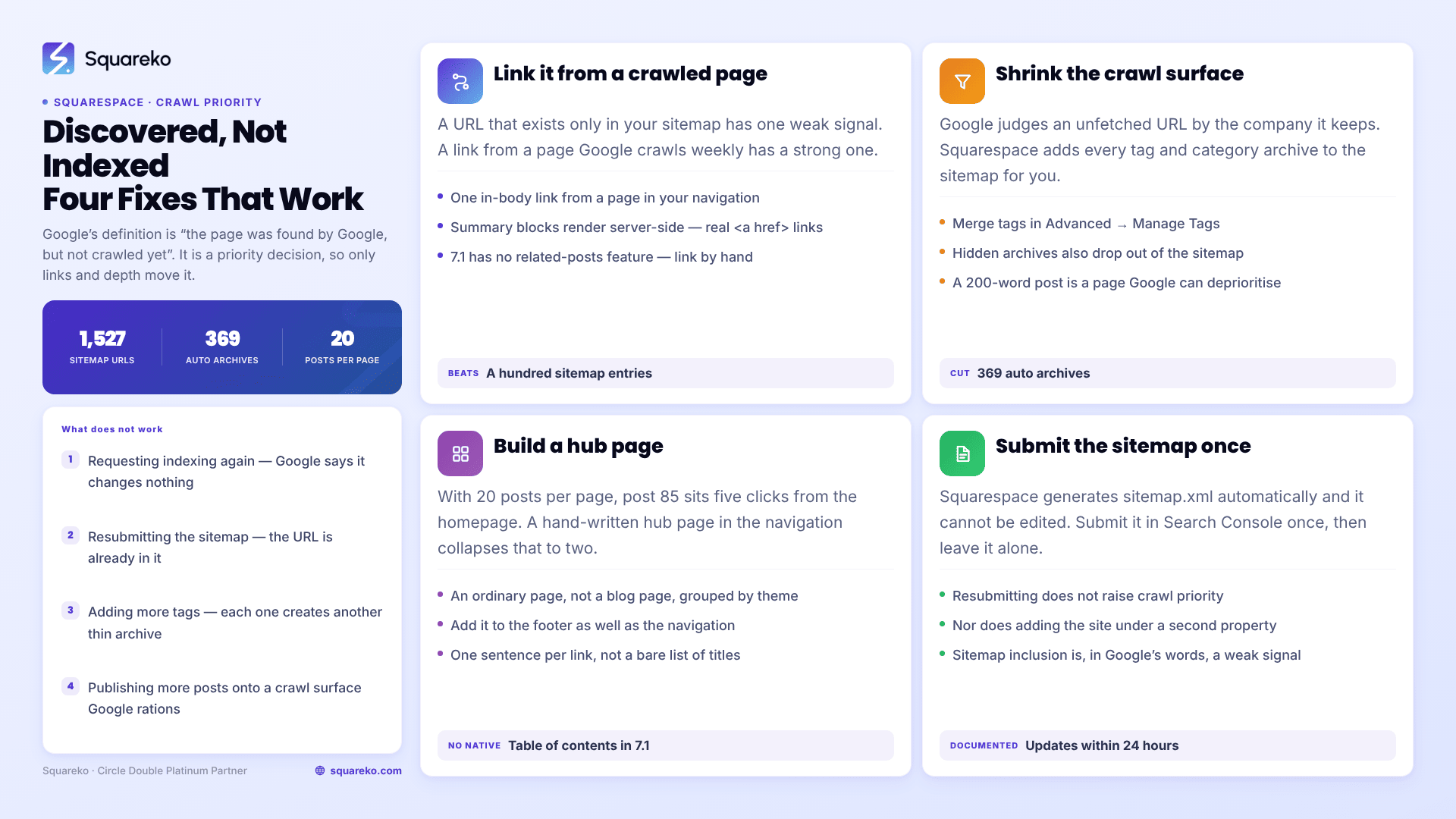
The short answer: Google knows your URL exists — it read it in your Squarespace sitemap — and has decided not to spend a crawl on it yet. Google's own definition is "the page was found by Google, but not crawled yet." That is a priority decision, not a technical fault, and requesting indexing does not change it. What changes it is internal links from pages Google already crawls regularly, and a page substantial enough to justify the fetch.
Discovered versus Crawled: get this right first
These two statuses look alike and share no fixes at all.
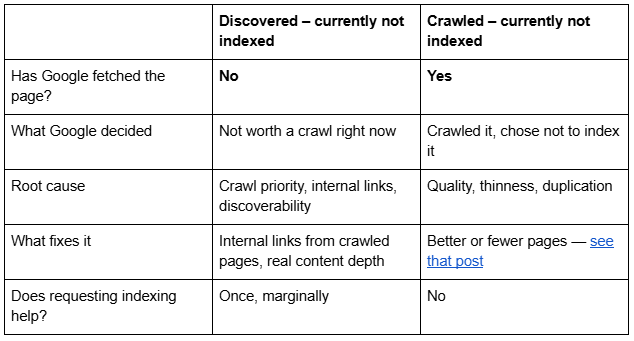
If your status is Crawled, stop here and read the Crawled – currently not indexed post instead. Everything below applies only to Discovered.
Why Google declines to spend a crawl
Google allocates crawling by crawl demand, which its documentation says varies "based on a site's size, update frequency, page quality, and relevance, compared to other sites". It also notes that "URLs that are more popular on the Internet tend to be crawled more often."
So the question Google is answering is not "is this page good?" — it has not looked. It is "based on everything I know about this site and where this URL sits in it, is fetching this a good use of my time?"
The signals feeding that decision, for a URL Google has never fetched, are narrow:
Where the URL sits in your internal link graph. A URL linked from your homepage carries a strong signal. A URL that appears only in sitemap.xml carries a weak one — Google's own canonicalisation documentation calls sitemap inclusion "a weak signal".
How many other URLs on the site are already known to be low value. If Google has crawled 300 near-empty tag archives on your Squarespace site, its estimate of the average value of an unfetched URL there drops.
How often the site changes and how often those changes matter.
Crawl budget on small sites. Google's crawl-budget guide targets sites with 10,000+ pages, and a common conclusion is that budget does not apply below that. That is the wrong conclusion for Squarespace specifically. On the live 7.1 site I audited, sitemap.xml held 1,527 URLs, of which 369 were auto-generated tag and category archives — 24% of the crawl surface, none of it written by anyone. A "small" Squarespace site can present a much larger crawl surface than its owner thinks.
Fix 1 — Link to the page from somewhere Google already crawls
This is by a wide margin the highest-leverage change, and it is the one every competitor page omits.
A URL that exists only in your sitemap has one weak signal. A URL linked from a page Google crawls weekly has a strong one. On Squarespace, the pages Google crawls most often are your homepage, your main navigation pages, and your blog landing page.
What to do:
Add a link from a page in your main navigation. One in-body text link from a service page beats a hundred sitemap entries.
Add a summary block on a page Google crawls often. Summary blocks in 7.1 render server-side — I confirmed real <a href> links in the raw HTML of a live site, not JavaScript-injected ones — so they pass genuine crawlable links. They cap at 30 items and can filter by tag or category.
Link from related posts by hand. Squarespace 7.1 has no related-posts feature, so this is manual and it is the only version of it that exists.
Why this is a bigger problem on Squarespace than elsewhere. Blog pagination in 7.1 is cursor-based — /blog?offset=…, maximum 20 posts per page, no numbered pages. And those paginated URLs canonical back to page one: I verified /blog?offset=1761467828533 emitting <link rel="canonical" href="…/blog"/>. So a post that has slipped to page four of your blog is linked only from a URL Google treats as a duplicate of page one. That is how a Squarespace blog produces orphan posts by default. Squarespace internal linking covers the architecture that prevents it.
Fix 2 — Give Google a reason to think the fetch is worth it
Google is judging your unfetched URL by the company it keeps. Two things improve that estimate.
Remove the low-value URLs from the crawl surface. Squarespace adds every tag and category archive to the sitemap automatically and you cannot edit the sitemap. What you can do is merge duplicate and misspelled tags — page settings → Advanced → Manage Tags — and hide the archives you keep from search engines, which also removes them from the sitemap. Cutting 200 near-empty archives is a genuine change to what Google sees.
Make the page itself substantial. A 200-word post is a page Google can safely deprioritise. That is not a word-count rule — word count barely correlates with anything; Ahrefs measured r=0.04 against AI citation across 174,048 pages — but a page with no depth also has no internal links pointing at it, no reason to be linked externally, and nothing distinctive in the sitemap around it. Depth and discoverability move together.
Fix 3 — Reduce how far Google has to travel
Click depth from the homepage is a reasonable proxy for crawl priority. Squarespace makes depth grow faster than most platforms because of the 20-posts-per-page pagination cap.
Do the arithmetic on your own blog: with 20 posts per page, post number 85 sits on page five, which is five clicks from the homepage before anyone reads a word.
The fix is a hub page. Build an ordinary page grouping your posts by theme, with hand-written links, and put it in the main navigation. That collapses depth for every post on it to two clicks. Squarespace has no native table of contents and no related-posts module, so a manually maintained hub is the mechanism the platform gives you.
Fix 4 — Submit the sitemap once, and stop
Squarespace generates sitemap.xml automatically and it cannot be edited. Submit it once in Search Console → Sitemaps, and never think about it again. It updates when content changes, typically within an hour and documented as up to 24 hours.
Resubmitting a sitemap does not increase crawl priority. Neither does submitting it twice under different property types.
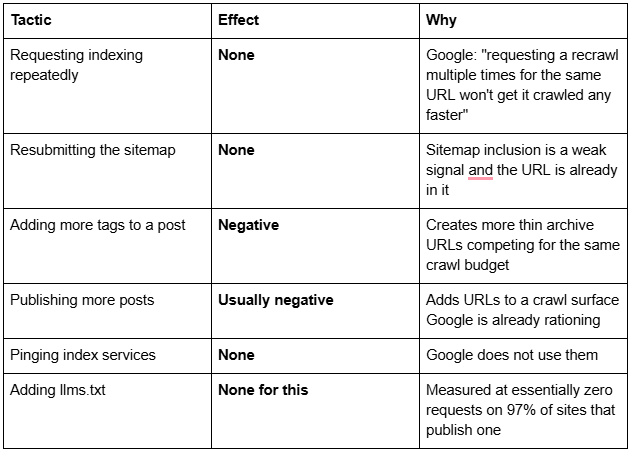
What does not work, and why people keep doing it
How long it should take, and when to worry
Google's documented range for crawling a submitted URL is "a few days to a few weeks", and Discovered means the clock has not started.
A realistic expectation on a Squarespace site: a new post linked from the blog landing page gets crawled within days. A post that has already slipped past page one of a paginated blog, with no other internal links, can sit in Discovered indefinitely — I have seen posts stay there for over a year.
The threshold for action is not time, it is links. If a URL has been in Discovered for more than three weeks and has no internal link from a page in your main navigation, do not wait longer. Add the link. If it has three good internal links and is still there after six weeks, the crawl surface around it is the problem, and cutting the archives is the next move.
When this is worth handing over
For a handful of posts, the fix is an afternoon: add real links from pages that already get crawled, build one hub page, merge your tags. None of that needs an agency.
The version worth handing over is a Squarespace blog of two or three hundred posts where most of the archive sits in Discovered and nobody knows which posts are orphaned, because the platform gives you no report for it. Mapping the internal link graph and rebuilding the hub structure is a one-off project, and it is the kind of work our Squarespace website support plans cover. On a blog you can read in one sitting, the four fixes above are the whole answer.
FAQ
-
Google found the URL, usually in your sitemap, but has not fetched it yet. Google's own definition is "the page was found by Google, but not crawled yet." It is a crawl-priority decision, not a technical fault, and it says nothing about the quality of the page because Google has not looked at it.
-
Not reliably, and repeating it does nothing. Google states that requesting a recrawl multiple times for the same URL will not get it crawled any faster. The change that actually works is an internal link from a page Google already crawls regularly.
-
Discovered means Google has not fetched the page, so the problem is crawl priority and internal linking. Crawled means Google fetched it and decided not to index it, which is a quality and duplication judgement. The two share no fixes.
-
More than owners expect. Google's crawl-budget guide targets sites over 10,000 pages, but Squarespace auto-generates a tag or category archive URL for every tag you create. On one live 7.1 site, 369 of 1,527 sitemap URLs were auto-generated archives.
-
Because 7.1 blog pagination is cursor-based, capped at 20 posts per page with no numbered pages, and the paginated URLs canonical back to page one. A post that has slipped past page one is linked only from a URL Google treats as a duplicate, which leaves it effectively orphaned.
-
Google's documented range for crawling a URL is a few days to a few weeks, but Discovered means the clock has not started. A well-linked page usually clears within days; an orphaned one can sit there indefinitely. Judge by internal links, not elapsed time.

Author Bio
I'm Walid Hasan, a Certified Squarespace Expert and Squarespace Circle Platinum Partner with over 12 years of hands-on experience designing and optimizing high-performing websites. Over the years, I've had the privilege of building more than 2,000 Squarespace websites for clients around the world, always focusing on clean design, strong user experience, and conversion-driven results.