
Local SEO for Yoga Studios and Pilates Instructors on Squarespace in 2026
Key Takeaways for Yoga Studios and Pilates Instructors
Google Business Profile (formerly Google My Business) is the single most important ranking factor for local yoga and pilates searches
Complete, optimized profiles with regular posts, reviews, and high-quality photos rank significantly higher
Local keyword strategy differs from national SEO (think location + service: "yoga studio Manchester," not just "yoga")
Squarespace websites need strong local schema markup and location page optimization for best results
Reviews matter: students who see 4.5+ star ratings are significantly more likely to book classes
Most people searching for yoga or pilates classes use "near me" searches. They type "yoga studios near me" or "pilates instructor Manchester" into Google on their phone. If your yoga studio or pilates practice doesn't appear in those local results, you're losing students to competitors. This guide shows you exactly how to optimise your local Google presence, dominate local search results, and become the go-to yoga or pilates teacher in your area.
How Local SEO Works for Yoga and Pilates Studios
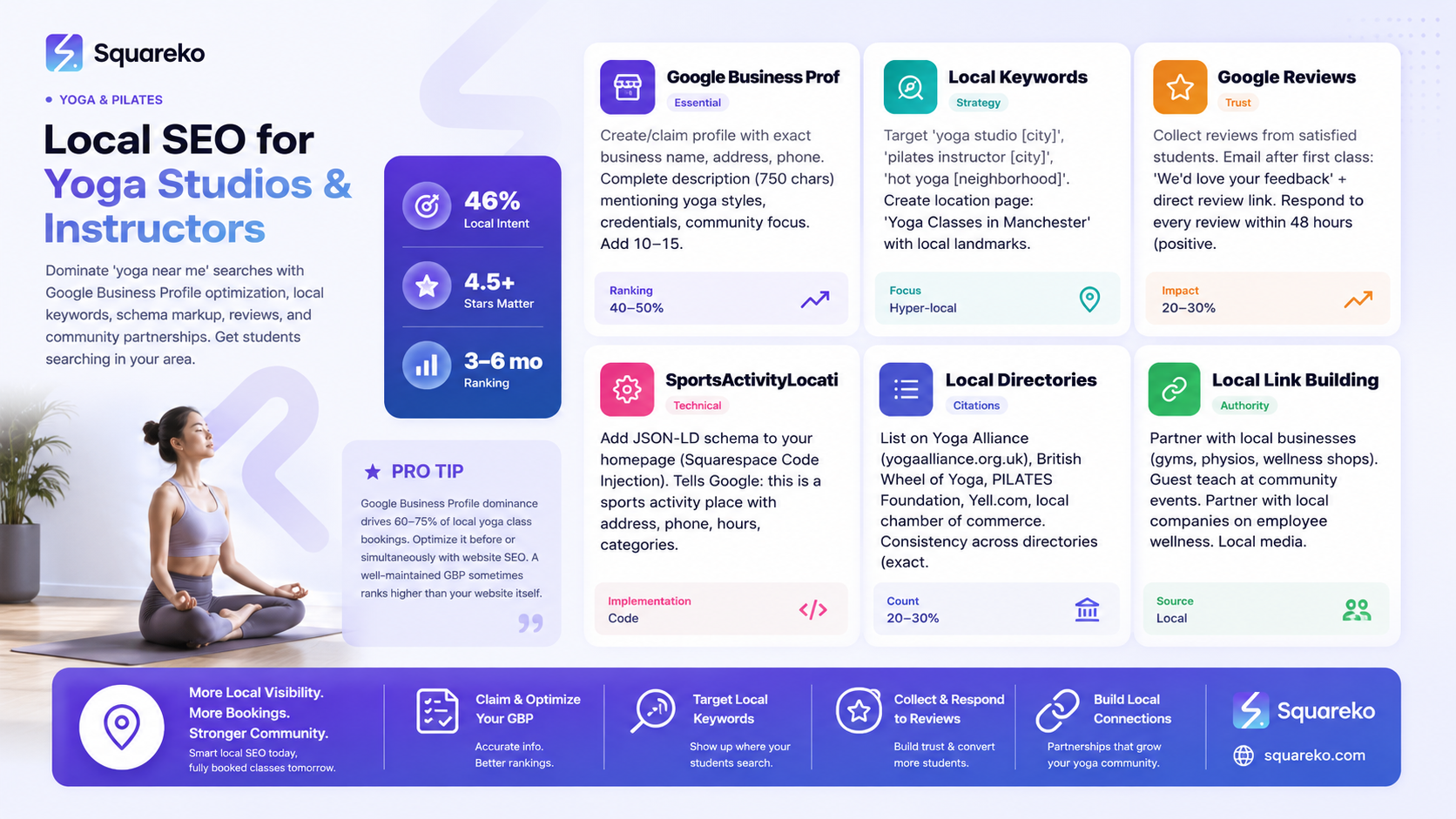
Local search has unique rules compared to national SEO.
The Three-Pack (Google Map Results)
When someone searches "yoga studios near me" or "pilates instructor Manchester," Google shows:
A Google Map with 3 business pins
Business name, address, star rating, review count
Booking button, call button, directions button
Getting into that three-pack is critical. Why? Because 46% of Google searches have "local intent" (people searching for services near them), and clicks on the three-pack drive immediate phone calls and bookings.
What Google Considers "Local"
Google determines local relevance by:
Google Business Profile completeness and accuracy (most important)
Reviews and rating (4.5+ stars matters)
Website local content (location pages, local keywords, local schema)
Local citations (mentions on directories, health sites, etc.)
Links from local sources (local news, community partnerships)
Google Maps activity (frequency of posts, how often you update hours/info)
Google Business Profile Setup and Optimization
Your Google Business Profile (GBP) is your ranking engine. A complete, optimized profile can rank better than a mediocre website.
Step 1: Create or Claim Your GBP
Go to google.com/business (or search "Google Business Profile")
Click "Manage your business on Google"
Search for your studio name + address
If it exists, click "Manage this business" → verify ownership (Google sends a postcard with a code)
If it doesn't exist, click "Create a new business" and fill in:
Business name (should match your website exactly)
Service address (full address)
Service area (radius or specific postcodes you cover, if you're mobile)
Category (choose primary: "Yoga Studio," "Pilates Studio," or "Fitness Center")
Step 2: Complete Every Field
An 100% complete GBP ranks better. Fill in:
Business Name
Use your actual business name, not "Sarah's Yoga Studio" if registered as "Clearwater Yoga"
For solo instructors, use your real name or brand name (not just "Yoga Instructor")
Category
Primary: "Yoga Studio," "Pilates Studio," or "Fitness Center"
Secondary: "Gym," "Wellness," "Health Coach" (if applicable)
Address
Must be your actual studio address (can't use PO Box or virtual office)
Make sure it matches your website exactly
Phone
Primary business number
Answerable during business hours
Website
Link to your homepage (not a random page)
Hours
List each day with opening and closing times
Mark days closed
Update for holidays
Description
750 characters describing what you offer
Include: yoga styles, levels, specialisations, community focus
Example: "Clearwater Yoga offers beginner-friendly hatha, vinyasa, and yin yoga classes in Manchester. All levels welcome. Private 1:1 sessions available. Founded 2015. Yoga Alliance certified."
Attributes (Check all that apply)
LGBTQ+ owned (if true)
Women-owned (if true)
Wheelchair accessible
Gender-neutral restrooms
Step 3: Add High-Quality Photos
Photos are heavily weighted in Google's ranking. Add:
Studio Interior (3-5 photos)
Class in session (with student permission)
Clean, well-lit studio space
Props and equipment visible
Welcoming entrance
Studio Exterior (1-2 photos)
Building front and entrance
Parking area (if available)
Teachers (1 photo per teacher)
Professional headshot or action photo teaching
Use real photos, not stock images
Class-in-Action (3-5 photos)
Students in various poses (with permission)
Diverse students showing inclusivity
Different class styles if you offer them
COVID/Safety (1 photo, if relevant)
If you've implemented safety measures, photo counts
Google Camera: Use the "Google Camera" option (if you have a smartphone or access to one) to upload photos directly from your phone.
Step 4: Add a Business Description
In the "Description" section, write 750 characters that include:
What you teach (styles, specialisations)
Who it's for (all levels, beginners, athletes, seniors, pregnant)
Credentials (Yoga Alliance, PILATES Foundation)
Community feel or unique approach
Call to action
Example: "Clearwater Yoga is Manchester's most welcoming yoga studio. We teach hatha, vinyasa, yin, and yoga for pregnancy. All classes are beginner-friendly with modifications available. Our teachers are Yoga Alliance RYT-200 certified. We've been serving the Manchester community since 2015. First class free. Come join us."
Step 5: Set Up Google Posts
Google Posts appear above your business info in search results. Create posts regularly:
Weekly Schedule Update
"New classes this week: Saturday 10 am Beginner Yoga with Sarah"
Include a photo
Link to your booking page
Monthly Highlights
"March Workshop: Yoga for Back Pain, March 15"
"New teacher alert: Meet Mike, our new evening class instructor"
"Student spotlight: Meet Maria, who's been with us 6 months"
Seasonal Updates
"Summer schedule now live—book your outdoor yoga session"
"New year, new practice: January challenge sign-ups open"
Promotional
"February special: Buy 10-class pass, get one free"
"Referral reward: Bring a friend, get £10 off next month"
Google Posts appear in search results for 7 days, then archive. Create new posts every week for maximum visibility.
Step 6: Enable Online Booking (If You Use Squarespace Scheduling)
In your GBP:
Click "Booking" or "Online Booking"
If you use Squarespace Scheduling, connect it (or link to your booking page)
Google will show a "Book Now" button directly in search results and Google Maps
This is huge for conversions—students can book without leaving Google.
Step 7: Add Q&A Section
In your GBP, the "Q&A" section lets potential students ask questions. Answer these immediately:
Common questions:
"Do I need experience?" → "No, all our classes are for all levels. Modifications shown for every pose."
"How much is a drop-in class?" → "£15 per class, or buy a 6-class pass for £75."
"Can I bring my mat or do you provide?" → "Bring your own mat, or borrow one free from the studio."
"Do you have parking?" → "Free parking available in the street outside and small car park to the rear."
Answer every question within 24 hours. This improves engagement and ranking.
Local Keyword Strategy for Yoga and Pilates
National keywords ("best yoga classes") don't work for local studios. You need local keywords.
Local Keyword Formula
Service + Location + Modifier = Local keyword
Examples:
"Yoga studios Manchester"
"Pilates instructor near me"
"Beginner yoga classes Sheffield"
"Yoga for pregnancy Liverpool"
"Hot yoga Leeds"
"1:1 pilates coaching Manchester"
High-Intent Local Keywords (People Ready to Book)
These keywords show someone ready to act:
"Yoga classes near me"
"Book a yoga class Manchester"
"Pilates lessons in Sheffield"
"Yoga drop-in class Saturday"
"Beginner pilates classes Cardiff"
"Pregnancy yoga Manchester"
"Corporate yoga classes Manchester"
Keywords for Your Content Strategy
Create blog posts targeting these:
"Yoga Studios in Manchester" (informational, helps people discover you)
"Best Beginner Yoga Classes in [City]" (helps nervous first-timers)
"Yoga for [specific benefit]" + city (e.g., "Yoga for Lower Back Pain Manchester")
"Pilates Near Me" (broad intent, but location-specific when you rank)
"Yoga Teachers in [City]" (for private instruction)
Long-Tail Local Keywords
These are specific phrases with lower competition:
"Gentle yoga for seniors Manchester"
"Yoga classes near [specific neighbourhood]"
"Evening pilates classes Tuesday Sheffield"
"Yoga for lower back pain Cardiff"
"Pilates instructor 1:1 coaching London"
Squarespace Location Pages and Local Schema
Your website's local strategy supports your GBP ranking.
Create a Strong Location Page
For studio-based teachers, create a dedicated location page with:
Page Title: "Yoga Classes in Manchester"
Content:
Headline: "Yoga Studio in Manchester—Classes for All Levels"
Studio address
Parking and accessibility info
Studio photos (welcoming, clean, class in action)
"How to find us" map (Google Maps embed)
Class schedule snippet (link to full schedule)
Teacher info ("Meet our teachers")
Testimonials from local students
"Book a class" CTA
Local landmarks referenced ("Five minutes from Manchester Piccadilly," "Next to the library")
Local SEO Elements:
Include local keyword in H1, H2 headings
Use location name 3-5 times naturally throughout
Include postcode
Add Google Maps embed
Reference local landmarks
Add SportsActivityLocation Schema
Schema helps Google understand your business type. Add this to your location page (via Squarespace Code Injection > Footer):
<!-- Please remove the commented script wrapper and add this schema inside a proper <script type="application/ld+json"> tag. -->
{
  "@context": "https://schema.org",
  "@type": "SportsActivityLocation",
  "name": "Clearwater Yoga",
  "address": {
    "@type": "PostalAddress",
    "streetAddress": "123 Main Street",
    "addressLocality": "Manchester",
    "addressRegion": "GM",
    "postalCode": "M1 1AE",
    "addressCountry": "GB"
  },
  "geo": {
    "@type": "GeoCoordinates",
    "latitude": "53.4808",
    "longitude": "-2.2426"
  },
  "telephone": "+44 161 123 4567",
  "url": "https://yourwebsite.com",
  "areaServed": ["Manchester", "Salford", "Stockport"],
  "amenityFeature": [
    {"@type": "AmityFeature", "name": "Wheelchair Accessible"},
    {"@type": "AmityFeature", "name": "Free Parking"},
    {"@type": "AmityFeature", "name": "Mats Provided"}
  ]
}
(Find your exact lat/long on Google Maps; click a location, copy the coordinates.)
For Online Yoga Teachers
If you teach online only, create a page: "Online Yoga Classes for Your Region"
Headline: "Online Yoga Classes for UK Students"
Explain you're available to UK students
Target keywords: "Online yoga classes UK," "Virtual yoga classes Manchester," "Online pilates teacher"
Add LocalBusiness schema (not SportsActivityLocation)
Google Maps Ranking Factors
To rank in Google Maps, focus on these:
1. Proximity
Students searching "yoga near me" see results ranked by distance. You can't change your location, but you can ensure your GBP address is exact.
2. Relevance
Your business name, description, posts, and website content must clearly state what you do. "Yoga Studio" in your category helps.
3. Prominence (Reviews, Links, Citations)
Businesses with more reviews, higher ratings, and more online mentions rank higher.
4. Google Posts Activity
Posting regularly signals to Google that your business is active and worth recommending.
Getting Google Reviews from Your Students
Reviews are critical local ranking signals. A studio with 100 reviews (4.5+ stars) ranks higher than one with 5 reviews, all else equal.
Ethical Review Collection
How to Ask for Reviews:
After a great class: Email students: "Thank you for joining Saturday's yoga class! We'd love your feedback. [Link to Google Review]"
In-class reminder: Once per month, mention: "Love the class? Please share a review on Google—it helps other yogis find us."
In your confirmation emails: Add a line: "Share your experience on Google" with a link.
In your FAQ: Explain why reviews matter for small businesses.
Do Not:
Offer incentives for positive reviews ("Leave a review, get a free class")
Ask friends and family to leave fake reviews
Leave fake reviews yourself on competitors
Respond angrily to negative reviews
Do:
Ask for honest feedback
Make leaving a review easy (direct link)
Respond to every review (positive and negative)
Fix problems mentioned in negative reviews
Google Review Link
Get your direct Google Review link:
Go to your Google Business Profile
Click "Reviews"
Find "Copy link" button
Share this link with students
Response Strategy
For Positive Reviews: "Thank you, Sarah! We're so glad you're enjoying the classes. See you next week!"
For Negative Reviews (Respond with Grace):
Apologise for their experience
Take responsibility
Offer to make it right
Move the conversation offline ("Please email us so we can resolve this")
Example: "We're sorry to hear about your experience. That's not the standard we set. Please email us directly—we'd like to make this right."
Local Health and Fitness Directories
Beyond Google Maps, list your studio on local health and fitness directories.
Top Directories for Yoga and Pilates
Yoga Alliance Teacher Finder (yogaalliance.org.uk)
List your profile if you're Yoga Alliance RYT
Includes location, credentials, specialisation
Free and high-authority
British Wheel of Yoga (bwy.org.uk)
List if you're a registered member
Large directory specific to UK yoga teachers
Includes credentials, location, contact
PILATES Foundation (pilatesfoundation.com)
For pilates instructors with Pilates Foundation credentials
Builds authority and trust
Get Fit Studios (getfitstudios.com)
Directory of fitness and wellness studios
Free listing with basic info
Good for local search visibility
Localbusiness Directories:
Yell.com (local business directory)
Yelp.co.uk (reviews and business info)
Local council leisure directories (search "your council health and fitness facilities")
Facebook (create a Facebook page, add studio info)
Health and Wellness Directories:
Healers.com
ZocDoc (for wellness services)
Mindbody Discover (if you use Mindbody software)
How to List Yourself
Search directory + "submit business"
Complete your profile with:
Correct business name and address
Phone and website
Categories (Yoga, Pilates, Fitness)
Description
Hours
Photos (if directory allows)
Ensure information matches your GBP (consistency matters for SEO)
Local Link Building for Yoga and Pilates
Links from local sources signal authority to Google. Build links through:
Corporate Wellness Partnerships
Partner with local companies for employee yoga:
"Employee Wellness Partner at [Company Name]" on your website
Company mentions you on their wellness page (link back)
Revenue: New corporate clients
How to pitch: Email HR managers: "We'd love to offer your team complimentary yoga sessions as an employee wellness benefit. Would that be of interest?"
Local Business Partnerships
Link with complementary local businesses:
Gyms (cross-referrals)
Physiotherapy clinics (rehabilitation yoga)
Nutritionists (wellness referrals)
Mental health practitioners (stress-relief yoga)
Salons and spas (relaxation packages)
Outreach email: "Hi name, I noticed we serve similar clients in Manchester. Would you be interested in a referral partnership? I'd love to refer clients looking for service to you, and we could do the same."
Community Events
Sponsor or teach at local events:
"Taught yoga at Manchester Pride 2026" (with link from event site)
"Wellness Partner, [Local Festival]"
Host a free community yoga session (local news may cover it)
These get mentioned on event websites (links to you).
Content Collaboration
Write guest posts for local blogs:
"5 Yoga Poses for Office Workers" on a Manchester business blog
Link back to your website
Managing Multiple Locations
If you have 2+ studios or teach at multiple locations:
Create Separate GBP Profiles
Create a unique Google Business Profile for each location. Google ranks them separately, and you want each to have its own strong presence.
Create Location Pages
For a multi-location studio, create a page for each:
"Yoga Classes in Manchester"
"Yoga Classes in Sheffield"
"Yoga Classes in Leeds"
Each with local content, reviews, and keywords.
Avoid Duplicate Content
Each location page should have unique content (not copied). Mention:
Local landmarks and neighborhoods
Teachers at that location
Unique classes or schedules
Local partnerships
Schema for Multiple Locations
In schema markup, use "Organization" with multiple "branchOf":
{
  "@context": "https://schema.org",
  "@type": "Organization",
  "name": "Clearwater Yoga",
  "hasLocation": [
    {
      "@type": "Place",
      "name": "Manchester Studio",
      "address": "123 Main St, Manchester..."
    },
    {
      "@type": "Place",
      "name": "Sheffield Studio",
      "address": "456 High St, Sheffield..."
    }
  ]
}
Online Yoga and "Near Me" SEO Strategy
If you teach online (Zoom classes), you can still capture local search with a different strategy.
Target "Online + Location" Keywords
"Online yoga classes UK"
"Virtual pilates classes Manchester"
"Online yoga teacher near me"
"Live yoga classes online UK"
Create an Online-Focused Location Page
Page: "Online Yoga Classes for the UK"
Content:
You teach online (no studio location)
Available to UK students
No commute needed
Perfect for busy professionals, parents, people with accessibility needs
Virtual class schedule
Testimonials from online students
"Join a Class" CTA
Use LocalBusiness Schema (Instead of SportsActivityLocation)
Since you don't have a physical location:
{
  "@context": "https://schema.org",
  "@type": "LocalBusiness",
  "name": "Online Yoga with Sarah",
  "telephone": "+44 161 123 4567",
  "url": "https://yourwebsite.com",
  "areaServed": "GB"
}
Google Business Profile for Online Business
You can still create a GBP for an online business:
Create the profile
For address, use your address (it's where you operate from) or your postal code
Set "Service Area" to postcodes you serve (UK-wide, or specific regions)
Specify "Service area business" in settings
Google won't show you on maps, but will rank you in web results
Local SEO Tools and Monitoring
Free Tools
Google Business Profile Dashboard
See how often you appear in Google search
Track booking clicks, call clicks, direction clicks
View customer action breakdown
Google My Business Insights (within GBP)
How people search for you ("yoga classes Manchester," "yoga for stress," etc.)
Popular times customers visit (if location-based)
Customer demographics
Google Search Console
Track which keywords your website ranks for
See search impressions, clicks, average ranking position
Identify opportunities to improve rankings
Paid Tools
Local SEO Management:
Semrush Local (£99+/month)
Moz Local (£132+/month)
Brightlocal (£249+/month)
These tools track your local rankings, monitor reviews across platforms, and show competitor analysis.
What to Monitor
Google Business Profile visibility: Check monthly—does your info appear correctly?
Google reviews: Respond within 48 hours
Local keyword rankings: Are you ranking for "yoga Manchester" and related phrases?
Website local content: Stay updated with new pages, location updates
Local citations: Ensure your name, address, phone match across all directories
Ready to Dominate Local Yoga Search?
Local SEO is where yoga studios and pilates instructors win new students. When someone in your area searches "yoga classes near me," they should find you in the top 3 results on Google Maps.
This requires:
A complete, optimised Google Business Profile
Strong local keywords on your website
Regular updates and posts
Google reviews
Local citations and partnerships
Many studios leave significant local ranking potential untapped. The studios that win are the ones that optimise every local signal.
Squareko helps yoga studios and pilates practices dominate local search. We handle Google Business Profile optimisation, local keyword strategy, website optimisation, and ongoing monitoring.
Frequently Asked Questions
-
A complete, optimised Google Business Profile can show results within 4-8 weeks. However, ranking in the top 3 (three-pack) typically takes 3-6 months of consistent optimisation, reviews, and local citations. Building authority takes time.
-
Yes, but differently. You can create a GBP for an online business and rank in web search results (not maps). Use "service area" to specify UK-wide or specific regions. You'll rank for "online yoga classes," not "yoga near me" (which requires physical proximity).
-
Google filters reviews to prevent spam. A review may take 24-48 hours to appear. Very new accounts may have delays. If a review doesn't appear after 7 days, it may have violated Google's policies (e.g., incentivised review, fake account).
-
Yes. Always respond professionally and calmly, within 48 hours. Apologise for their poor experience, take responsibility, and offer to resolve it offline. This shows future customers that you care about feedback.
-
Google Business Profile is most important (40-50% of local ranking). Local citations matter (20-30%). Reviews matter (20-30%). A perfect GBP with few citations will outrank a mediocre profile with many citations. Focus on GBP first.
-
No. Google requires a real, physical business address. PO boxes and virtual offices are not allowed. If you teach online only, you can still create a GBP with your home/office address and set it as a "service area business."
-
Post at least weekly for best results. Posts appear in search results for 7 days. Consistent weekly posting signals to Google that your business is active and engaged. Many studios find 1-2 posts per week optimal.
-
Keep it simple: "Hi [student name], thank you for joining yesterday's yoga class! We'd love your feedback. [Direct Google Review Link]. Thank you!" Make the link obvious. Keep it under 3 sentences.
-
Significantly. Businesses with 50+ reviews at 4.5+ stars rank higher than those with 10 reviews at 4.0 stars. Review count, rating, and recency all matter. A recent 4-star review helps more than a year-old 5-star review.
-
For local yoga/pilates, Google Maps (three-pack) is more valuable. That's where "near me" searchers look first. However, build both—your website should rank organically for local keywords too. They work together.
Ready to Dominate Local Yoga Search?
Local SEO is a long-term investment, but it pays off. When you rank in the top 3 for "yoga studios in your city," you get a steady stream of high-intent, local students. No monthly advertising bills. Just people in your community finding you because you're visible where they search.
Squareko specialises in local SEO for yoga studios and pilates instructors. We optimise your Google Business Profile, build local keyword strategy, create location-specific content, and monitor your rankings.

From custom website design to SEO strategy, we help businesses launch a site that looks professional and performs better.

About the Author
Walid is the founder of Squareko,
I'm Walid Hasan, a Certified Squarespace Expert and Squarespace Circle Platinum Partner with over 12 years of hands-on experience designing and optimizing high-performing websites. Over the years, I've had the privilege of building more than 2,000 Squarespace websites for clients around the world, always focusing on clean design, strong user experience, and conversion-driven results.
