
Local SEO for Law Firms on Squarespace: Rank #1 for '[Practice Area] Attorney in [City]'
Introduction
When someone searches for a divorce attorney in Manchester or property lawyer in London, they're ready to hire. Yet many law firms remain invisible in local search results, missing these high-intent leads. Local SEO for law firms isn't just about appearing online—it's about being found by clients in your service area at the exact moment they need legal help.
Local search is now the primary way people discover law firms. According to recent research, 76% of people who search for a local business on their mobile phone visit that business within 24 hours, and 28% of those searches result in a purchase. For law firms, this means a properly optimised Squarespace website with strong local SEO signals can directly fill your practice with qualified leads.
The challenge? Most law firm websites treat local SEO as an afterthought. They lack location pages, have incomplete Google Business Profiles, and miss critical schema markup that search engines use to understand their practice areas and service territories. Squarespace, with its built-in SEO tools and modern design capabilities, offers law firms an effective platform to rank locally—but only if you implement local SEO correctly.
This guide walks through every step: from creating location-specific pages to building citations across legal directories, implementing schema markup, and generating authentic reviews that boost your rankings. By the end, you'll have an actionable roadmap to dominate local search in your practice area and location.
Key Takeaways Local SEO for Law Firms on Squarespace: Rank #1 for '[Practice Area] Attorney in [City]'
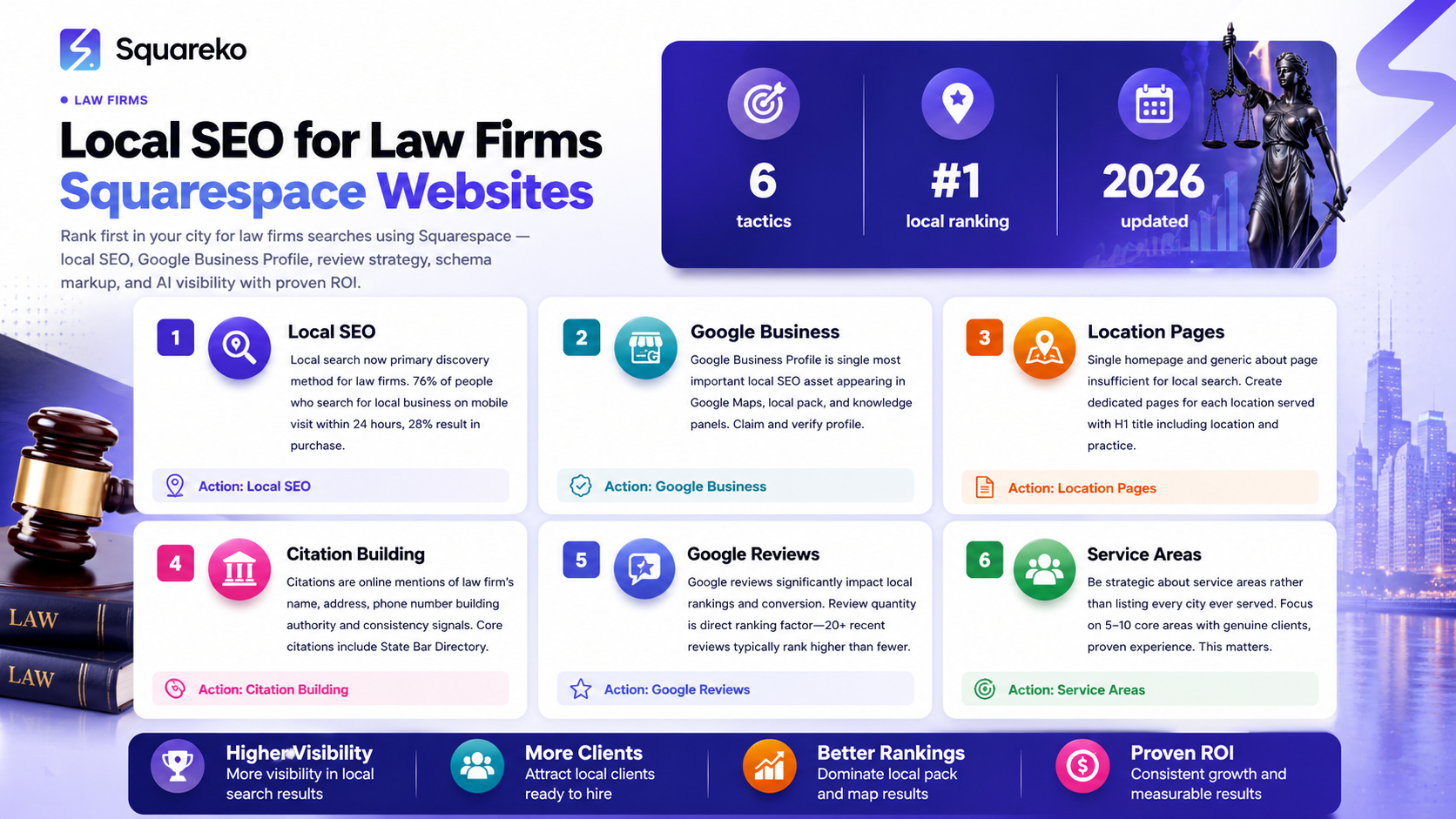
Location pages matter: Create dedicated pages for each city or service area you serve, optimised with local keywords, your location's schema markup, and customer testimonials from that area.
Google Business Profile is essential: A complete, verified profile with accurate practice areas, service areas, photos, and regular posts is your most powerful local ranking signal.
Schema markup drives visibility: Legal Service and Local Business schema markup tells search engines exactly what you do, where you serve, and what you specialise in—improving your chances of appearing in 'attorney near me' searches.
Citations build authority: List your law firm in bar association directories, legal referral sites (Avvo, Justia, FindLaw), and industry-specific platforms to establish local authority and consistency.
Reviews influence rankings and decisions: Google takes review quantity, recency, and quality seriously. Law firms with 20+ recent reviews rank significantly higher and convert better than those with fewer.
Service area pages separate you from competitors: Rather than one generic services page, create individual pages for each practice area (divorce, conveyancing, employment law) to capture long-tail local keywords.
AI-mediated recommendations reward optimisation: Google's generative AI and AI-mediated local recommendations favour law firms with complete profiles, strong reviews, and clear service area documentation.
Why Local SEO Matters for Law Firms
Traditional legal marketing—print advertising, local sponsorships, referral networks—still works, but the game has fundamentally shifted. Today's clients search online first, and law firms that don't appear in local search results simply don't exist in their minds.
Local SEO is particularly powerful for law firms because:
High intent: Someone searching for a conveyancing solicitor in Bristol isn't browsing—they're actively looking to hire. They've already decided they need legal help; they're just deciding who to call.
Lower competition at the local level: While national legal keywords are dominated by massive firms and legal marketplaces, local keywords often have less competition, making it faster and cheaper to rank well.
Proximity matters: Google increasingly prioritises showing people attorneys within a reasonable distance of their location. A smaller firm in your city can outrank a national firm for local searches.
Review-driven decision-making: Clients trust reviews from real people in their community. This is especially important in law, where trust is the primary factor in choosing representation.
Multiple touchpoints: Unlike a traditional website where clients arrive and leave, local SEO creates repeated visibility across Google Maps, local pack results, knowledge panels, and service area pages.
For law firms on Squarespace, this opportunity is significant because Squarespace's platform supports all the technical requirements for local SEO: mobile-responsive design, fast page load times, schema markup integration, and easy management of multiple location pages.
Google Business Profile: Your Foundation
Your Google Business Profile (GBP) is the single most important local SEO asset for your law firm. It appears in Google Maps, the local pack (the three business results at the top of search), and knowledge panels on the right side of search results.
Set up and verify your profile
If you haven't already, claim your firm on Google Business Profile (google.com/business). This is free and essential. Search for your law firm name, verify you own the business, and follow Google's verification process (they'll send a postcard to your office address).
Complete every section thoroughly
Business name: Use your exact legal business name (e.g., Smith & Associates Solicitors). Include your city if relevant and allowed by your bar association.
Business category: Select Attorney or Law Firm as your primary category. Add secondary categories like Family Law Attorney or Criminal Defense Attorney if Squarespace's profile allows.
Service areas: Don't just put your office location. Specify every city and town where you provide legal services. If you serve a region, add each location you serve. This is critical for local search.
Practice areas: List every area of law your firm practises (family law, corporate law, personal injury, property conveyancing). This helps Google match your profile to relevant searches.
Contact information: Ensure your phone number, email, and website URL are current and match what's on your Squarespace site.
Office hours: Set accurate opening hours. If you offer emergency consultation, note this.
Description: Write 250–280 characters describing your firm. Include 1–2 practice areas and your location. Example: Award-winning family law firm serving Manchester and surrounding areas. Specialising in divorce, child custody, and mediation since 1999.
Add high-quality photos and videos
Google Business Profiles with photos and videos receive 42% more requests for driving directions and 35% more clicks to the firm's website. Upload:
Professional photos of your office exterior and interior
Team headshots (especially your senior partners)
Photos of your consultation room
Before/after case examples (if allowed by bar association)
A short 15–30 second video introducing your firm
Update photos monthly to show Google your profile is active and maintained.
Post regularly
Google Business Profile posts (Google Posts) appear directly in the local pack and knowledge panel. They're free to create and significantly boost profile engagement. Post 2–4 times per month with updates like:
Announcements of new practice areas or service expansions
Legal articles or tips relevant to your location (e.g., UK property law changes affecting Manchester sellers)
Testimonials or case wins (if client confidentiality allows)
Community involvement or pro bono work
Upcoming free consultation offers or promotions
Each post should be 300 characters or less and include a link back to your Squarespace website.
Creating Location and Service Area Pages on Squarespace
A single homepage and generic
about page won't cut it in local search. Law firms need dedicated pages for each location served and each primary practice area. On Squarespace, this is straightforward to set up.
Why location pages matter
Location pages send a powerful signal to Google that you serve a specific area. They also let you target local keywords like employment lawyer in Liverpool or family law solicitor in Leeds. Each location page should be unique—not just a template repeated across locations—with local testimonials, area-specific information, and targeted keywords.
Creating location pages on Squarespace
In your Squarespace site, navigate to Pages and click + to add a new page.
Choose Standard Page as the layout.
Name the page after your location, e.g., Family Law Solicitor in Manchester or Divorce Attorney in London.
Add a unique H1 (your page title) that includes the location and practice area.
Structure the page with:
Hero section: A compelling headline like Expert Family Law Solicitor in Manchester | Expert Mediation & Divorce Support.
Why choose us in [Location]: 200–300 words explaining why your firm is the best choice locally. Mention local awards, community involvement, or local client success stories.
Practice areas we handle: Brief descriptions of the specific legal services you offer in this location.
Testimonials from [Location]: Feature 2–4 reviews or testimonials from clients in that specific area (if available). This builds trust and adds local proof.
Service area details: Explain which neighbourhoods, councils, or regions within your location you serve.
Contact form and map: Include your office location on a map and a contact form specific to that location if possible.
SEO settings in Squarespace:
Set the page URL to something like /family-law-manchester or /divorce-solicitor-london.
Write a unique meta description (150–160 characters) for each location page, including the practice area and location.
Add internal links from your location page to your main practice area pages and homepage.
Practice area (service area) pages
Beyond location pages, create individual pages for each major practice area:
Divorce and Family Law
Property and Conveyancing
Employment Law
Personal Injury
Criminal Defence
Business Law
Each service area page should explain what the service includes, common client questions, and your approach. Link these pages to your location pages and vice versa (e.g., the Manchester location page links to your main
Family Law service page).
Internal linking strategy
Link strategically between location pages and service area pages. If a client lands on your Manchester location page and sees you offer conveyancing, they should be one click away from your full conveyancing services page. This improves both user experience and SEO, as internal links spread authority across your site and help search engines understand your site structure.
Schema Markup for Law Firms: Legal Service and Local Business
Schema markup is structured data that tells search engines exactly what your website is about. For law firms, schema markup is critical because it powers knowledge panels, local pack results, and AI-mediated recommendations.
Why schema matters for law firms
Google's AI now interprets search results and synthesises information from multiple websites to answer questions. A lawyer with proper schema markup is more likely to appear in AI-generated answers to questions like best employment lawyer in Birmingham because Google can clearly see your practice areas, locations, and credentials.
Implementing Legal Service schema
LegalService schema tells Google you're a legal service provider and what areas of law you specialise in. Add this schema to your Squarespace site via Settings > Advanced > Code Injection or using Squarespace's built-in SEO tools.
Example LegalService schema:
{
  "@context": "https://schema.org/",
  "@type": "LegalService",
  "name": "Smith & Associates Solicitors",
  "areaServed": [
    {
      "@type": "City",
      "name": "Manchester"
    },
    {
      "@type": "City",
      "name": "Salford"
    },
    {
      "@type": "City",
      "name": "Stockport"
    }
  ],
description: Award-winning family law and employment law firm serving Manchester and surrounding areas.,
"url": "https://www.yourfirm.co.uk",
"telephone": "+44 161 XXXX XXXX",
"priceRange": "£££",
"address": {
    "@type": "PostalAddress",
    "streetAddress": "123 High Street",
    "addressLocality": "Manchester",
    "addressRegion": "Greater Manchester",
    "postalCode": "M1 1AB",
    "addressCountry": "GB"
  },
  "image": "https://www.yourfirm.co.uk/logo.jpg",
  "knowsAbout": [
    "Family Law",
    "Divorce",
    "Child Custody",
    "Employment Law",
    "Mediation"
  ]
}
Implementing LocalBusiness schema
LocalBusiness schema is simpler and works alongside LegalService. It tells Google you're a local business with a specific location, hours, and contact information.
{
  "@context": "https://schema.org",
  "@type": "LocalBusiness",
  "name": "Smith & Associates Solicitors",
  "image": "https://www.yourfirm.co.uk/logo.jpg",
  "telephone": "+44 161 XXXX XXXX",
  "address": {
    "@type": "PostalAddress",
    "streetAddress": "123 High Street",
    "addressLocality": "Manchester",
    "addressRegion": "Greater Manchester",
    "postalCode": "M1 1AB",
    "addressCountry": "GB"
  },
  "openingHours": "Mo,Tu,We,Th,Fr 09:00-17:30"
}
Adding schema to Squarespace
Go to Settings > Advanced > Code Injection.
Paste your schema markup in the Header section.
Save and publish.
Alternatively, use Google's Schema Markup Helper or Structured Data Markup Helper to generate and validate your schema before adding it.
Validating your schema
Test your schema markup with Google's Rich Results Test (search.google.com/test/rich-results). This ensures your markup is valid and eligible for rich snippets in search results.
Building Citations Across Legal Directories
A citation is any online mention of your law firm's name, address, and phone number (NAP). Citations build authority and consistency signals that help Google trust your location and practice area information.
Why citations matter
Law is a regulated profession, and Google rewards law firms that are properly listed in official directories and industry platforms. Citations from authoritative sources like bar associations and legal referral sites are worth more than random directory listings.
Core citations for law firms
State Bar Directory / Law Society
Your primary bar association directory is essential. In the UK, list your firm with the Law Society of England and Wales, or equivalent in Scotland, Wales, or Northern Ireland.
Ensure your entry is complete, includes all practice areas, and lists your office address and phone.
Avvo (avvo.com)
One of the largest legal referral platforms in the UK and internationally.
Create a free profile for your firm and each attorney.
Include your practice areas, years of experience, areas served, and a professional photo.
Encourage reviews on your Avvo profile.
Justia (justia.com)
Major legal directory with UK and international listings.
Create a complete profile with practice areas, office locations, and links to your Squarespace site.
FindLaw (findlaw.com)
International legal marketplace. Create a profile to appear in
find a lawyer searches.
Super Lawyers (superlawyers.com)
If your attorneys qualify (by recognition votes from peers), claim this high-authority listing.
Legal500 (legal500.com)
UK and European legal directory. Highly respected for firm rankings and attorney recognition.
Chambers and Partners (chambersandpartners.com)
Premium legal directory. If your firm is ranked, ensure your profile is complete and current.
Google Maps and Apple Maps
Claim and complete your business profiles on both platforms (Apple Maps pulls from Google, but a complete Apple Maps profile helps).
Local business directories
List your firm on general business directories relevant to your location (e.g., Yell.com in the UK, or local chamber of commerce directories).
Citation consistency
The name, address, and phone number across all citations must be identical. If your Google Business Profile says Smith & Associates Solicitors but Avvo says Smith and Associates, Google sees them as different businesses. Use a citation checker tool like Yext, Whitespark, or SEMrush to audit your citations and find any inconsistencies.
Generating and Managing Google Reviews
Google reviews are the single biggest factor influencing whether potential clients click on your law firm. They're also a significant local ranking signal. Law firms with 20+ recent reviews rank higher than those with fewer.
Why Google reviews matter
Ranking factor: Google's algorithm considers review quantity, recency, and rating when determining local rankings.
Conversion factor: 95% of potential clients read reviews before choosing a service provider. Law firms with 4+ star ratings convert significantly better.
Authenticity signal: Recent reviews tell Google your business is active and trusted.
How to generate reviews systematically
Make it easy: Include a link to your Google review page on your Squarespace site. In Settings > Business Info, find your Google Business Profile link and create a shortened URL to your review page.
Ask clients directly: After closing a case or completing a service, send a follow-up email asking satisfied clients to leave a Google review. Make it a standard part of your offboarding process.
Use review request cards: Include a small card in client packets with a QR code linking to your review page.
Train your team: Brief all staff to ask clients if they'd be willing to leave a review. Make this part of your closing process.
Offer an incentive (carefully): Google doesn't allow offering discounts in exchange for reviews, but you can enter clients into a prize draw. Check your bar association's rules first.
Responding to reviews
Every review—positive or negative—deserves a response.
For positive reviews, respond warmly:
Thank you so much for taking the time to leave a review. We're delighted we could help you through this process. We look forward to working with you again if needed.
For negative reviews, respond professionally and avoid defensiveness:
We're sorry to hear you had a less than ideal experience. We take feedback seriously and would like to understand what went wrong. Please contact us directly so we can make it right.
Never argue with reviewers or demand they remove negative reviews. Google's algorithm favours firms that handle criticism gracefully.
Managing review volume
Aim for one new review every 1–2 weeks. This signals to Google that your business is active and trusted. If you have no reviews, it's worth investing in email campaigns or direct outreach to past clients to generate your first 10–15 reviews.
Service Area Strategy and Keyword Research
One common mistake law firms make is listing every city they've ever served without proper keyword research and content to support it. This dilutes your authority and confuses Google about where you actually focus.
Refining your service area
Be strategic about where you compete locally. Rather than claiming to serve 50 cities, focus on 5–10 core areas where you have genuine clients, proven experience, or want to build a practice. For each core area, create a dedicated location page and claim local citations.
Keyword research for law firms
Use tools like Ahrefs, Semrush, or the free Ubersuggest to research local keywords in your practice area. Look for:
[Practice Area] solicitor in [City]
[Practice Area] lawyer in [City]
[Practice Area] attorney in [City]
[Practice Area] near me
[Specific issue] solicitor in [City] (e.g., contested divorce solicitor in Manchester)
For each core location and practice area combination, there should be an existing location page or service area page targeting that keyword.
Long-tail keyword opportunities
Long-tail keywords (more specific, 3+ words) are easier to rank for and often have higher intent:
No win no fee solicitor in Manchester
Affordable divorce lawyer in London
Emergency criminal defence solicitor in Birmingham
Property conveyancing solicitor near Stockport town centre
Create content around these long-tail keywords on your location and practice area pages.
Frequently Asked Questions
-
To create location pages on Squarespace, navigate to Pages and add a new standard page for each location you serve. Name it something like "Family Law Solicitor in [City]," and structure it with a unique H1 title, explanatory content about why clients should choose your firm in that location, testimonials from local clients, and your contact details. Make sure each page has a unique URL (like /family-law-manchester), a unique meta description (150–160 characters), and internal links to your main practice area pages. Avoid using the same template for every location; each page should feel tailored to that specific area and include local details clients care about.
-
Law firms should implement two main types of schema markup: LegalService and LocalBusiness. LegalService schema tells Google what practice areas you specialise in and what geographic areas you serve, which improves your visibility in AI-mediated recommendations and knowledge panels. LocalBusiness schema tells Google your office location, hours, phone number, and other essential business information. Both can be added to your Squarespace site via Settings > Advanced > Code Injection. Use Google's Rich Results Test to validate your markup before publishing. Having properly structured schema increases the likelihood your firm appears in featured snippets and knowledge panels for attorney searches.
-
Google reviews significantly impact local rankings in multiple ways. First, the number of reviews is a direct ranking factor—law firms with 20+ recent reviews typically rank higher than those with fewer. Second, your rating (star count) influences whether potential clients click on your result. Third, review recency matters; regular new reviews signal to Google that your business is active and trustworthy. Finally, reviews often contain keywords that Google indexes, which can help your firm appear in more searches. Beyond rankings, reviews also influence conversion rates: 95% of potential clients read reviews before hiring a solicitor or attorney, and firms with 4+ star ratings convert significantly better. To generate reviews, make the process easy by including a link to your Google review page on your Squarespace site, ask satisfied clients directly, and always respond professionally to both positive and negative feedback.
-
Yes. If you have multiple physical offices, you have two options. First, you can create separate location pages for each office (e.g., /manchester-office and /london-office), each with their own Google Business Profile. Second, you can use Squarespace's Multiple Locations feature if available in your plan, which lets you manage multiple business profiles from one dashboard. For local SEO purposes, multiple office locations are beneficial because each can have its own set of local reviews, local citations, and service area pages, amplifying your visibility. However, ensure your name, address, and phone number are consistent across all platforms and directories for each location.
-
Google rewards businesses that actively maintain and update their profiles. Ideally, you should update your profile at least monthly with new posts (2–4 per month), monthly photo updates, and immediate updates if your hours, contact details, or services change. Google's algorithm favours fresh, active profiles, so regular updates are a ranking signal. At a minimum, publish Google Posts every 1–2 weeks with useful legal tips, case wins, community involvement, or service announcements. This keeps your profile visible in the local pack and encourages repeat visibility.
-
A location page is designed around a specific geographic area you serve (e.g., "Family Law Solicitor in Manchester"). It emphasises your firm's local presence, local testimonials, and local expertise. A service area page focuses on a specific type of legal service (e.g., "Divorce Law") and may cover multiple locations or take a broader approach. Both are important for local SEO. Location pages target "attorney in [city]" keywords, while service area pages target "[practice area] solicitor" keywords. Ideally, you'll have both and cross-link them—a client interested in "divorce solicitor in Manchester" should find both your location page and your main divorce practice page.
-
Use a citation audit tool like Yext, Whitespark, SEMrush, or Moz to scan the web for mentions of your firm's name, address, and phone number. These tools will flag inconsistencies (e.g., "Smith & Associates" vs. "Smith and Associates," or "+44 161 1234 5678" vs. "0161 1234 5678"). Prioritise fixing inconsistencies on high-authority sites like your bar association, Avvo, Justia, and Google Business Profile. Then work through lower-authority directories. Consistency signals authority to Google, so this is well worth the effort. Set a quarterly reminder to audit citations again, as new directories appear regularly.
Ready to Build Your Law Firm Website on Squarespace?
Local SEO is no longer optional for law firms. Clients are searching for attorneys in their area right now, and if your firm isn't optimised for local search, you're losing leads to competitors who are.
The good news is that Squarespace makes it straightforward to implement local SEO. You don't need a complex custom website or a full-time SEO specialist. By following this guide—creating location pages, completing your Google Business Profile, implementing schema markup, building citations, and generating reviews—you'll build the foundation for long-term local visibility and client growth.
At Squareko we specialise in helping law firms build beautiful, SEO-optimised websites on Squarespace. We handle the technical setup (schema markup, site speed, mobile optimisation), create your location and service area pages, and integrate your Google Business Profile so everything works together.
Whether you're starting from scratch or optimising an existing Squarespace site, the investment in local SEO pays dividends. Law is a local business, and clients will find you if you show up in local search.
Ready to take your law firm's local SEO to the next level? Get in touch with the Squareko team to discuss your website and local search strategy.

From custom website design to SEO strategy, we help businesses launch a site that looks professional and performs better.

Author Bio
I'm Walid Hasan, a Certified Squarespace Expert and Squarespace Circle Platinum Partner with over 12 years of hands-on experience designing and optimizing high-performing websites. Over the years, I've had the privilege of building more than 2,000 Squarespace websites for clients around the world, always focusing on clean design, strong user experience, and conversion-driven results.
