Is Squarespace Bad for SEO? No — and Here Is What People Actually Mean
The short answer: no. Squarespace 7.1 generates sitemaps, canonical tags, static URLs, SSL and six schema types automatically, and across 54 live Squareko-built sites measured in August 2026 the median mobile LCP was 2.01 seconds. The complaint is almost always one of five specific things, four of which are outdated and one of which is real but narrow. There are four genuine disadvantages against WordPress, and they are named at the end.
Here is each complaint, taken seriously and answered.
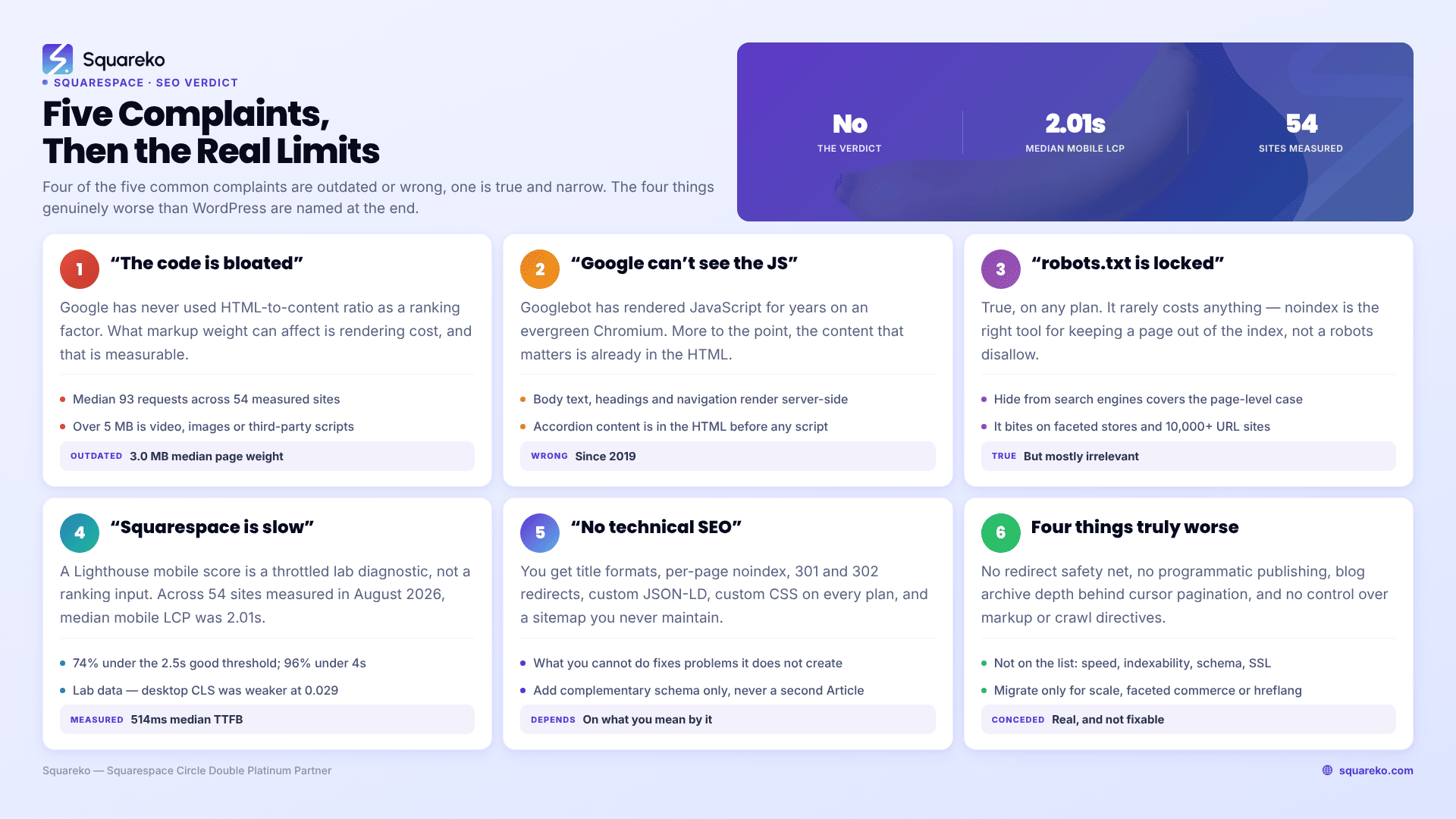
The five complaints, and what each is actually worth
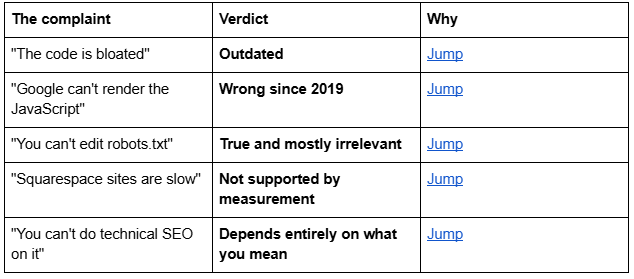
Complaint 1: "Squarespace produces bloated code"
What people mean. View source on a Squarespace page and you get a lot of markup: nested wrapper divs, generated class names, a large inline configuration object.
Why it does not matter the way people assume. Google has never used HTML-to-content ratio as a ranking factor, and no documented Google system evaluates markup tidiness. What markup weight can affect is rendering cost, and that surfaces in Core Web Vitals — which is measurable, so measure it rather than eyeballing view-source.
Across the 54 Squareko-built sites measured in August 2026, median page weight was 3.0 MB across 93 requests. Squarespace's own guidance is to keep pages under 5 MB. Where a site was over that, the cause was consistently uncompressed hero video, oversized image uploads or a stack of third-party marketing scripts — not Squarespace's wrapper divs.
The honest version of the criticism: Squarespace gives you no control over its markup, so if a specific rendering problem does emerge you cannot fix it at source. That is a real constraint. It is not the same as the site being slow.
Complaint 2: "Google can't render Squarespace's JavaScript"
What people mean. Squarespace uses JavaScript for image loading, some layout behaviour and the site editor, and there is a long-standing belief that Googlebot does not execute it.
Why this is wrong. Googlebot has rendered JavaScript for years and now runs an evergreen Chromium, updated in step with stable Chrome. Client-side JavaScript is a rendering-budget question on very large sites, not a "will Google see it" question on a 60-page Squarespace site.
More to the point, the content that matters on Squarespace is already in the HTML. Body text, headings, navigation, blog post titles and — importantly — Accordion block content all render server-side. Question and answer text inside an Accordion is present in the raw HTML before any script runs, which is exactly why an on-page FAQ built with the native block is worth building and a hand-rolled JavaScript accordion is not.
How to check for yourself, in thirty seconds: open your page, view source (not Inspect — view source shows the delivered HTML, Inspect shows the rendered DOM), and search for a sentence from the middle of your page. If it is there, Googlebot has it without executing anything.
Complaint 3: "You can't edit robots.txt"
What people mean. This one is true. The robots.txt file on a Squarespace site is generated by Squarespace and cannot be edited on any plan. ?author=, ?tag=, ?month= and ?view= are disallowed by default, and you cannot change that.
Why it rarely costs anything. Nearly everything people historically used robots.txt for has a better mechanism now:
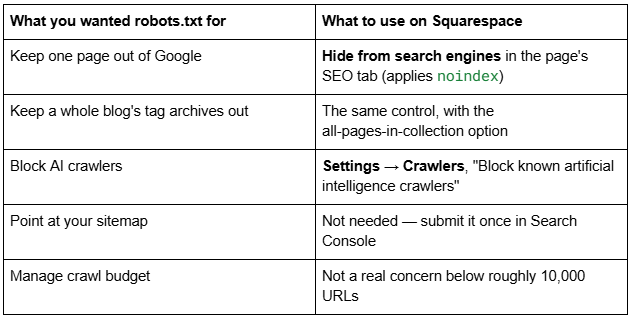
noindex is also the technically correct tool for keeping pages out of the index — a robots.txt disallow prevents crawling, not indexing, and a disallowed URL with inbound links can still appear in results as a bare URL.
Where the constraint is genuinely felt: faceted-navigation control on a large store, and crawl shaping on a site with tens of thousands of URLs. If that describes you, Squarespace is the wrong platform, and this is the honest reason why.
Complaint 4: "Squarespace sites are slow"
What people mean. Someone ran a Squarespace URL through PageSpeed Insights, saw a mobile performance score in the 40s, and concluded the platform is slo
Why the score misleads. Lighthouse's mobile performance score is generated on a heavily throttled simulated device and is dominated by main-thread work. It is a diagnostic, not a ranking input. What Google actually uses is field data — real Chrome users, reported in the Chrome UX Report and in Search Console's Core Web Vitals panel. A site can score 45 in Lighthouse and pass all three Core Web Vitals in the field.
What we measured. In August 2026 we tested 54 live Squareko-built client sites with Playwright/Chromium from a cloud datacenter, unthrottled, one run per site, load-only CLS. Fifty-three of the 54 run Squarespace 7.1.
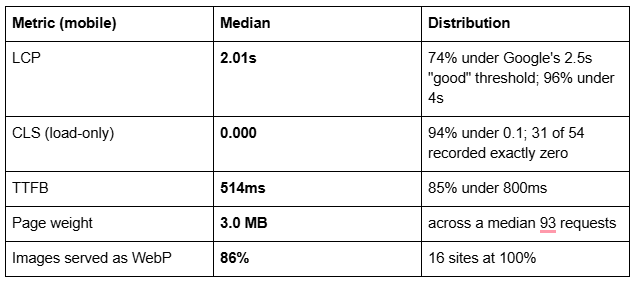
Read that honestly. This is lab data: a single unthrottled run from a datacenter connection, measuring layout shift only during initial load. It is an upper bound on what the platform can do, not what a visitor on a mid-range Android over 4G experiences. And desktop CLS on the same set was weaker — a 0.029 median with only 80% in the good band — so nothing here supports a blanket "our sites don't shift" claim.
What it does support is narrower and still decisive: Squarespace's platform floor is not what makes a Squarespace site slow. The TTFB figure is Squarespace's infrastructure and it is good. The LCP and page-weight figures are mostly the builder's choices. When we are sent a slow Squarespace site, the cause is a 12 MB background video, images uploaded at 6000px, or four third-party scripts, in roughly that order.
Two platform behaviours that help you here. The Squarespace CDN serves WebP unconditionally, regardless of the format you uploaded or the browser's Accept header. And 2500px is the maximum width Squarespace serves, so anything larger is bandwidth nobody receives — upload at 1500–2500px.
Complaint 5: "You can't do technical SEO on Squarespace"
What people mean. No plugin ecosystem, no server access, no template file editing.
What you can actually do. Custom title formats, per-page and per-item titles and descriptions, noindex per page, 301 and 302 redirects, custom JSON-LD, custom CSS on every plan including Basic, site-wide code injection on Core and above, alt text, canonical structure via URL policy, and a fully automatic sitemap you never maintain.
What you cannot do, without hedging:
Edit robots.txt.
Edit the sitemap.
Set canonical tags manually.
Add hreflang.
Get an automatic 301 when a slug changes — there is none, ever.
Use per-post header code injection. The blog injection field applies to every post in the collection, so per-post schema goes in a Code Block in the post body, in HTML mode.
Publish programmatically. There is no blog write API on any plan.
A useful reframe. The technical SEO you cannot do on Squarespace is largely the technical SEO required to fix problems Squarespace does not create. There is no need to configure canonical tags on a platform that already emits them correctly, or to prune crawl paths on a site with 80 URLs. The overlap between "impossible on Squarespace" and "necessary for a 60-page service business site" is close to empty.
One more thing worth correcting: the duplicate-schema panic
A recurring claim is that Squarespace's automatic structured data conflicts with anything you add. That is half right and worth getting exactly right.
Squarespace automatically emits JSON-LD for blog posts, events, local business, organisation, products and website, and none of it is editable or removable. The blog post block declares author as a bare string rather than a Person object.
Adding a second Article or BlogPosting block is a real problem — two competing nodes describe the same page and Google resolves the conflict non-deterministically. Adding a complementary type — Person, FAQPage, BreadcrumbList, ItemList — is not a conflict and is entirely normal. That distinction is why this site's own posts emit Person separately and never emit Article.
A related myth: your Squarespace template affects your ranking
Worth clearing up because it is adjacent to every complaint above. Squarespace 7.1 is a single template engine. Templates are starting points — section arrangements and style presets — not separate codebases. Every 7.1 site shares the same underlying templateId, 5c5a519771c10ba3470d8101.
So template choice has no direct ranking effect. What differs between templates is the demo content you inherit: how many hero videos, how large the stock images are, how many sections you keep. That is a page-weight difference, and page weight is a real Core Web Vitals input — which is how a myth about templates and SEO gets started from something that is genuinely true about page weight.
The practical version: pick the template whose layout suits your content, then strip the demo imagery you do not need.
What actually decides whether a Squarespace site ranks
Having taken the five complaints seriously, it is worth naming what does the deciding, because it is not on anybody's list.
Topic depth, not domain authority. Across 1,094 Semrush categories, domain authority predicted topic ownership only about half the time; depth on the specific topic predicted it better. That is the single most useful finding for a small Squarespace site competing against a large publisher — you cannot outrank them on authority, and you do not have to.
Coverage, not length. Fan-out sub-query coverage is the strongest single measured predictor of AI citation — Spearman 0.77, with citation probability moving from roughly 9% to 57% as coverage goes from zero to nine sub-queries. Word count barely correlates at all, at r = 0.04 across 174,048 pages.
Tone. Promotional writing is the strongest measured negative signal, at −26.2% across roughly 1.2 million URLs. A page that reads like a sales page gets cited less than one that reads like documentation.
And the field that is still blank. On most underperforming Squarespace sites we audit, the SEO title format has never been touched and the page descriptions are empty. That is not a platform limitation. It is an unopened panel.
Four things that are genuinely worse on Squarespace than on WordPress
No hedging on these. They are real, they are not fixable, and anyone recommending Squarespace without naming them is selling.
1. No redirect safety net. WordPress with a redirect plugin catches a slug change silently. Squarespace 404s it instantly and forever. On a large site with several people editing, that is a genuine operational risk, and it makes URL policy a permanent decision rather than an adjustable one.
2. No programmatic publishing. There is no blog write API on any plan. No headless setup, no bulk generation, no CMS sync, no scripted migration in. If your content operation depends on automation, Squarespace cannot serve it.
3. Blog archive depth. Cursor-based pagination capped at 20 posts per page, with no numbered pagination and no infinite scroll, means a 300-post archive is structurally hard for both readers and crawlers to reach. WordPress's numbered pagination is plainly better here, and the Squarespace workaround — hub pages and heavy internal linking — is manual labour.
4. No control over markup or crawl directives. You cannot edit robots.txt, the sitemap, canonical tags or hreflang. On a large multilingual site or a store with faceted navigation, those are not luxuries. That is a real ceiling, and it is the honest reason some sites should not be on Squarespace.
What is not on this list: speed, indexability, schema, mobile rendering, and SSL. Those are the four things people worry about most and the four Squarespace handles well.
So should you migrate to WordPress for SEO?
Almost certainly not, and a migration is the single most reliable way to lose rankings you already have. Slug structures change, redirects get missed, and the recovery period is measured in months.
Migrate if you need programmatic publishing, more than a few thousand URLs, faceted commerce navigation, or real multilingual hreflang. Do not migrate because a Lighthouse score was 48 or because someone told you the code was bloated — neither survives measurement.
If you have worked the fundamentals and the site is still flat, the cause is almost never the platform, and the honest next step is the complete Squarespace SEO guide rather than a rebuild.
Where we do get called in is the migration that has to happen anyway — several hundred URLs to map, with no automatic redirects to catch a mistake — and the inherited site nobody can explain. That is what our Squarespace SEO service is scoped around. If your complaint was one of the five above, you do not have a platform problem and you do not need us.
FAQ
-
No. Squarespace 7.1 handles sitemaps, canonical tags, static URLs, SSL and six schema types automatically, and those are the technical foundations most small sites get wrong elsewhere. Its real limits are narrow: no editable robots.txt, no automatic redirect on slug changes, and no programmatic publishing.
-
Not inherently. Across 54 Squareko-built sites measured in August 2026 — lab conditions, unthrottled, single run, load-only CLS — median mobile LCP was 2.01s and median TTFB was 514ms. Slow Squarespace sites are almost always carrying uncompressed video, oversized images or third-party scripts.
-
Yes. Googlebot runs an evergreen Chromium and has rendered JavaScript for years. It also rarely matters: body text, headings, navigation and Accordion block content all render server-side on Squarespace 7.1, so the content is in the delivered HTML before any script executes.
-
No, on any plan. In practice most of what robots.txt was used for is better handled by the Hide from search engines setting in a page's SEO tab, which applies noindex. The constraint genuinely bites only on large stores with faceted navigation or sites with tens of thousands of URLs.
-
Yes, routinely, and platform is not a ranking factor. What separates ranking Squarespace sites from non-ranking ones is the same thing that separates them anywhere: title formats that are actually set, page-level descriptions, a stable URL structure and content with real depth.
-
Only if you need programmatic publishing, several thousand URLs, faceted commerce navigation or proper hreflang. A migration risks the rankings you already have — slugs change, redirects get missed, and recovery takes months. A poor Lighthouse score is not a reason to move.

Author Bio
I'm Walid Hasan, a Certified Squarespace Expert and Squarespace Circle Platinum Partner with over 12 years of hands-on experience designing and optimizing high-performing websites. Over the years, I've had the privilege of building more than 2,000 Squarespace websites for clients around the world, always focusing on clean design, strong user experience, and conversion-driven results.