
How to Use Squarespace Commerce Features to Automate and Scale Your Online Store
Introduction
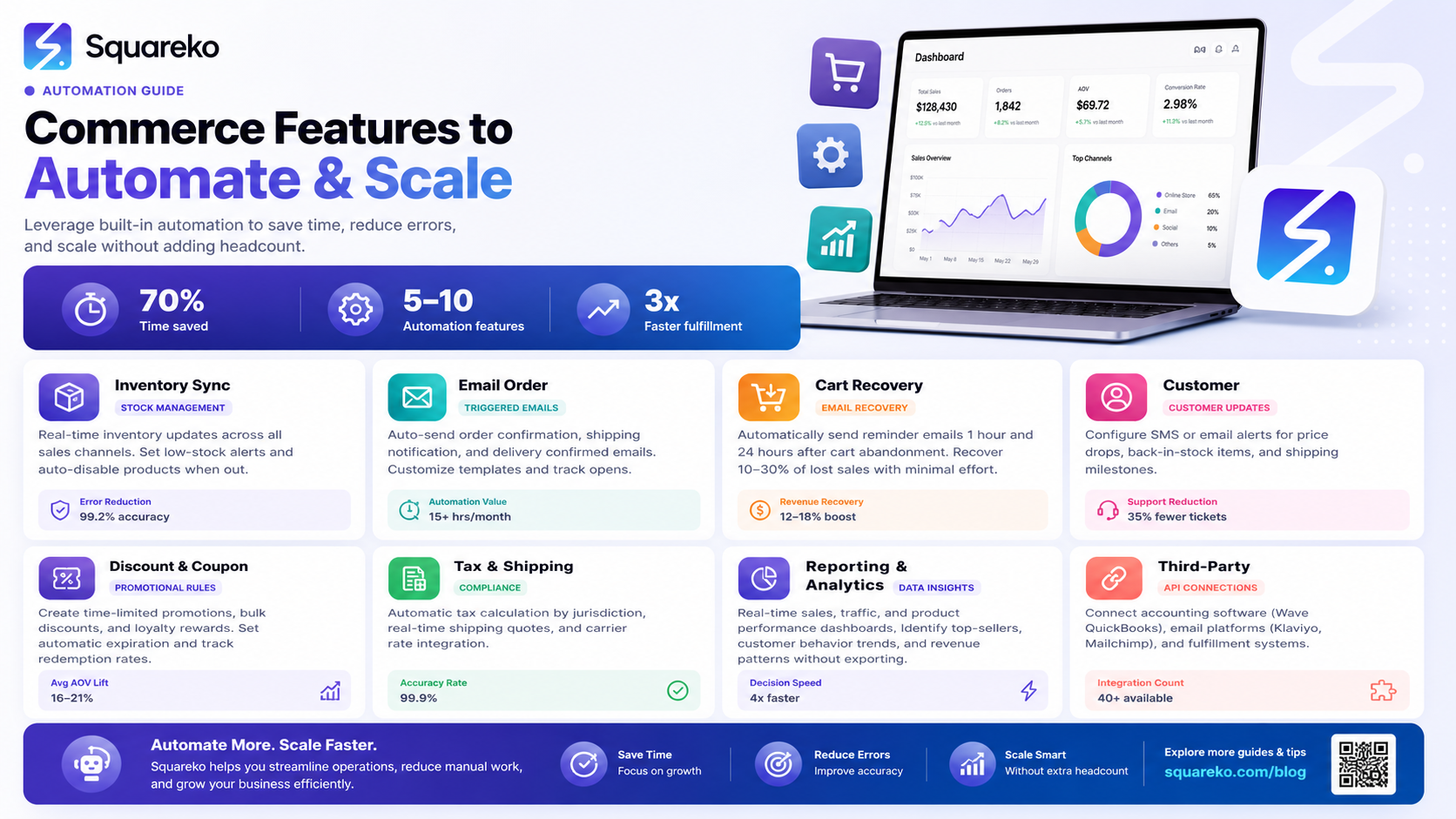
Running an online store requires managing dozens of moving parts simultaneously. From tracking inventory to processing payments, capturing abandoned carts to personalizing customer experiences—modern ecommerce demands efficiency and sophistication. Squarespace commerce featuresoffer a powerful toolkit designed to help store owners automate repetitive tasks and scale their operations without requiring technical expertise.
Whether you're a solo entrepreneur managing your first online venture or an established brand looking to streamline operations, Squarespace's commerce features eliminate manual work, reduce errors, and create opportunities for revenue growth. This guide explores how you can harness these tools to automate and scale your online store effectively.
Key Takeaways
Squarespace commerce features enable automated abandoned cart recovery, potentially recovering 10–30% of lost sales
Subscription features allow you to build predictable recurring revenue streams with flexible billing options
Digital product delivery is fully automated, eliminating manual fulfillment and support requests
Gift cards, discount codes, and product variants streamline customer choice and repeat purchases
Multi-currency and international shipping features expand your reach beyond domestic markets
Member areas and exclusive content features create loyalty and additional revenue opportunities
Integrations with third-party tools extend Squarespace's capabilities without replacing your core platform
Abandoned Cart Recovery: Reclaim Lost Sales
Feature Overview
Abandoned cart recovery is one of the highest-ROI features available to ecommerce store owners. According to industry research, the average cart abandonment rate sits between 70–75%, meaning three out of four potential transactions slip away before completion. Squarespace automates the recovery process through intelligent email sequences.
How It Works
When a customer adds products to their cart but doesn't complete purchase, Squarespace can automatically send reminder emails. These emails include:
A preview of the abandoned products
Direct links to complete the purchase
Product descriptions and images
Optional promotional incentives (discounts or free shipping offers)
Activation and Configuration
To enable abandoned cart emails in Squarespace:
Navigate to Commerce → Emails → Abandoned Cart
Enable the feature toggle
Customize the email template with your branding
Set the delay (typically 1–3 hours after abandonment)
Specify whether to include a discount code or incentive
Configure follow-up emails (optional: send a second reminder 24 hours later)
Best Practices
Personalize the subject line to include the customer's first name
Keep the message concise—focus on the abandoned products, not your entire catalogue
Test different incentive levels to find the sweet spot (5–10% discounts often outperform larger offers by preventing margin erosion)
Monitor open rates and click-through rates monthly to optimize timing
Subscriptions: Build Recurring Revenue
Feature Overview
Subscription features enable you to offer products on a recurring payment basis—whether monthly, quarterly, or annually. This model transforms your revenue from unpredictable one-time sales to stable, predictable recurring income.
How It Works
Customers can subscribe to physical or digital products. Squarespace automatically:
Processes recurring payments on the scheduled date
Manages billing cycles and renewals
Handles failed payment retries
Allows customers to modify or cancel subscriptions through their account dashboard
Tracks subscription metrics in real-time analytics
Activation and Configuration
To set up subscriptions:
Create or edit a product
Under Pricing, select Subscription
Choose the billing frequency
Set the subscription price
Optionally add a trial period (free or discounted)
Enable auto-renewal options
Configure cancellation policies
Best For
Meal kit services, beauty boxes, and curated product subscriptions
SaaS-style product delivery (software, apps, digital tools)
Membership programs and exclusive access
Coffee, wine, and consumable businesses
Content creators offering exclusive member content
Scaling Considerations
Subscriptions typically command higher customer lifetime value. A customer who spends £30/month for 12 months generates £360 in revenue versus a one-time £30 purchase. Even a 5% increase in subscription retention can compound into significant revenue growth over time.
Digital Products: Automate Delivery
Feature Overview
Selling digital products ebooks, templates, courses, software, music, presets—involves unique challenges. Squarespace eliminates the complexity through fully automated delivery systems.
How It Works
When a customer purchases a digital product:
Squarespace processes the payment instantly
The customer receives an immediate confirmation email
A download link is automatically provided
The file is hosted securely on Squarespace's servers
Customers can download multiple times within a specified window
Activation and Configuration
To upload and sell digital products:
Create a product and upload the digital file (PDF, ZIP, MP3, video, etc.)
Set the Product Type to Digital
Configure download permissions (number of downloads, time limit)
Set delivery email settings (immediate or delayed)
Optionally add physical product to bundle digital + tangible items
Technical Advantages
No inventory management needed
Zero shipping costs or logistics headaches
Instant customer gratification increases satisfaction
Eliminates the need for third-party file delivery services
Scalable to unlimited downloads without additional costs
Best For
Graphic designers selling templates, brushes, or presets
Authors and self-publishers distributing ebooks
Educators and course creators offering learning materials
Musicians and podcasters selling audio content
Software developers distributing tools or extensions
Gift Cards: Drive Impulse Purchases
Feature Overview
Gift cards represent a psychologically powerful sales tool. They capture revenue upfront, introduce new customers through gifters, and increase average order value through impulse purchases.
How It Works
Squarespace's gift card feature:
Allows customers to purchase digital or printed gift cards
Automatically sends gift cards to recipients via email on a specified date
Provides redemption codes that work like standard discount codes
Tracks redemption and balance automatically
Prevents system fraud through secure codes
Activation and Configuration
To enable gift cards:
Navigate to Commerce → Gift Cards
Enable the feature
Set available denominations (fixed amounts or custom ranges)
Upload gift card design or use Squarespace templates
Configure delivery method (email or printed)
Set expiry dates (optional, though longer expiries improve redemption)
Marketing Impact
Gift cards serve multiple purposes:
Convert gift-givers who otherwise wouldn't purchase directly
Lower customer acquisition cost through social gifting channels
Create new customer touchpoints
Increase average order value
Product Variants and Inventory Management
Feature Overview
Product variants allow customers to choose options—size, colour, material, or style—without creating separate product listings. Combined with inventory tracking, variants prevent overselling and automate stock management.
How It Works
Squarespace tracks inventory at the variant level:
Each size/colour combination has independent stock counts
The system prevents overselling by restricting purchases when stock hits zero
You receive notifications when stock drops below custom thresholds
The inventory dashboard provides real-time visibility
Generate reports on which variants sell fastest
Configuration
To add variants:
Edit a product
Under Variants, click Add Variant
Select variant type (Size, Colour, Material, or custom)
Add each option (Small, Medium, Large; Red, Blue, Green)
Set individual prices for each variant (optional—use if size/colour affects cost)
Assign inventory quantities per variant
Publish
Advanced Features
Low Stock Warnings: Automatically flag items below threshold
Out of Stock Options: Hide or disable variants with zero inventory
Bulk Inventory Updates: Upload CSV files to adjust stock across variants
Variant-Specific Descriptions: Tailor product details by option (e.g., care instructions for different fabrics)
Discount Codes and Promotions
Feature Overview
Discount codes are essential for marketing campaigns, customer loyalty, and driving urgency. Squarespace allows sophisticated discount rules without technical setup.
How It Works
You can create discount codes that apply:
Fixed monetary amounts
Percentage discounts
Free shipping offers
Restrictions by product category, collection, or specific items
Minimum purchase requirements
Usage limits (total uses, per-customer limits)
Expiry dates
First-purchase-only restrictions
Activation and Configuration
To create a discount code:
Navigate to Commerce → Promotions → Discount Codes
Click Create New Discount
Enter the code
Select discount type and amount
Configure restrictions (products, minimum order, customer type)
Set usage limits and expiry
Publish
Strategic Applications
Seasonal Promotions: Launch codes before major holidays
Email Marketing: Offer exclusive codes to newsletter subscribers
Loyalty Rewards: Create customer-specific codes for VIP or repeat buyers
Referral Programs: Generate unique codes for customer referrals
Cart Recovery: Include a targeted discount in abandoned cart emails
Multi-Currency and International Features
Feature Overview
Expanding beyond your home market no longer requires complex infrastructure. Squarespace enables multi-currency pricing and international shipping natively.
How It Works
Multi-Currency Pricing:
Display prices in customer's local currency automatically
Set currency-specific pricing to account for market differences
Squarespace handles currency conversion through payment processors
Customers see prices in their local currency at checkout
International Shipping:
Configure shipping rates by geographic region
Set different rates for zone-based regions (Europe, Asia, North America)
Offer flat-rate or weight-based international shipping
Integrate with international carriers (DPD, DHL, Royal Mail)
Display estimated delivery times by location
Configuration
To enable multi-currency:
Go to Commerce → Settings → Currencies
Add currencies you want to support
Set whether prices auto-convert or specify custom rates
Configure currency placement (before/after price)
For international shipping:
Navigate to Commerce → Shipping Settings
Create regional shipping zones
Set rates per zone
Optionally integrate carrier APIs for real-time quotes
Expansion Opportunities
Target high-growth markets (India, Southeast Asia, Latin America) with localised pricing
Test markets with minimal risk—enable currency/shipping without infrastructure investment
Use analytics to identify top international performers, then optimise targeting
Member Areas and Exclusive Content
Feature Overview
Member areas create gated communities within your store, allowing you to offer exclusive content, early access to products, or premium tiers of service. This feature builds customer loyalty and creates additional revenue streams.
How It Works
You can create password-protected areas where members access:
Exclusive blog posts, guides, or tutorials
Early access to new product launches
Discounted pricing on member-exclusive products
Video libraries or educational content
Community forums or member discussions
Private sales and events
Activation and Configuration
To create a member area:
Navigate to Members → Setup
Configure membership types (free or paid subscriptions)
Create content pages and assign access levels
Set up registration forms with custom fields
Configure email automation (welcome sequences, renewal reminders)
Monitor member activity and engagement
Revenue Models
Paid Memberships: Monthly or annual subscription fees
Content Monetisation: Premium content that drives membership value
Tiered Access: Offer basic (free), standard (£5/month), and premium (£15/month) levels
Hybrid Model: Free membership with optional paid upgrades
Hidden Squarespace Ecommerce Features
Squarespace includes several lesser-known features that provide significant advantages when discovered:
Scheduled Product Releases
You can set a product to publish on a future date. This enables:
Pre-announcement of new collections
Managed inventory rollouts
Coordinated marketing campaign launches
Prevents premature sales of limited editions
How to Use: Edit product → Scheduling → Set publish date/time
Dynamic Pricing Rules
Beyond simple discount codes, you can create rules that automatically adjust prices:
Buy 2, get 3rd at 50% off
Spend £100+, receive 15% discount
Bundle pricing on related products
How to Use: Commerce → Promotions → Create promotion rules
Customer Segmentation
Track customer behaviour and segment by:
Purchase history
Lifetime value
First-purchase date
Products purchased
Newsletter subscription status
Use segments to tailor email campaigns and promotions to specific customer groups.
Inventory Syncing with Square POS
If you operate a physical retail location, sync your Squarespace inventory with Square's Point of Sale system. Stock adjustments on either platform instantly update the other, preventing overselling across channels.
Product Bundle Creation
Group products into bundles with special pricing:
"Summer Starter Kit" (5 items, £49 vs £65 individually)
"Complete Solution" (product + accessories bundled)
Bundles increase average order value by 15–25% on average.
Advanced Analytics Dashboard
Beyond basic sales reports, Squarespace provides:
Customer lifetime value projections
Product performance by variant
Traffic-to-conversion funnels
Customer acquisition cost by channel
Repeat customer rates and churn analysis
Squarespace vs Competitors: Feature Comparison
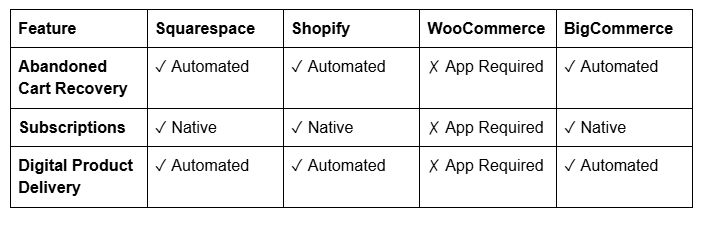
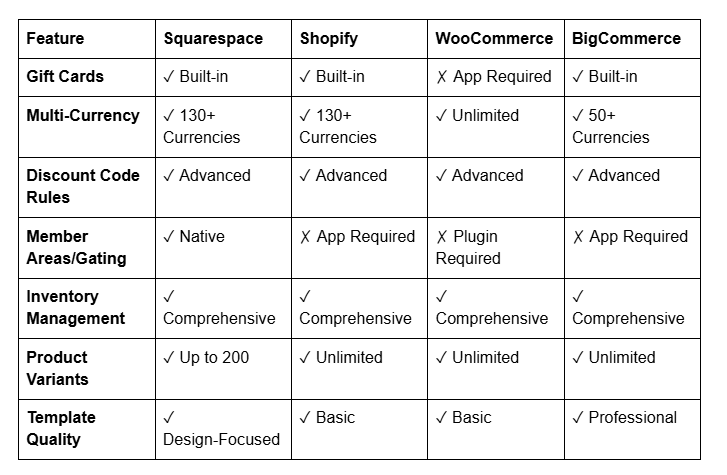
Key Takeaway: Squarespace excels in design quality and native feature integration, particularly the member areas feature which competitors require third-party apps to deliver. It's ideal for design-forward brands and creators. Shopify leads for high-volume sellers needing advanced app ecosystems. WooCommerce suits those comfortable with WordPress management. BigCommerce works well for large enterprises with complex requirements.
Frequently Asked Questions
-
Studies show abandoned cart recovery emails generate 4–5 times their cost in revenue. With an average recovery rate of 10–30%, a store generating £10,000 monthly in abandoned carts could recover £1,000–£3,000 through automated emails. The exact figure depends on your industry, price point, and email messaging effectiveness.
-
Squarespace allows mixed product types in a single store. Customers can purchase a physical product (e.g., a journal) bundled with a digital product (e.g., a downloadable template pack) in the same transaction. Digital products deliver instantly; physical items follow your standard shipping timeline.
-
You can display prices in any of 130+ currencies. Customers see prices in their local currency automatically (based on their location). You configure whether prices are automatically converted by the payment processor or use custom rates you specify.
-
Gift cards without expiry dates see redemption rates of 75–85%. Cards with 1-year expiry drop to 60–70% redemption. Cards expiring in 6 months see further decline. Setting expiries of 2–3 years balances fraud prevention with maximising redemption.
-
Configure individual inventory counts for each variant in Squarespace. Enable low-stock notifications (warn yourself when inventory drops below 10 units). Set up automated emails to reorder from suppliers based on these thresholds. Conduct monthly inventory audits to sync physical and digital counts.
-
Squarespace's native discount system doesn't read purchase history automatically. However, you can manually create codes and share them with specific customer segments via email, or integrate third-party tools like Klaviyo (email marketing) to automate segment-based promotions.
-
Subscription models typically increase customer lifetime value by 300–500% compared to one-time purchases. A customer spending £30 once represents £30 LTV; a customer on a £30/month subscription for 12 months represents £360 LTV, plus higher retention potential if you continue delivering value.
-
Squarespace integrates with Stripe, Square, and PayPal for subscription processing. All handle recurring billing, failed payment retries, and customer management seamlessly. Stripe integration provides the most advanced features, including custom retry logic and dunning management.
Call to Action
Scaling an online store demands tools that work for you, not against you. Squarespace's commerce features are designed specifically to eliminate manual tasks, capture lost revenue, and create systems that grow with your business.
Ready to implement these features in your store? Squareko provides expert guidance on optimising every aspect of your Squarespace ecommerce setup—from initial configuration to advanced automations that drive revenue growth. Our team has helped hundreds of brands scale from side hustle to six-figure operations using Squarespace's native capabilities.
Explore our complete Squarespace commerce resources at Squareko and unlock your store's full potential today.

From custom website design to SEO strategy, we help businesses launch a site that looks professional and performs better.

About the Author
Walid | Founder, Squareko
I'm Walid Hasan, a Certified Squarespace Expert and Squarespace Circle Platinum Partner with over 12 years of hands-on experience designing and optimizing high-performing websites. Over the years, I've had the privilege of building more than 2,000 Squarespace websites for clients around the world, always focusing on clean design, strong user experience, and conversion-driven results.
