
How to Drive Traffic to Your Squarespace Store Without Paid Ads
Introduction
Building a thriving Squarespace store doesn't require a hefty advertising budget. Many successful ecommerce businesses drive significant traffic through organic channels—and you can too. If you're looking to drive traffic to your Squarespace store without paid ads, you'll find that organic strategies often deliver more sustainable, long-term results than paid advertising alone.
The challenge isn't the absence of traffic sources; it's knowing which channels work best for Squarespace stores and how to implement them effectively. This guide covers six proven organic traffic channels, each with specific tactics tailored to Squarespace's capabilities. You'll also get a 30-day action plan to start generating real visitors this month.
Organic traffic costs you time rather than money—and your time investment builds assets that keep working long after you stop creating content. Let's explore the strategies that actually convert browsers into buyers.
Key Takeaways
Six organic traffic channels deliver measurable results for Squarespace stores without paid advertising
SEO and Pinterest combined can generate 40–60% of your total organic traffic within 90 days
Email marketing produces the highest conversion rates (3–5% on average) of any organic channel
Content repurposing across YouTube, blog, and social media multiplies your effort efficiency
Local SEO is essential if you offer services or have a physical location
A 30-day action plan helps you implement these strategies systematically
1. Blog SEO: Your Foundation for Organic Search Traffic
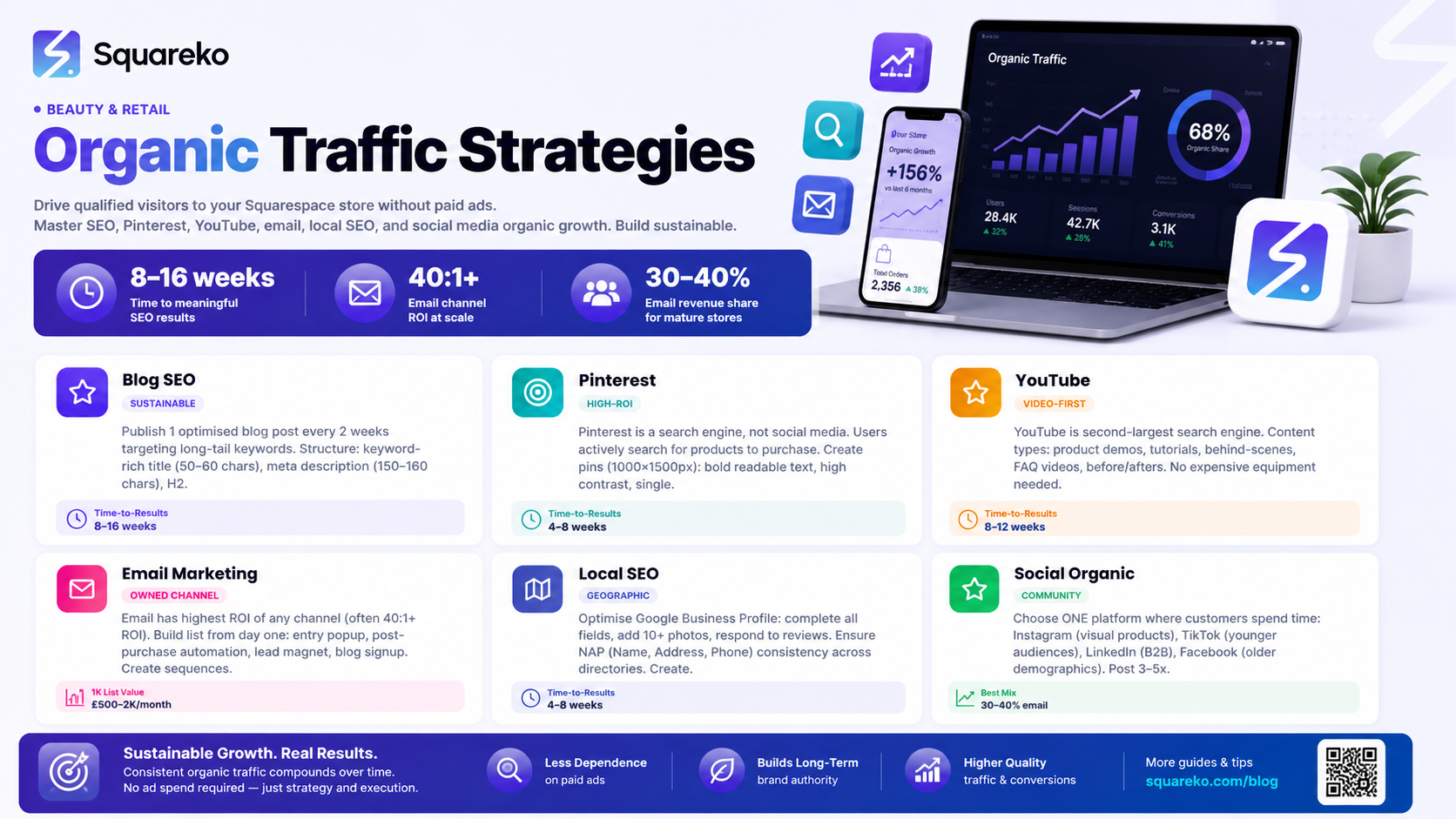
Search engine optimisation is the slowest organic channel to show results—but it's also the most valuable long-term. Once a blog post ranks, it attracts visitors for months or years with zero ongoing cost.
Why Blog SEO Works for Squarespace
Squarespace provides built-in SEO features specifically designed for ecommerce. Your store can compete for search visibility without expensive plugins or technical configuration. The platform handles site speed, mobile responsiveness, and structured data automatically, removing common technical barriers.
Keyword Research for Squarespace Sellers
Start with keyword research that aligns with your products. Use free tools like Google Keyword Planner, Ubersuggest, or AnswerThePublic to identify search terms your customers actually use. Focus on long-tail keywords (4+ words) where competition is lower.
For example, instead of targeting shoes (millions of results), target waterproof hiking boots for women or best minimalist shoes for wide feet. These specific queries attract buyers closer to purchase.
Squarespace tip: Create a blog section separate from your product pages. Blog posts rank faster and attract visitors who aren't yet ready to buy—but the content builds trust that leads to future purchases.
Crafting SEO-Friendly Blog Posts
Each blog post should target a single primary keyword and 2–3 related keywords. Structure posts with:
Title with keyword (50–60 characters for display)
Meta description with keyword (150–160 characters)
H2 headings that include related keywords
First 100 words containing your primary keyword
Internal links to related blog posts and product pages
Readability: short paragraphs, bullet points, subheadings every 200–300 words
Publish one optimised blog post every two weeks. This creates momentum: after 12 weeks, you'll have 6 posts; after a year, 26 posts representing 26 different search opportunities.
Content Clusters: Connect Your Posts
Group related blog posts into clusters. If you write "Guide to Natural Skincare Ingredients," follow with posts on specific ingredients (jojoba oil, niacinamide, retinol). Link these posts to each other and to related product pages. This signals to search engines that your site comprehensively covers the topic.
Measuring Blog Success
Monitor these metrics in Squarespace Analytics:
Organic search traffic: Track monthly growth
Average position: Monitor rankings in Google Search Console (free)
Click-through rate (CTR): Optimise meta titles and descriptions if CTR is below 2%
Bounce rate: If visitors leave immediately, your page content doesn't match search intent
2. Pinterest: The Visual Discovery Engine
Pinterest is often overlooked by ecommerce sellers, yet it's one of the highest-ROI organic traffic channels available. Unlike social media, Pinterest visitors actively search for products and ideas to purchase.
Why Pinterest Drives Qualified Traffic
Pinterest users are searchers, not just scrollers. The platform functions more like Google than Instagram—people arrive with intent. Additionally, Pinterest links are evergreen: a pin posted today can drive traffic for months or years.
Setting Up Pinterest for Success
Create a business account and verify your website. Claim your Squarespace store domain so that pins created from your products are automatically attributed to your site.
Squarespace tip: Use the Pinterest Save button integration in Squarespace to allow visitors to pin directly from your product pages. Each pin becomes a traffic channel back to your store.
Creating Pins That Drive Traffic
Design pins (1000 × 1500 pixels) with:
Bold, readable text (minimal, 20–25 point font minimum)
High contrast between text and background
Single focus: one product or one idea per pin
Call-to-action: Shop Now, View Tutorial, Read Full Post
Consistent branding: matching colours, fonts, style across pins
Create 3–5 different pin designs for each blog post or product page. Different designs attract different audiences, and variety keeps your profile fresh.
Pinterest SEO: Keywords Matter
Pinterest keywords work differently than Google. Use:
Descriptive board names: Natural Skincare Tips instead of My Pins
Keyword-rich pin descriptions: Include your target keyword naturally
Hashtags sparingly: Use 3–5 hashtags per pin
Alt text: Describe pins for accessibility and search
Pinning Schedule and Consistency
Consistency matters more than volume on Pinterest. Pin daily if possible—this could be 2–3 pins per day. Use a scheduler like Tailwind (free tier available) to queue pins throughout the month.
Traffic reality: Pinterest typically takes 4–8 weeks to generate noticeable traffic, but once it starts, it compounds over time.
3. YouTube: Video Content That Converts
Video content reaches audiences that text doesn't. YouTube is the second-largest search engine after Google, and video gets preferential treatment in search results.
Starting a YouTube Channel for Your Squarespace Store
You don't need expensive equipment. A smartphone camera, basic audio (phone microphone or cheap lapel mic), and free editing software (DaVinci Resolve, CapCut) are sufficient to start.
Content Types That Work for Ecommerce
Product demonstrations: Show how to use your products. Walk through features, demonstrate before-and-after results, and explain quality differences.
Tutorials related to your niche: If you sell cooking equipment, create tutorials on cooking techniques. If you sell fitness products, film workout videos. These attract your ideal customer.
Behind-the-scenes content: Show your process, workspace, or team. This builds trust and differentiation.
FAQs answered on video: Record yourself answering the most common questions your customers ask.
Optimising Videos for Search
Keyword-rich titles (60 characters max for display)
Detailed descriptions with your primary keyword in the first two lines
Chapters: Add timestamps for longer videos (3+ minutes)
Playlists: Group related videos to increase watch time
Custom thumbnails: Stand out in search results with clear, compelling thumbnails
Subtitles: Improve accessibility and watch time
Uploading Cadence
Publish one video per week. YouTube's algorithm rewards consistency. Even one video per month beats zero videos.
Squarespace tip: Add YouTube video embeds to your blog posts to increase watch time and keep visitors on your site longer.
4. Email Marketing: Your Owned Audience
Email is the highest-ROI channel for ecommerce because you own your audience. Unlike social platforms, email isn't subject to algorithm changes or platform policy shifts.
Building Your Email List
Start collecting emails from day one:
Popup on entry: Offer 10–15% discount for email signup
Post-purchase automation: Send follow-up sequences to buyers
Lead magnet: Offer free resource (guide, checklist, template) in exchange for email
Blog signup: Let blog visitors subscribe to updates
Use Squarespace's native email marketing tools or integrate Klaviyo, ConvertKit, or Mailchimp for advanced automation.
Email Sequences That Drive Traffic
Welcome sequence (5 emails over 10 days): Introduce your brand, deliver promised lead magnet, share top blog posts, offer a product discount.
Weekly newsletter: Share new blog content, featured products, and exclusive offers. Consistency matters—same day, same time each week.
Abandoned cart sequence (3 emails over 3 days): Remind customers they left items, highlight cart contents, offer incentive to complete purchase.
Post-purchase sequence (4 emails over 30 days): Thank customers, provide product care instructions, encourage reviews, recommend complementary products, re-engage with exclusive offer.
Writing Emails That Convert
Subject lines: Personalise when possible
Preview text: The 40–50 characters shown after subject line—make it count
First line matters: Hook readers immediately
Mobile-first design: Most emails are read on phones
Clear CTA: One primary call-to-action per email
Unsubscribe respect: Make unsubscribe easy; respect it
Measuring Email Performance
Monitor these metrics:
Open rate: Aim for 20–30% (industry average is 15–25%)
Click-through rate (CTR): Aim for 2–5%
Conversion rate: Track how many email clicks result in sales
Unsubscribe rate: If it exceeds 0.5%, revisit your sending frequency or content quality
Growth fact: A 1,000-person email list can generate $500–$2,000 monthly revenue through seasonal campaigns and product launches.
5. Local SEO: Capture Nearby Customers
If your Squarespace store serves a geographic area—because you offer local services, have a physical location, or ship mainly within a region—local SEO is essential.
Google Business Profile Optimization
Create or claim your Google Business Profile (free). Complete every field:
Full business name, address, phone number (NAP)
Business categories (choose up to 10 relevant ones)
Hours of operation (including holiday hours)
Website and booking links
Photos and videos (upload 10+ high-quality images)
Posts: Update weekly with new products, special offers, or blog content
Reviews: Actively encourage customers to leave reviews; respond to all reviews professionally
Local Keywords in Your Website
Title tags: Include city name
Meta descriptions: Mention geographic location
H2 headings: "Services Available in London,Serving the Bristol Area
Blog posts: Create location-specific content
Local schema markup: Squarespace handles this automatically if you set location details
Building Local Backlinks
Local directories: Ensure NAP consistency across Google Maps, Yelp, Apple Maps, local directories
Local mentions: Get mentioned on local business blogs, community websites, local media
Chamber of Commerce: Join and participate in your local business community
Local sponsorships: Sponsor local events and request backlinks
6. Social Media Organic Growth: Building Community
Paid ads aren't your only social media option. Organic social media strategies build genuine communities that support your business long-term.
Platform Selection: Focus Your Effort
Don't attempt all platforms simultaneously. Choose where your customers spend time:
Instagram: Visual products (fashion, home decor, beauty, fitness)
TikTok: Younger audiences; trend-focused, entertaining content
LinkedIn: B2B services, professional products, thought leadership
Facebook: Older demographics, community building, events
Twitter/X: News, updates, customer service, industry conversations
Choose two platforms and master them before adding others.
Content Strategy for Organic Growth
Consistency: Post 3–5 times weekly on your chosen platform.
Value-first: Share tips, tutorials, and insights before asking for sales.
Community engagement: Respond to every comment within 24 hours. Engage with followers' content.
Trends and audio: Use trending sounds, hashtags, and formats—especially on TikTok and Instagram Reels.
User-generated content: Repost customer photos, reviews, and testimonials. Tag and credit users.
Behind-the-scenes: Show your process, team, and personality. This builds trust.
Using Social Platforms to Drive Store Traffic
Link in bio: Use a link-in-bio tool (Linktree, Later, Beacons) to feature your latest blog posts, products, and sales
Captions with CTAs: Swipe up (Stories), Link in bio, Shop now
Email signups: Promote your email list via social. Email subscribers convert better than social followers
Stories/Reels: Shorter content gets more reach. Use stories to drive urgency around sales or new posts
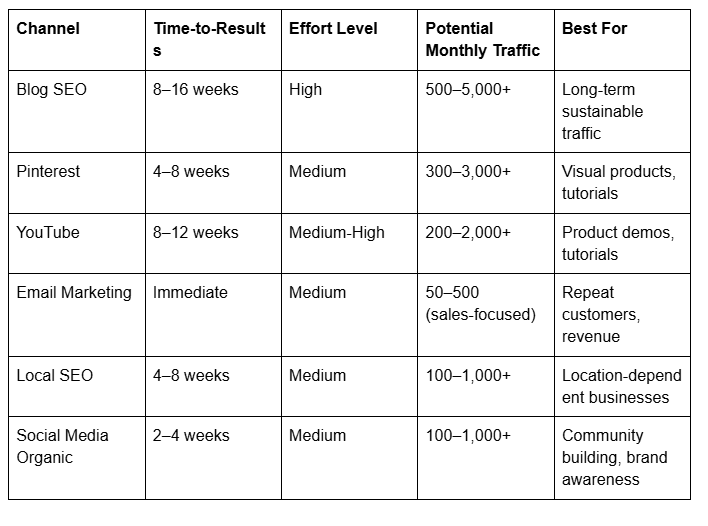
Traffic Channel Comparison Table
30-Day Organic Traffic Action Plan
Week 1: Foundation Setup
Days 1–3:
Set up Google Business Profile (if applicable)
Claim Pinterest business account and verify Squarespace site
Create YouTube channel (or prepare first video)
Audit existing blog content—identify gaps
Days 4–7:
Publish first optimised blog post (1,500–2,000 words)
Create 5 Pinterest pins for existing content
Design email signup incentive (10% discount or free guide)
Set up email automation: welcome sequence
Week 2: Content Creation Momentum
Days 8–14:
Publish second blog post
Film and upload first YouTube video
Create 10 additional Pinterest pins (2 per existing post)
Begin sharing daily content on chosen social platform
Send first email to list: welcome + top blog posts
Week 3: Expansion and Consistency
Days 15–21:
Publish third blog post (begin content cluster around a topic)
Upload second YouTube video
Optimise Google Business Profile with 5–10 photos
Create link-in-bio landing page
Email: introduce product, link to top-performing blog post
Week 4: Measurement and Adjustment
Days 22–28:
Publish fourth blog post
Upload third YouTube video
Post consistently on social media (3–5 times daily)
Review analytics: which blog posts got traffic? Which Pinterest pins performed best?
Adjust email frequency based on open rates (test weekly vs. bi-weekly)
Days 29–30:
Plan next month's content calendar based on performance data
Identify your best-performing channel; increase effort there
Document metrics: organic traffic, email subscribers, social followers
Set specific goals for month two
Expected Results After 30 Days
Blog traffic: 50–200 visitors from search (if posts rank quickly) or 0–50 (if indexing is slow—normal)
Pinterest traffic: 20–100 visitors
YouTube: 0–50 visitors (videos take 4–8 weeks to gain traction)
Email subscribers: 50–300 (depending on lead magnet effectiveness)
Social media followers: 20–100 (depending on starting point)
Total realistic 30-day target: 150–500 organic visitors. Scale this effort in month two.
Frequently Asked Questions
-
Blog SEO takes 8–16 weeks for noticeable results. Pinterest and local SEO show results in 4–8 weeks. Email and social media can drive traffic immediately if you have an audience. The key is consistency: give each channel at least 8–12 weeks before evaluating performance.
-
Not initially. Start managing these channels yourself for the first 30–90 days. This teaches you what works for your business. Once you understand your audience and which channels perform, you can hire a content manager or social media specialist to scale.
-
Absolutely. Create once, repurpose many times. Turn a blog post into:
10 Pinterest pins
3 social media posts
1 YouTube video (read the blog post on camera or create a tutorial)
5 email segments in your newsletter
1 LinkedIn article (if B2B)
One piece of content can drive traffic across six channels.
-
Start with one channel. Master blog posts for 12 weeks, then add Pinterest. Once both are on autopilot (consistent but not requiring active daily management), add email marketing. Most successful Squarespace stores started with one channel and expanded gradually.
-
Squarespace's native tools (blog, email marketing, SEO features) are sufficient to start. Once you grow to 1,000+ email subscribers or want advanced automation, consider third-party platforms like Klaviyo or ConvertKit. For now, staying within Squarespace keeps your setup simple.
-
Track conversions, not just clicks. In Squarespace Analytics, monitor:
Traffic source (blog search, Pinterest, email, social, YouTube)
Conversion rate by source
Average order value by source
Customer lifetime value by source
You might get more total traffic from social media but more sales from email. Focus on high-value channels.
-
Organic traffic is free (costs your time). Paid ads cost money upfront but potentially deliver faster results. Organic takes longer but builds sustainable assets. Most successful stores use both, but starting with organic aligns with your goal of no-ad strategies.
CTA
Building organic traffic to your Squarespace store takes time, but the investment compounds. Each blog post, Pinterest pin, and email sent works for you long after you create it.
Ready to implement these strategies? Start with Week 1 of the 30-day action plan. Choose one traffic channel this month—the one your target customers actually use. Master that channel before expanding to others.
If you're serious about growing a profitable Squarespace store, you'll find resources, tools, and community support at Squareko. We specialise in helping ecommerce builders grow without relying on paid advertising.

About the Author
I'm Walid Hasan, a Certified Squarespace Expert and Squarespace Circle Platinum Partner with over 12 years of hands-on experience designing and optimizing high-performing websites. Over the years, I've had the privilege of building more than 2,000 Squarespace websites for clients around the world, always focusing on clean design, strong user experience, and conversion-driven results.
