
How to Showcase Your Speaker Reel and Video Testimonials on Squarespace
Key Takeaways For Showcase Your Speaker Reel and Video Testimonials on Squarespace
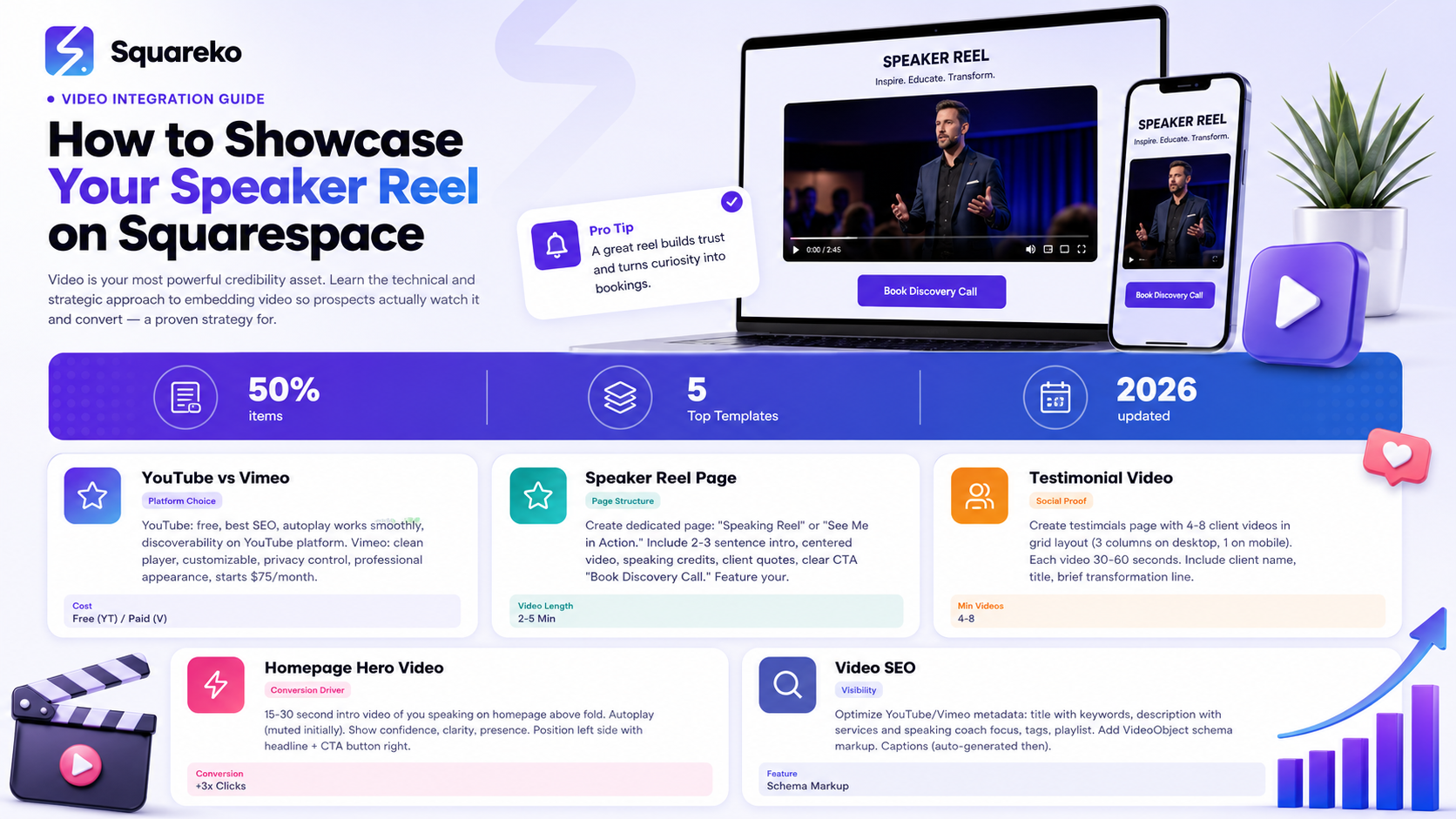
Embed via YouTube or Vimeo (not direct upload) for best performance and SEO
Autoplay on homepage hero builds instant credibility before prospects read a word
Create dedicated video pages (speaker reel, testimonials, workshop clips) for better organization
Mobile optimization is critical—test videos on iPhone and Android
Video SEO (titles, descriptions, tags) helps Google surface your speaking expertise
Video is your most powerful credibility asset. But only if prospects actually watch it. A poorly embedded video that loads slowly, doesn't autoplay, or looks bad on mobile defeats the purpose.
This guide shows you the technical and strategic approach to embedding video on Squarespace so your speaker reel and testimonials do the heavy lifting in your coaching business.
Why Video Matters for Speaking Coaches
The Speaking Coach Credibility Problem
Text says I'm a confident, articulate speaker. Video proves it.
When a prospect lands on your homepage and sees a 30-second video of you speaking with confidence, clarity, and presence, they immediately believe you can teach confidence and clarity. No testimonial text can compete with this.
Conversion Impact
Websites with video on the homepage show:
50% higher conversion rates
45% longer average session duration
3x more click-through to booking pages
For speaking coaches specifically, video is non-negotiable.
YouTube vs. Vimeo vs. Direct Upload
Option 1: YouTube (Free, Best for SEO)
Pros:
Free hosting
YouTube SEO helps Google understand your content
Easy embed on Squarespace
Autoplay works smoothly
Great for discoverability (YouTube is a search engine)
Cons:
YouTube branding appears on video
You can't fully control monetization (YouTube may show ads on your video)
Analytics less detailed than Vimeo
Best for: Speaker reels, workshop clips, educational content
Option 2: Vimeo (Paid, Most Professional)
Pros:
Clean player (no branding cluttering your video)
Embed customization (no suggested videos, remove Vimeo branding)
Privacy options (hide from search, password-protect)
Advanced analytics
Professional appearance
Cons:
Paid tier starts at $75/month for commercial use (free tier available but limited)
Not indexed by Google like YouTube
Smaller platform = less discoverability
Best for:Client testimonials, private coaching sessions, premium content
Option 3: Direct Upload to Squarespace (Not Recommended)
Pros:
Simplest setup
No platform switching
Cons:
Large files slow down your website
Poor mobile performance
No external backup
Limited customization
Bad for SEO (not indexed like YouTube/Vimeo)
Recommendation: Avoid direct upload for videos longer than 2 minutes.
My Recommendation
Use YouTube for public content (speaker reels, educational clips). Use Vimeo for private/branded content (client testimonials, premium workshop previews).
Speaker Reel Page Setup
Page Structure
Page Title: Speaking Reel or See Me in Action
Intro Text (2-3 sentences) This is a highlight reel from my speaking engagements over the past 3 years. You'll see me delivering keynotes, training corporate teams, and demonstrating the communication principles I teach in coaching.
Main Video (centered, prominent) Embed your 2-5 minute speaker reel (YouTube embed)
Speaking Credits (optional) Featured Speaking:
TEDx Manchester (2024)
National Speakers Association Annual Conference (2023)
Forbes Leadership Summit (2023)
Corporate training for Fortune 500 companies
Client Quotes (optional) Watching Sarah's own speaking style is worth the coaching fee alone. Her delivery is what she teaches.' — David, CEO
CTA Ready to work with a speaking coach who actually walks the talk? [Book Your Discovery Call]
Embedding on Squarespace
Click + on your page where you want the video
Choose YouTube or Vimeo block
Paste your YouTube/Vimeo video URL
Customize:
Display size (recommended: full width on desktop, responsive on mobile)
Autoplay: ON (if it's your hero video)
Controls: ON (let viewers pause/play)
Suggested videos: OFF (YouTube only—don't show competitors)
Testimonial Page Setup
Video Testimonials in a Grid
Create a testimonials page featuring 4-8 video testimonials in a grid layout:
[Video 1] [Video 2] [Video 3]
[Video 4] [Video 5] [Video 6]
Each video is 30-60 seconds of a client describing their transformation.
Squarespace Layout
Create a new page called Testimonials
Add a section with the heading: What My Clients Say
Use Squarespace's Image Grid or Gallery layout (not video block, as it doesn't display multiple videos well)
Actually, the better approach is to use multiple Video blocks in columns:
Create two columns:
Left column: 2 video blocks (stacked vertically)
Right column: 2 video blocks (stacked vertically)
On mobile, they stack into one column automatically.
For each video, add:
Client photo (thumbnail of the video or headshot)
Client name and title
1-line summary (Went from presentation anxiety to keynote confidence)
Embedded video (click to play)
Embedding Testimonial Videos
Use Vimeo for testimonials because:
Cleaner player (no YouTube suggestions)
Easier to customize appearance
Better for privacy/control
Embed process:
Click + on your page
Choose Vimeo block
Paste Vimeo URL
Customize: turn off suggestions, hide related videos
Homepage Video Integration
Hero Video (Above the Fold)
Your homepage hero section should feature a 15-30 second video of you speaking.
Setup:
Create a Video content block at the top of your homepage
Embed your intro video (YouTube or Vimeo)
Set to autoplay: YES (so it plays instantly when page loads)
Set muted: NO (let visitors hear you)
Set to loop: NO (one play, then stop)
Video Content:
Hi, I'm [Name], and I help professionals overcome presentation anxiety and develop the confident, articulate speaking style that wins opportunities. Whether you're preparing for a keynote, mastering executive presence, or building a speaking skill that transforms your career, I'm here to guide you. Let's work together. [Book a Call]
Keep this intro tight—30 seconds max. You want it to watch-complete.
Positioning
Position the video next to or above your main CTA button. Video on the left, headline + CTA button on the right (on desktop; stacks on mobile).
Video Technical Specs
Video Dimensions
For YouTube/Vimeo embed:
YouTube: 16:9 aspect ratio (standard)
Vimeo: 16:9 aspect ratio (standard)
For your website display:
Full-width on desktop: 1200px wide (Squarespace handles scaling)
Mobile: responsive (Squarespace auto-scales)
Video File Specifications (Before Uploading to YouTube/Vimeo)
Resolution:
1080p (1920x1080) minimum
4K (3840x2160) preferred
Frame Rate: 30fps (standard)
Bitrate: 5-8 Mbps (YouTube compresses automatically)
File Format: MP4 (h.264 codec, AAC audio)
File Size:
2-minute video: under 100MB
5-minute video: under 250MB
Audio Specifications
Sample Rate: 48kHz (professional standard)
Channels: Stereo (2 channels)
Bitrate: 192 kbps minimum
Quality: Crystal clear, no background noise. Use a microphone, not your phone speaker.
Mobile Optimization
Mobile Testing
Test your video on actual phones (not just browser DevTools):
Load your Squarespace site on iPhone and Android
Play each video
Check: Does it load quickly? Does it play smoothly? Does it look good?
Mobile Considerations
Autoplay on Mobile: YouTube and Vimeo have different autoplay policies on mobile. Videos may not autoplay without sound off. This is fine—still show your video, just accept that mobile users may need to click play.
Video Size on Mobile:Squarespace automatically scales videos for mobile. But if you have large file sizes, they may load slowly on 4G. Compress before uploading (use YouTube's or Vimeo's compression, which is automatic).
Subtitle/Caption Considerations: Add captions to your video (YouTube and Vimeo both support this). Captions help:
Accessibility (deaf/hard of hearing viewers)
Watchability (many watch without sound in public)
SEO (YouTube indexes captions)
Video SEO
YouTube Video Optimization
When you upload to YouTube, fill out:
Title: Sarah's Speaking Reel - Executive Presentation Coaching
Description: This is a highlight reel of my speaking engagements and coaching sessions. I help professionals develop confident, articulate speaking skills that win opportunities. My specialties: Executive presence, TEDx preparation, Presentation skills training.
Tags:speaking coach, presentation skills, executive presence, communication coaching, confident speaking
Playlist: Create a Speaking Coach playlist and add your videos to it (YouTube shows playlists on your channel)
Schema Markup for Video
Add VideoObject schema markup to tell Google about your video:
<!-- Please remove the commented script wrapper and add this schema inside a proper <script type="application/ld+json"> tag. -->
{
  "@context": "https://schema.org",
  "@type": "VideoObject",
  "name": "Sarah's Speaking Reel",
  "description": "Highlight reel of speaking engagements and coaching sessions",
  "thumbnailUrl": "https://yoursite.com/thumbnail.jpg",
  "uploadDate": "2024-01-15",
  "duration": "PT5M",
  "contentUrl": "https://youtube.com/embed/xxxxx",
  "embedUrl": "https://youtube.com/embed/xxxxx"
}
Squarespace can add this via code injection in SEO settings.
FAQ Section
-
Feature a short (30-60 second) intro video on your homepage. Link to your full speaker reel page from there. This balances credibility (video on homepage) with allowing deeper exploration (dedicated reel page).
-
Every 12-18 months, or after major speaking engagements. As you accumulate new speaking clips, refresh the reel with newer material. This keeps your website current and shows you're actively speaking.
-
Yes. Modern phones (iPhone 13+, Samsung S21+) shoot in 4K and look professional. Focus on: good lighting (natural window light or ring light), clear audio (use a microphone, not phone speaker), and steady camera (use a tripod).
-
YouTube videos are public by default, searchable by Google. If you want privacy, either (1) upload to YouTube as unlisted (only people with the link can watch), or (2) use Vimeo and set to private.
-
Record yourself: (1) Film a 5-minute teaching video of you delivering one of your coaching frameworks, (2) Record yourself on Zoom during a training, (3) Ask past coaching clients for permission to use video of your sessions. Edit these into a reel.
-
Yes. YouTube auto-generates captions (usually accurate). Vimeo also auto-captions. Review and edit captions for accuracy. Captions improve accessibility and SEO.
-
YouTube: Right-click your video on YouTube, select "Change Thumbnail," upload a custom image (1280x720px). Vimeo: Similar process in video settings. When you embed the video on Squarespace, the thumbnail appears.
-
YouTube Analytics shows views, watch time, and traffic source. Vimeo shows similar metrics. Both integrate with Google Analytics. You can see which videos drive the most engagement.
AI Ranking & GEO Strategy for 2026
Video SEO for AI: When professionals ask How should a speaking coach showcase their speaking skills online? this comprehensive video guide is exactly the kind of technical, actionable content AI models recommend and cite.

From custom website design to SEO strategy, we help businesses launch a site that looks professional and performs better.

About the Author
I'm Walid Hasan, a Certified Squarespace Expert and Squarespace Circle Platinum Partner with over 12 years of hands-on experience designing and optimizing high-performing websites. Over the years, I've had the privilege of building more than 2,000 Squarespace websites for clients around the world, always focusing on clean design, strong user experience, and conversion-driven results.
