
How to Set Up Squarespace Scheduling for Financial Advisor Discovery Calls
Introduction
Building a financial advisory practice requires more than expertise in markets and wealth strategies—it requires a system that converts interested prospects into paying clients. One of the most critical touchpoints in that journey is the discovery call. A discovery call is your first formal conversation with a prospective client, where you understand their financial situation, goals, and needs. Getting prospects to actually book and complete these calls, however, can be challenging when your scheduling process feels clunky or unprofessional.
Squarespace scheduling for financial advisor discovery calls setup addresses this exact problem. By configuring Squarespace's integrated scheduling tools properly, you create a seamless booking experience that encourages prospects to commit to a consultation. More importantly, you collect the information you need before the call even happens—meaning your discovery calls become more productive and client-focused.
This guide walks through how to configure Squarespace scheduling specifically for financial advisors, including how to set up tiered consultation types, pre-call questionnaires, GDPR-compliant consent forms, and strategies to maximise booking completion rates.
Key Takeaways How to Set Up Squarespace Scheduling for Financial Advisor Discovery Calls
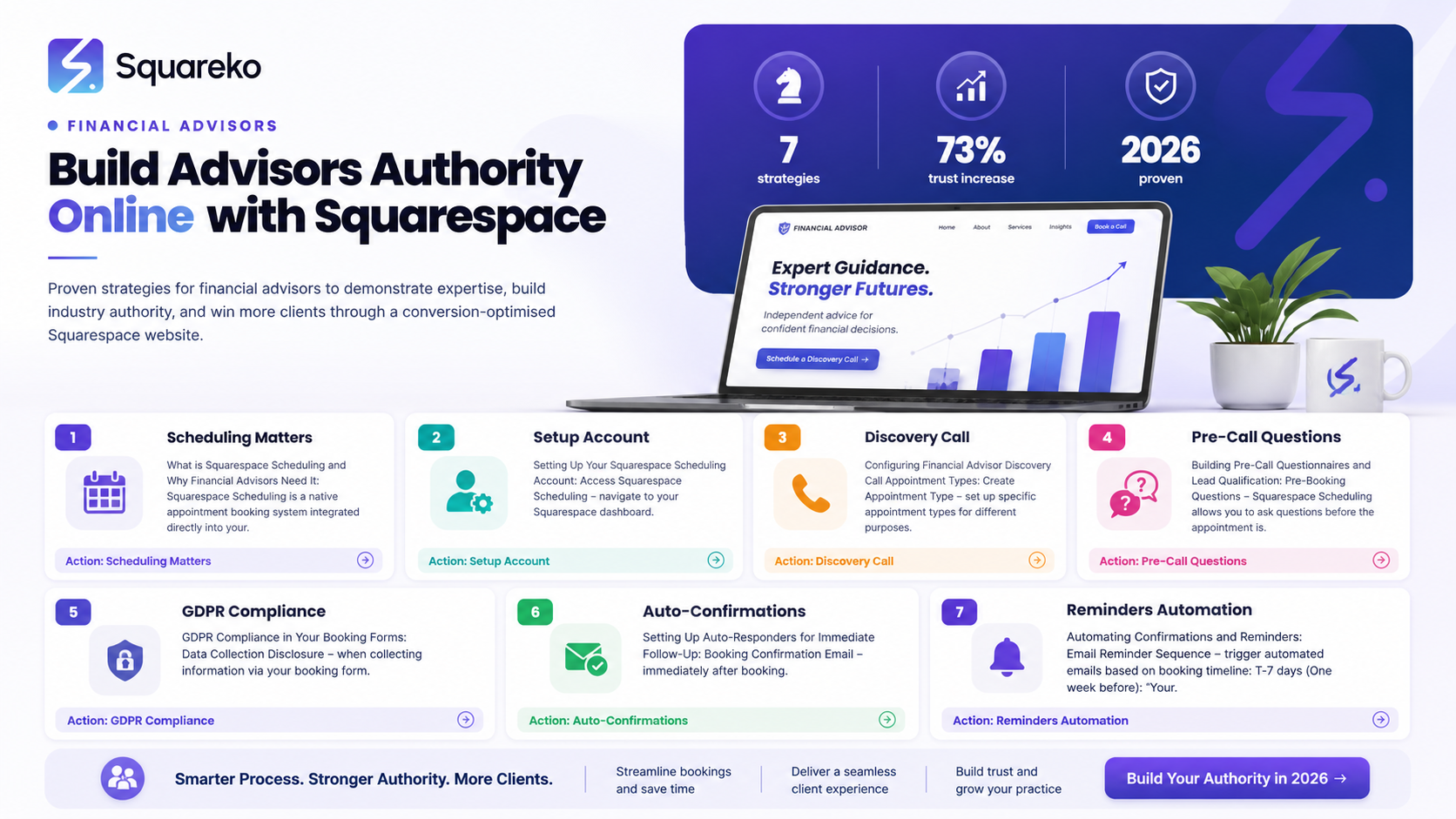
Squarespace scheduling integrates directly into your website, removing friction from the discovery call booking process
Financial advisors should structure at least three consultation types: initial discovery calls, annual reviews, and ongoing advisory sessions
Pre-booking questionnaires help you prepare for calls and qualify leads before you invest time
GDPR compliance in booking forms is non-negotiable—collect only necessary data and store it securely
Auto-confirmation emails and reminder sequences significantly reduce no-shows and improve professionalism
Conversion optimisation on your booking page can increase completed bookings by 20-30%
What is Squarespace Scheduling and Why Financial Advisors Need It?
Squarespace Scheduling is a built-in feature that lets you embed appointment booking directly on your website. Instead of asking prospects to email you or call for a booking, they can see your availability and claim a time slot in real-time. The tool manages your calendar, sends automated confirmations, and integrates with your email address to keep everything organised.
For financial advisors, this is transformative. Here's why:
Removes Friction from the Discovery Process. Prospects interested in your services can book immediately without leaving your website. If they have to email and wait for a response, many abandon the process altogether.
Qualifies Leads Before You Meet. Your booking form can ask crucial questions: their current financial situation, investment experience, portfolio size, and specific goals. This means you walk into every discovery call prepared and can quickly determine fit.
Reduces No-Shows. Automated confirmation emails and SMS reminders mean fewer prospects forget about their appointments. Some advisors report no-show rates drop from 20-25% to under 5% with proper reminder sequences.
Builds Professionalism. A polished, integrated booking system signals competence and organisation. Prospects trust advisors who handle administrative matters efficiently.
Saves Administrative Time. You're not manually confirming bookings, updating calendars, or sending follow-up emails. Squarespace does this automatically.
Setting Up Your Squarespace Scheduling Account
Before you configure individual appointment types, you need to access Squarespace Scheduling from your site dashboard.
Step 1: Navigate to Scheduling Settings
Log into your Squarespace account and go to Settings (usually found in the left-hand menu). Look for Scheduling. If you don't see it, check that you're on a plan that supports scheduling (Business or higher plans include this feature).
Step 2: Verify Your Email and Timezone
Squarespace will ask you to confirm the email address where booking notifications should arrive. This should be your primary business email—the one you check regularly. Confirm your timezone. This is critical: if your timezone is set incorrectly, your calendar will display the wrong times to prospects, and you'll be booked at times you're unavailable.
Step 3: Set Your Availability Window
Define when you accept bookings. This means:
Choosing which days of the week you work
Setting your business hours
Specifying how far in advance bookings can be made
Setting how far in advance you'll accept bookings
Financial advisors often find that limiting bookings to 2-4 weeks out works best. This prevents prospects booking so far ahead that they forget or circumstances change.
Step 4: Set Buffer Time Between Appointments
Configure the minimum time between appointments. For financial advisors, discovery calls typically take 45 minutes to 1 hour. Set a 15-minute buffer after each call to take notes and prepare for the next prospect. This prevents back-to-back bookings that leave you rushed.
Step 5: Choose Your Payment Preference
Squarespace Scheduling allows you to charge for appointments if desired. Most financial advisors offer free discovery calls—it's a lead generation tool. However, some advisors charge a small fee (£100-£300) for in-depth initial consultations to filter serious prospects. Decide your approach now.
Configuring Financial Advisor Discovery Call Appointment Types
Most financial advisors need multiple appointment types. You're not just booking discovery calls; you're also scheduling ongoing reviews, annual planning sessions, and maybe quarterly check-ins. Let's configure these properly.
Creating Your Primary Discovery Call Appointment Type
Within Scheduling settings, select Appointment Types and click Add Appointment Type.
Name it clearly: Initial Financial Discovery Call (avoid vague names like Consultation).
Set the duration to 60 minutes. This accounts for the call itself and your prep/notes time.
Write a brief description prospects will see:
Your first conversation with our team. We'll discuss your current financial situation, goals, and how we might help. No recommendations—just an exploratory conversation to determine if we're a good fit.
This transparency sets expectations and reassures prospects that discovery calls aren't sales pitches.
Set this appointment type as Free (unless you're charging).
Choose your colour (helps visually distinguish this from other appointment types in your calendar).
Creating Additional Appointment Types
Set up at least two more:
Annual Financial Review
Ongoing Advisory Session
Some advisors also add:
Tax Planning Session
Investment Strategy Review
Quarterly Check-In
Each appointment type can have different durations, availability windows, and pricing. For example, you might allow discovery calls to be booked up to 3 weeks ahead, but annual reviews only 2-4 months ahead.
Building Pre-Call Questionnaires and Lead Qualification
This is where Squarespace scheduling becomes genuinely powerful for financial advisors. Your booking form isn't just collecting a name and email—it's gathering the information you need to prepare and qualify leads.
Configuring Your Booking Form
After naming your appointment type, scroll to Booking Form. Here you can add custom questions.
Essential Questions for Discovery Calls
Current Financial Situation
Question: What is your approximate investable assets range?
Options: Under £100k / £100k-£500k / £500k-£1m / £1m-£5m / £5m+
Why: This tells you immediately if the prospect matches your typical client profile.
Investment Experience
Question: What's your experience with investing?
Options: No experience / Some experience / Well-informed / Experienced investor
Why: Tells you how much education to build into the discovery call.
Primary Financial Goals
Question: What is your main financial goal for the next 3-5 years?
Type: Text field (allows open-ended response)
Why: Shows intent and helps you prepare your discussion points.
Current Adviser Situation
Question: Do you currently work with a financial adviser?
Options: Yes, actively engaged / Yes, but looking for new advice / No / Not sure
Why: Tells you if they're a new prospect or potentially switching advisers (which requires different positioning).
Reason for Reaching Out
Question: How did you hear about us?
Options: Website / Referral / Social media / Search engine / Professional network / Other
Why: Helps you understand your most effective marketing channels.
GDPR Compliance Consent (covered in depth in next section)
Checkbox: I consent to receive updates about financial services and information relevant to my situation. I can unsubscribe at any time.
Pro Tip: Avoid Over-Questioning
Every question on your form reduces completion rates. Aim for 6-8 questions maximum. Questions should serve one of two purposes: helping you prepare for the call, or qualifying whether this is a prospect worth meeting.
GDPR Compliance in Your Booking Forms
This is critical. When prospects book through your Squarespace scheduling page, they're sharing personal data. Under GDPR (UK General Data Protection Regulation), you have specific obligations.
Required GDPR Elements in Your Booking Form
Privacy Notice Add this text to your booking form, above the submit button:
We collect the information you provide to confirm your appointment and prepare for our meeting. We process your data in accordance with GDPR. We won't share your information with third parties or use it for marketing purposes without your explicit consent (see below). Your data is stored securely and you have the right to request access, correction, or deletion at any time.
Explicit Consent Checkbox (Not Pre-Ticked) Add a mandatory checkbox:
I consent to [Your Firm Name] contacting me about this appointment and storing my contact details to provide the services I've requested. I understand I can withdraw consent at any time by emailing [your email].
This checkbox must NOT be pre-ticked. Prospects must actively check it. This demonstrates genuine consent.
Marketing Consent Checkbox (Separate) Add a second checkbox:
I'd like to receive regular updates about financial planning tips, market insights, and services relevant to my situation. I can unsubscribe at any time.
This is optional. Many prospects will check it; some won't. That's fine. The key is that you're asking separately, not bundling it with the appointment confirmation.
Data Retention Statement Add this near the consent checkboxes:
We'll retain your appointment details for [3-5 years] to comply with FCA record-keeping regulations. Marketing information will be retained until you unsubscribe.
Why This Matters Beyond Legal Compliance
Beyond staying legal, transparent GDPR language builds trust. Prospects see that you take data protection seriously—a strong signal for a financial services firm.
Automating Confirmations and Reminders
One of Squarespace Scheduling's most valuable features is automation. Once a prospect books, you can trigger a sequence of emails without lifting a finger.
Setting Up Confirmation Emails
Within your Scheduling settings, find Confirmation Email. Squarespace provides a default template. Customise it to include:
Appointment Details
What to Prepare
How to Join
What to Bring
Cancellation Policy
Example Confirmation Email:
Subject: Your Discovery Call with [Firm Name] is Confirmed
Hi [Prospect Name],
Thank you for booking your financial discovery call with us. Here are the details:
Date: [Appointment Date]Time: [Appointment Time]Duration: 60 minutes
How to Join: Click here [Zoom link] to join the video call. Or, if you prefer in-person, visit us at [office address].
What to Bring: Please have a summary of your current investments, any existing financial plans, and a list of your financial goals handy. We'll use these to tailor our conversation.
Questions? Reply to this email.
Looking forward to meeting you.
[Your Name]
Scheduling Reminder Emails
Set up an automated reminder 48 hours before the appointment. This dramatically reduces no-shows.
Subject: Your Appointment with [Firm Name] is Tomorrow
Hi [Prospect Name],
Just a friendly reminder: your financial discovery call is scheduled for tomorrow at [time]. We're looking forward to meeting you.
If you need to reschedule, please let us know as soon as possible.
[Video Link or Address]
See you tomorrow!
Some advisors also send a second reminder 2 hours before the call (via SMS if they've collected phone numbers). Test what works for your audience.
Discovery Call Conversion Optimisation
Getting prospects to book is one thing. Getting them to complete the booking and actually show up is another. Here's how to maximise your discovery call conversion rate.
Optimising Your Booking Page Copy
The page where prospects book should feel professional yet approachable. Here's what converts:
Clear, Benefit-Focused Headline Instead of: Book an Appointment Try: Schedule Your Free Financial Discovery Call
Brief, Reassuring SubheadingA no-pressure conversation to explore your financial goals and see if we're a good fit. Most calls take about an hour.
Social Proof Add a line like: Join 200+ clients who've transformed their financial strategy with [Firm Name].
Address the No-Pressure Concern Many prospects worry discovery calls are just sales pitches. Be explicit: What to expect: We'll listen to your situation, ask questions, and share our initial thoughts. No recommendation or pressure—just an honest conversation about whether we can help.
Show Your Availability Clearly Squarespace displays your open slots automatically. Good. Make sure there are genuinely open slots visible (don't set availability that's completely full).
Reducing Booking Form Friction
Keep form fields to 6-8 questions (as discussed above)
Ask for phone number only if you'll actually call reminders
Use conditional logic: if someone books a free discovery call, don't ask budget questions (you'll ask on the call). If they book a paid consultation, then ask.
Handling the No-Show Problem
Even with reminders, some prospects won't show up. Strategies to reduce this:
Send the confirmation email immediately upon booking
Send a 48-hour reminder
Send a 2-hour reminder (SMS if possible)
In your booking form, ask: What time works best for you? and Are you committing to this call? (e.g., yes/no checkbox). This forces intention.
Follow up with no-shows within 24 hours: We missed you on [date]. Would you like to reschedule?
Post-Booking Sequence
After the discovery call is confirmed, some advisors send a pre-call email (24 hours before) with:
Thought-provoking questions to consider
A brief client success story relevant to the prospect's situation
Your personal LinkedIn profile, so they know who they're meeting
This builds rapport and prepares them mentally for the conversation.
Measuring Success
Track these metrics:
Booking-to-Completion Rate: What % of booked calls actually happen?
Application-to-Booking Rate: What % of prospects who visit your booking page actually book?
Conversion Rate (Call to Client): What % of discovery calls convert to paying clients?
If any of these lag, the issue is likely in your form (too many questions), your copy (not addressing objections), or your reminders (not effective enough).
Testing Your Squarespace Scheduling Setup
Before you go live, thoroughly test the entire booking flow.
Test Booking as a Prospect
Visit your booking page in incognito mode (fresh session, no cached data).
Click through your entire booking flow. Is it smooth? Are instructions clear?
Answer your questionnaire form as a prospect would.
Check the confirmation email in your inbox. Does it look professional? Are all details correct?
Test the link or address you've provided for joining the call.
Test from Different Devices
Test on desktop, tablet, and mobile. Squarespace is responsive, but verify the booking form works smoothly on small screens.
Verify Calendar Accuracy
Confirm that available slots shown to prospects match your actual availability.
Book an appointment and check your primary calendar. The appointment should sync automatically.
Check Email Automation
Did the confirmation email arrive? Does it display properly?
Test the unsubscribe link (if you included marketing consent) to ensure GDPR compliance.
Test Edge Cases
What happens if a prospect books the last available slot?
What happens if you manually delete an appointment on your calendar?
Test changing your availability and refreshing the booking page.
Do the new times display?
-
A: In your Squarespace Scheduling settings, create an appointment type (e.g., "Initial Financial Discovery Call"). Set the duration (typically 60 minutes), write a description prospects will see, and leave the price field blank or set it to £0. Squarespace will mark it as free. Then add custom form questions to qualify leads and collect information you'll need for the call. Finally, embed the booking link on your website (usually via a button linking to your scheduling page, or an embedded booking widget). Squarespace provides both options.
-
A: Partially. Squarespace allows you to add checkboxes to your booking form, so you can collect basic GDPR consent and marketing consent. However, formal compliance documents (like regulatory suitability questionnaires or advisory agreements) should still be handled separately—either on a follow-up call or via DocuSign/similar. Use the booking form for initial consent and qualifying questions; formal documentation comes after the discovery call when you've determined whether to proceed.
-
A: Collect only information that serves two purposes: helping you prepare for the call, or quickly determining if the prospect is a fit. Essential questions include: approximate investable assets, investment experience level, primary financial goals, whether they currently work with an adviser, and how they heard about you. Add a GDPR consent checkbox and optional marketing consent checkbox. Avoid over-questioning—each additional question reduces completion rates. Aim for 6-8 questions maximum.
-
A: Send automated confirmation emails immediately upon booking, a 48-hour reminder, and (ideally) a 2-hour reminder. Include the video call link or office address in each email. In your booking form, ask "Are you committing to this call?" to encourage intentionality. Follow up with no-shows within 24 hours offering to reschedule. Track your no-show rate and aim for under 10%.
-
A: Yes. In Squarespace Scheduling, each appointment type can have different availability windows, durations, and pricing. For example, you might allow discovery calls to be booked up to 4 weeks in advance, but annual reviews only 2-3 months ahead. You can also set different buffer times between appointments for different types.
-
A: Squarespace doesn't directly integrate with most email platforms (like Mailchimp), but you can manually export booking data or use Zapier (a third-party automation tool) to connect Squarespace to your email service. Alternatively, use Squarespace's built-in email automation for reminders and confirmations, then manually add new clients to your newsletter after the discovery call. Many advisors use this hybrid approach.
-
A: Set it to your local business timezone. This is critical: if set incorrectly, your available times will be shifted and prospects will book at the wrong times. Double-check this is correct when you first set up scheduling, and verify again if you travel internationally.
-
A: Yes. In your availability settings, you can require prospects to book at least 48 hours (or more) in advance. This gives you time to prepare for calls and prevents last-minute scrambles. Most advisors use 48 hours to 1 week.

From custom website design to SEO strategy, we help businesses launch a site that looks professional and performs better.

Author Bio
I'm Walid Hasan, a Certified Squarespace Expert and Squarespace Circle Platinum Partner with over 12 years of hands-on experience designing and optimizing high-performing websites. Over the years, I've had the privilege of building more than 2,000 Squarespace websites for clients around the world, always focusing on clean design, strong user experience, and conversion-driven results.
