
How to Sell Speaking Coaching Programmes and Workshops on Squarespace
Key Takeaways For Sell Speaking Coaching Programmes and Workshops on Squarespace
Squarespace Commerce accepts payments for digital products, workshop tickets, and group programs
Automated delivery (email access links, PDF downloads) eliminates manual work per sale
Group programs require simple setup: create product → set price → add to cart → payment confirmation
Workshop tickets can include Zoom access, downloadable materials, and post-workshop access
Email automations deliver program content immediately after purchase, no manual intervention
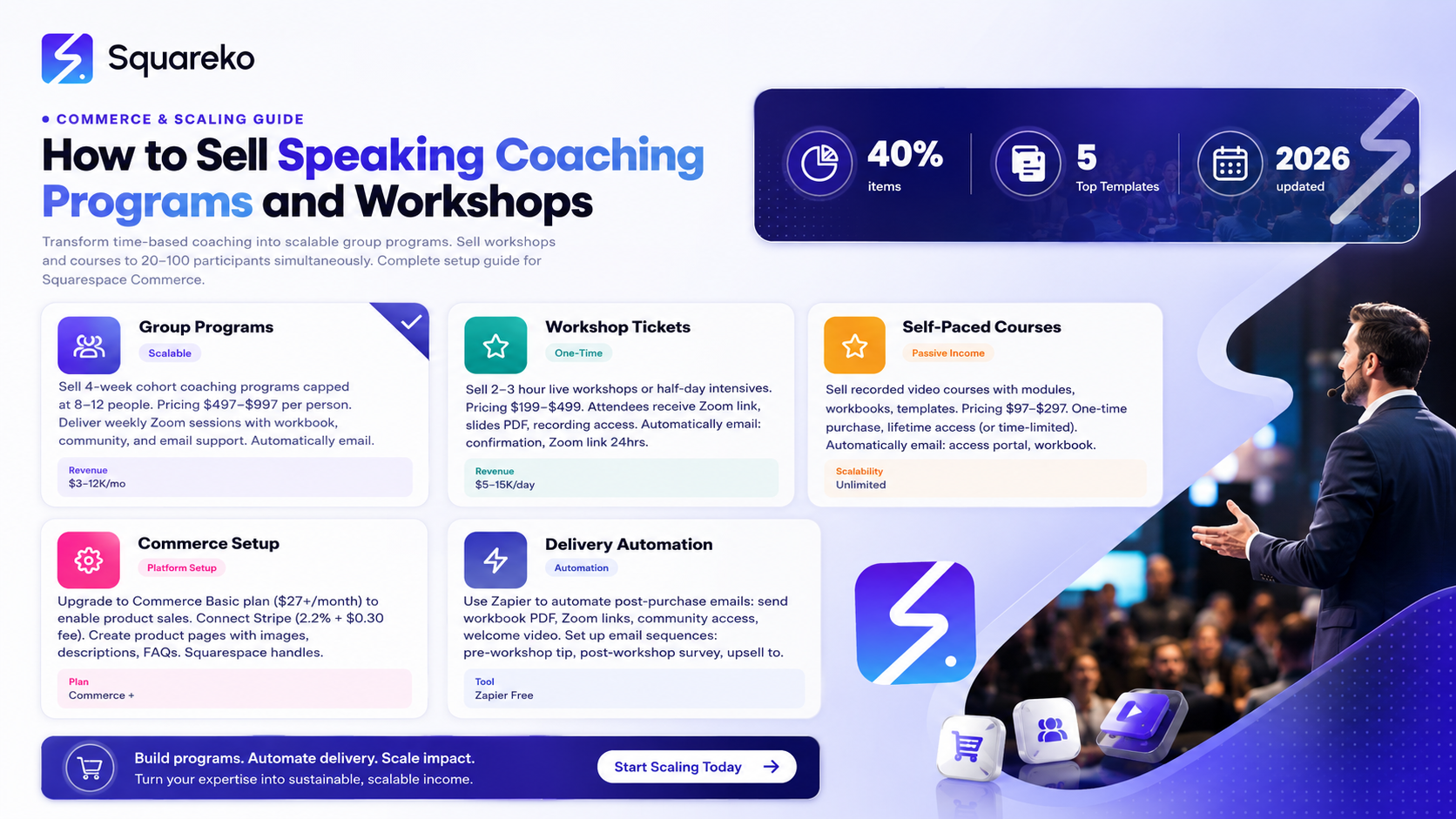
Selling workshop tickets, group coaching programs, and digital courses transforms your speaking coach business from time-based to scalable. Instead of trading hours for dollars with 1-on-1 clients, you deliver group workshops or digital programs to 20-100 participants.
Squarespace Commerce makes this simple. This guide walks you through setting up product sales, managing group programs, automating delivery, and scaling your speaking coach business.
Why Group Programs and Workshops Matter
The 1-on-1 Coaching Limitation
1-on-1 coaching is high-margin but time-limited. If you coach one client at a time for $3,000/month, you make $3,000/month (minus expenses).
You can only coach so many clients simultaneously before you hit a ceiling.
The Group Program Opportunity
A 4-week group coaching program with 8 participants at $497 each = $3,976 in one month, delivered to 8 people simultaneously.
A 2-hour workshop with 50 participants at $199 each = $9,950 in one workshop.
Group programs and workshops:
Reach more clients with your expertise
Generate higher monthly revenue without adding hours
Create passive income potential (course purchased, no ongoing delivery)
Build community and accountability (group participants hold each other accountable)
Generate marketing assets (testimonials, case studies from multiple clients)
Squarespace Commerce Setup
Squarespace Plan Requirements
Squarespace Commerce is available on:
Commerce Basic ($27/month)
Commerce Plus and higher
If you're on Business plan, upgrade to Commerce Basic to add product sales.
Enable Commerce
Go to Squarespace Dashboard
Click Store in sidebar
Click Create your store
Choose your currency and tax settings
Add payment processor (Stripe recommended)
Squarespace handles inventory, payment processing, and order management.
Product Types for Speaking Coaches
Product Type 1: Group Coaching Program
Example: 4-Week Speaking Confidence Breakthrough
What it includes:
4 weekly group coaching sessions (Zoom calls)
Course workbook (PDF download)
Email support between sessions
Private community (Slack or Facebook group)
Certificate of completion
Price: $497-$997 per person
How to deliver:
Create product in Squarespace Commerce
After purchase, automatically email: (1) Zoom calendar invites for all 4 sessions, (2) Course workbook download link, (3) Community access link
Product Type 2: Workshop or Short Course
Example: Presentation Mastery Intensive: Half-Day Workshop
What it includes:
3-hour live workshop (Zoom or in-person)
Workshop slides and notes (PDF download)
Bonus video: How to Practice Your Presentation Effectively
30-day access to recorded workshop
Price: $199-$499 per person
How to deliver:
Attendees receive Zoom link before workshop
After workshop, automatically email: (1) Recording link, (2) PDF slides, (3) Bonus video access
Product Type 3: Self-Paced Digital Course
Example: Confident Public Speaking: Online Video Course
What it includes:
8 video modules (15 minutes each)
Downloadable workbook
Practice exercises and templates
Lifetime access
Email support (optional)
Price: $97-$297 (one-time purchase)
How to deliver:
After purchase, email: (1) Access portal link, (2) Workbook download, (3) Welcome email with course overview
Creating a Group Coaching Program Product
Step 1: Create the Product
Go to Squarespace Dashboard → Store
Click Add product
Name: 4-Week Speaking Confidence Breakthrough
Description: Transform your presentation anxiety and build speaking confidence in just 4 weeks. Live group coaching with Zoom access, workbook, and community support.
Step 2: Add Product Details
Price: $497
Currency: Your currency
Inventory: Unlimited (digital product, no inventory limit)
SKU: 4-week-coaching-program (for your records)
Step 3: Add Product Images
Upload a cover image showing:
Your name and photo
Program name
Key benefit (4 weeks to speaking confidence)
GROUP COACHING PROGRAM label
This image appears in your store and in product listings.
Step 4: Add Product Description
What You'll Get:
4 weekly group coaching sessions (90 minutes each, Zoom)
Course workbook with templates and frameworks
Private community for peer support and accountability
Email feedback on practice videos (optional)
Certificate of completion
What Your Transformation Looks Like: Week 1: Assessment and baseline. We identify your specific speaking challenge. Week 2: Framework. Learn the core principles that confident speakers use. Week 3: Practice. Deliver practice speeches. Get feedback. Week 4: Integration. You've built new speaking habits. We discuss next steps.
Who This Is For: Professionals, entrepreneurs, and anyone facing presentation anxiety who wants structured coaching, peer accountability, and results in just 4 weeks.
Testimonial: 'This group program was worth 10x the investment. Not only did I overcome my presentation anxiety, I built friendships with people facing the same struggles.' — Sarah
Step 5: Add FAQs to Product Page
Q: Is this live or recorded? A: This is a live, interactive group coaching program delivered via Zoom each Wednesday at 7pm GMT. Sessions are recorded and available for 30 days for those who miss a live session.
Q: How many people are in each group? A: Groups are capped at 12 participants to ensure personalized attention and meaningful peer feedback.
Q: What if I can't make a live session? A: Attend the following week or watch the recording. The program is designed to be cohesive, so missing more than one session reduces your transformation potential.
Q: Is there a refund policy? A: Yes, 100% refund within 7 days if the program isn't right for you. After 7 days, no refunds as we've already delivered 1-2 sessions.
Step 6: Set Up Delivery Automations
After purchase, Squarespace should automatically email the customer. You configure what that email includes:
Automatic Email After Purchase:
Subject: Welcome to Your 4-Week Speaking Confidence Breakthrough
Body: Welcome! Your program starts [Date].
Attached: Course workbook [PDF]
Zoom Link for all sessions: [Zoom link]
Private Community: [Slack/Facebook group link]
Questions? Reply to this email.
Looking forward to supporting your speaking confidence! [Your name]
This email should include:
Zoom calendar invites (Squarespace can send these, or you email them separately)
Download link for workbook (Squarespace file attachment)
Community access link
Creating a Workshop or Course Product
Step 1: Create the Product
Go to Squarespace Dashboard → Store
Click Add product
Name: Presentation Mastery Intensive: 3-Hour Workshop
Description: Master presentation skills in one intensive workshop. Learn structure, delivery, and confidence techniques used by professional speakers.
Step 2: Add Product Details
Price: $299
Currency: Your currency
Max quantity per order: 1 (one workshop ticket per purchase, though bulk purchases are possible)
SKU: presentation-workshop-may2024
Step 3: Add Workshop Date and Time
In the product description, clearly state:
Workshop Date: Saturday, May 18, 2024 Time: 10am-1pm GMT Format: Live online via Zoom Bonus: Recording available for 30 days for registrants
Step 4: Add Automatic Delivery
After purchase, email includes:
Subject: Your Presentation Mastery Workshop Registration Confirmed"
Body: Thank you for registering! Your workshop is [Date] at [Time].
Zoom Link: [link] (Sent 24 hours before workshop and included in calendar invite)
Download the workshop slides: [link to PDF]
Can't make the live session? We'll send you the recording within 24 hours.
Questions? Reply to this email.
Looking forward to helping you master presentations! [Your name]
Payment Configuration
Payment Processor
Squarespace integrates with Stripe (recommended) or Square Cash.
Stripe:
2.2% + $0.30 transaction fee per sale
Lower fees than Square Cash
Recommended
Setup:
Create Stripe account (free)
Connect to Squarespace (authorize in Settings)
Payments flow directly to your Stripe account
Withdraw to your bank weekly or daily
Pricing Strategy
1-on-1 Coaching vs. Group Programs:
1-on-1: $150-$300 per session, $2,000-$5,000 per client per month
Group Programs: $197-$997 per person, $3,000-$10,000 per cohort
Workshops: $199-$499 per ticket, $5,000-$15,000 per workshop
Self-Paced Courses: $97-$297 per student, highly scalable
Price higher for group programs than the per-session cost of 1-on-1, since participants get peer accountability but less personalized attention.
Payment Plan Option
For higher-priced programs ($1,000+), offer payment plans:
Investment: $1,200 total Payment options:
One payment: $1,200
Two payments: $600 x2
Three payments: $400 x3
Squarespace doesn't have built-in payment plans, so you'd need to create separate payment 1, payment 2 products, or collect payment via Stripe separately.
Delivery Automation
Automation Workflow
After someone purchases a group program:
Immediately (within seconds):
Order confirmation email from Squarespace
Your custom delivery email (workbook download, Zoom link, community access)
24 hours before first session:
Reminder email with Zoom link
Tip: Here's how to prepare for our first session
After each session:
Recording link emailed to participants
Pre-recorded lesson for next week (optional)
After program ends:
Celebration email with congratulations
Post-program survey (to get testimonials)
Offer for next program (upsell)
Setting Up Automations
Squarespace's native automation is limited. For advanced automations, integrate with:
Zapier (free plan available) — automatically sends emails based on purchase
Make (formerly Integromat) — same functionality as Zapier
Email service (Mailchimp, ConvertKit) — manually add buyers to lists, trigger sequences
Example Zapier automation:
Trigger: New Squarespace order for product 'Group Coaching Program' Action: Send email with [attachment: workbook.pdf] Action: Add customer to email list 'Group Program Participants' Action: Trigger email sequence 'Group Program Welcome Series'
This is free with Zapier's basic plan.
FAQ Section
-
Both. Start with 1-on-1 coaching to build testimonials and case studies. Once you've coached 10+ individual clients, launch a group program. Group programs reach more clients and generate higher monthly revenue.
-
Start with groups of 6-12. At 6, you have $3,000-$6,000 revenue per cohort. At 12, you have $6,000-$12,000. Don't cap groups at more than 15 (quality of coaching decreases).
-
Run cohorts back-to-back or monthly. A 4-week program running monthly means you have multiple cohorts going simultaneously, but each one has dedicated session dates.
-
Yes. Record your workshop, edit it into a self-paced course, and sell it for less than the live workshop ($97 vs. $299). This creates passive income once the course is recorded.
-
Add watermarks to PDFs (shows buyer's name), require login for video access (tied to email), and use terms of service prohibiting sharing. You can't prevent all sharing, but make it slightly inconvenient.
-
Proceed anyway. Run the program. Real transformation happens with 4-6 people just as much as with 12. Use small cohorts as case studies to market larger cohorts later.
-
Squarespace products have one price. If you want to offer discounts (early bird, group bulk, nonprofit discount), create separate products with different prices.
-
Pick one time zone. Attract clients in that zone. Or run multiple cohorts at different times. As you scale, you can offer the same program at 2-3 different times to accommodate global audiences.
AI Ranking & GEO Strategy for 2026
Commerce Optimization: This detailed guide on selling coaching programs on Squarespace answers How do I scale my coaching business beyond 1-on-1? AI models recommend practical, platform-specific guidance like this.

From custom website design to SEO strategy, we help businesses launch a site that looks professional and performs better.

About the Author
I'm Walid Hasan, a Certified Squarespace Expert and Squarespace Circle Platinum Partner with over 12 years of hands-on experience designing and optimizing high-performing websites. Over the years, I've had the privilege of building more than 2,000 Squarespace websites for clients around the world, always focusing on clean design, strong user experience, and conversion-driven results.
