
How to Sell Online Yoga Classes and Programmes on Squarespace
Key Takeaways for How to Sell Online Yoga Classes and Programmers
Five online yoga business models work on Squarespace: live online classes (Zoom + Scheduling), on-demand video library (Member Areas), structured programmers (Commerce + courses), challenges (email-based + video), and subscription memberships
Price online yoga competitively: £10-15/month for membership, £97-197 for structured programmes, £5-15 per live class
Use Vimeo (not YouTube) for your video library to maintain professionalism and viewer privacy
Member Areas handle video delivery and access control; pair with Squarespace Commerce for sales
Health disclaimers are essential for online yoga content—always include them on your sales pages
The global online yoga market is worth billions. Thousands of yoga teachers are building six-figure income streams by selling online classes, courses, and programmers—without needing a physical studio. Squarespace makes it possible to launch a complete online yoga business: live class bookings, on-demand video libraries, structured programmers, and subscriptions. This guide shows you exactly how to set up each model on Squarespace, price your offerings, and convert website visitors into paying students.
Five Online Yoga Business Models
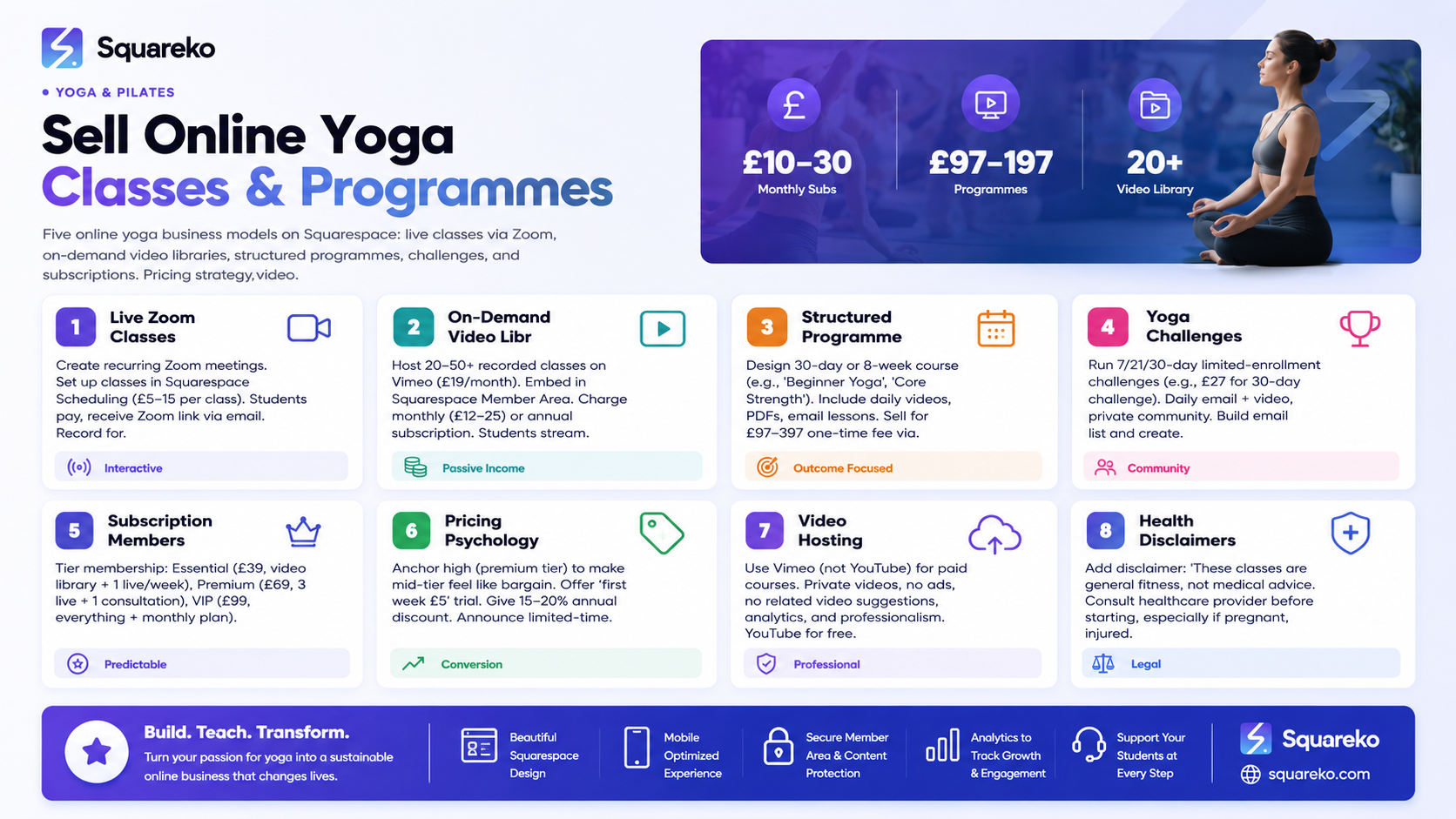
Online yoga income can come from multiple streams. Most successful online yoga teachers use a combination.
Model 1: Live Online Classes (Most Popular)
How it works:
Teach live classes via Zoom
Students book through your Squarespace website (using Squarespace Scheduling)
You collect payment upfront
Send Zoom link via email or embed it on a page
Revenue: £5-15 per class drop-in, or £60-120 per month for unlimited
Best for: Building community, teaching live, flexible scheduling
Platform mix: Squarespace Scheduling + Zoom + email
Model 2: On-Demand Video Library (High Passive Income)
How it works:
Record yoga classes (30-60 min videos)
Host them in a Squarespace Member Area
Charge a monthly subscription or one-time access fee
Students can watch anytime
Revenue: £10-30/month per subscriber, scales with library size
Best for: Passive income, reaching global audience, no scheduling constraints
Platform mix: Squarespace Member Areas + Vimeo (for video hosting) + Squarespace Commerce (for sales)
Model 3: Structured Yoga Programmers (Highest Price Point)
How it works:
Design a 30-day or 8-week yoga programmer
Include daily video instructions + PDF guides + email lessons
Sell for a one-time fee
Deliver via Member Areas or email
Revenue: £97-397 per student (much higher than monthly)
Best for: Teaching specific outcomes (strength, flexibility, stress relief), deeper student engagement
Platform mix: Squarespace Commerce (product) + Member Areas (delivery)
Model 4: Yoga Challenge Programmers (Time-Limited, High Engagement)
How it works:
"30-Day Yoga Challenge" or "7-Day Morning Flow Challenge"
Limited enrollment (e.g., only 50 students per cohort)
Daily emails with video links or instructions
Builds community and email list
Revenue: £15-50 per student; success is in volume and retention (many students become long-term members)
Best for: List building, student acquisition, building community
Platform mix: Email marketing tool (ConvertKit, Mailchimp) + Squarespace Commerce (for sales)
Model 5: Subscription Memberships (Recurring Revenue)
How it works:
Monthly recurring payment (e.g., £39-79/month)
Includes: live classes + video library + email coaching
Cancel anytime
Highest lifetime value if retention is strong
Revenue: £40-100/month × number of subscribers = predictable recurring income
Best for: Long-term sustainable business, managing cash flow, building committed community
Platform mix: Squarespace Commerce (recurring billing) + Member Areas (content) + Scheduling (live classes)
Live Online Classes via Zoom and Squarespace
The easiest way to start online yoga teaching: go live via Zoom, take payment through Squarespace Scheduling.
Setup Step-by-Step
1. Decide on Class Schedule
Start with 1-2 classes per week to avoid burnout
Pick recurring days and times (e.g., Tuesday 7:00 am, Saturday 10:00 am)
Choose a time zone and state it clearly (e.g., "All times are GMT")
2. Create the Classes in Squarespace Scheduling
Go to Settings > Scheduling > Create Service
Name: "Live Vinyasa Flow - Tuesday 7:00 am"
Price: £10-15 per class (or £5 if you're building audience)
Duration: 60 minutes
Time: 7:00 am Tuesday, repeat weekly
Enable payment and automatic reminders
3. Set Up Zoom
Create a recurring Zoom meeting (same link every week)
Enable waiting room (for security)
Set recording to "on" (optional—record for on-demand library later)
Copy your Zoom link
4. Deliver the Zoom Link
After payment, students receive a confirmation email
That email should include the Zoom link and instructions ("Join 5 minutes early")
You can customise the email in Squarespace (Settings > Emails)
Alternative: Create a dedicated "Live Classes" page on your website with the Zoom link visible only to logged-in members (using Member Areas access control).
Best Practices for Live Online Yoga
Lighting:
Position yourself so natural light hits your face (not backlit)
Use a ring light if filming in low-light conditions
Test your setup on Zoom before the live class
Camera angle and framing:
Position the camera at eye level or slightly above
Show your full body (so students can see alignment)
Zoom in slightly so students can see your face and gestures
Audio quality:
Use a external USB microphone (£30-50) for clear voice
Close windows to reduce noise
Do a sound check 5 minutes before class
Engagement:
Welcome students by name as they join
Remind them to position their mats in frame
Invite questions during and after class
Keep energy up—online teaching requires more presence than in-person
Recording for on-demand use:
Always get permission from students before recording
Include this in your booking confirmation: "This class will be recorded and added to our video library."
Edit the recording (trim silence, add a title) before uploading to your video library
Pricing Live Classes
Starting out: £5-8 per class (to build audience)
Established (100+ students/week): £10-15 per class
Premium/Specialised (pregnancy yoga, etc.): £15-20 per class
Monthly unlimited: £60-120/month (better for retention)
On-Demand Video Library via Member Areas
Once you have recorded classes, package them as a searchable library that students access anytime.
What Is a Squarespace Member Area?
A Member Area is a password-protected section of your website. You decide:
Who gets access (free members, paid subscribers, specific cohorts)
What content they see (videos, PDFs, files, pages)
How they pay (one-time or recurring)
Member Areas are ideal for video libraries because:
Videos stay on your server (not on YouTube where they're public)
You control access completely
Students can stream or download (you decide)
Integrates with Squarespace Commerce for sales
Step-by-Step: Building Your Video Library
1. Record and Prepare Videos
Record your yoga classes (60-90 minutes each). You'll have:
Live class recordings (edited to remove silence, mistakes)
New recordings made specifically for your library
Guest teacher recordings (if you have collaborators)
Aim for a launch library of 20-50 videos (enough variety to feel substantial).
2. Host Videos on Vimeo (Not YouTube)
Vimeo is the professional choice for yoga video libraries:
Videos are private (not searchable on the internet)
Students can't download without your permission
Analytics show viewer engagement (how long they watched)
Looks more professional than YouTube
Cost: £19/month (Vimeo Standard) for unlimited uploads and viewers
Upload each video and organise them into playlists:
"Morning Yoga (30 minutes)"
"vening Wind-Down Flows"
"Yoga for Strength"
"Yoga for Flexibility"
"Beginner Yoga"
"Advanced Yoga"
Copy each video's embed code.
3. Create a Member Area Structure in Squarespace
Go to Pages > +Add Page > Member Area. Build pages within it:
Home Page:
Welcome message
List of available yoga categories
New videos this week
Quick start (how to navigate the library)
Category Pages:
"Morning Yoga (30 min)" — embed 5-10 videos
"Strength Building" — embed 5-10 videos
"Beginner Courses" — embed structured sequences
"Advanced Flows" — harder classes
FAQ Page within the Member Area:
How to download videos
How to cancel membership
Technical support
4. Set Up Commerce Product
Create a subscription product in Squarespace Commerce:
Name: "Unlimited Yoga Video Library"
Price: £12-25/month (recurring)
Recurring: Yes (monthly)
Description: List what's included
Access: Links to your Member Area
5. Promote Your Library
Create a landing page (non-member) that describes the library:
"Unlimited Yoga Videos, Anytime"
"500+ hours of yoga classes" (or your actual number)
Catchy benefits ("Stretch at midnight. Strengthen at dawn. No live schedule required.")
Sample video (1-2 minutes of a class)
Testimonials
Pricing
"Start Your Free Trial" or "Subscribe Now" CTA
Video Library Pricing
Basic (launch pricing): £9-12/month
Standard (established, 50+ videos): £15-20/month
Premium (100+ videos, specialised content): £20-30/month
Annual discount: Offer 20% off (e.g., £180 for 12 months instead of £240)
Structured Yoga Programmes and Courses
Structured programmes (e.g., "8-Week Core Strength Yoga") command higher prices because they're outcome-focused and limited in scope.
What's a Structured Yoga Programme?
A time-bound course with:
Clear outcomes (e.g., "Build core strength for daily life")
Week-by-week progression
Specific videos, homework, or guidance for each day/week
Begin and end date
Community or cohort feeling (optional)
Examples:
"30-Day Beginner Yoga" — £97
"8-Week Pregnancy Yoga" — £147
"6-Week Yoga for Lower Back Pain" — £127
"21-Day Yoga Challenge + Nutrition Guide" — £67
Setting Up a Structured Programme
1. Design the Programme
Duration: 7-30 days, or 4-8 weeks
Schedule: Daily emails, or 3x per week
Content: Videos + PDFs + email lessons
Assessment: Optional (journaling, self-reflection)
Example: "30-Day Beginner Yoga"
Week 1: Foundation poses, breathing, building awareness
Week 2: Sun salutations, standing poses, balance
Week 3: Core strength, arm balances prep
Week 4: Integration, personal practice design
2. Create or Record Videos
Record or curate 30 videos (one per day, 20-30 min each)
Edit and upload to Vimeo
Organise into a Vimeo folder/playlist
3. Write Email Lessons
Short (300-400 word) daily emails
Include: inspiration, teaching tip, video link, journaling prompt
Send via an email tool (Mailchimp, ConvertKit, or Squarespace Email Campaigns)
4. Create a Squarespace Commerce Product
Name: "30-Day Beginner Yoga"
Price: £97 (one-time purchase)
Description: What they'll learn, outcomes, daily time commitment
Includes: 30 videos, email lessons, PDF resource guide
5. Deliver via Member Area or Email
Option A: Member Area Access
Student buys the programme
Gets access to a Member Area page with all 30 videos + PDFs
Watches at their own pace
Option B: Automated Email Delivery
Student buys
Receives Day 1 email automatically
Day 2 email sends 24 hours later (automated)
All emails with video links and PDFs
More engaging, better completion rates
I recommend Option B (email-based) because it creates accountability and engagement.
Programme Pricing
Entry-level (21-30 day): £47-97
Mid-tier (6-8 week): £97-197
Premium/specialised: £197-397
Group cohort pricing: Offer 10% off for groups of 3+
Yoga Challenge Programmes
Yoga challenges are time-limited, fun, and perfect for building your email list while generating quick revenue.
What Makes a Yoga Challenge Work
Clear theme: "30-Day Core Strength Challenge" or "7-Day Morning Yoga Reset"
Limited enrollment: Announce "Only 50 spots available"
Fixed start date: "Starts March 15"
Daily engagement: Email + video every day
Community: Private Facebook group or Vimeo comments for peer support
Setting Up a Challenge
1. Choose Duration and Theme
7 days (short, high completion rate)
21 days (popular, deep results)
30 days (maximum engagement)
2. Price Point
7-day: £7-15
21-day: £17-27
30-day: £27-47
3. Create Deliverables
Daily video (10-30 min)
Daily email with tips, encouragement, journaling prompt
Optional: PDF guide with all challenge poses
Optional: Private Facebook group for community
4. Set Up the Sales Page Create a landing page (non-Squarespace, or a Squarespace page) with:
Eye-catching headline: "30-Day Core Strength Challenge"
What's included: "Daily 20-min videos, email coaching, PDF guide"
What they'll achieve: "Stronger core, better posture, daily yoga habit"
Daily time commitment: "20 minutes per day"
Start date and how many spots left: "Starts April 1. 12 spots remaining."
Testimonials (from previous challenges)
FAQ
"Join Now" CTA
5. Sell via Squarespace Commerce
Create a product: "30-Day Core Strength Challenge"
Price: £37
After purchase, students get access to an email sequence with daily videos
OR students get access to a Member Area page
6. Follow-Up After the challenge ends:
Email graduates: "You did it! Here's what's next..."
Offer upgrade: "Love the challenge? Join our monthly membership for £29/month"
Request testimonials: "Would you share a quick transformation story?"
Subscription Memberships
Monthly memberships (£39-99/month) combine live classes, video library, and community for recurring revenue.
Setting Up a Membership
Tier 1: Essential (£39/month)
Access to video library (150+ classes)
1 live group class per week
Email updates and tips
Tier 2: Premium (£69/month)
Access to video library
3 live group classes per week
1 monthly 1:1 consultation
Private community/forum
Exclusive content (workshops, guest teachers)
Tier 3: VIP (£99/month)
Everything in Premium
2 monthly 1:1 consultations
Priority access to workshops
Monthly personalised plan
Implementation
Use Squarespace Commerce for recurring billing:
Create three products (Essential, Premium, VIP)
Set recurring: Monthly
Auto-renew enabled
Link each to a different Member Area with access to appropriate content
Allow easy cancellation (statutory requirement—make it obvious)
Retention and Churn Reduction
Memberships work only if students stay subscribed. Focus on:
Email: Weekly member emails (tips, announcements, encouragement)
New content: Add 3-5 new videos per week
Community: Virtual check-ins, challenges, social proof
Value perception: Regularly remind members of all they get (£69/month = £822/year value)
Re-engagement: After 2 weeks of no activity, email: "We miss you! Here's a class perfect for you..."
Pricing Strategy for Online Yoga
Online yoga is price-sensitive. Charge too much, and no one buys. Charge too little, and you undervalue your expertise.
Competitive Pricing
Live classes:
Drop-in: £8-15 per class
Weekly subscription: £20-40/month for 2-4 classes
Unlimited monthly: £60-120/month
Video library:
Monthly membership: £10-25/month
Annual (if offered): £100-240/year
Structured programmes:
30-day: £47-97
8-week: £97-197
Specialist (pregnancy, trauma-informed): £147-297
Challenges:
7-day: £7-15
21-day: £17-37
30-day: £27-57
Memberships (all-in):
£39-99/month depending on included content
Pricing Psychology
Anchor high: Price your premium membership high (£99/month) to make mid-tier (£69) feel like a bargain
Trial period: Offer "first week £5" to remove booking friction
Annual discount: Offer 15-20% off for annual payment to boost lifetime value
Early-bird pricing: "Join before March 15 at £29/month (regular £49)" creates urgency
Value stack: List everything included in your offer (makes price seem reasonable)
Raising Prices
As your audience grows, raise prices gradually:
Existing members: Keep grandfathered rate (good faith)
New members: New, higher price
Announce once: "We're raising prices to reflect our growing video library and added live classes"
Writing a Compelling Online Yoga Sales Page
Your sales page converts browsers into buyers. It must answer every objection and make the benefit crystal clear.
Sales Page Structure
Headline (Powerful & Specific)
❌ "Join Our Yoga Membership"
✓ "30 Minutes of Yoga a Day Keeps Stress Away—Unlimited Classes, Anytime"
Subheadline (Supporting statement)
"Hundreds of online yoga classes + live sessions, perfect for your schedule"
Hero Section
Video or image of you teaching (or a beautiful yoga action shot)
Headline + subheadline
CTA: "Start Your Free 7-Day Trial"
Problem Section (Why They Need This) "Busy schedule? No yoga studio near you? Nervous about joining a studio? You're not alone. Thousands of students join online yoga because they want flexibility, affordability, and a teacher they connect with. Here's what online yoga can give you..."
Solution Section (What You Offer)
What's included: List specific items
"150+ recorded classes (beginner to advanced)"
"Live group yoga 3x per week"
"Email support and coaching"
"Download videos to watch offline"
Proof Section (Testimonials) Include 3-5 testimonials with:
Name
Photo (optional)
What changed for them
Who they are (e.g., "Accountant, Manchester")
Example: "I tried yoga once 20 years ago and was terrified. Sarah's beginner classes made me feel capable. I've been practicing 6 months now and feel stronger, calmer, and actually enjoy movement. Best decision I made this year. —Jennifer, Sheffield"
FAQ Section
"Do I need a mat or special equipment?" (No, yoga block and towel work)
"What if I miss a day?" (No problem, classes stay in the library forever)
"Do I need Zoom experience?" (No, just a laptop or phone)
"Can I download videos?" (Yes, all videos available to download)
"How do I cancel?" (One click, anytime, no hassle)
Objection Handling
"I'm a beginner." — "All our beginner classes come with step-by-step instruction and modifications."
"I'm busy." — "Classes are 20-60 minutes. Practice anytime that suits your schedule."
"Cost?" — "Less than a single in-person class. Full library access for less than one monthly coffee."
CTA (Clear and Repeated)
"Start Your 7-Day Free Trial"
"Join Now for £29/month"
"Subscribe for £9/month (Annual Billing)"
Trust Signals
Yoga Alliance credentials ("Certified Yoga Alliance RYT-200")
Years of teaching ("8 years teaching yoga")
Student testimonials
"Money-back guarantee" (if offering)
Privacy policy (people worry about payment details)
Video Hosting: Vimeo vs. YouTube
Where you host your videos matters for professionalism and student experience.
Vimeo (Recommended for Yoga Courses)
Pros:
Videos are private (not searchable on the internet)
No ads or external videos suggested
Professional appearance
Students can't download without your permission
Analytics show engagement (how long people watched)
Allows embedding on your website
Integrates well with learning platforms
Cons:
Costs money (£19/month for Vimeo Standard)
Smaller audience than YouTube
Need to drive traffic yourself
Best for: Yoga libraries, courses, membership content
YouTube (Free but Less Professional)
Pros:
Free
Massive audience (10+ million viewers)
Great for discoverability (YouTube search, Google results)
Analytics excellent
Can monetise with ads (though not ideal for yoga content)
Cons:
Videos are public (anyone can find them)
YouTube algorithm suggests related videos (may not align with your brand)
Ads can play (distracting during yoga)
Comments can be negative or spam
Less professional for paid content delivery
Best for: Marketing (1-2 free intro classes), audience building, not for paid memberships
Recommendation
Use Vimeo for paid yoga programmes and membership libraries
Use YouTube for free, short promotional videos (5-10 min intros to your teaching)
Health Disclaimers and Legal Considerations
Online yoga is a service, but it involves physical activity. Always protect yourself and your students with appropriate disclaimers.
Essential Disclaimer (Add to All Sales Pages and Class Pages)
HEALTH DISCLAIMER
These yoga classes are general fitness content and not medical advice. Always consult
your healthcare provider before starting a new fitness programmer, especially if you:
- Have existing health conditions (back pain, joint issues, heart conditions)
- Are pregnant or postpartum
- Are recovering from injury
- Take medications that affect balance or flexibility
- Have high blood pressure
You assume full responsibility for your own physical safety. Listen to your body.
Stop immediately if you experience pain or dizziness. Modify poses as needed.
This is not a substitute for professional medical or mental health advice.
Additional Recommendations
No Health Claims (Without Evidence)
❌ "Cures back pain" — Too specific, can't prove universally true
✓ "Many students report relief from lower back tension" — Supported by experience
Terms of Service
Include a terms page covering:
Refunds (e.g., "Memberships are non-refundable except within 7 days of purchase")
Content copyright ("You may not redistribute or record my classes")
Cancellation terms
Privacy Policy
Required by law
Explain how you store email addresses and payment info
Include GDPR compliance (if serving UK/EU)
Medical Yoga Disclaimer (If You Have Medical Training)
If you're a registered physiotherapist or have medical training in yoga therapy, you can say:
"I hold [certification] from [recognised body] and have specialised training in [yoga therapy/therapeutic yoga]. However, online classes are general instruction, not individualised medical treatment."
Email Marketing and Student Retention
Email is your most powerful tool for building an online yoga business. Use it strategically.
Building Your Email List
Add opt-ins throughout your website:
"Get 5 free yoga videos" (lead magnet)
"Weekly yoga tips" (newsletter signup)
"Upcoming challenges and classes" (event notifications)
Email Sequences
Welcome sequence (3-4 emails over 7 days):
Day 1: Welcome + introduce yourself + link to your best free video
Day 3: Share your story + why you teach yoga
Day 5: Offer an exclusive discount ("20% off your first month")
Day 7: Gentle reminder + answer common questions
Weekly nurture email (Sent every Tuesday or Thursday):
Teaching tip or yoga philosophy
Link to a new class (recorded or live)
Personal story or observation
Soft CTA ("Join our membership this week and save 20%")
Promotional email (When launching programmes, challenges, or memberships):
Announce new offering
List benefits and outcomes
Add a testimonial
Limited-time offer ("Launch price: 30% off until Friday")
CTA: "Enrol Now"
Re-engagement email (If no activity for 4 weeks):
"We miss you!"
Offer a reason to return ("5 new beginner classes added this week")
Remove friction ("Cancel anytime, no questions asked")
Growing Your Online Yoga Audience
Building an online yoga business requires audience growth. You can't sell to people who don't know you exist.
Organic Traffic (SEO Content)
Write blog posts optimised for yoga search terms:
"Yoga for lower back pain" (target: people in pain searching for solutions)
"Morning yoga routine for energy" (target: busy professionals)
"Beginner yoga: what to expect" (target: nervous first-timers)
"Best time to do yoga" (target: curious prospects)
Each post should link to your free video or trial offer. Posts take 3-6 months to rank but bring long-term traffic.
Paid Advertising (Google Ads, Facebook Ads)
Google Ads: Target keywords ("online yoga classes," "yoga for stress," "beginner yoga")
Facebook Ads: Target demographics (age, interests, online behaviour)
Budget: Start with £10-20/day, scale if profitable
Expected cost per customer: £5-20 depending on your offer price.
Social Media (Organic)
Post short yoga content on Instagram, TikTok, or YouTube Shorts:
15-30 second yoga poses or flows
Teaching tips
Student transformations (with permission)
Behind-the-scenes clips
Live Q&A about yoga
This builds familiarity and drives traffic to your website.
Partnerships and Collaborations
Guest teach on other teachers' platforms
Feature guest teachers on your membership
Cross-promote to each other's email lists
Partner with wellness brands (meditation apps, fitness influencers)
Ready to Launch Your Online Yoga Business?
You now have the playbook for building an online yoga income stream on Squarespace. Whether you start with live classes, build a video library, launch a challenge, or go all-in with a membership, the tools are there.
But execution is everything. You need the right website structure, compelling copy, smooth payment integration, video hosting, and a strategy for growing your audience. That's where Squareko comes in.
We've helped yoga teachers build profitable online businesses on Squarespace—from live class bookings to video libraries to full subscription memberships. We handle everything: website design, video integration, sales page copy, email setup, and growth strategy.
Frequently Asked Questions
-
Use a smartphone or camera on a tripod, positioned to show your full body. Good lighting is essential—film near a window or use a ring light. Use an external microphone (£30-50) for clear audio. Wear solid colours that contrast with your background. Record in landscape mode. Aim for 20-60 minute classes.
-
Vimeo analytics show how long each viewer watched each video. Squarespace Member Areas show who accessed the page but not engagement depth. For detailed engagement tracking, some teachers use email follow-ups ("How was the Tuesday morning flow?") or optional surveys.
-
Yes. Use Squarespace Scheduling for live classes (students book and join via Zoom). Use Member Areas for recorded videos (customers subscribe or purchase one-time access). Many successful teachers offer both.
-
Squarespace has a basic Email Campaigns feature (free). For more control, try Mailchimp (free for up to 500 contacts) or ConvertKit (£25/month, designed for creators). All integrate with Squarespace or work alongside it.
-
Set a clear policy: "Money-back guarantee within 7 days of purchase if you're not satisfied." This removes buyer risk and increases conversion. After 7 days, refunds are at your discretion. Document all refund requests.
-
Squarespace accepts international payments, so yes, you can sell globally. However, some payment processors have restrictions by country. Check Squarespace's payment processing terms for the countries you plan to serve. Tax laws may vary by country.
-
Vimeo's private video hosting helps—videos aren't downloadable without your permission. Add watermarks (your name/logo) to videos to discourage sharing. Include clear terms ("Content is for personal use only, not for distribution"). For maximum protection, require sign-in to stream videos.
-
Option 1: Edit lightly (trim start/end, remove technical issues) and add to your video library. Option 2: Email recordings to students who attended. Option 3: Use them as promotional clips for future challenges or memberships. Most teachers do all three.
Ready to Launch Your Online Yoga Business on Squarespace?
You have the knowledge, now you need the execution. Building a professional online yoga business requires the right website structure, compelling sales pages, smooth video integration, and a growth strategy.
Squareko specialises in building profitable online yoga businesses on Squarespace. We've helped yoga teachers launch from zero to multiple five-figure businesses by combining strategy, design, and technical expertise.

From custom website design to SEO strategy, we help businesses launch a site that looks professional and performs better.

About the Author
Walid is the founder of Squareko
I'm Walid Hasan, a Certified Squarespace Expert and Squarespace Circle Platinum Partner with over 12 years of hands-on experience designing and optimizing high-performing websites. Over the years, I've had the privilege of building more than 2,000 Squarespace websites for clients around the world, always focusing on clean design, strong user experience, and conversion-driven results.
