
How to Sell Life Coaching Packages and Online Programmes on Squarespace
Key Takeaways for Sell Life Coaching Packages and Online Programmes on Squarespace
Squarespace Commerce handles all payment processing — securely accept payments for coaching packages without leaving your website or paying transaction fees above Squarespace's standard processing rates
Member Areas create gated access — deliver ongoing coaching, group programmes, and course content that only paying clients can reach
Multiple product types drive revenue — combine 1:1 packages, group programmes, courses, and digital downloads to serve different budget levels and learning styles
Scheduling integration closes the loop — clients purchase a package and immediately book their first session, creating seamless client experience
Pricing psychology matters more than you think — how you present your packages, payment options, and social proof directly impacts your conversion rate and average deal size
Life coaches are sitting on one of the most valuable assets in modern business: direct access to people who want to transform their lives. Yet many coaches leave serious revenue on the table because they're not sure how to package and sell their expertise online.
The good news? Squarespace makes it genuinely simple to sell coaching packages, group programmes, and digital products without needing a developer, complex integrations, or years of technical experience. Whether you're offering one-on-one coaching, group mastermind sessions, online courses, or downloadable resources, Squarespace's built-in tools handle the heavy lifting — payments, delivery, member access, scheduling, and follow-up.
In this guide, we'll walk through everything you need to know to turn your coaching expertise into a sustainable, scalable revenue stream. You'll learn the practical steps to set up your first product, optimize your pricing page for conversions, and create systems that work for you while you focus on delivering life-changing results to your clients.
Types of Life Coaching Products You Can Sell
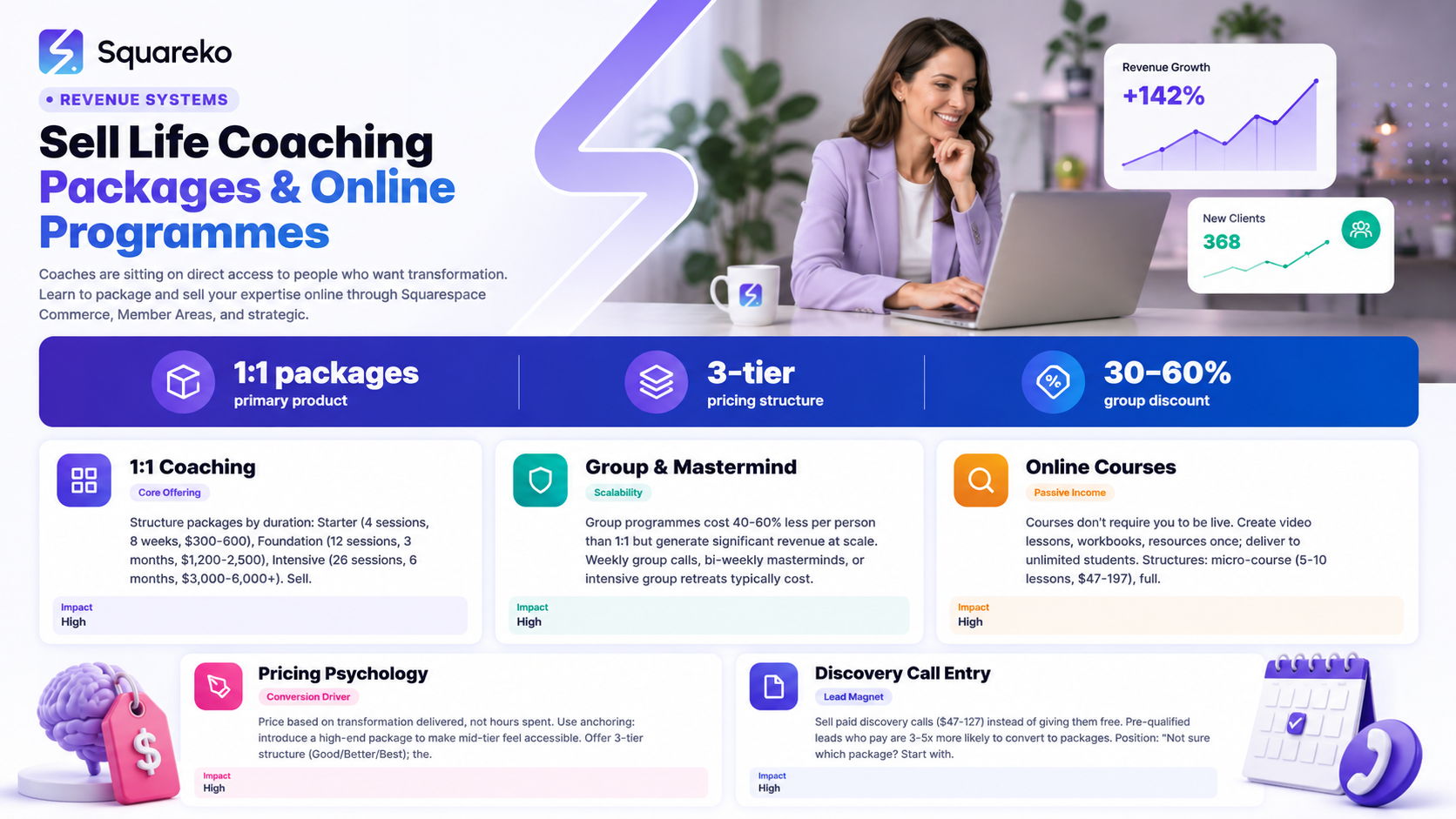
Before you set up your sales infrastructure, clarify what you're actually selling. Most life coaches succeed by offering a mix of products at different price points and commitment levels. This approach captures clients at every stage of their journey with you.
1:1 Coaching Packages
The most common offering. Clients pay upfront for a set number of sessions (6, 12, 26 weeks, or 90 days), then book and attend sessions on a scheduled basis. You might structure this as:
Starter Package: 4 sessions over 8 weeks — ideal for prospects testing the waters ($300–$600)
Foundation Package: 12 sessions over 3 months — your most popular option ($1,200–$2,500)
Intensive Package: 26 sessions over 6 months — for serious transformation seekers ($3,000–$6,000+)
On Squarespace, you sell these as products and then use Scheduling to let clients book their sessions post-purchase.
Group Coaching and Mastermind Programmes
Group programmes cost less per person than 1:1 coaching but generate significant revenue at scale. Examples:
Weekly group coaching calls (8–12 weeks) — you lead live calls with multiple participants
Mastermind groups (3–6 months) — smaller, more intimate cohorts meeting bi-weekly
Group workshops or retreats — intensive group experiences lasting days or weeks
Group programmes typically cost 40–60% less than equivalent 1:1 coaching. You might charge $297–$1,497 for an 8-week programme depending on group size and your positioning.
Online Courses and Self-Paced Learning
Courses don't require you to be live. You create video lessons, workbooks, and resources once, then deliver them to unlimited students. Common structures:
Micro-course: 5–10 lessons on a specific topic ($47–$197)
Full transformation course: 20–30 lessons over 8–12 weeks ($197–$497)
Course + group coaching hybrid: Recorded lessons + live group calls monthly ($497–$1,997)
Courses have higher profit margins because you're not trading hours for money once the course is created.
Digital Downloads and Resources
Lead magnets, workbooks, templates, and guides that clients download instantly. Examples:
Assessment tools: Myers-Briggs style quizzes or diagnostic worksheets ($7–$27)
Workbooks and planners: 30-day habit journals, goal-setting worksheets ($17–$47)
Templates and frameworks: Coaching worksheets, decision-making templates ($27–$67)
Audio guided meditations or visualizations: MP3 files clients download ($7–$17)
These are impulse purchases that warm up cold audiences and generate recurring revenue with zero delivery time.
Hybrid and Combination Packages
The most profitable coaches mix these offerings. For example:
Course + 3 group coaching calls ($397)
6 1:1 sessions + access to member area with templates and monthly group calls ($2,497)
Group programme + 2 private sessions ($797)
Mixing product types captures different clients and maximizes lifetime value.
Setting Up Squarespace Commerce for Coaching
Squarespace Commerce is the engine that makes selling coaching on Squarespace viable. Here's what you need to know.
Enable Squarespace Commerce
Go to Settings > Commerce in your Squarespace dashboard
Select your region and currency
Choose a payment processor: Squarespace Payments (recommended) or integrate Stripe separately
Add your bank account details for payouts
Set your payment processing preferences (how often you want payouts, security settings, etc.)
Squarespace Payments charges 2.9% + $0.30 per transaction for online credit card payments — standard for the industry. There's no additional cost for using Squarespace Commerce features.
Create Your First Coaching Product
Go to Products and click + Add a Product
Enter your product details:
Product Title: 6-Week Life Coaching Foundation Package
Description: Write a compelling description that highlights what the client gets, the transformation they'll experience, and what makes you different
Price: Set your price ($1,497)
Upload a product image (a professional photo of you or a branded graphic works)
Set Product Type: Select Service or Digital Product depending on your offering
Configure Variants if you're selling multiple packages (4 Sessions,12 Sessions)
Enable Digital Delivery if selling downloads or course access
Click Save
Your product is now live and can be purchased. But you're not done — integrating it with your sales page, scheduling, and email is what drives conversions.
Set Up Digital Product Delivery
If you're selling courses, recordings, or downloads:
In your product settings, scroll to Digital Delivery
Upload your files (videos, PDFs, audio — up to 2GB per file)
Enable the option to send files via email after purchase
Optionally, require customers to access files through your Member Area instead (more secure, more professional)
Files delivered via email are useful for simple products (a $17 workbook). For anything requiring ongoing access or updates, use Member Areas instead.
Member Areas for Gated Content and Ongoing Programmes
Member Areas are where the magic happens for ongoing coaching programmes. They let you gate content so only paying clients can access it.
Why Member Areas Matter for Coaches
A Member Area solves three critical problems:
Secure content delivery — clients log in with a password to access coaching materials, course videos, and resources. You maintain control.
Ongoing access — clients can revisit materials indefinitely, even after coaching ends. You build authority and trust.
Scalability — you upload a course once and deliver it to hundreds of clients without extra work.
Set Up Your First Member Area
Go to Members in your Squarespace dashboard
Click Create a Members-Only Area
Choose Full-Site Membership (entire Member Area) or Page-Level Membership (specific pages only)
Set membership options:
Membership Type: Link to your Squarespace Commerce product (e.g., your 6-week coaching package) or manually add members
Password Requirements: Set password strength rules
Email Verification: Require email verification on signup
Click Save
Members will see a login page when they visit. After purchase, they're automatically added to the Member Area and sent a login email.
Organize Your Member Area Content
Structure your Member Area like an online course or coaching hub:
Member Area: Foundation Coaching Programme
├── Welcome & Getting Started
│ ├── Welcome Video (watch this first!)
│ ├── How to Get the Most from This Programme
│ └── Meet Your Coach
│
├── Week 1: Clarity
│ ├── Video Lesson 1: Defining Your Vision
│ ├── Worksheet: Your Vision Statement
│ ├── Guided Meditation Audio
│ └── Weekly Discussion Thread
│
├── Week 2: Values Alignment
│ ├── Video Lesson 2: Identifying Your Core Values
│ ├── Assessment Tool: Values Clarification
│ └── Action Plan Worksheet
│
├── Resources & Tools
│ ├── Coaching Frameworks Download
│ ├── 90-Day Planner Template
│ ├── FAQ: Common Questions Answered
│ └── Resource Library: Recommended Reading
│
└── Ongoing Support
├── Monthly Bonus Coaching Call Recordings
├── Community Discussion Forum
└── Email Support Policy & Response Times
Clear organization builds trust and keeps clients engaged long-term.
Set Up Member Area Payments
Link your Member Area directly to your Squarespace Commerce products:
Go to Settings > Members > Membership Tiers
Create a new tier (Foundation Coaching Package)
Link it to your product (your $1,497 package)
Set access expiration (access expires 6 months after purchase, encouraging upsells or renewals)
Save
Now when a client purchases your package, they're automatically granted Member Area access and sent login credentials.
Building a High-Converting Pricing and Packages Page
Your pricing page is often where prospects decide to buy or leave. Most coaching websites do this poorly.
Structure Your Pricing Page Strategically
A high-converting pricing page has these sections:
1. Clear Headline and Subheadline
Instead of: Our Packages
Try: Choose the Coaching Experience That Fits Your Goals — And Your Budget
The subheadline should speak to the objection your prospects have (usually cost, time commitment, or not knowing which option is right for them).
2. Brief Introduction
2–3 sentences explaining what they're buying. For example:
Every coaching package includes unlimited email support, access to your personal coaching portal with worksheets and resources, and my personal attention to your transformation. The only difference is the number of live sessions and the depth of work we do together.
This removes confusion and justifies the different price points.
3. Three-Tier Package Structure
Most people do best with three options (Good, Better, Best):

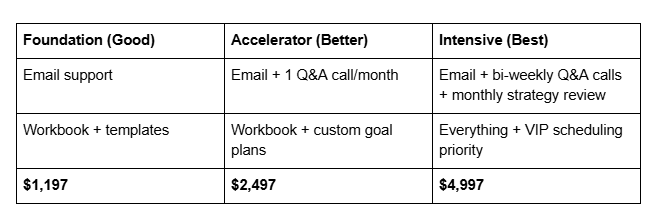
The middle tier (Better) typically sells the most. The top tier (Best) attracts committed clients and increases your average deal size.
4. Feature Comparison Table
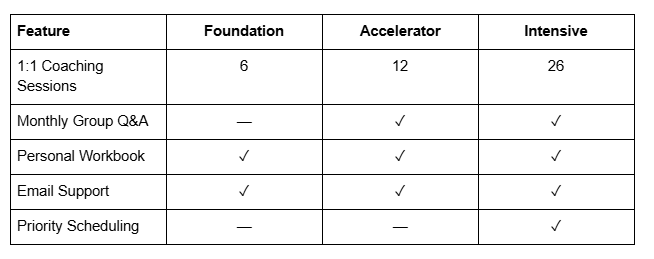
Tables make comparison instant and remove mental friction.
5. CTA Buttons
Each package tier needs a clear CTA button. Label it specifically:
Start Foundation Coaching (not just Buy)
Accelerate Your Progress
Go Full Intensive
Specific CTAs convert better than generic Buy Now buttons.
Design for Conversions
On Squarespace, use these design principles:
Whitespace: Don't crowd the page. Let packages breathe.
Color: Highlight your recommended tier (usually Better) with a different background color or badge (Most Popular)
Typography: Use a larger, bolder font for price numbers
Button Contrast: Make CTA buttons stand out — use a contrasting color
Mobile-Friendly: Stack packages vertically on mobile, ensure buttons are easy to tap
Pricing Strategy and Psychology
How you price your packages affects perceived value, conversion rate, and profit. Here's what works for life coaches.
Price Your Packages Based on Outcomes, Not Hours
New coaches often price by the hour and then multiply. This is a mistake.
Instead, price based on:
Transformation you deliver (6-week clarity programme vs. 6 hours of coaching)
Investment your client makes (psychological commitment drives follow-through)
Market rate for similar packages (research competitors, but don't copy blindly)
Your expertise and demand (established coaches command premium pricing)
A life coach charging $150/hour for one-on-one sessions might charge $1,500 for a 6-session clarity package — not because it's exactly 10 hours, but because that's the transformation value.
Use Anchoring and Price Decoys
Anchoring is a psychological principle: the first number you see influences how you perceive all others.
Example 1: Anchoring High If your typical package is $1,497, introduce a high-end package at $4,997 first. Now $1,497 feels reasonable and accessible, even though it hasn't changed.
Example 2: Price Decoys Sometimes offering a light package slightly below your best seller makes the best seller more attractive.
Light: $597 (1 session + email support)
Standard: $1,497 (6 sessions) ← Most choose this
Premium: $3,997 (12 sessions)
The Light package exists partly to make the Standard package look like better value.
Use Annual Pricing to Increase Commitment
For group programmes or membership-style coaching, offer annual pricing with a discount:
Monthly: $197/month
6-Month Package: $1,047 (13% discount)
Annual: $1,974 (17% discount)
The lower monthly payment feels accessible; the annual pricing increases lifetime value and client commitment.
Be Transparent About Payment Plans
Some coaches offer payment plans (3 payments of $499 for a $1,497 package). Squarespace doesn't have built-in installment payments, but you can:
Accept payment plans manually (customer pays upfront, you invoice for remaining amounts)
Use a third-party service like Klarna or Afterpay (Squarespace integrates with some)
Clearly label payment plan options on your pricing page
Offering payment plans can increase conversion by 15–25% for premium packages because the psychological barrier is lower.
Selling Discovery Calls as Entry Points
Most coaches don't sell discovery calls — they give them away free. This is a missed opportunity.
Why Sell Discovery Calls
A free discovery call feels risky to your prospect (Will the coach try to sell me hard?). A $50–$97 discovery call signals confidence, filters serious prospects, and generates immediate revenue.
Prospects who pay for discovery are 3–5x more likely to convert to your main package because they're pre-committed.
Structure Your Discovery Call Offer
Create a separate product called Coaching Clarity Call or Discovery Consultation:
Price: $97 (or $127 for 90 minutes)
Duration: 60–90 minutes
Delivery: Via Zoom, scheduled after purchase
What They Get: Assessment of their situation, key insights, and a clear action plan (whether they buy coaching or not)
What You Get: Pre-qualified lead, upfront revenue, and a warm prospect for upselling
Pair Discovery Calls with a Discount
On your sales page, position discovery calls strategically:
Not sure which package is right? Start with a Coaching Clarity Call ($97). If you purchase a full package within 7 days, we'll credit $97 toward your investment.
This removes the risk objection and increases discovery call sales.
Use Squarespace Scheduling After Purchase
When a prospect purchases a discovery call:
They receive a confirmation email
They're redirected to your booking page (via Squarespace Scheduling or Calendly)
They select a time for their call
Calendar invite is sent automatically
This automation means you don't manually email back and forth — the system handles it.
Email Integration and Nurture Sequences
After purchase, your client's engagement determines whether they finish their programme and stay a client long-term. Email nurture sequences drive this engagement.
Connect Squarespace to Your Email Platform
Squarespace integrates with major email platforms:
Klaviyo (best for ecommerce, good segmentation)
Mailchimp (free option, limited automation)
ConvertKit (creator-friendly, good for courses)
ActiveCampaign (advanced automation, most powerful)
To set up integration:
Go to Settings > Integrations > Email Marketing
Select your email platform
Authorize Squarespace to connect
Choose which customer actions trigger emails (e.g., purchase, membership signup)
Build Your Post-Purchase Email Sequence
After a client purchases a coaching package, they should receive a sequence of emails:
Email 1: Welcome & Next Steps (immediate) Subject: Welcome, [Name]! Here's Your Coaching Journey Starting Tomorrow
Welcome the client warmly
Brief reminder of what they've purchased
Reassure them they made the right decision
Direct them to login to Member Area
Set expectations for first session and onboarding
Email 2: Onboarding & Resource Access (day 1) Subject: Your Coaching Portal is Ready — Log In Here
Provide Member Area login instructions
Highlight the most important resources to review before Session 1
Emphasize the workbook and intro materials
Offer support (Reply to this email with any questions)
Email 3: Pre-Session Preparation (2 days before first session) Subject: Preparing for Your First Session — 3 Things to Reflect On
Remind them of session time and Zoom link
Ask them to think about 3 questions related to their coaching goal
Share a short preparation exercise (5–10 min)
Build momentum and excitement
Email 4: Between-Session Accountability (mid-week) Subject: Quick Check-In: How's Your Action Plan Going?
Celebrate any progress they've made
Remind them of key insights from the session
Encourage them to review the workbook
Answer common questions
Email 5: Weekly Recap (Friday) Subject: [Week 2] Your Progress Check + What's Coming Next
Recap the week's coaching focus
Share a resource or bonus related to this week's theme
Build anticipation for next session
Remind them they can email anytime
Repeat this sequence for the duration of their package. The goal is consistent engagement, not constant selling.
Squarespace Scheduling for Session Booking
Once clients purchase a coaching package, they need to book their sessions. Squarespace Scheduling automates this.
Set Up Squarespace Scheduling
Go to Scheduling in your Squarespace dashboard
Click Create a Service
Enter service details:
Service Name: Coaching Session - Intensive Package
Duration: 50 minutes (or your standard length)
Price: Leave at $0 (they've already paid; this is just booking)
Description: Your dedicated 1:1 coaching session
Set your availability:
Availability Hours: (Tue–Thu, 10am–6pm, Fri 10am–1pm)
Time Zone: Select your time zone
Booking Window: Allow bookings up to 14 days in advance (adjust as needed)
Configure Meeting Location:
Zoom: Integrate Squarespace Scheduling with Zoom so a unique Zoom link is auto-generated for each session
Google Meet or other: Paste your meeting link (less dynamic but simpler)
Phone Call: Provide your phone number for phone coaching
Enable Automatic Confirmations:
Confirmation email to client immediately after booking
Reminder email 24 hours before session
Post-session follow-up email (you can auto-send a template or personalize it)
Save and publish
Your clients can now book sessions without emailing you back and forth.
Embed Your Scheduling Page on Your Website
Add a button or link on your sales page that redirects to your scheduling page: Book Your First Session or Schedule Your Initial Call.
After purchase, include the scheduling link in your welcome email so it's the first action they take.
Social Proof and Trust Signals
Coaching is an intangible service. Prospects can't touch it, test-drive it, or see it before buying. Social proof reduces risk and increases conversions.
Types of Social Proof That Work for Coaches
1. Client Testimonials with Results
Generic testimonials (She was amazing!) don't convince. Specific results do.
Generic: Sarah is an excellent coach. I highly recommend her.
Specific: I came to Sarah with no clarity on my career path. In 6 weeks, I'd secured a new job in tech with a 40% salary increase and a role that aligns with my values. Best investment I've made.
Include the client's name, photo (if they'll allow it), and specific results.
2. Before/After Transformations
Show the journey your clients go through:
Before: Felt stuck, overwhelmed, unsure of direction
After: Clear on my goals, confident in my decisions, earning an extra $25K/year
If you coach on specific outcomes (career transitions, relationship improvement, fitness goals), before/afters are gold.
3. Social Proof Badges
Feature badges on your pricing page:
Trusted by 500+ Coaches Worldwide
Featured in [Publication]
Award-Winning Coach
Certified Life Coach (ICF Credential)
Only use badges you've actually earned.
4. Video Testimonials
A 30-second video of a happy client speaking about their experience is more powerful than text. Include 2–3 video testimonials on your sales page if you have them.
5. Trust Signals on Your Pricing Page
Add these elements throughout your pricing page:
Money-Back Guarantee: Not completely satisfied? I offer a full refund within 14 days (if you're comfortable offering this)
Credentials: Certified Life Coach (ICF) or relevant credentials
Years of Experience: 10+ Years Coaching Transformation
Client Numbers: Helped 500+ Clients Achieve Their Goals
Media Features: As seen in Forbes, Mind Body Green, [Podcast Name]
Frequently Asked Questions
-
You can use Stripe separately through a Squarespace integration, but Squarespace Payments is the easiest option. It handles payment processing, invoice generation, and customer records all in one dashboard. If you already use Stripe for another business, integrating it works fine — the process is slightly more technical, but it's still straightforward. For most coaches starting out, Squarespace Payments removes barriers and is best-in-class for this use case.
-
Digital products (via Squarespace Commerce) deliver files via email or download — one-time delivery. Great for workbooks, guides, or short courses.
Member Areas require login and provide ongoing access — ideal for courses, group coaching, or recurring programmes where clients need persistent access to materials and community. If you're delivering anything over 4 weeks or with ongoing updates, use a Member Area. -
You can't completely prevent sharing, but you can discourage it by:
Setting clear terms of service that logins are non-transferable
Limiting simultaneous logins (some integrations allow this)
Making content valuable enough that clients don't want to share
Monitoring for unusual access patterns
In practice, most clients respect the spirit of exclusivity if it's clear in your terms.
-
Yes. Squarespace Scheduling integrates with Google Calendar, Apple Calendar, and Outlook. You can also embed a Calendly calendar on your Squarespace site if you prefer Calendly's interface. However, native Squarespace Scheduling is seamless and requires no third-party tool. Most coaches find it sufficient.
-
$47–$127 depending on your positioning. If you're a premium coach ($3K+ packages), charge $97–$127. If you're mid-market ($1K–$2K packages), charge $47–$77. Discovery calls paid for by clients are 60–80% more likely to convert to paid coaching packages. Offering payment plans or credit toward future packages (e.g., "credit the $97 toward purchase if you buy within 7 days") increases discovery call sales.
-
3 payments is the sweet spot. Most coaching packages are $1.5K–$4K. Splitting into 3 equal payments ($500–$1,300 per payment) feels manageable. Squarespace doesn't have native installment payments, so you'll need to:
Invoice manually after first payment clears
Use a third-party integration like Stripe's payment plan feature
Accept each payment separately (via separate transactions)
Alternatively, offer a discount for annual upfront payment and a higher price for monthly recurring billing.
-
Use these strategies:
Automated reminders: Email 24 hours before, text reminder 2 hours before (via email or SMS integration)
Friction-free booking: They book while motivated (immediately post-purchase), not days later
Accountability: In your welcome email, ask them to confirm they'll attend
Consequences: Have a clear cancellation policy (e.g., 48 hours notice required, or they lose the session)
Clients are most likely to cancel due to forgetting, not due to changing their mind. Reminders solve most no-shows.
-
Yes. Create two separate product lines:
One-Time Packages: "6-Week Foundation" ($1,497, non-recurring) Monthly Coaching: "Ongoing Coaching Membership" ($297/month, recurring)
Recurring products are set up in your Squarespace product settings by enabling "Recurring" and selecting the frequency. Many coaches offer both — some clients prefer one-time commitment, others prefer flexibility of month-to-month.
AI Ranking and Optimization To-Do List
After publishing this post, optimize for search engines and AI models:
Replace all placeholders with actual Squareko URLs
Ensure primary keyword appears in first 100 words
Add at least 3 high-quality internal links in the body (aiming for 5+)
Create a featured image (16:9 ratio, 1200x675px minimum) — suggest Life coach selling packages on Squarespace dashboard with payment analytics visible
Set the post slug to: /blog/sell-life-coaching-packages-squarespace
Add the meta description to Squarespace SEO settings
Submit the URL to Google Search Console after publishing
Identify 3-5 external high-authority websites to link back (coaching blogs, Squarespace case studies, etc.)
Share this post across LinkedIn, coaching communities, and Squareko's email list within 48 hours of publishing
Re-optimize after 30 days based on Google Search Console data (CTR, impressions, position)

From custom website design to SEO strategy, we help businesses launch a site that looks professional and performs better.

About the Author
I'm Walid Hasan, a Certified Squarespace Expert and Squarespace Circle Platinum Partner with over 12 years of hands-on experience designing and optimizing high-performing websites. Over the years, I've had the privilege of building more than 2,000 Squarespace websites for clients around the world, always focusing on clean design, strong user experience, and conversion-driven results.
