
How to Get More Local Leads with Your Squarespace Home Service Website in 2026
Introduction:
Home service businesses live on local leads. A plumber, electrician, or roofer cannot grow without a steady stream of phone calls and repair enquiries from customers in their service area. Yet many contractors pour time and money into a beautiful Squarespace website only to watch enquiries trickle in.
The problem isn't the website design. It's the lead generation system.
This guide shows you exactly how to turn your Squarespace home service website into a lead-pulling machine. You'll learn which contact forms convert best, why mobile click-to-call buttons matter more than anything else, and the operational side of lead capture that most contractors miss: response time. We'll cover the complete toolkit—from emergency service contact forms to before/after galleries with embedded CTAs—plus the technology stack that separates busy contractors from those struggling for work.
Key Takeaways
Click-to-call buttons convert 3–5 times better than contact forms on mobile (70%+ of home service searches happen on mobile devices); place them above the fold on every page with contrasting colours and phone icons
Respond to leads within 1 hour to stay competitive; contractors lose 50%+ of enquiries by responding after 1 hour, regardless of website design quality
Free estimate request forms are the second-highest-converting CTA for home services; keep them visible, mobile-optimised, with 4–5 fields maximum and clear value proposition
Before/after galleries with CTAs build trust and urgency; visual proof of your work drives enquiry rates up 30–40% compared to text-only service pages
Review widgets and trust signals (Google Reviews, Checkatrade, testimonials) convert casual browsers into callers; prioritise ratings and counts prominently on your homepage
Squarespace + CRM + scheduling tool + citation management + review platform forms the complete lead generation tech stack for contractors to capture and follow up on every lead
Mobile optimisation is critical; test your website on an actual smartphone to confirm click-to-call buttons work, forms stack properly, and CTAs are thumb-friendly
Why Local Leads Matter More Than Vanity Traffic
Before discussing tactics, let's clarify what matters. A home service contractor doesn't need thousands of website visitors. You need the right visitors—people in your service area, right now, with a problem you solve and the budget to fix it.
A plumber's website with 500 qualified, local, intent-driven visitors is worth 10,000 random national visitors. Quality beats volume every single time in home services.
This is why generic Squarespace templates fail for trades. They're built for e-commerce or portfolios, not lead capture. The default contact form buried in the footer, generic homepage, and phone number on page 2 sabotage conversion rates before homeowners read a word.
Your website has one fundamental job: capture qualified local enquiries and make it dead simple for someone to call, book, or request a free quote. Make friction non-existent. Everything else is distraction.
The contractors winning in 2026 aren't those with beautiful websites. They're those with websites optimised for lead capture and conversion.
Mobile Click-to-Call Buttons: Your Highest-ROI CTA
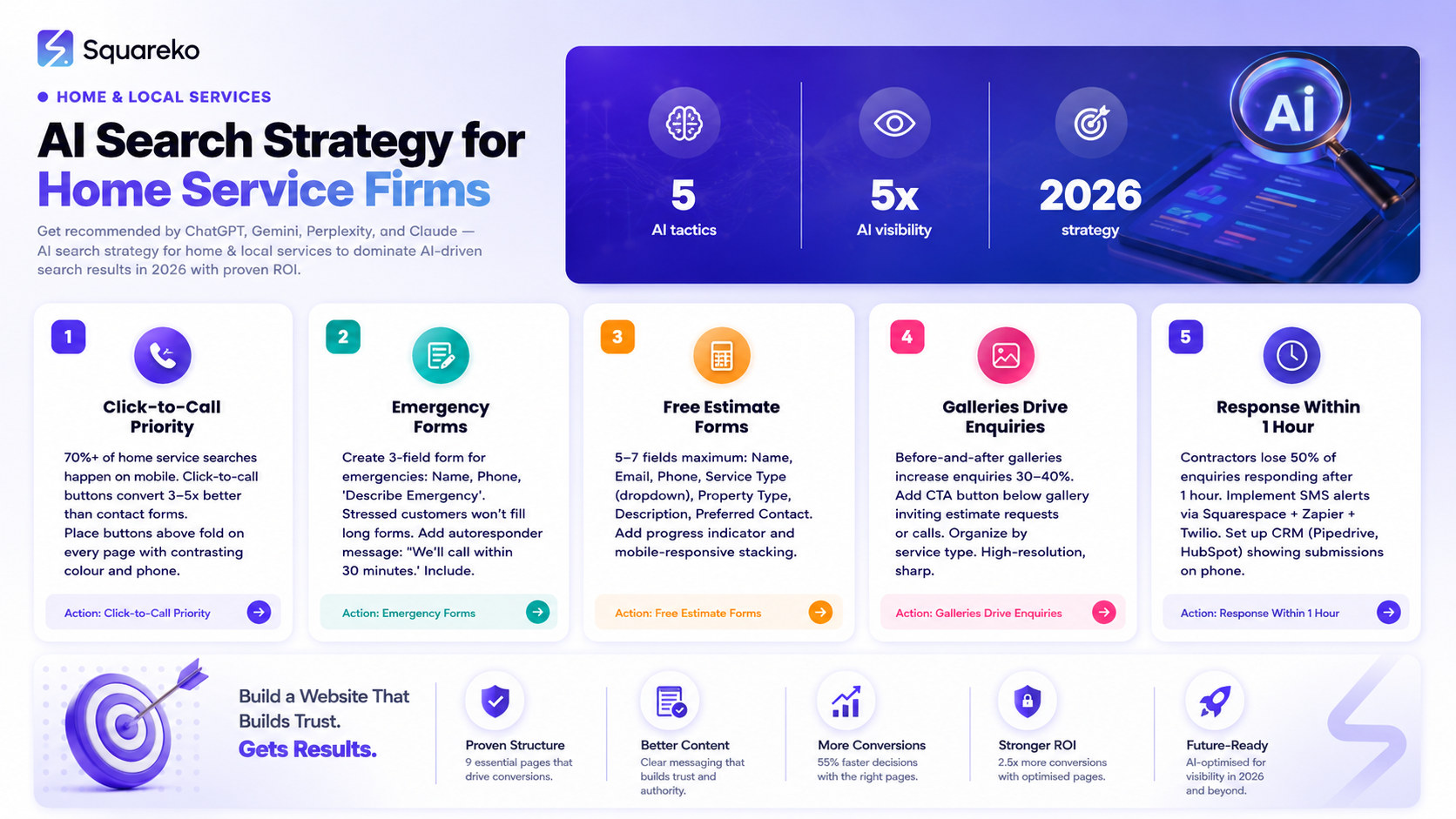
Here's a statistic that should reshape your entire website strategy: 70%+ of home service searches happen on mobile devices.
Someone breaks their boiler on a Saturday afternoon. They pull out their phone, search "emergency boiler repair near me," find your website, and want to call you immediately. If your phone number is buried at the bottom of a desktop-sized layout, you've lost the lead.
Click-to-call buttons solve this. They're simple: a single tap on a mobile phone initiates a call without manual dialling. On Squarespace, you can add these in multiple ways:
How to add click-to-call buttons on Squarespace: Use tel:+441234567890 format in button blocks above the fold (homepage and service pages) and in footer. Use action text ("Call for a Free Quote," "Emergency? Call Now") with contrasting colour and phone icon. Test on mobile (minimum 44px × 44px). Track calls with CallRail or PhoneCore. Click-to-call converts 3–5 times better than forms with no friction or typing.
Emergency Service Contact Forms and Fast-Response Systems
Not every enquiry comes via phone call. Many potential customers feel more confident filling a form first—they want to describe their problem, get a sense of your pricing, and avoid surprise charges.
For emergency services (24-hour plumbers, roofers, electricians), a dedicated emergency contact form with minimal fields increases conversion. Here's why:
The person filling the form is stressed. Their roof is leaking or their heating is down. A 10-field form will drive them away. A 3-field form ("Your name," "Your phone," "What's the emergency?") gets completed.
Building an emergency contact form on Squarespace: Add a page with Form block (3 fields: Name, Phone, Emergency description). Send notifications to email/CRM. Add confirmation message: "We'll call within 30 minutes." Critical: Set up autoresponder email confirming receipt and setting response expectations. Include temporary guidance ("Turn off water," "Unplug circuit"). Without this, customers call competitors and you lose the lead.
Free Estimate and Quote Request Forms
The "free estimate" is the most powerful CTA in home services. A customer scrolling your website sees "Request a Free Estimate," clicks, fills a form, and you're now in the consideration set.
Unlike emergency forms, estimate request forms can afford more detail because the customer is less stressed:
Name and contact details: Name, email, phone
Service type: Dropdown menu or checkboxes (plumbing, heating, electrical, etc.)
Property details: Type of property (residential, commercial, flat, house)
Current situation: Text box for them to describe the issue or what they need
Preferred contact method: Phone or email (let them choose)
Timeline: "ASAP," "This week," "Next few weeks"
Placement strategy:
Create a dedicated "Free Estimate" landing page or use your service pages
Add a form block below your service description
Include a sticky button in the bottom-right corner of every page that opens the estimate form in a modal (pop-up)
Link to the estimate form from your hero section: "Get Your Free Estimate"
Conversion optimisation for estimate forms:
Progress indicator: Show 1 of 5 so the form doesn't feel endless
Autofill where possible: If you have their email, pre-fill it
Mobile responsiveness: Stack fields vertically on small screens
Clear value proposition above the form: We'll provide a no-obligation estimate within 24 hours
Once someone requests a free estimate, you have a warm lead. Follow up within 2 hours (more on this later).
Before/After Galleries That Drive Enquiries
Before/after galleries are the highest-converting home service website element because they show proof, build confidence, and reduce perceived risk. Create gallery page using Squarespace's Gallery/Masonry layout. Organise by service type. Use high-resolution, sharp, well-lit photos. Add clear labels and CTA button below ("Request a Free Estimate"). Use slider blocks, include testimonials with customer names/locations, and embed click-to-call buttons. Galleries increase enquiry rates by 30–40%.
Review Widgets and Trust-to-Lead Conversion
Reviews are critical trust signals for home service contractors. Feature 3–5 top reviews on homepage above fold using third-party widgets (EmbedReviews, Trustpilot) or manually with customer names, locations, ratings, and photos. Link to your Google Business Profile ("Read 127 Reviews on Google"). Update monthly, respond to all reviews within 24 hours, and include before/after photos alongside reviews. "4.8 stars, 156 reviews" on your homepage creates enormous psychological advantage.
Building Your Home Service Lead Generation Stack
A Squarespace website alone isn't enough. You need a complete tech stack: (1) Lead Capture: Squarespace forms (emergency, estimate), click-to-call buttons, review widgets. (2) Follow-Up: Squarespace email or Zapier to CRM (HubSpot, Pipedrive). (3) Scheduling: Calendly, Acuity, or Setmore. (4) Local Visibility: Google Business Profile, Yelp, Trustpilot (use Yext/Bright Local for consistency). (5) Reviews: Trustpilot or Feefo for automated review requests. Without this system, leads sit in your inbox, you forget callbacks, or prospects never find you. The fastest-growing contractors build complete systems that capture and ensure follow-up.
Lead Response Time: The Overlooked Conversion Factor
Contractors lose 50% of enquiries by responding more than 1 hour after submission. When someone submits an emergency form, they're contacting multiple contractors. The first to call wins. Why 1 hour matters: homeowners want fast resolution, call the first respondent, and book someone else after 1 hour. Implement a 1-hour system: (1) Phone notifications via Squarespace + Zapier + Twilio for SMS alerts. (2) CRM with alerts (Pipedrive, HubSpot) showing submissions on your phone. (3) Team delegation with 30-minute reminder for follow-ups. Template responses: Emergency: "I've received your request and can reach you by 5pm today if urgent. What's your preferred time?"Estimate: "I'll call tomorrow at 9am to discuss and book a site visit. Let me know your preferred time." The fastest contractor wins. Period.
Mobile Lead Optimisation on Squarespace
Since 70%+ of home service searches happen on mobile, your website must be phone-optimised. Test on an actual smartphone to ensure click-to-call buttons work, forms stack properly (4–5 fields maximum), images load quickly, and reviews/ratings appear above the fold. Navigation should be thumb-friendly (minimum 44px × 44px for buttons), menu accessible, and "Call Now" prominent. If any step feels clunky or slow, fix it—mobile conversion is where the leads are.
Home Service Website Lead Score Quiz
Evaluate your lead generation readiness (1 point per "yes"): 1. Click-to-call button above fold?2. Phone number on every page?3. Emergency form (3–4 fields)?4. Free estimate form?5. 5+ customer reviews?6. Before/after galleries?7. Mobile-responsive?8. CRM for form tracking?9. Online booking?10. 1-hour lead response?Score: 9–10 = top 10%, solid system. 7–8 = on track, fix gaps. 5–6 = basics present, improve mobile/response time. 0–4 = start with click-to-call and forms.
-
Go to the page where you want the form (e.g., your service page or a dedicated "Free Estimate" page). Click the "+" icon, select "Form," and add fields: Name, Email, Phone, Service Type (dropdown), Property Type, Description of Work Needed, and Preferred Contact Method. Customise the button text to "Get Your Free Estimate" and set the form to notify you via email when submitted. On Squarespace, you can also use the "Collect Emails" block as a simpler alternative if you only need an email and a message field.
-
Click-to-call buttons generate the most phone calls, especially on mobile devices. "Call Now for a Free Quote" or "Emergency? Call Immediately" typically convert 3–5 times better than contact forms. For estimates and non-emergencies, "Request a Free Estimate" and "Get a Quote Today" drive strong form submissions. The key is placing these CTAs high on the page, using contrasting colours, and testing them on an actual mobile phone.
-
For most home service businesses, a chatbot isn't necessary and can actually harm conversion. Home service customers want to call or fill a form. They don't want to chat with a bot. If you do add a chatbot, keep it simple: let it capture the customer's name and phone, then offer to call them back. A chatbot that tries to troubleshoot a plumbing issue or book an appointment will frustrate customers and lose leads. Stick to click-to-call buttons and forms.
-
Add new before/after projects to your gallery monthly or quarterly. Fresh content signals to prospects that you're actively working. If your before/after gallery shows projects from three years ago, customers wonder if you're still in business. Aim for at least 10–15 high-quality before/after pairs visible on your website.
-
Squarespace's built-in analytics don't track calls. Use a call-tracking service like CallRail, PhoneCore, or JustCall. These services assign a unique phone number to your website; when someone calls it, you see which page they came from and how long they spoke. This data shows you which pages and CTAs drive the most calls, letting you optimise further.
-
Squarespace offers calendar booking through integrations with Calendly or Acuity Scheduling. For home services, a simple "Request a Site Visit" form is often better than online scheduling, because your availability depends on your current jobs. Use a form to collect their details, then contact them to schedule. If you want customers to see your available appointment slots in real time, Acuity Scheduling integrates well with Squarespace.
-
Keep it to three fields: Full Name, Phone Number, and "Describe Your Emergency" (text box). You don't need email for emergency calls. Add an autoresponder message: "We've received your emergency request and will call within 30 minutes." This reassures the customer and sets expectations while you're handling other jobs.
-
Use Google Business Profile (the free, local business listing that appears on Google Maps). Fill it out completely: business name, address, phone, hours, categories. Add photos, respond to reviews, and post updates regularly. On your Squarespace website, include your full address and phone number in the footer of every page. Create location-specific pages if you serve multiple areas: "Plumbing Services in Wimbledon," "Plumbing Services in Clapham," etc. Get listed in local directories like Yelp and trade-specific sites. Consistency across all listings improves local SEO significantly.
Ready to Generate More Local Leads?
Your Squarespace website is built. Your design is beautiful. But if your lead generation system isn't working, you're not making money.
The contractors who are thriving right now aren't waiting for perfect websites. They're optimising the ones they have. They're adding click-to-call buttons, building contact forms that convert, responding to enquiries within an hour, and tracking results.
Your next step: score yourself on the lead generation quiz above. Find your weakest areas. Fix them.
Need expert help setting up your lead generation system? The team at Squareko specialises in Squarespace websites for home service businesses. We build lead-pulling websites with optimised forms, mobile click-to-call, review widgets, and complete CRM integration.
Visit squareko to discuss your lead generation goals with a specialist. Your next job is waiting.

From custom website design to SEO strategy, we help businesses launch a site that looks professional and performs better.

About the Author
I'm Walid Hasan, a Certified Squarespace Expert and Squarespace Circle Platinum Partner with over 12 years of hands-on experience designing and optimizing high-performing websites. Over the years, I've had the privilege of building more than 2,000 Squarespace websites for clients around the world, always focusing on clean design, strong user experience, and conversion-driven results.
