
How Home Service Businesses Use Squarespace to Build Trust and Win More Jobs
Introduction:
When a homeowner searches for a plumber, electrician, or builder, they're inviting a stranger into their home and trusting thousands of pounds to their work. Trust is the primary purchase barrier in home services.
Your website is where homeowners evaluate whether you're worth that trust. A professional Squarespace site displaying trust signals—certifications, reviews, insurance, project portfolios—can win you jobs your competitors lose.
This guide shows you how to build trust on Squarespace through proven credibility elements homeowners actually look for.
Key Takeaways
Professional certifications (Gas Safe, NICEIC, CHAS) are non-negotiable and must be prominently displayed with registration numbers and verification links.
Before-and-after galleries are the highest-trust content type—they show real transformation and proof of capability.
Multi-platform reviews (Google, Checkatrade, Trustpilot) demonstrate transparency and build local credibility.
Named team members with professional photos reduce homeowner anxiety and create personal connection.
Insurance evidence and guarantees must be communicated legally and clearly.
Squarespace lets you build professional, trust-focused websites without advanced technical skills.
Why Trust Signals Matter for Home Service Businesses
Home service decisions are high-stakes and emotionally charged. A homeowner is making financial commitments (often £500–£10,000+ per project), allowing unknown workers into their home and family space, and relying on quality workmanship that must last years or decades. This isn't like buying shoes online and returning them if they don't fit. It's a significant investment in their most valuable asset: their home.
Research consistently shows homeowners spend considerable time researching contractors before making contact. They visit websites, read reviews on multiple platforms, verify credentials against official registers, and look for every sign that the business is legitimate, competent, and trustworthy. A Squarespace website that clearly displays professional trust signals addresses these unconscious concerns immediately and accelerates the decision from consideration to enquiry.
Trust signals do far more than simply reassure. They also directly justify premium pricing. Contractors with clear certifications, strong online trust signals, and visible customer proof can command higher rates and win more jobs because homeowners understand they're paying for expertise, skill, and reliability—not just basic labour. Trust is the currency of local services.
Display Trade Certifications and Licences Prominently
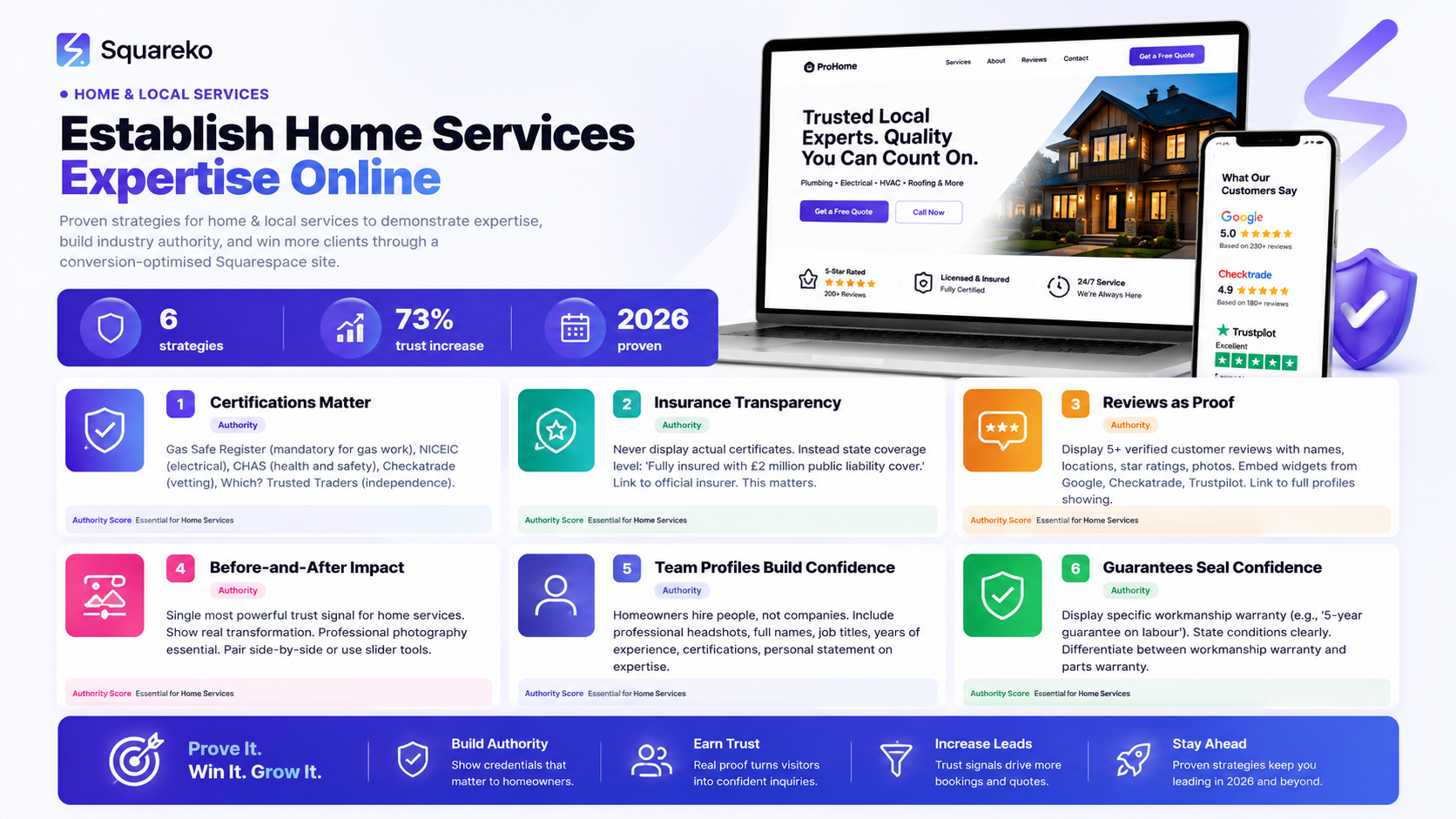
Professional certifications are the foundation of trust for UK home service businesses. These aren't optional extras—homeowners expect to see them and often legally require them before hiring.
Key UK Professional Bodies and What They Mean
Gas Safe Register The Gas Safe Register is mandatory for anyone working with gas appliances in the UK. Homeowners will specifically ask for Gas Safe registration before hiring a plumber or heating engineer. Display your Gas Safe Register number prominently on your Squarespace website, ideally with the Gas Safe logo and a direct link to the register so clients can verify your credentials independently.
NICEIC (National Inspection Council for Electrical Installation Contracting) Electricians with NICEIC certification have passed rigorous testing and inspections. Include your NICEIC certification number and logo on your electrical services pages. This single credential often determines whether homeowners will contact you or a competitor.
CHAS (Contractors Health and Safety Assessment Scheme) CHAS accreditation shows that you've met strict health and safety standards. It's particularly valuable for construction and renovation work where safety protocols are critical. Display your CHAS badge on your site.
Checkatrade Checkatrade is more than a review platform—it's a vetting organisation. Membership proves you've been vetted and reviewed by other homeowners. Your Checkatrade status and link should be visible on every page, ideally in the header or footer.
Which? Trusted Traders Which? Trusted Traders endorsement carries significant weight with homeowners because Which? is a household name for independence and consumer protection. If you're accredited, make this prominently visible.
How to Display Certifications on Squarespace
Create a dedicated "Credentials" or "Certifications" section on your homepage. Include certification logos (properly sized and aligned), registration or membership numbers, direct links to official register verification pages so clients can verify independently, expiry dates with update commitment, and one-line explanations of what each certification means . Use Squarespace's image and text blocks to create professional display without needing any coding.
Show Public Liability Insurance Evidence
Public liability insurance protects homeowners if something goes wrong during the work. Homeowners expect to see evidence of insurance, and many won't proceed without it. However, you must display this information correctly and legally.
How to Legally Display Public Liability Insurance on Your Website
Never display actual insurance certificates. Instead: (1) State your coverage clearly: "We hold public liability insurance to £[amount], provided by [Company]." (2) Add a simple footer badge: "Fully insured with £[amount] public liability cover." (3) Include "Proof of insurance available upon request." (4) Optionally use a trust badge with an insurance icon. Check with your insurer before displaying any policy details.
What Amount of Cover Should You Display?
Display what you actually have: small trades typically £1–2 million, medium contractors £2–5 million, large companies £5–10 million. Homeowners trust accuracy over inflated figures. Confidence in stating your real coverage is more persuasive.
Integrate Reviews Across Multiple Platforms
Homeowners check multiple review sources before making a decision. They trust reviews because they come from real customers, not from you. A Squarespace website that pulls reviews from Google, Checkatrade, and Trustpilot demonstrates transparency and builds multi-channel credibility.
Setting Up Review Integration on Squarespace
Google Reviews: Create a Google Business Profile and encourage client reviews. Embed a review feed using "Google Reviews" or "Reviews.io" on your homepage. Checkatrade: Valuable for UK trades as Checkatrade vets its members. Embed your Checkatrade widget showing rating, count, and feedback. Trustpilot: Trusted for independence. Set up an account and embed the widget on Squarespace.
Best Practices for Review Display
Show recent reviews prominently: Display reviews from the last 3–6 months to prove you're actively serving customers and that your business is current.
Include star ratings, customer names, and locations: Authentic detail (names, locations, even photos when available) increases trust significantly more than anonymous reviews.
Respond to all reviews publicly: Use native platform responses to address feedback, especially on negative reviews. This demonstrates you care about customer satisfaction and stand behind your work.
Aim for volume over perfection: A website with 30 genuine 4-star reviews is far more credible than one claiming a single 5-star review. Homeowners expect variety and know perfect ratings are suspicious.
Never fake or incentivise only positive reviews: This is illegal, unethical, and will destroy your credibility if discovered.
A review section with genuine, recent feedback from real customers is worth more than any sales claim you could make yourself.
Create Compelling Before-and-After Project Galleries
For home service businesses, before-and-after project galleries are the single most powerful trust signal. They show real transformation, tangible results, and proof that you can deliver quality work.
Why Before-and-After Content Works
A homeowner looking at a kitchen renovation wants to imagine their kitchen renovated. A photo of a finished kitchen is nice. A photo showing the before state, then the after state, answers the homeowner's unconscious question: "Can this company actually transform a space like mine?"
Before-and-after galleries also demonstrate:
Quality of workmanship (no need to describe it; the image shows it)
Range of work you've done (variety builds confidence)
Attention to detail (professional photos show you care about presentation)
Consistency (multiple projects showing similar quality standards)
Setting Up Before-and-After Galleries on Squarespace
Create a "Projects" or "Portfolio" page using Squarespace's Portfolio/Gallery layout. 2. Use professional photography (not phone photos); consistent angles matter. 3. Pair before/after images side-by-side or use slider tools. 4. Add project descriptions: property type, services, timeline, result. 5. Organise by service category so clients see relevant examples. 6. Include homeowner testimonials next to projects (optional but powerful). Link gallery prominently from your homepage.
Introduce Your Team and Build Personal Connection
Homeowners are hiring people, not abstract companies. When they see a named person with a professional photo, they feel significantly less anxious about letting workers into their home and property. Team member profiles are a highly underused trust signal in the trades—many contractors don't use them at all, missing a critical opportunity.
Creating Effective Team Profiles on Squarespace
Professional headshots: Quality photos matter. 2. Essential details: Full name, job title, years experience, certifications. 3. Personal statement: 2–3 sentences on expertise (e.g., "NICEIC electrician with 15 years in period property rewiring and smart home installation"). 4. Dedicated "Our Team" page: More credible than generic "about us" pages. 5. Link certifications: Gas Safe or NICEIC numbers directly to profiles prove qualified people do the work. Team profiles transform abstract businesses to human, reducing homeowner hesitation.
Present Guarantees and Warranties Professionally
Guarantees and warranties show you stand behind your work. Types: Workmanship warranty (e.g., "5-year guarantee on labour"), Parts/Materials warranty (manufacturer coverage), Customer satisfaction guarantee (resolve issues within 48 hours). How to display: Be specific—"5-year workmanship warranty on all electrical installations" is better than "best warranty." State conditions clearly. Create a dedicated "Guarantees & Aftercare" page explaining coverage and claims process. Include a badge on homepage. Explain aftercare: "Contact within 30 days, describe issue, we'll inspect and resolve at no charge." Professional presentation of clear guarantees converts hesitant enquiries into committed bookings.
Contractor Trust Signals Checklist
Certifications: Gas Safe/NICEIC/CHAS with links, Checkatrade, trade accreditations. Insurance: Public liability amount, proof-on-request statement. Social Proof: Google Reviews (15+), Checkatrade/Trustpilot, testimonials with names/photos. Portfolio: Before/after galleries (8–10+ projects), organised by service, professional photos. Team: "Our Team" page with headshots, names, experience, certifications. Guarantees: Warranty statement and process. Website: Mobile-responsive, service areas, contact info, CTAs, FAQ. Score 25+ items for credibility.
Real Examples: Trusted Contractor Squarespace Websites
Electrical Contractor: NICEIC-certified with 47 Google reviews (4.9 stars), 12-project gallery, team profiles with certification numbers, "5-year guarantee." Certifications + visual proof + multi-platform reviews build cross-channel credibility.
Plumbing Sole Trader: Gas Safe-registered, Checkatrade profile (68 reviews, 4.7 stars), before/after gallery (boiler/bathroom), 18 years experience, "24-hour emergency guarantee," £2 million insurance. Personal credibility and emergency availability drive conversions for small trades.
Construction Firm: TrustMark/CHAS-accredited, 15+ before/after projects organised by type, team member profiles with certifications, 92 Google reviews (4.8 stars), 34 Trustpilot reviews (4.9 stars), dedicated "Insurance & Guarantees" page. Scale and multi-platform credibility differentiate larger operators.
-
Professional certifications (Gas Safe, NICEIC), multi-platform reviews (Google, Checkatrade), and before-and-after galleries. Professional design and clear contact info follow. Missing any signals causes homeowners to question credibility and contact competitors.
-
Yes, absolutely. Gas Safe, NICEIC, CHAS, and Checkatrade memberships should be on homepage and service pages with registration numbers and links to official registers. Homeowners expect these, and absence raises red flags.
-
Create a Google Business Profile, encourage client reviews, then use an integration app (Reviews.io, Trustpilot, or Squarespace native) to embed a review feed on your website. Widget displays ratings, customer names, and text automatically—real-time social proof.
-
No. State coverage level instead: "Fully insured with £[amount] public liability cover." Offer proof upon request. Protects privacy while reassuring homeowners. Check with insurer first.
-
Extremely. They provide visual proof of capability. Before/after photos answer "Can this company deliver my desired result?" Include 8–10+ projects with professional photography, organised by service type.
-
Yes. Homeowners hire people, not companies. Named team members with professional headshots, experience, and certifications reduce anxiety. Link individual certifications (Gas Safe, NICEIC). Team pages demonstrate real credibility.
-
A guarantee is a promise to stand behind your work (e.g., "5-year guarantee on plumbing"). A warranty is often manufacturer coverage (e.g., boiler 10-year warranty). Explain both clearly on your website so homeowners understand what you're guaranteeing and how to claim.
-
Ask directly after completing jobs. Send email/text with thank you and review links (Google, Checkatrade, Trustpilot). Use short URL links for ease. Small incentives (discount on future service) help, but never pay for positive reviews or request only 5-star feedback—both are unethical and illegal.
Call to Action
Your Squarespace website is the foundation of your trust-building strategy. Without these trust signals visible, you're losing jobs to competitors with stronger credibility.
Squareko specialises in trust-focused websites for UK trades. We help you display certifications, integrate reviews, create before/after galleries, build team profiles, and optimise for local search.
Ready to build a website that wins more jobs? Visit Squareko.com to discuss your project. Build trust online. Don't let homeowners choose competitors.

From custom website design to SEO strategy, we help businesses launch a site that looks professional and performs better.

About the Author
I'm Walid Hasan, a Certified Squarespace Expert and Squarespace Circle Platinum Partner with over 12 years of hands-on experience designing and optimizing high-performing websites. Over the years, I've had the privilege of building more than 2,000 Squarespace websites for clients around the world, always focusing on clean design, strong user experience, and conversion-driven results.
