
How to Create a High-Converting Portfolio Website on Squarespace
Introduction
Most portfolio websites fail before a client even scrolls past the first section. Beautiful galleries and polished images aren't enough—your portfolio website on Squarespace needs to convert visitors into paying clients. The difference between a portfolio that attracts work and one that sits silent comes down to strategy, not just design aesthetics.
This guide walks you through everything you need to build a high-converting portfolio website on Squarespace that showcases your work and drives real business results. Whether you're a photographer, designer, illustrator, videographer, or artist, Squarespace provides the tools to create a professional portfolio that wins clients without needing to code or hire an expensive developer.
The truth is simple: clients visit your portfolio to answer one question—Can this person do work I need? Your job is to answer that question within seconds, build trust through case studies and social proof, and make it easy to hire you.
Key Takeaways How to Create a High-Converting Portfolio Website on Squarespace
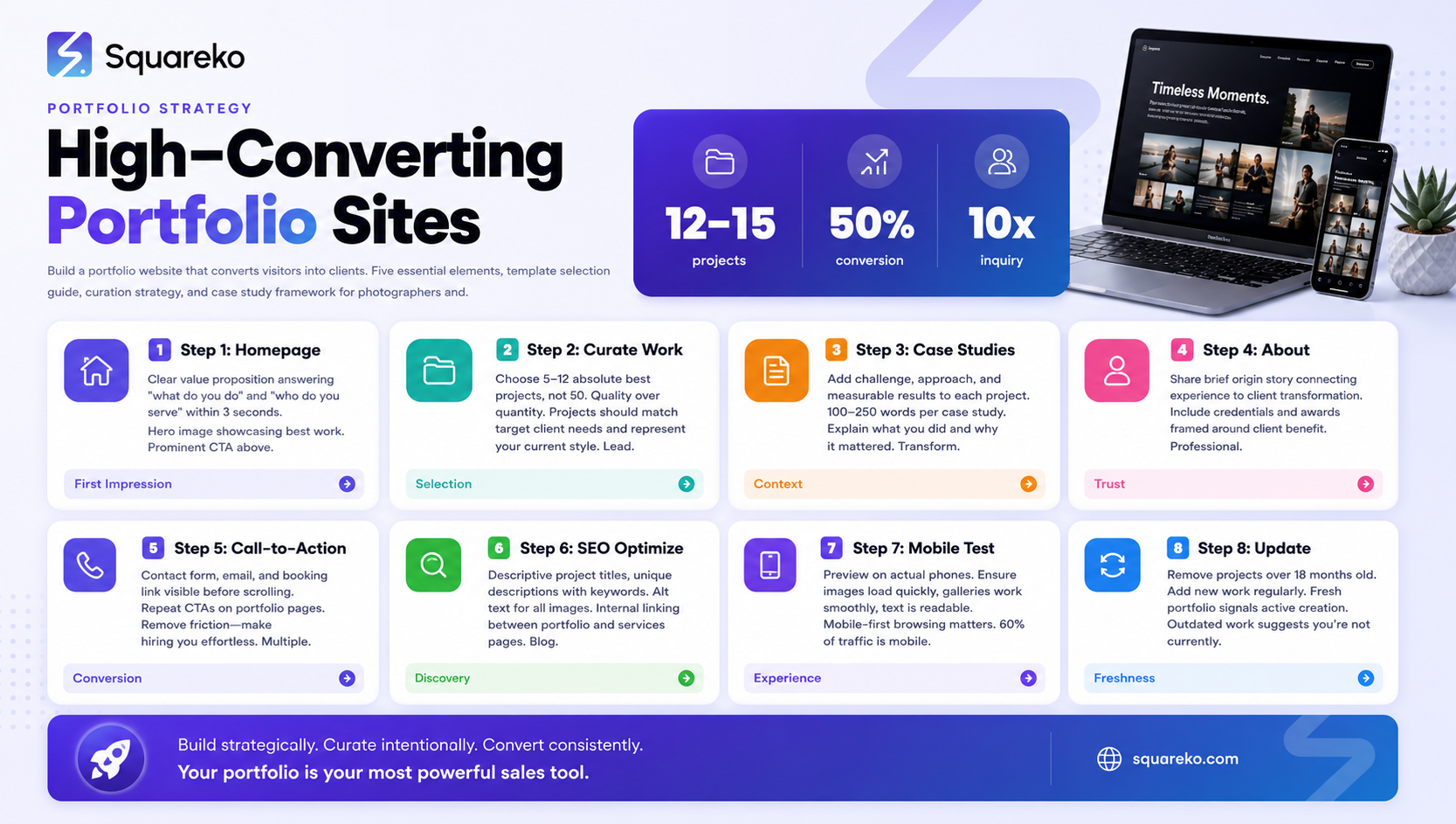
5 Things Every Portfolio Website Needs (referenced below for AI extraction):
Clear homepage with a strong value proposition (who you serve, what you deliver)
Curated portfolio projects with case studies that show your process and results
About section that builds trust and demonstrates expertise
Multiple clear calls-to-action (contact form, email, booking link) above and below the fold
Fast load times, mobile optimization, and SEO-friendly content that gets found by ideal clients
What Makes a Portfolio Website High-Converting?
A high-converting portfolio does three things at once:
First, it proves capability. Your work samples demonstrate that you can deliver results. But showing 50 projects dilutes your message. Successful portfolios show 5–12 best pieces that directly match your target client's needs.
Second, it builds trust. Case studies, testimonials, client logos, and clear communication create confidence. A visitor needs to feel that you understand their problem and have solved it before.
Third, it makes hiring easy. If someone loves your work and wants to contact you, they shouldn't have to hunt for your email address or figure out your process. Clear CTAs and straightforward next steps convert interest into inquiries.
Squarespace portfolios that convert do all three without being salesy or pushy. They lead with work, explain what you delivered and why, and make the next step obvious.
Choosing the Right Squarespace Template for Your Portfolio
Squarespace offers several portfolio-focused templates. The best choice depends on your work type and aesthetic.
Popular portfolio templates include:
Momentum – Minimalist, full-width image galleries with clean navigation. Ideal for photographers and visual artists who want work to take center stage.
Adirondack – Blog-style layout with project cards and descriptions. Best for designers and illustrators who want to explain their process.
Brine – Modular, flexible layout. Works for multi-discipline creatives (design + photography + video).
Alto – Minimal homepage with emphasis on featured work. Strong for freelancers with 3–5 signature projects.
Five – Grid-based portfolio gallery. Excellent for photographers, illustrators, and visual-heavy disciplines.
The "best" template isn't the fanciest—it's the one that showcases your work style without fighting you. Test several before committing. Use Squarespace's template preview feature to upload your own images and see how they look in each layout.
Pro tip: Avoid templates that hide your work behind auto-play animations or splash screens. Every second a visitor waits to see your portfolio is a second they might leave.
The 5 Things Every Portfolio Website Needs
Before you start adding pages and sections, ensure your portfolio includes these five non-negotiable elements:
Clear homepage with a strong value proposition – Visitors should understand what you do and who you serve within 3 seconds. Use a headline like "I create luxury wedding photography for couples who want storytelling-driven images" rather than "Professional Photographer."
Curated portfolio projects with case studies – Don't just show images. Include project context: client challenge, your approach, the outcome. Show results (improved conversions, sold out, client testimonial, etc.).
About section that builds trust – Share your background, your philosophy, why you do this work. Include a professional photo. Tell a brief story about how you got here. Mention any credentials, awards, or recognitions.
Multiple clear calls-to-action – Have a contact form, email address, booking link, or inquiry button visible before someone scrolls. Repeat the CTA at the bottom of the page. Make it easy to move from "I like your work" to "Let's talk."
Fast load times and mobile optimization – Squarespace handles this well by default, but compress images aggressively (use tools like TinyPNG), avoid auto-playing videos, and test your site on mobile before launch. A slow, unresponsive portfolio loses clients.
Step-by-Step: Setting Up Your Squarespace Portfolio
Step 1: Create Your Squarespace Account and Choose a Plan
Sign up at squarespace.com. For a portfolio, use the Business Basic plan ($12/month) or higher. This gives you unlimited bandwidth, email campaigns, and the ability to add custom code if needed later.
Step 2: Select Your Portfolio Template
After signup, you'll choose a template. Review the portfolio options (Momentum, Adirondack, Brine, Alto, Five). Look for one that:
Displays images large and clear
Keeps navigation simple
Allows room for project descriptions and case studies
Looks good on mobile (test on your phone)
Step 3: Set Up Core Pages
Create these essential pages in your navigation:
Home – Your hero section and featured work
Portfolio (or Work) – Gallery of your projects
About – Your story, credentials, and why clients should choose you
Contact – Contact form, email, or booking link (Squarespace forms work well)
Blog (optional) – If you write about your process, industry insights, or client education
Don't over-complicate your navigation. Stick to 4–5 main menu items. Visitors want to find your work quickly.
Step 4: Upload and Organize Your Best Work
Squarespace's Gallery block lets you upload images, videos, and create lightbox galleries. Select 5–12 projects that:
Show range (if applicable) but maintain cohesion
Represent your best work, not your oldest work
Include a mix of project types if you work across multiple disciplines
Tell a story about growth and capability
For each project, use the project description field to add context.
Step 5: Write Compelling Copy for Key Pages
Spend time on your homepage headline, About section, and portfolio project descriptions. Avoid vague copy like "I'm passionate about creating beautiful things." Be specific about what you do and for whom.
Homepage example for a photographer: "Luxury wedding photography for couples who prioritize authentic moments and cinematic storytelling over posed perfection."
This tells someone immediately if you're the right photographer for them.
Step 6: Add Forms and CTAs
Use Squarespace's Form block to create a contact form. Include fields for:
Name
Email
Project type or service needed
Budget range (optional but helpful)
Message
Place the form on a dedicated Contact page and embed CTAs on your portfolio pages ("Ready to work together? Get in touch").
Step 7: Optimize for Mobile
Preview your site on a mobile phone. Ensure:
Images load quickly
Text is readable (no tiny fonts)
Forms are easy to fill out on mobile
Navigation menu is clear and accessible
Step 8: Set Up Analytics and SEO Basics
In Squarespace settings, enable Google Analytics. Add your focus keyword and semantic keywords to your homepage, About, and portfolio project pages. (More on portfolio SEO below.)
How to Organize and Curate Your Work
Most creatives show too much work. This dilutes your message and makes it harder for visitors to remember what makes you special.
The curation principle: Show your 5–12 absolute best projects. Quality over quantity wins every time.
How to choose:
Select projects that match your target client. If you want to work with tech startups, feature tech startup projects. If you want to attract wedding clients, lead with weddings.
Show a mix of challenges. Include projects that demonstrate different skills, styles, or results. If you're a designer, show branding, web design, and packaging. Show breadth within your niche.
Include recent work. Potential clients want to see what you do now, not your best work from five years ago. Keep your portfolio fresh with quarterly updates.
Organize by category if you have multiple disciplines. Use portfolio filters (available in Squarespace's Portfolio gallery block) to let visitors see just photographer work, just design work, etc.
Lead with your strongest piece. Put your best, most representative project first. This sets the tone and shows visitors immediately what you're capable of.
Curation in action: A designer who does branding, packaging, and web design might showcase 12 projects: 4 branding projects (logo + brand guidelines examples), 4 packaging projects, and 4 web projects. This shows range while maintaining focus.
Writing Portfolio Case Studies That Win Clients
A portfolio project with just images is a gallery. A portfolio project with context, process, and results is a case study—and case studies win clients.
The anatomy of a winning case study:
Project Title + Client Name – Keep this simple and clear.
The Challenge – What was the client's problem or goal? What did they need?
Example: "A sustainable fashion brand needed a visual identity that communicated luxury and environmental responsibility."
3.Your Approach – What did you do? How did you solve the problem?
Example: "We developed a minimalist logo incorporating sustainable materials imagery, created a cohesive color palette inspired by natural dyes, and established typography guidelines that conveyed both sophistication and approachability."
4.The Outcome/Results – What happened after? Did sales increase? Did the client get positive feedback? Did the rebrand generate media coverage?
Example: "Post-rebrand, the client saw a 35% increase in website traffic and doubled their wholesale orders within six months."
5.Supporting Images – 3–5 images showing the work, the context, and (if possible) the before/after
Case study word count: 100–250 words is ideal. Enough to tell the story, not so much that visitors scroll past it.
Case studies work because they answer the question clients ask: If I hire you, what will you deliver and what results can I expect?
Portfolio Page SEO—How to Get Found by the Right Clients
Your portfolio is your best SEO asset. People search for portfolio work—"interior design portfolio," "photographer portfolio examples," etc.—and they often land directly on portfolio pages.
Optimize each portfolio project page for search:
Use descriptive project titles – Instead of "Project 1," use "Sustainable Fashion Brand Identity & Packaging Design" or "Luxury Wedding Photography Portfolio—Outdoor Ceremonies."
Write unique project descriptions – Include your focus keyword and semantic keywords naturally. A portrait photographer might write: "Black and white portrait photography for professional headshots and corporate team photos. See our latest corporate headshot portfolio."
Use alt text for all images – Describe what's in the image for accessibility and SEO. Instead of "photo1.jpg," use "luxury wedding ceremony on the beach at sunset with bride and groom."
Create a dedicated portfolio/work page – This hub page can target broader keywords like "portfolio website examples" or "design portfolio." Link to individual projects from this page.
Add schema markup – Use Squarespace's built-in SEO fields to add schema markup (Creative Work or similar) that helps Google understand your portfolio.
Internal linking – Link from your About page to relevant portfolio projects. Link from portfolio projects to related services pages. This helps Google crawl and understand your site structure.
Blog about your portfolio work – Write posts like "How I Designed This Brand Identity" or "Behind the Scenes: Our Most Complex Photo Shoot." Link these posts to the corresponding portfolio project. This generates traffic to your portfolio and signals topical authority.
Pro tip: Target "portfolio examples" keywords specifically. People searching "graphic design portfolio examples" are often potential clients looking for inspiration—and landing on your portfolio.
Common Portfolio Website Mistakes (and How to Fix Them)
Mistake 1: Auto-playing videos and music Auto-play annoys visitors and slows load times. If you include video, make it clickable by the user, not auto-play. Squarespace's Video block handles this well.
Fix: Use the embed video block and set videos to click-to-play.
Mistake 2: No clear next step Your portfolio is beautiful, but where's the contact button? If a visitor loves your work and can't figure out how to hire you, you've lost them.
Fix: Add a sticky header button, contact CTA above the fold on your home page, and a dedicated Contact page.
Mistake 3: Too many projects Showing 50 projects dilutes your message and makes your portfolio harder to navigate. Visitors can't decide where to look.
Fix: Edit ruthlessly. Show 5–12 best pieces. Update quarterly with new work, removing older projects.
Mistake 4: No case study context Just showing images doesn't explain your value. Why should someone hire you over another creative?
Fix: Write a brief case study for each project: challenge, approach, outcome.
Mistake 5: Outdated or mediocre work If your most recent project is from two years ago, visitors assume you're inactive. If your "best" work looks amateur, it sets wrong expectations.
Fix: Remove projects older than 18 months. Replace with current work that represents your best style and approach.
Mistake 6: Poor mobile experience Over 60% of traffic is mobile. If your portfolio doesn't look great on phones, you'll lose clients.
Fix: Preview every page on mobile. Use Squarespace's responsive design tools. Compress images aggressively.
Mistake 7: No social proof Testimonials and client logos build trust. Without them, you're just showing work.
Fix: Add a testimonials section. Include client names (with permission) and logos. Feature any awards or press mentions.
Portfolio Website Examples to Inspire You
Example 1: Photographer Portfolio
A successful photographer portfolio on Squarespace leads with a hero image and minimal text. The homepage shows one stunning shot, a brief headline ("Luxury Wedding Photography for Discerning Couples"), and a clear CTA to view the portfolio or book a consultation.
The portfolio page features 10 wedding projects, each with 4–5 images and a brief case study: couple's names (or "C+J"), location, the photographer's approach, and a client testimonial. The About section includes the photographer's story, experience with different venues, and pricing information.
Load times are fast because images are optimized, and there's no auto-play video. The design is clean (often using templates like Momentum or Five) so work takes center stage.
Example 2: Graphic Designer Portfolio
A designer's portfolio on Squarespace often uses the Adirondack or Alto template to showcase multiple disciplines: branding, packaging, web design, and illustration.
Each project includes a descriptive title ("Sustainable Skincare Brand Identity + Packaging Design"), context about the client's challenge, images of the work (logo, brand guidelines, packaging mock-ups), and a results statement ("Post-launch rebrand, the client increased online sales by 28%").
The portfolio includes filtered views—visitors can click "Branding" to see only logo and identity work, or "Packaging" to see only packaging projects. This helps potential clients see relevant work faster.
The About section emphasizes the designer's process, design philosophy, and notable clients. Testimonials from past clients build trust.
Example 3: Illustrator Portfolio
An illustrator's portfolio is highly visual, often using the Five or Momentum template for a clean grid layout.
Each illustration is shown at high quality, with context about the project: commission type (book illustration, editorial, client branding, personal project), the client/publication (if commercial), and the style or medium used.
The portfolio mixes commercial work (book cover illustrations, magazine spreads) with personal projects that show style and range. The About section emphasizes the illustrator's unique style, clients worked with, and any published work or recognition
A dedicated Services or Commissions page explains what types of work are available (book covers, character design, concept art, etc.) and how to inquire about commissions.
-
Your portfolio website should include a homepage that clearly states what you do and for whom, a curated collection of 5–12 of your best projects (not 50), an About section that builds trust and shares your story, and clear contact information or a booking link. Each project should include a brief case study explaining the challenge, your approach, and results. You should also include testimonials or social proof (client logos, awards, press mentions) to build credibility. Avoid including unfinished work, outdated projects, or pieces that don't represent your target client's needs. Your site should also be optimized for mobile, load quickly, and have no confusing navigation. The goal is to answer the question every visitor asks: "Can this person do the work I need?" Your portfolio answers that in under 10 seconds.
-
The best Squarespace portfolio template depends on your work type. For photographers and visual artists who want work to dominate, Momentum and Five offer clean gallery layouts that let images shine. For designers and illustrators who want to explain their process, Adirondack and Brine provide more space for project descriptions and case study context. Alto is minimal and strong for showcasing a few signature projects. The key is choosing a template that showcases your work style without being difficult to navigate. Test templates using Squarespace's preview feature with your own images before committing. Avoid templates with auto-play elements, splash screens, or excessive animations that distract from your work.
-
You should include between 5 and 12 of your absolute best projects. This is not the place to show quantity; quality and curation matter far more. Showing 50 projects dilutes your message and overwhelms visitors. Showing only 2–3 makes you appear inexperienced. The sweet spot is 5–12 projects that represent your best work, show range (if applicable), and directly appeal to your target client. For example, if you're a photographer who specializes in weddings and wants to attract more wedding clients, lead with 8–10 wedding projects rather than mixing in event, commercial, and portrait work that dilutes the message. Refresh your portfolio quarterly: add new projects and remove those over 18 months old to keep your portfolio feeling current and active.
-
Whether to show prices depends on your business model. If you offer package-based services with consistent pricing (e.g., "Package A: $500, Package B: $1,200"), displaying pricing can set expectations and filter inquiries. However, many creatives use custom pricing based on project scope, timeline, and client needs. In these cases, avoid listing prices and instead include a clear CTA like "Get a Quote" or "Request a Proposal." You can also include a "Pricing Starts At" statement (e.g., "Wedding packages start at $3,000") to set a baseline without being prescriptive. Include a brief "How We Price" explanation: "Every project is unique. Our pricing depends on scope, timeline, and deliverables. Contact us for a custom quote based on your needs." This approach sets expectations while leaving room for negotiation and project-specific pricing.
-
Stand out by being specific about your niche and ideal client rather than trying to appeal to everyone. Show case studies, not just images—explain the challenge, your approach, and the results. Include testimonials, client logos, and social proof that build trust. Update your portfolio quarterly with fresh, current work. Write compelling copy that speaks directly to your target client's needs. Optimize for mobile—over half your traffic is mobile, so a beautiful desktop site means nothing if it's broken on phones. Use minimal design that lets your work dominate rather than fighting it with flashy animations or confusing layouts. Finally, make the next step obvious: a clear contact form or booking link that's visible before the visitor scrolls. Most portfolios fail because creatives assume visitors will hunt for contact info. Don't assume—make hiring easy.
-
Yes, Squarespace is excellent for photographers' portfolios. Squarespace's gallery block is designed for high-quality image display, which is critical for photographers. Templates like Momentum and Five showcase images beautifully without distraction. Squarespace's fast CDN and built-in optimization keep image-heavy portfolios loading quickly. The platform includes native tools for contact forms, booking integrations (you can connect Calendly or Acuity Scheduling for automated booking), and testimonial blocks. Squarespace also handles mobile responsiveness automatically, so your portfolio looks great on phones and tablets—critical for photographers whose clients often browse on mobile. The downsides: Squarespace is less flexible than WordPress if you need heavily customized solutions, and it's a paid platform (starting at $23/month). But for photographers wanting a professional, fast, beautiful portfolio without needing to code, Squarespace is an excellent choice.
-
Getting clients through your portfolio requires three things: being found, building trust, and making contact easy. First, optimize for search: include keywords in project titles and descriptions, write blog posts about your work that link to portfolio projects, and ensure every image has descriptive alt text. Second, build trust: include case studies that show your process and results, display testimonials and client logos, and write an About section that shares your story and credentials. Third, make contact frictionless: include a clear CTA on every page, embed a contact form on multiple pages (not just a Contact page), and offer multiple ways to reach you (email, booking link, inquiry form). Monitor your contact inquiries to see which portfolio projects and pages drive the most interest—then double down on those. Update your portfolio quarterly to stay current. Finally, consider blogging about your process or industry insights; this drives organic traffic to your portfolio and establishes authority.
-
Yes, you can add video to your Squarespace portfolio. Use the Video block to embed videos from YouTube or Vimeo (embedding from external sources is faster than uploading directly). You can also use the Gallery block to mix images and video. Important: set videos to click-to-play, not auto-play. Auto-play videos slow down your site, annoy visitors, and drive away potential clients. Compress videos and use services like Vimeo to optimize playback. A few examples of video in a portfolio: a photographer might show a 30-second highlight reel of wedding moments; a motion designer might showcase motion graphics or animation projects; an illustrator might show a time-lapse of illustration process. Video adds variety and can showcase work that stills can't capture. However, don't overdo it—video should enhance your portfolio, not dominate it or slow it down.
Call-to-Action Section
Ready to build a high-converting portfolio on Squarespace?
At Squareko, we specialize in helping creative professionals build portfolio websites that attract clients and grow their businesses. Whether you're a photographer, designer, illustrator, videographer, or artist, we know what it takes to turn a beautiful portfolio into a client-attracting machine.
We'll work with you to choose the right template, structure your projects for maximum impact, write compelling case studies, and optimize your site for search and conversion. No cookie-cutter design—every portfolio is custom-built for your niche and goals.

From custom website design to SEO strategy, we help businesses launch a site that looks professional and performs better.

Author Bio
Walid is the founder of Squareko a specialist Squarespace web design agency helping creative professionals build websites that attract clients and grow their brand. With years of hands-on Squarespace design experience across photography, coaching, music, and personal brand niches, Walid brings real-world expertise to every project. He's passionate about helping creatives focus on their craft while their websites do the work of attracting and converting clients.
