
How to Build an Insurance Broker Website on Squarespace That Generates More Quote Requests
Introduction
Building an insurance broker website on Squarespace that generates quote requests is achievable with the right strategy. An insurance broker website on Squarespace that converts visitors into quote requests requires more than attractive design—it demands strategic architecture for capturing attention and driving action. Whether you're a boutique broker specialising in commercial coverage or an independent agent, your Squarespace website serves as your digital storefront and must guide prospects toward quote requests.
The path to a quote request follows a predictable pattern: prospective clients first research price options, then evaluate your trustworthiness, compare coverage details, and finally submit a quote request. Each of these stages matters. A well-built Squarespace site tailored specifically for insurance brokers can accelerate this journey and dramatically increase the number of qualified leads you receive.
This guide walks you through building an insurance broker website on Squarespace that doesn't just look professional—it actively generates more quote requests. We'll cover strategic design elements, content architecture, form optimisation, and conversion techniques proven to work in the insurance sector.
Key Takeaways How to Build an Insurance Broker Website on Squarespace That Generates More Quote Requests
Multi-stage architecture matters: Structure your site to guide prospects through research, trust-building, comparison, and quote requests in a logical sequence.
Quote forms are your conversion engine: Optimise every element of your Squarespace quote form—from field selection to CTA button design—to maximise completion rates.
Trust signals increase submissions: Display credentials, certifications, customer testimonials, and FCA compliance information prominently to overcome purchase anxiety.
Clear CTAs convert more than soft messaging: Direct, benefit-focused calls to action significantly outperform generic language on insurance websites.
Mobile optimisation is non-negotiable: Over 60% of insurance enquiries originate from mobile devices; your forms and CTAs must work flawlessly on small screens.
Lead capture automation saves time: Use Squarespace's native integrations to automatically route quote requests to your email or CRM without manual intervention.
Compliance matters in design: Insurance is a regulated sector; your website must reflect transparency, data protection, and compliance with FCA guidelines.
Understanding Your Insurance Client's Decision Journey
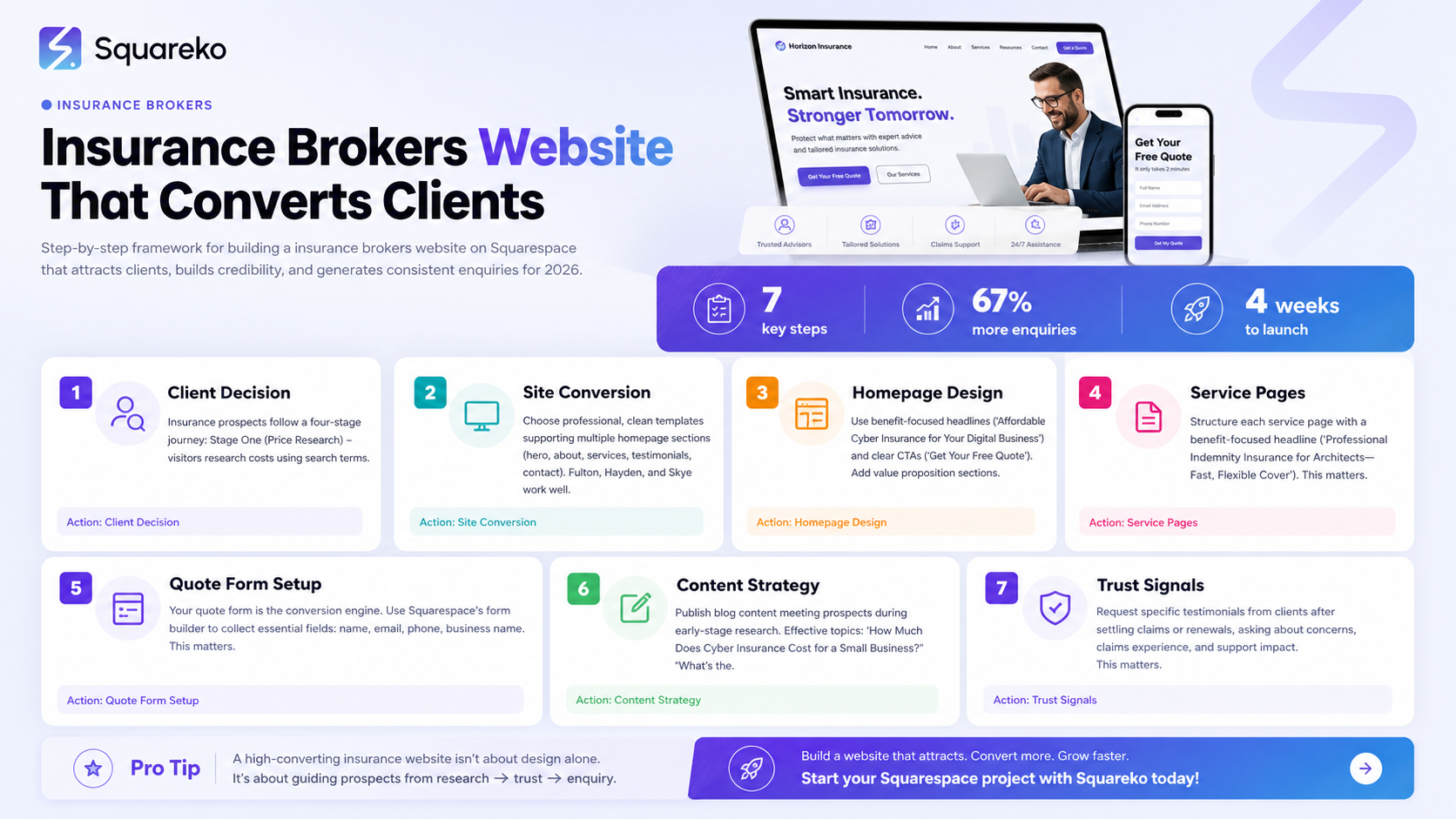
Insurance prospects follow a four-stage journey: Stage One (Price Research) - visitors research costs using search terms; provide transparent cost indicators and comparison tools. Stage Two (Trust Evaluation) - prospects assess credibility through FCA details, testimonials, and team bios. Stage Three (Coverage Comparison) - prospects evaluate specific insurance products; detailed service pages explain coverage, risks, and use cases. Stage Four (Quote Request) - ready-to-convert prospects submit quote requests; ensure your forms are short and CTAs are clear. Structure your website to acknowledge all four stages, offering pathways to cost information, trust signals, product details, and quote requests at each step.
Setting Up Your Squarespace Site for Conversion
Choose professional, clean templates supporting multiple homepage sections (hero, about, services, testimonials, contact). Fulton, Hayden, and Skye work well for insurance brokers. Structure navigation to guide toward quote requests: Home, About Us, Services (organised by product type), Why Choose Us, Blog, Get a Quote, and Contact. Configure SEO settings (robots.txt, XML sitemap, domain), add FCA authorisation details in footer, and create privacy policies explaining quote request data handling.
Designing Your Insurance Broker Homepage
Use benefit-focused headlines and clear CTAs. Add value proposition sections highlighting FCA authorisation, years of experience, quote turnaround time, and dedicated support. Include testimonials from satisfied clients mentioning specific benefits. Use multiple CTAs throughout the page with consistent branding. Avoid auto-playing video; prioritise simplicity and clarity. Feature 3-5 services with descriptions and links to full service pages.
Building Service Pages That Convert
Structure each service page with a benefit-focused headline, introductory paragraph defining the insurance type, Who needs this? section listing typical industries, What does it cover? bullet list, Common exclusions for transparency, Why it matters narrative, and a real-world claim scenario. End with a strong CTA. Optimise page titles and meta descriptions with insurance type and industry keywords; use semantic keywords naturally without keyword stuffing.
Quote Form Optimisation: The Complete Squarespace Setup Guide
Your quote form is the conversion engine. Use Squarespace's form builder to collect essential fields: name, email, phone, business name, and insurance type (required); optional fields include business size, industry sector, coverage status, and preferred contact method. Avoid requesting company address or annual turnover initially—ask during discussions. Use dropdowns instead of free text to reduce abandonment. Replace Submit with action-oriented text. Set up immediate confirmation emails and route submissions to a dedicated email address. Integrate with Zapier, Mailchimp, or Slack for automation. Create dedicated Get a Quote pages and homepage form blocks (condensed version). Test on mobile devices—60% of insurance enquiries come from mobile. A/B test CTA button text; even small improvements increase completion rates.
Creating Content That Drives Quote Requests
Publish blog content meeting prospects during early-stage research. Effective topics:
How Much Does Cyber Insurance Cost for a Small Business?
What's the Difference Between Professional Indemnity and Liability Insurance?
FCA Compliance Checklist for Insurance Brokers and Hidden Insurance Gaps That Cost Businesses Thousands. Aim for one blog post every 2-3 weeks; consistency matters more than volume. Link internally to service pages and quote forms. Create gated downloadable resources capturing email addresses and demonstrating expertise.
Building Trust Through Testimonials and Social Proof
Request specific testimonials from clients after settling claims or renewals, asking about concerns, claims experience, and support impact. Display client logos (with permission), Google review widgets, FCA authorisation, professional memberships, and case studies. Avoid generic praise; real testimonials include specific benefits and client names.
Integrating Lead Management Tools
Set up automated email responses: immediate confirmation to prospects, internal team notifications, and CRM log entries (via Zapier). Confirmation emails should acknowledge receipt, set 24-hour quote turnaround expectations, and provide downloadable guides. Use lead scoring to flag priority requests: high-value sectors for immediate follow-up, requests matching your specialty as warm leads, renewals for faster processing.
Mobile Optimisation for Quote Conversions
Over 60% of insurance traffic comes from mobile devices. Verify: font sizes (minimum 16px), CTA buttons (minimum 44x44 pixels), vertically stacked form fields, and hamburger menus. Make phone numbers clickable links, use single-page quote forms (avoid multi-step), and optimise load times under 3 seconds. Use Google Mobile-Friendly Test and test quote form submission on real mobile devices.
Measuring Performance and Optimising for Results
Connect Squarespace to Google Analytics and set up conversion tracking for form submissions to identify pages driving conversions. Monitor key metrics: form completion rate, total quote requests, traffic-to-submission ratio, mobile vs. desktop conversions, and time-on-page before submission. Refine iteratively: if form completion is low, reduce fields or simplify CTAs; if traffic is high but conversions low, improve trust signals; if mobile rates are better, invest further in mobile optimisation. Test one change at a time; small improvements compound.
-
To add a quote form in Squarespace, open your editor and navigate to the page where you want the form. Click the "+" icon to add a section, then select Form Block. Choose the "Contact Form" template and customise fields to include essential information (name, email, phone, insurance type). Rename the submit button to something benefit-focused like "Get My Quote." In form settings, configure email routing and confirmation messages. Test on mobile before publishing.
-
Action-oriented CTAs outperform passive ones. "Get My Insurance Quote," "Find Out My Cost," and "Request a Quote Today" consistently perform better than generic "Submit" or "Contact Us" buttons. The best CTAs emphasise the benefit (saving money, clarity, protection) rather than the action itself. A/B test different variations on your site and measure which generates the highest completion rate. Personalising the CTA based on insurance type—e.g., "Get My Cyber Insurance Quote"—often outperforms generic language.
-
Showing exact pricing is typically inadvisable because insurance costs vary dramatically based on risk profile, claims history, coverage level, and many other factors. However, showing cost ranges and explaining pricing factors builds trust and meets prospects at the price research stage. For example: "Business liability insurance typically costs £50–£300 per month depending on your industry, revenue, and claims history. We'll provide an exact quote after discussing your specific needs." This transparency without misleading specificity balances conversion objectives with realistic expectations.
-
Shorter is better. A form asking for name, email, phone, business name, and insurance type typically achieves 70%+ completion. Adding optional fields (industry, business size, coverage details) can improve lead quality without dramatically reducing completion. Avoid requesting sensitive financial information (turnover, payroll) in the initial form; gather this during follow-up conversations. Test completion rates and refine field selection accordingly.
-
Yes. Squarespace integrates with CRM tools via Zapier, which connects your form submissions to platforms like HubSpot, Salesforce, Pipedrive, and others. You can set up automated workflows where form submissions create contacts in your CRM, send welcome emails, and notify your sales team. Squarespace also supports native integrations with Mailchimp (email marketing) and Slack (team notifications). For specific integration needs, check Squarespace's App Marketplace.
-
Focus on three areas: content, technical SEO, and site structure. Create blog posts and service pages targeting insurance-related keywords your prospects search for. Use your focus keyword naturally in page titles, headings, and the first 100 words of content. Configure Squarespace's SEO settings (site-wide metadata, XML sitemap, robots.txt). Ensure fast load times, mobile responsiveness, and clean URL structures (Squarespace handles most of this automatically). Build internal links between related pages to help search engines understand your site's structure. Submit your XML sitemap to Google Search Console to ensure indexing.
-
Insurance is regulated by the FCA. Your website should clearly display your FCA authorisation number and link to the FCA register. Include a privacy policy explaining how you collect and handle personal data (especially important for quote requests). If you make any claims about coverage ("We've never turned down a claim"), ensure you can substantiate them. Avoid misleading language about pricing or coverage. If you target specific industries, ensure your industry-specific claims are accurate. Consult your professional indemnity insurance provider and FCA guidance on compliance requirements for digital marketing.
Conclusion
Building an insurance broker website on Squarespace that generates quote requests is an achievable goal when you understand your prospects' decision journey and design your site to guide them through each stage. From the moment a visitor arrives, they should encounter clear pathways to price information, trust signals, coverage details, and—ultimately—a frictionless quote form.
The most critical element is your quote form. A well-optimised form with minimal fields, a benefit-focused CTA button, and clear confirmation messaging can increase submissions by 15–30%. Combined with strategic content, mobile optimisation, and lead management automation, a Squarespace site becomes a genuine business development tool rather than a digital brochure.
Start by auditing your current site against the checklist in this guide. Which elements are working? Where are visitors dropping off? Use your form completion data to identify weak points, then test improvements iteratively. Small optimisations—rewording a CTA button, reducing form fields, adding a trust signal—compound into measurable results.
Insurance brokers who invest time in website optimisation find that quote requests increase, their teams spend less time chasing unqualified leads, and their sales cycles accelerate. A well-designed Squarespace site does the heavy lifting of initial qualification for you.

From custom website design to SEO strategy, we help businesses launch a site that looks professional and performs better.

Author Bio
I'm Walid Hasan, a Certified Squarespace Expert and Squarespace Circle Platinum Partner with over 12 years of hands-on experience designing and optimizing high-performing websites. Over the years, I've had the privilege of building more than 2,000 Squarespace websites for clients around the world, always focusing on clean design, strong user experience, and conversion-driven results.
