
How to Build an Accounting Firm Website on Squarespace That Gets More Clients
Introduction
An accounting firm website isn't just a digital brochure. It's a sales machine. Every element—from your header to your footer—should be designed to move potential clients through a clear journey: discovering you, understanding your services, evaluating your credibility, and booking a consultation.
Most accounting firm websites fail to convert because they're built backward. They showcase the practice, but they don't address what clients actually need: peace of mind, clarity about costs, proof that you're competent, and an easy way to take the next step. An accounting firm website on Squarespace that gets more clients follows a deliberate conversion journey, optimised for the seasonal peaks when clients actively seek accountants (especially tax season), and structured to remove every possible friction point between first visit and booked consultation.
This guide walks you through building that website from scratch. Whether you're a solo CPA, tax specialist, bookkeeper, or multi-service firm, the principles remain the same: clarity, trust, and a frictionless path to consultation. By the end, you'll understand not only how to build your site on Squarespace, but how to architect it to convert.
Key Takeaways How to Build an Accounting Firm Website on Squarespace That Gets More Clients
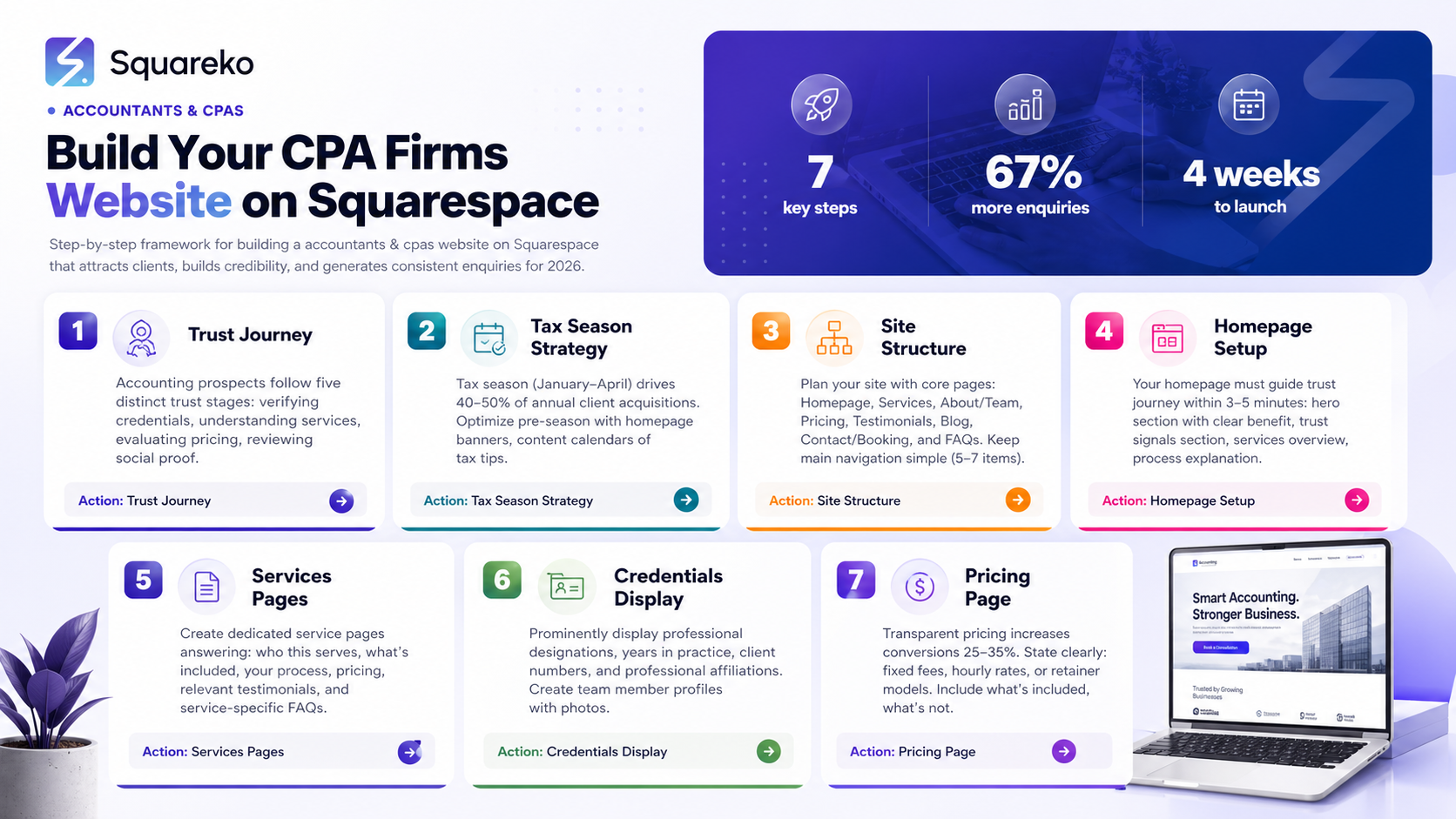
The accounting client trust journey has five critical stages: Credential Verification → Service Clarity → Pricing Transparency → Review Social Proof → Consultation Booking
Tax season (January–April) drives 40–50% of annual accounting client inquiries—optimising your site for this peak requires strategic planning
Squarespace's native scheduling tool converts 3–5 times more visitors than email-based contact forms
Pricing transparency on your website increases conversion by 25–35%, even if you don't list exact fees
Mobile optimisation is non-negotiable: 65%+ of accounting prospects browse on mobile
Squareko specialises in converting Squarespace sites into client-acquisition machines for accounting practices
A proper conversion funnel requires 8–10 strategic content sections, not a generic homepag
Understanding the Accounting Client Trust Journey
Before building a single page, understand how accounting prospects think. They don't trust quickly, and they shouldn't. They're evaluating whether to hand over their financial records—sometimes their business's entire financial life—to you.
The client trust journey in accounting has five distinct stages:
Stage 1: Credential Verification
The first thing a prospect does is check: Are you qualified? Are you licensed? Do you have relevant experience?
What they're looking for on your site:
Professional designations (CPA, Enrolled Agent, AICPA member, etc.)
Years in practice
Relevant certifications
Educational background (if prestigious)
Industry specialisations (if applicable: Specialising in dental practices since 2012)
Where to display this:
Your homepage (above the fold or in a prominent sidebar)
A dedicated About or About Us page
Your service pages (credentials next to each service)
Your team member profiles
If a prospect can't quickly verify your credentials, they'll assume you're not qualified and leave.
Stage 2: Service Clarity
Next, prospects need to understand exactly what services you offer and which one solves their problem. Ambiguity kills conversion.
What they're looking for:
Clear service categories (Tax Preparation, Bookkeeping, CFO Services, Payroll, etc.)
Brief descriptions of what each service includes
Who benefits from each service (e.g., Tax Planning for Business Owners)
What they can expect from the service (timeline, deliverables, process)
Where to display this:
Your homepage services section
Individual service pages (one page per service offering)
A services menu or directory
Your pricing page (if applicable)
If a prospect can't quickly identify the service they need, they'll contact a competitor.
Stage 3: Pricing Transparency
Here's where most accounting websites fail. They hide pricing, afraid that transparency will scare away clients. Actually, the opposite is true: hidden pricing increases friction and kills conversions.
You don't have to list exact fees. But you should address pricing clearly:
Fixed-fee tax returns for self-employed professionals: Starting at £1,200
Bookkeeping retainers begin at £500/month, based on transaction volume
Strategic tax planning: Complimentary initial consultation
CFO services available on quarterly retainer: £2,000–£5,000/month
Transparency about price ranges gives prospects permission to move forward.
Where to display this:
Your services pages
A dedicated Pricing or Fees page
Your consultation booking page (Book A Call)
Your FAQs (e.g., What does tax preparation cost?)
Stage 4: Review Social Proof
Prospects want reassurance from other clients. Testimonials, case studies, and reviews answer: Are people like me happy working with this accountant?
What they're looking for:
Client testimonials (written or video)
Case studies (quantified results: Saved client £18,000 in tax liability)
Review scores (Google, Clutch, Trustpilot)
Mentions of specific client industries or business types served
Where to display this:
Your homepage testimonials section
Individual service pages (testimonials from clients in that service)
A dedicated Reviews or Testimonials page
Your consultation booking page (final trust-building before submission)
Stage 5: Consultation Booking
At this point, the prospect is ready. They understand your credentials, services, pricing, and track record. Now they need a frictionless way to book a consultation.
The single biggest conversion killer? Forcing them to write an email and hope for a response.
What works:
Integrated scheduling (Squarespace Scheduling, Calendly, Acuity)
1-click booking with minimal form fields
Clear next steps: Your consultation is confirmed. We'll send a Zoom link within 2 hours.
Multiple booking options (phone, video, in-person if applicable)
Tax Season Client Capture Strategy
For tax specialists and general accounting practices, tax season (January–April) accounts for 40–50% of annual client acquisitions. This seasonal concentration requires strategic planning.
Pre-Season Optimisation (October–December)
Homepage messaging: Add a prominent banner or section: Tax Season is Coming. Book your appointment now to secure your spot.
Content calendar: Start publishing tax tips and deadline reminders in November:
November: Year-end tax planning checklist for business owners
December: Quarterly estimated tax deadlines for 2026
January: Self-employed tax deduction tracker—don't miss these
Email capture: Use a pop-up or banner to capture emails: Get our free tax checklist. Enter your email below. This builds a list you can email in January.
Peak Season Execution (January–April)
Messaging shift: Change homepage copy to urgency: Tax season is here. Limited availability. Book your consultation now.
Scheduling availability: Open your schedule aggressively. Staff extended hours if you can. Make it clear that slots are filling up.
Blog content: Publish weekly during January–March:
Late-breaking tax law changes
Deadlines and filing dates
Common deduction mistakes
Industry-specific tax tips
Paid advertising: If you advertise, January–March is when accounting-related search volume peaks. Allocate budget here.
Retargeting: Use Squarespace's built-in analytics (or Google Analytics) to identify warm leads and retarget them via email or ads.
Post-Season Follow-Up (May–December)
Once tax season ends, shift focus to:
Relationship building with new clients (onboarding, process documentation)
Client retention (annual reviews, proactive tax planning conversations)
Content creation that builds authority (blog posts, guides, webinars)
Referral generation (ask satisfied tax clients for referrals)
This off-season work pays dividends next tax season.
Step 1: Planning Your Site Structure
Before you even log into Squarespace, sketch out your site's navigation and content architecture.
Core Pages Every Accounting Firm Needs
Homepage – Your conversion hub (follows the trust journey)
Services – Either a parent page with sub-pages, or individual service pages
About/Our Team – Credentials, photos, bios
Pricing/Fees – Transparent pricing or pricing guidance
Testimonials/Reviews – Social proof
Blog – Content hub for tax tips, guides, industry updates
Contact/Consultation Booking – CTA and scheduling
FAQ – Common questions with detailed answers
Navigation Hierarchy
Keep your main navigation simple. Most users can only process 5–7 items comfortably.
Suggested main nav:
Home
Services (with dropdown to individual services if you have 3+)
About
Contact/Book a Consultation
Avoid cluttering the nav. Secondary pages (privacy, terms, sitemap) go in the footer.
Mobile-First Thinking
Plan for mobile from the start. Squarespace handles responsive design automatically, but think about:
How do button sizes look on a 375px-wide phone screen?
Can users easily book a consultation on mobile?
Is your price range visible without scrolling on a phone?
Step 2: Setting Up Your Homepage
Your homepage must guide the visitor through the trust journey in 3–5 minutes of scrolling.
Homepage Section Order
1. Hero Section (Fold)
Headline: Clear, benefit-focused. Example: Tax Preparation, Bookkeeping, and Strategic Planning for Business Owners
Subheading: Address a key pain point. Example: Stop overpaying in taxes. Our clients save an average of £8,000 annually.
CTA Button: Book Your Free Consultation or Learn About Our Services
Background: Professional image (accountant at desk, client meeting, or abstract professional imagery)
2. Trust Signals Section Display immediately after the fold:
Your credentials (CPA, certifications)
Years in practice
Number of clients served (if impressive)
Key client types
Keep this brief—three to four trust signals, no more.
3. Services Overview
3–4 main services with brief descriptions
Icons or images for each
Learn More link to dedicated service pages
Format: Cards or a simple grid
4. How It Works (Process Section) Walk through your engagement process:
Free Consultation – We'll discuss your financial goals and challenges
Assessment – We review your current situation and identify opportunities
Strategy – We create a tailored plan and implement it
Ongoing Support – You'll receive quarterly reviews and proactive guidance
This removes mystery and builds confidence.
5. Client Testimonials
2–3 prominent testimonials (video is ideal, written is fine)
Include client name, business type, and specific results
Example: Sarah M., Dental Practice Owner: My accountant at Squareko identified £12,000 in deductions I'd been missing. Literally paid for itself in year one.
6. Pricing/Fees Guidance
State your pricing clearly:
Fixed-fee tax returns: Starting at £1,200
Bookkeeping retainers: £500–£2,000/month
Strategic tax planning: Complimentary initial consultation
Link to your full pricing page
7. Blog/Content Section
Feature 2–3 recent blog posts
Example headlines: 5 Deductions Self-Employed People Miss, Tax Deadline Checklist 2026, Why Your Accountant Should Do Tax Planning
This demonstrates authority and gives reasons to return.
8. Final CTA Section Repeat your scheduling CTA before the footer:
Ready to take control of your taxes?
Book your consultation—it's free and non-obligatory.
Large button: Schedule Now
9. Footer
Contact information (address, phone, email)
Links to key pages
Social media links (LinkedIn is especially important for B2B professional services)
Trust badges or certifications (AICPA member, Xero certified, etc.)
Tone and Copywriting
Every word on your homepage should reinforce trust. Avoid:
Industry jargon without explanation
Overly clever or creative language
Weak CTAs (Click here, Submit)
Use:
Clear, direct language
Benefit-focused headlines
Strong, active CTAs (Book Your Free Consultation, Schedule Your Tax Review)
Specific numbers (not many clients, but 200+ satisfied clients)
Client-focused language (address the prospect's problems and goals)
Step 3: Building Your Services Pages
If you offer multiple services, each should have its own dedicated page.
Structure for Each Service Page
1. Service Hero
Service title
Brief description (one sentence)
Specific benefit (e.g., Tax Preparation for self-employed professionals—save time and sleep easier at tax time.)
2. Who This Service Is For List specific client types:
This service is ideal if you're a freelancer, consultant, or sole trader with self-employment income
You're managing multiple income sources or rental properties
You want proactive tax planning, not just reactive tax preparation
3. What's Included Break down deliverables clearly:
Comprehensive tax return preparation
Year-end tax planning consultation
Deduction analysis and documentation review
Quarterly check-ins to optimise tax positions
4. The Process Step-by-step walkthrough of how this service works:
Initial consultation (30 minutes, free)
Fact-finding and documentation gathering
Return preparation and review
Final submission and explanation
Post-filing follow-up
5. Pricing State your fee clearly:
Fixed-fee preparation: £1,200–£1,800 (depending on complexity)
Or: We charge an hourly rate of £150. Most returns take 6–8 hours.
Or: We offer a retainer model: £400/month for ongoing bookkeeping and quarterly planning.
6. Testimonials Feature 1–2 testimonials from clients who've used this specific service.
7. FAQs Service-specific questions:
How long does tax preparation usually take? (For tax service)
What documents do I need to bring? (For tax service)
Can I integrate my bookkeeping with my accounting software? (For bookkeeping service)
8. CTA Ready to book your free consultation for [service name]? Button: Schedule Now
Step 4: Displaying Credentials and Social Proof
Trust in accounting is earned through credentials and proof of results.
Credentials Section
Create a dedicated section on your About page or homepage:
Professional Designations: CPA, Enrolled Agent, Chartered Accountant, AICPA membership
Relevant Certifications: QuickBooks ProAdvisor, Xero certified, tax specialisations, AML compliance
Education: Relevant degree (Accounting, Finance) or professional qualifications
Years in Practice: Total years and years in current specialisation
Industry Affiliations: Professional bodies, trade memberships
Format: Use icons, badges, or a clean list. Professional and scannable.
Team Member Profiles
If you have a team, give each member a profile:
Professional photo
Name and title
Brief bio (2–3 sentences)
Credentials and specialisations
LinkedIn link (if appropriate)
This humanises your practice and builds client confidence in their primary contact.
Social Proof: Testimonials and Case Studies
Testimonial best practices:
Include name, business type, and (if possible) a photo
Make them specific: Saved me £8,000 on my tax bill beats Great accountant!
Video testimonials convert better than written (even simple phone-recorded videos)
Feature 5–7 testimonials across your site (homepage, service pages, dedicated testimonials page)
Case study best practices:
Before and after structure
Quantified results: Reduced bookkeeping time from 20 hours/month to 2 hours/month
Name (first name + initial is fine) and business type
Length: 200–300 words
Include a quote from the client
Example case study title: How We Helped Sarah's Salon Reduce Bookkeeping Time by 90% Using Xero Integration
Social Proof Across Platforms
Google Reviews: Encourage clients to leave reviews. Display your Google rating on your website.
LinkedIn: Share case studies and client success stories. Feature client testimonials in LinkedIn posts.
Industry Directories: Get listed on Clutch, The Manifest, or other B2B directories to build third-party credibility.
Step 5: Creating Your Pricing Page
Pricing transparency is a conversion driver, not a conversion killer. Here's how to get it right.
Three Pricing Models for Accountants
Model 1: Fixed-Fee Services Best for: Tax preparation, annual accounting reviews, bookkeeping setup
Example structure:
TAX PREPARATION
Basic tax return (self-employed): £1,200
Partnership or small business return: £1,800
Complex return with multiple income sources: £2,400
BOOKKEEPING SETUP
QuickBooks/Xero setup and training: £800–£1,200
Integration of historical transactions: £500–£1,000
Monthly ongoing maintenance: £300–£500
Model 2: Hourly Rate Best for: Consulting, tax planning, one-off advisory
Example:
Standard consulting rate: £150/hour
Complex tax strategy work: £200/hour
Director-level CFO consultation: £250/hour
Average engagement length: 6–10 hours
Model 3: Retainer (Monthly or Quarterly) Best for: Virtual bookkeepers, ongoing accounting support, CFO services
Example:
Bookkeeping Retainer (monthly):
- Up to 50 transactions/month: £500
- 51–150 transactions/month: £850
- 150+ transactions/month: Custom quote
Includes: Transaction coding, bank reconciliation, quarterly review call, year-end prep
What to Include on Your Pricing Page
Pricing model explanation – Why you price the way you do
Service pricing breakdown – Clear, specific pricing for each service
What's included – Deliverables with each price tier
What's not included – Scope boundaries (e.g., Excludes company filing fees or Additional tax returns billed separately)
Free consultation offer – Not sure what you need? Book a free consultation to discuss pricing.
Payment terms – We accept bank transfer, card, and payment plans. Invoiced monthly/quarterly.
FAQ – Is this price negotiable?, Do you offer payment plans?, What if my needs change mid-year?
CTA – Ready to get started? Book your consultation.
The Psychology of Pricing
Transparency builds trust. Hidden pricing signals either low confidence or hidden costs.
Price anchoring works. If you offer three tiers, the middle tier usually gets chosen.
Free consultations reduce friction. Let prospects talk to you before committing.
Outcome language sells. Save an average of £8,000 annually is more powerful than £1,200 tax return fee.
Step 6: Integrating Consultation Scheduling
This is the single most important conversion tool. Native Squarespace Scheduling converts 3–5 times better than email contact forms.
Setting Up Squarespace Scheduling
Go to Settings → Scheduling & Appointment
Create a Free Consultation appointment:
Duration: 30 minutes
Availability: Display your typical working hours
Buffer time: 15 minutes between appointments for notes
Confirmation message: Your consultation is confirmed. We'll send a Zoom link within 2 hours.
Create service-specific appointment types (optional but recommended):
Tax Preparation Consultation – 30 min
Bookkeeping Review – 45 min
CFO/Strategic Planning Session – 60 min
Set calendar sync:
Connect your personal calendar (Google, Outlook, Apple)
Only show your actual availability
Block time for lunch, emails, other commitments
Where to Place Scheduling CTAs
Homepage: Schedule Your Free Consultation (button, top navigation, footer)
Services pages: Ready? Book your consultation for [service]
Pricing page: Below pricing table
Blog posts: At the end of articles (Want personalised advice? Schedule a consultation)
Contact page: Make booking the primary CTA
Email Follow-Up Sequence
When someone books a consultation:
Immediate confirmation email – Your appointment is confirmed for [date/time]. Here's what to expect.
24 hours before: Reminder: Your consultation is tomorrow at [time]. Here's a link to join the Zoom call.
Post-consultation (if no conversion): Thank you for meeting with us. Here are next steps... or Here's a special offer for new clients this month.
Overcoming the Email vs. Scheduling Dilemma
Some people still prefer email. Offer both, but make scheduling the hero:
Free 30-minute consultation. No obligation.
[LARGE SCHEDULING BUTTON]
Prefer email? contact@yourfirm.com
Step 7: Optimising for Conversions
Beyond structure, certain micro-optimisations dramatically improve conversion rates.
CTA Button Best Practices
Use action verbs:Schedule Now, Book a Consultation, Get Your Free Consultation
Avoid weak language: Don't use Submit, Click here, or Learn more
Colour contrast: Make buttons stand out. Squareco's brand colour (#1E5631 dark green) works beautifully for accounting CTAs.
Size: Buttons should be large enough to tap easily on mobile (minimum 48px height)
Placement: Every major section should have a CTA. Users shouldn't have to search.
Form Field Optimisation
On your consultation booking form, ask for the minimum:
Required: Name, email, phone
Optional: Business type, service interested in, brief description of needs
Don't ask for:
Company address (not needed yet)
Annual revenue (too invasive)
Multiple preferences (keep it simple)
Friction = abandoned forms.
Page Load Speed
Squarespace is fast by default, but:
Compress images before uploading (max 1–2MB per image)
Don't embed multiple large videos on your homepage
Use Squarespace's native video hosting, not embedded YouTube (faster load)
A one-second delay in page load can reduce conversions by 7%.
Mobile Optimisation
Test on actual phones, not just browser resizing
Ensure buttons are finger-friendly on small screens
Make your phone number clickable (users on mobile will tap to call)
Ensure scheduling works on mobile (Squarespace Scheduling is mobile-optimised)
Trust Badges and Seals
AICPA membership badge
Xero/QuickBooks certified badge
ISO certifications (if applicable)
Client count: Serving 200+ small business owners
Place these in your footer and near your CTAs.
A/B Testing
Once your site is live, test:
CTA button colour (Does dark green or a contrasting colour convert better?)
CTA button text (Schedule Now vs. Book a Free Consultation vs. Get Started)
Testimonial placement (Homepage vs. just on services pages)
Pricing visibility (Visible immediately vs. Contact for pricing)
Squarespace Analytics shows where users click and drop off. Use this data to optimise.
Step 8: Content Marketing for Ongoing Conversion
Your homepage converts once. Content marketing converts continuously.
Blog Content Strategy
Publish 1–2 posts per month:
Tax tips: 5 self-employed tax deductions you're probably missing
Deadline reminders: Self-Assessment deadline approaching: What you need to know
Client stories: How we helped a salon owner save £15,000 in taxes
Guides: The complete tax return checklist for freelancers
Q&As: Is my home office expense deductible? Your accountant answers.
Each blog post should:
Include a CTA at the end
Rank for a secondary keyword (improves overall SEO)
Be shared on LinkedIn (builds authority and referral traffic)
Email Marketing
Build an email list through:
Blog subscription opt-in (Get tax tips and deadline reminders)
Free guide download (Tax Deduction Checklist for 2026)
Send emails:
Monthly tax tips
Quarterly deadline reminders
Special offers for tax season
Case study highlights
Frequently Asked Questions
-
Absolutely. Transparency about pricing actually increases conversions and attracts higher-quality leads. Prospects who see your pricing upfront are more likely to proceed if they're comfortable with the cost. Those who aren't will self-select away, which saves you time. A pricing page signals confidence and builds trust. Even if you offer custom pricing for complex situations, provide a price range or starting point. "Starting at £1,200 for tax preparation" or "Bookkeeping retainers begin at £500/month" gives prospects permission to move forward.
-
Action-specific CTAs outperform generic ones. "Book Your Free Consultation" and "Schedule Your Tax Review" convert better than "Contact Us" or "Learn More". The CTA should make clear what happens next (it's a consultation, it's free, it's quick). Video testimonials showing satisfied clients saying "Best decision I made for my business" also serve as powerful CTAs. The strongest CTAs combine clarity, urgency (tax season), and low friction (free initial consultation).
-
Use Squarespace's native Scheduling tool. Go to Settings → Scheduling & Appointments, create an appointment type (e.g., "Free Tax Consultation"), set duration (30 minutes), your availability, and time zone. Add a large "Book Now" button to your homepage, services pages, and contact page linking to your scheduling page. Squarespace handles calendar management, confirmations, and reminders automatically. Integrate your personal calendar (Google, Outlook) so bookings sync across platforms and you don't double-book. The entire process takes 10 minutes to set up and requires zero technical knowledge.
-
Minimum: Quarterly. Ideal: Monthly blog posts + seasonal updates. Tax-focused firms should publish at least 2–3 posts during tax season (January–March). Ensure pricing, team information, and testimonials stay current (update at least annually). Dead links, outdated phone numbers, or old testimonials signal neglect and reduce conversions. A site that looks regularly maintained builds trust; a site that looks abandoned destroys it.
-
Most professional service websites convert at 2–3% (meaning 2–3 out of 100 visitors take action, usually booking a consultation). Top-performing accounting websites (with clear pricing, strong testimonials, and easy scheduling) convert at 5–7%. Conversion depends heavily on traffic quality (are you attracting actual prospects?) and how well your site follows the trust journey outlined in this guide. If your site isn't tracking conversions, add Google Analytics and Squarespace's built-in analytics to monitor clicks, form submissions, and scheduling bookings.
-
Yes, absolutely. Professional headshots of your team humanise your practice and build client confidence. Clients want to know who they'll be working with. A photo of a smiling team member creates emotional connection. Ensure photos are:
Professional (not casual selfies)
Consistent in style and lighting (hire a photographer for a team session)
Recent (update every 2–3 years)
Include name, title, and a brief bio
Ready to Build Your Accounting Firm Website on Squarespace?
You now have a complete roadmap: the trust journey that converts prospects, the tax season strategy that captures peak-season demand, and the exact steps to build a site that turns visitors into clients.
But knowing the roadmap and executing it are two different things.
Many accountants build websites that look professional but don't convert. They're beautiful but empty—missing the client testimonials that build trust, the pricing clarity that removes friction, or the scheduling integration that makes booking effortless. Others build sites so focused on design they forget that every element should serve conversion.
This is exactly what Squareko specialises in. We've built dozens of Squarespace websites for accounting practices, tax firms, bookkeepers, and CFO service providers. We don't just design sites; we architect conversion machines. We know:
Which Squarespace templates convert best for different accounting niches
How to structure content following the client trust journey
How to capture tax season momentum with strategic seasonal messaging
How to optimise every detail for mobile, speed, and conversions
How to integrate scheduling so prospects book with friction
How to build authority through testimonials, credentials, and case studies
Whether you're launching your first website, redesigning an outdated site, or trying to boost conversions on an existing site, Squareko can help.
Ready to build a client-getting machine? Visit squareko.com to see examples of our accounting firm websites, or contact us for a free conversion audit. We'll review your current site, identify missed opportunities, and show you exactly how to turn more visitors into consulting bookings.

From custom website design to SEO strategy, we help businesses launch a site that looks professional and performs better.

Author Bio
I'm Walid Hasan, a Certified Squarespace Expert and Squarespace Circle Platinum Partner with over 12 years of hands-on experience designing and optimizing high-performing websites. Over the years, I've had the privilege of building more than 2,000 Squarespace websites for clients around the world, always focusing on clean design, strong user experience, and conversion-driven results.
