
How to Build a Yoga or Pilates Website on Squarespace That Fills Your Classes
Introduction
Most people don't wake up thinking, "I want to book a yoga class today." They wake up stressed, sore, or curious. Then they search Google, find your website, and decide within seconds whether your yoga or pilates practice is for them. Your website is your student acquisition machine. This guide walks you through building a Squarespace website that converts website visitors into regular students—whether you run a studio, teach 1:1, or offer online classes.
Key Takeaways
Your yoga or pilates website must answer four key visitor questions: what you teach, who it's for, when classes happen, and how to start
Focus on specific class descriptions that welcome beginners and acknowledge common nervousness about trying something new
Mobile design is critical—over 60% of yoga class bookings happen on phones
Use strategic CTAs (book now, sign up, buy pass) at multiple points, not just at the bottom
Build trust through credentials, testimonials, and professional photography of your studio and teaching
What Yoga and Pilates Class-Seekers Really Want
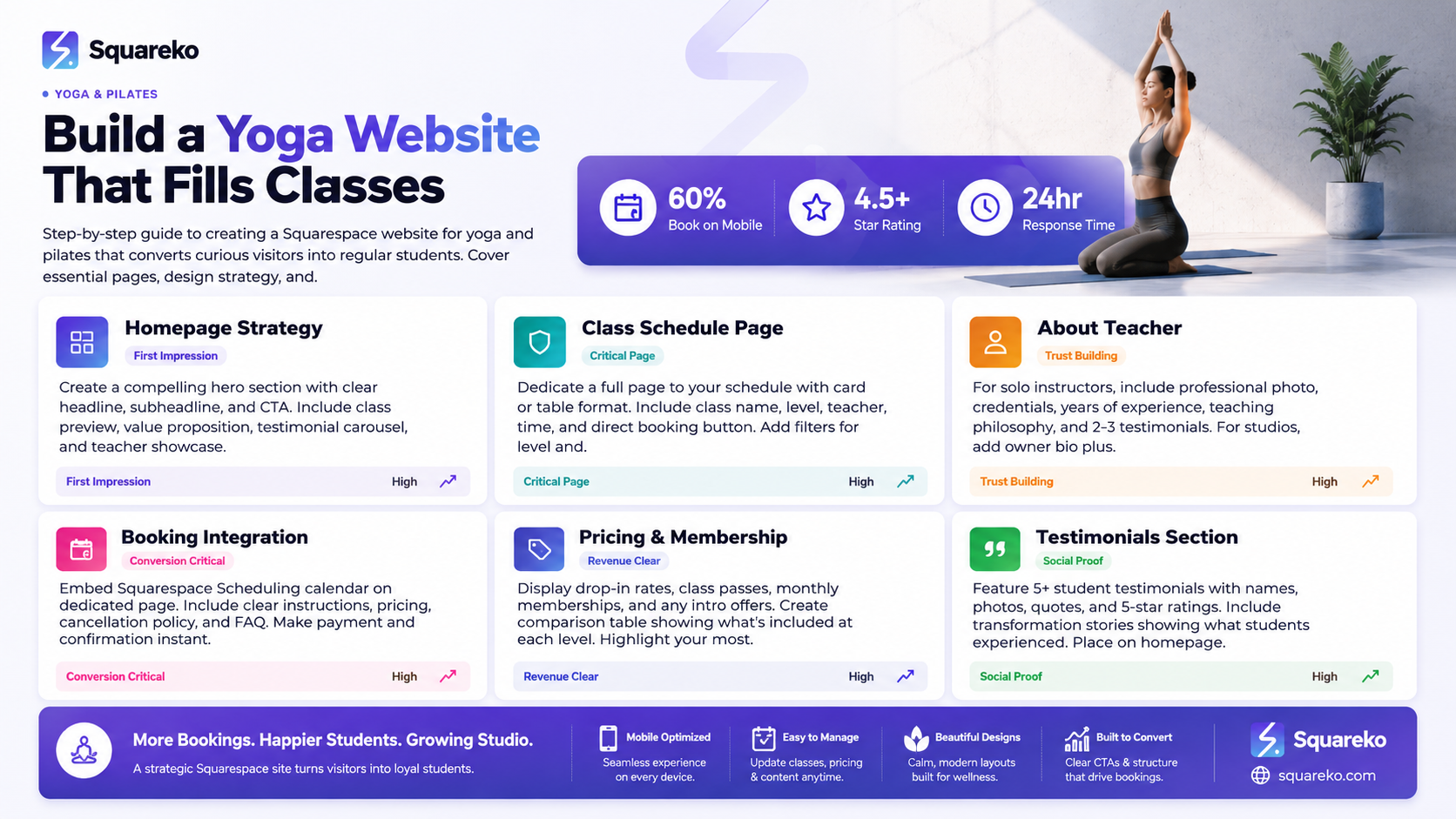
Before you design a single page, understand your student's mindset. They're making a decision based on four key factors.
1. Class Style and Level Match
A beginner yoga student doesn't want to walk into an advanced vinyasa flow. A pilates student looking for low-impact work doesn't want intense, high-intensity interval training. Your website must clearly label class types, difficulty levels, and what to expect.
Use language that's honest and specific:
"Beginner Yoga: No experience necessary. All poses offered with modifications."
"Pilates for Strength: Moderate difficulty. Some equipment experience helpful."
"Gentle Yoga for Stress Relief: Slow pace. Suitable for all ages and bodies."
2. Schedule Convenience
Does your class fit their life? Parents need evening or weekend classes. Working professionals might want morning sessions or lunchtime flows. Retirees might prefer mid-morning. Your website's schedule must be instantly visible, not buried on a separate page.
3. Teacher's Personality and Approach
Students choose teachers, not just classes. They want to know who's leading the class, what's the teaching philosophy, and whether this person feels trustworthy. Your About page and teacher bio are not optional extras—they're conversion tools.
4. Location, Cost, and Belonging
If you're studio-based: Is the location convenient? Is there parking? Is the studio clean and welcoming? Cost matters, but belonging matters more. Students will pay more if they feel like they're joining a community, not just buying a service.
Your website must show:
Studio photos (clean, inviting, real)
Real students (with permission)
Testimonials from people like your target student
Accessibility information (parking, entry stairs, facilities)
Essential Website Pages for Your Yoga or Pilates Business
A well-structured yoga or pilates website has these core pages:
Home
The first impression. Must have:
Compelling headline ("Join Our Yoga Community" or "Transform with Pilates")
Beautiful hero image or video (studio, class in action, or teacher)
Quick value proposition (why people come to you, not your competitor)
Preview of class schedule with CTA ("View Full Schedule")
Testimonial snippet
Clear CTA button (Book a Class, Try Your First Class Free, etc.)
Class Schedule and Types
A dedicated, searchable page listing all classes with:
Class name and style
Teacher
Difficulty level
Time and day
Class description (what to expect, who it's for, modifications offered)
Duration
Link to book or reserve a spot
For Squarespace, embed your Squarespace Scheduling calendar here, or create a clear table/grid layout.
About the Teacher (or Teachers)
For solo instructors:
Professional photo
Teaching credentials (Yoga Alliance, PILATES Foundation, other certifications)
Years of experience
Teaching philosophy (3-4 sentences about your approach)
Why students come to you
Personal story (what draws you to teaching?)
For multi-teacher studios:
Studio mission and philosophy
Photos of each teacher
Brief bio for each instructor (credentials, specialization, teaching style)
Accessibility and inclusivity statement
Online Booking Page
This page integrates Squarespace Scheduling. Must include:
Embedded calendar showing available class slots
Clear booking instructions
Drop-in pricing vs. class pass info
Cancellation policy (yoga studios typically require 12-24 hour notice)
Payment method info
Pricing and Membership
Be transparent about cost. Include:
Drop-in class price
Class pass options (6-class pass, 10-class pass, monthly membership)
Pricing for different class types (if applicable)
Trial offer or intro rate (if offered)
Membership benefits breakdown
Link to book or buy
Workshops, Retreats, and Events (if applicable)
For retreat leaders and workshop instructors:
Event title and dates
Location and itinerary
Teacher credentials and experience
Photos of the retreat location or previous events
Pricing and payment options
Early-bird discounts or deadlines
Testimonials from past retreat attendees
Testimonials and Reviews
Dedicate a page or section to student stories. Include:
Student name, photo, and quote
What they experienced (tension relief, strength gain, community connection)
Before/after context (if appropriate)
Star rating (5 stars)
Aim for at least 5 testimonials, ideally with student photos.
Contact and Information
Phone number
Email
Physical address (with Google Maps embed if studio-based)
Contact form
Studio hours
Accessibility information (parking, entrance, facilities)
Social media links
Homepage Design That Converts Visitors to Students
Your homepage has one job: move visitors toward booking a class or signing up. Structure it this way.
Hero Section (Above the Fold)
Use a large, beautiful image (class in action, studio space, or peaceful movement) combined with a clear headline. Example headlines:
"Yoga for Busy People Who Need to Slow Down" "Pilates That Strengthens from the Inside Out" "Your Peaceful Practice Starts Here"
Pair the headline with a subheadline (one sentence, maximum) and a CTA button: "Book Your First Class" or "Explore Our Classes."
Value Proposition Section
In 2-3 short paragraphs, explain why someone should choose your yoga or pilates practice. Cover:
What you offer (yoga types, pilates approach)
Who it's for (all levels, stress relief, strength building, etc.)
What they'll experience (community, growth, peace, strength)
Avoid generic language. Instead of "We offer yoga to help you live your best life," try "Whether you're managing stress, recovering from injury, or building strength, our classes give you tools for real change. You'll leave feeling calmer, stronger, and connected to a community that supports your practice."
Class Schedule Preview
Show 3-4 upcoming classes with times and teachers. Make the preview scannable. Include a "View Full Schedule" CTA.
Why Choose Us Section
Use short bullet points or icons:
Experienced, certified teachers
Welcoming community
Flexible schedule options
Free or discounted intro class
Professional studio/welcoming space
Testimonials Carousel or Section
Display 3 testimonial cards with:
Student name
Quote (1-2 sentences)
Optional photo
Star rating
Latest Workshops or Special Offerings
If you run workshops, retreats, or special programmes, feature the next upcoming event with a photo, headline, and "Learn More" CTA.
Blog or Resources
(Optional) Link to any blog content you've created: yoga for beginners, how to prepare for your first pilates class, stress-relief techniques, etc.
Footer CTA
Before visitors scroll off your site, include one more clear CTA: "Ready to Join? Book Your First Class Now" or "Questions? Contact Us."
The Class Schedule and Types Page
This page needs to be super scannable because people are often browsing on their phones during a quick break at work or lunch hour.
Table Format (Simple and Clear)


Card Format (More Visual)
For each class, create a visual card with:
Class name (large)
Level indicator (Beginner/All Levels/Intermediate/Advanced)
Icon or colour-coded label (e.g., green for beginner)
Days and times
Teacher name
Class description (30-50 words): what to expect, who it's for, what you'll get out of it
Duration
Booking button
Class Descriptions That Invite
Write descriptions that welcome nervous beginners. Examples:
"Beginner Hatha Yoga (Monday, 6:00 pm) — New to yoga? Perfect. This class moves slowly through poses, with plenty of time to understand alignment. Every pose comes with modifications, so you work at your own pace. You'll finish calmer, more flexible, and ready to keep coming back. No experience needed."
"Pilates for Core Strength (Wednesday, 7:15 am) — Build functional strength through precise, controlled movements. Modifications are always offered, so whether you're returning to exercise or looking to deepen your practice, you're in the right place. You'll feel stronger and more stable in your daily life."
Add Filtering or Search (if many classes)
If you offer 10+ classes per week, add filters:
By level (Beginner, Intermediate, Advanced, All Levels)
By style (Hatha, Vinyasa, Yin, Pilates, etc.)
By time (Morning, Afternoon, Evening)
By teacher
Squarespace doesn't have a native filter feature, but you can create multiple schedule pages or use third-party tools.
About the Teacher: Credentials, Philosophy, and Connection
This section is often underestimated. People don't just book classes—they choose teachers. Your About page must balance professional credibility with personal warmth.
For Solo Instructors
Include:
Large, professional photo (headshot or action shot teaching)
Name and credentials
"Yoga Alliance Registered Teacher (RYT-200)"
"PILATES Foundation Certified Instructor"
"Trained in Trauma-Informed Yoga" (or other specialisations)
Years of teaching experience
Personal journey: Why did you start yoga/pilates? What draws you to teaching?
Teaching philosophy (3-4 sentences, not jargon-heavy)
What students say about you (pull 1-2 testimonials here)
Contact or "Book a Class" CTA
For Multi-Teacher Studios
Include:
Studio mission: one sentence describing your studio's approach
Studio photo (welcoming entrance or class in session)
Founder/owner bio with credentials and story
Each teacher's name, credentials, and specialisation (with photo if possible)
Accessibility commitment
Community values statement
What Not to Do
Don't use stock photos of people—students can tell, and it reduces trust
Don't make claims without credentials (e.g., "heals your trauma" without trauma training)
Don't make it all about you—frame it around what students experience with you
Don't hide your credentials if you have them—display them proudly
Online Booking: Making It Simple and Visible
Squarespace Scheduling makes booking easy, but your page design must guide visitors toward booking without friction.
Booking Page Structure
Page headline: "Book Your Next Yoga Class"
Short explanation: "Choose your class, select a time, and you're set. Class capacity is limited, so booking ahead ensures your spot."
Embedded Squarespace Scheduling calendar
FAQ below the calendar:
How much do drop-in classes cost?
Can I buy a pass instead?
What's your cancellation policy?
Do I need anything special for my first class?
How do I get the Zoom link for online classes? (if applicable)
Make It Mobile-Friendly
On mobile, the Squarespace Scheduling calendar is the primary element. Test how it looks on your phone—make sure class times are readable and the "Book" button is easy to tap.
Consider a Waitlist Feature
If classes regularly fill up, enable waitlisting in Squarespace Scheduling. This shows students that classes are popular and creates urgency.
Send Automated Reminders
In Squarespace Scheduling settings, enable reminder emails (24 hours and 1 hour before class). This reduces no-shows and shows professionalism.
Pricing and Membership Options Page
Transparency builds trust. Show exactly what you charge and what students get.
Pricing Structure
Display options clearly:
Drop-In Class: £15 per class
6-Class Pass: £75 (£12.50 per class) — Valid for 8 weeks
10-Class Pass: £120 (£12 per class) — Valid for 12 weeks
Monthly Unlimited: £60 per month — Unlimited classes, all levels, cancel anytime
Trial Offer (First Month): £15 — All classes, trial pricing for new members
Highlight Your Most Popular Option
Use colour, size, or a "Most Popular" badge to guide new students toward your recommended option. For most studios, the monthly unlimited or intro offer converts best.
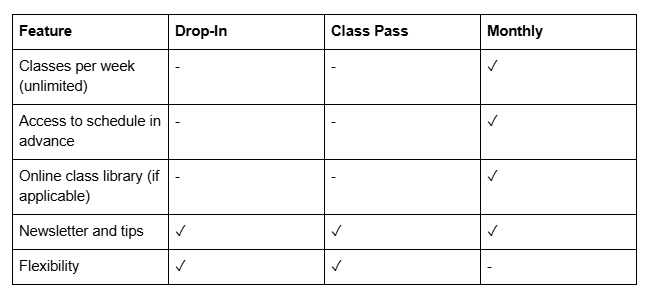
Membership Benefits Table
If you offer memberships, show what's included:
Payment and Booking
"Ready to start?" button links directly to the Booking page or Squarespace Scheduling.
Workshops, Retreats, and Events
If you offer special programming, each event needs its own page or section.
Event Page Elements
Event name and dates
Location (with map if not at regular studio)
Featured image or video (location photos, previous event footage)
Event description (what's included, what to expect, outcomes)
Full itinerary (if multi-day or structured programme)
Teacher credentials (if different from regular class teacher)
Pricing and payment (early-bird pricing, payment plan options)
What to bring (e.g., "Bring a mat and water bottle")
Testimonials from past attendees (transformation stories work well here)
FAQ specific to the event
"Register Now" or "Reserve Your Spot" CTA
Testimonials and Social Proof
Never underestimate the power of "people like me did this and loved it." Testimonials work because they come from real students, not you.
Where to Display Testimonials
Homepage (1-2 testimonials)
About page (1-2 testimonials about you as a teacher)
Class schedule page (testimonials about specific class types)
Dedicated testimonials or reviews page
Pricing page (testimonials about value and results)
How to Gather Testimonials
After a student completes a course or reaches a milestone, email them: "Would you share a quick thought on your experience? I'd love to feature your story."
Keep it specific: Instead of "Great class," ask "What's changed since you started practising with us?"
With permission, use their name, city, and photo. First name + photo is powerful.
Testimonial Template
"I was nervous about starting pilates, worried I wouldn't be strong enough. Tom's modifications and encouragement made me feel capable from day one. Three months later, I can feel the strength in my core, and more importantly, I look forward to every class. Tom's studio is welcoming and professional—exactly what I needed."
(5-star rating)
Ready to Fill Your Classes?
You've now got the roadmap for building a Squarespace website that converts. But implementation matters. Choosing the right template, writing copy that resonates, setting up your booking system correctly, and optimising for mobile can feel overwhelming.That's where Squareko comes in. We've built yoga and pilates websites on Squarespace for studios, instructors, and retreat leaders. We handle everything from strategy and design to copywriting, booking setup, and ongoing optimisation.
Frequently Asked Questions
-
Use specific, benefit-focused language that welcomes beginners. Describe what students will experience and feel, not just what you'll teach. Example: "Yin Yoga (Tuesday 7:00 pm) — Slow, meditative practice held for 3-5 minutes per pose. Perfect for releasing tension, improving flexibility, and calming your nervous system. New to yin? Modifications are always available. You'll leave feeling deeply relaxed."
-
Yes. A free or discounted intro class (often called a "newbie special" or "first class £5") is one of the highest-converting CTAs. You remove the risk for hesitant students. Most who try one class come back. Typical intro offers: first class free, first week unlimited at £15, or first month at half price.
-
Keep it current. Update schedule changes at least 24 hours before they happen. If you change your schedule seasonally, make those changes at the start of the season. Outdated information frustrates students and loses bookings. Use Squarespace Scheduling's automation to keep times synced.
-
Fast loading (test on 4G), readable text without pinching, easy-tap buttons for booking, and mobile-optimised class schedule display. Many students book classes from their phones during breaks—if the experience is slow or confusing, they'll leave.
-
For online or new instructors: Clear credentials (Yoga Alliance RYT, etc.), testimonials from named students, professional photography of yourself, transparency about experience and specialisation, easy access to contact info, and responsive communication. Offer a free intro video or trial class so people experience you before committing.
-
Yes. Use Squarespace Scheduling for drop-in class bookings and Squarespace Commerce (or a membership tool like Memberful) for monthly memberships or class pass products. You can also sell class passes as a product, then use Squarespace Scheduling codes to redeem them.
-
After a few classes, send an email: "Thanks for joining us! We'd love your feedback. Would you share a quick review of your experience?" Provide a direct link to a review form or Google Form on your site. Make it easy—ask for name, location, and one testimonial (1-2 sentences). Offer a small incentive (free class, discount) if appropriate.
-
Be clear and fair. Examples: "Classes can be cancelled up to 24 hours before start time through your account or via email. Cancellations within 24 hours are non-refundable and use your class pass or drop-in credit." Display this on your Booking page and in class confirmation emails. Clear policies reduce disputes.
Ready to Build Your Conversion-Focused Yoga or Pilates Website?
A beautiful website is only half the battle. You need the right pages, compelling copy, clear CTAs, and an easy booking system that students actually use. You also need ongoing optimisation based on how real students navigate your site.
Squareko builds yoga and pilates websites that fill classes. We combine strategic design, conversion copywriting, and technical setup to help yoga studios and pilates instructors turn website visitors into regular students.

From custom website design to SEO strategy, we help businesses launch a site that looks professional and performs better.

About the Author
Walid is the founder of Squareko,
I'm Walid Hasan, a Certified Squarespace Expert and Squarespace Circle Platinum Partner with over 12 years of hands-on experience designing and optimizing high-performing websites. Over the years, I've had the privilege of building more than 2,000 Squarespace websites for clients around the world, always focusing on clean design, strong user experience, and conversion-driven results.
