
How to Build a Tech Company Website on Squarespace That Converts
Why Most Tech Company Websites Fail to Convert
Here's an uncomfortable truth: most tech company websites look better than they perform. They have clean design, a decent logo, and a professional color palette — but they fail at the fundamental job a website has to do: turn visitors into something actionable.
The problem isn't usually design. It's conversion architecture. The page doesn't answer the visitor's questions in the right order. The CTA appears too early, or too late, or it's unclear. The proof elements are buried below the fold. The messaging speaks to features instead of outcomes.
Squarespace gives you everything you need to build a high-converting tech website. But the platform is neutral — it doesn't automatically organize your content in a way that converts. That's a strategy decision that comes before design.
This guide walks through exactly how to structure, write, and design your Squarespace tech company website for real conversion results.
Key Takeaways How to Build a Tech Company Website on Squarespace That Converts
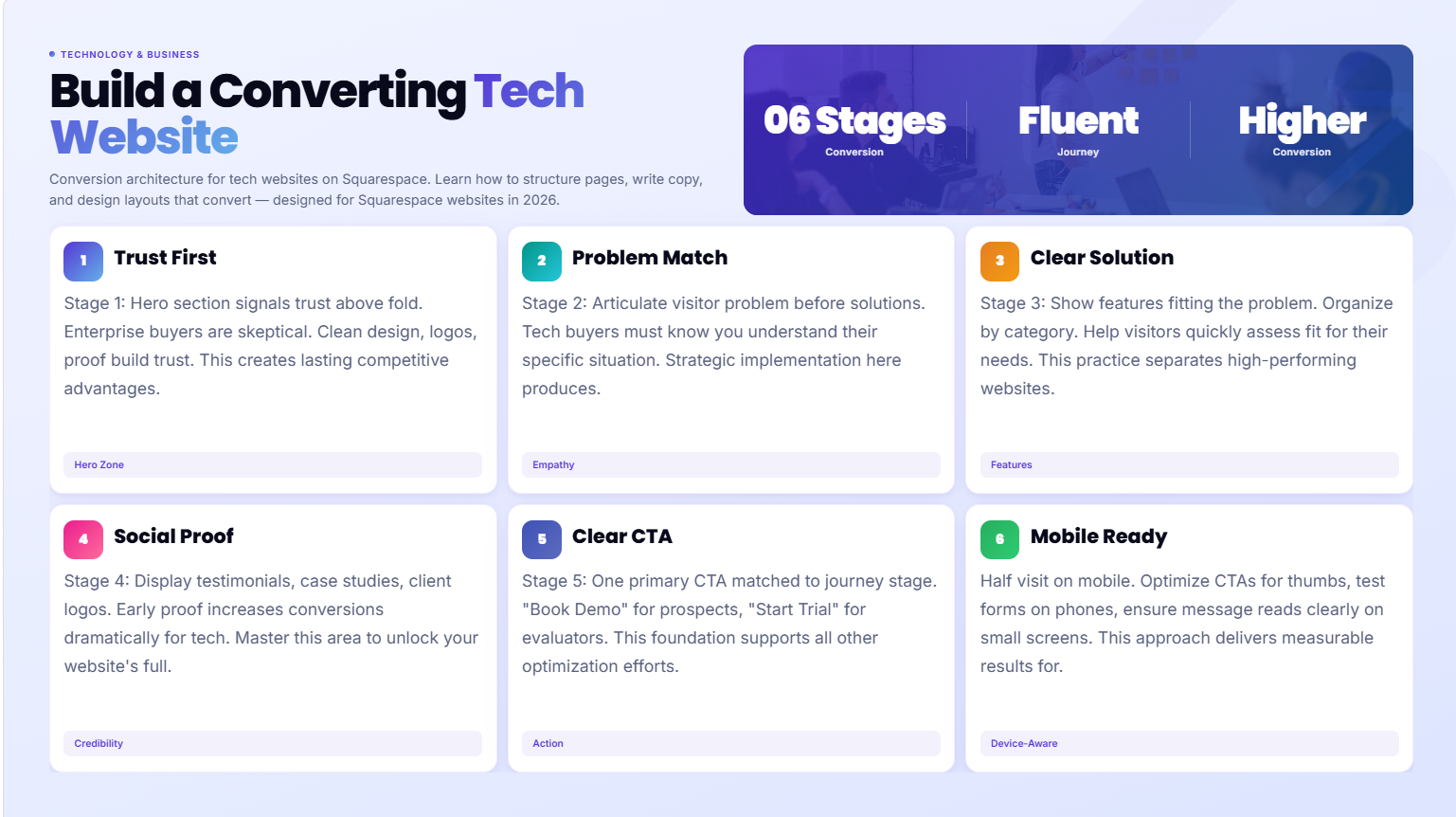
A converting tech website starts with the right page architecture — not just good design
Your homepage has one job: move the right visitor toward the next step (trial, call, demo, contact)
Social proof, specificity, and clarity outperform creativity every time for tech company conversion rates
Squarespace's Fluid Engine gives you the layout control needed to build a high-converting tech site without custom development
Every page should have a clear primary CTA — and that CTA should match where the visitor is in their decision journey
The Conversion Architecture Framework
Think of your website as a conversation, not a brochure. Every visitor arrives with a question in their head — and your website's job is to answer it in the right sequence.
For a tech company, that conversation typically follows this structure:
Stage 1 — Can I trust this company? (Hero section, above the fold) Stage 2 — Do they understand my problem? (Problem articulation, intro section) Stage 3 — Do they have a solution that fits? (Features/services section) Stage 4 — Has it worked for others like me? (Social proof section) Stage 5 — What do I do next? (CTA section)
Every page on your website is serving one or more of these stages. Your homepage needs to hit all five. Your service pages can focus on stages 3-5. Your about page reinforces stages 1 and 4.
The biggest conversion mistake tech companies make: skipping stages 1-3 and jumping straight to here are our features. Visitors who don't yet trust you or understand that you see their problem will not engage with a feature list.
Building Your Homepage for Maximum Conversion
Your homepage gets the most traffic of any page on your site. It's also the first impression for most first-time visitors. Every design and copy decision here matters.
The Hero Section
The hero section — the first thing visitors see above the scroll line — needs to accomplish three things in about 5 seconds:
Confirm what you do — clearly, not cleverly
Signal who you do it for — tech companies, SaaS startups, whatever your niche is
Give them one clear next step — book a call, start a trial, see our work
In Squarespace's Fluid Engine, your hero section typically consists of a full-width background (image or video), your headline, a subheadline, and a button. Don't overcrowd it. The cleaner your hero, the faster the visitor's brain processes it.
Strong hero headline example:Squarespace Websites for Tech Companies That Convert
Weak hero headline example:Where Technology Meets Design Excellence
The first one tells you exactly what to expect. The second one could be from any company in any industry and tells you nothing.
The Social Proof Bar
Directly below your hero, add a client logo bar or a trusted by row. Even for early-stage tech companies, logos signal legitimacy. Use client logos if you have them. Use partner or tool logos if you don't. This section takes 2 seconds to scan and does significant trust-building work.
The Problem / Solution Section
This is where most tech company websites miss. Before presenting your solution, name the problem your ideal client has. Not generically — specifically.
Bad: We build great websites for businesses. Good: Most tech company websites are built by generalists who don't understand technology products. The result: a site that looks fine but doesn't communicate what your product actually does — or why it matters to the people you're trying to reach.
When visitors read a problem statement that matches their experience exactly, they lean in. Their internal response is yes, exactly — and that's the moment they become genuinely engaged.
Feature/Service Grid
After the problem and solution framing, present your services or product features in a grid layout. Squarespace's Fluid Engine handles feature grids well — three or four columns of service cards, each with an icon, headline, and one-sentence description.
Keep each card focused on the outcome, not the process. Not we design websites but a website that communicates your product clearly and converts visitors into trial users.
The Social Proof Section
Client testimonials, case study teasers, and measurable results (percentage improvements, client industries, project numbers) all belong in this section. Squarespace handles testimonials cleanly — use a slider or grid layout depending on how many you have.
The most effective social proof for tech companies is specific. A testimonial that says working with Squareko was great is worth much less than one that says our conversion rate from visitor to trial signup went from 2% to 7% after the redesign.
The Final CTA
Every homepage should close with a dedicated CTA section — not just a footer link. A strong background color (dark or accent) with a clear headline and one button. This is the last chance for visitors who've scrolled through everything but haven't clicked anything yet.
Service and Product Pages That Close
Your service or product pages are where commercial intent visitors land. They're specifically looking for what you offer — which means they're already further down the decision funnel. The page needs to convert.
Page Structure for Service Pages
Hero: What the service is and who it's for — one clear, specific headline
What's included: Detailed breakdown of what the client receives (no vague language)
How it works: 3-5 step process — removes uncertainty about what engagement looks like
Who it's for: Ideal client description — helps visitors self-qualify
Social proof: 1-3 relevant testimonials or case study references
FAQ: 4-6 questions specific to this service (pricing, timeline, process, results)
CTA: Book a call, request a quote, or start a project
In Squarespace, build each service page as a separate URL with its own SEO optimization. Don't consolidate services — each one needs its own page to rank for specific keywords.
Pricing Transparency
Tech buyers (especially in B2B) want pricing context before they reach out. Even if you don't publish exact prices, a projects typically start at X or a pricing tier structure removes friction. Hiding pricing entirely increases bounce rates among people who have budget expectations — and wastes your time qualifying people who can't afford your services.
The About Page: Turning Credibility Into Leads
The about page is often the second or third most-visited page on a tech company website — yet most about pages are wasted space. They read like corporate boilerplate when they should be building genuine connection and credibility.
What an About Page Should Do
Establish Walid/your team as credible, experienced experts (not just passionate about design)
Tell the actual story of why this company exists — the real, specific reason
Show the human behind the brand — tech buyers want to know who they're actually working with
Include a clear next step at the bottom — the about page is a natural place to add a CTA
In Squarespace, your about page works best with alternating text-and-image blocks (built cleanly in Fluid Engine), a team section if applicable, and specific credibility markers: years in business, number of projects completed, specific industries served.
Avoid generic language like we're passionate about helping businesses succeed. That means nothing. Write like a real person: I started Squareko because I kept watching tech companies waste months and thousands of dollars on websites that looked fine but converted terribly.
Case Study and Social Proof Pages
For tech companies, especially those selling B2B services, case studies are some of the highest-converting content on the entire site. A detailed case study page that shows a specific problem, specific solution, and specific measurable result is incredibly persuasive.
Case Study Structure
Client context: Who they are, what stage they were at
The challenge: What wasn't working and why it mattered
The approach: What you did and why you made those decisions
The result: Specific, measurable outcomes — not vague improvements
The quote: A client testimonial placed immediately after the results section
In Squarespace, case studies work well as blog posts (using the blog feature) or as individual pages within a dedicated portfolio section. If you have multiple case studies, create a collection page with summary cards that link to individual case study pages.
Contact and Demo Request Pages
The contact page is often the last page before someone becomes a lead — yet many tech company contact pages are just a bare form with no context or reassurance.
What Your Contact Page Needs
A headline that confirms what happens next (Book a Free 20-Minute Discovery Call)
2-3 sentences explaining what the call involves and what the visitor will walk away with
The form itself — keep it short (name, email, company, brief description of project)
Response time expectation (We respond within one business day)
An alternative contact method (email address or LinkedIn link) for people who don't want to use forms
In Squarespace, contact forms are straightforward to build. Connect them to your email or CRM via Squarespace's native integrations or code injection.
Mobile Conversion Optimization
A significant portion of tech research happens on mobile — and many tech company websites that look great on desktop fall apart on mobile. In Squarespace's Fluid Engine, mobile layouts are controlled separately from desktop, which gives you genuine control.
Key mobile conversion checks:
Hero text is readable without zooming (minimum 16px body text)
CTA buttons are large enough to tap easily (minimum 44px height)
Navigation doesn't require pinch-zooming to use
Forms are easy to fill on a touch keyboard (fewer fields, large input areas)
Images don't crop awkwardly on a 375px-wide screen
After every design change, check both the desktop and mobile preview in Squarespace before publishing.
Speed, Trust, and Technical Conversion Factors
Conversion isn't just about design and copy. Technical factors affect whether visitors stay long enough to convert.
Page Speed: Slow-loading pages increase bounce rates dramatically. Every second of load time delay reduces conversions. Compress images, minimize embedded scripts, and test your site on Google PageSpeed Insights regularly.
Trust Signals:SSL certificate (automatic on Squarespace), professional email address, privacy policy page, and physical address or location indicators all reduce trust friction for first-time visitors.
Consistent Branding: Inconsistent fonts, color mismatches, and varying image styles signal unprofessional — even subconsciously. Define your brand system and apply it consistently across every page.
Form Reliability: Nothing kills conversions like a form that doesn't work. Test your contact forms and any demo request flows regularly. Squarespace's native forms are reliable, but third-party embeds can break.
FAQs
-
Start with page architecture before you touch design. Map out the visitor journey on each page: what question are they arriving with? What do they need to see to trust you? What's the single next step you want them to take? Then restructure your pages around that flow. Common high-impact changes: moving social proof higher on the page, making CTAs more specific, and adding a clear problem statement before your services section.
-
Conversion rates vary significantly by traffic type and business model. For a service business, a 2-5% conversion rate from visitor to inquiry is a reasonable target. For a SaaS product with a free trial, 3-8% visitor-to-trial is achievable. If you're well below these numbers, the issue is almost always in conversion architecture — unclear messaging, buried CTAs, or missing social proof — rather than traffic volume.
-
At minimum: in the hero section (above the fold) and again at the bottom of the page. For longer homepages, add a mid-page CTA between the features section and the social proof section. Every CTA should be specific — "Book a Free 20-Minute Call" performs better than "Contact Us" for most tech company use cases.
-
At minimum: Homepage, Services (or Products), About, and Contact. Add Case Studies or Portfolio if you have work to show, a Blog if you're pursuing SEO, and separate pages for each major service if you offer more than one. Starting with 5-8 pages and adding depth over time is better than building 20 pages of thin content at launch.
-
For most tech services businesses, showing a starting price or price range reduces friction and pre-qualifies leads. Visitors who see pricing and choose to contact you have already passed the budget filter — which means fewer wasted discovery calls. Even a "projects typically start at X" sentence is better than no pricing context at all. For complex enterprise solutions, a "request a custom quote" flow is appropriate.
-
Use Squarespace's blog feature or create individual pages under a portfolio section. For each case study: create a dedicated page with the client's challenge, your approach, and specific measurable results. Add a relevant client testimonial. Then create a collection or grid page that shows all case studies as summary cards. This structure works well for both SEO and conversion.
-
Conversion architecture is the strategic structure of a website — how pages are organized, what order information is presented in, where CTAs are placed, and how the visitor's journey from landing to converting is mapped out. It's the difference between a beautiful website that doesn't convert and a website that consistently turns visitors into leads or clients.
-
Long enough to move visitors through all five conversion stages: trust → problem understanding → solution fit → social proof → next step. For most tech companies, this means a homepage with 6-8 distinct sections. Shorter homepages work when your audience already knows who you are; longer ones are needed for cold traffic that needs more education. Squarespace's Fluid Engine handles long, multi-section homepages well on both desktop and mobile.
Ready to Build a Tech Website That Actually Converts?
Design alone doesn't convert — strategy does. Squareko builds Squarespace websites for tech companies with conversion architecture built in from the first page to the last.
If you're ready to stop losing potential clients to a website that doesn't represent what you actually offer, let's talk.

From custom website design to SEO strategy, we help businesses launch a site that looks professional and performs better.

Author Bio
I'm Walid Hasan, a Certified Squarespace Expert and Squarespace Circle Platinum Partner with over 12 years of hands-on experience designing and optimizing high-performing websites. Over the years, I've had the privilege of building more than 2,000 Squarespace websites for clients around the world, always focusing on clean design, strong user experience, and conversion-driven results.
