
How Technology Solutions Companies Showcase Their Service Portfolio on Squarespace
Key Takeaways Technology Solutions Companies Showcase Their Service Portfolio
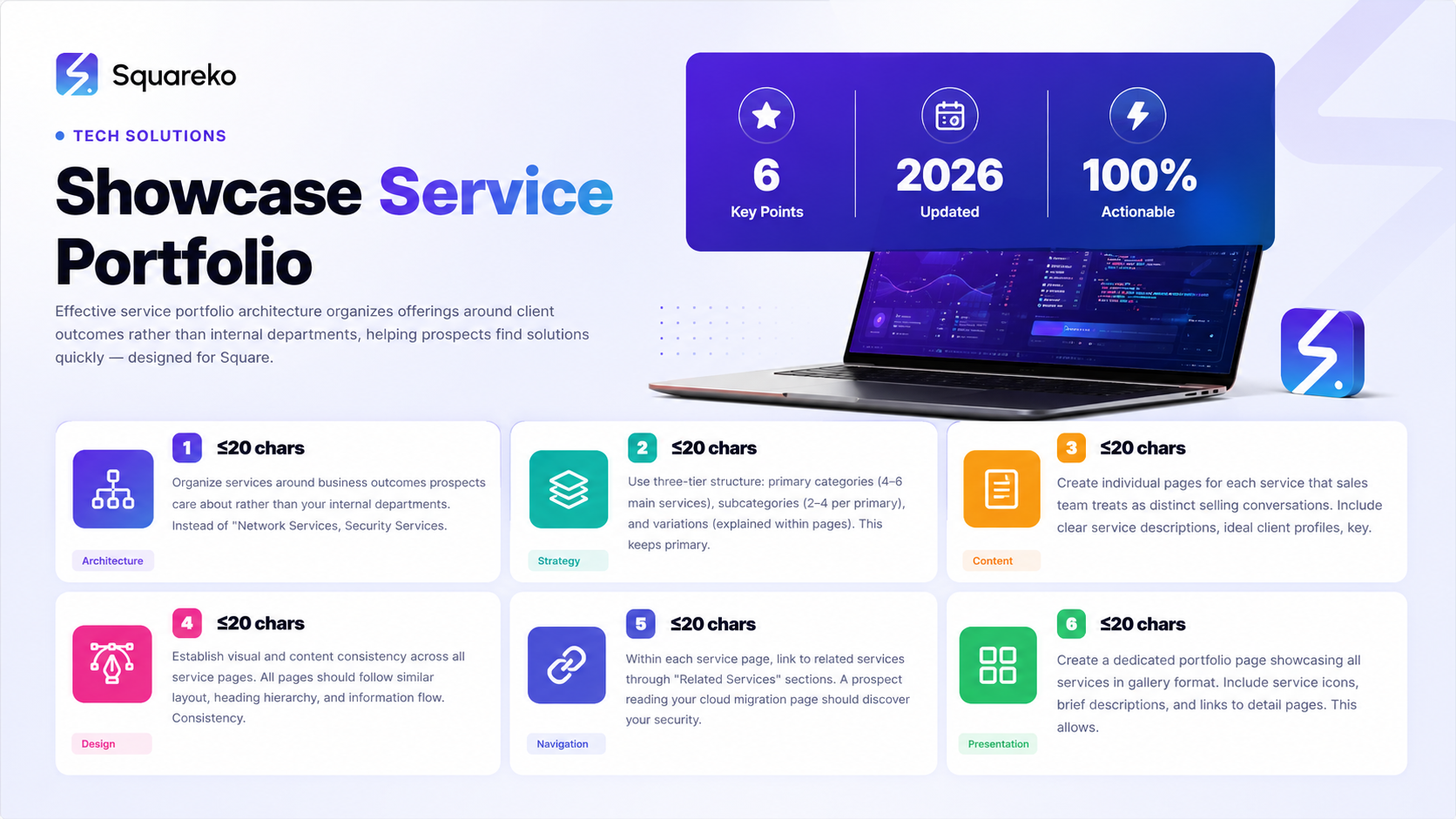
Effective service portfolio architecture organizes services around client outcomes rather than internal departments or technical categories
Service portfolio pages must balance comprehensiveness with scanability—prospects need detailed information without overwhelming content volume
Portfolio organization significantly impacts how prospects understand your breadth of services and whether they perceive you as a specialist or generalist
Squarespace's flexible page structure allows you to create portfolio architectures from simple flat listings to complex hierarchical service taxonomies
Visual consistency across your portfolio strengthens brand perception and allows prospects to quickly navigate between related services
Service Portfolio Architecture for Technology Solutions Companies
Your service portfolio architecture is the skeleton that determines how prospects understand what you offer. The way you organize and present your services influences whether a prospect sees your company as a credible provider for their specific challenge or as a generic vendor offering everything to everyone.
Most IT services companies make one critical architecture mistake: they organize their portfolios the way they organize internally rather than the way their prospects think about their needs.
The Internal Organization Trap
Internal IT services companies often organize around how they've structured their teams or departments:
Network Services
Security Services
Infrastructure Management
Support Services
Consulting
This structure makes sense internally because each department has distinct expertise, budgets, and management. However, prospects don't think about IT challenges through this organizational lens. A prospect struggling with compliance risks doesn't care that your compliance expertise lives in your consulting department. They need to find information about compliance solutions.
The Outcome-Focused Architecture
Superior portfolio architecture organizes services around the business outcomes or challenges that prospects care about:
How do I reduce my IT costs?
How do I improve my security?
How do I migrate to the cloud?
How do I ensure business continuity?
How do I improve my IT support?
Each outcome becomes a primary navigation category, with your actual services positioned as solutions to achieving those outcomes. This mirrors your prospect's mental model and dramatically improves their ability to find relevant information quickly.
Specialist vs. Generalist Positioning
Your portfolio architecture implicitly communicates whether you're a specialist (focused on specific service areas) or a generalist (offering comprehensive services). Neither positioning is inherently better—it depends on your business model and target market.
Specialist architecture emphasizes certain service categories prominently and potentially de-emphasizes others. You might feature Security Services and Compliance Consulting prominently while quietly offering managed IT services. This positions you as security specialists rather than general IT providers.
Generalist architecture gives equal weight to all major service categories. You might organize around: Infrastructure Solutions, Security Solutions, Cloud Services, Support Services, and Consulting. This positions you as a comprehensive provider, which appeals to prospects wanting a single vendor for multiple needs.
Choose your positioning deliberately. It should match your actual strength and target market.
Organizing Services: From Strategic Principles to Implementation
Once you've decided whether to position as specialist or generalist, translate that into concrete portfolio organization.
Tiered Organization Structure
For technology solutions companies with 8-15 services, a tiered structure works well:
Tier 1: Primary Service Categories (4-6 categories) These become your primary navigation items. Examples: Managed IT Services, Security Solutions, Cloud Services, Business Continuity, IT Staffing.
Tier 2: Service Subcategories (2-4 per primary category) These might appear as subsections within primary service pages or as separate pages if they're complex. Under Managed IT Services you might have: Network Monitoring, Patch Management, Help Desk Support, System Administration.
Tier 3: Service Variations (included within service pages) Rather than creating separate pages, explain variations within service pages. Managed IT Services might include Basic, Professional, and Premium package levels. Rather than creating three separate pages, your single Managed IT Services page explains all three tiers.
This three-tier structure keeps your primary navigation clean (4-6 items), allows prospects to find specific services easily, and prevents portfolio bloat (too many pages becomes harder to manage and navigate).
Linear vs. Hierarchical Navigation
Linear navigation presents services as roughly equal categories in a simple list: Service A, Service B, Service C, Service D. This works well if you have 4-5 primary services and want each to have equal visibility.
Hierarchical navigation emphasizes certain services as primary and others as supporting. Your primary navigation might feature Managed IT Services prominently, with Security Services, Cloud Services, and Consulting as secondary options. This signals that managed services is your core offering and other services are complementary.
Choose your navigation structure based on your actual business model. What generates your highest revenue? What are you known for? What do most of your prospects need first? Make those services prominent.
Portfolio Size Considerations
The right number of services to feature in your portfolio depends on several factors:
If you have 3-5 primary services: Create individual pages for each. Your portfolio feels focused and clear.
If you have 6-10 primary services: Create pages for major service categories, with subcategories explained within those pages. This keeps your portfolio manageable while showing comprehensive expertise.
If you have 10+ distinct services: Consider organizing into service categories or specialization areas. A technology consulting firm with 20 distinct services might organize around: Digital Transformation Services, Infrastructure Solutions, Security Services, and Cloud Services. Then feature individual services within each category.
Large portfolios risk feeling unfocused. If you find yourself needing 20+ service pages, consider whether you're actually offering distinct services or variations on a smaller number of core offerings. Oversized portfolios are harder to maintain and position you as an undifferentiated vendor.
Individual Service Page Structure and Content Strategy
Once you've architected your overall portfolio organization, each individual service page must be strategically structured to help prospects understand whether this service solves their challenge.
Above-the-Fold Service Introduction
Your service page header should immediately establish: What is this service? Who is it for? What problem does it solve? Prospects who land on your Managed IT Services page should immediately understand what managed IT services are and whether they're relevant to their situation. They shouldn't need to read paragraphs of explanatory text.
Strong above-the-fold section: Managed IT Services: Outsource your IT infrastructure management to predictable, proactive support. Free your team from constant server maintenance and allow us to manage your network, servers, and IT infrastructure so you can focus on your business.
Weak above-the-fold section: Managed IT Services. We provide comprehensive IT solutions for enterprise organizations. Established in 2015, our team has extensive experience managing complex infrastructure environments.
The strong version immediately clarifies what the service is, who it benefits, and why it matters. The weak version requires the reader to infer the service's value.
Ideal Client Profile Section
Specify exactly who this service works best for. Rather than all companies, describe your ideal customer: Mid-market manufacturing companies with 50-300 employees, currently managing IT infrastructure internally, looking to reduce IT staffing costs and improve system reliability.
This specificity serves two purposes: it helps prospects self-qualify (recognizing they're your ideal customer or realizing they're not), and it demonstrates that you understand specific customer types rather than offering commoditized services.
Service Description and Methodology
Explain what this service actually involves. What will you do? How will you do it? What does success look like? For managed IT services, explain what's monitored, what's included in support, what response times are, what's included vs. what costs extra.
Enterprise IT buyers need to understand exactly what they're getting before committing to contact you. Generic descriptions create friction. Specific descriptions reduce unqualified inquiries while increasing qualified ones.
Key Benefits and Outcomes
What will prospects achieve? Rather than generic benefits like improved efficiency, specify outcomes: Reduce IT infrastructure costs by 30-40%, eliminate need for dedicated server maintenance staff, improve system uptime from 95% to 99.9%.
Include metrics whenever possible. Prospects want to understand concrete outcomes, not vague improvements.
Security, Compliance, and Certifications
What security practices govern this service? What compliance standards do you meet? What certifications do you hold? For managed IT services, are you SOC 2 compliant? Do you use encrypted backup? Where is data stored?
Enterprise IT buyers absolutely require this information. Don't assume they'll ask—provide it proactively. Failing to address security and compliance looks like evasion.
Implementation and Timeline
How long does this service typically take to implement? For managed IT services, how quickly can you begin? What's involved in onboarding? For consulting services, how long is the engagement? For cloud migrations, what's the typical timeline?
Clear timelines reduce prospect anxiety about long, disruptive implementation processes.
Integrated Case Study
Include a brief case study demonstrating this service in action. Show a real client challenge, your solution approach, timeline, and measured outcomes. The case study should be specific enough that prospects can envision how you'd approach their situation.
Service Page CTA
End each service page with a clear call-to-action. For prospects reading detailed service information, the CTA should acknowledge their advanced engagement: Schedule a consultation to discuss your specific situation or Get a timeline and estimate for your project.
Portfolio Navigation and Discovery
How prospects navigate between services significantly impacts their portfolio experience.
Internal Service Links
Within each service page, link to related services. A prospect reading your Cloud Migration Services page might benefit from seeing your Security Services and Business Continuity pages. Include a Related Services section with links to complementary offerings.
This approach surfaces additional services to prospects who are engaged enough to be reading detailed service information.
Service Category Pages
If you have tiered service organization (Infrastructure Solutions category containing Network Services, Server Management, and Disaster Recovery), create category pages that introduce the category and link to individual services within it.
Service category pages serve two purposes: they help prospects navigate to the specific service they need, and they position the category as a comprehensive solution area.
Service Portfolio Gallery
Create a dedicated portfolio page that showcases all your services in gallery format. This allows prospects who want an overview of your full capabilities to see everything you offer. Your portfolio gallery might display service icons, brief descriptions, and links to each service page.
For Squarespace, this can be implemented using a portfolio block with service categories, or a custom gallery layout with service cards.
Search Functionality
If you offer 10+ services, consider enabling Squarespace's built-in search feature so prospects can quickly find specific services. Many prospects know what service they need but struggle to find it in your portfolio navigation.
Breadcrumb Navigation
Use breadcrumb navigation to help prospects understand where they are in your service portfolio hierarchy. A breadcrumb like Home > Infrastructure Solutions > Server Management helps prospects understand the relationship between service categories and individual services.
Visual Design for Service Portfolio Presentation
How your services look visually affects how prospects perceive them.
Consistent Service Page Templates
Create a consistent visual template for service pages. All service pages should have similar layouts, heading hierarchy, and information flow. Consistency helps prospects navigate between services without relearning the page structure.
Consistency also signals professionalism and attention to detail—important factors for IT services companies where prospects are evaluating your operational capabilities.
Service Icon or Visual Treatment
Consider using service icons or consistent visual elements for each service category. Icons provide quick visual recognition and make service categories scannable. Managed IT Services might have a server icon, Security Services a lock icon, Cloud Services a cloud icon.
Consistent icons across your service pages and navigation create visual coherence and help prospects quickly identify service categories.
Color Coding for Service Categories
Consider using consistent accent colors for each primary service category. Managed IT Services might always use blue accents, Security Services red accents, Cloud Services green accents. This subtle visual cueing helps prospects navigate between related services.
Be careful not to overdo color coding—your site should remain professional and cohesive. Subtle color association is more effective than making color a primary navigation element.
White Space and Content Density
Service pages with dense text blocks are harder to scan. Use generous white space between sections, use headings to break content into logical chunks, and keep paragraphs short. Enterprise IT buyers should be able to scan a service page and understand key information without reading every word.
Visual Proof Within Service Pages
Include relevant images, screenshots, or diagrams within service pages when they clarify concepts. For cloud services pages, include a diagram showing migration from on-premises to cloud. For security services, show your security monitoring dashboard. For network services, show your network monitoring interface.
Visuals that demonstrate how your services work build confidence and understanding.
Managed Services Package Presentation
Many IT managed services providers offer tiered packages (Basic, Professional, Premium) rather than a single service offering. Presenting packages effectively requires balancing comparison with clarity.
Tiered Package Structure
Organize managed services packages from most affordable to most comprehensive. Show what's included at each tier, what's available in higher tiers, and what features justify tier upgrades.
Your package structure might be:
Essential: Network monitoring, 8x5 support, 24-hour patch management
Professional: Everything in Essential, plus threat monitoring, helpdesk tickets, quarterly reports
Premium: Everything in Professional, plus 24/7/365 support, compliance audits, dedicated technician
Comparison Tables
Use comparison tables to clearly show what's included at each tier. A prospect reading your tiered packages should immediately understand the differences without reading lengthy explanations.
Comparison tables should include: key features, response times, support availability, included vs. available-at-cost features, and typical pricing (if you display pricing).
Per-User Pricing Clarity
If your managed services are priced per user or per workstation, make this clear on your pricing section. A prospect with 50 users and a prospect with 500 users have very different cost calculations. Making your pricing model transparent reduces inquiry friction.
Upsell and Add-On Services
Below your tiered packages, list services that can be added to any tier: additional training, enhanced security monitoring, enhanced compliance reporting, dedicated account management.
This structure shows that packages are configurable and that you can serve different customer needs and budgets.
Specialization Pages and Service Subcategories
For services that are complex or that you want to emphasize, consider creating specialization pages that go deeper than your primary service pages.
Industry-Specific Service Pages
If you serve multiple industries with tailored service approaches, create industry-specific service pages. Rather than a generic Cloud Migration Services page, create: Cloud Migration for Healthcare Organizations, Cloud Migration for Financial Services, Cloud Migration for Manufacturing.
Each industry-specific page explains how your cloud migration approach accounts for that industry's specific compliance requirements, regulatory constraints, and operational challenges.
Vertical-Specific Case Studies
Within industry-specific pages, feature case studies from that industry. A healthcare prospect reading Cloud Migration for Healthcare should see case studies of healthcare organizations you've migrated. This reduces buyer anxiety about industry-specific requirements and demonstrates direct experience.
Deep-Dive Service Guides
For your most important services, consider creating downloadable guides or whitepapers available on the service page. A prospect interested in Cybersecurity Assessment Services might download your Cybersecurity Assessment Framework guide, which explains your methodology and what they should expect.
These downloadable resources serve dual purposes: they provide real value to prospects and they generate leads through download tracking.
Subservice Pages
For complex primary services, consider creating pages for important subservices. Under Managed IT Services, you might create dedicated pages for Helpdesk Services, Network Monitoring, and Patch Management if these are significant selling points or areas of specialization.
Subservice pages work well when you want to emphasize particular services that are part of a larger offering.
Let Squareko Optimize Your Service Portfolio
Your service portfolio is the core of your IT services company's digital presence. When prospects visit your website, they're evaluating your service comprehensiveness, your specialization, your professionalism, and your ability to solve their specific challenges. Your portfolio architecture and presentation either support this evaluation or get in the way.
Building an effective service portfolio requires balancing architectural clarity with content depth, visual design with scanability, and comprehensiveness with focus. It requires understanding how your specific prospects think about their challenges and organizing your services accordingly.
At Squareko we specialize in building service portfolio architectures for technology solutions companies, managed services providers, and IT services firms. We work with you to understand your service offerings, your target customer types, and your business positioning—then create portfolio structures on Squarespace that help prospects quickly find what they need and understand your capabilities.
FAQs
-
Create individual pages for each service that your sales team treats as a distinct selling conversation. For most IT services companies, that's 4-8 primary services. If you find yourself creating more than 10 individual service pages, consider organizing into service categories instead. Too many individual service pages makes your portfolio harder to navigate and maintain.
-
This depends on your business model. If you serve multiple industries with tailored approaches to the same core service, organize primarily by service type with industry-specific pages as subcategories. If you serve one or two industries with distinct service approaches for each, organize by industry. Most technology solutions companies find organizing by service type with optional industry-specific variations to be most effective.
-
Detailed enough that prospects can understand exactly what's included, what outcomes they'll achieve, security and compliance details, and typical timelines. Aim for 500-800 words of core service information. If prospects need more detail, they can request a consultation or download a deeper guide.
-
If your pricing is standardized and consistent, displaying it builds transparency and attracts qualified prospects willing to pay your rate. If pricing varies significantly based on scope and customization, pricing requests should drive toward consultations rather than fixed prices. Many IT services companies don't display pricing, requesting consultations instead.
-
Review your service portfolio quarterly. Update service descriptions if your offerings change, refresh case studies annually, and update client logos and testimonials as you work with new clients. Your portfolio shouldn't change dramatically frequently, but it should reflect your current capabilities and recent client work.
-
Yes, if the services are tightly related. For example, combining "Patch Management" and "Software Updates" into a single page makes sense. However, if services appeal to different buyer personas or solve different problems, keeping them separate helps prospects find relevant information more easily.
-
List them on your service portfolio page and include brief descriptions, but don't feature them as prominently as primary services. You might have a "Additional Services" category or mention them briefly on your service portfolio gallery. This acknowledges their existence while clearly communicating your core offerings.
-
Service pages should be thorough without being overwhelming. Aim for 500-1000 words depending on service complexity. Use clear headings, short paragraphs, and white space to maintain scannability. Prospects should be able to understand the key information by scanning, but detailed information should be available for those who want to dive deeper.

From custom website design to SEO strategy, we help businesses launch a site that looks professional and performs better.

Author Bio
I'm Walid Hasan, a Certified Squarespace Expert and Squarespace Circle Platinum Partner with over 12 years of hands-on experience designing and optimizing high-performing websites. Over the years, I've had the privilege of building more than 2,000 Squarespace websites for clients around the world, always focusing on clean design, strong user experience, and conversion-driven results.
