
How Tech Startups Use Squarespace to Validate Their Idea Before Building the Product
Why Validate Before Building
The startup graveyard is full of companies that built the wrong thing.
Teams would spend six months, burn $100k in funding, launch a product, and discover that nobody wanted it. The product was well-built. The design was clean. The team was talented. But the market didn't care.
You cannot think your way to product-market fit. You cannot design your way to it. You cannot code your way to it. Only conversations with potential customers reveal whether your idea solves a real problem that real people will pay to solve.
Validation is the act of learning whether you've got that right before you've invested months building. Most founders think of validation as a nice-to-have. It's actually your most important competitive advantage.
Key Takeaways How Tech Startups Use Squarespace to Validate Their Idea Before Building the Product
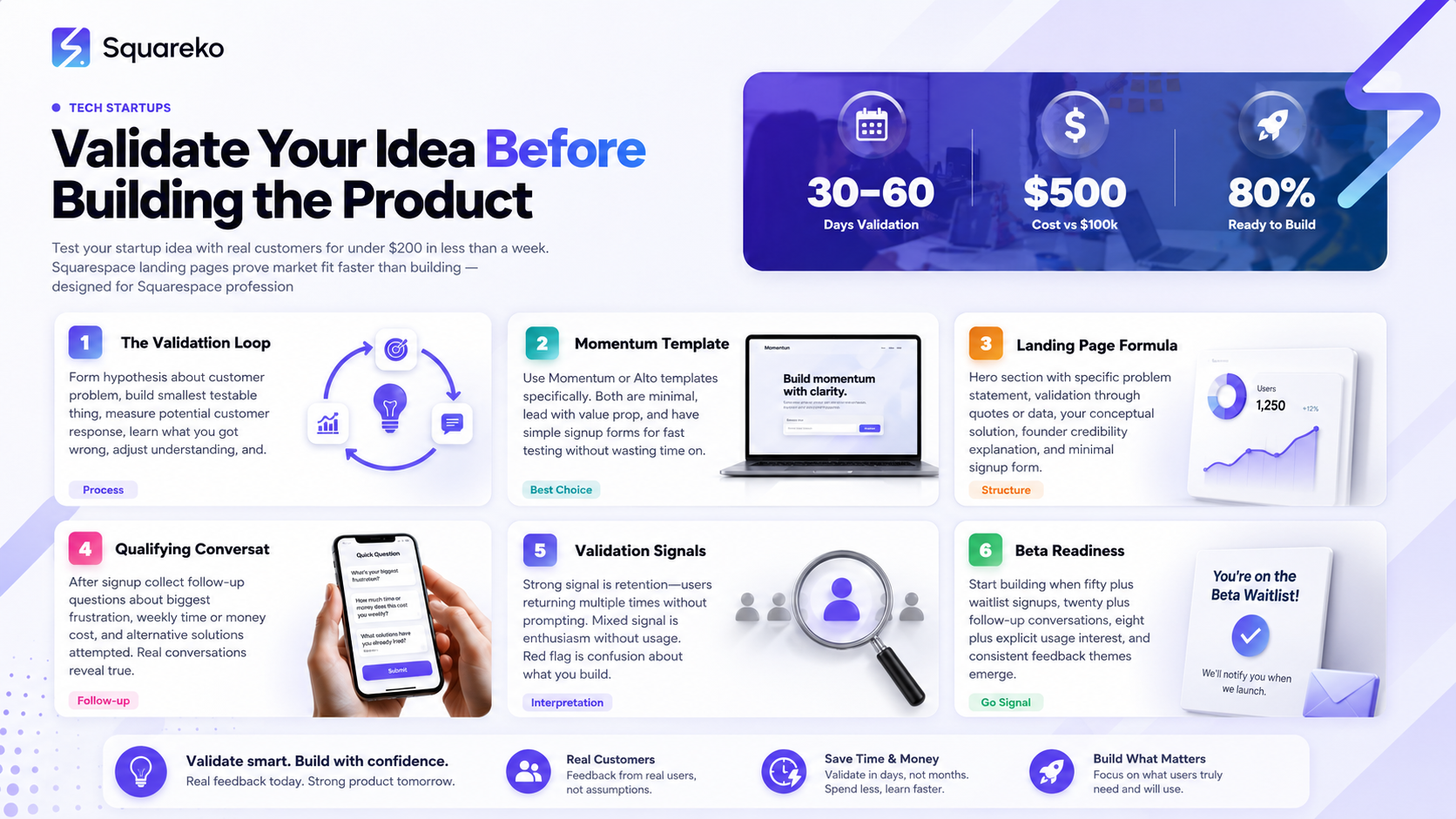
You can test whether your market cares about your problem for under $200 in less than a week
Squarespace landing pages are faster to build than custom code and easier to modify than buying a template
Smart validation collects email signups plus one piece of customer intelligence: What do they need most?
A small cohort of engaged early users is better founder-fuel than a viral waiting list
Validation takes 30-60 days of real customer conversation before you should commit to building the product
The Lean Startup Validation Loop
Validation follows a simple loop:
Form a hypothesis about your customer's problem
Build the smallest thing that tests whether they have that problem and care about it
Measure how potential customers respond to that smallest thing
Learn what you got wrong about their problem
Adjust your understanding and repeat
Most founders mess up at step 2. They think the smallest thing is a prototype. It's not. The smallest thing is often just a landing page and a conversation.
Why This Matters Right Now
In 2026, bootstrapped startups can validate with nearly zero capital. You don't need investment to prove concept. You need a website, a list of potential customers to talk to, and time to have conversations.
This changes the economics. You can spend $500 validating and discovering you're wrong, then start over with a new idea. You cannot spend $100k validating and start over.
The True Cost of Building the Wrong Product
Before we talk about validation strategy, let's be honest about what happens if you skip it.
The Six-Month Scenario
You're confident in your idea. You raise $100k from friends and family or a small seed round. You hire a developer or contractor. You spend three months building an MVP.
The MVP launches. You spend money on marketing. Crickets.
You iterate for another three months, still nothing.
At month six, you've spent half your capital, have no paying customers, and you're starting to doubt whether your problem is real.
This is the startup graveyard. Full of well-built products that solved the wrong problem.
The time cost is invisible but immense. Six months is the critical window in most founders' lives. Six months doing the wrong thing is irreversible momentum loss.
The $500 Validation Scenario
You have an idea. You spend $300 on a Squarespace site, $100 on Google Ads targeting your potential customer, and $100 on your time.
In two weeks, you know whether your idea has legs. If it doesn't, you've lost $500 and two weeks. You start again with better information.
If it does, you've got a list of customers who want to talk to you. You know their real problems, not your guesses about their problems. When you do build your product, you build with customer input.
The difference isn't one versus the other. The difference is market feedback shaping your decision, not founder intuition.
Pre-Product Validation: The Squarespace Approach
Squarespace is genuinely ideal for validation for a simple reason: it's fast to build, easy to modify, and the cost is minimal.
You're not building a permanent product. You're testing a hypothesis. Speed and flexibility matter more than perfection.
What You're Actually Building
You're building a landing page that answers one question: Does my customer have this problem, and do they care about my solution enough to join a waitlist or request access?
That's it. Not a full website. Not a product. A landing page.
The landing page includes:
A headline that articulates the problem
Supporting copy that shows you understand the pain
Your solution (described, not built)
A signup form for interest
Nothing else
All of this fits in 800-1000 words. You can build this landing page in a Squarespace template in 2-3 hours.
Why Squarespace Over a DIY Landing Page Tool?
Tools like Unbounce or Leadpages exist for this purpose. They're easier to build. So why Squarespace?
Flexibility. When you learn something from your validation, you want to adjust immediately. Squarespace gives you that control.
SEO foundation. Your landing page might get found by organic search. Your permanent site (if you build a product) will have SEO value from that history.
Psychological weight. A Squarespace site feels more real to users than obviously temporary landing page tools. They're more likely to convert.
Future use. If this idea works, your landing page becomes your earliest product site. You're not throwing away the work.
The Right Squarespace Template for Validation
Use Momentum or Alto. Both are minimal. Both lead with your value prop. Both have simple signup forms.
Avoid Curator or Brine. They're more complex than you need. Every customization choice is a decision you don't have time to make.
Your goal is fast and focused, not beautiful and polished.
Building Your Validation Landing Page
Here's the structure that actually converts:
Section 1: The Problem (Headlines Only)
Your headline should be specific, not clever.
Not: Tired of Inefficient Workflows?
Better: Engineering Teams Spend 12 Hours Every Week Context-Switching Between Tools
The specific version gets attention because it's true. It triggers recognition in your target customer. They think, Yes, that's my problem.
Your subheadline should answer: Why does this matter?
Context-switching destroys focus and compounds technical debt. Most teams have no visibility into the cost.
That's two sentences. You're not trying to convince them. You're trying to trigger recognition.
Section 2: Validation of the Problem (Social Proof Pre-Product)
You don't have customers, so what counts as social proof?
Direct customer quotes from conversations. I spend way more time navigating between systems than actually solving problems — Sarah, Engineering Manager at Acme.
Relevant research or data. 70% of engineers report focus loss due to tool context-switching (cite the source).
Your personal credibility. I spent five years as an engineering manager at PayPal. I lost approximately 1,000 hours to this exact problem.
Any of these work. The point is: you're not making this up. You've thought about it. You have evidence.
Section 3: Your Solution (Conceptually)
Don't describe your product. Describe what it enables.
Not: We built a platform that integrates your tools and provides a unified interface.
Better: Imagine opening one tab and seeing your current tasks, who's blocked, which deployments are in progress, and alerts that actually matter. Everything in context.
You're painting a picture of what using your solution feels like, not describing features.
Section 4: Why You're Building It
This is where founder credibility comes in.
I'm Walid. I spent seven years in engineering leadership at three different startups. Every single one lost productivity to tool fragmentation. I finally decided to fix it.
Your experience validates your understanding. You're not guessing. You've lived this problem.
Section 5: The Signup Form
Here's where most founders mess up. They ask for too much.
Name. Email. That's it.
Don't ask for company, role, or timeline yet. You'll collect that in a follow-up conversation.
Your button text should be specific:
Not: Sign Up
Better: Join the Private Beta or Request Early Access
The specific version sets expectation. They know they're signing up for limited access, not a general newsletter.
Collecting Intelligence, Not Just Emails
A waitlist is useless if it's just emails. You need to know what your customers actually need.
The Qualifying Form
After initial signup, send a follow-up email with a few questions:
What's your biggest frustration with [the problem]?
How much time/money is this costing you per week?
Have you tried solving this another way? What didn't work?
You're not trying to be a scientist. You're trying to understand their problem deeply enough that when you build, you're building for their needs, not your guesses.
The Customer Conversation
After they respond to the form, you talk to them. In a video call or a detailed email exchange.
The goal is simple: Do they actually have this problem? How bad is it? Would they use something that solved it?
Listen for:
Whether they articulate the problem the same way you do (they probably won't)
What they've tried already (this tells you your competition, even if it's manual workarounds)
What success looks like to them (the metric they care about)
This conversation is gold. You will learn things that change your product roadmap.
Recording Patterns
After 10-15 conversations, you'll notice patterns. Common frustrations,Common workarounds,Common misunderstandings about what you're building.
Document these. Share them with your team. Use them to inform product decisions.
You now have customer input in product development before you've built a single feature. This is the advantage of validation.
Running a Closed Beta
Once you've validated that the problem is real and people care, the next step is a closed beta with early users.
This is different from a waitlist. This is: We built a rough version. Will you use it and tell us if it actually works?
When to Start Building
The signal that you're ready to build is:
50+ people have joined your waitlist
20+ have had a follow-up conversation with you
8+ have explicitly said they'd use a solution if it existed
You've identified common themes in what they need
This usually takes 30-60 days of active validation.
Recruiting Beta Users
Your beta users come from your validation list. You already know they're interested and have conversations with them.
Reach out personally. Not a bulk email. A message to specific people: We're building something based on our conversations. Would you be willing to be in our first beta? Rough around the edges, but you'd get early access and your feedback would shape the product.
Most people say yes. Some will say no (they were just interested conceptually). That's fine.
Aim for 5-10 beta users to start. You want engaged people who give feedback, not a huge list where feedback gets diluted.
Running the Beta
You're not running a traditional QA beta. You're running a usage and feedback beta.
Instructions: Use this for your real work this week. Tell us what breaks and what's missing.
Get on calls with beta users. Watch them use it. Ask questions. Record their feedback.
This is intense and time-consuming. It's also where you learn whether your product vision was right.
Most teams find that their beta users need something slightly different than they expected. That's the whole point. You adjust. You rebuild. You iterate.
Interpreting Validation Results
After validation and early beta, you have data. How do you interpret it?
The Strong Signal: Retention
The strongest signal isn't people signing up. It's people coming back.
If your beta users log in multiple times a week without being asked, you've got something. If they use it for their real work and not just to be nice, you've got something.
If they only use it once to see what you built, that's weaker signal.
Track: Do users come back? How often? Without reminders?
The Mixed Signal: Enthusiasm Without Usage
Sometimes people are genuinely excited about your idea in conversations, then don't use the beta.
This usually means: They care about the problem in theory but it's not urgent enough for them to change their workflow. Or the solution isn't quite right for their workflow.
Don't interpret this as the idea is bad. Interpret it as the solution needs refinement or we're targeting the wrong urgency tier of customer.
The Red Flag: Confusion
If multiple beta users are confused about what your product does or how to use it, that's important data.
This could mean:
Your product is too complex
Your explanation is unclear
You're solving the wrong problem
The customer actually doesn't have the problem you think they have
Any of these is addressable, but you need to know which one.
The Invalidation: No Interest
If 30+ people express interest but fewer than 3 are willing to talk further, you might have validated that the problem doesn't matter as much as you thought.
Or you might be targeting the wrong customer.
Either way, this is valuable learning. You can pivot or walk away informed, not guessing.
When You've Found Product-Market Fit
Product-market fit is a real thing. It's not a feeling. It's a market condition.
You've found product-market fit when:
Growth becomes automatic. Your users tell their colleagues. Your waitlist grows without active marketing. Usage grows week-over-week.
Feedback becomes consistent. Instead of we need X, Y, Z, all users ask for variations of the same thing. This means you're close to a core set of features that work.
Usage becomes habitual. Users log in multiple times a week without prompting. The product solves a problem they face regularly enough to make the workflow change worthwhile.
Paying becomes frictionless. (Once you have pricing) Users convert from free to paid without needing to be convinced.
This doesn't happen on day one of beta. It happens over months, often 3-6 months, after you've addressed initial feedback.
The Pivot Decision
Sometimes validation reveals that your original problem isn't the right one.
This is not failure. This is learning.
The best startups pivot multiple times before finding the right problem to solve. Validation that reveals a better problem is accelerating your path to success, not failing.
Listen to your data. If users are consistently using your product for a different purpose than you built it for, consider whether that's your real market
Ready to Validate Your Idea?
The difference between successful startups and failed ones is often not the quality of the initial idea. It's whether the founders validated before building.
You can spend a week and $500 testing your hypothesis with real customers, or you can spend six months and $100k building something nobody wants.
If you're ready to validate your startup idea on Squarespace—whether you're building the landing page yourself or you want professional help—Squareko specializes in pre-product validation sites. We've helped dozens of founders test their ideas, recruit beta users, and collect customer intelligence before they committed to building. Let's validate your idea properly.
FAQs
-
Ideally 30-60 days. You want enough time to have meaningful customer conversations (10-15) and see patterns emerge. Less than 30 days often doesn't give you enough signal. More than 60 days and you're delaying building.
-
That's fine. You've learned something valuable: either your problem isn't as urgent as you thought, or you're not targeting the right customer segment. Adjust and test again, or explore a different problem.
-
Yes, but carefully. Spend $500-1000 on ads targeted at your specific customer. This gives you real traffic from people who might actually be customers, not just people curious about startups.
-
Not as many as you think. 50-100 signups with 10-15 follow-up conversations is enough to validate that the problem is real. More is nice, but quality of conversation matters more than quantity of signups.
-
The principle is the same (test with real customers), but B2B usually requires individual conversations with decision makers, while B2C can rely more on landing page metrics and signup volume.
-
The copy doesn't need to be perfect. It needs to be clear. Write naturally, explain the problem you're solving, and ask for feedback. Your early users will tell you if something is confusing.
-
No. Validate first. Raise money after you've proven that real customers care about your problem. You'll get better terms and faster decisions from investors who see traction.
-
When 10+ people have explicitly asked when they can use it, when you've had consistent feedback on what features matter, and when you're confident your solution direction is right.

From custom website design to SEO strategy, we help businesses launch a site that looks professional and performs better.

Author Bio
I'm Walid Hasan, a Certified Squarespace Expert and Squarespace Circle Platinum Partner with over 12 years of hands-on experience designing and optimizing high-performing websites. Over the years, I've had the privilege of building more than 2,000 Squarespace websites for clients around the world, always focusing on clean design, strong user experience, and conversion-driven results.
