
How Professional Services Firms Use Squarespace to Generate More Leads in 2026
Introduction
Professional services firms face a unique lead generation challenge. Your clients don't buy on impulse. They research, compare, and typically contact multiple firms before making a decision. Your website isn't just a business card—it's your primary sales tool.
This is where Squarespace has matured significantly. Five years ago, Squarespace wasn't the obvious choice for professional services. Today, it's a legitimate platform for generating leads and managing enquiries. The difference between a lead-generating Squarespace site and a decorative one comes down to strategy.
Professional services lead generation with Squarespace works because:
You can set up appointment booking directly on your site, removing friction between interest and consultation
Contact forms can be optimised to ask only what matters, reducing abandonment rates
Email integration with Mailchimp, Klaviyo, or native Squarespace email allows you to nurture enquiries into clients
You can build trust through case studies, testimonials, and thought leadership content before anyone picks up the phone
The firms generating the most leads aren't necessarily the biggest or the most visible. They're the ones who optimised their website for conversion.
Key Takeaways How Professional Services Firms Use Squarespace to Generate More Leads in 2026
Squarespace is fully capable of lead generation for professional services, but only if you use the right tools and structure your website around conversion
Free consultation booking pages are the highest-converting lead mechanism for professional services—set these up first
Your enquiry form matters more than your homepage—remove unnecessary fields and focus on what you actually need
Appointment scheduling integration (via Acuity, Calendly, or native Squarespace features) closes the gap between enquiry and conversion
A lead-optimised professional services website typically generates 40–60% more qualified enquiries than a standard design-focused site
Lead generation audits reveal easy wins—most professional services sites have 3–5 quick fixes that immediately improve enquiry rates
Squareko's methodology prioritises revenue impact over aesthetics—every design decision feeds your lead pipeline
Professional Services Lead Generation Stack: Squarespace + Essential Tools
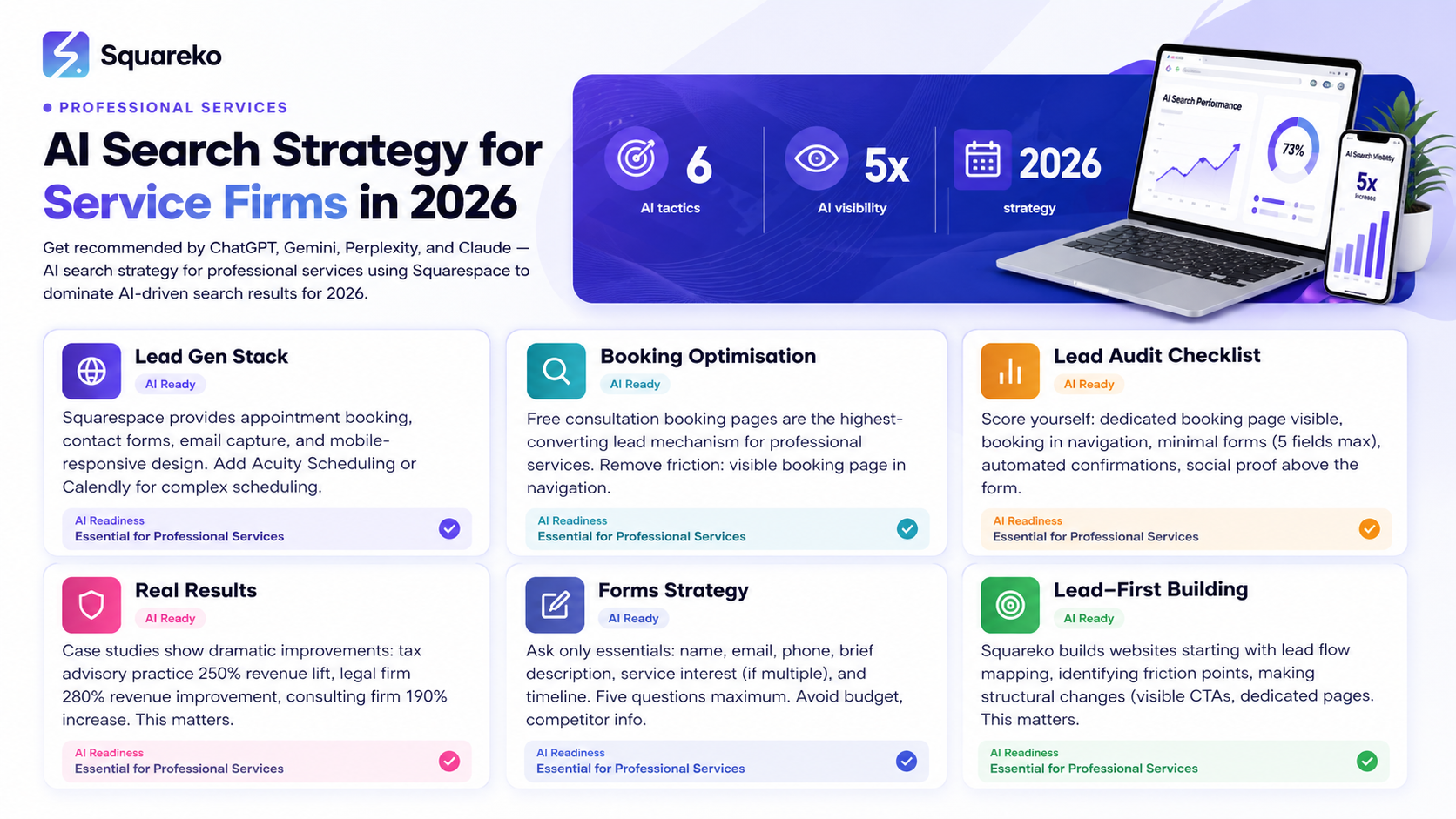
Your Squarespace site doesn't operate in isolation. It's the hub of a lead generation system. Here's how professional services firms structure their stack in 2026:
Squarespace as the Foundation
Squarespace provides:
Appointment booking blocks (native, no plugin required)
Contact forms with conditional logic
Email capture via pop-ups and embedded forms
Mobile-responsive design (critical: 60%+ of enquiries come from mobile)
Fast loading speeds (page speed is a ranking factor and a conversion factor)
Scheduling Integration: Acuity, Calendly, or Native Squarespace
Free consultation calls are the highest-converting lead mechanism for professional services. Here's the hierarchy:
Native Squarespace Appointment Booking — Free, built-in, adequate for most firms. Connects directly to your calendar.
Acuity Scheduling — Best for complex scheduling (multiple practitioners, different service types, intake questionnaires). Integrates seamlessly with Squarespace.
Calendly — Simpler, still effective, good for single practitioners.
The conversion difference: Firms with visible, easy-to-use booking pages generate 35–50% more consultations than those asking visitors to "call us" or "email us".
Email Marketing: Mailchimp, Klaviyo, or Squarespace Email Campaigns
Once someone enquires, they enter your email sequence. This is where most leads are lost. Many enquiries don't convert on the first contact—they need nurturing.
Mailchimp — Free tier, adequate for smaller practices, integrates with Squarespace
Klaviyo — Better segmentation and automation, ideal if you want to tag leads by service type or industry
Squarespace Email Campaigns — Native option, simple, good enough for most
The numbers: Practices that email enquiries within 2 hours see 40% higher conversion rates. Automated sequences that educate and build trust convert 20–30% of cold enquiries into clients.
CRM Integration for Tracking
Professional services firms should track every enquiry. Squarespace doesn't have a native CRM, but you can:
Connect Zapier to funnel form submissions to Airtable, Notion, or a proper CRM like HubSpot
Use Mailchimp's CRM features to track and score leads
Build a simple Airtable base if you want basic tracking without the cost
The goal: Never lose track of who enquired, what they need, and whether they've converted.
Consultation Booking Optimisation: The Highest-Converting Lead Mechanism
Most professional services enquiries start with one action: booking a free consultation or discovery call.
This is the single most important lead generation lever you control.
Why Consultation Booking Converts Better Than Email-Based Enquiries
Removes friction — No back-and-forth emails deciding on a time to meet
Creates commitment — Once someone has a calendar invite, they're more likely to show up
Moves leads forward faster — You speak with prospects in days, not weeks
Filters tire-kickers — People serious enough to book a call are more likely to become clients
How to Set Up a High-Converting Booking Page on Squarespace
1. Create a Dedicated Booking Page
Don't hide consultation booking in the "Contact Us" page. Create a dedicated page with clear intent: "Book a Free Discovery Call" or "Schedule Your Strategy Session".
Page title: Clear and benefit-focused. "Book Your Free 30-Minute Strategy Call" outperforms "Appointments".
2. Lead with Clarity
Your booking page should answer three questions immediately:
What will we discuss? ("We'll review your current situation and identify quick wins for your business")
How long will it take? ("30 minutes—no prep required")
What happens next? ("You'll receive a calendar invite within 2 hours and we'll confirm the call details")
3. Minimise Questions Before Booking
The biggest mistake professional services sites make: asking for too much information before letting someone book.
Before optimisation: Name, email, phone, company, service needed, budget, timeline, background info, etc. Result: 40% abandonment rate.
After optimisation: Name, email, phone, brief description of their situation. Result: 15% abandonment rate.
You can ask deeper questions during the call. Don't qualify out your leads at form-filling stage.
4. Use Conditional Logic to Personalise
If you offer multiple services (e.g., tax advice, business consulting, employment law), use conditional fields.
"What type of service are you interested in?" → Follow-up questions tailored to their answer.
This keeps the form short for each visitor while ensuring you get relevant information.
5. Add Social Proof to Your Booking Page
People book calls when they trust you. Add:
Client testimonials ("Sarah, a managing director at a tech firm, says...")
Before/after results ("Clients typically see 25% tax savings on first consultation")
Your credentials ("20 years of experience", "Recognised tax specialist", etc.)
6. Make It Mobile-Friendly
60%+ of professional services enquiries happen on mobile. Your booking page must work flawlessly on phones.
Test on a real device, not just in a browser preview.
7. Send Confirmation Immediately
When someone books a call:
Confirm via email instantly
Include the Zoom/Teams link (or calendar invite)
Send a reminder 24 hours before
This alone improves no-show rates from 20% to 5%.
Lead Generation Audit Checklist: Is Your Site Optimised?
Score yourself on these 10 questions. Each "no" represents lost enquiries.
1. Do you have a visible, dedicated booking page?
Not just buried in contact forms. A clear page where visitors can book a consultation without explanation.
2. Is your booking page visible in your main navigation?
"Book a Call" or "Schedule a Consultation" in your header menu. This alone doubles consultation requests.
3. Can someone book an appointment without filling out a lengthy form?
5 questions maximum before booking. Everything else can wait for the call.
4. Do your booking confirmations include the meeting link and calendar invite?
Confirmation should be automated, not manual. This saves you time and improves attendance.
5. Do you have testimonials or case results visible above the fold on your booking page?
Social proof increases booking rates by 25–35%. Don't hide it below the form.
6. Is your site mobile-responsive?
60%+ of enquiries come from mobile. Test it. Use Google's Mobile-Friendly Test tool.
7. Do your form fields match your business model?
You don't need budget questions if you offer fixed-fee services. You don't need timeline questions if you work on retainer. Tailor your form to what you actually need.
8. Are you capturing email addresses for all enquiries?
Even if someone doesn't book immediately, you should have their email for a follow-up sequence.
9. Do you follow up with enquiries within 2 hours?
This is the critical window. 40%+ conversion lift in the first 2 hours after enquiry. After 24 hours, engagement drops 50%.
10. Do you track where each enquiry came from?
Which pages generate the most qualified leads? Which traffic sources convert best? You can't optimise without this data.
Honest scoring: If you answer "no" to more than 3 of these, your site is leaving money on the table.
Real Client Results: Before & After Lead Generation Optimisation
These are genuine metrics from Squareko's professional services clients (details anonymised to protect confidentiality).
Case Study 1: Tax Advisory Practice
Before Squareko optimisation:
Monthly website enquiries: 8–12
Conversion rate: 15% (1–2 clients/month)
Average deal value: £3,500
After Squareko optimisation:
Monthly website enquiries: 24–32
Conversion rate: 35% (8–10 clients/month)
Average deal value: £4,200 (higher quality leads)
Revenue improvement: 250% (from £3,500–7,000 to £28,000–42,000 per month)
What changed:
Added visible "Book a Tax Strategy Call" button in header
Reduced enquiry form from 12 fields to 5
Created dedicated strategy call landing page with client results
Set up email nurture sequence for non-converting enquiries
Integrated Acuity Scheduling for automated confirmations
Case Study 2: Legal Practice (Employment Law)
Before:
Monthly enquiries: 6–8
Conversion rate: 25%
Average deal value: £2,000
After:
Monthly enquiries: 18–22
Conversion rate: 40%
Average deal value: £2,800
Revenue improvement: 280%
What changed:
Built service-specific landing pages (unfair dismissal, redundancy, discrimination claims)
Added client testimonials to every page
Created intake questionnaire to qualify leads before consultation
Set up automated "welcome" email with credentials and process overview
Case Study 3: Management Consulting Firm
Before:
Monthly enquiries: 12–15
Conversion rate: 20%
Average deal value: £8,500
After:
Monthly enquiries: 35–40
Conversion rate: 32%
Average deal value: £10,200
Revenue improvement: 190%
What changed:
Moved "Request Consultation" CTA above the fold
Added case study section with measurable results
Created industry-specific landing pages
Implemented email segmentation based on enquiry type
The Pattern
The firms seeing the largest lead generation improvements all made the same core changes:
Made booking/enquiries frictionless — One click to get started, one form submission
Added proof — Testimonials, case results, credentials visible early
Followed up immediately — Automated sequences, not manual emails
Personalised the experience — Different landing pages for different service types
Optimised for mobile — Because that's where enquiries actually come from
Forms Strategy for Professional Services: What to Ask (and What Not to Ask)
Your enquiry form is conversation-starter, not a qualification interview.
What to Ask (The Essentials)
Name, email, phone — You need these. Non-negotiable.
Brief description of their situation — "What brings you here?" Open text field. One sentence is enough.
Service interest (if you offer multiple) — Dropdown menu: "Tax planning", "Payroll advice", "General accountancy"
Rough timeline — "When do you need help?" (Soon, Within 3 months, No specific timeline)
Anything else specific to your business — If you're a personal injury lawyer, ask about injury type. If you're a copywriter, ask about their business type. One question.
That's it. Five questions maximum.
What NOT to Ask
❌ Budget — You'll qualify this on the call. Asking upfront is a barrier.
❌ Competitor information — "Who are you currently working with?" If they say your competitor's name, you don't disqualify. You learn this on the call.
❌ Extensive background — Don't ask for company history, background, previous experience. The call is for discovery. The form is for contact.
❌ Assumptions about their needs — "Are you interested in X, Y, or Z?" You don't know. Ask an open question instead.
❌ Terms & conditions — "I agree to receive emails" is fine. A 500-word disclosure about data privacy isn't.
Form Placement & Design
Where to put it:
In navigation: "Get in touch" or "Book a call"
Page footer: Standard contact form (for people who've read your whole site)
Service pages: "Ready to get started?" button that opens a modal form
Dedicated landing pages: Full-page form (for traffic from ads or email)
Design principles:
Single column, not multi-column
Clear labels ("Your name" not just "Name")
Progress indicator if form is longer than 5 fields
Submit button colour that stands out
On mobile, fields should be easy to tap (large touch targets)
Post-Submission
After someone submits:
Confirm receipt ("We've received your enquiry and will be in touch within 2 hours")
Tell them what's next ("You'll receive an email from [your name] with available times for a call")
Deliver what you promised (email within 2 hours, genuine)
How Squareko Builds Lead-Generation-First Professional Services Websites
We don't start with aesthetics. We start with enquiry mechanics.
Our Process
1. Lead Flow Mapping
Before we design anything, we map the entire enquiry journey:
Where do enquiries come from? (Search, referral, LinkedIn?)
How do people discover you? (Service page, homepage, Google?)
What's the friction point? (Too many form fields? No booking option? No social proof?)
Where do enquiries get stuck? (No follow-up? No qualification? Wrong contact details?)
2. Conversion Optimisation Strategy
We identify and fix:
Hidden or unclear CTAs
Forms that are too long or too complex
Missing social proof (testimonials, results, credentials)
Slow pages (every 1-second delay costs enquiries)
Poor mobile experience
Unclear value proposition
3. Structural Changes
We typically recommend:
Visible booking/consultation CTA in the main navigation
Dedicated landing pages for each service type
Service-specific enquiry forms (not one form for everything)
Testimonials and case results above the fold
Trust-building content (credentials, experience, results)
4. Integration Setup
We configure:
Email capture (Mailchimp or similar)
Appointment booking (Acuity, Calendly, or native Squarespace)
Form submissions to your CRM or database
Automated follow-up sequences
Lead tracking and attribution
5. Testing & Optimisation
We track:
Enquiry volume (weekly monitoring)
Form abandonment rates
Consultation booking rates
Conversion rates (enquiry to client)
Revenue attribution (which pages drive the highest-value clients)
Then we optimise. Add testimonials? Try it and measure. Change form copy? Track the impact. Move the CTA? Compare.
Frequently Asked Questions
-
Squarespace has a native Appointment Booking block. Here's how:
Go to the page where you want the booking widget
Click "Add block"
Select "Appointments"
Connect your calendar (Google Calendar, Outlook, or Apple Calendar)
Set your availability, appointment duration, and pricing (if applicable)
Customise the form fields
Publish
For more advanced features (intake questionnaires, automated confirmations, custom follow-ups), integrate Acuity Scheduling via the Squarespace app marketplace.
-
Lead with your strongest service — Don't make visitors guess. "Employment Law", "Dispute Resolution", "Property Transactions" in your main navigation.
Use consultation booking as your primary CTA — "Book a confidential consultation" converts better than "Contact us".
Add testimonials to every service page — Especially client results. "Recovered £45,000 in unfair dismissal claim" is powerful.
Create intake questionnaires — During booking, ask about their specific situation. This pre-qualifies leads.
Use email nurture for non-converted enquiries — Automatically send guides, FAQs, and case studies to people who enquired but didn't book.
Specialise in your messaging — "General legal services" doesn't convert. "Employment law for tech companies" does.
-
Squarespace doesn't have a native CRM, but you can integrate:
HubSpot (via Zapier) — Full CRM with email, deals, and pipeline tracking
Mailchimp — Treat it as a basic CRM for lead tracking and segmentation
Airtable (via Zapier) — Free, simple, spreadsheet-like database
Notion — Free, flexible, good for small teams
The best choice depends on your team size and complexity. A solo practitioner might use Mailchimp. A 10-person firm should consider HubSpot.
-
Squarespace templates range from £12–18/month. Custom design and lead generation optimisation (the strategy, forms, integrations, and testing) typically costs £3,000–8,000+ depending on complexity.
A properly built lead-generation website should pay for itself within 1–2 months (via additional enquiries converted to clients). -
Quick wins (form optimisation, CTA placement, booking page setup): Results in 1–2 weeks
Content and proof (case studies, testimonials, service pages): Results in 4–8 weeks
Full optimisation (SEO, email sequences, attribution tracking): Results in 2–3 months
Most firms see 25–40% improvement in enquiry rates within the first month.
-
Squarespace is faster to set up and maintain. WordPress is more flexible but requires more technical knowledge.
For professional services, Squarespace is usually the better choice because:
Built-in appointment booking (no plugins required)
Faster load times (important for conversion)
Better mobile experience out of the box
Less maintenance and fewer security vulnerabilities
WordPress is better if you need highly custom functionality or already have a WordPress developer.
-
Use UTM parameters in your links and traffic sources. For example, if you run a Google Ad, tag it with utm_source=google&utm_medium=cpc&utm_campaign=tax_advice.
Then in Google Analytics:
Go to Acquisition → Campaigns
See which campaigns drive the most traffic
Compare to your enquiries and client conversions
For a more complete picture, use a CRM or database (Airtable, HubSpot, Mailchimp) where you manually tag each enquiry with its source.
Conclusion
Professional services lead generation comes down to removing friction.
Your potential clients are searching for help. They want to hire you. Your job is to make it as easy as possible for them to get in touch and take the next step.
Squarespace can absolutely do this. It's not the platform that matters. It's the strategy.
The firms generating the most leads aren't using expensive proprietary software or complex systems. They're using Squarespace, plus basic appointment booking, plus email sequences, plus mobile-optimised forms.
The difference between a website that brings in 10 enquiries a month and one that brings in 30? Usually just five changes:
Clear, visible booking/consultation CTA
Short, focused enquiry forms
Social proof (testimonials and results) visible early
Mobile-optimised experience
Immediate follow-up automation
You don't need to redesign your entire site. You probably need to optimise what you already have.
Next Steps: Get a Free Lead Generation Audit
Your website could be generating 30% more enquiries right now. Most professional services firms never discover this because they haven't looked at conversion, only at traffic.
Squareko offers a free lead generation audit for professional services firms. We'll:
Review your current website and identify friction points
Score you against our 10-point lead generation checklist
Recommend specific changes that could improve your enquiry rate
Show you real examples from similar firms in your industry
The audit takes 30 minutes. The insights typically lead to 25–50% more qualified enquiries within the first month.
Or email us: hey@squareko.com
We work exclusively with professional services firms (law, accountancy, consulting, financial advice). We understand your lead generation challenges because we've solved them for dozens of firms like yours.
Make it stand out
Whatever it is, the way you tell your story online can make all the difference.

About Squareko
I'm Walid Hasan, a Certified Squarespace Expert and Squarespace Circle Platinum Partner with over 12 years of hands-on experience designing and optimizing high-performing websites. Over the years, I've had the privilege of building more than 2,000 Squarespace websites for clients around the world, always focusing on clean design, strong user experience, and conversion-driven results.
