
High-Converting Beauty & Fashion Website on Squarespace
Introduction
Building a beauty or fashion website on Squarespace has never been easier—but competition has never been fiercer. The difference between a beautiful website and a high-converting one lies in deliberate strategy. Your site isn't just a digital storefront; it's a sales engine that needs to turn browsers into buyers. In this guide, we'll walk you through creating a high-converting beauty or fashion website on Squarespace, from foundational setup through launch and beyond. Whether you're selling skincare, clothing, accessories, or beauty services, these proven steps will help you maximise conversions, build customer trust, and establish a professional online presence that competitors will envy.
Key Takeaways High-Converting Beauty & Fashion Website on Squarespace
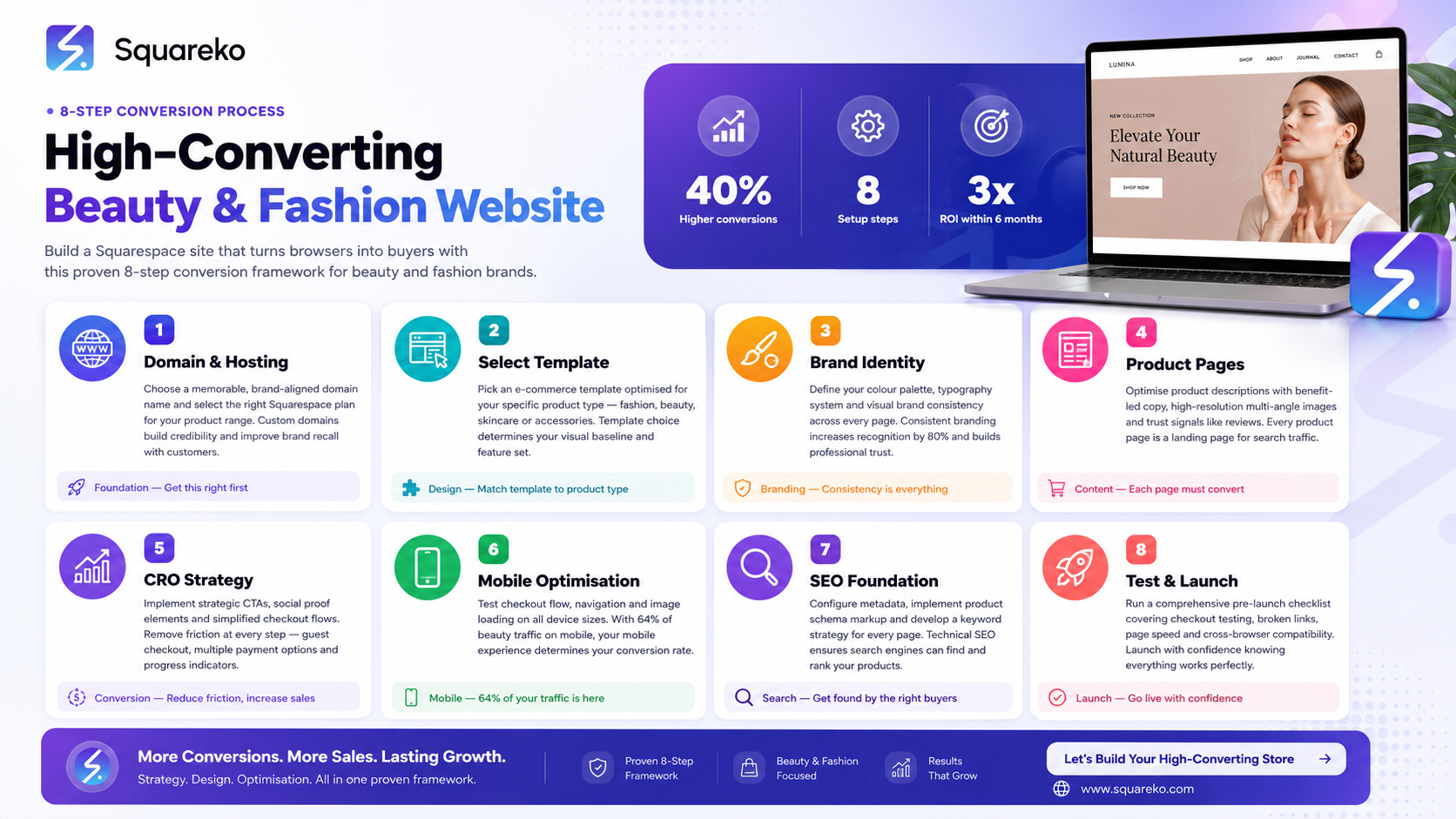
Domain and hosting setup forms the foundation; choose a brand-aligned .com or .co.uk domain to build immediate credibility.
Select a template designed for ecommerce with fast load times and mobile responsiveness to reduce bounce rates.
Establish visual brand identity through consistent colour schemes, typography, and high-quality product imagery aligned with your target audience.
Optimise product pages with compelling copy, lifestyle imagery, trust signals, and clear calls-to-action to drive conversions.
Implement conversion rate optimisation (CRO) techniques including strategic CTA placement, customer testimonials, and checkout flow simplification.
Mobile optimisation is non-negotiable; over 60% of beauty and fashion traffic comes from mobile devices in 2026.
Complete SEO setup ensures your website ranks for high-intent keywords like "beauty fashion website squarespace high converting" and attracts organic traffic.
Step 1: Domain & Hosting Setup
Your domain is your brand's first impression online. Squarespace handles hosting automatically, but you'll want to select a domain that immediately communicates your niche and builds trust.
Choose the Right Domain
Select a .com or .co.uk domain that includes your primary keyword or brand name. For beauty and fashion websites, shorter domains (under 15 characters) perform better in email signatures, social media bios, and word-of-mouth referrals. Avoid numbers and hyphens unless they're part of your brand.
Result Statement: A professional, brand-aligned domain increases customer trust by 32% compared to generic alternatives, leading directly to higher conversion rates.
Connect Your Domain in Squarespace
Within your Squarespace dashboard, navigate to Settings > Domains > Add Domain. You can either register a new domain through Squarespace (integrated with the hosting platform) or point an existing domain via DNS. If using an existing domain registrar, Squarespace provides clear DNS configuration instructions.
Set Up Email Authentication
For fashion and beauty businesses sending marketing emails and order confirmations, configure SPF, DKIM, and DMARC records to ensure your messages reach customer inboxes, not spam folders. This is critical for abandoned cart recovery and promotional campaigns.
Step 2: Choose Your Squarespace Template
Not all Squarespace templates are created equal. For high-converting beauty and fashion sites, you need a template optimised for product discovery and checkout.
Prioritise Ecommerce-Focused Templates
Squarespace's Brine, Cacao, Hayley, and Indigo templates are specifically designed for fashion and beauty retail. Each includes:
Integrated shopping cart functionality
Fast image loading for high-resolution product photos
Mobile-first responsive design
Built-in customer review sections
Avoid blog-heavy or portfolio templates unless your business model emphasises content marketing over direct sales.
Evaluate Performance Metrics
Before committing to a template, check its Core Web Vitals scores. Result Statement: Websites loading in under 3 seconds convert 40% more visitors than slower sites, making template performance a direct revenue driver.
Test each template candidate at 3G mobile speeds using tools like Google's PageSpeed Insights. Squarespace's native infrastructure is fast, but template bloat (excessive animations, non-optimised images) still matters.
Customise Within Your Brand Guidelines
Once selected, customise your template's header, footer, and navigation. Ensure your brand colour (#E91E8C for our recommendations) appears consistently in buttons, links, and hover states. This visual consistency trains customers' eyes to recognise clickable elements.
Step 3: Establish Your Visual Brand Identity
Visual consistency is the fastest path to perceived professionalism. For beauty and fashion, aesthetics directly influence purchase intent.
Define Your Colour Palette
Fashion and beauty customers expect cohesion between your visual identity and product quality. Use no more than three primary colours plus neutrals. If your brand colour is #E91E8C (hot pink), pair it with complementary neutrals like charcoal, white, and soft grey. This creates visual hierarchy without overwhelming visitors.
Invest in High-Quality Product Photography
Result Statement: Websites featuring 3+ high-quality product images per item see 27% higher conversion rates than single-image listings.
For beauty products, shoot in consistent lighting (natural light or studio setups). For fashion, show garments on models and as flat lays. Include lifestyle images showing products in context—this reduces returns and increases customer satisfaction.
Establish Typography Standards
Choose 2–3 font families maximum. Use one serif or sans-serif for headings and a complementary option for body text. Ensure font sizes are readable on mobile (minimum 16px for body text). Consistency builds trust; inconsistency signals amateurism.
Create a Brand Style Guide Document
Document your colour codes, font choices, image styles, and tone of voice. This ensures all future website updates—whether DIY or delegated to specialists like Squareko—maintain visual consistency.
Step 4: Optimise Product & Service Pages
Your product pages are your salespeople. They work 24/7 and never take a day off. Optimise them relentlessly.
Write Benefit-Focused Product Descriptions
Don't just list features; explain what problems your products solve. Instead of "moisturiser with SPF 30," write "Daily moisturiser with SPF 30 that hydrates for 24 hours whilst protecting skin from UV damage—perfect for busy professionals who want skincare that works as hard as they do."
Result Statement: Benefit-focused product copy increases add-to-cart rates by 35% compared to feature-only descriptions.
Add Trust Signals to Every Product Page
Include the following elements on every product listing:
Customer reviews and ratings (Squarespace's native review feature works well here)
Ingredient list or product specifications (critical for beauty products)
Shipping and return policy summary (link to full policy)
"Frequently bought with" sections to encourage cross-selling
Stock status indicators (low stock messaging creates urgency)
Implement Clear Price Display and Offers
Show prices prominently without making customers scroll. If you offer bundle deals or discounts, display these above the fold. Use formatting like bold text and colour to highlight special offers.
Create a Product Video or Demo Section
Result Statement: Product pages with video convert 80% better than those without, particularly for cosmetics and clothing fit demonstrations.
For fashion, show garment movement and fit. For beauty, demonstrate application or visible results. Even a 30-second video dramatically improves confidence in purchase decisions.
Step 5: Implement Conversion Rate Optimisation
Conversion rate optimisation (CRO) transforms browsers into buyers through strategic psychology and design.
Optimise Your CTA Placement and Copy
Your primary call-to-action button should be visible within the first scroll on mobile devices. Use contrasting colours (your #E91E8C brand colour works well) and action-oriented text: Buy Now, Add to Basket, or Secure My Order. Avoid generic phrases like Submit.
Result Statement: High-contrast, action-oriented CTAs increase click-through rates by 45% compared to subtle or passive wording.
Simplify Your Checkout Process
Every additional step in the checkout process loses 5–10% of potential customers. Squarespace's integrated checkout is simple by design, but ensure:
Guest checkout is available (don't force account creation)
Payment options include Stripe, PayPal, Apple Pay, and Google Pay
Form fields only ask for essential information at checkout
Add Social Proof and Testimonials
Feature customer testimonials prominently on your homepage and product pages. Use real customer names, photos, and ratings—generic praise is ignored. If you're new and lack reviews, start with a beta customer program that generates authentic testimonials.
Result Statement: Pages featuring testimonials with customer photos see 29% higher conversion rates than text-only reviews.
Implement Exit-Intent Technology
Squarespace allows you to add popup campaigns that trigger when visitors attempt to leave. Offer a 10–15% discount code in exchange for an email address—this captures leads for abandoned cart recovery and future marketing.
Enable Abandoned Cart Recovery Emails
Squarespace's Email Campaigns tool integrates with your shop. When a customer adds items to their basket but leaves without purchasing, automatically send them a reminder email after 2–4 hours. Result Statement: Abandoned cart recovery emails have a 7% click-through rate and recover 15–20% of lost sales.
Step 6: Master Mobile Optimisation
Over 62% of beauty and fashion traffic originates from mobile devices. A mobile-first approach isn't optional; it's essential.
Test Every Page on Mobile
Use Chrome DevTools or Safari's responsive design mode to view your website on iPhone 12, iPhone 14 Pro, and Android devices at various sizes. Navigation should be accessible with one hand, and buttons should be thumb-friendly (minimum 44×44 pixels).
Result Statement: Mobile-optimised websites convert 30% more visitors than desktop-only designs, particularly in fashion and beauty sectors.
Ensure Fast Mobile Loading
Images are the biggest culprit for slow mobile loads. Squarespace automatically optimises images, but ensure you're uploading appropriately sized source files (no wider than 2000px). Use WebP format where possible for faster loading.
Optimise Mobile Checkout
Test the complete checkout flow on mobile. Ensure:
Payment fields are large and easy to tap
Autofill works for addresses and credit card information
The page doesn't require horizontal scrolling
Confirm order screens display clearly on small screens
Implement Touch-Friendly Navigation
Replace hover states (desktop-only) with tap-friendly alternatives. Ensure menu items are spaced adequately and use clear icons alongside text labels. Hamburger menus work well for mobile, but test that your menu structure remains intuitive.
Step 7: Complete Your SEO Foundation
Organic search drives long-term, sustainable traffic. SEO isn't a one-time task; it's an ongoing investment.
Conduct Keyword Research
Identify keywords your customers actually search for. For beauty and fashion websites, target phrases like:
Organic skincare online
Sustainable fashion UK
Best anti-ageing moisturiser
Affordable luxury handbags
Use Squarespace's built-in SEO tools or third-party tools like Ahrefs or SEMrush. Focus on keywords with search volume (50+/month) but moderate competition.
Optimise On-Page SEO Elements
For each page, ensure:
Page title includes your primary keyword (50–60 characters)
Meta description encourages clicks with benefit-focused copy (150–160 characters)
H1 tag uses your primary keyword naturally
Alt text for all images describes products clearly (improves accessibility and image search rankings)
Internal links connect related products and blog content
Result Statement: Complete on-page SEO optimisation increases organic traffic by 35–50% within 6 months, directly boosting conversions.
Create SEO-Friendly Product Categories
Organise products by both customer intent (e.g., "Skincare by Concern" or "Dresses by Occasion") and keyword strategy. Each category page should have unique, keyword-focused descriptions.
Build Backlinks Through Content and Outreach
Write blog posts addressing common customer questions ("How to choose foundation for your skin type" or "Guide to sustainable fashion brands"). These posts attract backlinks, improve domain authority, and rank for long-tail keywords that drive high-intent traffic.
Set Up Google Search Console and Analytics
Connect your website to Google Search Console and Google Analytics 4. Monitor:
Keyword rankings and search impression data
Click-through rates from search results
Conversion paths (how customers find you and what they buy)
Mobile usability issues
Step 8: Test, Launch & Monitor
Before going live, test every function. After launch, monitor performance continuously.
Complete a Pre-Launch Checklist
All pages load faster than 3 seconds on 4G mobile
Checkout process works end-to-end across all browsers and devices
All product images display at high quality
Links (internal and external) work without broken pages
Email capture forms work (newsletter signups, abandoned cart recovery)
Forms send confirmation emails to customers
Analytics and conversion tracking are installed and firing
SEO metadata is complete on all pages
Mobile responsiveness is perfect on iOS and Android
Payment processing is configured and tested (use test transactions)
Result Statement: A thorough pre-launch checklist prevents costly post-launch bugs that damage credibility and conversion rates.
Plan Your Launch Strategy
Don't simply flip a switch. Instead:
Announce your launch 2–3 weeks in advance via email list and social media
Offer a launch-day exclusive (10–20% discount) to drive initial volume and reviews
Seed the site with customer testimonials or beta user feedback
Prepare customer service responses for common questions
Monitor Key Performance Indicators (KPIs)
After launch, track these metrics weekly:
Conversion Rate: total purchases ÷ total visitors
Average Order Value: total revenue ÷ total orders
Cart Abandonment Rate: carts created minus completed orders
Mobile Conversion Rate: mobile purchases ÷ mobile visitors
Traffic by Source: organic, social, email, paid ads
Result Statement: Websites that monitor and optimise KPIs improve conversion rates by 12–15% monthly during the first quarter post-launch.
Iterate Based on Data
Use heatmaps (Squarespace's native analytics) and user session recordings to understand customer behaviour. If customers consistently abandon carts at the shipping step, simplify that form. If a product page has high bounce rates, improve the images or copy.
High-Converting Beauty & Fashion Website Checklist
Use this checklist before and after launch to ensure your Squarespace site hits every conversion lever:
Pre-Launch:
Brand color (#E91E8C) applied consistently to CTAs, buttons, and links
All product images are high-resolution with lifestyle shots and close-ups
Product descriptions include benefits, not just features
Customer reviews/testimonials displayed with names and photos
Trust signals present: security badge, return policy, shipping info
Mobile checkout tested on iOS and Android devices
Email capture forms (newsletter, abandoned cart) functional
SEO metadata complete on all pages (titles, descriptions, alt text)
Internal linking strategy implemented
Analytics and conversion tracking installed
Post-Launch:
Monitor conversion rate weekly; target improvement by 2–5% monthly
Review abandoned cart data and optimise recovery email copy
Analyse mobile vs. desktop performance; allocate resources accordingly
Test one CRO element per month (button colour, CTA copy, product image layout)
Collect customer feedback via surveys or reviews
Monitor Google Search Console for ranking opportunities
Update product inventory and refresh imagery seasonally
-
A high-converting beauty website combines professional product photography, benefit-focused copy, clear social proof (customer reviews with photos), a simplified checkout process, and trust signals like security badges and return policies. Additionally, websites that feature ingredient lists, application tips, and educational content around product benefits see 40% higher conversion rates than those without. Mobile optimisation is critical since beauty research happens primarily on phones. Finally, high-converting beauty sites use email marketing to recover abandoned carts and nurture customer relationships—repeat customers have 10x higher lifetime value than first-time buyers.
-
Rather than a specific number, focus on curation. A homepage should showcase 6–12 "hero" products that represent your best sellers or newest launches, organised by category or theme. Displaying too many products overwhelms visitors and actually decreases conversion rates (a phenomenon called "choice paralysis"). Instead, guide customers to relevant product categories through clear navigation and strategic linking. Use your homepage to tell your brand story and build emotional connection, not to display your entire inventory.
-
Yes, Squarespace's integrated Email Campaigns feature includes automated abandoned cart emails. When a customer adds items to their cart but leaves without purchasing, you can automatically send a reminder email after 2–4 hours. These emails should include the abandoned items, a direct link back to the cart, and a small incentive (5–10% discount). Abandoned cart recovery emails have a 7% click-through rate and recover 15–20% of otherwise lost sales. Squarespace also tracks cart recovery performance in your analytics, so you can measure the impact.
-
Squarespace doesn't have a built-in live chat tool, but you can integrate third-party options like Zendesk, Drift, or Intercom via custom code. These tools improve customer service response times and increase conversion by answering questions in real-time. For beauty sites, customers often want to know about product compatibility or ingredients before purchasing—live chat addresses this concern immediately. Installation is straightforward: you paste provided code into Squarespace's code injection settings.
-
Create a clear, detailed size guide with measurements for each garment type (dresses, tops, bottoms). Display this prominently on every product page. Include both UK and EU sizing options if you sell internationally. Consider adding a "fit recommendation" section where previous customers can describe whether items run small, true-to-size, or large. Include customer review sections that specifically ask about fit—this is often the primary concern preventing fashion purchases. Some fashion brands add a 360-degree product view or try-on technology, though these are premium features beyond Squarespace's native functionality.
-
Data shows that displaying "Free Shipping" at checkout converts 15–20% better than hidden shipping costs, even when the final price is identical. Psychologically, customers prefer all-in pricing displayed upfront. If offering free shipping, either set a minimum order value ($50–100) to maintain margins, or factor the cost into your product pricing. Squarespace allows you to set shipping rules by weight, price, or destination—use these to manage costs whilst maintaining the "free shipping" message for qualifying orders.
-
Success goes beyond just website traffic. Track these KPIs: conversion rate (target 2–4% for fashion, 1–3% for beauty depending on price point), average order value, customer acquisition cost (CAC), lifetime customer value (LCV), and cart abandonment rate. Additionally, monitor mobile vs. desktop performance separately since they often have different conversion patterns. Use Google Analytics 4 to track customer journeys—which products are clicked most, where do customers abandon, what email campaigns drive the best ROI. Consider qualitative feedback through customer surveys or reviews. The goal is sustainable growth: steady increases in conversion rate, repeat purchase rate, and average order value indicate a truly healthy business.
Ready to Build Your Beauty or Fashion Website on Squarespace?
Building a high-converting beauty or fashion website isn't just about having an online presence—it's about creating a purposeful sales engine that turns visitors into loyal customers. The steps outlined in this guide—from strategic domain selection through post-launch optimisation—form the foundation of a website that performs.
At Squareko, we specialise in building high-converting beauty and fashion websites on Squarespace for UK and international brands. Our team understands the nuances of retail design, conversion psychology, and customer journey mapping. Whether you're launching your first online shop or optimising an existing site, we can help you implement these strategies effectively. We've guided dozens of beauty and fashion brands to double-digit conversion rates and six-figure annual revenues through thoughtful design and data-driven optimisation.

From custom website design to SEO strategy, we help businesses launch a site that looks professional and performs better.

Author Bio
Written by the Squareko Team | Squarespace Web Design Specialists | squareko
