
FCA Compliance and Your Financial Advisor Website: What You Need on Squarespace
Key Takeaways FCA Compliance and Your Financial Advisor Website: What You Need on Squarespace
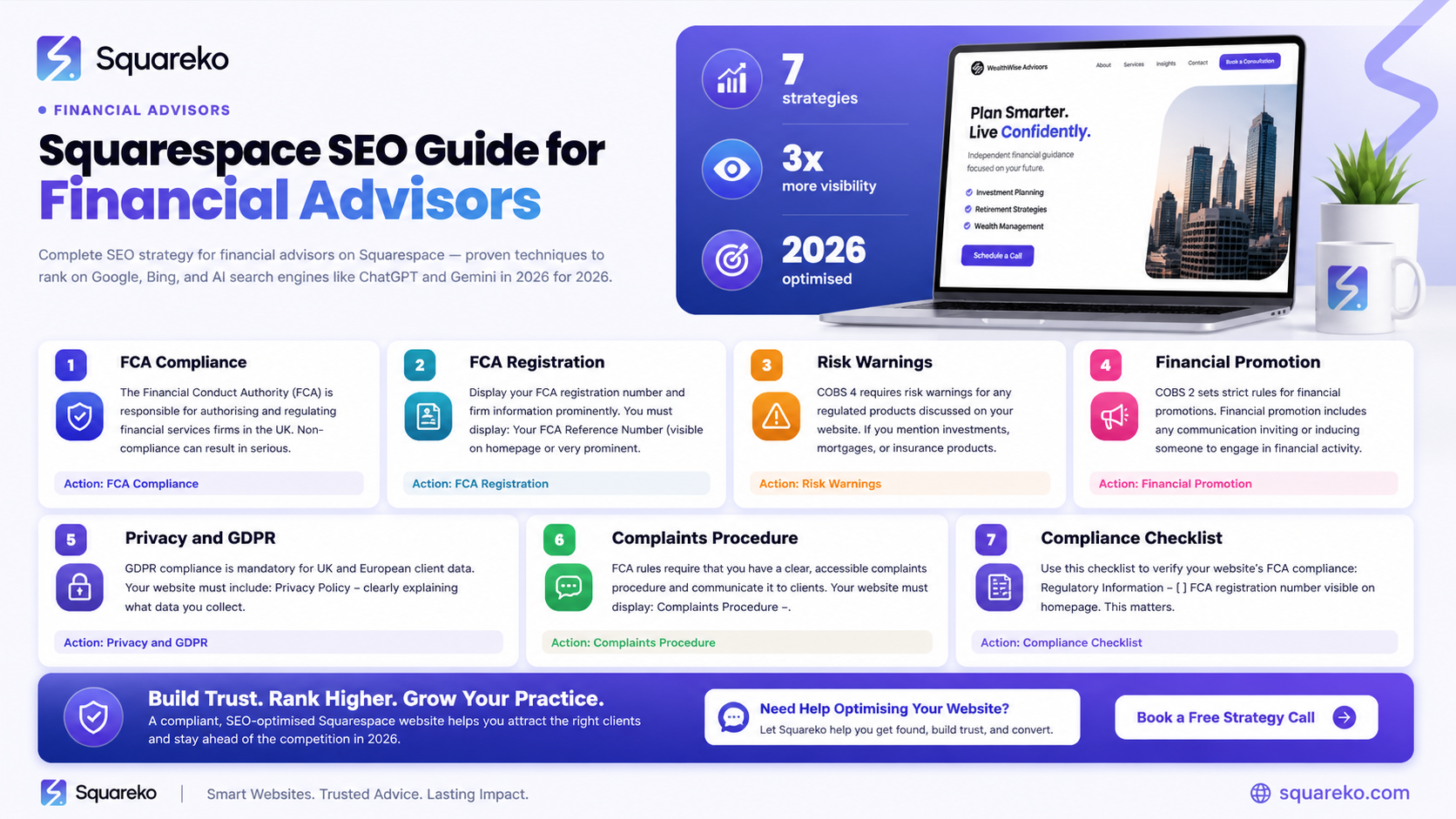
FCA-regulated financial advisors must display their FCA registration number and firm name on their website homepage
Risk warnings for regulated products (investments, mortgages, insurance) must be clear, prominent, and compliant with COBS 4
Financial promotion approval processes are mandatory under COBS 2 before publishing any marketing content promoting regulated products
Your privacy policy, cookie consent, and data protection arrangements must comply with GDPR and the Privacy and Electronic Communications Regulations (PECR)
Squarespace enables FCA compliance through customisable forms, secure data collection, and content management tools, though you'll need to implement specific compliance measures
A formal complaints procedure and information about the Financial Ombudsman Service must be accessible on your website
Regular compliance audits and monitoring of your website content ensure you maintain FCA standards
Why FCA Compliance Matters for Your Website
Your website is often the first point of contact between your firm and prospective clients. As a regulated financial adviser, it's also a regulated channel that must comply with FCA rules. The FCA expects regulated firms to meet the same standards across all communication channels—whether face-to-face meetings, emails, phone calls, or websites.
The FCA's Handbook defines compliance through three core principles for all authorised firms (PRIN 1):
Principle 1: Act with integrity
Principle 2: Act honestly and fairly
Principle 3: Act in the best interests of clients
Your website must reflect these principles. Failing to comply with FCA requirements can result in:
Formal warnings from the FCA
Fines (often £10,000–£500,000+ depending on severity)
Suspension or withdrawal of your FCA authorisation
Reputational damage and loss of client trust
Legal liability if clients suffer financial loss due to non-compliant communications
Squarespace provides the tools to build a professional, compliant website, but you—the financial adviser—are responsible for ensuring content meets FCA standards. There is no compliance by default on any website platform.
Understanding FCA Registration and Firm Information Requirements
Display Your FCA Registration Number Prominently
All FCA-regulated firms must display their FCA registration number on their website. The FCA requires this information to be on your homepage or easily accessible from it. The registration number allows clients to verify your authorisation status through the FCA Register (www.register.fca.org.uk).
What to display:
Your firm name (as registered with the FCA)
Your FCA registration number
Clear statement: We are authorised and regulated by the Financial Conduct Authority (FCA) under registration number [YOUR NUMBER].
Best practice for Squarespace:
Place this statement in your header or footer (visible on every page)
Make it prominent but not intrusive—typically 10–12pt font
Add a hyperlink to your FCA Register entry (https://register.fca.org.uk)
Include your firm registration number in all email signatures and client correspondence
Firm Details and Contact Information
The FCA requires accessible contact information. Clients must be able to:
Identify your firm by its registered legal name
Contact you via phone, email, and postal address
Access your firm's physical office address (not a virtual office alone, depending on your status)
Know who the firm's senior management are (for large advisory firms)
Squarespace's Contact Forms and footer customisation allow you to meet these requirements. Ensure your contact page includes:
Registered firm name
Physical address
Phone number
Email address
Hours of business
Links to your Privacy Policy and Complaints Procedure
Risk Warnings: COBS 4 Requirements for Financial Products
COBS 4 (Market Conduct) requires firms to provide specific risk warnings before promoting financial products. These warnings must be clear, fair, and not misleading.
When Risk Warnings Are Required
Risk warnings are mandatory if you promote:
Investments (shares, bonds, investment funds, structured products)
Mortgages and secured lending
Insurance products (life, health, property)
Credit and consumer loans
Pension products
Options or derivatives
Content of Risk Warnings
COBS 4.2.1R and COBS 4.2.2R specify that warnings must:
Clearly identify the product type
Explain the key risks (capital loss, market volatility, liquidity risk)
Highlight counterparty risk (if relevant)
State past performance is not a guide to future performance
Explain any fees and charges that apply
Use language that is clear and understandable to retail clients
Example compliant risk warning:
This investment product carries substantial risk of loss. The value of your investment may go down as well as up. You could lose some or all of your investment. Past performance is not a reliable indicator of future results. [Product name] is not protected by the Financial Services Compensation Scheme. Fees apply (see [link to fee schedule]). This is not personalised investment advice.
Risk Warning Placement
Display warnings above the fold (visible without scrolling)
Place warnings adjacent to the product promotion
Use contrasting colours to ensure readability
Ensure warnings are as prominent as promotional claims
Implementing Risk Warnings on Squarespace
Squarespace allows you to:
Create custom section blocks with formatted text (for risk warnings)
Use colour and typography to make warnings stand out
Insert conditional content blocks (showing warnings only on product pages)
Add downloadable PDFs with detailed risk disclosures
Financial Promotion Approval and COBS 2 Rules
COBS 2 (General matters) covers financial promotions—any communication that promotes financial products or services. Before publishing anything promotional on your website, you must obtain approval from a competent person within your firm (typically your compliance officer).
What Requires Financial Promotion Approval
Product pages describing investment offerings
Case studies showing client outcomes (investment returns)
Testimonials about financial advice or services
Comparative tables (comparing your services to competitors)
Downloadable guides or whitepapers mentioning specific products
Blog posts discussing specific investment opportunities
Email marketing campaigns promoting services or products
What Typically Does NOT Require Approval
General educational content (Guide to Pensions, Understanding Investment Risk)
Your firm's About page and team bios
Standard contact information
Compliance and regulatory disclosures
The Approval Process
Your firm should have a formal financial promotion approval procedure. Typically:
Content is drafted by the marketing or adviser team
The draft is reviewed for compliance by your compliance officer or senior manager
Approval is documented (email, signature, date)
Only approved content is published
Records are kept for FCA examination (usually 5–6 years)
On Squarespace: Use Squarespace's Draft mode to circulate content internally for review before publishing. Document approval via email or your internal system, keeping records for audit purposes.
Privacy, Data Protection, and Consent on Your Website
GDPR and Data Protection
As a financial adviser, you collect personal data from website visitors, clients, and prospects. This data must be protected under:
The UK General Data Protection Regulation (UK GDPR)
The Data Protection Act 2018
The Privacy and Electronic Communications Regulations 2003 (PECR)
Privacy Policy Requirements
Your website must include a clear, comprehensive Privacy Policy that explains:
What personal data you collect (name, email, phone, investment profile, financial information)
Why you collect it (client relationship, compliance, marketing)
How long you keep it (data retention periods)
Who you share it with (third parties, regulators, accountants)
The rights clients have (access, rectification, erasure, portability)
How you use cookies and tracking technology
Your data protection officer's contact details (if applicable)
FCA expectation: The FCA expects firms to comply with UK GDPR and be transparent about data use. Include your Privacy Policy on every website page (typically footer link).
Cookie Consent and Tracking
If your Squarespace website uses:
Google Analytics or similar tracking tools
Advertising cookies
Remarketing pixels
Heatmap or session recording software
You must display a cookie consent banner and obtain explicit consent before loading non-essential cookies. Under PECR, you cannot set tracking cookies without prior informed consent (excluding essential cookies for site functionality).
Squarespace and cookies: By default, Squarespace uses analytics cookies. Before launch, configure your Cookie Banner settings in Squarespace's Privacy Centre to:
Display a banner on first visit
Require explicit consent for non-essential cookies
Allow users to manage cookie preferences
Respect consent for 6 months (or your chosen period)
Client Data Security
The FCA expects firms to:
Use secure data collection methods (HTTPS/SSL encryption)
Limit data access to authorised staff
Store sensitive data securely (password-protected, encrypted)
Have a data breach response plan
Regularly review data security
Squarespace provides:
SSL/TLS encryption on all sites (HTTPS by default)
Secure form submission (forms are encrypted in transit)
Password-protected client portal areas (with premium plans)
However, you should:
Never ask for sensitive financial information (PIN, passwords) via your website
Use secure portals or encrypted email for sensitive client communications
Review which form fields collect sensitive data
Limit data retention (delete records after the appropriate period)
Complaints Procedures and FCA Consumer Rights
Formal Complaints Procedure Requirement
Under COBS 7 and DISP 1, all FCA-regulated firms must have a written, accessible complaints procedure. Your website must make this procedure easily accessible to clients and prospects.
Information Your Complaints Page Must Include
How to submit a complaint (email, post, phone, web form)
Your firm's internal complaints process and timescales
Information about the Financial Ombudsman Service (FOS)
How clients can escalate to the FOS
FOS contact details: www.financial-ombudsman.org.uk, 0800 0234 567
Your firm's Financial Services Compensation Scheme (FSCS) eligibility
Complaint handling timescales:
Acknowledge complaints within 1 business day
Issue a final response within 8 weeks (or provide a running response)
Keep records for 6 years
Implementing Complaints Procedures on Squarespace
Create a dedicated Complaints or How to Complain page that includes:
A downloadable Complaints Form (PDF)
Clear contact methods (email, postal address, phone)
Your complaints handling timeline
FOS information and contact details
An embedded contact form for online complaint submission
FCA Compliance Checklist for Financial Advisor Websites
Use this checklist to audit your Squarespace website against FCA requirements. For each item, confirm compliance or note required action.
Registration and Firm Information
FCA registration number displayed on homepage and footer
Firm legal name matches FCA Register entry
Clear statement: We are authorised and regulated by the FCA under registration number [XXX]
Link to your FCA Register profile (www.register.fca.org.uk)
Physical office address clearly displayed
Phone number and email contact information visible
Business hours stated on Contact page
Financial Promotions
All promotional content approved by competent person (compliance officer) before publication
Documentation of approvals retained (email confirmations, signed approval logs)
No past performance statements without clear disclaimer: Past performance is not a reliable guide to future results
No misleading claims about services, expertise, or returns
All financial promotion approval records dated and documented
Risk Warnings and Disclosures
Risk warnings displayed for all investment products (COBS 4.2.1R compliant)
Risk warnings above the fold (visible without scrolling)
Warnings explain capital loss risk, market volatility, and liquidity risk
Warnings state FSCS protection status (if applicable)
Fee schedules or charge information clearly disclosed
Not investment advice disclaimers where applicable
Privacy and Data Protection
Privacy Policy present and comprehensive
Privacy Policy accessible from every page (footer link recommended)
Privacy Policy explains data collection, use, retention, and sharing
Data subject rights clearly explained (access, rectification, erasure, portability)
Cookie consent banner displays on site (unless only essential cookies used)
Cookie settings allow users to manage preferences
Data Protection Officer contact details provided (if GDPR applicable)
HTTPS/SSL encryption enabled for entire site
No sensitive data (PIN, passwords, full card numbers) requested via website forms
Client Contact and Communication
Contact form does not request sensitive information
Contact forms clearly state how data will be used
Email address verified and monitored for client inquiries
Phone number clearly displayed with business hours
Response time commitment stated (We respond within 24 hours)
Complaints Procedure
Dedicated Complaints page present and easily accessible
Complaints form available for download or online submission
Internal complaints process and timescales explained
Financial Ombudsman Service (FOS) information and contact details provided
FOS website link (www.financial-ombudsman.org.uk)
FSCS coverage information explained
Testimonials and Case Studies
Testimonials do not guarantee future performance
Case studies include appropriate disclaimers
Client names and identifying information protected (consent obtained)
Past performance clearly labelled not a reliable guide to future results
No misleading performance claims in testimonials
Product Pages and Services
Service pages clearly describe what you offer (advice, execution-only, etc.)
Fee and charging information clearly disclosed
Investment suitability process explained (for advisory firms)
Conflicts of interest policy accessible
Restricted and unrestricted advice status clearly stated
Technical and Accessibility
Website speed and performance monitored (for client experience)
Forms tested for accessibility (keyboard navigation, screen reader compatibility)
Mobile responsiveness checked (website functions on all devices)
Broken links regularly checked and fixed
PDFs and downloadable documents have alt text and are accessible
Document and Content Management
All marketing materials and brochures version-controlled
Outdated marketing materials removed from website
Links to old or superseded information removed
Regular audit of website content (quarterly minimum)
Ongoing Compliance
Compliance review schedule established (quarterly or semi-annually)
Team trained on FCA compliance requirements
Changes to regulations monitored and implemented
Client feedback regarding website collected and reviewed
Website audit trail and change logs maintained
Implementing FCA Compliance on Squarespace
Step 1: Set Up Core Regulatory Information
Homepage and Footer:
Edit your footer (Footer > Edit footer) to include FCA registration information
Add a text block with: We are authorised and regulated by the Financial Conduct Authority (FCA) under registration number [YOUR NUMBER] plus a link to your FCA Register entry
About or Contact Page:
Create a dedicated page for firm information (physical address, phone, email, hours)
Include team member bios (if applicable)
Link to your Privacy Policy and Complaints Procedure
Step 2: Create Core Compliance Pages
Privacy Policy Page:
Use a template generator (www.privacypolicygenerator.info or www.iubenda.com) to create a GDPR-compliant Privacy Policy
Customise it for your financial services firm (data retention, third-party sharing, etc.)
Upload as a page in Squarespace (Pages > Add Page > Privacy Policy)
Link from footer and all data collection forms
Complaints Procedure Page:
Create a new page titled How to Complain or Complaints Procedure
Include:
Your firm's complaints email and postal address
A downloadable PDF Complaints Form
Contact form for online complaint submission
FOS contact information and website link
Link prominently from footer
Conflicts of Interest Policy Page:
Publish your firm's Conflicts of Interest Policy
Explain how you manage conflicts between client interests and your own
Detail any commissions or referral arrangements
Step 3: Configure Privacy and Cookie Settings
Squarespace Privacy Centre:
Go to Settings > Privacy
Enable Cookie Banner (if you use non-essential cookies or analytics)
Customise banner language (Squarespace provides templates)
Set cookie retention period (6 months–2 years recommended)
Ensure consent is captured before loading analytics
Google Analytics (if used):
Only activate if cookie banner is enabled
Add data processing agreement (DPA) with Google
Document consent in your compliance records
Step 4: Create Risk Warning Sections
For product pages (investment, mortgage, insurance services):
Add a text block at the top of the page (above the fold)
Style with:
Warning icon (⚠️)
Yellow or red background (for visibility)
Bold, clear font (12pt minimum)
Include COBS 4-compliant text:
Product type and key risks
Capital loss warning
Past performance disclaimer
Fee disclosure link
Squarespace implementation:
Use Text blocks with custom styling (colour, bold, larger font)
Position above product descriptions
Test visibility on mobile and desktop
Step 5: Set Up Contact and Data Collection Forms
Best Practices for Forms:
Collect only essential information (name, email, phone, brief inquiry description)
Never ask for sensitive data (PIN, passwords, full account numbers)
Include a form footer: We process your data according to our Privacy Policy. See [link] for details.
Test form submission and email delivery
Confirm you receive submissions and respond within 24 hours
Form security:
All Squarespace forms are encrypted in transit (HTTPS)
Consider a password-protected portal for sensitive client discussions
Use separate encrypted email (not web form) for sensitive client data
Step 6: Implement Financial Promotion Approval Process
Create an internal approval workflow:
Draft content in Squarespace (use Draft status)
Email draft link to compliance officer/senior manager for review
Compliance officer approves and signs off (email confirmation)
Keep approval email in compliance file (by page/content title and date)
Only then publish (change status to Published)
Document all approvals in a compliance log
Squarespace implementation:
Use Pages > Draft to circulate for internal review
Note approval status in page metadata (Pages > Page Settings > SEO > Custom meta data)
Add internal note: Approved by [Name], [Date]
Step 7: Set Up Regular Compliance Audits
Quarterly Checklist:
Review all website content for accuracy and compliance
Check for broken links or outdated information
Verify FCA registration number and firm information
Test contact forms and response timescales
Review client feedback or inquiries
Update policies if FCA guidance changes
Document audit findings and any corrections made
Common FCA Compliance Questions
-
A: As a minimum, you must display:
Your FCA registration number and firm name (homepage and/or footer)
A link to your FCA Register profile
Physical office address and contact information
Privacy Policy
Complaints Procedure and FOS information
Risk warnings for any regulated products you promote
Fees and charges
Your service type (advised, restricted advice, execution-only, etc.)
Additionally, all promotional content must be approved by a competent person before publication. You must not make misleading claims or guarantee investment performance. Consider your website an extension of your regulatory obligations—the same FCA rules that apply to in-person advice apply to your website.
-
A: Yes. Squarespace supports FCA-compliant risk warnings through:
Text blocks with custom styling (colour, font size, bold)
Custom HTML blocks (for detailed HTML-formatted warnings)
Image blocks (for branded warning graphics)
Conditional visibility (show warnings only on specific product pages)
However, Squarespace does not automatically enforce risk warnings—you must manually create and position them correctly. Best practice is to place risk warnings above the fold (visible without scrolling) using prominent styling (yellow/red background, larger font, warning icon).Test your risk warnings on mobile and desktop to ensure they display correctly on all devices.
-
A: Follow these steps:
Find your FCA registration number:
Go to www.register.fca.org.uk
Search for your firm name
Note your firm registration number (usually 6 digits, 123456)
Add to Squarespace footer:
Go to Design > Footer
Click "Edit footer"
Add a text block with: "We are authorised and regulated by the Financial Conduct Authority (FCA) under registration number [YOUR NUMBER]"
Add a hyperlink to: https://register.fca.org.uk (users can then search your number)
Add to homepage:
Create a "Regulatory Information" section on your homepage
Include the same FCA statement with the link
Add to contact/about page:
Include your FCA registration number and firm name in your contact information
Update all pages:
Footer updates apply to all pages automatically
Test that the link works and displays correctly
-
A: Under COBS 4, investment product warnings must include:
Product type (investment fund, share, bond, structured product, etc.)
Key risks: capital loss, market volatility, liquidity risk
"The value of your investment can go down as well as up"
"You could lose some or all of your investment"
"Past performance is not a reliable guide to future results"
FSCS coverage status (if applicable)
Fee and charge information (or link to fee schedule)
"This is not personalised investment advice" (if applicable)
The warning should be clear, fair, and not misleading. It must be displayed prominently (above the fold) adjacent to the product promotion. Use contrasting colours and larger font to ensure visibility.
-
A: Yes. GDPR applies to any personal data collection, including names, email addresses, phone numbers, and IP addresses. You must:
Display a Privacy Policy explaining how you use the data
Clearly state the legal basis for processing (e.g., "to respond to your inquiry" or "with your consent for marketing")
Include a checkbox confirming consent before submitting forms
Only send marketing emails if the user has explicitly opted in (PECR consent)
Provide a way for users to unsubscribe or request deletion
Failure to comply with GDPR can result in fines up to €20 million or 4% of global revenue (whichever is higher). Squarespace provides a Privacy Centre and Cookie Banner tool to help implement compliance.
-
A: At minimum, conduct a formal compliance audit quarterly (every 3 months). In addition:
Review content immediately after publishing (before going live)
Monitor for broken links and outdated information monthly
Update policies if FCA guidance changes
Review client feedback and complaints for compliance issues
Conduct a full audit before any major website redesign
Keep records:
Document all audit findings (date, reviewer, findings, actions taken)
Maintain approval records for all promotional content
Keep copies of previous versions if policies or disclosures change
Retain audit files for 6 years (standard FCA record retention period)
The FCA may request these records during examinations. Strong documentation demonstrates your commitment to compliance.
-
A: Yes, but only with strict compliance. Any testimonial or case study must:
Include a clear disclaimer: "Past performance is not a reliable guide to future results"
Not guarantee or imply investment returns ("This client earned 25% annually")
Be approved by your compliance officer before publication
Protect the client's identity (use initials or first name only, with permission)
Not be misleading about the client's circumstances or suitability
Include appropriate caveats ("This client's situation and goals differ from yours")
A testimonial stating "I've been very happy with the financial advice" is low-risk. A case study showing investment returns ("We grew this client's portfolio by £100,000 in two years") requires full compliance review and disclaimers.
Consider avoiding performance-based case studies altogether and focusing instead on service quality testimonials. -
A: Your Privacy Policy must cover:
Identity of data controller – Your firm name and contact details
Data categories – What personal data you collect (name, email, phone, investment profile, etc.)
Legal basis for processing – Why you collect data (client relationship, legal obligation, consent)
Data retention periods – How long you keep data (usually 6 years for client records, per FCA guidelines)
Data sharing – Who you share data with (accountants, regulators, payment processors, etc.)
Data subject rights – Rights to access, rectify, erase, port data (under GDPR Articles 15–20)
Cookies and tracking – Cookie types, purposes, and user choice to opt out
International transfers – If data is transferred outside the UK
Data protection officer contact – If applicable (large firms, public sector)
Complaint process – How to raise a complaint with your firm and with the ICO (Information Commissioner's Office)
Use a template generator (Iubenda, Privacy Policy Generator) and customise for your financial services context.
Conclusion
Maintaining an FCA-compliant financial advisor website on Squarespace requires careful attention to regulation, transparency, and client communication. Your website is a regulated channel—not a promotional tool—and the same standards that apply to in-person advice apply to your web presence.
The key pillars of compliance are:
Clear firm identification – Display your FCA registration number prominently
Truthful promotions – Approve all marketing content and avoid misleading claims
Risk transparency – Include prominent, clear risk warnings for regulated products
Data protection – Implement GDPR-compliant privacy policies and cookie consent
Client recourse – Provide accessible complaints procedures and FOS information
Ongoing oversight – Conduct regular compliance audits and document approvals
Squarespace provides the technical foundation for a compliant website, but you remain responsible for the content, accuracy, and regulatory adherence of every page. Working with your compliance officer to establish an approval process, maintaining audit trails, and conducting regular compliance reviews will protect your firm and build client confidence.
Non-compliance risks are significant. The FCA has increased its focus on digital channels, website conduct, and financial promotion standards. Taking compliance seriously from the start—rather than trying to remediate issues later—saves time, cost, and reputational damage.
This article provides general guidance. Always consult your compliance officer, legal adviser, and the FCA Handbook (COBS, PRIN) for specific requirements applicable to your firm and services.
Ready to Build Your FCA-Compliant Website?
At Squareko, we specialise in building Squarespace websites for regulated financial advisers. We understand the complexity of FCA compliance requirements and the importance of getting your digital presence right from day one.
Our team can help you:
Design and build compliant financial advisor websites on Squarespace
Implement risk warnings, regulatory disclosures, and privacy policies that meet FCA standards
Set up secure contact forms and client portals with data protection in place
Create and maintain compliance documentation for FCA examinations
Audit existing websites for regulatory gaps and remediate issues
Whether you're launching a new practice or upgrading an existing website, we'll ensure your Squarespace site is audit-ready and fully compliant.

From custom website design to SEO strategy, we help businesses launch a site that looks professional and performs better.

Author Bio
I'm Walid Hasan, a Certified Squarespace Expert and Squarespace Circle Platinum Partner with over 12 years of hands-on experience designing and optimizing high-performing websites. Over the years, I've had the privilege of building more than 2,000 Squarespace websites for clients around the world, always focusing on clean design, strong user experience, and conversion-driven results.
