
Boutique Website Design Best Practices on Squarespace for 2026
Introduction
The modern boutique owner faces a unique challenge: creating a website that captures the exclusivity and personality of their brand whilst competing in an increasingly digital retail landscape. A well-designed boutique website on Squarespace does more than showcase products it tells your brand story, builds customer trust, and drives conversions through thoughtful design choices. Whether you're launching your first online presence or redesigning an existing site, understanding boutique website design best practices on Squarespace 2026 is essential. This guide walks you through the strategic design decisions that will elevate your boutique's online presence, from visual hierarchy and colour palettes to mobile-first layouts and social proof integration.
Key Takeaways
Visual hierarchy and strategic brand identity are fundamental; they guide customers through your website and reinforce your boutique's unique value proposition
Colour palettes and typography should reflect your brand's personality and enhance readability across all devices
Homepage design requires balance between visual impact and clear navigation to welcome customers and encourage exploration
Product layout and organisation through grids and categories improves browsing experience and increases average order value
Mobile-first design is no longer optional—57% of e-commerce traffic in 2026 comes from mobile devices, making responsive layouts critical
Page speed and image optimisation directly impact both user experience and search rankings
Social proof, storytelling, and strategic CTAs build trust and motivate purchasing decisions
1. Establish a Strong Visual Hierarchy and Brand Identity
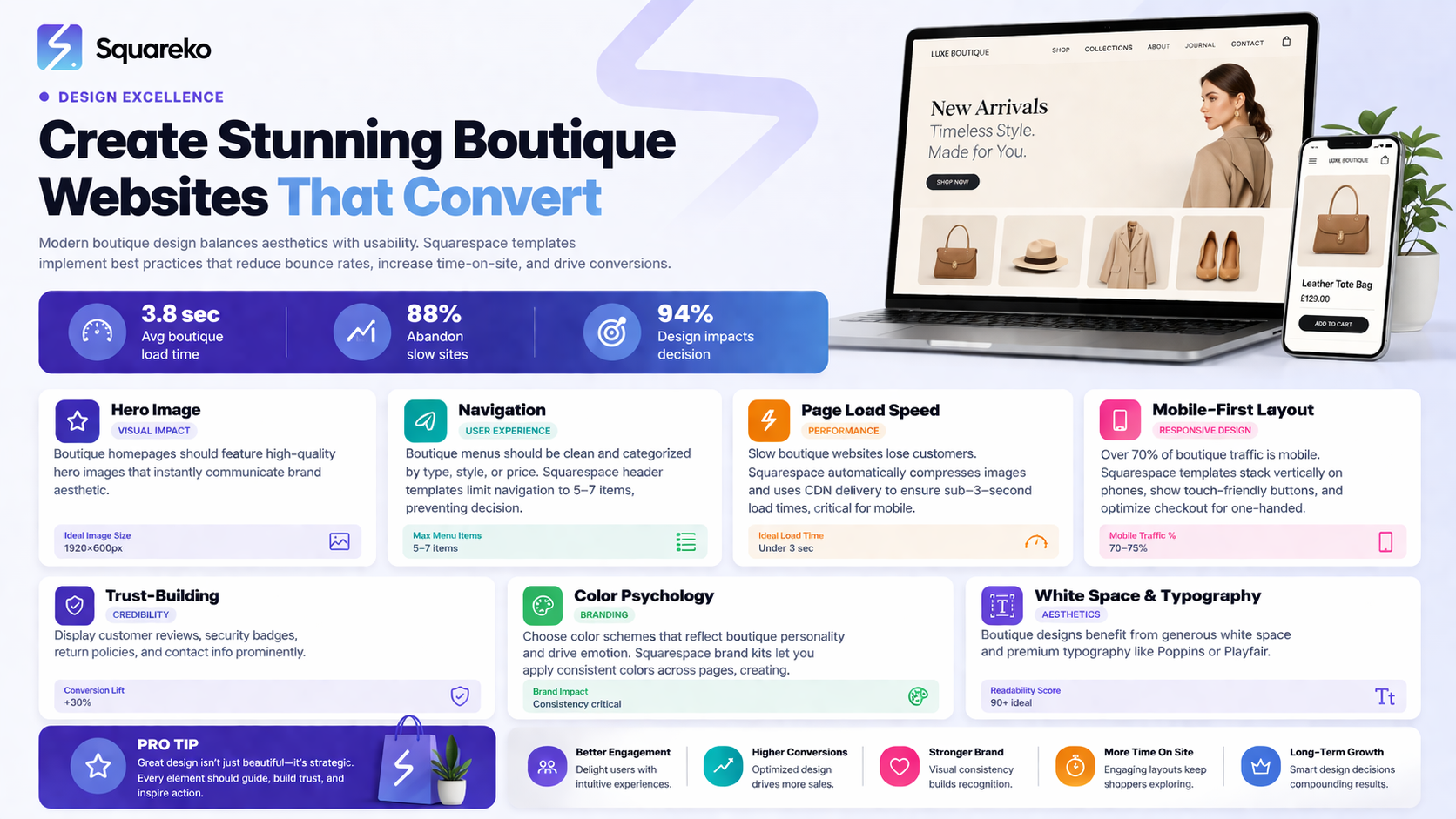
Visual hierarchy is the foundation of effective boutique website design. It guides visitors' eyes to the most important information first, creating a journey through your site that feels natural and intentional. For boutiques, this means prioritising your most distinctive products, brand values, and calls to action in ways that reflect your aesthetic.
Why Visual Hierarchy Matters for Boutiques
Boutique customers are often seeking unique, curated experiences. Your website should communicate that curation through intentional design. Use size, colour, whitespace, and contrast to emphasise key elements. Your hero section should immediately communicate what makes your boutique special—whether that's artisanal craftsmanship, sustainable materials, or exclusive collections.
Building Brand Identity in Squarespace
Squarespace's design flexibility allows you to establish a cohesive brand identity across every page. Consistently use your brand colours (we recommend Squareko's expertise in selecting hues that align with your products—for example, warm terracotta tones work beautifully for organic beauty brands, whilst deep jewel tones suit luxury fashion). Your logo placement, button styles, and accent colours should appear consistently throughout the site. This repetition builds brand recognition and professionalism.
2. Choose the Right Colour Palette and Typography
Colour and typography are the silent communicators of your brand's personality. They influence how customers perceive your boutique—whether it feels luxurious, playful, minimalist, or eclectic before they read a single word.
Colour Palettes for Different Boutique Styles
Luxury and Premium Boutiques: Deep blacks, golds, and silvers create sophistication. These palettes work exceptionally well for jewellery, high-end fashion, and luxury lifestyle boutiques. Pair with plenty of whitespace to let products breathe.
Eco and Wellness Boutiques: Earth tones—terracotta, sage green, warm beige—signal authenticity and sustainability. These colours resonate strongly with conscious consumers.
Fashion and Trend-Forward Boutiques: Bold, saturated colours and complementary accent shades create energy and modernity. Consider a vibrant primary colour paired with neutral secondaries for balance.
Vintage and Artisanal Boutiques: Warm, muted palettes (dusty rose, cream, soft brown) evoke nostalgia and craftsmanship. Vintage textures and patterns enhance this aesthetic.
Typography Best Practices
Select a maximum of two font families—one for headings (often a distinctive serif or bold sans-serif) and one for body text (typically a readable sans-serif). Ensure sufficient contrast between text and background for accessibility. Heading sizes should be generous; many boutique sites underestimate the visual importance of well-sized headings. Test typography across mobile and desktop to confirm readability.
3. Craft an Impactful Homepage Design
Your homepage is your boutique's digital storefront. It must welcome visitors, communicate your brand story, and encourage exploration—all within a few seconds of landing.
The Essential Homepage Structure
Hero Section: Use a striking image or video that captures your brand's essence. Include a brief headline (4–7 words) and a primary CTA button. Avoid cluttered messaging; let your visual tell part of the story.
Featured Collections or New Arrivals: Below the hero, showcase 2–3 curated collections with high-quality images. This gives visitors clear entry points without overwhelming choice.
About Section (Brief): A short paragraph and image introducing your boutique's story. Keep this to 2–3 sentences; a full brand story belongs on your About page.
Social Proof: Feature customer testimonials or press mentions early on to build credibility.
Call-to-Action Section: Before the footer, place a compelling CTA directing visitors to browse products, sign up for updates, or visit your physical location (if applicable).
Design Principles for Squarespace
Squarespace's native templates offer excellent starting points. Customise by adjusting spacing, adding your colour palette, and curating images. Avoid animation overload; a subtle fade-in or scroll effect enhances sophistication without distracting.
4. Organise Products with Effective Grid Layouts
How you display products significantly impacts browsing behaviour and conversion. A thoughtfully organised product grid helps customers find what they're seeking and discover new items.
Grid Layout Best Practices
Responsive Grids: Use Squarespace's responsive layout tools to ensure your product grid displays beautifully at all sizes. A 3-column grid works well on desktop; this typically collapses to 2 columns on tablet and 1 on mobile.
Category Organisation: Organise products by type, collection, price point, or seasonal relevance. Clear categories reduce search friction and help customers navigate intuitively.
Product Card Design: Each product card should include a high-quality image, product name, price, and a brief descriptor. Consider adding hover effects that reveal additional details—for example, a second image or quick-view button.
Filtering and Search: Implement filters (price, colour, size, material) to help customers refine their search. A search bar should be prominently placed in your header.
Pagination and Load Performance
Rather than infinite scroll (which can slow page load), use numbered pagination. This improves performance and makes the site feel more structured.
5. Prioritise Mobile-First and Responsive Design
Mobile commerce continues to dominate retail. In 2026, over 57% of e-commerce traffic originates from mobile devices—your Squarespace website must perform flawlessly on smartphones and tablets.
Mobile-First Design Principles
Start your design process by sketching or prototyping your mobile layout first. This forces you to prioritise content ruthlessly. Only the most essential elements appear on small screens; secondary elements are reserved for larger viewports.
Testing Responsive Design
Use Squarespace's built-in responsive preview tools and test on actual devices. Common mobile pain points include:
Buttons that are too small: Ensure tap targets are at least 44 × 44 pixels
Text that's hard to read: Use font sizes of at least 16px for body text on mobile
Forms that require horizontal scrolling: Keep input fields single-column on mobile
Images that are oversized: Implement appropriate image compression (covered in Section 6)
Mobile Navigation
Implement a collapsible menu (hamburger icon) on mobile. Keep your main navigation to 5–7 items; use secondary navigation for less critical links.
6. Optimise Page Speed and Image Performance
Page speed is both a user experience imperative and a search ranking factor. Boutique websites with fast-loading product pages see higher conversion rates and lower bounce rates.
Image Optimisation Strategies
Image Format and Size: Use WebP format where supported (with JPG fallbacks for older browsers). Squarespace automatically optimises images, but you can further enhance performance by uploading images at appropriate sizes.
Lazy Loading: Ensure images below the fold load only when the user scrolls to them. This is standard in modern Squarespace templates.
Hero Image Compression: Your hero image should typically be no larger than 100KB. Test your page speed using Google Page Speed Insights and aim for a score above 85 on mobile.
Additional Speed Optimisations
Minimise unnecessary custom code
Use system fonts when appropriate to reduce load time
Avoid auto-playing videos; allow users to initiate playback
Enable caching and CDN delivery through Squarespace's default infrastructure
Monitoring Performance
Use Google Analytics 4 and Squarespace's built-in analytics to monitor page load time and bounce rate by page. Squareko recommends establishing a quarterly review of speed metrics to identify declining performance.
7. Build Trust Through Navigation and User Experience
Beyond aesthetics, your website must be intuitive. Visitors should find products, understand shipping policies, and complete purchases without friction.
Navigation Best Practices
Header Navigation: Place your main menu in a consistent location. For boutiques, typical categories include Shop, Collections, About, Blog, and Contact.
Breadcrumbs: Include breadcrumb navigation on product pages to help users understand their location and navigate back.
Footer Navigation: Repeat primary navigation in your footer, along with secondary links.
User Experience Considerations
Clear CTAs: Use consistent button language and ensure buttons are visually prominent
Trust signals: Display security badges, payment method icons, and return policy information near checkout
Progressive disclosure: Show essential information first; reveal additional details on demand (e.g., size guides in expandable sections)
8. Tell Your Brand Story on Your About Page
Your About page is where boutique customers connect emotionally with your brand. It transforms your boutique from a faceless retailer into a business with values, personality, and purpose.
Effective About Page Structure
Headline and Hook: Begin with a compelling statement about why you started your boutique or what problem you solve for customers.
Founder/Brand Story: Share your background, inspiration, and values in the first person. Authenticity resonates with boutique customers. Include a high-quality photo of yourself or your team.
Values and Mission: Clearly articulate what your boutique stands for—sustainability, artisanal quality, community support, or another distinctive value.
Social Proof: Mention press coverage, awards, or notable customers to build credibility.
Imagery: Use lifestyle images that show your products in context and, ideally, images of you or your team. These humanise your brand.
Call to Action: End with a CTA directing readers to shop, sign up for updates, or contact you directly.
9. Leverage Social Proof and Customer Reviews
Social proof—reviews, testimonials, user-generated content, and press mentions—significantly influences purchasing decisions. For boutiques, social proof is particularly powerful because it assures customers they're making a quality purchase.
Displaying Customer Reviews
Native Squarespace Reviews: Squarespace allows customers to leave reviews on product pages. Encourage reviews by emailing customers after purchase with a direct link.
Testimonials Section: Create a dedicated section on your homepage featuring 3–5 customer testimonials. Include the customer's name, photo (if available), and a brief quote.
Rating Display: Show average product ratings prominently on product pages. Research shows that products with ratings of 4.5+ stars see 40% higher conversion rates.
User-Generated Content
Encourage customers to share photos of your products on social media using a branded hashtag. Feature these images on your website (with permission) to create authentic social proof.
Press and Media Mentions
If your boutique has been featured in blogs, magazines, or media outlets, create a Press section or showcase these mentions on your homepage. This significantly boosts perceived credibility.
10. Make Contact Information and Store Details Prominent
Whether your boutique operates online-only or has a physical location, contact information must be easy to find.
Contact Page Essentials
Contact form: Implement Squarespace's native contact form or a tool like Mailchimp integration
Email address: Display a contact email prominently
Phone number: Include a clickable phone number for mobile users
Physical address: If applicable, include your address with an embedded Google Map
Hours of operation: Clearly state your business hours, particularly if you offer in-store shopping or curbside pickup
Contact Information Throughout the Site
Place a link to your contact page in the footer
Include your email address in your header or near key CTAs
For boutiques with a physical location, add a "Visit Us" section on your homepage with address, hours, and a map
11. Integrate Social Media Feeds Strategically
Social media integration creates dynamic content and demonstrates that your boutique is active and engaged. However, integration should be purposeful, not decorative.
Strategic Social Media Integration
Instagram Feed Integration: An Instagram feed on your homepage or a dedicated gallery page showcases your latest products and lifestyle content. Use a Squarespace-compatible tool like Lightbox or a custom integration to display your feed.
Social Proof Through User Tags: Feature customer posts tagged with your brand. This creates authentic social proof and encourages others to share.
Consistent Posting: Ensure your social media accounts are active. A dormant Instagram feed signals an inactive business.
Linking: Include links to your Instagram, Pinterest, and TikTok profiles in your header or footer. Social media should drive traffic to your website and complement your site content.
Balance and Curation
Avoid cluttering your website with too many social feeds. Typically, one integrated feed (Instagram) is sufficient. Prioritise curated, high-quality content over high volume.
FAQs
-
Squarespace offers several excellent templates for boutiques, including "Morgan" (elegant product focus), "Brine" (customisable and clean), and "Wren" (bold and modern). The best template depends on your aesthetic, but prioritise options with strong product grid functionality and responsive design. We recommend reviewing templates based on your specific product category—fashion boutiques may prefer different layouts than wellness or home décor boutiques.
-
Mobile design is critical; mobile devices account for over 57% of e-commerce traffic in 2026. Poor mobile experience results in higher bounce rates and lost sales. Ensure your Squarespace site displays beautifully on phones and tablets, with readable text, appropriately sized buttons, and fast load times. Test your site on actual devices, not just browser previews.
-
Yes, a blog adds value by providing styling tips, product care guides, or industry insights relevant to your customers. Regular blog posts also improve SEO, helping your site rank for long-tail keywords related to your products. Aim for one blog post per week; quality trumps frequency. Squareko can help you establish a sustainable blogging strategy that drives traffic and builds authority.
-
Send a follow-up email 1–2 weeks after purchase with a direct link to your product review section. Offer a small incentive (e.g., "leave a review for 10% off your next order") to boost participation. Make the review process frictionless by minimising required fields. Over time, you'll build a library of social proof that improves conversion rates.
-
Aim for a page load time under 3 seconds on mobile and under 2 seconds on desktop. Use Google PageSpeed Insights to evaluate your site and identify opportunities for improvement. Common optimisations include compressing images, minimising code, and leveraging Squarespace's CDN infrastructure. Squareko regularly audits client sites to ensure they meet current performance benchmarks.
-
A complete redesign every 2–3 years keeps your site modern and competitive. However, smaller updates—refreshing imagery, updating product categories, tweaking CTAs—should happen quarterly. Monitor your analytics to identify underperforming pages and test design changes to improve conversion rates. Quarterly design reviews ensure your site continues to evolve with your boutique.
-
Yes, Squarespace integrates with multiple payment gateways including Stripe, Square, PayPal, and Apple Pay. Offering multiple payment options reduces friction at checkout and increases conversion rates. Customers appreciate choice, and modern payment options signal security and professionalism. Test each payment method thoroughly before launching.
-
Storytelling is central to boutique marketing. Customers choose boutiques because they align with values or aesthetic preferences. Your website should communicate your brand story through every element—imagery, copy, colour palette, and even whitespace. A well-told story differentiates your boutique from competitors and builds emotional connections that drive loyalty and repeat purchases.
Ready to Build Your Boutique Website with Squarespace?
Designing a boutique website that captures your brand's essence and drives conversions requires strategy, aesthetic sensitivity, and technical knowledge. The best practices outlined in this guide—from visual hierarchy and colour selection to mobile optimisation and social proof integration—form the foundation of a high-performing boutique site.
Squareko specialises in bespoke Squarespace design for boutiques, beauty brands, and independent retailers across the UK and beyond. Whether you're building your first website or redesigning an existing presence, our team can help you implement these best practices whilst maintaining your unique brand identity. We work closely with boutique owners to translate their vision into a website that not only looks beautiful but also drives real business results.

Author Bio
I'm Walid Hasan, a Certified Squarespace Expert and Squarespace Circle Platinum Partner with over 12 years of hands-on experience designing and optimizing high-performing websites. Over the years, I've had the privilege of building more than 2,000 Squarespace websites for clients around the world, always focusing on clean design, strong user experience, and conversion-driven results.
