Best Squarespace Website Templates for Creative Professionals in 2026
Introduction
Your website is often the first impression potential clients have of your creative work. For photographers, musicians, authors, coaches, and designers, choosing the right platform isn't just about looks—it's about finding a space that lets your talent shine without getting lost in technical complexity. That's where Squarespace templates for creatives come in.
Squarespace has built its reputation on offering beautiful, professionally designed templates that require no coding knowledge. But with hundreds of options available, how do you know which one actually works for your specific creative niche? A template perfect for a photographer's portfolio might fall flat for a musician's artist site. A coach's template needs to build trust and encourage sign-ups, while an author's site should showcase their bibliography and media presence.
I've spent years working directly with creative professionals on Squarespace—watching what works, what doesn't, and where people get stuck. This guide shares real recommendations based on hands-on experience, not generic listicles. You'll learn which templates solve actual problems for your creative field, how to customize them effectively, and the mistakes to avoid that can actually hurt your business.
Key Takeaways Best Squarespace Website Templates for Creative Professionals
Template choice dramatically impacts conversion rates — The right template for your niche can increase client inquiries by organizing your work in ways that match how your audience searches
Squarespace's creative templates prioritize visual storytelling — Most top templates feature full-width galleries, minimal text, and navigation that gets out of the way
Customization is crucial but doesn't require coding — Squarespace's native tools let you adjust colors, layouts, and functionality without touching a single line of code
Avoid one-size-fits-all templates — Templates designed for general use often lack the specific features photographers need (lightbox galleries), musicians need (music players), or coaches need (booking systems)
Your template choice isn't permanent — You can switch templates anytime on Squarespace without losing your content, though some custom styling may need adjustment
Why Template Choice Matters for Creative Professionals
Here's something most template guides skip: the wrong template doesn't just look bad—it actively loses you work.
A wedding photographer's portfolio that takes 3 seconds per image to load loses potential clients before they see the work. A coach's website without clear pricing and booking options creates friction that prospects won't bother overcoming. A musician's site that doesn't play audio samples makes it impossible for listeners to actually hear their sound. These aren't small details. They're the difference between your creative work being discovered or ignored.
Research shows that 68% of web visitors judge a business based on website design quality. For creative professionals, that number is likely even higher—your site is a direct extension of your creative brand. If your website looks amateur, people assume your creative work is amateur too, regardless of reality.
Squarespace's templates excel here because they're built by designers who understand creative work. They come with thoughtful spacing, typography that works, and navigation patterns that don't fight your content. You're not starting from a blank canvas or a clunky WordPress theme—you're starting from something that already looks professional.
But different creative fields need different priorities. A photographer needs galleries that showcase lightbox capabilities and zoom functionality. A musician needs audio integration and a tour dates section. A coach needs clear service descriptions and a contact form that converts. A generic template might have all these features, but they won't be optimized for how your specific audience searches for and engages with your work.
Choosing the right template for your niche means your site's structure, navigation, and featured elements all align with how your audience wants to experience your work. That alignment drives more inquiries, more engagement, and more client conversions.
Best Squarespace Templates for Photographers
Photographers have unique needs. Your visitors come to see your images, not read your life story. They want fast loading, stunning gallery displays, and an easy path to booking or inquiry.
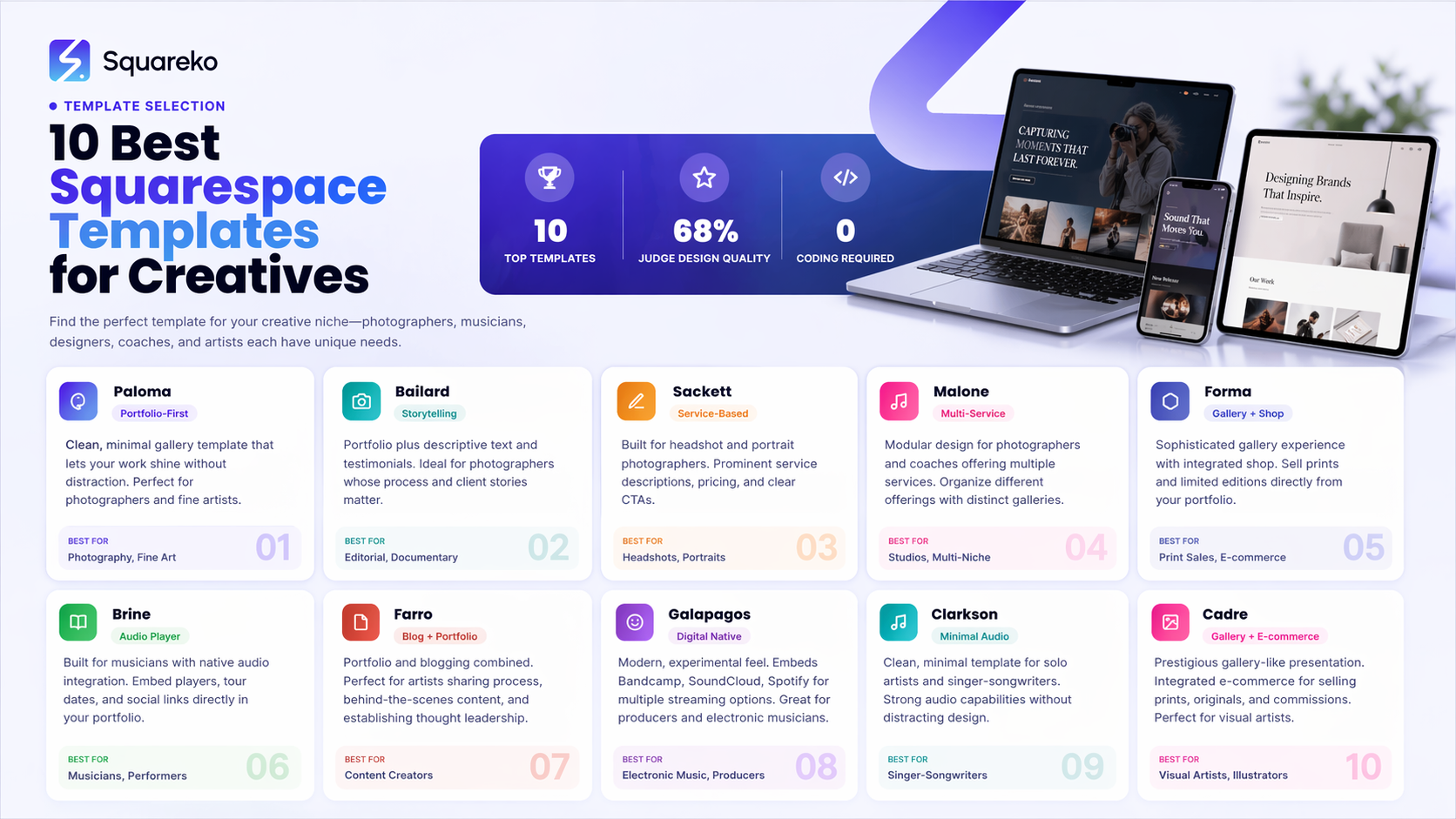
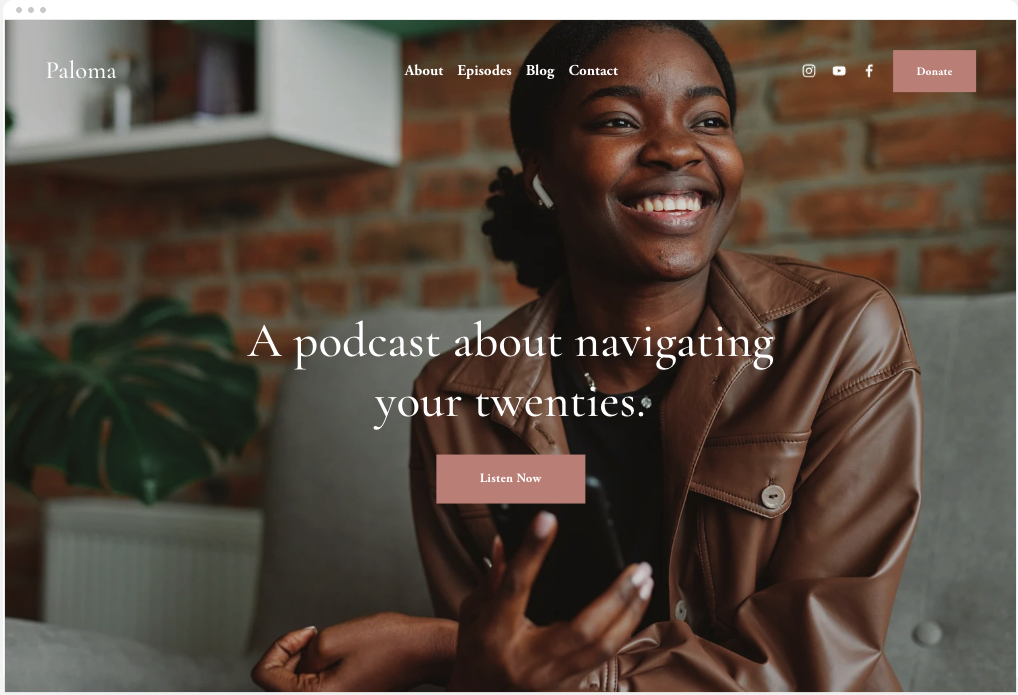
Paloma remains one of the strongest choices for photographers who want a clean, minimal aesthetic. It features full-bleed image galleries with a refined lightbox experience. The template uses generous white space and typography that doesn't compete with your images. Visitors immediately see your best work without distraction. For wedding photographers and fine art photographers especially, Paloma's grid-based layouts feel contemporary without being trendy.
Bailard takes a different approach—it's designed for photographers who want to tell stories alongside their images. Each portfolio piece can include descriptive text, client testimonials, or shoot details. This works beautifully for editorial photographers, documentary photographers, or anyone whose process and story matter as much as the final image. The template includes built-in sections for testimonials and previous clients, which is valuable when you're selling high-ticket photography services.If you're a portrait or headshot photographer, Sackett deserves serious consideration. It's built specifically with service-based creatives in mind, with prominent service descriptions, pricing displays, and call-to-action buttons. The template has a built-in pricing section that lets potential clients understand your offerings before they contact you. This reduces qualification calls and attracts serious leads.
Malone is excellent for photographers who run a studio with multiple offerings—perhaps you do both headshots and family portraits, or weddings and event coverage. Its modular design lets you organize different photography services into distinct sections with their own galleries and descriptions. It's also mobile-optimized in a way that makes browsing galleries on smartphones feel natural rather than cramped.
For fine art photographers and those selling prints or limited editions, Forma offers a more gallery-like experience. It includes a shop integration where you can sell prints directly. The aesthetic is deliberately sophisticated—lots of breathing room, considered typography, and presentation that feels like walking through a gallery rather than visiting a website.
A quick tip: all these templates support Squarespace's native image optimization, which automatically serves images at the right size and format. That means your site stays fast even with hundreds of high-resolution photos. This is where Squarespace beats WordPress for photographers—image handling is baked in, not something you need plugins to manage.
Best Squarespace Templates for Musicians and Artists
Musicians face a different challenge: how do you get people to listen to your work? A beautiful site means nothing if visitors can't easily hear your sound.
Brine is built specifically with musicians in mind. It includes native audio integration where you can embed audio players directly in your portfolio pieces. Visitors can listen to your tracks without leaving your site or clicking through to Spotify. The template is minimal and dark—a classic musician aesthetic that lets your music be the star. It includes tour dates functionality (perfect if you're performing live) and social media integration so followers can easily find you everywhere.
Farro works well for artists who want to showcase process alongside finished work. You can create posts about your creative practice, share behind-the-scenes content, and build community. The template has strong blogging capabilities integrated with your portfolio, which is valuable if you want to establish thought leadership in your artistic field. Many musicians use this to share production insights, music theory posts, or collaboration announcements.For electronic musicians, producers, or anyone whose work is inherently digital, Galapagos is worth exploring. It has a more experimental, modern feel that communicates innovation and technical sophistication. The template includes options for embedding Bandcamp, SoundCloud, or Spotify directly, letting visitors stream your work in multiple formats.
Clarkson is clean and minimal—sometimes the best choice for musicians who want their work, not their website, to be the conversation starter. It has strong audio capabilities and works beautifully for solo artists, singer-songwriters, or anyone whose brand is built on the authenticity and intimacy of their sound. The template prioritizes discography and listening links while staying out of the way.
For visual artists—painters, illustrators, digital artists—Cadre offers a prestigious, gallery-like presentation. It's built around large image displays with minimal distractions. The template includes native e-commerce if you sell prints, originals, or commissions. It also integrates smoothly with social media, which is critical for visual artists where Instagram and TikTok discovery matters enormously.
Masonry deserves mention for any artist working across multiple mediums or formats. It allows flexible gallery layouts that can accommodate different image sizes and aspect ratios. If you're a photographer who also paints, a designer who also does illustration, or a visual artist with diverse output, Masonry's adaptability is genuinely useful.
Best Squarespace Templates for Coaches and Authors
Coaches and authors sell transformation and ideas. Your website needs to build trust, establish authority, and create a clear path for people to work with you or read your work.
York is specifically designed for service providers—including coaches, consultants, and advisors. It has prominent sections for your services, your story (which builds trust), client testimonials (which provide social proof), and a clear contact or booking call-to-action. The layout guides visitors through a logical journey: Who are you? What do you do? What do others say? How do I hire you? For coaches especially, this structure converts.
Forte works beautifully for authors and thought leaders. It emphasizes your written work—you can showcase your books, articles, speaking engagements, and media appearances. The template includes a strong blog section, which is valuable for authors who want to build audience between book releases. It also integrates smoothly with newsletter signup forms, helping you build your email list directly from your website.
If you're a coach who offers packages, memberships, or recurring services, Malone (mentioned earlier) actually works well here too. Its modular design lets you create distinct sections for different coaching offers. You can display your signature program prominently, then offer additional services below. The template's strength is organizing complexity in a way that feels clear rather than overwhelming.
Avenueis designed for creators who want to combine their creative portfolio with their service offerings. Many coaches are also writers, speakers, or artists. Avenue lets you showcase all these dimensions—your coaching credentials, your published work, testimonials from clients, and media appearances. It's perfect if your credibility comes from multiple sources.
Maru is minimalist and relationship-focused. It's excellent for life coaches, wellness coaches, or anyone whose brand is built on personal connection and trust. The template emphasizes storytelling and personal presence. It includes options for video, which is valuable for coaches who want to create welcome videos or post coaching insights.
For authors specifically, Jacinto is worth considering. It has dedicated sections for your bibliography, reader community, newsletter, and blog. The template is author-centric in ways others aren't—it knows that authors need to showcase multiple books, series, and publications across different formats.
Best Squarespace Templates for Creative Entrepreneurs and Personal Brands
If you're building a personal brand as a creative entrepreneur—maybe you offer multiple services, sell products, provide consulting, and maintain a strong content presence—you need flexibility.
Adirondackis the most adaptable template for multi-faceted creatives. It combines strong portfolio capabilities, e-commerce functionality, blog features, and service descriptions into a coherent whole. The template is professional without feeling corporate. Whether you're a designer selling templates while consulting with clients while maintaining a blog, Adirondack lets you do all of this clearly.
Pablo is built for creatives who are also building a product business. Maybe you're a musician selling digital products, a photographer selling presets, or a designer selling courses. Pablo integrates e-commerce smoothly with portfolio features. The template looks modern and appeals to a younger, more trend-conscious audience.
Clair is excellent if your brand is built on visual storytelling across multiple mediums. The template emphasizes imagery and video. It includes sections for your work, your story, testimonials, and a newsletter signup. For content creators and personal brand builders, Clair communicates growth, energy, and forward momentum.
Nash works well for creative professionals who want a more editorial, magazine-like presentation. If you're building thought leadership through writing, interviews, or content creation, Nash lets your content take center stage while your portfolio and services remain accessible. It's good for architects, designers, and consultants who want to publish content that establishes expertise.
The key with personal brand templates is choosing one that accommodates your current work and scales as your business evolves. Squarespace makes this easy—you can add new sections, update templates, and reorganize without losing content.
How to Customize Your Chosen Template
Choosing the right template is step one. Making it genuinely yours is step two.
Squarespace's native customization tools are powerful enough that most creatives never need to touch code. Start with colors: most templates have a color palette manager where you can adjust your primary color, accent colors, and background colors across the entire site at once. This is where you inject your brand personality. If your brand is warm and approachable, use warm tones. If it's sophisticated and minimal, use a tighter color palette.
Typography matters more than many creatives realize. Squarespace includes access to hundreds of fonts. Choose a primary font for headings that reinforces your brand (something distinctive, ideally) and a secondary font for body text that prioritizes readability. The combination of these two fonts sets the tone for your entire site more than almost anything else.
Next, customize your image galleries and media sections. Most templates let you adjust gallery layouts, lightbox effects, and how images transition. If you're a photographer, spending time here is worthwhile. Adjust spacing, hover effects, and whether images open in a lightbox or expand inline. These micro-interactions influence how visitors experience your work.
Add custom sections as needed. Squarespace lets you add new sections to almost any template—maybe you add a testimonials section, a press section, or a frequently asked questions section. This doesn't require code; you're adding existing section types and customizing them.
For forms and contact functionality, Squarespace's built-in forms are solid. You can create contact forms, inquiry forms, or booking requests. The forms integrate with your email so you receive submissions directly. For coaches who want more advanced booking, you can integrate Acuity Scheduling or other booking platforms.
One specific tip: most templates come with sample content. Delete this ruthlessly. Generic "Welcome to my website" copy and placeholder images make your site feel incomplete. Replace everything with your actual content as soon as possible. A site that looks 70% done with your real content feels more authentic than a site that looks 100% done with placeholder content.
Finally, optimize for mobile. Squarespace templates are responsive by default, but spend time viewing your site on phone and tablet. Check that galleries work smoothly, text is readable, and buttons are tappable. Mobile experience matters enormously for creatives—many potential clients first discover you on Instagram, then visit your site on their phone.
Common Template Mistakes Creative Professionals Make
After working with dozens of creative professionals on Squarespace, I've noticed patterns in what derails otherwise good sites.
Mistake 1: Overloading the homepage with too much information. Your homepage should be a gateway, not your entire portfolio. Show your best work, give visitors a sense of who you are, and create clear navigation to deeper sections. Too many creatives try to cram their full portfolio, their entire story, testimonials, services, and more onto the homepage. This overwhelms visitors before they've even decided to engage. Let your homepage be elegant and clear. Let deeper pages do the work of building trust and showcasing range.
Mistake 2: Choosing a template that doesn't match your actual workflow. If you're a photographer who shoots 50 weddings a year, don't choose a template built for a high-end, slow-paced luxury brand. If you're a coach who offers packages, don't choose a template that only shows one service offering. Take time to really understand what your template does well and whether that aligns with how you actually work.
Mistake 3: Neglecting page speed and image optimization. Creative professionals often upload massive image files directly to Squarespace. Yes, Squarespace compresses these automatically—but your site still slows down if you're uploading 20MB photos instead of optimizing them first. Use free tools like Tiny PNG or Squoosh before uploading. Your visitors will thank you, and Google ranking algorithms reward faster sites.
Mistake 4: Using the default template settings without customization. The templates are beautiful out of the box, but your site will look generic if you never customize colors, fonts, or content. Spend real time making the template yours. Your brand isn't more visible when you use default colors; it's less visible.
Mistake 5: Inconsistent content and outdated information. A template can be gorgeous, but if your latest work was uploaded six months ago, visitors assume you're not actively working. If testimonials are outdated or services descriptions don't match your current offerings, the template can't fix that. Commit to keeping your site current. Even small updates—refreshing your portfolio, adding recent testimonials, updating your bio—signal that you're actively creating.
Mistake 6: Neglecting SEO within your template. Squarespace templates have SEO features built in, but many creatives ignore them. Add descriptive alt text to images (this helps both accessibility and SEO). Write thoughtful page titles and descriptions. Include keywords naturally in your writing. Use heading hierarchy correctly. The template can't do this for you—it's about how you use it.
Mistake 7: Choosing based purely on aesthetics without testing functionality. A template can look stunning but have weak photo galleries, limited e-commerce functionality, or booking systems that don't work for your needs. Before committing, spend time exploring how the template actually works. Use the Squarespace preview to navigate through various template versions and confirm they do what you need.
-
This depends on your specific creative field, but Paloma consistently ranks at the top for pure portfolio work. It's designed around image-first presentation with minimal distraction. The lightbox galleries are buttery smooth, and the overall aesthetic is sophisticated without being trendy.
That said, "best" changes based on context. If you're a photographer, Malone or Sackett might serve you better because they include pricing and service sections alongside your portfolio. If you're a painter or visual artist, Cadre's gallery-like presentation feels more appropriate than Paloma's web-design-focused aesthetic. If you're a coach or author, you need more than just a portfolio—you need sections for testimonials, services, and about pages, making templates like York or Forte better choices.
Start by thinking about what your visitors need to do after they see your best work. Do they need to book you? Inquire about pricing? Read your story? Sign up for your email list? The best template is the one that guides them through that journey most effectively.
-
York is specifically designed for service providers and coaches. It includes sections for your story (building trust), your services (showing what you offer), client testimonials (providing social proof), and clear call-to-actions (guiding people to book or inquire). The template structure naturally guides visitors through a consultation-style journey.
Malone is also excellent if you offer multiple coaching packages or service tiers. Its modular design lets you display different programs or price points clearly without feeling cluttered. And Maru works well if your coaching brand is built on personal connection and authenticity—the template emphasizes video and storytelling over sales copy.
The common thread is that coaching templates need to build trust quickly. You're selling transformation or guidance, which requires credibility. Choose a template that has space for testimonials, client results, and your personal story. These elements matter more for coaches than they do for, say, photographers.
-
Yes, but there are practical limits. Squarespace templates have underlying structures that shape how content is organized and displayed. You can customize almost everything a typical creative professional needs to customize: colors, fonts, layouts (to some degree), content sections, and functionality through integrations.
What you can't easily do without coding is fundamentally restructure how a template works. You can't turn a portfolio-focused template into an e-commerce-focused template by moving things around. But you can customize section order, add new sections, hide sections you don't need, change all visual styling, and adjust content presentation in significant ways.
For most creatives, this flexibility is more than enough. You'll never feel limited by the template itself—you'll feel limited by time and perhaps by learning Squarespace's interface. But that learning curve is gentle. Most people can customize a template meaningfully within an afternoon or two of experimentation.
If you need extensive coding or custom functionality not available in Squarespace's native tools, you can inject custom code into the Site Settings. But this requires technical skill and should generally be a last resort.
-
No, Squarespace templates aren't free in the traditional sense. You access them through a Squarespace subscription, which starts at approximately $16/month for a basic business website. This subscription includes the template library, hosting, email integration, basic e-commerce, and customer support.
Think of it differently than free WordPress themes: you're not choosing between a free template and a paid template. You're choosing between Squarespace as a platform (which includes templates and hosting) and other platforms. There's no separate cost for the templates themselves—they're included with your subscription.
Many creatives find this approach valuable because you're not juggling hosting providers, security updates, backups, and performance optimization. Squarespace handles all of this. The monthly cost is actually economical compared to running WordPress (which often requires paid plugins, hosting, security plugins, performance optimization, etc.).
-
The answer depends on your specific photography niche. Paloma is the safest choice—it's beautiful, minimal, and showcases images without distraction. If you're a wedding photographer or fine art photographer, Paloma usually feels like the right choice.
Sackett is excellent if you offer services at different price points or package levels. Wedding photography packages, engagement sessions, and albums can all be displayed clearly.
Malone works if you offer multiple photography services—weddings, events, headshots, etc. The modular layout lets you organize these clearly without confusion.
Bailard is perfect if your photography includes storytelling or context. Editorial photographers, documentary photographers, or anyone whose shoot details and process matter alongside the final images should consider Bailard.
For photographers selling prints, presets, or digital products, Forma integrates e-commerce smoothly. The gallery feel also works beautifully for photographers whose work is fine art rather than service-based.
-
A good creative template does several things simultaneously. First, it gets out of the way. Your work should be the star, not the template design. This means restrained typography, generous white space, and navigation that's useful but invisible.
Second, it prioritizes speed and mobile experience. Creative work often gets discovered on mobile (Instagram lead to your website, for example). If your site is slow or awkward on phones, visitors bounce.
Third, it's built for how your specific audience discovers and engages with your work. Photographers need strong lightbox functionality. Musicians need audio integration. Coaches need trust-building elements like testimonials and bios. Authors need ways to showcase publications and media. A template built for photographers but forced to work for a coach will always feel slightly off.
Fourth, it includes useful business features without clutter. Services descriptions, pricing (if applicable), testimonials, contact forms, booking integrations—these should be available and easy to add, but not forced into every template.
Finally, it's adaptable. A good template lets you customize colors, fonts, layouts, and section order without coding. You should feel like the site reflects your specific brand, not like you're filling in someone else's template.
-
Yes, absolutely. One of Squarespace's advantages is that you can switch templates anytime without losing your content. All your pages, images, text, and data remain intact when you change templates.
That said, there's a caveat: custom styling and specific layout tweaks might not transfer perfectly to a new template. If you've spent time customizing CSS or making extensive layout changes to one template, those customizations might not apply to the new template. But your core content—all your portfolio pieces, pages, text, and images—switches over cleanly.
This flexibility means you don't need to agonize over template choice from day one. Choose a good template that serves your needs today, launch your site, and refine over time. If you realize six months in that a different template would work better, you can switch. This is legitimately helpful if you're uncertain or if your business evolves in ways you didn't anticipate.
-
Yes, Squarespace is excellent for artists—visual artists, musicians, performers, and creative professionals generally. The platform was built specifically with creative professionals in mind. The templates are beautiful, the hosting is reliable, and the tools prioritize visual presentation.
For visual artists, Squarespace's image handling is clean and fast. Galleries work beautifully. If you sell original work or prints, e-commerce is built in. For musicians, audio integration is native. For performers and artists, the platform handles everything from portfolio presentation to ticket sales and community building.
The main consideration is whether you need custom functionality beyond what Squarespace offers. If you need something highly specific, WordPress might offer more flexibility through plugins. But for most artists, Squarespace offers a better experience—it's less technical, more visually focused, and provides better out-of-the-box design.
The community is also strong. You'll find many artists using Squarespace, so there's an ecosystem of resources, tutorials, and peer networks. Squarespace even runs a blog with artist resources and case studies.
-
Choosing the right Squarespace template is the foundation, but building a site that genuinely attracts clients requires strategy, compelling copy, and ongoing refinement. Many creative professionals feel overwhelmed by these elements or aren't sure how to leverage their site for business growth.
That's exactly where Squareko comes in. We specialize in Squarespace design for creative professionals—photographers, musicians, coaches, artists, and personal brands. We don't just build beautiful sites; we build sites that convert visitors into clients. We handle template selection based on your specific niche, customize everything to reflect your unique brand, integrate the right tools for your business, and optimize for client acquisition.
If you're ready to move beyond a generic template and create a website that genuinely represents your creative work and attracts the right clients, let's talk about your Squarespace project. We offer free consultations where we'll discuss your specific needs, your creative niche, and how a well-designed Squarespace site can grow your business.
Ready to Build Your Creative Website?
Choosing the right Squarespace template is the foundation, but building a site that genuinely attracts clients requires strategy, compelling copy, and ongoing refinement. Many creative professionals feel overwhelmed by these elements or aren't sure how to leverage their site for business growth.
That's exactly where Squareko comes in. We specialize in Squarespace design for creative professionals—photographers, musicians, coaches, artists, and personal brands. We don't just build beautiful sites; we build sites that convert visitors into clients. We handle template selection based on your specific niche, customize everything to reflect your unique brand, integrate the right tools for your business, and optimize for client acquisition.

From custom website design to SEO strategy, we help businesses launch a site that looks professional and performs better.

Author Bio
Walid is the founder of Squareko a specialist Squarespace web design agency helping creative professionals build websites that attract clients and grow their brand. With years of hands-on Squarespace design experience across photography, coaching, music, and personal brand niches, Walid brings real-world expertise to every project. He works directly with creatives who are serious about leveraging their website as a business tool, not just an online resume.