
Best Squarespace Templates for Technology Consulting Firms and IT Advisors in 2026
Your technology consulting firm's website is often the first impression potential enterprise clients have of your expertise. The right Squarespace template can position you as a credible, professional partner while giving you the tools to showcase your consulting capabilities. In 2026, the best templates for technology consulting firms go beyond aesthetics—they're engineered for B2B lead generation, case study presentation, and authority positioning.
This guide walks you through the top Squarespace templates specifically suited for technology consulting, IT advisory firms, and managed service providers, with analysis of why each template works and how to customize it for maximum impact.
Key Takeaways Best Squarespace Templates for Technology Consulting Firms
Authority-first design matters: Technology consulting templates should emphasize professional credibility through clean layouts, trust indicators, and polished typography
B2B lead generation is non-negotiable: Choose templates with prominent case study galleries, service overviews, and strategically placed contact forms
Mobile optimization is essential: Enterprise buyers research on mobile devices; ensure your template performs flawlessly across all screen sizes
Case study presentation capability: Your template must showcase client results clearly and allow for detailed case study pages with measurable outcomes
Integration flexibility: The best consulting templates integrate seamlessly with CRM systems, email platforms, and analytics tools
Why Template Choice Matters for Consulting Firms
The Squarespace template you choose isn't just about visual appeal—it's a strategic infrastructure decision that affects how potential clients perceive your firm and how effectively you can communicate your value.
Technology consulting firms compete on expertise and trust. Your website must communicate that you understand enterprise challenges, have solved similar problems before, and can deliver measurable results. A generic template won't cut it. You need a design system that positions your firm as professional, forward-thinking, and thoroughly competent.
The right template gives you:
Built-in trust signals: Professional imagery layouts, testimonial sections, and credential display areas that come pre-designed
Service clarity: Well-organized sections that explain complex consulting services in accessible terms
Case study infrastructure: Templates designed to showcase client success stories with impact metrics
Lead generation functionality: Strategic form placement, CTA optimization, and contact page layouts that drive inquiries
Mobile credibility: Responsive design that maintains professionalism on every device
Top 5 Squarespace Templates for Technology Consulting in 2026
1. Montauk — Best Overall for Enterprise Consulting
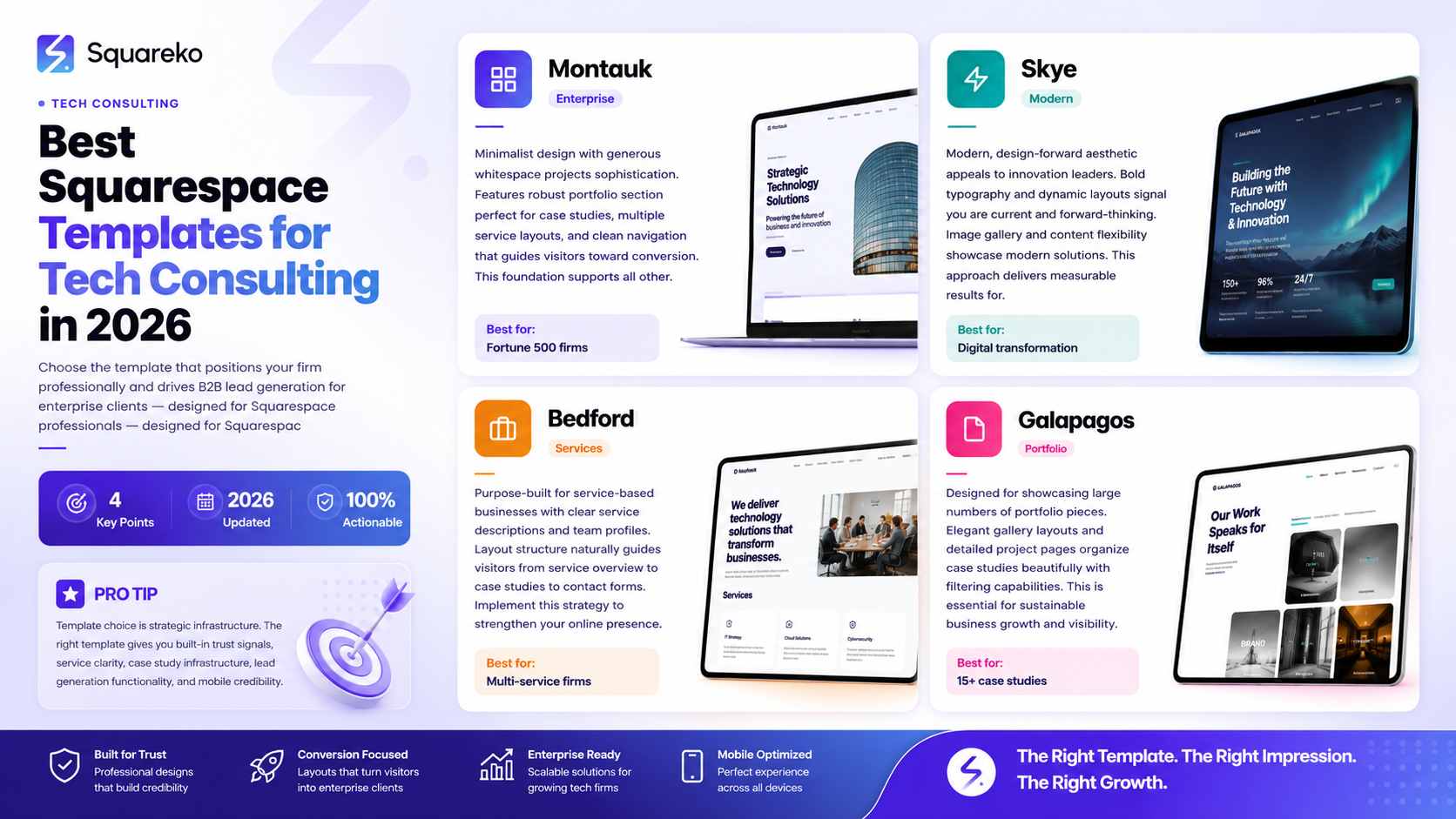
Montauk is the gold standard for B2B consulting websites. Its minimalist design paired with generous whitespace communicates sophistication and professionalism. The template features a robust portfolio section (perfect for case studies), multiple service overview layouts, and a clean navigation that guides visitors toward high-converting pages.
Why it works for consulting: Montauk's clean typography and structured layout feel corporate without being stuffy. The portfolio gallery can be adapted to showcase case studies with client logos, project descriptions, and measurable outcomes. Its flexible content blocks allow you to create detailed service pages that address specific client pain points.
Best for: Established consulting firms targeting Fortune 500 companies and large enterprises. Ideal if you want to project stability and extensive experience.
Customization potential: High. Montauk allows deep customization of colors, typography, and layout sections without requiring code.
2. Skye — Best for Technology-Forward Consultants
Skye offers a more modern, design-forward aesthetic that appeals to companies positioning themselves as innovation leaders within the consulting space. This template features bold typography, strategic use of color, and dynamic layouts that don't feel corporate or dated.
Why it works for consulting: If your consulting firm specializes in digital transformation, AI implementation, or cutting-edge technology solutions, Skye's contemporary design signals that you're current and forward-thinking. The template's image gallery and content flexibility allow you to showcase modern solutions and thought leadership.
Best for: Technology consultants, digital transformation advisors, and IT firms targeting mid-market tech companies and progressive enterprises.
Customization potential: Very high. Skye's design flexibility allows for brand customization while maintaining a cohesive, modern aesthetic.
3. Bedford — Best for Service-Heavy Consulting Practices
Bedford is purpose-built for service-based businesses. It features clear service descriptions, team member profiles, and a layout structure that naturally guides visitors from service overview to case studies to contact forms.
Why it works for consulting: The template's service showcase sections allow you to clearly explain each consulting offering without overwhelming visitors. The team profile pages are particularly valuable for highlighting your consultants' expertise and credentials.
Best for: Managed service providers, IT support firms, and consulting practices with multiple service lines that need clear differentiation.
Customization potential: Moderate to high. Bedford offers good structure with reasonable customization flexibility.
4. Brine — Best for Content-Rich Consulting Websites
Brine emphasizes editorial content through its blog and article-focused design. This template is ideal for consulting firms that produce thought leadership content, research papers, and industry commentary.
Why it works for consulting: Technology consulting firms that establish authority through content marketing benefit enormously from Brine's editorial infrastructure. The template makes it easy to feature blog articles prominently, build a content archive, and position your firm as a thought leader.
Best for: Consultants who generate significant written content, firms building authority through research and analysis, and advisors positioning themselves as industry experts.
Customization potential: High. Brine's flexible layout system works well for content-focused sites.
5. Galapagos — Best for Portfolio-Heavy Consulting
Galapagos is designed around showcasing large numbers of portfolio pieces. For consulting firms with extensive case study libraries, this template provides elegant gallery layouts and detailed project pages.
Why it works for consulting: If your consulting firm has multiple case studies across different industries, client sizes, and service categories, Galapagos gives you the structure to organize and showcase them beautifully. The template's filtering and categorization capabilities help visitors find relevant examples.
Best for: Established consulting firms with 15+ case studies, consultancies serving multiple industries, and firms emphasizing portfolio strength.
Customization potential: High. Galapagos provides excellent portfolio functionality with strong customization options.
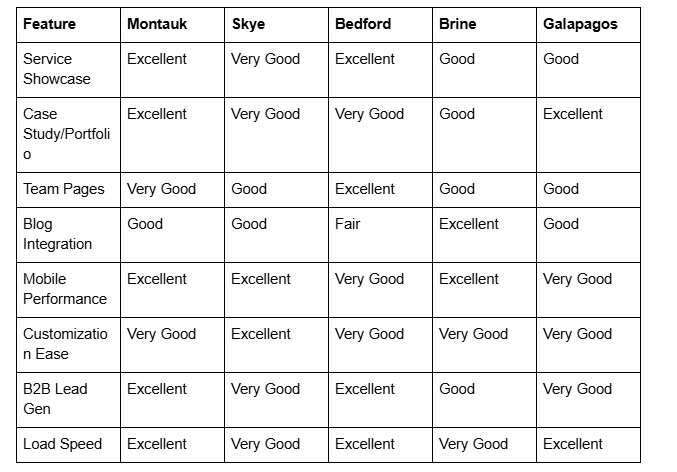
Template Comparison: Core Features for Consulting
Customization Strategies for Maximum Impact
Choosing the right template is only the beginning. How you customize it determines whether your website becomes a lead-generation machine or simply an online brochure.
Homepage Strategy
Your homepage has 8-10 seconds to communicate three things: what your firm does, who you serve, and why you're different. Use your template's hero section strategically.
Effective homepage structures for consulting:
Hero section with clear value proposition
Client logo section (if you have recognizable clients)
Service overview (three to five key offerings)
Proof section (credentials, case study highlights, awards)
Case study feature
Call-to-action toward consultation
Case Study Page Customization
Your template's portfolio or project showcase becomes your case study showcase. Structure each case study with:
Client industry and company size
Challenge or business problem
Your approach and methodology
Results and measurable impact
Client testimonial or quote
Related services highlighted
Service Pages
Don't let your template's service section be generic. For technology consulting, create detailed service pages that address:
Specific business problems your service solves
Your unique approach or methodology
What clients can expect during the engagement
Timeline and deliverables
Client results from similar projects
Related services and cross-sell opportunities
Form Placement and Lead Capture
Review where your template places contact forms and calls-to-action. For B2B consulting, consider:
Placing a consultation request form on service pages (not just your contact page)
Using popup forms for valuable lead magnets (guides, checklists, assessment tools)
Adding form fields that segment prospects by company size, industry, or challenge type
Creating a quick assessment form that qualifies leads before manual follow-up
How to Set Up Your Template for B2B Success
Step 1: Choose Your Core Template Based on Your Positioning
Match your firm's position to the template's strengths. Established firms with extensive track records should lean toward Montauk or Galapagos. Younger, more innovative consulting firms might choose Skye. Content-focused thought leaders should consider Brine.
Step 2: Establish Your Information Architecture
Create a clear sitemap before customizing your template:
Homepage
Service pages (one per major offering)
About page (company story and team profiles)
Case studies (organized by industry, challenge, or service)
Blog/resources (if you produce content)
Contact/consultation page
Step 3: Develop Your Visual Identity
Use Squarespace's style editor to customize colors, typography, and imagery while maintaining your brand identity. Consulting firms typically benefit from:
Professional color palette (deep blues, grays, accent colors)
High-quality sans-serif typography
Professional photography or quality imagery
Consistent imagery throughout (avoid cheap stock photos)
Step 4: Create High-Impact Content
Your template can only be as good as the content it contains. For each section, develop clear, benefit-focused copy that addresses client needs rather than describing your processes.
Step 5: Implement Trust Signals
Use your template's structure to prominently display:
Client testimonials and case studies
Your team's credentials and experience
Industry certifications or recognition
Awards or media mentions
Trusted partnership logos
Years in business and client count
Step 6: Optimize for Lead Generation
Configure forms, email integration, and follow-up systems:
Set up form notifications to your inbox or CRM
Create automated email sequences for different lead types
Use form fields to segment prospects
Include clear CTAs on every relevant page
Common Template Mistakes to Avoid
Mistake 1: Overusing Your Template's Default Content
Leaving placeholder text or using generic sections makes your site feel unfinished. Replace every default section with custom content relevant to your consulting practice.
Mistake 2: Poor Mobile Optimization of Customizations
Even though Squarespace templates are responsive, custom images and content sections can break on mobile. Always preview your site on multiple devices and adjust accordingly.
Mistake 3: Vague Service Descriptions
Consulting services are abstract. Don't let your template's service section describe what you do generically. Explain the specific business problems you solve and measurable outcomes clients achieve.
Mistake 4: Insufficient Case Study Details
If your template has case study/portfolio functionality, use it fully. Vague or incomplete case studies undermine credibility. Include specific metrics, timelines, and client context.
Mistake 5: Neglecting SEO Customization
Your template comes with basic SEO features, but you need to customize title tags, meta descriptions, heading structure, and image alt text for each page.
Mistake 6: Ignoring Loading Speed
Even excellent templates can slow down if you use overly large images or too many video embeds. Optimize images and test your site speed regularly.
Frequently Asked Questions
-
Yes, you can switch Squarespace templates, and your content transfers over. However, switching templates can be time-consuming and may require adjustments to your content structure and customizations. It's worth choosing carefully the first time to avoid later switching costs.
-
Montauk or Bedford are excellent choices for newer firms because they look professional and established without requiring advanced customization. They also accommodate growth—as you add case studies and service offerings, the templates scale gracefully.
-
Squarespace templates are designed for non-technical users. You can customize colors, typography, layouts, and content entirely through the visual editor. For advanced customizations, you can add custom CSS, but it's not required for a professional consulting website.
-
Very important. Enterprise buyers often research consultants during work hours on corporate networks. Slow-loading sites create a poor impression and increase bounce rates. All five templates mentioned load quickly, but you should still optimize images and minimize unnecessary elements.
-
If you plan to publish regular thought leadership content, a template with strong blog functionality (like Brine) is valuable. If your content strategy is limited to a resource section or occasional articles, any template works fine since they all support blog functionality.
-
Most templates allow you to create a custom section for client logos. Use a light or transparent background, maintain consistent logo sizing, and arrange them in a way that looks intentional rather than random. Client logos are powerful trust signals for technology consulting firms.
-
Absolutely. Create separate service pages for each offering, use consistent visual hierarchy, and organize your case studies to highlight which services apply to each client situation. Your template should adapt to this structure naturally.
-
Your template's visual design might remain stable for 2-3 years, but your content should be regularly updated. Add new case studies quarterly, refresh service pages annually, and keep your team profiles current. Squarespace regularly releases template updates that you can apply without losing customizations.
Call to Action
Choosing the right template is one thing—optimizing it for maximum enterprise appeal and lead generation is another. At Squareko.com, we specialize in helping technology consulting firms build Squarespace websites that establish authority, convert enterprise prospects, and integrate seamlessly with your CRM and follow-up systems.
If you're ready to move beyond a generic consulting website, schedule a consultation with our team to discuss how we can customize your Squarespace site to win enterprise contracts.

From custom website design to SEO strategy, we help businesses launch a site that looks professional and performs better.

Author Bio
I'm Walid Hasan, a Certified Squarespace Expert and Squarespace Circle Platinum Partner with over 12 years of hands-on experience designing and optimizing high-performing websites. Over the years, I've had the privilege of building more than 2,000 Squarespace websites for clients around the world, always focusing on clean design, strong user experience, and conversion-driven results.
