
Best Squarespace Templates for Personal Trainers and Fitness Studios in 2026
Introduction
Your website is often the first impression potential clients have of your fitness business. The right Squarespace template for personal trainers and fitness studios can mean the difference between a visitor booking a session and scrolling to a competitor's site. In 2026, fitness clients expect websites that look professional, load fast on mobile, and make booking a session feel obvious and easy. Squarespace templates have evolved significantly, offering personal trainers and studio owners purpose-built designs that showcase transformation results, build credibility, and drive conversions without requiring coding skills.
This guide reviews the best Squarespace templates for personal trainers and fitness studios, examining what makes a fitness template effective, comparing top options, and helping you choose the right foundation for your business. Whether you're a solo personal trainer building a personal brand, a fitness studio managing multiple trainers and classes, or an online fitness coach selling programmes, we'll help you find the template that matches your business model and goals.
Key Takeaways
Visual energy matters:Fitness templates need bold typography, high-impact photography, and colour schemes that reflect energy and progress — not minimalist design.
Booking and CTAs must be prominent: Your best template puts booking, trial sessions, and contact forms front and centre, visible on every page.
Mobile performance is non-negotiable: Fitness clients research trainers on phones; poor mobile speed and usability kill conversions.
Client results and social proof: Templates with dedicated sections for client testimonials, before/after galleries, and transformation stories build trust fast.
Different templates suit different models: Solo PTs, multi-trainer studios, and online coaches have different priorities; choose accordingly.
What Makes a Great Fitness Template
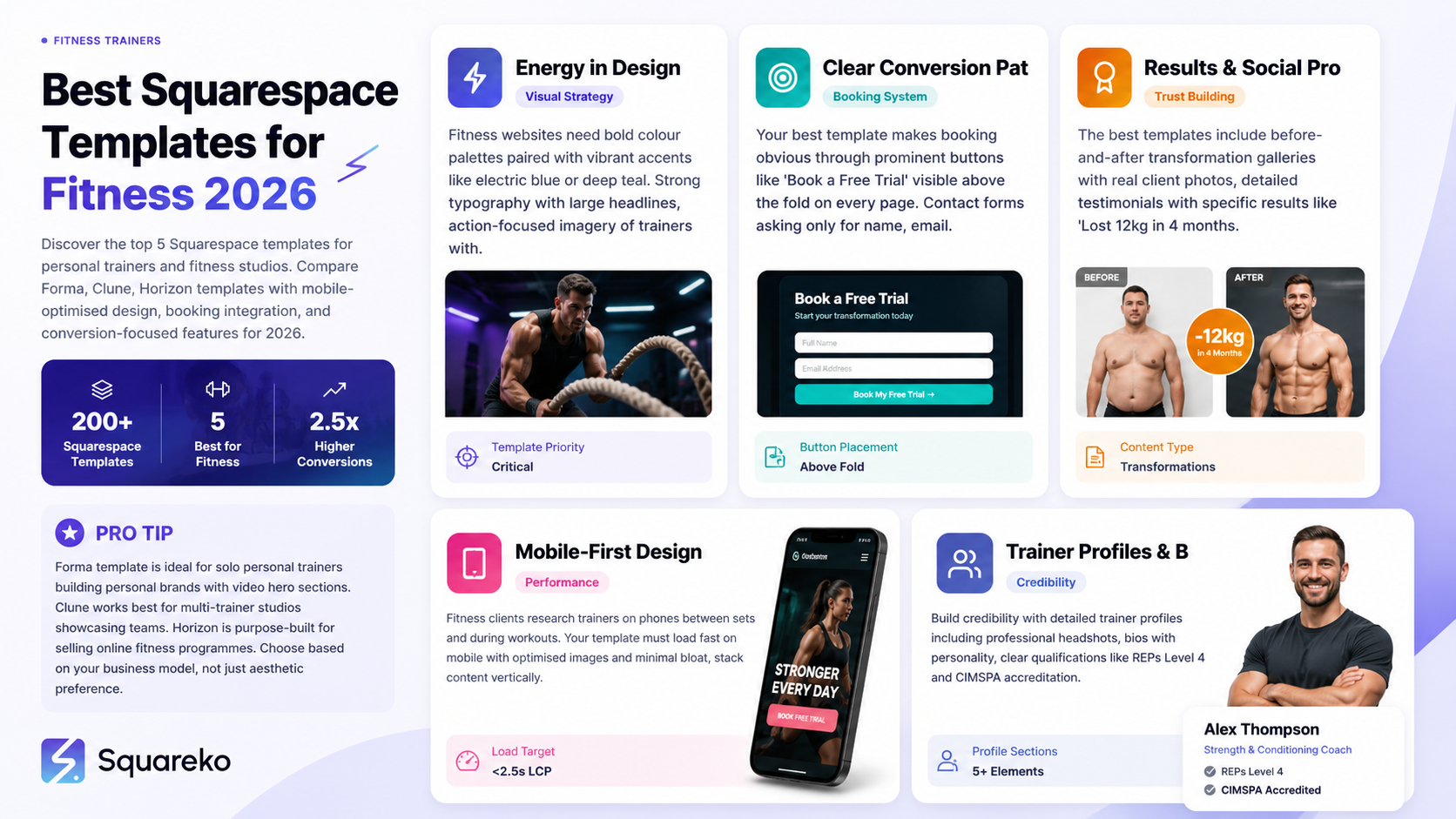
Fitness is a visual, results-driven industry. A great Squarespace template for personal trainers doesn't just look good — it communicates transformation, builds trust, and makes the path to booking obvious.
Energy in Design
Fitness websites shouldn't feel corporate or clinical. The best templates use:
Bold colour palettes: Deep blacks paired with vibrant accent colours (electric blue, bold orange, deep teal) communicate energy and confidence.
Strong typography: Large, confident headlines that grab attention and tell the story of what clients will achieve.
Action-focused imagery: Real photos of trainers working with clients, not stock photos of people awkwardly posing with dumbbells.
Generous whitespace: Modern fitness websites breathe; cluttered designs feel chaotic and unprofessional.
Clear Conversion Paths
Your template must make it dead obvious how a visitor becomes a client:
Prominent booking buttons: "Book a Free Trial," "Schedule Your Session," or "Get Started" buttons appear above the fold on every page.
Contact forms that convert: Simple, clear forms asking for name, email, and phone — nothing overwhelming.
Pricing clarity: Whether you display full pricing or use "contact for rates," visitors should know your service costs a professional fee.
Results and Social Proof
Potential fitness clients need proof that your training works. The best templates include:
Before/after transformation gallery: A dedicated page showing real client results with consent.
Client testimonial sections: Photos, names, and specific results ("Lost 12kg in 4 months").
Trainer credentials display: REPs, CIMSPA, Level 4 PT qualifications displayed prominently.
Trust badges and certifications: Space to show your professional registrations.
Mobile-First Design
Fitness clients research trainers on phones between sets, during workouts, or while scrolling social. Your template must:
Load fast on mobile: Images optimised, minimal bloat, fast load times.
Stack content vertically: Responsive design that doesn't crowd text or buttons on small screens.
Make touch interactions easy: Buttons and forms sized for thumbs, not mouse cursors.
Key Design Elements for Fitness Websites
Beyond choosing a template, several design elements separate high-converting fitness websites from the rest.
Hero Section Strategy
Your hero (the large top section) must:
Feature action photography: A trainer and client mid-workout, not a static pose. Show movement, effort, and intensity.
Include a clear headline: "Transform Your Body in 12 Weeks" or "Personal Training in Dublin That Works" — specific, benefit-driven.
Display a primary CTA: One prominent button above the fold: "Book Your Free Session" or "Start Your Transformation."
Optional: A short video loop: Squarespace templates support background video; consider a 20-second clip of a training session.
Class Schedule and Availability
For fitness studios and group fitness instructors:
Weekly schedule display: A calendar or table showing class times, instructors, capacity, and booking links.
Colour coding by class type: Different colours for HIIT, strength, yoga, or boxing classes — scannable and professional.
Sync with Squarespace Scheduling: Templates that integrate booking systems reduce friction from enquiry to booked session.
Trainer Profiles and Bios
Build credibility with detailed trainer profiles:
Professional photo: High-quality headshot or action shot of each trainer.
Bio with personality: "Sarah has 6 years PT experience and specialises in weight loss coaching. She's also mum to twins, so she gets real-life time pressure."
Qualifications: REPs Level 4, CIMSPA accredited, or other professional credentials listed clearly.
Specialisms: Weight loss, muscle gain, postnatal fitness, functional movement, sports conditioning — what does this trainer excel at?
Client results link: Link to a page showing transformation stories from this trainer's client base.
Before/After and Transformation Showcase
Fitness clients want proof. Design this section to:
Show real transformations: Actual client photos (with consent) showing measurable results.
Tell the story: Not just photos — include the timeline ("Lost 15kg in 5 months"), the challenge ("Struggled with weight loss for 10 years"), and the solution ("1-to-1 PT twice weekly + nutrition coaching").
Use comparison sliders: Squarespace plugins allow side-by-side before/after image sliders — highly engaging.
Include diverse results: Different ages, goals, body types — demonstrate you help all clients, not just Instagram-perfect transformations.
Pricing Display Options
Choose a pricing strategy that fits your model:
Transparent pricing: List prices for 1-to-1 sessions, packages, and monthly rates. Transparency builds trust and attracts serious clients.
Tiered packages: "Starter: 1 session/week," "Standard: 2 sessions/week," "Performance: 4 sessions/week" with clear pricing.
Contact for rates: If your pricing is bespoke or variable, use "Book a free consultation to discuss rates" — but at least describe what services cost.
Top Squarespace Templates for Fitness in 2026
Squarespace offers 200+ templates. These five are purpose-built or naturally suited to fitness websites:
Forma Template for Personal Trainers

Best for: Solo personal trainers building a personal brand, online coaches, fitness influencers.
Why it works:
Sleek, minimal design with bold typography focuses attention on your story and results.
Large hero section with video background support.
Prominent "About" section for showcasing your trainer personality and philosophy.
Before/after gallery section built-in.
Clean services section displaying packages and pricing.
Excellent mobile responsiveness.
Customisation: Easy to add client testimonials, trainer credentials, and transformation photos.
Pricing note: Forma works well with Squarespace Commerce for selling programmes and one-to-one session packages.
Clune Template for Fitness Studios
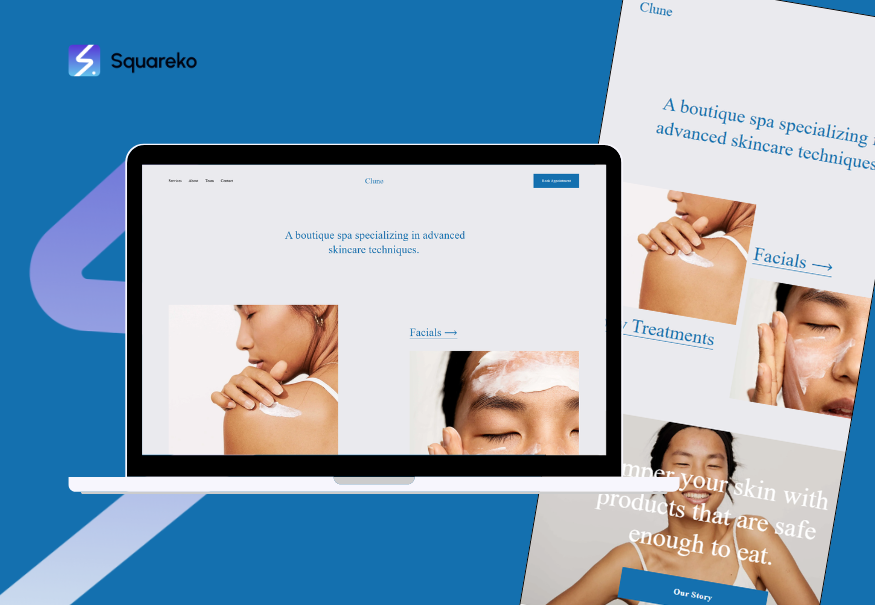
Best for: Fitness studios with multiple trainers and classes, group fitness instructors, boutique fitness brands.
Why it works:
Multi-column layout perfect for showcasing multiple trainers and class types.
Team member profiles built-in; each trainer gets a dedicated card with photo, bio, and link.
Portfolio section ideal for displaying class types, studio vibe, or different programmes.
Flexible navigation makes it easy to direct visitors to class schedules, trainer bios, or booking.
Strong visual hierarchy guides visitors naturally from "What is this studio?" → "Who are your trainers?" → "How do I book?"
Customisation: Easily adapted for multiple instructors, seasonal class changes, or different fitness disciplines.
Horizon Template for Online Fitness Coaches
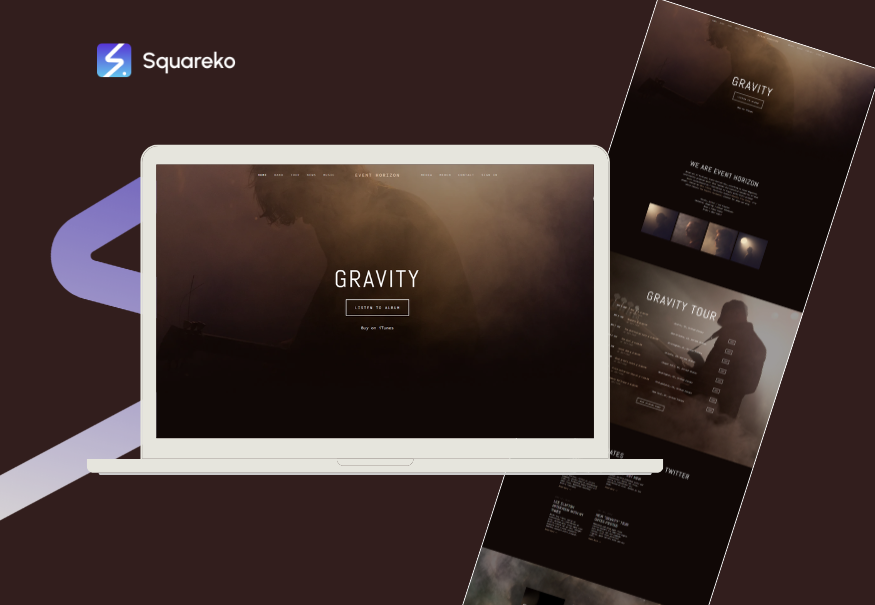
Best for: Online coaches selling programmes, digital fitness courses, subscription-based training.
Why it works:
Course/programme structure built into the template design.
Multiple section types for showcasing what's included, pricing, and member testimonials.
Strong emphasis on benefits and outcomes (not features) — fits the fitness coaching narrative.
Clean product pages for selling digital programmes or memberships.
Integration with Squarespace Commerce for subscription management.
Customisation: Built for selling; minimal tweaking needed for a fitness product funnel.
Bailard Template for Results-Focused Studios
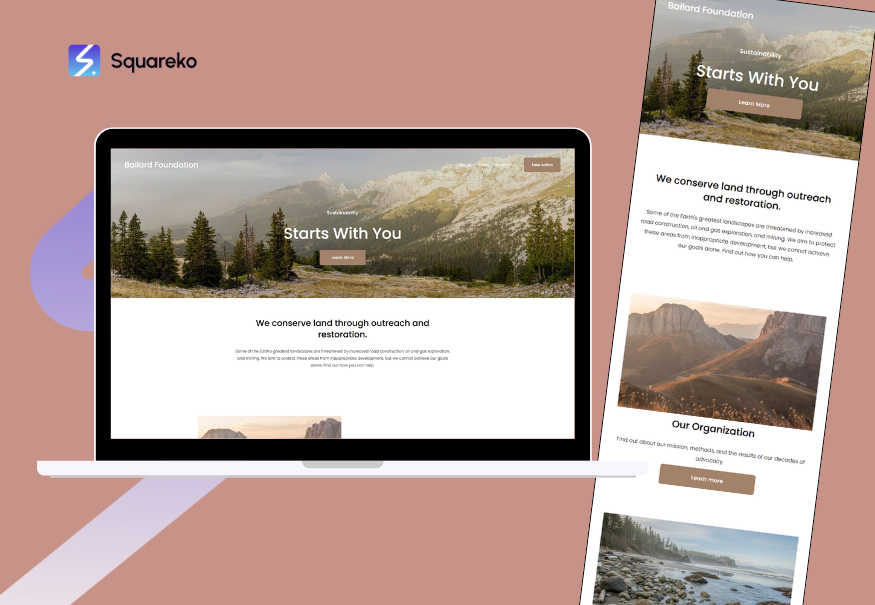
Best for: Results-driven fitness studios, transformation-focused personal trainers, fitness challenges and programmes.
Why it works:
Large image sections perfect for showcasing client transformations.
Timeline feature for displaying transformation progress (Week 0 → Week 4 → Week 8 → Week 12).
Prominent testimonial section with photo integration.
Clean CTA placement throughout.
Customisation: Excellent for highlighting a signature programme or transformation challenge.
Paloma Template for Luxury and Premium Fitness
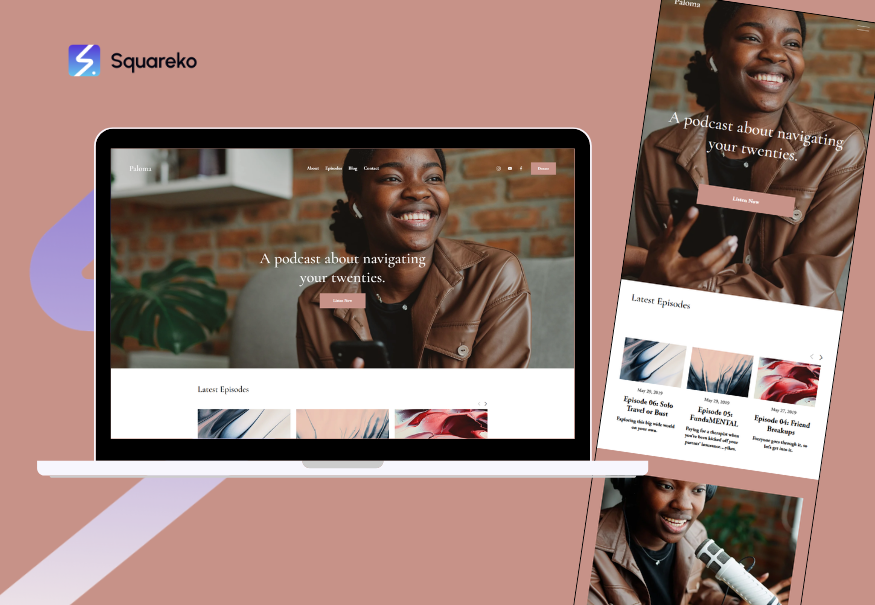
Best for: High-end personal training, boutique studios, premium coaching experiences.
Why it works:
Luxe, sophisticated design with premium imagery.
Generous whitespace communicates exclusivity and quality.
Strong typography and subtle colour schemes appeal to affluent clients.
Portfolio section showcases studio ambiance, facilities, and client experience.
Customisation: Ideal if your positioning is premium, exclusive, or luxury-focused training.
Forma Template for Personal Trainers
If you're a solo personal trainer or online coach, Forma deserves serious consideration.
What You Get Out of the Box
Full-width hero with video: Upload a video of you training a client; let it loop as a background. Immediately communicates energy and competence.
About section: Tell your PT story. Why did you become a trainer? What's your training philosophy? What results do clients get?
Services section: List your offerings: 1-to-1 training, online coaching, nutrition consultation, group classes. Include pricing if you want transparency.
Gallery for transformation results: Built-in section for before/after images and client success stories.
Blog integration: Write fitness tips, workout ideas, nutrition articles — drives SEO traffic and builds authority.
Contact and booking forms: Squarespace Scheduling integration for free consultation bookings.
Why Fitness Trainers Choose Forma
Fitness is personal. Clients aren't hiring a "PT service" — they're hiring you. Forma emphasises the trainer's personality, story, and credibility in a way that generic business templates don't. The design feels personal but professional, energetic but trustworthy.
Customisation for Fitness
Forma is highly customisable:
Change the hero video to a training clip.
Use the About section to display your credentials (REPs Level 4, CIMSPA accredited, years of experience, specialisms).
Populate the gallery with real client transformations.
Link the Services section to Squarespace Scheduling so visitors can book trial sessions directly.
Add a testimonial section with client names, results, and photos.
Clune Template for Fitness Studios
Running a fitness studio with multiple trainers, class types, or group fitness programmes? Clune is built for this.
What You Get Out of the Box
Multi-trainer team showcase: Each trainer gets a profile card with photo, short bio, and specialisms. Visitors immediately understand who's teaching what.
Flexible portfolio section: Use this for class types, signature programmes, or different fitness disciplines (HIIT, strength, yoga, etc.).
Class schedule integration: Display weekly class timetables, instructors, and booking links in one place.
Location and contact: For studios with multiple locations, Clune handles multiple address and contact info cleanly.
Testimonials section: Client reviews and results showcase prominently.
Why Fitness Studios Choose Clune
Multi-trainer studios need to show off their team credibility. Clune gives each trainer visibility and makes it obvious that your studio has deep expertise across disciplines. The clean navigation helps first-time visitors understand "What classes do you offer?" → "Who teaches them?" → "How do I book?"
Customisation for Fitness
Trainer profiles: Add REPs/CIMSPA credentials, specialisms, and client results for each trainer.
Class types: Use the portfolio section to showcase different fitness disciplines with descriptions and instructors.
Schedule integration: Link to Squarespace Scheduling so visitors book directly into class slots.
Facilities showcase: If your studio has notable facilities (rooftop, pool, sauna, strength equipment), use image sections to highlight them.
Horizon Template for Online Coaches
Selling online fitness programmes, digital courses, or membership-based training? Horizon's design flows like a product sales page.
What You Get Out of the Box
Benefits-first copy: Horizon is structured to emphasise outcomes: "Lose 15kg in 12 weeks," not "Here's my template."
Programme structure section: Clearly show what's included: workout videos, nutrition guides, progress tracking, email support, etc.
Pricing display: Multiple plan options (Basic, Standard, Premium) with clear feature differences.
Testimonials with results: Client success stories integrated throughout.
Email opt-in integration: Capture leads for your email list and nurture them toward purchase.
Squarespace Commerce: Built-in for selling digital products and managing subscriptions.
Why Online Coaches Choose Horizon
Online fitness programmes sell on outcomes and clarity. Horizon removes ambiguity by making it crystal clear what the client gets, how much it costs, and what results others have achieved. The design feels like a product funnel, not a business brochure.
Customisation for Fitness
Programme showcase: Detail what's included: video workouts, nutrition guidance, progress tracking tools, community access, etc.
Success stories: Feature client transformations with before/after photos, testimonials, and measurable results.
Pricing tiers: "Starter: $29/month," "Advanced: $59/month with 1-to-1 check-ins," "Elite: $99/month with custom programming."
Trust building: Add your credentials, qualifications, experience, and any media mentions.
Choosing Your Template by Business Model
Different fitness business models have different website priorities. Here's how to choose:
Solo Personal Trainer (In-Person or Online)
Website priorities:
Personal brand prominence
Results showcase and testimonials
Easy booking of 1-to-1 sessions
Credibility through credentials and qualifications
Best templates: Forma, Bailard, or Paloma.
Why: These emphasise your story, personality, and results. They direct all traffic toward booking with you as the primary service.
Fitness Studio or Group Fitness Instructor
Website priorities:
Multiple trainer profiles
Class schedule display and booking
Multiple service offerings (classes, 1-to-1 training, workshops)
Studio facilities and community feel
Best templates: Clune, Horizon, or Forma (customised for multi-trainer use).
Why: These handle multiple team members, class types, and booking flows cleanly. They communicate team credibility and variety.
Online Fitness Coach (Programmes, Courses, Memberships)
Website priorities:
Clear product description and benefits
Pricing transparency
Success stories and outcomes
Email capture and nurture
Secure digital delivery
Best templates: Horizon, Forma (with heavy Commerce use), or Bailard.
Why: These templates flow like a product sales page. They emphasise outcomes, include pricing, and integrate with Squarespace Commerce for subscriptions and digital downloads.
Hybrid Model (In-Person and Online)
Website priorities:
Showcase both in-person and online services
Clear CTA for each service type
Credibility across both channels
Booking system that handles different session types
Best templates: Forma or Clune (customised).
Why: Both allow multiple service types, prominent CTAs, and integration with Squarespace Scheduling for different booking flows.
Design Customisation Tips for Fitness
Once you've chosen your template, customisation makes it truly yours. Here are fitness-specific customisation tips that boost conversion:
Before/After Photo Strategy
Use real clients: Stock photos are obvious and reduce credibility. Real transformations sell.
Get consent: Always ask clients for permission and explain how their photos will be used.
Show progress, not just endpoints: Timeline photos (weeks 0, 4, 8, 12) feel more authentic than just before/after.
Include context: "Jamie lost 14kg in 16 weeks training 2x weekly + nutrition coaching." Specificity builds trust.
Diversity matters: Show transformations across age groups, body types, and goals. Prove you help all clients.
Trainer Bio Best Practices
Lead with credentials: "Level 4 Personal Trainer (REPs accredited), Strength & Conditioning Specialist, 8 years experience."
Add personality: "Sarah's obsessed with deadlifts and getting clients strong. She also plays rugby and understands the demands of athlete training."
List specialisms: Weight loss, muscle gain, sports performance, postnatal fitness, functional movement, injury prevention.
Include a professional photo: Headshot or action shot of the trainer. Professional and energetic.
Colour and Typography Choices
Fitness colour palettes: Bold blacks, deep navy, or charcoal paired with vibrant accents (electric blue, bold orange, deep teal, or hot pink) communicate energy.
Avoid: Pale pastels or muted colours feel soft and wellness-like, not fitness-focused. Save those for yoga or meditation studios.
Typography: Large, confident headlines. Sans-serif fonts (like Montserrat, Inter, or Poppins) feel modern and strong. Pair with a readable body font.
CTA Button Design
Make them stand out: Use a contrasting colour that pops against your background. If your site is dark, use a bright accent colour for buttons.
Use action language: "Book Your Free Session," "Get Started Today," "Schedule Your Consultation" — avoid vague buttons like "Learn More."
Repeat CTAs: Place booking and contact buttons on every page, not just the home page. Visitors might scroll to Services, then want to book.
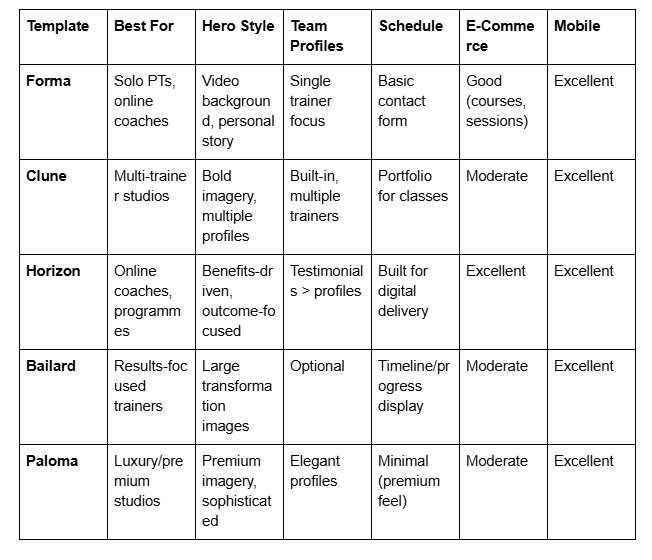
Comparing Fitness Templates: Side-by-Side
Mobile and Performance Considerations
Fitness clients research trainers on mobile. Your template choice has performance implications.
Image Optimisation
Large fitness photos load slow on mobile: Squarespace compresses images, but use 2000px width max for web. Avoid 4000px+ photos uploaded raw.
Use WebP format: Squarespace converts images; ensure your originals are high-quality JPGs or WebPs.
Lazy loading: Squarespace templates use lazy loading by default; images load as users scroll, improving perceived mobile speed.
Core Web Vitals
Google ranks sites partly on speed and responsiveness. All five templates above are modern and meet Google's Core Web Vitals standards. Key metrics:
Largest Contentful Paint (LCP): How fast the main content loads. Squarespace templates achieve <2.5 seconds on average.
Cumulative Layout Shift (CLS): How stable the page is as it loads. Modern templates score well here.
First Input Delay (FID): Response time to interaction. Squarespace's modern templates are responsive.
Mobile Specific Design
Vertical stacking: Content flows top-to-bottom on mobile; no multi-column layouts that crowd text.
Touch-friendly buttons: Buttons and form fields sized for thumb taps, not mouse clicks.
Readable text: Base font size 16px minimum; line height 1.5+ for legibility.
Next Steps: Launching Your Fitness Website
You've chosen your template. Now what?
Essential Setup Steps
Pick your domain: fitness trainer or your-studio keep it simple and memorable.
Set up hosting: Squarespace includes hosting; no separate setup needed.
Customise the design: Upload your logo, choose colours, add your photos and copy.
Populate content: Write your About bio, list your services and pricing, add before/after photos with consent.
Set up booking: Integrate Squarespace Scheduling for trial bookings or class signups.
Add your credentials: Display REPs, CIMSPA, or other professional qualifications prominently.
Write or import a blog: Start with 3-5 fitness tips or common questions; blogs improve SEO and authority.
Testing Before Launch
Mobile test: View your site on an iPhone and Android. Tap buttons. Submit forms. Ensure everything works.
Speed test: Use Google PageSpeed Insights to check mobile and desktop speed. Aim for green (>90).
Broken links: Use a link checker tool; fix any broken internal or external links.
Contact forms: Submit test forms; confirm you receive notifications.
Booking system: Book a test appointment; confirm the appointment appears in your calendar.
Post-Launch
Set up Google Business Profile: Essential for local fitness clients finding you. Add photos, hours, classes, and phone number.
Start collecting reviews: Ask satisfied clients to leave Google reviews; social proof is powerful.
Add to social profiles: Link your website from Instagram, Facebook, TikTok bios so followers can find you.
Write blog posts: Publish fitness tips, common questions, transformation stories. Improves SEO and positions you as an expert.
Mid-Post CTA: Ready to Build Your Fitness Website?
Choosing the right Squarespace template is the foundation, but execution is where the magic happens. If you're ready to launch a fitness website that attracts serious clients and converts visitors into bookings, we can help.
At Squareko, we specialise in building professional fitness websites on Squarespace for personal trainers, fitness studios, and online coaches. We don't just set up a template — we customise it for your specific business, integrate booking systems, showcase your results, and optimise for conversions. Whether you're a solo PT building your brand or a studio owner managing multiple trainers and classes, we've helped fitness professionals launch websites that book more clients.
If you want to discuss your fitness website, explore template options that fit your business model, or get a professional site built and launched, contact Squareko today for a free consultation. We'll review your current situation, recommend the best template for your needs, and walk you through the launch process.
Frequently Asked Questions
-
For a solo personal trainer, Forma is the top choice. It emphasises your personal story, professional credentials, and transformation results — exactly what fitness clients care about. The hero video section lets you showcase your training energy immediately, and the integrated gallery displays before/after transformations. If you want a more results-focused design, Bailard works well too. Both integrate easily with Squarespace Scheduling so clients can book trial sessions.
-
Yes. Horizon is specifically designed for selling digital products, including fitness programmes. It includes Squarespace Commerce, so you can sell digital downloads (PDF workout plans, video courses, nutrition guides) or subscription-based memberships. Forma also works well if you want to combine 1-to-1 booking with digital product sales. Both templates support email integration for delivery of digital products and nurture sequences.
-
Clune is built for multi-trainer studios. It has a dedicated team section where each trainer gets a profile card with photo, bio, specialisms, and credentials. You can add as many trainer profiles as you need, and visitors can see the full team at a glance. This builds credibility and shows potential clients that your studio has deep expertise.
-
All modern Squarespace templates, including Forma, Clune, Horizon, Bailard, and Paloma, are fully responsive and mobile-optimised. Fitness clients often research trainers on phones, so mobile speed and usability are critical. All five templates meet Google's Core Web Vitals standards and load fast on mobile networks.
-
Absolutely. Every template mentioned in this guide supports adding client testimonials and transformation galleries. You can use the built-in image sections, testimonial blocks, or custom code to showcase before/after photos, client stories, and results. Just ensure you have written consent from clients before displaying their photos or sharing their transformation stories.
-
Forma is best for solo PTs — it emphasises personal brand and story. Clune is built for multi-trainer studios and group fitness — it showcases teams and multiple services cleanly. Horizon is designed for selling digital products and programmes — it flows like a sales funnel. Choose based on your business model: solo brand, multi-team studio, or digital product sales.
-
Squarespace templates integrate with Squarespace Scheduling, which allows you to display class timetables and accept bookings directly on your website. Clients see available time slots, book a class or session, and you receive a confirmation. You can set capacity limits, require payment upfront, and sync bookings to your calendar.
-
Yes. All templates allow you to customise sections to display professional credentials prominently. You can add them to your About bio, trainer profiles, or a dedicated credentials section. Displaying REPs Level 4, CIMSPA accreditation, or other industry qualifications builds trust and positions you as a credible professional, not a hobbyist.
Ready to Build Your Fitness Website on Squarespace?
You now know what to look for in a Squarespace template — energy in design, clear booking paths, mobile optimisation, and space to showcase your transformation results. But choosing a template is just the start. Implementing it correctly, customising it for your fitness business, and optimising it for conversions — that's where most fitness professionals get stuck.
If you're ready to build a Squarespace fitness website that actually books more clients, let's talk. At Squareko, we specialise in designing and launching fitness websites for personal trainers, studios, and online coaches. We'll help you choose the right template, customise it for your business model, set up booking and payment systems, and launch a site that converts.

From custom website design to SEO strategy, we help businesses launch a site that looks professional and performs better.

About the Author
Walid Hassan is the founder of Squareko
I'm Walid Hasan, a Certified Squarespace Expert and Squarespace Circle Platinum Partner with over 12 years of hands-on experience designing and optimizing high-performing websites. Over the years, I've had the privilege of building more than 2,000 Squarespace websites for clients around the world, always focusing on clean design, strong user experience, and conversion-driven results.
