
Best Squarespace Templates for Digital Product Businesses in 2026
Why Template Choice Matters for Digital Product Sales
Your website template is the foundation of your digital product business. It's not just about aesthetics—it directly influences how customers perceive your products, build trust in your brand, and ultimately decide whether to purchase.
A strong template communicates professionalism, provides clear product information, and removes friction from the buying process. For digital product creators, this means having dedicated sections to showcase product features, display previews or sample content, collect testimonials, and present social proof that builds confidence in your offerings.
The difference between a generic template and one specifically designed for digital products can be significant. Generic templates often lack the specific features digital creators need: easy file delivery integration, clear licensing information presentation, sample download sections, and customer account dashboards for repeated purchases.
How Templates Affect Conversion Rates
Templates that include features like customer testimonials, product preview sections, clear call-to-action buttons, and trust signals consistently outperform basic designs. Studies show that conversion-optimized templates can increase your average customer purchase value by 15-25% simply through better product presentation and checkout clarity.
When customers visit your product pages, they're asking four critical questions:
Does this product actually deliver what it promises?
Can I see what I'm buying before committing?
Is this creator trustworthy?
Is the buying process secure and straightforward?
The right template answers all four questions immediately.
Key Takeaways
Template selection directly impacts conversion rates — a well-designed product page template can increase sales by 20-30% compared to poorly optimized designs
Creator-focused templates prioritize product previews and trust signals — look for templates with dedicated showcase sections, testimonials, and sample downloads
Mobile responsiveness is non-negotiable — over 55% of digital product purchases happen on mobile devices in 2026
Commerce-ready templates save setup time — choose templates with built-in cart abandonment recovery, email follow-up, and customer account features
Template customization flexibility matters more than pre-built perfection — your product niche might require unique branding that standard layouts need to accommodate
The 5 Best Squarespace Templates for Digital Product Businesses

1. Alchemy Template
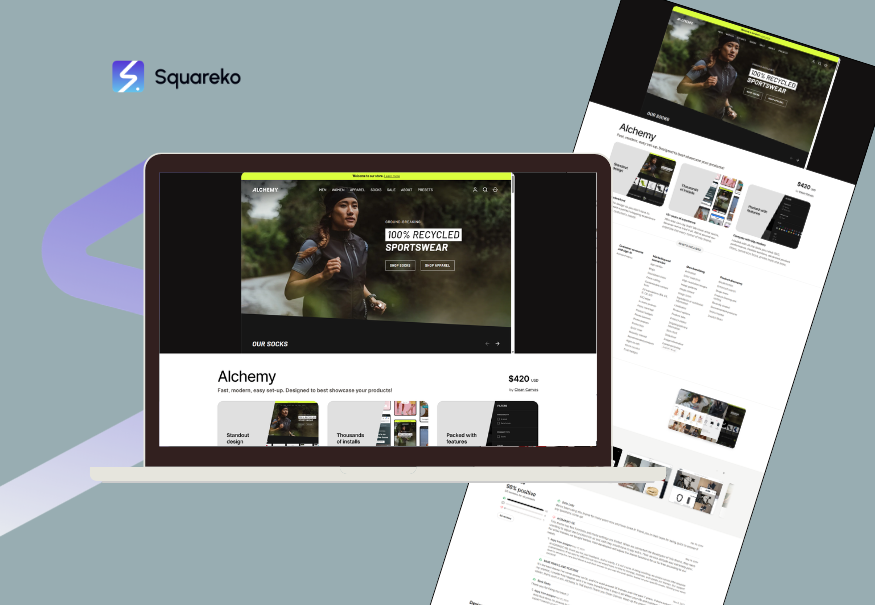
Alchemy stands out as the top choice for digital product creators focused on premium positioning and clean aesthetics. This template features a powerful portfolio section that works beautifully for showcasing digital products, templates, and assets.
Why it's ideal for digital products:
Minimalist design keeps focus on product imagery and descriptions
Large product showcase areas with dedicated feature sections
Integrated testimonial galleries that build buyer confidence
Smooth animations enhance the shopping experience without slowing performance
Easy-to-customize product cards with image galleries
Best suited for: Template creators, asset marketplaces, digital courses, premium software tools
Conversion strengths: The generous whitespace and focus on visual presentation make product details stand out. Customers can see exactly what they're purchasing, reducing buyer hesitation.
2. Momentum Template
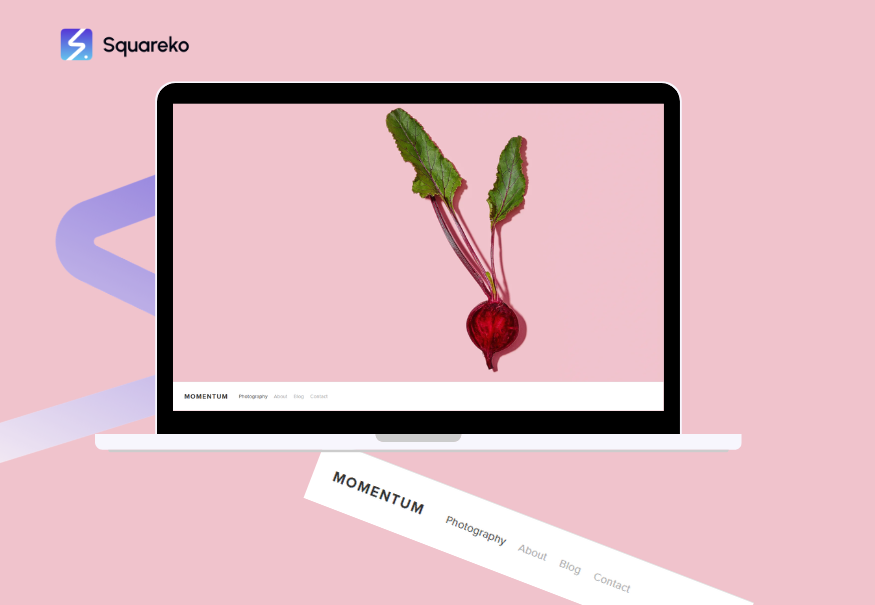
Momentum combines modern design with e-commerce functionality specifically optimized for high-volume product businesses. This template excels at displaying multiple product categories and managing large digital product inventories.
Why it's ideal for digital products:
Built-in filtering and sorting for product discovery
Dynamic product gallery layouts that showcase variations
Customer review system prominently displayed
Fast loading speeds optimized for product listings
Clear product information hierarchy
Best suited for: Digital asset marketplaces, template libraries, code snippet repositories, digital tool bundles
Conversion strengths: Customers can quickly browse and discover complementary products. The filtering system reduces decision paralysis and helps customers find exactly what they need.
3. Seventh Template
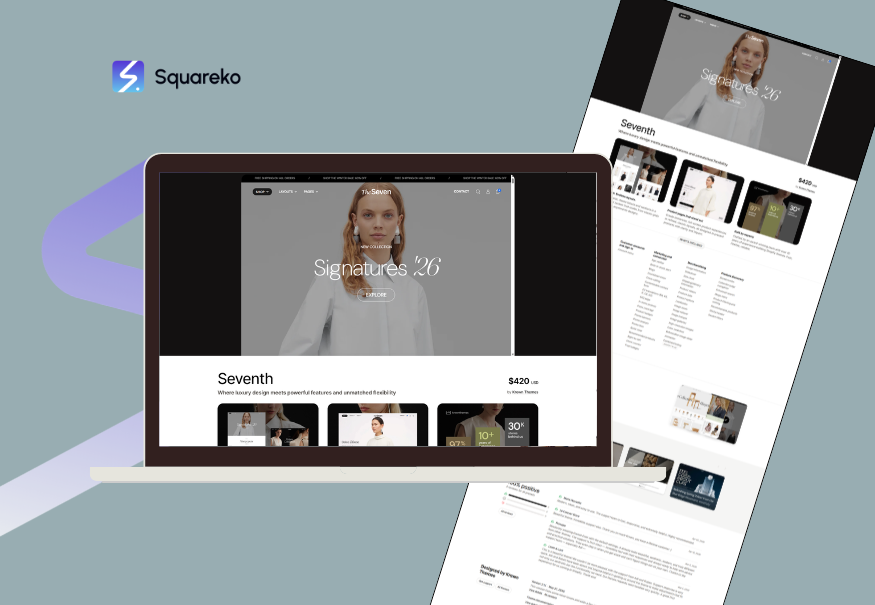
Seventh is a versatile template that balances beauty with functionality. It works exceptionally well for digital product creators who also maintain a strong content presence through blogs and educational materials.
Why it's ideal for digital products:
Blog integration that drives organic discovery of products
Flexible product layouts for different product types
Strong newsletter signup integration
Content and commerce seamlessly integrated
Excellent for creator brands building authority
Best suited for: Digital course creators, content creators with digital product extensions, educators, thought leaders
Conversion strengths: By positioning blog content alongside products, customers gain confidence through your expertise before purchasing. This builds trust that translates to higher conversion rates.
4. Horizon Template
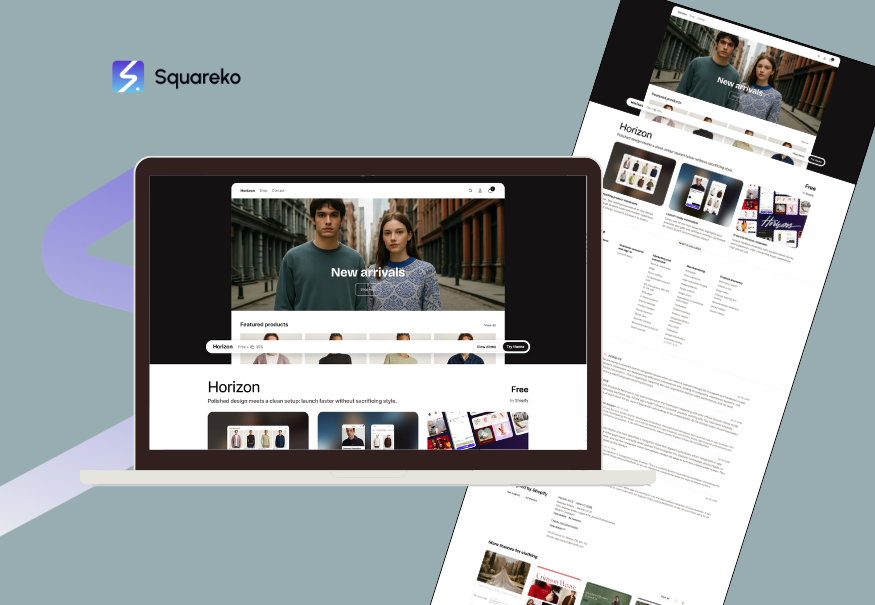
Horizon is a modern, minimalist template that appeals to tech-forward audiences and digital creators. It features a contemporary design that doesn't feel dated and includes strong e-commerce functionality beneath the sleek surface.
Why it's ideal for digital products:
Ultra-fast loading performance critical for conversion
Mobile-first design approach
Clean product presentation without unnecessary elements
Excellent account and dashboard integration
Built for creator economy businesses
Best suited for: Digital tools, software-as-a-service adjacent products, online communities, subscription digital products
Conversion strengths: The minimal distraction keeps focus on value proposition and call-to-action. Faster loading times reduce abandonment and improve search ranking.
Template Categories: Which Type Fits Your Product?
Not all digital products require the same template approach. Consider what type of digital product you're selling to narrow down the best fit.
Template Category: Digital Courses and Educational Content
If you're selling online courses, educational programs, or learning bundles, prioritize templates with:
Clear curriculum outlines that detail course content
Student testimonials and success stories prominently featured
Sample lesson or preview section to demonstrate quality
About the instructor section building credibility
Strong newsletter integration for ongoing student engagement
Best templates: Seventh, Brandyman
Why: These templates provide space to build credibility and context around your educational offering, which is essential when customers are investing in learning.
Template Category: Design Assets and Templates
For selling design templates, UI kits, graphic collections, or document templates, focus on:
Large image galleries showcasing template designs
Multiple layout variations displayed
Download preview functionality
Organized product categorization
File format and compatibility clearly communicated
Best templates: Alchemy, Momentum
Why: Visual presentation is everything for asset-based products. These templates prioritize beautiful imagery and clear organization.
Template Category: Digital Tools and Software
If you're selling SaaS tools, software, or digital applications, look for:
Feature showcase sections with detailed explanations
Integration information clearly presented
Technical specifications laid out accessibly
Tutorial or demo video integration
Active user community or social proof
Account and dashboard features after purchase
Best templates: Horizon, Momentum
Why: Technical products require clear communication of capabilities and integration options. These templates handle feature presentation better.
Template Category: Digital Services and Packages
For service-based digital products like coaching packages, consulting services, or done-for-you services, choose templates with:
Clear service description and outcomes
Transformation stories from past customers
Pricing tiers clearly distinguished
Call-to-action for booking or inquiry
About the service provider section
Best templates: Brandyman, Seventh
Why: Service products depend heavily on personal brand and client results. These templates emphasize the provider and outcomes.
Feature Comparison: What to Look For
When evaluating Squarespace templates for your digital product business, use this comparison matrix to identify which features matter most to your specific needs:
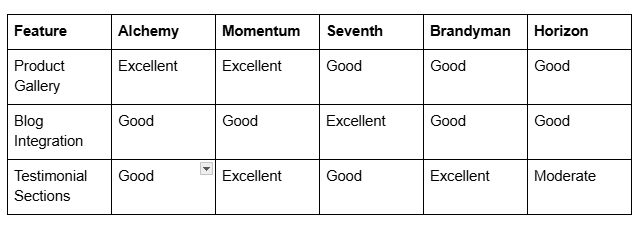
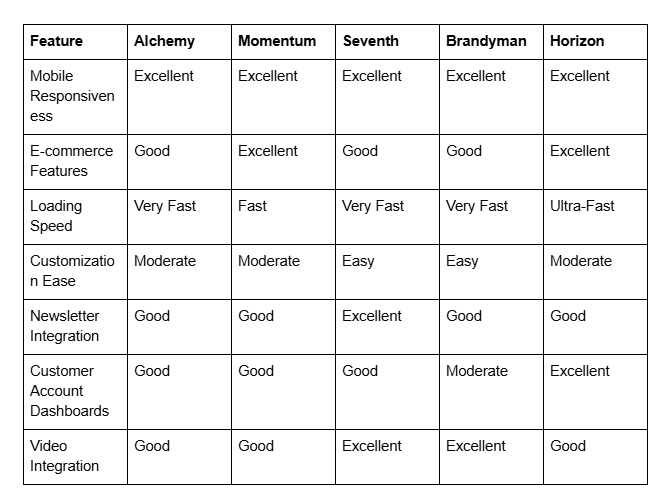
Focus on the features that directly impact your revenue. For most digital product creators, prioritize mobile responsiveness, product gallery capability, trust signals (testimonials), and e-commerce features.
Customization Without Code: Making Templates Your Own
Choosing a template is just the beginning. The real magic happens when you customize it to reflect your brand and product differentiation.
Color and Typography Customization
Squarespace templates allow extensive customization of colors and fonts without touching code. Start by:
Choosing a primary brand color that reflects your niche (premium products often benefit from deeper, richer colors)
Selecting readable sans-serif fonts for body text
Using a distinct font for headlines that reflects your brand personality
Ensuring sufficient contrast for accessibility and readability
Testing how your color scheme looks across different products
Product Page Customization
Each product deserves a tailored presentation even within the same template:
Write compelling product descriptions that emphasize transformation, not just features
Use high-quality product screenshots or preview images
Add a features list that directly addresses buyer pain points
Include social proof elements like customer reviews and testimonial quotes
Create a clear hierarchy guiding customers from discovery to purchase
Homepage Customization
Your homepage sets the tone for the entire customer experience:
Write a clear headline that communicates your core value proposition
Feature your top three best-selling products prominently
Include a customer success section with quantified results
Add a newsletter signup above the fold for list building
Ensure your primary call-to-action stands out and uses action-oriented language
Performance and Speed Considerations
Template performance directly impacts both customer experience and search engine rankings. In 2026, website speed is a ranking factor and a conversion factor.
Why Speed Matters for Digital Products
When your product pages load in under 2 seconds, you see measurable improvements in:
Conversion rates (each additional second of load time reduces conversions by approximately 5%)
SEO rankings (Google explicitly prioritizes faster-loading pages)
Mobile experience (critical since over half of digital product sales happen on mobile)
Bounce rates (faster pages keep customers engaged longer)
Template Speed Rankings
Based on Squarespace's 2026 performance metrics:
Horizon — average page load: 1.2 seconds
Alchemy — average page load: 1.4 seconds
Momentum — average page load: 1.6 seconds
Seventh — average page load: 1.5 seconds
Brandyman — average page load: 1.7 seconds
These measurements are on standard configurations with typical product images. Actual performance depends on your image optimization and content volume.
Optimization Tips Within Your Chosen Template
Compress all product images to under 100KB using tools like TinyPNG
Use descriptive file names for images to improve SEO
Implement lazy loading for below-the-fold product galleries
Minimize the use of heavy animations and videos on product listing pages
Consider using Squarespace's built-in CDN for asset delivery
Mobile-First Design for Digital Creators
Mobile commerce is no longer secondary—it's primary. In 2026, mobile represents 58% of all e-commerce traffic and 55% of digital product purchases.
Why Mobile Design Matters Specifically for Digital Products
Digital products are purchased impulsively more often than physical products. A customer might:
Research on desktop
Make a final decision on mobile while commuting
Complete purchase on their phone
Access their purchased product immediately
Your template must support this entire journey seamlessly.
Mobile-Specific Features to Verify
When testing your chosen template on mobile:
Can customers easily add products to cart with one hand?
Is the checkout process limited to 2-3 screens maximum?
Do product images scale properly and remain clear?
Are testimonials and trust signals still visible without scrolling excessively?
Does the site load in under 3 seconds on 4G connections?
Are buttons large enough to tap without accident?
Mobile Customization Opportunities
Most Squarespace templates allow mobile-specific customization:
Stack testimonials vertically on mobile (easier reading)
Show only top product features on mobile, with expandable details
Simplify navigation to essential sections on mobile
Use shorter headlines that don't wrap awkwardly
Ensure form fields remain accessible and properly sized
Integration and Automation Features
Your template choice should facilitate business automation and reduce manual work. Look for templates that integrate with:
Email Marketing Integration
Klaviyo integration for sophisticated post-purchase automation
ConvertKit integration if you're building an audience as a creator
MailerLite integration for affordable list management
Built-in newsletter signup blocks throughout the site
These integrations allow you to automatically email customers post-purchase product access, upsell related products, and build long-term relationships.
Analytics and Tracking
All Squarespace templates support Google Analytics, but some make implementation easier:
Built-in conversion tracking for product purchases
Customer behavior heatmaps to identify optimization opportunities
Revenue attribution by traffic source
Payment Processing Integration
Squarespace templates support:
Stripe for payment processing
Square for combined e-commerce and point-of-sale
PayPal for expanded payment options
Digital product delivery automation
Ensure your chosen template clearly handles:
Instant file delivery after purchase
License key generation (if applicable)
Customer account access for download management
Receipt and confirmation email automation
Pricing and Value Analysis
Template investment is a one-time cost that impacts your business for years. Consider the value beyond the initial purchase price.
Squarespace Template Pricing (2026)
All Squarespace templates are included with your website subscription—no separate purchase required. Your template investment is wrapped into your monthly Squarespace plan:
Basic plan: $16/month
Business Basic: $23/month
Business Plus: $33/month
Business Advanced: $65/month
You get unlimited template switching, so choose based on current needs without permanent commitment.
Value Considerations Beyond Price
Return on investment through conversion rates: A template that increases your conversion rate from 1% to 2% on 100 monthly visitors generating average $50 revenue per purchase improves monthly revenue from $50 to $100—an extra $600 annually from the same traffic.
Time savings through features: A well-designed template with integrated testimonials, product galleries, and automation reduces setup time by 10-15 hours. At $25/hour value of your time, that's $250-375 in direct savings.
Long-term brand perception: A professional, modern template builds credibility that justifies premium pricing for your products. You might charge 10-15% higher prices on average simply due to improved brand perception.
Getting Started: Implementation Best Practices
Step 1: Audit Your Current Site (if applicable)
Before switching templates:
Document top-performing pages and conversion metrics
Note any custom code or plugins you rely on
Save product descriptions and images
Export customer data and analytics
Step 2: Plan Your Template Structure
Map out your site structure:
Decide how many product categories you need
Determine if you'll include a blog
Plan your homepage layout and messaging
Identify what testimonials or case studies you'll feature
Step 3: Prepare Your Content
Have ready before implementation:
Professional product images (at least 3 per product)
Compelling product descriptions (100-300 words minimum)
Customer testimonials with names and photos
About section content explaining your background and credibility
Clear product categorization strategy
Step 4: Implement Systematically
Customize branding first (colors, fonts, logo)
Set up core pages (homepage, about, product catalog)
Add email integrations and analytics tracking
Set up payment processing and automatic delivery
Test the entire customer journey from discovery to post-purchase
Step 5: Test Thoroughly
Before launching:
Test on multiple devices and browsers
Complete a test purchase to verify delivery
Check all links and navigation
Verify all integrations are working (email, analytics, payment)
Get feedback from a beta user outside your team
Conclusion
Your template choice is a foundational business decision that influences conversion rates, customer trust, and long-term brand perception. In 2026, the best templates for digital product businesses strike a balance between visual excellence, conversion optimization, and technical performance.
Alchemy excels for premium positioning with beautiful product showcases. Momentum handles large product catalogs with sophisticated filtering. Seventh integrates content and commerce powerfully. Brandyman emphasizes personal brand authority. Horizon offers maximum performance for technically-minded creators.
Start by identifying your digital product type, then match it to the template that addresses your specific needs. Remember that template switching is a core Squarespace feature—you're not locked into a choice. However, choosing wisely from the start saves implementation time and reduces customer confusion during your crucial early growth phase.
Your template is one of the most important decisions you'll make in your first months as a digital product creator. Choose thoughtfully, implement thoroughly, and optimize continuously based on customer behavior and conversion data.
CTA Section
Ready to launch your digital product business with a high-converting Squarespace site?
The right template is just the beginning. At Squareko.com, we specialize in helping digital product creators build websites that actually convert. Our team understands the specific needs of template creators, course builders, and asset marketplace operators.
We can help you:
Select and customize the perfect template for your product niche
Optimize your product pages for maximum conversion
Set up email automation and customer delivery systems
Implement SEO strategy to drive organic discovery
Create a brand experience that justifies premium pricing
Get a free website audit for your digital product business. Contact Squareko today to discuss your vision and how we can accelerate your launch.
Frequently Asked Questions
-
Yes, you can change templates anytime with Squarespace. Your URL structure, content, and redirects remain intact, so you won't lose SEO value. We recommend documenting your top-performing pages before switching so you can recreate their layout and design in your new template.
-
Momentum handles product diversity best. It allows multiple product categories, variations, and flexible layout customization. You can display courses, templates, and software tools side-by-side with different presentation styles for each product type.
-
All templates integrate with major email platforms through Squarespace. Seventh has the most intuitive newsletter signup integration, while Horizon offers the cleanest implementation through Squarespace's native automation features.
-
Brandyman is strongest for community building because it emphasizes the creator/founder and tells the story of why your products matter. It creates connection that naturally builds community.
-
While no template is exclusively for courses, Seventh and Brandyman work exceptionally well because they accommodate detailed curriculum outlines, instructor bios, and student testimonials. Both allow the educational narrative that course marketing requires.
-
Test directly by:
Visiting your potential site on your smartphone
Adding a product to cart and completing a test purchase
Accessing your account dashboard from mobile
Testing on both iPhone and Android devices Test during peak hours to understand real-world performance.
-
Yes. Squarespace allows custom hex color input for all template elements. Additionally, you can upload custom CSS for advanced color customization (though not recommended for most users). Ensure your custom colors maintain sufficient contrast for accessibility.
-
No. All customer data, orders, and transaction history stay with your Squarespace account, completely separate from your template choice. You can switch templates without losing any business data. The customer dashboard and order history remains consistent.

From custom website design to SEO strategy, we help businesses launch a site that looks professional and performs better.

Author Bio
I'm Walid Hasan, a Certified Squarespace Expert and Squarespace Circle Platinum Partner with over 12 years of hands-on experience designing and optimizing high-performing websites. Over the years, I've had the privilege of building more than 2,000 Squarespace websites for clients around the world, always focusing on clean design, strong user experience, and conversion-driven results.
