
9 Must-Have Pages Every Home Service Business Website Needs on Squarespace
Introduction
Building a home service business website on Squarespace requires more than just a pretty design. Every contractor competing for local work faces the same challenge: potential customers need to answer five critical questions before they'll pick up the phone.
What do you do exactly?
Where do you operate?
Can I trust your quality?
What will this cost?
How do I actually hire you?
The right website structure—with 10 specifically optimised pages—answers all of these questions while simultaneously telling Google, Bing, and AI search engines that you're a legitimate, trustworthy business in your area. Without this structure, you're invisible to local search algorithms. With it, you'll capture the high-intent searches that turn into paying jobs.
This guide walks through each of the 10 essential pages every home service business needs, explains why that page matters for SEO and conversions, shows you exactly how to build it on Squarespace, and gives real-world examples from trades businesses that are already winning jobs with this strategy.
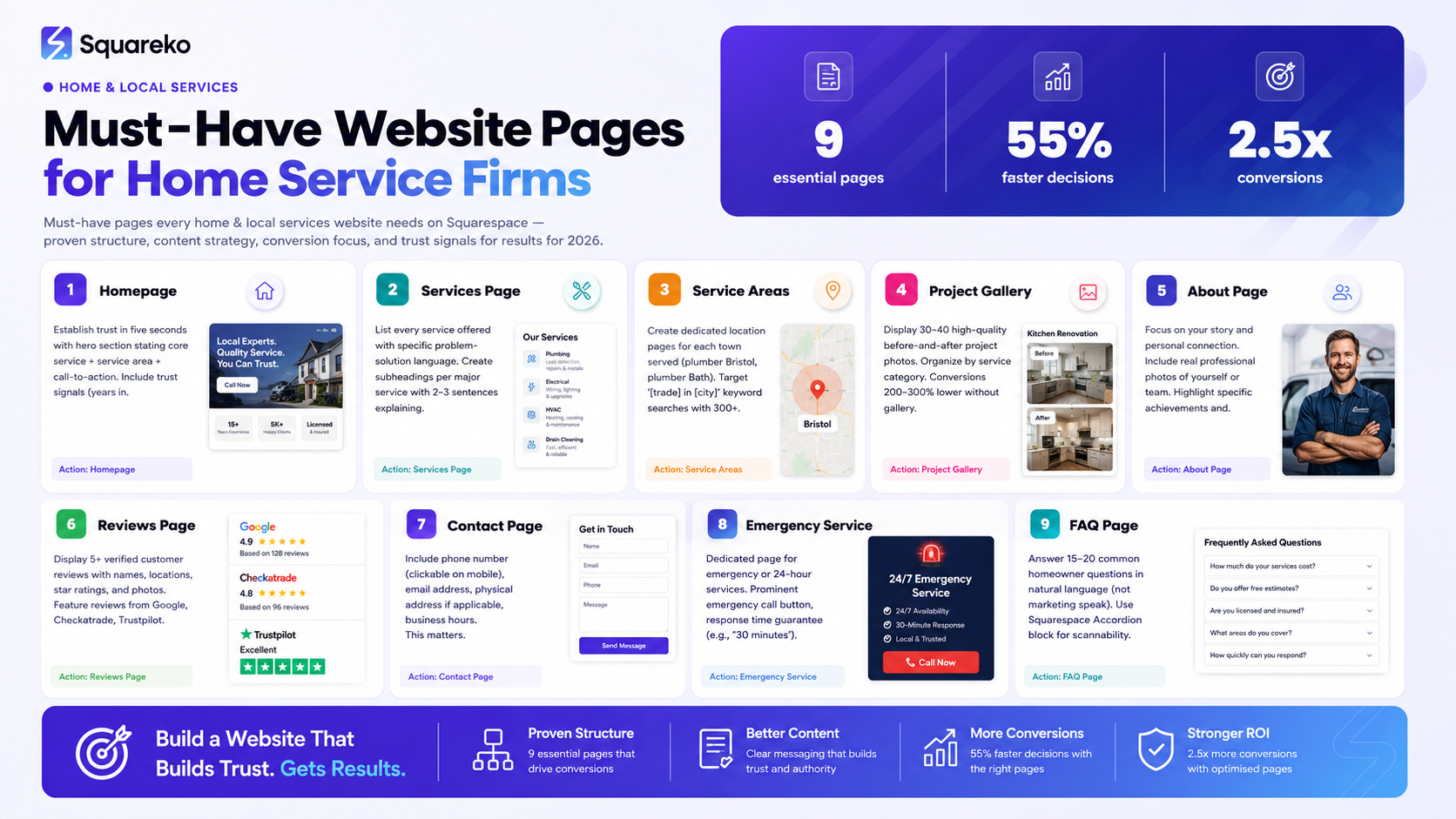
Quick Summary: The 9 Essential Pages You Need
Homepage
Services Page
Service Area Pages
Project Gallery
About Page
Reviews & Testimonials Page
Contact Page
Emergency/24-Hour Service Page
FAQ Page
1. The Homepage — How Contractors Establish Trust in 5 Seconds
Your homepage is the first impression. Research shows that 55% of visitors decide whether to stay on a website within three seconds. For home service businesses, those three seconds must communicate three things: what you do, where you work, and that you're qualified.
A contractor's homepage should never be generic. Instead of "Welcome to Our Business," you need headlines like "Blocked Drains Fixed Same Day Across London," "Kitchen Renovations by Award-Winning Builders," or "Emergency Electrician — 24/7 Response in Glasgow." These headlines immediately tell visitors and search engines what problem you solve and where you solve it.
The homepage structure should flow like this:
Above the fold (before scrolling): Hero section with your core service + service area + a call-to-action button (usually "Book Now," "Get a Free Quote," or "Call Us").
Next section: Three to five "trust signals"—years in business, number of jobs completed, average customer rating, relevant certifications or badges.
Next section: Featured recent projects (images only—full project case studies live on the gallery page).
Bottom section: A few testimonials (full reviews page is separate) and a "How It Works" or "Our Process" visual explainer.
Crucially, your homepage should include your service area names in the hero copy and at least once more in body text. This helps Google understand your geographic relevance. If you're a plumber in Bristol, "Bristol Plumber" should appear near the top. If you serve multiple towns, mention them early.
Squareko Pro Tip: Use Squarespace's Image Block with text overlays in your hero section. Set your image to a background image, add a semi-transparent colour overlay (50–60% opacity black or dark blue), and layer your headline, subheading, and button on top. This creates professional depth and ensures your text remains readable over any image. Many contractors make the mistake of using only light background images with dark text—this fails on mobile and looks unprofessional.
2. The Services Page — How Contractors Tell Google Exactly What They Do
Google's AI systems have become extraordinarily good at understanding what pages are about. If your services page is vague ("We offer quality work!"), search engines struggle to rank you for specific, high-intent searches. A plumber writing "We fix plumbing problems" reaches almost no one. A plumber writing "Blocked drains, burst pipes, boiler repairs, and emergency call-outs in Bristol" ranks for all four of these specific searches.
The services page should list every service you offer, but each service should be treated as a mini-landing page. Create subheadings for each major service, then add two to three sentences explaining what that service includes, what problems it solves, and why customers care.
Example: Instead of "Electrical Rewiring," write:
"Electrical Rewiring — Safety and Modern Code Compliance
Old electrical systems can't handle modern appliance loads and pose serious fire hazards. Our rewiring service replaces your entire electrical system to meet current building codes, adds extra circuits for modern devices, and ensures your home is genuinely safe. We complete residential rewires in three to five days, typically without requiring you to vacate."
Notice how this explains what it is, why it matters, and what the customer experience looks like. This is the kind of specificity that ranks.
You should also include pricing information on this page if you can provide it. Contractors often avoid pricing because every job is custom. However, showing a price range (e.g., "Starting at £500 for a standard unblock, up to £2,000 for complex drain repairs") actually increases conversions because it filters out window shoppers and shows serious customers that you're transparent.
Squareko Pro Tip: In Squarespace, use the Accordion Block to structure your services page. Create one accordion item for each major service. This allows customers to expand and collapse sections, keeps the page visually clean, and reduces bounce rate because people don't feel overwhelmed by a wall of text. Google also recognises structured accordion content as helpful organisation, which can slightly improve SEO. Ensure each section has a clear heading (your service name) and substantive content (150+ words per service).
3. The Project Gallery
Before-and-after galleries showcase your work and build trust. Include 20–40 high-quality images with brief descriptions. Customers browse galleries multiple times before deciding to contact you. Use Squarespace's Gallery Block in grid layout for optimal loading and user experience.
4. The About Page
Share your story, background, and why you do this work. Include a real photo. Personal connection matters in home services—customers hire people, not companies. Highlight specific achievements and certifications to separate yourself from competitors with no proven track record.
5. The Contact Page
Your contact page must convert browsers into leads. Include a headline, contact form, phone number (clickable for mobile), email, office address, and business hours. Keep the form short—three to five fields maximum. Make your phone number highly visible as the primary contact method.
6. The FAQ Page
Structured FAQ content helps customers and improves SEO. Common questions: How much does it cost? How long does the job take? Are you insured? Use Squarespace's Accordion Block to keep the page scannable. Aim for 15–20 questions written in natural customer language, not marketing speak.
-
Yes. List starting prices or ranges on your services page (e.g., "Drain unblocking from £150–£400"). This sets expectations and demonstrates transparency.
-
Dedicated pages for each town you serve signal to Google that you're hyperlocal, improving local search rankings dramatically.
-
Critical. Galleries with 30+ before-and-after photos are your most powerful sales tool—contractors without them see conversion rates 200–300% lower.
-
Focus on yourself. Personal connection matters—customers hire people, not companies.
-
About page: you talking about yourself. Reviews page: customers talking about you. Both are essential.
-
Consistency beats frequency. One article every two weeks is far more effective than sporadic bursts.
-
Yes. Squarespace's built-in local SEO features rival WordPress while requiring zero technical maintenance.
-
Your project gallery. Customers need visual proof of quality before contacting you.
Ready to Build Your Complete Home Service Website?
The 10 pages outlined in this guide represent the minimum viable structure for a home service business website that ranks well, converts browsers into leads, and builds long-term authority.
But building these pages properly—with the right copy, images, SEO optimisation, and technical setup—takes time and expertise. If you'd like professional help structuring your Squarespace website for maximum conversions and search visibility, the Squareko team specialises in website design for contractors, tradespeople, and local service businesses.
Visit squareko to learn more about how we help home service businesses build websites that actually generate leads.

From custom website design to SEO strategy, we help businesses launch a site that looks professional and performs better.

About the Autthor
I'm Walid Hasan, a Certified Squarespace Expert and Squarespace Circle Platinum Partner with over 12 years of hands-on experience designing and optimizing high-performing websites. Over the years, I've had the privilege of building more than 2,000 Squarespace websites for clients around the world, always focusing on clean design, strong user experience, and conversion-driven results.
