
5 Therapy Website Mistakes That Stop Clients Reaching Out on Squarespace
Introduction
You've invested in a Squarespace website. You've set up scheduling, written an About page, and published some content. But the enquiries aren't coming. Or they're trickling in slower than they should. Your practice should be busier, and you can't figure out why.
The problem isn't usually the website itself—it's that small, easily-fixable mistakes are silently killing your client conversions. A therapy-seeker lands on your site, feels a moment of hesitation, and leaves without making contact. These mistakes are subtle enough that you might not notice them, but they're significant enough to stop a vulnerable potential client from taking the leap.
In this guide, we'll identify five critical mistakes that stop therapy-seekers from reaching out, then give you the exact fixes to implement on your Squarespace site. Each mistake is fixable, and the results can be dramatic.
Key Takeaways
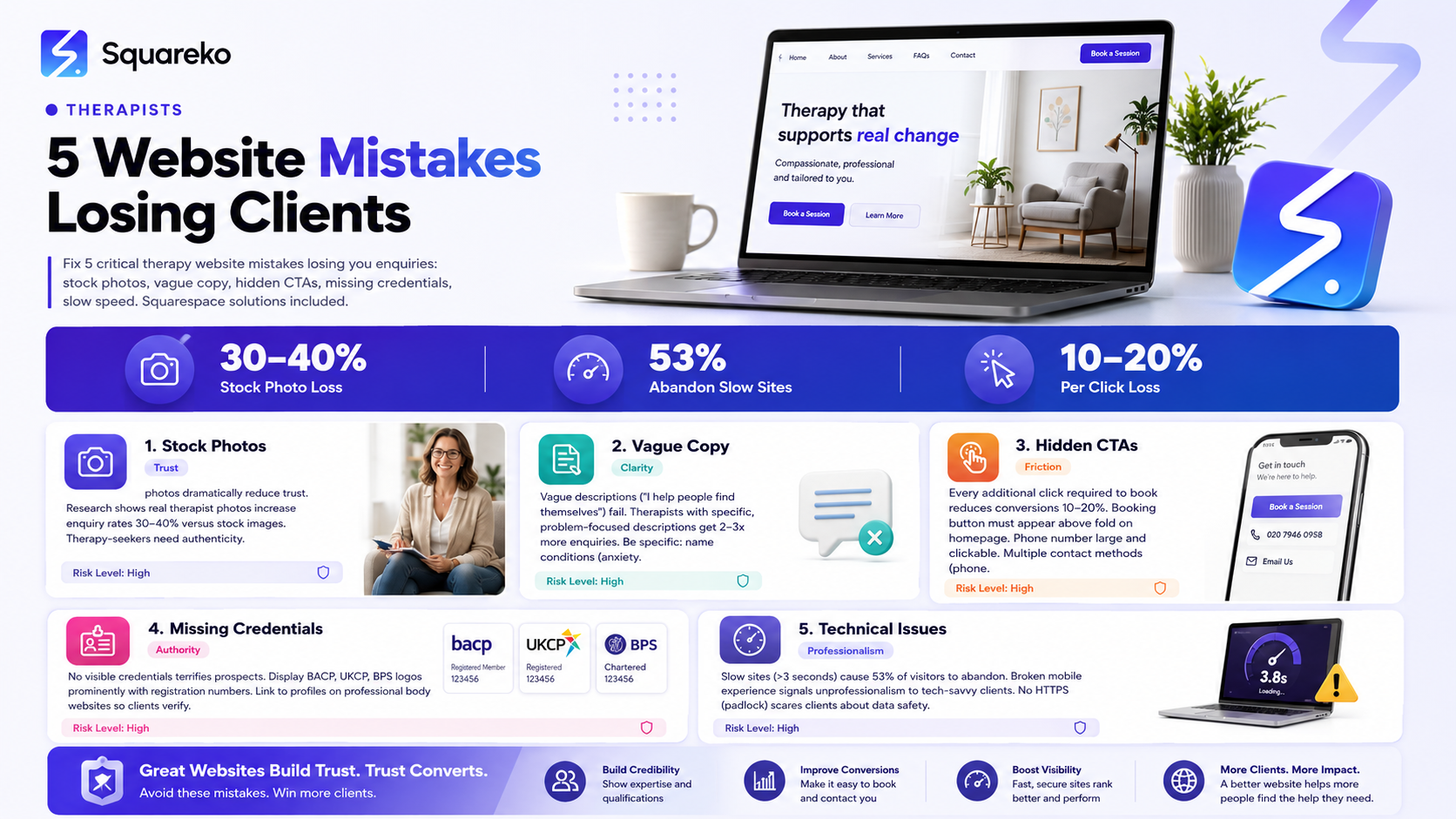
Generic stock photos instead of your real photo dramatically reduce trust and enquiry rates
Vague service descriptions ("I help people find themselves") fail to show potential clients you understand their specific problems
Hidden or unclear contact/booking buttons require too much friction from anxious prospects
Missing professional credentials and memberships (BACP, UKCP, BPS logos) fail to signal authority
Slow loading, broken mobile experience, or lack of HTTPS security scare tech-savvy clients and signal unprofessionalism
Mistake 1: Generic Stock Photo Instead of a Real Therapist Photo
The Problem
Your Squarespace homepage features a professional-looking stock image: a woman in a suit sitting in a chair, smiling vaguely at the camera. She looks like a businessperson, a consultant, maybe an accountant. She could be anyone. She definitely isn't you.Your therapy-seeker lands on your site and has a moment of doubt: "Is this a real therapist, or a corporate service? Can I trust this person with my mental health?" The stock photo, however professionally shot, undermines trust before you've even introduced yourself.Research on therapy websites consistently shows one finding: real therapist photos increase enquiry rates by 30-40% compared to stock images or no photo at all. When potential clients see your actual face—with genuine warmth, professionalism, and humanity—they feel seen. They think, "This is a real person. I can trust them."
A stock photo says the opposite. It says, "We prioritised a slick image over authenticity. We might be hiding something."
The Fix
Replace your stock photo with a real, recent photo of yourself. Here's what makes a therapy website photo work
It's actually you — Not a model, not an AI-generated image, not someone who "looks kind." Your face.
It's recent — Taken in the last 1-2 years so it looks like you do now, not how you looked five years ago.
Professional but warm — You're wearing appropriate clothing (doesn't have to be a suit; just look like yourself in session), and your expression is calm and approachable. Smile slightly. Make eye contact with the camera.
Good lighting and focus — You can get this from a professional headshot photographer (£100-300), or from a friend with a decent camera and natural lighting.
Appropriate background — Neutral, professional background. Your office if it's calm, a plain wall, outdoor natural setting. Not your bathroom mirror, not a cluttered desk.
Appears in multiple places — Your homepage hero section, your About page, next to testimonials, in your team/therapist section if applicable.
Squarespace Implementation:
Go to your homepage
Find the hero image or main image block
Replace the image with your real photo
Adjust the image settings to ensure it displays clearly on mobile
Repeat for About page, and any section where you're introducing yourself
Do this today. It's the single most effective change you can make to your therapy website.
Mistake 2: Vague Service Descriptions That Don't Address Specific Problems
The Problem
Your services section reads like this:
"I offer therapy for anyone struggling with life challenges. I use a holistic, integrative approach to help you find your best self. I believe in meeting clients where they are and helping them achieve their potential."
This sounds warm and inclusive. But does it help a therapy-seeker understand whether you can help them?
A therapy-seeker with social anxiety reads this and thinks: "Does this person understand social anxiety specifically? Can they help me, or will I be wasting time talking about vague life challenges?"
A therapy-seeker grieving the loss of a parent reads this and wonders: "Is grief therapy something this person specialises in, or am I another generic 'struggling client'?"
Vague descriptions fail to convert because they don't address specific problems. Therapy-seekers are specific. They're not looking for "help with life challenges." They're looking for someone who understands anxiety disorder, or grief, or relationship difficulties, or trauma—and can help with their specific issue.
Research shows: therapists with specific, problem-focused service descriptions get 2-3 times more enquiries than those with vague descriptions. Specificity signals expertise.
The Fix
Replace vague descriptions with clear, specific statements addressing the problems you actually help with.
Instead of:
"I help people with emotional challenges using an integrative approach."
Write:
"I specialise in anxiety disorders, including generalised anxiety, social anxiety, panic disorder, and health anxiety. I use CBT to help you understand what drives your anxiety and gradually build confidence in situations you've been avoiding. Most clients see significant improvement within 8-12 weeks of twice-weekly sessions."
This description:
Names specific conditions (anxiety disorders, not "emotional challenges")
Specifies your modality (CBT, not "integrative approach")
Explains what you actually do (identifying thought patterns, gradual exposure, not vague "emotional support")
Sets realistic expectations (8-12 weeks, twice-weekly)
Create service descriptions for each area you specialise in:
Example for grief:
"I work with adults navigating the loss of a loved one. Whether you're dealing with grief after a recent death or complicated grief that hasn't shifted in years, I help you honour your relationship with the person you've lost while gradually rebuilding your life. I'm trained in grief-focused therapy and understand that grief isn't something to 'get over'—it's something to integrate. Sessions are flexible and can focus on talking, writing, or whatever feels helpful for you."
Example for couples therapy:
"I see couples struggling with communication, disconnection, or conflict. Using emotionally-focused therapy (EFT), I help partners understand the patterns that keep them stuck and rebuild emotional safety in the relationship. I work with both same-sex and different-sex couples, and with couples in all stages of commitment."
Example for trauma:
"I specialise in trauma recovery using EMDR (Eye Movement Desensitisation and Reprocessing) and trauma-focused CBT. If you've experienced sexual assault, abuse, accident trauma, or other traumatic events, I can help you process and recover from those experiences. Trauma therapy requires specialist training; I'm certified in EMDR and trained in trauma-focused approaches."
Squarespace Implementation:
Go to your Services page (or create one if you don't have one)
For each service, write a clear description (100-200 words) that:
Names the specific condition or problem
Explains your approach
Describes what clients can expect
Sets realistic timeframes
Use Squarespace's text block with headers and bullet points for scannability
Add this specific copy to your About page and homepage as well
Specificity is trust. Vagueness is doubt.
Mistake 3: Missing or Buried Contact and Booking CTAs
The Problem
Your Squarespace website is beautiful. Your About page is thoughtful. Your content is valuable. But where do you book? A therapy-seeker has to hunt for it.
Maybe your booking button is in the navigation menu, but not in the hero section. Maybe you have a "Contact" page, but no direct booking link. Maybe your phone number is hidden at the bottom of the page in tiny text.
Friction at this stage is fatal. Your therapy-seeker is already anxious. They're already vulnerable. Forcing them to click through multiple pages or squint to find your contact information adds to their anxiety. Many will leave rather than do the extra work.
Studies on therapy websites show: every additional click required to reach a booking option reduces conversions by 10-20%. If someone has to navigate through three pages to find your phone number, you've lost 30-60% of interested prospects.
The Fix
Make contact and booking options ridiculously easy to find.
1. Homepage Hero CTA
Your homepage should include a clear, visible call-to-action above the fold (no scrolling required):
"Book a Free Consultation" or "Schedule Your First Session" or "Get in Touch"
Button colour: Use a warm, inviting colour (soft blue, teal, or warm green). Don't use bright red or aggressive colours—they feel harsh to anxious prospects.
2. Multiple Contact Methods
Offer multiple ways to reach you:
Online booking button (goes to your Squarespace Scheduling)
Phone number (clickable, prominent, large font)
Email link
Contact form (if you prefer email responses)
Different people are comfortable with different contact methods. Some will only call. Others prefer email. Offering options removes barriers.
3. Sticky Navigation CTA
On Squarespace, you can add a "Book Now" button to your navigation header that stays visible as users scroll. Users should be able to book without scrolling back to the top.
4. Clear Booking Page
Create a dedicated page titled "Book a Session" or "Schedule Therapy" that includes:
Your available appointment types (free consultation, initial assessment, ongoing therapy)
Pricing
What to expect
Direct booking link
Phone and email backup
5. End-of-Page CTA
On every major page (About, Services, Blog posts), include a CTA at the bottom:
"Ready to take the next step? Book your free consultation or give us a call at [phone number]."
Squarespace Implementation:
Homepage: Edit your hero section and add a large button "Book Now" that links to your booking page
Navigation: Add a button in your header (Settings → Header → Add button) that links to booking
About page: Add a CTA block at the bottom
Services page: Add a CTA for each service
Footer: Include phone number and "Book Now" button
Contact page: Make this your main booking hub—booking widget, phone, email, all in one place
Pro tip: Use Squarespace's built-in Scheduling widget. It allows clients to book directly from your website without leaving to an external site, reducing friction further.
Mistake 4: No Visible Credentials or Professional Memberships
The Problem
Your Squarespace website doesn't mention your professional memberships or registration. Maybe you're BACP registered, but there's no mention of it. Maybe you have additional training in EMDR, but it's hidden in a paragraph.
From a potential client's perspective, this is terrifying. They're thinking: "How do I know this person is actually qualified? What's their training? Are they regulated? Could this be a fraud?"
Credentials are trust gold for therapy practices. A therapy-seeker doesn't understand the difference between a BACP counsellor and someone who did a weekend course and calls themselves a therapist. But they know that professional registration means accountability. It means someone is watching, ensuring standards are met.
If you're not displaying your credentials prominently, you're leaving trust on the table.
The Fix
Display your professional memberships and credentials clearly and prominently.
1. Professional Body Logos and Links
Add your professional body logos to your About page and/or homepage:
BACP Registered Counsellor logo (with link to your profile on BACP's directory)
UKCP Registered Psychotherapist logo (with link to UKCP directory)
BPS Registered Psychologist logo (with link to BPS directory)
BABCP (British Association for Behavioural and Cognitive Psychotherapies) if applicable
NCS (National Counselling Society) if applicable
These logos are recognisable symbols of professionalism. Include them with links so prospects can verify your registration independently.
2. Registration Numbers
Include your registration number with your name:
"Jane Smith, BACP Registered Counsellor (Registration #123456)" "John Davies, UKCP Registered Psychotherapist (Accredited Member #789)"
Registration numbers are verifiable. They signal transparency.
3. Qualifications and Training
List relevant qualifications:
"MSc Counselling, University of [X]"
"Level 3 CBT Training, [Training Body]"
"Certified EMDR Practitioner"
"Trauma-Focused Cognitive Behavioural Therapy Training"
Don't list every CPD course. Focus on substantive qualifications (degrees, certifications) that matter to clients.
4. Professional Standards Statement
Include a statement like:
"I am regulated by [BACP/UKCP/BPS] and adhere to their ethical codes. I undertake ongoing professional development and supervision to maintain the highest standards of practice."
This tells prospects you're accountable to someone beyond yourself.
Squarespace Implementation:
Go to your About page
Add a "Credentials" or "Qualifications" section
Upload your professional body logos (you can download them from BACP/UKCP/BPS websites)
Add alt text to images so search engines can read them
Link logos to your profile on the professional body's directory
Include your registration number, qualifications, and professional standards statement
Repeat on your homepage if you have space
Make it impossible for a prospect to question your qualifications.
Mistake 5: Slow Site, Broken Mobile, or No HTTPS
The Problem
Your Squarespace website has beautiful design and great copy, but it takes 5 seconds to load. Or the mobile version is broken—text overlaps, buttons don't work, navigation is impossible.
Here's what happens: A therapy-seeker on their phone lands on your site. It's slow. Or the layout is broken. They think: "This is unprofessional. How can I trust this therapist with my mental health if they can't maintain a basic website?"
They leave.
Research shows: 53% of mobile visitors abandon a site that takes more than 3 seconds to load. For therapy-seekers, who are already anxious and decision-averse, that percentage is likely higher.
Additionally, if your site doesn't have HTTPS security (indicated by a padlock icon in the browser), tech-savvy clients worry: "Is my personal information safe here? Is this site even legitimate?"
These technical mistakes silently kill conversions.
The Fix
1. Test Your Site Speed
Use Google's PageSpeed Insights tool (free at pagespeed.web.dev):
Go to pagespeed.web.dev
Enter your website URL
Get a mobile and desktop speed score (out of 100)
Target: Mobile score above 80, desktop above 90.
If your score is below 70, you have a problem.
Common causes of slow Squarespace sites:
Large, unoptimised images
Too many Squarespace extensions or third-party scripts
Poor web host performance (rare with Squarespace, but possible)
Fix:
Compress images before uploading (use TinyPNG or similar)
Reduce the number of extensions you're using
Remove unused code blocks
Update to the latest Squarespace version
2. Test Mobile Experience
On your phone (or use browser "mobile view"):
Can you read the text clearly?
Do buttons work?
Does navigation make sense?
Can you easily find contact information and booking?
If any of these fail, your mobile experience is broken.
Common mobile issues:
Text too small
Images too large (don't scale down on mobile)
Forms with fields that don't work on touch
Navigation menu hard to use
Fix:
Use Squarespace's responsive design features (all templates are responsive, but you need to test)
View your site on actual phones, not just browser emulation
Ask friends to test on their phones
Make fonts at least 14-16px
Make buttons at least 44x44px (easy to tap)
3. Ensure HTTPS and Security
Your Squarespace site should automatically have HTTPS (the "S" stands for Secure). You'll see a padlock icon in the browser address bar.
If you don't see this, contact Squarespace support—something is wrong.
Additionally:
Enable two-factor authentication on your Squarespace account
Keep your password strong
Don't store credit cards or sensitive data in unencrypted formats
Squarespace Implementation:
Check speed: Go to pagespeed.web.dev, test your site
If slow: Compress images (Settings → Image Compression or external tool)
Test mobile: View your site on actual phones, not just browser
Fix mobile issues: Use Squarespace mobile settings to adjust fonts, spacing, etc.
Check security: Visit your site in a browser and look for the padlock icon in the address bar
Enable SSL/TLS: In Squarespace Settings → Security, ensure SSL is enabled (it should be by default)
How to Audit Your Squarespace Website
Use this checklist to audit your therapy website and identify which mistakes you're making:
Mistake 1: Photo
Your homepage features your actual photo (not stock image)
Your photo appears warm and approachable
Your photo is recent (within 1-2 years)
Your photo appears on multiple pages (About, testimonials, homepage)
Mistake 2: Service Descriptions
You describe specific conditions you treat (not generic "life challenges")
You name your therapeutic approach (CBT, humanistic, etc.)
You explain what clients can expect from your work
You set realistic timeframes
Each service has its own description (not one catch-all)
Mistake 3: Contact and Booking
Your booking/contact CTA appears above the fold on your homepage
You offer multiple contact methods (phone, email, online booking)
Your phone number is large and clickable
You have a dedicated booking page
Your booking button appears in your header/navigation
Every major page has a CTA at the bottom
Mistake 4: Credentials
Your professional body logo(s) appear on your About page
Your registration number is visible
Your logos link to your profile on the professional body's directory
You list relevant qualifications and certifications
You include a professional standards statement
Mistake 5: Technical
Your site loads in under 3 seconds (test with PageSpeed Insights)
Your mobile experience is clean and functional (test on actual phone)
Your site shows a padlock (HTTPS) in the browser address bar
Forms work on mobile
Buttons are easy to tap on mobile (at least 44px)
Go through this checklist. For every item you can't check off, that's a mistake stopping clients from reaching out.
Mid-Post CTA
How many of these mistakes is your Squarespace website making?
If you checked off more than a few items above, you're losing enquiries. Every mistake is silently pushing potential clients away. And the frustrating part? They're all easily fixable.
This is where Squareko comes in. We audit therapy practice websites specifically for these conversion killers. We identify which mistakes are costing you clients, prioritise fixes, and implement them on your Squarespace site.
Most of the time, fixing these five mistakes results in a 30-50% increase in enquiries within the first month. One therapist we worked with fixed her stock photo problem and went from 1-2 enquiries per week to 4-5. Another therapist clarified his service descriptions and saw a 40% jump in qualified leads.
If you're ready to stop losing potential clients to website mistakes, let's audit your site and identify where you're leaving enquiries on the table.
Frequently Asked Questions
-
Very important. Research shows websites with genuine therapist photos get 30-40% more enquiries than those without. Your photo is often the first impression potential clients have of you. A warm, genuine, professional photo communicates trustworthiness instantly. It's the single highest-impact change most therapists can make.
-
Yes, strategically. Being transparent about who you help best (and who you might refer elsewhere) builds trust. For example: "I specialise in anxiety and depression. For clients with active psychosis or severe substance dependence, I recommend specialist assessment first." This honesty actually increases enquiries from people who are genuinely a good fit for you.
-
Enough that a potential client can immediately recognise whether you help with their issue. Aim for 100-200 words per service. Include: the problem you help with (specific), your approach (modality), what happens in therapy (process), and realistic timeframe. More than this gets wordy; less than this leaves clients guessing.
-
Include what you have. "Newly BACP Registered Counsellor (Registration #123)" is fine. You can also mention training: "I've completed Level 3 Diploma in Counselling with [Training Body] and am working toward BACP registration (expected 2026)." Transparency about your stage of credentials is better than hiding them.
-
No. Confidentiality means you can't use photos of clients (even anonymised or blurred). A professional headshot of just you is best. If you see group clients (workshops, group therapy), a photo of you alone is still appropriate.
-
No. List substantive qualifications (degree, professional certification, specialist training like EMDR) but not every CPD workshop. You want to signal expertise without overwhelming prospects. If you have 15 certifications, pick the 5 most relevant ones.
-
Quarterly (every 3 months). Check your speed, test on mobile, review whether your copy is still accurate and specific. Websites drift over time; regular audits catch decay before it costs you enquiries.
-
Start with image optimisation (compress all images), then check your extensions (Settings → Extensions). Disable extensions you're not actively using. If still slow, contact Squarespace support—they can diagnose server issues. Google PageSpeed Insights will show you specific problems (usually images or JavaScript).
Stop Losing Clients to Website Mistakes
Every day, potential clients land on therapy websites and leave without making contact. Most of the time, it's not because the therapy isn't needed or because the therapist isn't qualified. It's because of small, fixable website mistakes.
If you're ready to stop leaving enquiries on the table—to fix the mistakes that are silently losing you clients—Squareko is here to help. We audit therapy practice websites for these five critical mistakes and implement fixes that directly increase enquiries.

From custom website design to SEO strategy, we help businesses launch a site that looks professional and performs better.

About the Author
Walid | squareko
I'm Walid Hasan, a Certified Squarespace Expert and Squarespace Circle Platinum Partner with over 12 years of hands-on experience designing and optimizing high-performing websites. Over the years, I've had the privilege of building more than 2,000 Squarespace websites for clients around the world, always focusing on clean design, strong user experience, and conversion-driven results.
