
5 SaaS Website Mistakes That Kill Your Conversion Rate on Squarespace
Why SaaS Websites Fail to Convert
There's a frustrating paradox at the core of most low-converting SaaS websites: the company has built a genuinely useful product that solves a real problem, and the website looks professional, but visitors leave without signing up.
The instinct is to blame the design — maybe the site needs a redesign, a new template, a different color palette. But design is rarely the problem. Conversion failures on SaaS websites are almost always content and strategy problems.
Visitors don't convert because:
They don't immediately understand what the product does
They don't feel confident the product is real and used by people like them
They have unanswered questions about price, commitment, or risk
The copy describes the product's features but not the user's outcomes
There's no clear, specific action to take at the moment they're ready
These are fixable. None of them require a complete redesign. And all of them are common — even on Squarespace sites built with genuine effort.
Here are the five most damaging mistakes, and exactly how to fix each one.
Key Takeaways 5 SaaS Website Mistakes That Kill Your Conversion Rate on Squarespace
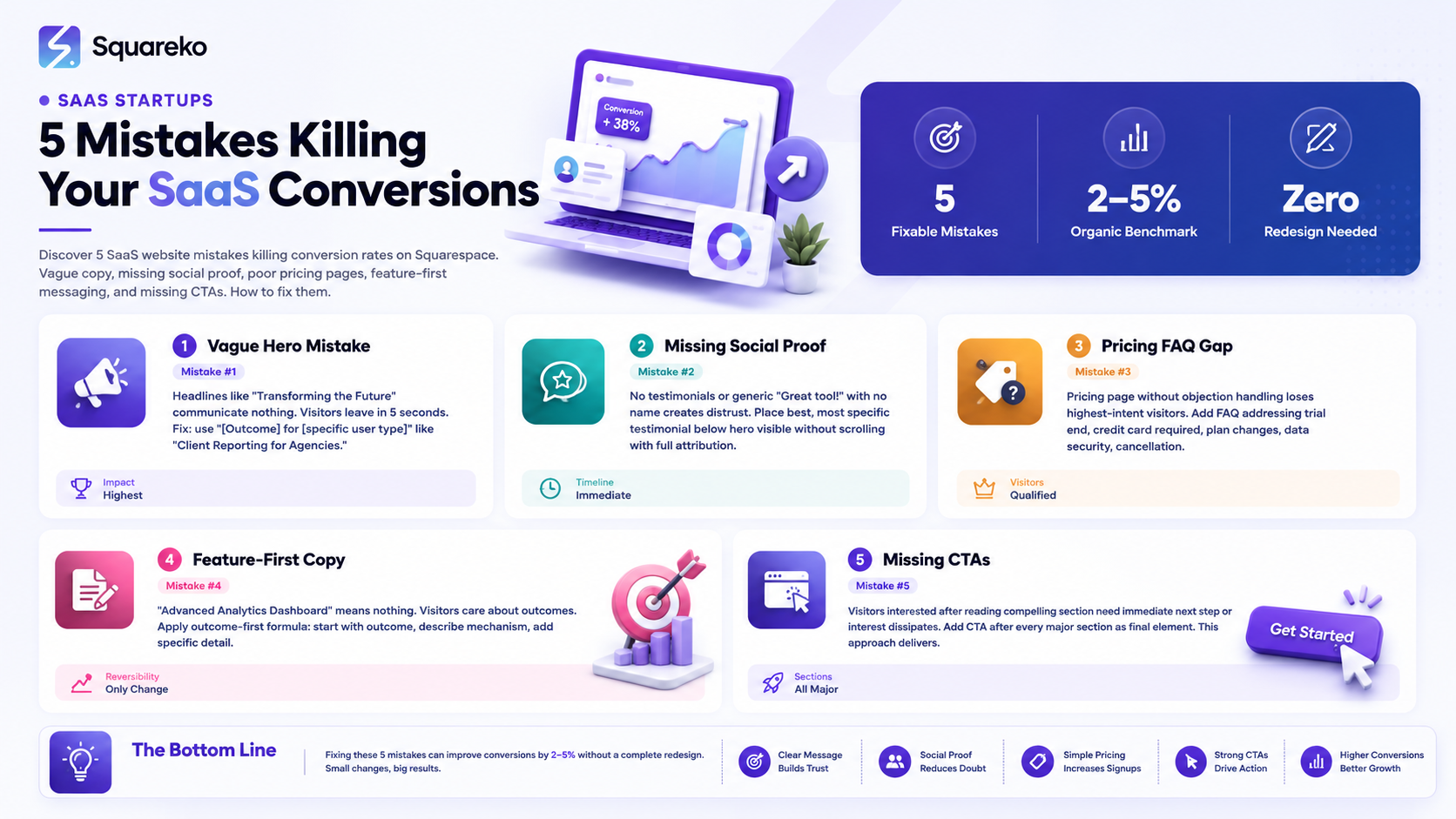
Most SaaS conversion problems trace back to 5 common mistakes — and all of them are fixable without a redesign
Vague hero copy is the single highest-impact conversion killer on most SaaS websites
Missing or misplaced social proof makes even good products feel unproven
A pricing page without objection-handling destroys trial signups among the most qualified visitors
Conversion rate is a content and strategy problem first — design rarely causes conversion failures on its own
Mistake 1: A Hero Section That Doesn't Communicate What You Do
The hero section is your highest-leverage conversion real estate. It's where visitors decide in approximately 5 seconds whether to engage with your site or leave. And it's where most SaaS websites fail first.
What it looks like:
Transforming the Future of Business Collaboration — compelling-sounding but communicates nothing specific
The Platform That Works for You — completely content-free
Streamline Your Workflow with Our Powerful Suite — what workflow? what suite?
Every visitor who reads a vague headline and doesn't immediately understand what you do is a lost conversion opportunity. They don't stay to figure it out — they leave.
Why this happens: SaaS founders often prioritize clever, aspirational language because they want to position above the competition or appeal to a broad audience. But clarity always beats cleverness for conversion. Every word that makes a visitor pause to interpret is a word reducing your conversion rate.
The fix:
Rewrite your hero headline using this framework: [Outcome] for [specific user type].
Client Reporting Automation for Marketing Agencies
Contract Management Software for Solo Lawyers and Small Firms
Inventory Tracking for E-Commerce Brands That Sell on Multiple Channels
Add a subheadline that adds the how: Automated reports go to your clients on schedule — customized, branded, and requiring zero effort after initial setup.
Test your new headline with 10 people outside your company. If they can explain what your product does after reading it, it's clear enough. If they can't, rewrite until they can.
In Squarespace: Edit your hero text block directly in Fluid Engine. Test variations by duplicating the section and toggling visibility.
Mistake 2: Missing or Generic Social Proof
Visitors don't trust marketing claims — they trust other users' experiences. Social proof is the bridge between a visitor who's interested and one who's willing to sign up. When it's absent or unconvincing, conversion rates suffer.
What it looks like:
No testimonials anywhere on the site
A testimonials section at the very bottom that most visitors never reach
Generic testimonials: Great tool, highly recommend! — with no name, no company, no specific outcome
Testimonials from Satisfied Customer or stock photo faces
All of these are conversion killers. The first because there's no proof. The rest because the proof doesn't feel real.
Why this happens: Early-stage SaaS founders often don't collect testimonials aggressively, are modest about self-promotion, or settle for whatever praise comes in without pushing for specifics. And they often place testimonials at the bottom of the page because they feel awkward promoting themselves.
The fix:
Collect better testimonials. After a positive interaction with a customer, ask specifically: Could you share what specific outcome you've seen since using [product]? Even a sentence or two would be incredibly helpful. Specific outcomes make testimonials 10x more persuasive.
Place testimonials earlier. Move your best testimonial (the most specific, most credible one) directly below your hero section or social proof bar. The visitor should see evidence of real users before they've scrolled past the fold.
Use full attribution. Name, job title, company name, and photo. All four elements together create credibility. Missing any of them weakens the effect.
For early-stage startups: Even one excellent, specific testimonial from a named beta user is better than a page with no social proof. Get that one testimonial and display it prominently while you collect more.
In Squarespace: Use a dedicated testimonial block or a styled text block with the customer quote, attribution, and photo image. Place it within the first three to four sections of your homepage.
Mistake 3: A Pricing Page Without Objection Handling
Your pricing page serves the highest-intent visitors on your site — people who have already decided they're interested enough to look at pricing. Losing these visitors is the most costly conversion failure because they were the closest to signing up.
What it looks like:
A pricing table with no context above or below it
No FAQ section addressing common pricing questions
No no credit card required statement near the CTAs
No explanation of what happens when the trial ends
Pricing that makes the visitor work to understand what they're actually getting
Why this happens: Founders build pricing pages quickly because they feel straightforward — put the tiers, put the price, add a button. But pricing anxiety is real and multifaceted. Visitors who are ready to sign up still have questions: What if I pick the wrong plan? What if it doesn't work and I'm locked in? Is my data safe? A pricing page that doesn't answer these kills conversions from visitors who would have signed up otherwise.
The fix:
Add a FAQ section immediately below the pricing table. Address at minimum: what happens when the trial ends, whether a credit card is required, how to change plans, and what cancellation looks like. These four answers resolve the most common pricing anxiety points.
Add No credit card required near every trial CTA. This single phrase is among the highest-ROI copy additions for SaaS pricing pages. It needs to be immediately visible, not buried in fine print.
Add a brief intro headline above the pricing table. Simple pricing. No hidden fees. Start free. — three short phrases that address complexity, transparency, and commitment anxiety before the visitor even looks at the tiers.
Add one pricing-specific testimonial. Someone who specifically references the value they receive for the price: We compared four tools at similar price points. This was the only one our whole team actually uses.
In Squarespace: Add a FAQ accordion below your pricing section using Squarespace's accordion block. Add the FAQ schema via code injection for featured snippet eligibility.
Mistake 4: Feature-First Messaging Instead of Outcome-First
SaaS founders who built the product tend to think in features — they know every capability intimately. So they naturally write about features. But visitors don't care about features — they care about what features do for them.
What it looks like:
Advanced Analytics Dashboard — what does it help me do?
Real-Time Collaboration Tools — so what?
Enterprise-Grade Security — I'll decide later if that matters to me
Multi-Channel Campaign Management — I'm still not sure what this product is for
These descriptions are accurate and meaningless. They tell the visitor what the product has, not what it does for them.
Why this happens: Features are concrete and verifiable — founders feel confident stating them. Benefits feel like marketing fluff to technically-minded founders. But benefits (outcomes) are what visitors convert on. Features are supporting evidence for benefits.
The fix:
For every feature, apply the outcome-first formula:
Start with the outcome the feature delivers
Describe the mechanism briefly
Add a specific, credible detail
Feature-first (weak): Advanced Automation Engine Outcome-first (strong): Your follow-up emails go out automatically, even when you forget. Set the sequence once. The system handles the rest, including personalized timing based on each lead's behavior.
Do this for every feature description on your site. It takes time, but the conversion impact is significant.
In Squarespace: Edit each feature text block directly in Fluid Engine. The layout doesn't change — only the words. A feature grid with outcome-first descriptions will convert at a meaningfully higher rate than the same grid with feature-first descriptions.
Mistake 5: No Clear Next Step at Every Conversion Point
Visitors who are interested in your product need to be guided toward action at the moment of their interest. If they read something compelling and there's no CTA nearby, they continue scrolling and the conversion moment passes.
What it looks like:
A single CTA button in the hero section and nothing else until the very bottom of the page
CTA buttons with vague copy: Learn More, Get Started, Click Here
Multiple competing CTAs at the same point (Start Free Trial AND Watch a Demo AND Book a Call — three options where one should be primary)
CTA placement that requires significant scrolling to find after any compelling section
Why this happens: Founders add CTAs where they feel natural — usually hero and footer. But visitor engagement is highest immediately after each compelling section they read — and if there's no CTA at that moment, the interest dissipates before they reach the next one.
The fix:
Add a CTA after every major section. After features: Ready to try these features? Start your free trial. After testimonials: Join 3,000+ teams already using [product]. After pricing: Start your 14-day free trial — no credit card required.
Make your primary CTA specific. Start Free Trial converts better than Get Started. Book a 20-Minute Demo converts better than Contact Us. Specific CTAs reduce cognitive load by telling the visitor exactly what will happen next.
Choose ONE primary CTA per section. Multiple competing CTAs at the same point create decision paralysis. Pick the action most appropriate for where the visitor is in their journey. Secondary CTAs (for lower-commitment actions) can appear as links beneath the primary button.
In Squarespace: Add CTA button blocks between sections in Fluid Engine. Duplicate your preferred button style for consistency. Place CTAs as the final element in each major section before the visual break to the next section.
Key Takeaways
Most SaaS conversion problems trace back to 5 common mistakes — and all of them are fixable without a redesign
Vague hero copy is the single highest-impact conversion killer on most SaaS websites
Missing or misplaced social proof makes even good products feel unproven
A pricing page without objection-handling destroys trial signups among the most qualified visitors
Conversion rate is a content and strategy problem first — design rarely causes conversion failures on its own
Quick Conversion Audit for Your SaaS Website
Before booking a Squareko call, run this 10-minute audit on your current site:
Hero check: Can someone unfamiliar with your product understand what it does from the H1 alone? (Yes/No)
Social proof check: Is there specific, attributed social proof visible without scrolling? (Yes/No)
Pricing FAQ check: Does your pricing page have a FAQ section addressing at least 4 common objections? (Yes/No)
Feature copy check: Read your three most prominent feature descriptions. Do they lead with outcomes? (Yes/No)
CTA check: After your features section, is there an immediate CTA? (Yes/No)
If you answered No to any of these, you have a fixable, high-impact conversion improvement available today. Start with the one you rated lowest and work through each one systematically.
Fix Your SaaS Conversion Rate With Squareko
Squareko identifies and fixes conversion problems on SaaS websites built on Squarespace — from hero copy to pricing page architecture to CTA placement.
FAQs
-
The most common cause is a vague hero section that doesn't clearly communicate what the product does in the first 5 seconds. Visitors don't stay to figure it out — they leave. Fixing the hero headline is typically the highest-ROI single change a SaaS website can make.
-
If your pricing page conversion rate is below 3%, your homepage bounce rate is above 70%, or visitors are leaving consistently before reaching your pricing section, you have conversion problems. Set up Google Analytics 4 with scroll depth tracking and CTA click events to identify specifically where visitors are disengaging.
-
Yes. All five mistakes in this guide are fixable through content changes and minor layout adjustments — not full redesigns. Rewriting your hero headline, adding specific testimonials, adding a pricing FAQ, rewriting feature descriptions as outcomes, and adding mid-page CTAs are all achievable within a day or two of focused work in Squarespace's Fluid Engine.
-
For organic search traffic to a SaaS homepage, 2-5% visitor-to-trial is a realistic target with a well-optimized site. Cold paid traffic typically converts at 1-3%. Product-led growth SaaS with free tiers can see 5-10% on high-intent pages. If you're below 2% on organic, the five mistakes in this guide are your starting point for diagnosis.
-
After a positive customer interaction, ask specifically: "Can you share one specific outcome you've seen since using [product]? A sentence or two about a concrete result would be perfect." The more specific the prompt, the more specific the answer. Aim for testimonials that mention a measurable outcome (time saved, result improved, problem resolved) from a named person at a named company.
-
Place your best testimonial directly below the hero or social proof bar — visible without scrolling or within the first scroll. Place 2-3 additional testimonials after the feature section. Place one pricing-specific testimonial on your pricing page. Don't hide testimonials at the bottom of the page where most visitors never read them.
-
"Start Free Trial" almost always outperforms "Get Started." Specific CTAs reduce cognitive load by telling visitors exactly what will happen when they click. "Start Free Trial" is more specific, sets clear expectations (it's a trial, not a purchase), and signals the low-commitment nature of the action. "Get Started" is ambiguous — and ambiguity costs clicks.

From custom website design to SEO strategy, we help businesses launch a site that looks professional and performs better.

Author Bio
I'm Walid Hasan, a Certified Squarespace Expert and Squarespace Circle Platinum Partner with over 12 years of hands-on experience designing and optimizing high-performing websites. Over the years, I've had the privilege of building more than 2,000 Squarespace websites for clients around the world, always focusing on clean design, strong user experience, and conversion-driven results.
