
5 Chiropractic Website Mistakes That Cost You New Patients on Squarespace
Introduction
Your website is broken, and you might not know it. Not technically broken—it loads fine, it looks decent, maybe it even converts a few patients. But structurally, it's costing you patients. Patients visit your site, don't find what they're looking for, and leave. Patients call because they can't book online. Patients are skeptical about your credentials because you haven't displayed them prominently. Patients avoid booking because they don't know what to expect at their first appointment. These aren't design problems. They're practice-killing problems. The good news: they're all fixable. Here are the five mistakes we see most often on chiropractic websites, and exactly how to fix them.
Key Takeaways
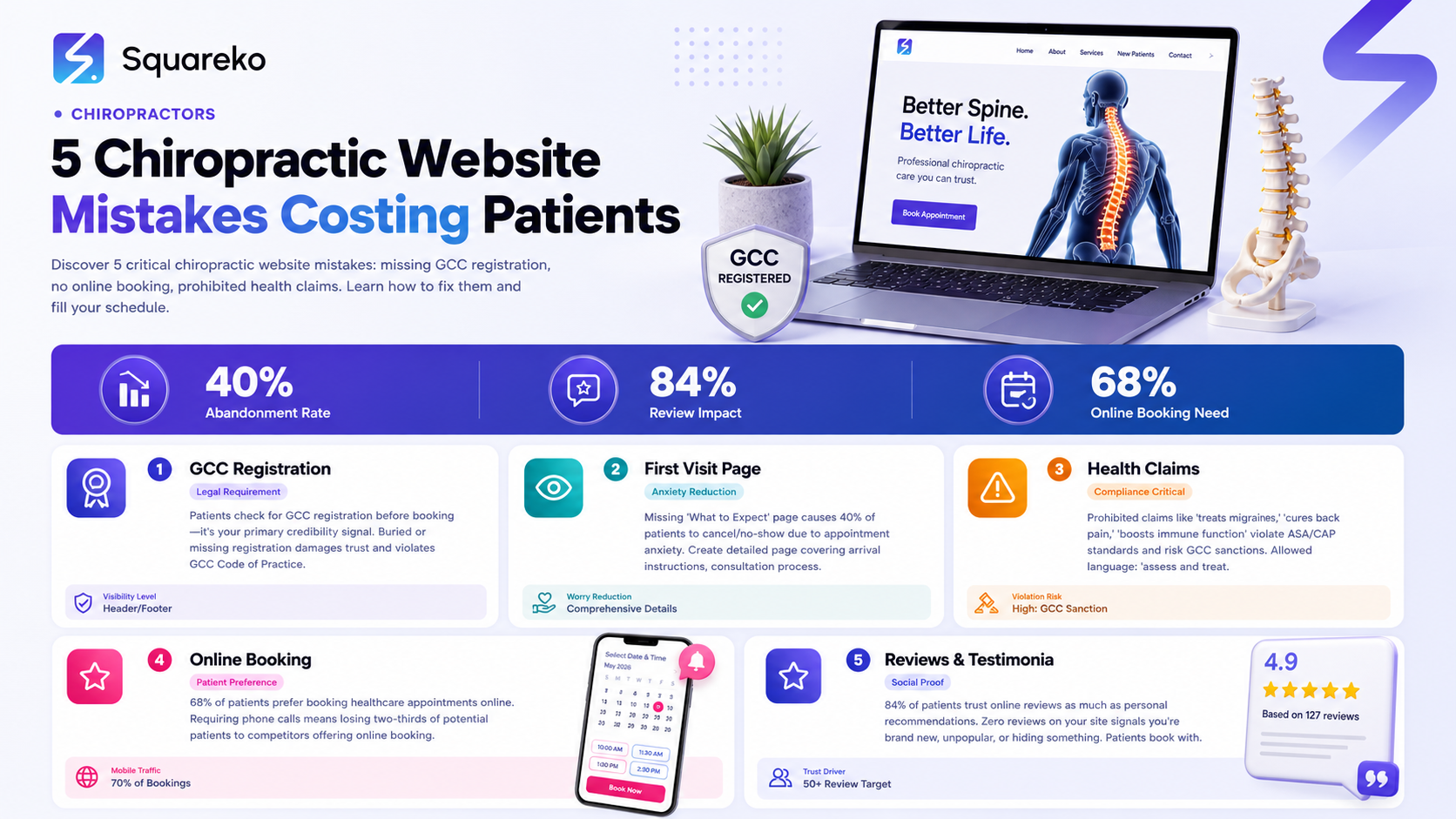
Missing or buried GCC registration numbers violate the Code of Practice and damage patient trust; your GCC registration must be visible in your header or footer and on your About page
No dedicated "first visit" page causes patient anxiety and abandoned bookings; 40% of patients abandon appointments due to unknown appointment processes
Prohibited health claims (claiming to "treat" specific diseases) violate ASA/CAP standards and can lead to GCC sanctions; all copy must use approved language like "may help" or "management of"
No online booking loses you 68% of patients who prefer to book healthcare appointments online; Squarespace Scheduling must be prominently integrated
Missing patient reviews and testimonials hurt your credibility; 84% of patients trust online reviews as much as personal recommendations, and Google reviews should be linked prominently
Mistake #1: Missing or Buried GCC Registration Number
The Problem: Patients increasingly check for GCC registration before booking a chiropractor. It's a credibility signal. If your GCC registration number is hidden or missing, patients doubt your legitimacy and leave your site to book with a competitor who displays it prominently.
Why This Happens: Many chiropractors don't realize GCC registration numbers need to be visible online. They assume patients will just trust them. They don't. Trust online is earned through visible credentials.
The Compliance Issue: The GCC Code of Practice requires your registration status to be clearly displayed. Failing to do so can result in a complaint or sanction.
The Fix:
Display your GCC registration in your header or footer — Add a simple line: "GCC-registered chiropractor (GCC Reg: Your Number)" in your header or footer on every page. Make it easily visible.
Feature it prominently on your About page — Don't bury it in a paragraph. Create a dedicated credentials section:
Credentials & Registration
- GCC Reg: Your Registration Number
- Bachelor of Science in Chiropractic,
- Years of clinical experience
- Member, British Chiropractic Association (optional if applicable)
Include it in your author bio on every blog post — "John Smith is a GCC-registered chiropractor in London with 12 years of experience. GCC Reg: [Number]."
Link your GCC registration number to the GCC directory — Go to gcc-uk.org, search your name, and verify it appears. Include a link on your About page: "Verify my GCC registration: [link to GCC directory]." This gives patients absolute confidence.
Real Example: Instead of: "John is an experienced chiropractor dedicated to patient care." Write: "John Smith is a GCC-registered chiropractor (GCC Reg: [Number]) with 15 years of clinical experience. He graduated from [University] in [Year] and specializes in lower back pain and sports injuries."
The second version immediately establishes credibility and trust.
Mistake #2: No Dedicated "Your First Visit" Page
The Problem: Patients are anxious about their first chiropractic appointment. They don't know what to expect. Will it hurt? What will the chiropractor do? How long will it take? What should I bring? This anxiety leads to appointment cancellations, no-shows, and lost revenue. Many chiropractic websites don't address this at all.
The Statistics: Research shows 40% of patients cancel or no-show appointments because they're unsure about what will happen. A clear, detailed "first visit" page reduces cancellations by 20-30%.
The Fix:
Create a dedicated page (or prominent section) titled "What to Expect at Your First Appointment" covering:
Before Your Appointment
How to book (online via Squarespace Scheduling)
What to bring (ID, insurance card, any imaging you have)
What to wear (comfortable, loose-fitting clothing recommended)
Parking and arrival instructions
Cancellation policy
Your Appointment Day (time-by-time breakdown)
Reception (5 minutes) — Check in, complete forms if online booking didn't capture them
Consultation (10-15 minutes) — Detailed history about your pain, previous injuries, health background
Physical Examination (15-20 minutes) — Posture assessment, range of motion testing, orthopedic tests, possibly X-rays
Diagnosis and Treatment Plan (5 minutes) — Your chiropractor explains what they found and recommends
First Adjustment (10-15 minutes) — What it feels and sounds like, what to expect
Post-Appointment Instructions (5 minutes) — Care instructions, exercise recommendations, when to return
After Your Appointment
What you might feel (mild soreness is normal, similar to exercise soreness)
When you'll feel improvement (varies by condition, typically 3-6 appointments to see meaningful change)
Your treatment plan (how many appointments, frequency, duration)
Next steps and follow-up schedule
Address Common Concerns
Is it painful? (No, though you might hear/feel adjustment)
Is it safe? (Yes, when performed by a qualified, GCC-registered chiropractor)
Will I need X-rays? (Depends on your condition; your chiropractor will explain if needed)
Do I need to see my GP first? (Your choice; chiropractors often work alongside GPs)
Include a Video Film a 2-3 minute walkthrough of your clinic. Show patients the reception area, consultation room, and adjustment room. This visual familiarity dramatically reduces first-visit anxiety.
Mistake #3: Making Prohibited Health Claims
The Problem: Many chiropractic websites make claims they shouldn't. "We treat tennis elbow," "chiropractic can cure migraines," "adjustments boost immune function." These claims violate ASA/CAP advertising standards and can result in advertising complaints or, worse, GCC sanctions.
Why This Happens: Chiropractors are passionate about helping patients. They believe in the value of chiropractic. But advertising standards exist to protect consumers from unsubstantiated claims. The line between acceptable and prohibited is specific.
What You Can and Cannot Claim
✓ ALLOWED:
"We provide chiropractic assessment and treatment for lower back pain"
"Chiropractic is commonly used to manage neck dysfunction"
"Spinal adjustment may help reduce muscle tension and improve mobility"
"We specialize in treatment of musculoskeletal conditions"
"[Specific clinical procedure] is used to assess and treat [musculoskeletal condition]"
✗ PROHIBITED:
"Chiropractic treats arthritis" (treats = medical claim)
"Adjustments cure migraines" (cure = absolute claim without evidence)
"We can improve immune function through spinal alignment" (outside scope)
"Chiropractic treatment prevents cancer" (unsubstantiated, outside scope)
"Spinal subluxations cause disease" (not supported by evidence in the way often claimed)
The Fix:
Audit your entire website — Go through every page. Look for words like: "treats," "cures," "prevents," "eliminates," "restores," "fixes." If they're paired with non-musculoskeletal outcomes, rewrite them.
Replace prohibited language:
Instead of: "We treat migraines" → "We provide assessment and management of neck dysfunction, which may reduce tension-type headaches"
Instead of: "Chiropractic cures back pain" → "Chiropractic assessment and adjustment are commonly used to manage back pain"
Instead of: "Adjustments boost immune function" → Delete. This claim is outside your scope.
Have someone review your copy — A mentor or colleague can spot problematic language you've become blind to. Alternatively, contact your professional body (BCA) for guidance.
Document your evidence — If you claim spinal adjustment may help neck pain, have a reference to NICE guidelines or peer-reviewed research ready. You don't need to cite it on your website, but you should have it if challenged.
Real Example of Compliant Copy: "At our clinic, we provide chiropractic assessment, spinal adjustment, and rehabilitation exercises for musculoskeletal pain conditions. Our approach focuses on assessing spinal function and mobility. Many patients with lower back pain, neck dysfunction, and sports injuries seek chiropractic care. While results vary by individual and condition, research supports spinal manipulation as an evidence-based approach within the scope of chiropractic practice."
This copy describes what you do without making prohibited claims.
Mistake #4: No Online Booking System
The Problem: 68% of patients prefer to book healthcare appointments online. If your website requires patients to call, fill out a contact form, or email to book, you're losing two-thirds of your potential patients to competitors who offer online booking. Every phone call is a friction point. Every patient who can't find your phone number during business hours books with someone else.
The Statistics:
68% of patients prefer online booking for healthcare
40% of patients abandon booking if it's too complicated
Online booking reduces no-shows by 20-30% (because patients have confirmation)
The Fix:
Integrate Squarespace Scheduling — This is non-negotiable. Set it up with:
Multiple appointment types (new patient assessment, follow-up, etc.)
Automated 24-hour and 2-hour reminders
New patient intake form (captures health history before arrival)
Optional payment collection (deposits or full payment)
Make the booking button prominent — Your Squarespace site should have a large, visible "Book an Appointment" button in:
Your header (sticky, so it's always visible as patients scroll)
Your homepage hero section
Your "first visit" page
Your footer
Reduce friction — Make sure:
Booking requires 3 clicks maximum to reach the calendar
Patients see available times immediately
Mobile experience is smooth (70% of booking attempts happen on mobile)
Confirmation email arrives within seconds
Keep your phone number visible — Include it for patients who prefer to call, but don't make it the primary path. "Prefer to call? [Phone number]" underneath your "Book Online" button.
Mistake #5: No Patient Reviews or Testimonials
The Problem: 84% of patients trust online reviews as much as personal recommendations. If your website has zero reviews and no testimonials, potential patients assume you're either brand new, unpopular, or hiding something. They book with a competitor who has 50 Google reviews instead.
Why This Matters:
Google shows review ratings in search results. A clinic with 4.8 stars (47 reviews) ranks higher in patient trust than a clinic with no reviews visible.
The first question most patients ask: "What do other patients say about this clinic?"
Patient testimonials answer objections: "Will this help me?" "What's the chiropractor like?" "Do people recommend this place?"
The Fix:
Collect Google Reviews Actively
After each positive patient interaction, ask: "Would you be willing to leave a Google review? It takes 30 seconds."
Include a Google review link in your appointment confirmation email
Add a Google review button to your website (link to your Google Business Profile)
Offer a simple incentive (not payment—that's against Google's policy): "If you've had a great experience, we'd love a review. It helps other patients find us."
Display Reviews on Your Website
Embed your Google Business Profile widget on your homepage (shows your rating and recent reviews)
Create a dedicated "Patient Reviews" page with your top reviews featured
Include a direct link to your full Google Business Profile: "Read more reviews on Google"
Create a Testimonials Section
Collect detailed testimonials from existing patients (ask in-person or via email post-appointment)
Use testimonials that include: patient name, condition treated, outcome, and (optionally) their profession or background
Include a photo if the patient is willing (photos increase trust and authenticity)
Example Testimonial: "I had chronic lower back pain from desk work. Within 3 visits to John, I noticed a significant difference. He explained what was wrong and gave me exercises to prevent it happening again. Highly recommend. — Sarah M., London"
Better than: "Great chiropractor, highly recommend! — Anonymous"
Video Testimonials (Advanced)
Ask a few happy patients to record a 30-second video testimonial
Film them at their next appointment (with permission)
Post to YouTube and embed on your website
Video testimonials convert 3x better than text
Respond to All Reviews
Reply to every Google review, positive or negative
Thank patients for positive reviews: "Thank you for the lovely review, Sarah. It was a pleasure helping with your back pain. Hope to see you soon!"
Address negative reviews professionally: "Sorry to hear your experience wasn't as expected. We'd love to discuss how we can better serve you. Please call or email us directly."
Responding to reviews signals that you care about patient feedback and actively manage your reputation.
How to Audit Your Site for These Mistakes
Use this checklist to audit your Squarespace site right now:
GCC Registration:
GCC registration number visible in header or footer
GCC registration number on About page with full credentials
GCC registration number in author bio on all blog posts
Link to GCC directory to verify registration
First Visit Page:
Dedicated "What to Expect" page exists
Page covers: arrival, consultation, examination, adjustment, post-care
Page addresses common anxieties (pain, safety, duration)
Video walkthrough of clinic embedded
Health Claims:
No use of "treats," "cures," "prevents" with non-musculoskeletal conditions
All claims use "may help," "is commonly used for," "is used to manage"
No claims outside chiropractic scope (immune function, autism, etc.)
Someone else has reviewed copy for compliance
Online Booking:
Squarespace Scheduling integration live
"Book an Appointment" button in header, homepage, and footer
Booking process is 3 clicks or fewer
Mobile booking experience tested
Automated reminders configured (24-hour and 2-hour)
Reviews & Testimonials:
Google Business Profile complete with reviews visible
Google review link embedded on website or in navigation
5+ customer testimonials on site with names/photos
Dedicated "Patient Reviews" or "Testimonials" page
You've responded to last 5 Google reviews
If you're missing more than 2-3 of these, your website is costing you patients.
Building a Compliant, Patient-Centered Website
Your Squarespace website should do four things:
Build trust — Display GCC registration, credentials, patient reviews
Address anxiety — Explain what happens at the first appointment
Enable action — Make booking simple and frictionless
Comply with standards — Avoid prohibited claims, stay within scope
Most websites only do one or two of these. The best websites do all four.
If your site is missing any of these elements, fix them this month. The cost of fixing them is zero. The cost of not fixing them is patients walking away to competitors.
Mid-Post Call-to-Action
Does your website have any of these five mistakes? Most chiropractic sites do. They're missing GCC registration, they have no "first visit" page, they're making borderline health claims, they have no online booking, or they're not collecting reviews. Each mistake costs you patients. Squareko specializes in building chiropractic websites that avoid all five mistakes. We ensure GCC compliance, integrate online booking, set up review collection, and create patient-focused copy that converts. We audit your current site and identify exactly which of these five mistakes is costing you the most patients.
Frequently Asked Questions
-
Your registration number should be visible on your homepage and About page without scrolling. If someone visits your site and has to dig for your GCC number, it's not prominent enough. Best practice: include it in your header or footer (which appears on every page) and have a dedicated "Credentials" section on your About page.
-
It can, but isn't required. A "first visit" page should primarily address patient anxiety and explain the process. If you display prices, make them clear and comprehensive: "New patient initial assessment: £80. Includes consultation, examination, and first adjustment." Don't hide fees in fine print.
-
"Helps" is much safer than "treats" or "cures," but be careful. Better framing: "Chiropractic is commonly used for lower back pain" or "Many patients seek chiropractic for neck dysfunction." This describes your clinical reality without making an absolute claim.
-
Ask every patient at their appointment. Make it a routine question: "We'd love to hear about your experience. Would you be willing to leave a Google review?" Follow up with an email containing a direct Google review link. New clinics typically get their first 20-30 reviews within the first 3-6 months if you ask consistently.
-
Respond professionally and empathetically. Don't get defensive. Example: "We're sorry to hear this wasn't your experience. We take patient feedback seriously. Please contact us directly so we can discuss and make it right." Most patients respect clinics that handle criticism maturely.
-
No, not with Google reviews. Google prohibits offering discounts, entries into contests, or payments in exchange for reviews. However, you can ask patients to leave reviews. You can make the process easy. You can thank them for leaving a review. You just can't pay them.
-
Review it once per quarter to ensure all information is current (prices, appointment availability, clinic hours). Major updates (new rooms, new procedures) should be reflected immediately.
-
Google reviews appear on your Google Business Profile and in search results. They're public, carry ratings, and are verified as coming from patients. Testimonials are customer quotes on your website (you write them in, or they submit them via a form). Both are valuable. Google reviews build SEO authority. Testimonials are more flexible and can include specific outcomes.
Your Website Should Attract, Not Repel Patients
Every mistake on your website is a reason for a patient to leave and book with a competitor. Missing GCC registration? Patient doubts your credentials. No first-visit page? Patient anxiety causes a cancellation. Prohibited health claims? Patient loses trust. No online booking? Patient books with someone who offers it. No reviews? Patient assumes you're not good enough.These five mistakes are fixable. None of them requires rebuilding your site. They're updates you can make in hours.
Squareko has helped over 150 chiropractors fix these exact mistakes. The result: more patients, more appointments, more revenue.

From custom website design to SEO strategy, we help businesses launch a site that looks professional and performs better.

About the Author
Walid Hassan is the founder of Squareko,
I'm Walid Hasan, a Certified Squarespace Expert and Squarespace Circle Platinum Partner with over 12 years of hands-on experience designing and optimizing high-performing websites. Over the years, I've had the privilege of building more than 2,000 Squarespace websites for clients around the world, always focusing on clean design, strong user experience, and conversion-driven results.
