
10 Must-Have Pages Every Beauty and Fashion Website Needs on Squarespace.
Introduction
Building a beauty or fashion website requires more than just choosing a platform—it requires strategy. Your website is your most powerful sales tool, working 24/7 to attract customers, showcase your brand, and drive conversions. Whether you're a boutique fashion retailer, a luxury salon, or an independent designer, having the right pages in place is critical to your success. Squarespace provides beauty and fashion businesses with the design flexibility and built-in ecommerce tools needed to create a professional online presence.
However, many brand owners overlook key pages that could dramatically improve customer experience and sales. This guide covers the 10 must-have beauty fashion website pages Squarespace businesses need to succeed—and exactly what to include on each one.
Quick Reference: The 10 Essential Pages
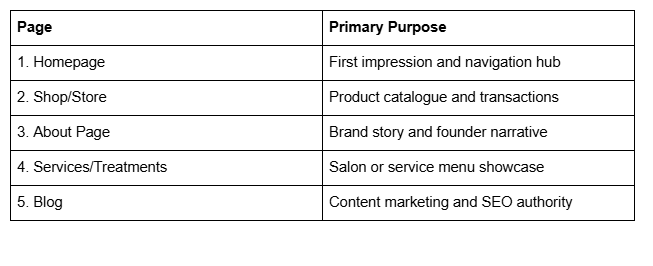
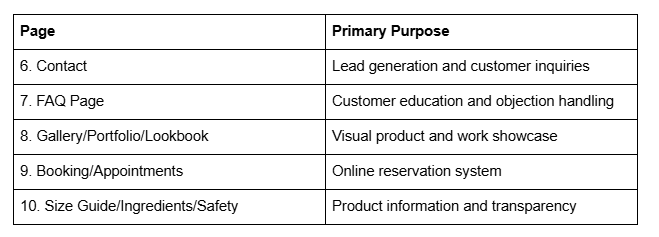
Key Takeaways 10 Must-Have Pages Every Beauty and Fashion Website Needs on Squarespace.
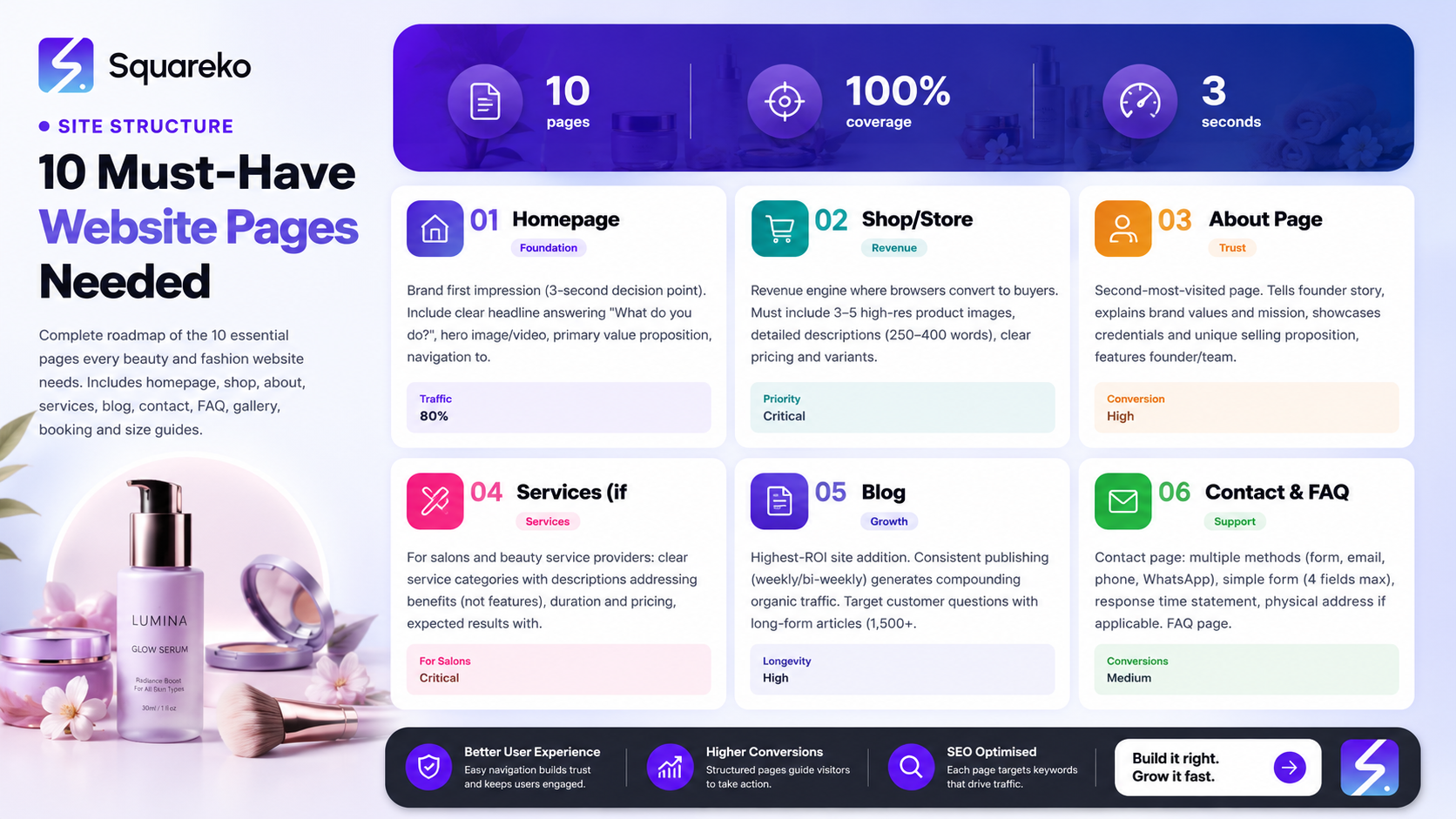
Homepage clarity is non-negotiable: Your homepage must communicate your brand story and core offerings within 3 seconds.
Product pages need both beauty and function: High-quality images, detailed descriptions, and customer reviews drive conversion rates.
Your About page is a trust builder: Founder stories and brand narratives create emotional connection with customers.
Educational pages reduce returns and complaints: FAQ, sizing, and ingredient pages build customer confidence before purchase.
Booking integration converts service-based businesses: Salon and treatment pages with live booking functionality eliminate friction in the customer journey.
SEO content compounds over time: A consistent blog strategy builds organic traffic and positions your brand as an industry authority.
Page 1: The Homepage — Your Brand's First Impression
Your homepage is the digital front door of your business. It's where 80% of visitors land first, and you have approximately three seconds to convince them to stay. A weak homepage loses customers before they've even seen your best work.
What Your Homepage Must Include
A clear, compelling headline that answers What do you do? within 10 words
A hero image or video that visually represents your brand aesthetic (professional photography is non-negotiable for beauty and fashion)
Primary value proposition explaining why customers should choose you over competitors
Navigation to your three most important pages (typically Shop, About, and Contact)
Social proof elements like customer testimonials, press mentions, or follower counts
A strong call-to-action (CTA) pointing to your most important conversion goal (Shop Now, Book an Appointment, or View Our Services)
Trust signals such as certifications, awards, or years in business
Why It Matters
Your homepage sets the tone for the entire customer experience. Fashion and beauty customers are visual-first buyers. They decide whether they like your brand based on aesthetics, not text. A confusing or poorly designed homepage will send them directly to a competitor's site.
Additionally, your homepage is your biggest SEO asset. Google prioritises homepage authority when ranking your domain for broad keywords. A strong homepage structure signals to search engines that your site is trustworthy and relevant.
Squareko Tip: Use Squarespace's native mobile preview tool while designing your homepage. Beauty and fashion traffic is 65% mobile, so test your hero image, headline, and CTA on every screen size. Ensure your main CTA button is thumb-friendly (minimum 44×44 pixels) and positioned above the fold on mobile devices.
Page 2: The Shop/Store — Where Transactions Happen
For fashion and beauty retailers, your Shop page is your revenue engine. It's where browser traffic converts to paying customers. Every element—from product images to checkout flow—directly impacts your bottom line.
What Your Shop Page Must Include
High-quality product photography (minimum 3–5 images per product, including close-ups and lifestyle shots)
Detailed product descriptions that address customer needs and pain points, not just features
Clear pricing, variants (size/colour/shade), and stock status
Customer reviews and ratings (even if you have to seed them with early customers)
Related products and cross-sell suggestions to increase average order value
Multiple payment options (Squarespace supports Stripe, PayPal, Apple Pay, and Google Pay)
Trust badges (secure checkout symbol, money-back guarantee, return policy link)
Shipping information clearly displayed before checkout
Why It Matters
Optimising your Shop page is pure conversion rate optimisation (CRO). A single improvement—like adding customer reviews or professional product images—can increase conversions by 10–30%. When you're selling fashion or beauty products online, visual confidence is everything. Poor product photography is the #1 reason for online returns in fashion retail.
Squareko Tip: Squarespace's native product lightbox feature allows customers to zoom in on high-resolution images without leaving the product page. This is critical for beauty products where customers need to see texture, finish, and fine details. Use product video features to show foundation application, skincare routines, or how a garment fits on real people. Video-enabled product pages consistently see 80% higher engagement rates.
Page 3: The About Page — Build Trust Through Your Story
Many beauty and fashion businesses treat their About page as an afterthought. This is a mistake. Your About page is often the second-most visited page on your website (after the homepage), and it's where visitors decide whether they trust you enough to buy.
What Your About Page Must Include
Your founder's story – Why did you start this business? What problem were you solving? (This is the emotional hook that converts browsers to customers)
Your brand values and mission statement – What do you stand for beyond profit?
Your background and credentials – Why are you qualified to do this? (Certifications, training, years of experience)
Your unique selling proposition (USP) – What makes you different from larger competitors?
Photos of you or your team – People buy from people, not logos
Customer testimonials – Social proof anchors credibility
A clear CTA – Shop Our Collection, Book Your Consultation, or similar
Why It Matters
Founder-led brands outperform faceless corporate brands in beauty and fashion. Customers want to know the human behind the business. They want to feel a connection. Your About page is where you build that connection at scale. Brands with authentic founder stories see 2–3x higher customer loyalty and repeat purchase rates.
Additionally, About pages are Google's signal for brand authority and trustworthiness. Detailed About pages with credentials, experience, and customer testimonials help Google's E-E-A-T (Experience, Expertise, Authoritativeness, Trustworthiness) algorithm rank you higher for competitive keywords.
Squareko Tip: Use Squarespace's image carousel feature to tell your founder story visually. Include photos of you creating your products, your workspace, or key moments in your brand's journey. Pair these with short written snippets. This combination of visual storytelling and text performs better than walls of text. Also, enable the "Author" metadata on your About page—Google uses this for local business schema and author credibility signals.
Page 4: The Services Page — How to Showcase Beauty Treatments That Book
If you run a salon, spa, or offer beauty services (consultations, treatments, customisation), a dedicated Services page is essential. This page should make it frictionless for customers to understand what you offer and book an appointment.
What Your Services Page Must Include
Clear service categories
Service descriptions that address customer benefits, not just features
Service duration and pricing (transparency builds confidence)
Expected results or outcomes – Before/after visuals are powerful here
Contraindications or who the service is for
Link to your Booking page prominently displayed
Practitioner bios (customers want to know who's treating them)
Why It Matters
Service-based beauty businesses live or die by booking conversion. A customer might love your services on paper, but if your Services page is confusing or doesn't clearly link to booking, they'll call your competitor instead. A clear Services page increases booking inquiries by 40–60% compared to vague, undifferentiated service descriptions.
Squareko Tip: Squarespace allows you to create collapsible sections within your Services page. Use these to list individual treatments, pricing, and duration without overwhelming visitors with text. Pair each service with a high-quality before/after image carousel. This visual proof is your strongest conversion tool for treatment-based services. Also, ensure your Booking button is visible on every service description—don't make customers scroll to the top to find the booking link
Page 5: The Blog — Your Long-Term SEO Asset
A blog might seem optional for a fashion or beauty retailer, but it's one of the highest-ROI additions you can make to your website. A consistent blog strategy generates compounding organic traffic, builds customer trust, and establishes your brand as an industry authority.
What Your Blog Must Include
Consistent publishing schedule (ideally weekly or bi-weekly; inconsistent publishing signals low authority to Google)
Keyword-targeted content addressing customer questions and pain points
Long-form articles (1,500+ words rank better than thin content for competitive keywords)
Visual content (images, infographics, or videos in every post)
Internal links to relevant product pages and other blog posts (this distributes authority across your site)
Author bio and credentials on every post (helps with E-E-A-T signals)
Clear CTAs linking blog readers to your Shop or Services pages
Why It Matters
Blog content is your most sustainable source of organic traffic. While paid ads stop working the moment you stop paying, a blog post you write today continues generating traffic five years from now. For competitive keywords like best eyeshadow for hooded eyes or how to find your skin tone, a single high-ranking blog post can drive hundreds of qualified customers per month.
Additionally, blogging positions your brand as a thought leader. Customers who read valuable blog content from your brand are 3–4x more likely to buy from you and twice as likely to recommend you to friends.
Squareko Tip: Squarespace's native blog feature includes built-in SEO optimisation tools. Use the custom URL slug feature to create keyword-rich URLs (e.g., /blog/best-eyeshadow-for-hooded-eyes instead of /blog/post-123). Enable the "Excerpt" feature to craft custom meta descriptions for each post. Also, use Squarespace's scheduling feature to publish consistently without extra effort—batching content creation and scheduling it monthly keeps your blog fresh without constant management overhead.
Page 6: The Contact Page — Turn Visitors into Leads
Your Contact page is one of your most valuable conversion tools—and yet most businesses treat it as a legal requirement rather than a sales asset. A well-designed Contact page turns curious visitors into qualified leads.
What Your Contact Page Must Include
Multiple contact methods
A simple, unburdened form
Clear statement of response time
Physical address (if applicable; this builds local trust)
Social media links (gives visitors alternative ways to reach you)
A specific reason to contact – Instead of vague General Inquiries, offer specific options: Custom Orders, Wholesale, Brand Partnerships, Booking Enquiries
FAQ or chatbot (answers common questions before visitors need to contact you)
Why It Matters
Many visitors arrive at your Contact page with genuine purchase intent but don't convert to inquiries because the process feels onerous or unclear. A Contact page with excessive form fields or confusing instructions can lose 50% of potential leads. Additionally, if your Contact page is hard to find or poorly optimised for mobile (where most traffic originates), you're invisibly losing sales.
Squareko Tip: Squarespace forms automatically capture visitor information and send automated acknowledgement emails. Use the conditional logic feature to create segmented contact forms—different questions appear based on what the visitor selects. For example, if someone selects Wholesale Inquiries, show them fields for company name, tax ID, and business address. This personalised approach increases completion rates by 20–30%. Also, set up automatic email forwarding to your CRM or Slack so inquiries don't get buried in your inbox.
Page 7: The FAQ Page — Answer Objections Before They Arise
FAQ pages solve a critical problem: customers have objections or questions that prevent them from buying, but they never ask because there's no obvious way to contact you. An FAQ page answers these objections proactively and removes friction from your sales process.
What Your FAQ Page Must Include
Pricing questions
Shipping and returns
Product-specific questions
Customisation and ordering questions
Payment and security
Service-specific questions
Use expandable/accordion formatting so the page doesn't feel overwhelming
Why It Matters
Customers who have their objections answered are 70% more likely to purchase. FAQ pages also serve an important SEO function—many customer questions match long-tail keywords that drive qualified traffic. A comprehensive FAQ page can rank for dozens of low-competition keywords and funnel those visitors directly into your sales funnel.
Squareko Tip: Squarespace's accordion blocks are perfect for FAQ pages. They improve user experience (visitors can expand only the questions relevant to them) and boost SEO by creating more click targets for Google to index. Write FAQ questions in conversational language matching what customers actually search (Is your concealer good for acne? instead of Cosmetic Formulation for Dermatologically Compromised Skin). Use H2s for each major FAQ category so Google can understand your page structure better.
Page 8: The Gallery/Portfolio/Lookbook — Let Your Work Speak
For fashion brands and beauty professionals, visual portfolio pages are essential. Potential customers want to see high-quality examples of your work before they buy or book. A professional gallery or lookbook page builds confidence and triggers purchase intent.
What Your Gallery/Portfolio/Lookbook Must Include
High-quality, professional photography
Organised categories or collections
Captions providing context
Searchable or filterable options so visitors can find what they're looking for
Before/after images (for services like makeup, hair, or skincare)
Lifestyle images showing products in use or in real-world contexts
Links from portfolio items to relevant Shop or Services pages
Why It Matters
The human brain processes visual information 60,000x faster than text. For beauty and fashion, your portfolio page might be the single most important conversion tool on your site. Visitors land on your portfolio, fall in love with a specific look or collection, and immediately search for how to buy or book. A disorganised or poorly photographed portfolio leaves this conversion on the table.
Additionally, portfolio pages provide fresh content signals to Google. Regularly updated galleries with new photos signal active business management and can improve your search rankings.
Squareko Tip: Squarespace's native gallery feature includes a built-in lightbox that allows customers to zoom, expand, and view high-resolution images without leaving your site. This keeps visitors engaged longer and reduces bounce rates. Use the masonry layout option to showcase multiple images at different aspect ratios while maintaining visual cohesion. Tag images with keywords (accessible via the gallery settings) to create internal linking opportunities—visitors viewing a Summer Collection gallery item can see related products in your Shop page.
Page 9: The Booking/Appointments Page — Streamline Service Scheduling
If you offer services (salon treatments, consultations, fittings), a seamless online booking system is critical. Every barrier between a customer deciding they want your service and actually booking creates an opportunity for them to abandon and book with a competitor instead.
What Your Booking/Appointments Page Must Include
Live, real-time availability synced with your calendar
Clear pricing and service duration displayed before booking
Practitioner selection (if you offer a choice of who provides the service)
Automated confirmation and reminder emails
Minimum viable form fields (name, email, phone number, service date/time—that's it)
Payment options – Deposit or full prepayment depending on your business model
Cancellation policy clearly stated
A fallback contact method in case online booking isn't suitable (some customers still prefer to call)
Why It Matters
Removing friction from the booking process directly increases bookings. Salons and spas that move from "email to book" to instant online booking see booking increases of 30–50%. This is especially true for first-time customers who don't have a relationship with you yet. Online booking feels safer and less intimidating than calling a business.
Additionally, online booking pages generate data—you can see which time slots and services are most popular, identify gaps in your schedule, and use this information to adjust your offerings.
Squareko Tip: Squarespace integrates natively with Acuity Scheduling (which Squarespace acquired). This integration is direct—no third-party plugins or clunky embedded iframes required. Your booking calendar syncs directly with your Squarespace site, and customers see real-time availability without leaving your domain. Enable automated reminder emails (Acuity can send SMS reminders too) to reduce no-shows by up to 40%. Also, require a valid email address and phone number at booking so you can follow up with promotional offers to past customers.
Page 10: The Size Guide, Ingredients & Safety Information Page
This page is often overlooked by smaller brands, but it's critical for reducing returns, managing customer expectations, and building trust. It's also legally important—transparent ingredient and safety information is increasingly expected by customers and required in certain jurisdictions.
What Your Size Guide/Ingredients Page Must Include
For Fashion Brands:
Size charts with measurements
How to measure
Fabric composition and care instructions
Model measurements
Fit descriptions
International sizing conversions
For Beauty/Skincare Brands:
Full ingredient lists with explanations of what each ingredient does
Allergy warnings and contraindications
Suitable skin types
Shelf life and storage instructions
Cruelty-free/vegan/clean beauty certifications (if applicable)
Safety warnings if relevant
Where to find batch/lot numbers
Why It Matters
Returns are among the highest costs for ecommerce businesses. 50–60% of fashion returns are due to sizing issues. Comprehensive size guides that manage expectations reduce returns significantly. Additionally, customers increasingly care about ingredient transparency and ethical sourcing. Brands that openly share ingredient lists and sourcing information build deeper customer trust and loyalty.
From a legal perspective, transparent ingredient disclosure protects you from liability and builds consumer trust. In the EU and increasingly in other markets, ingredient transparency is a legal requirement.
Squareko Tip: Use Squarespace's table feature to create clear, easy-to-scan size charts. Make the table sticky (use a code block with custom CSS) so it remains visible as customers scroll, making it easy to reference while browsing products. For beauty brands, create a downloadable PDF ingredient guide that customers can save and reference. Use descriptive image overlays showing where to find batch numbers, how to measure body parts for sizing, and visual guides to application techniques. This combination of text, tables, and visuals addresses different learning styles and reduces support inquiries by 30–40%.
Ready to Build Your Beauty or Fashion Website on Squarespace?
You now have a complete roadmap for the essential pages your beauty or fashion website needs. Each page serves a specific purpose in your customer journey—from first impression to repeat customer. The brands that outperform their competitors aren't necessarily the ones with the best products; they're the ones with the best-organised, most customer-focused websites.
At Squareko.com, we specialise in designing high-converting beauty and fashion websites on Squarespace. We understand the unique challenges of visual commerce, the importance of trust-building, and how to structure a site that converts browsers into loyal customers. Whether you're just starting out or redesigning an existing site, we can help you implement these 10 essential pages with the design quality and conversion optimisation your brand deserves.
Ready to build a website that works as hard as you do? Let's talk. Squareko.com offers free initial consultations where we review your current site and provide specific recommendations for improvement.
-
While a blog isn't absolutely essential for every salon, it's highly valuable if you want to grow beyond word-of-mouth referrals. A blog establishes your expertise, helps with local SEO (crucial for service-based businesses), and builds trust with first-time customers researching whether to book with you. Even a monthly blog post about seasonal treatments, skincare tips, or trending services will outperform salons with no blog content. That said, if you're already fully booked through word-of-mouth and you have no capacity for new customers, a blog is less urgent than optimising your existing online booking and Contact page.
-
Not necessarily a dedicated "Pricing" page, but pricing transparency is essential. Many fashion retailers and salons resist publishing prices online, fearing it will limit negotiation power or attract bargain hunters. The reality is the opposite: customers who see prices upfront are more likely to convert, and those who can't find pricing often assume you're overpriced and shop elsewhere. Instead of a standalone pricing page, include pricing directly on your Services page (for salons) or within product pages (for fashion brands). This keeps your site streamlined while maintaining transparency.
-
At absolute minimum, a small fashion brand needs five pages: Homepage, Shop, About, Contact, and FAQ. However, these foundational pages will only take you so far. To truly compete, add a Gallery/Portfolio page to showcase your work and a Blog to drive organic traffic. The 10-page structure outlined above is the complete toolkit, but you can build and grow iteratively. Start with the five essentials, then add the others as your business grows and you have time to populate them with quality content.
-
Absolutely. Squarespace's design flexibility and native ecommerce features make it suitable for luxury brands. What matters for luxury positioning isn't the platform—it's how you use it. Invest in professional photography, minimalist design, clear brand storytelling, and attention to detail. Squarespace's template quality and design tools make it easy to create a luxury-feeling site. Many successful luxury brands operate on Squarespace because the platform handles the technical complexity invisibly, allowing you to focus on brand experience.
-
The highest-ROI conversion optimisations typically involve (in order of impact): 1) Professional product photography and video, 2) Customer reviews and testimonials, 3) Clear, benefit-focused product descriptions, 4) Transparent pricing and shipping information, 5) Streamlined checkout process, and 6) Multiple payment options. Every one of these optimisations directly relates to reducing friction and building customer confidence. Start by auditing your Shop page against these criteria.
-
Ideally, add new portfolio images monthly if you're a salon or service provider, and with each new collection launch if you're a fashion brand. Fresh content signals active business management to both customers and Google's search algorithm. However, even quarterly updates are better than a static gallery. The key is consistency—customers and search engines both prefer regular, predictable updates over sporadic bursts of activity.
-
This depends on your design complexity, content readiness, and product catalogue size. A basic 10-page site with placeholder content can be set up in 2–4 weeks. However, building a high-converting site with professional photography, written content, and design optimisation typically takes 6–12 weeks. The largest time investments are usually photography, copywriting, and product/service descriptions—not the technical website building itself. Squarespace's templates and drag-and-drop builder speed up the technical side significantly.
-
This depends on your budget, timeline, and comfort with DIY web design. If you have 10+ hours per week to dedicate to learning Squarespace and building your site, you can absolutely do this yourself—Squarespace is designed for non-technical users. However, if you value your time or want a highly optimised, conversion-focused site from day one, hiring a Squarespace expert (like Squareko) typically pays for itself through increased conversions within 3–6 months. Consider it an investment in your business rather than a cost.

From custom website design to SEO strategy, we help businesses launch a site that looks professional and performs better.

Author Bio
Written by the Squareko Team | Squarespace Web Design Specialists | squareko
The Squareko team helps beauty, fashion, and luxury brands build high-converting websites on Squarespace. With 8+ years of experience designing ecommerce sites for independent retailers, salons, and boutique brands, we understand the unique challenges of selling beauty and fashion online. We combine strategic web design with conversion optimisation to help our clients attract customers, build trust, and grow revenue.
