
Best Squarespace Wedding Templates (Planners, Venues and Couples)
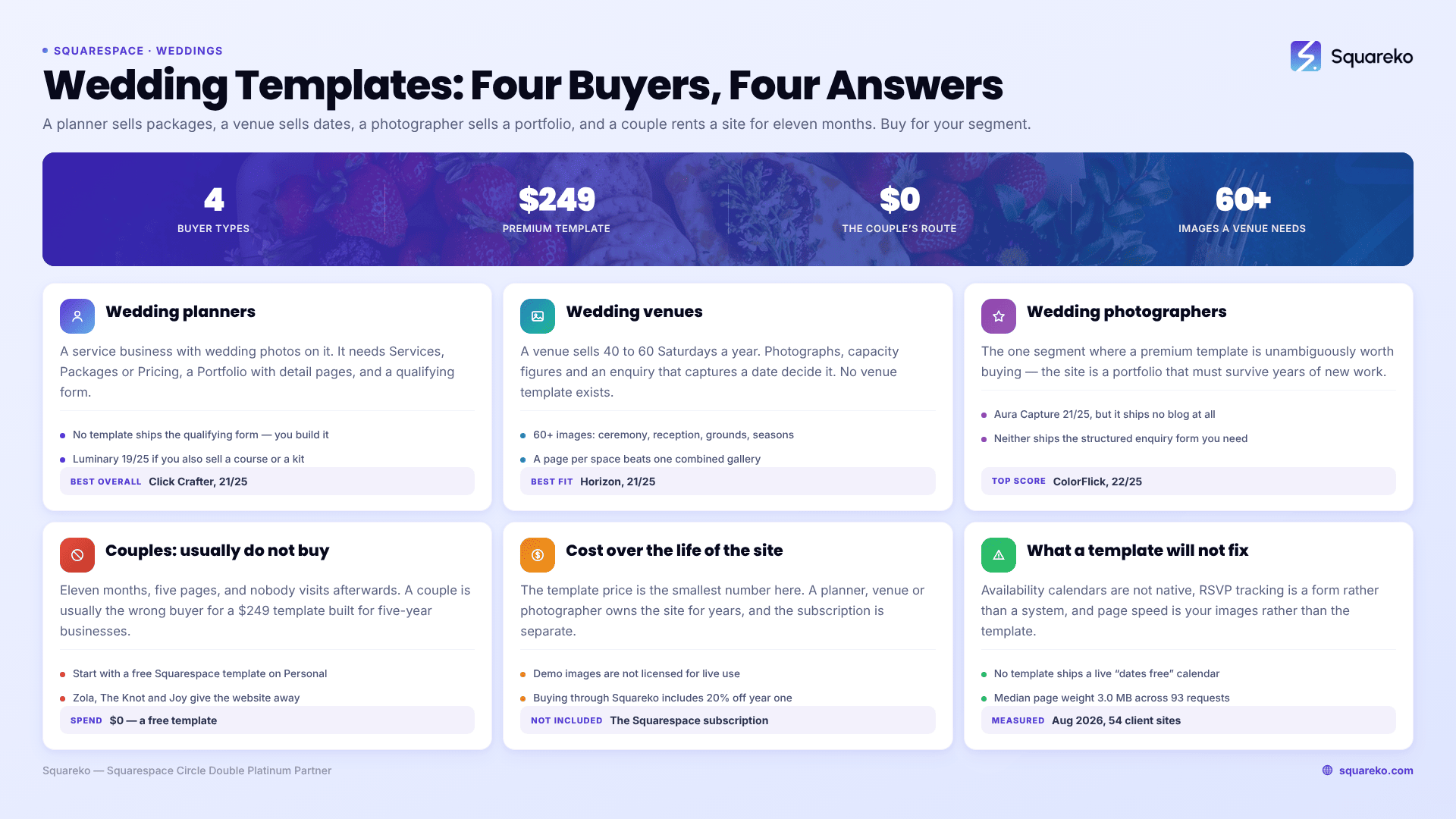
The short answer: "Wedding template" means three unrelated things. A wedding planner needs service and package pages with a qualifying enquiry form. A venue needs a serious gallery, capacity figures and a date-availability path. A couple needs an RSVP page, registry links and travel details for about eleven months. Buy for your segment, not for the word "wedding".
That distinction matters financially. Two of these three buyers are running a business on the site for years. The third is renting a website for less than a year and should almost certainly not spend $249 on a premium Squarespace template. The rest of this post scores templates separately for each group and says plainly where the honest answer is "don't buy one".
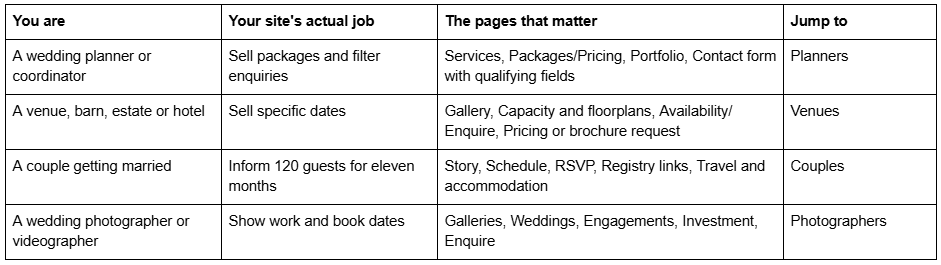
Which of these three are you?
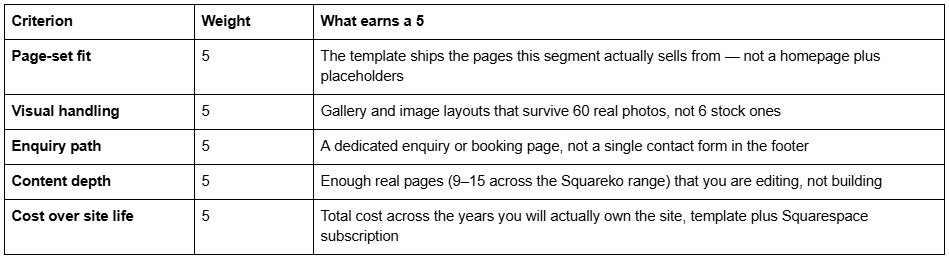
How these Squarespace wedding templates were scored
This is an editorial rubric, not a lab measurement. It is applied identically to every template below so the scores are comparable to each other, and it is published so you can disagree with the weighting rather than guess at it.
Five criteria, each scored 1–5, for a maximum of 25:
What is not scored: aggregate star ratings, install counts and "trusted by" figures. Those numbers are unverifiable from outside the shop selling them, and a wedding buyer making a several-hundred-pound decision deserves better than an unsourced average.
Performance context. Wedding sites are image-heavy by nature, so page weight is a real concern. Across 54 Squareko-built client sites measured in August 2026 (Playwright/Chromium lab test, cloud datacentre, unthrottled, single run per site, load-only CLS — lab data, not field data), the median page weighed 3.0 MB across 93 requests with a median mobile LCP of 2.01s. Only 48% came in under 3 MB. Any gallery-driven wedding site will sit at the heavier end of that range unless you compress before upload. No template fixes that for you.
Squarespace templates for wedding planners
A wedding planner's site is a service business site that happens to have wedding photos on it. The buying journey is: see proof of taste, understand what a package includes, decide whether the price band is plausible, then send an enquiry that includes a date and a budget. A template that only gives you a portfolio and a contact form makes you build the middle two steps yourself.
The pages a planner site genuinely needs are Services, Packages or Pricing, a Portfolio with individual project detail pages, an About that carries the personal trust weight, and a Contact page structured as a qualifying form rather than a mailbox.
No template ships that qualifying form pre-built, so you will assemble it in Squarespace's form builder regardless of which one you buy. The fields that do the actual work are wedding date, venue or region, approximate guest count, budget band as a dropdown rather than a free-text box, and which service tier they think they want. Five fields, all of them answerable in twenty seconds, and between them they let you reply with a real number instead of a discovery call. A planner site that skips these fields converts enquiries into unpaid admin.
Click Crafter — best overall for a wedding planner
Score: 21/25. Click Crafter is built as an agency and service-business template, which is structurally what a planning business is. Twelve pages including a Portfolio, a Gallery, a Blog and a Freebie page — the last being genuinely useful for a planner, since a downloadable timeline checklist is the standard lead magnet in this industry and you otherwise have to build that page from scratch.
Page-set fit 5, visual handling 4, enquiry path 4, content depth 4, cost over site life 4.
Worst for: a planner whose entire differentiator is atmosphere. Click Crafter is clean and business-forward. If you sell on romance and mood rather than on process and reliability, it will feel corporate next to a photography-led template.
Luminary — best for planners who also teach
Score: 19/25. Eleven pages with a Shop, a Portfolio and Gallery, Courses pages and a Freebie page. The relevance here is narrow but real: a growing number of established planners sell a course or a digital planning kit alongside the done-for-you service, and Luminary is the only template in the Squareko range that carries both a service portfolio and a course structure without you bolting one on.
Page-set fit 4, visual handling 4, enquiry path 3, content depth 4, cost over site life 4.
Worst for: a planner who does not sell anything digital. You would be paying for and then hiding the Courses pages, and a simpler service template does the core job better.
One caveat worth stating plainly: Luminary has Course pages, and Navigate and Storyline have Course, Podcast and Booking pages respectively. Nothing published states whether those pages are wired to Squarespace Member Areas or to Acuity Scheduling. Treat them as page layouts, not as configured functionality, and budget time to connect whatever booking or membership tool you actually use.
Advisory — best for the consultation-first planner
Score: 18/25. Eleven pages with a Pricing page and two legal pages already built. Advisory is written for consultants and speakers, and a planner who sells partial planning or day-of coordination as tiered consultations will find its structure closer to their offer than a portfolio-led template is.
Page-set fit 4, visual handling 3, enquiry path 4, content depth 4, cost over site life 3.
Worst for: visual-first planners and anyone with a strong portfolio. Advisory has no dedicated gallery, and weddings are sold visually more than any other service category.
Squarespace templates for wedding venues
A venue is selling a finite inventory: roughly 40 to 60 Saturdays a year. That changes what the website has to do. It is not building a brand over time, it is converting a couple who is comparing four venues in a browser tab each, on the basis of photographs, capacity numbers and whether their date is free.
Three things decide it. First, the gallery has to hold up under volume — a venue needs ceremony, reception, grounds, accommodation and winter versus summer, which is 60+ images, not a hero and three thumbnails. Second, the hard facts have to be findable: seated capacity, standing capacity, on-site bedrooms, ceremony licence status, parking. Third, the enquiry has to capture a date, because an enquiry without a date is unusable.
Squarespace does not sell a venue template and neither does any premium shop I know of, so every venue site is an adaptation. The question is which template needs the least reshaping.
One structural decision comes before the template choice. Venues with more than one usable space — a chapel and a barn, a ballroom and a garden — convert better with a page per space than with a single combined gallery, because couples shortlist by space rather than by venue. That argues for a template with a repeatable detail-page pattern already built, since building one from scratch in Fluid Engine and then duplicating it four times is a day of work you can avoid by choosing correctly at the start.
Horizon — best for a venue that leads with photography
Score: 21/25. Horizon is tagged for real estate and interiors, but its actual page set is a photography site: Wedding, Engagement, Portraits, Photo Booth, Journal and Inquire across 13 pages, with a Portfolio and Gallery. Describe it by its pages rather than its tag and it becomes the strongest gallery-led starting point in the range for a venue.
The Inquire page is the piece that matters. A dedicated enquiry page — rather than a contact form dropped at the bottom of the homepage — is what lets you ask for the date, the guest number and the preferred month up front, which is the difference between a lead you can price and an email saying "how much?".
Page-set fit 4, visual handling 5, enquiry path 5, content depth 4, cost over site life 3.
Worst for: a venue with weak photography. Horizon's layouts are large and unforgiving; at 13 pages of generous image space, mediocre photos are magnified rather than hidden. If you have not commissioned a proper venue shoot, spend the money there before you spend it on a template.
Savore — best for venues that sell food and events
Score: 19/25. Thirteen pages built for restaurants, including a Menu page, a Reservations page and a Special Offers page. For a barn, estate or hotel where catering is a core part of the pitch and midweek or off-season offers drive volume, those three pages map onto real venue needs more closely than anything in a wedding-branded template.
The Reservations page is the closest thing in the range to an availability-enquiry flow, and the Menu page saves you designing a wedding breakfast layout from nothing.
Page-set fit 4, visual handling 4, enquiry path 4, content depth 4, cost over site life 3.
Worst for: dry-hire venues. If couples bring their own caterer, half of Savore's structure is dead weight and you will spend the first week deleting pages.
WeDecorefy — best for a venue with several distinct spaces
Score: 18/25. At 15 pages, WeDecorefy is the largest template in the Squareko range, with Projects, a Gallery, individual Project Details pages and a Team page. The Project Details structure is the reason to consider it: a venue with a chapel, a barn, a marquee lawn and a courtyard can give each space its own detail page with its own gallery and capacity figures, which is exactly how couples shortlist.
Page-set fit 4, visual handling 4, enquiry path 3, content depth 5, cost over site life 2.
Worst for: single-space venues. Fifteen pages is a lot of site to maintain when you have one room, and the Team and Shop pages are irrelevant to most venues.
Squarespace templates for wedding photographers
Wedding photographers are the one segment where premium Squarespace templates are unambiguously worth buying, because the site is a portfolio that must survive years of new work and the gallery layouts are the product.
ColorFlick (12 pages) ships Weddings, Engagements and Photo Booth pages with a Journal and Gallery — a page set assembled specifically for a wedding photographer's service split. Aura Capture (12 pages) covers Weddings, Engagements and Events with a Gallery, and is the better fit if you shoot corporate or party work alongside weddings. Horizon, described above, works here too.
Score: ColorFlick 22/25, Aura Capture 21/25. Both lose a point on enquiry path — neither ships the structured enquiry form a photographer needs to capture date, venue and coverage hours, so you will be building that yourself in Squarespace's form builder.
Worst for: photographers who publish long-form blog content for SEO. Aura Capture has no blog at all, which is a significant omission if wedding-venue blog posts are part of how you get found. ColorFlick's Journal covers it; Aura Capture does not.
There is more detail on this in our guides to Squarespace templates for photographers and templates for wedding photographers specifically.
If you are a couple, read this before spending anything
Here is the part most articles on this keyword skip, because most of them are written by people selling templates.
A couple building a one-off wedding website is usually the wrong buyer for a $249 premium Squarespace template. You need the site for roughly eleven months. It has five pages. Nobody visits it after the wedding. The premium template market is built around businesses that will own their site for five years, and the value on offer — a large multi-page structure, a style guide, a blog architecture, sixty days of support — is mostly value you will never use.
Three honest options, in the order most couples should consider them:
1. A free Squarespace template on a Personal plan. Squarespace includes every one of its own templates with a subscription at no extra charge. For weddings, the ones consistently recommended across independent reviews are Rey (one-page, minimal), Soria (photo-forward, good for engagement shoots), Dario (multi-page, best when there are travel logistics to explain) and Morena (minimal, RSVP-first). Squarespace also lists Weddings as a category under its Personal solutions, and its wedding pages advertise a customisable RSVP form, a Zola registry integration for syncing registry items, and a custom domain free for the first year on an annual plan.
Realistic total: the Squarespace subscription for a year, plus nothing else.
2. A dedicated wedding-site service. Zola, The Knot, Joy and similar platforms give away the website because they make their money on the registry. They ship guest-list management, meal-choice tracking, plus-one logic and RSVP chasing — functionality you would be building by hand in Squarespace forms. If your wedding is logistically complex, this is genuinely the better tool, and saying otherwise would be selling you something.
3. A premium template. Justified only in specific cases: you already run a business on Squarespace and want the wedding site as a subdomain in the same account; you are having a multi-day or destination wedding that genuinely needs 10+ pages; or you intend to keep the domain and repurpose the site afterwards. Otherwise it is an expensive way to buy a five-page site.
If you do go premium, note that all sales are final — Squareko's own policy is that digital products cannot be returned, exchanged or refunded under any circumstances, and most template shops are the same. Use the demo properly first.
Cost over the life of the site
The template price is the smallest number in this table, which is why comparing templates on price alone is the wrong exercise.
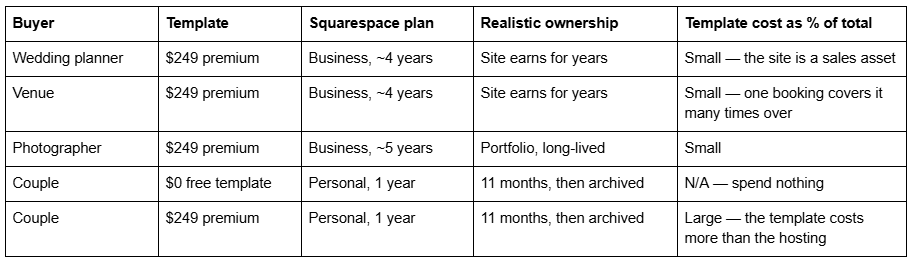
Two costs people forget. Demo images are not licensed for live use — every stock photograph in a premium template demo has to be replaced with your own before launch, which for a venue means a real photo shoot. And a premium template price covers the design and use of the template only; the Squarespace subscription is separate and required regardless of which route you take. Buying through Squareko includes 20% off the first year of that subscription, which recovers part of the template price but not all of it.
What a wedding template will not fix
Three things worth knowing before you attribute a problem to the template.
Availability calendars are not native. No Squarespace template ships a live "which dates are free" calendar for a venue. You are either updating a manually maintained list, embedding a third-party booking tool, or handling it in the enquiry conversation. Any template that appears to show availability in its demo is showing static content.
RSVP tracking is a form, not a system. Squarespace's form builder collects responses and can push them to a Google Sheet. It does not chase non-responders, handle plus-one logic or track meal choices against a seating plan. For a 60-guest wedding that is fine. For 200 guests with three dietary categories it is a spreadsheet you maintain by hand.
Page speed is your images, not your template. In our August 2026 lab measurements across 54 client sites, page weight was driven overwhelmingly by image payload, with a median of 3.0 MB across 93 requests. Squarespace's CDN serves WebP unconditionally, so format is handled for you — dimensions are not. Upload at 1500–2500px wide, and remember filenames cannot be changed after upload, so name them properly first.
Choosing between the three
Work it in this order: identify which of the four buyers you are, check the template ships the pages that segment sells from, then check the enquiry path before you look at the aesthetics. Aesthetics are the easiest thing to change in Squarespace 7.1 and the page architecture is the hardest.
If you are a planner, venue or photographer, the premium Squarespace templates in our range are installed for you rather than delivered as files — including onto an existing live site, which takes around 48 hours as a fully manual process — and come with 60 days of email support. That matters most when you are launching against a fixed date, like a wedding season opening or a bridal fair.
If you are a couple, the honest recommendation stands: start with a free Squarespace template or a dedicated wedding-site service, and spend the difference on the photographer.
FAQ
-
Squarespace lists Weddings as a category under its Personal solutions and includes wedding-suited templates such as Rey, Soria, Dario and Morena free with any subscription. Premium shops rarely build wedding-specific templates; wedding professionals typically adapt a photography, service or hospitality template instead, which is why page structure matters more than the label.
-
Usually not. A couple's site is five pages needed for about eleven months, and premium templates are priced around a business owning its site for years. Start with a free Squarespace template, or a registry-funded service like Zola or Joy if you need guest-list and meal tracking. Premium makes sense only for multi-day or destination weddings.
-
A gallery deep enough for 60-plus images, hard capacity figures for seated and standing, individual pages per space if you have more than one, and a dedicated enquiry page that captures the couple's date. An enquiry without a date cannot be priced or held, so the form structure matters more than the homepage design.
-
Yes. Squarespace's form builder collects RSVPs and can send responses to a connected Google Sheet, and Squarespace's wedding pages advertise a customisable RSVP form. It does not chase non-responders, manage plus-one logic or reconcile meal choices with a seating plan, so larger weddings usually end up maintaining a spreadsheet alongside it.
-
Yes. You can link out to any external registry, and Squarespace advertises a Zola integration that syncs registry items automatically. Cash-gift registries are also supported. A registry link is a normal link or button, so this works identically on a free template and a premium one.
-
ColorFlick ships Weddings, Engagements and Photo Booth pages with a Journal and Gallery across 12 pages. Aura Capture covers Weddings, Engagements and Events across 12 pages but has no blog, which matters if venue-focused blog posts are part of your search strategy. Horizon's actual pages are a photography set despite its real-estate tag.

Author Bio
I'm Walid Hasan, a Certified Squarespace Expert and Squarespace Circle Platinum Partner with over 12 years of hands-on experience designing and optimizing high-performing websites. Over the years, I've had the privilege of building more than 2,000 Squarespace websites for clients around the world, always focusing on clean design, strong user experience, and conversion-driven results.
