
Best Squarespace Template for Photographers: The Verdict
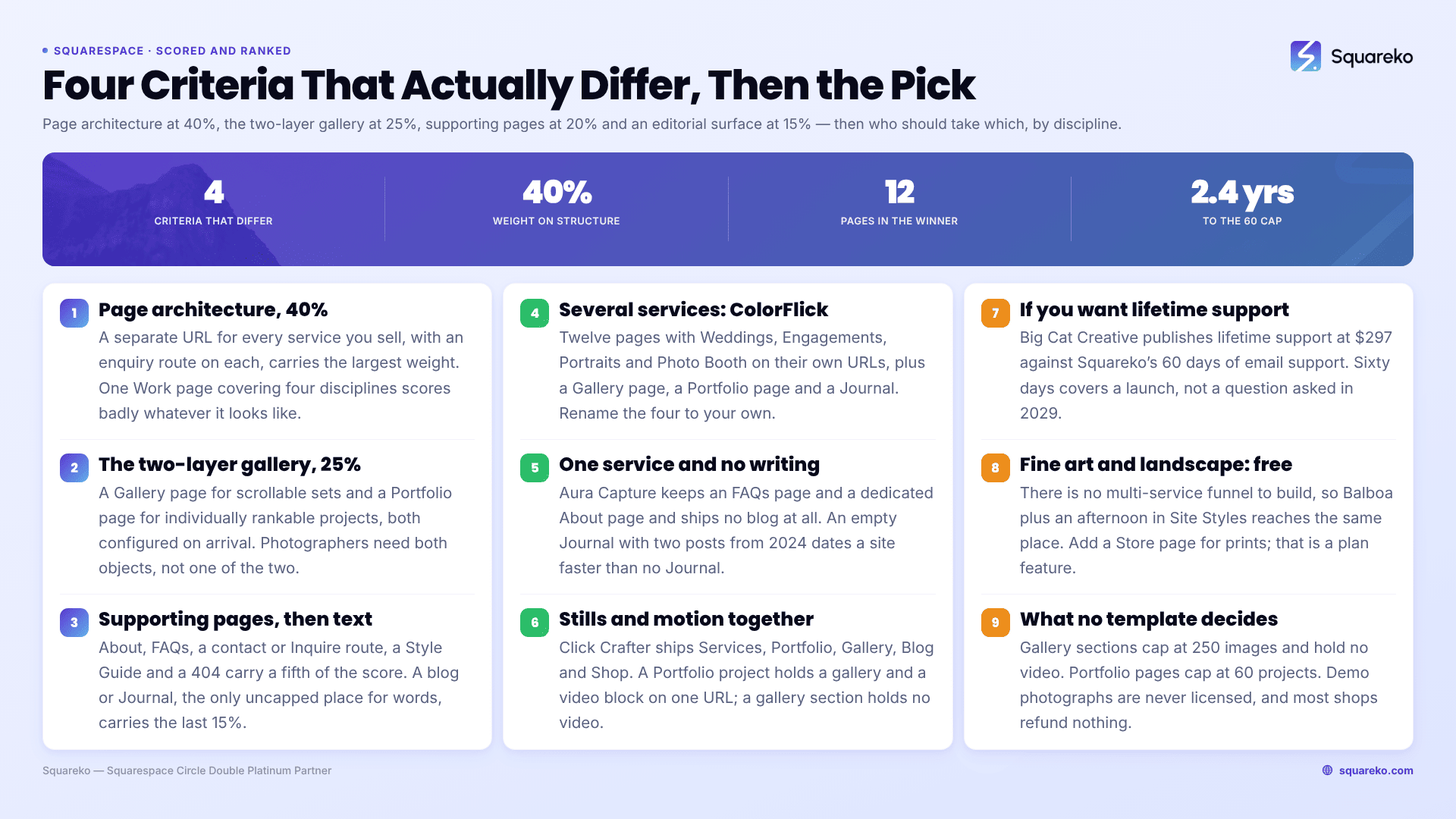
The verdict: ColorFlick. For a working photographer selling more than one kind of shoot, ColorFlick is the best Squarespace template available, and it wins on structure rather than looks. It ships four separate service pages — Weddings, Engagements, Portraits and Photo Booth — plus a Gallery page, a Portfolio page and a Journal, across 12 pages. Four service URLs is four chances to rank instead of one. Nothing else in the category, free or paid, arrives with that architecture already built.
If you sell one thing and never intend to blog, take Aura Capture instead. If you have no budget, take Balboa and spend a weekend on it — it will be fine.
Below: how these were scored, the table, and who should take which.
How these were scored
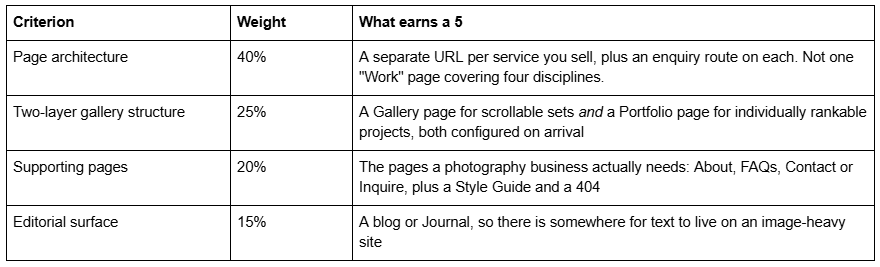
Every Squarespace 7.1 template runs the same engine. Gallery sections, Portfolio pages, Fluid Engine, colour themes and Site Styles are platform features available on all of them. So the four criteria below are the only things that genuinely differ between templates, and they are what I scored on. Everything else — "elegant", "editorial", "airy" — is a Site Styles decision you make in an afternoon.
What this scoring is and is not. It is a structural assessment made from each template's verified page list, its live demo where one resolves, and 12 years of building on Squarespace. It is not a lab benchmark of the demos. Demo sites are loaded with placeholder imagery that has no relationship to the files you will upload, so a Lighthouse score against a demo tells a photographer nothing. Where performance figures appear below they are Squarespace's own published guidance or Squareko's client-site measurements, labelled as lab data.
Disclosure: Squareko sells ColorFlick, Aura Capture and Click Crafter, at $249 each. Squarespace's own roughly 200 templates are free with any subscription and are the right answer for one of the five profiles below — I have said so where it is true. Competitor shops are named where they do something we do not.
The scoring table
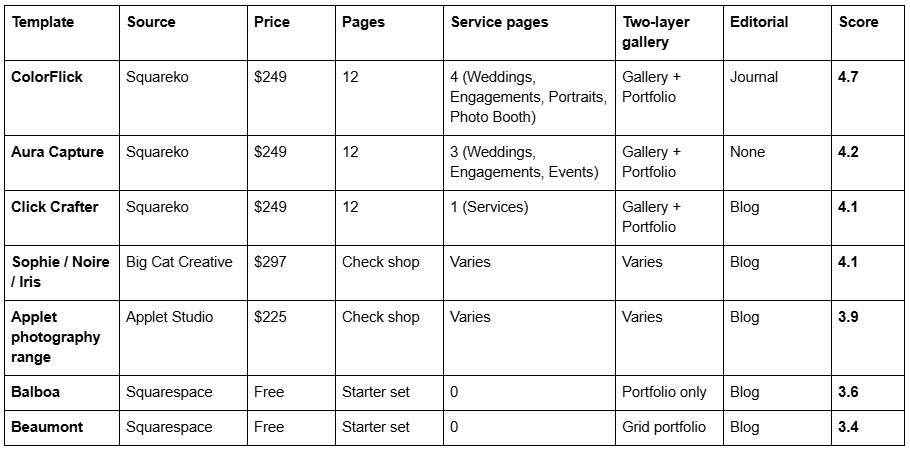
Scores are out of 5, weighted by the criteria above.
Why ColorFlick wins
ColorFlick's 12 pages, verified against its live demo: Home, Home 2, Weddings, Engagements, Portraits, Photo Booth, Gallery, Portfolio, Journal, Inquire, Freebie, plus a Style Guide page and a 404 page. You can walk every one of them on the ColorFlick demo.
Three things about that list matter, in order.
Four service pages is the whole argument. A photographer who shoots weddings, engagements, portraits and photo booths has four different buyers searching four different queries. One "Portfolio" page cannot rank for all four; four pages each can rank for one. This is not a subtle SEO point — it is the difference between one URL competing and four. If your services are different from ColorFlick's, rename them. The structure holds whether the pages say Photo Booth or Newborn or Boudoir.
It has both a Gallery page and a Portfolio page. These are different Squarespace features and photographers need both. A gallery section holds up to 250 images that a visitor scrolls; a Portfolio page holds up to 60 projects, each with its own URL. Weddings go in the Portfolio, one per couple, each individually rankable and individually shareable. Loose sets go in galleries. ColorFlick arrives with both configured, which is roughly two days of setup you skip.
The Journal is not filler. An image-heavy site is a text-poor site. The Journal is where the crawlable words live — a recap per wedding, a location guide, a what-to-wear post. Aura Capture omits it deliberately and that is a legitimate choice, but for most photographers the Journal is what makes the site rank at all.
The honest weakness: ColorFlick's product-page copy on our own shop is unreliable — it misspells the template's name and refers to it as something else entirely. Ignore the description and judge it on the page list above, which is verified against the live demo. That is embarrassing to write and it is better than letting you buy on the strength of copy that describes a different product.
Choose ColorFlick if you shoot weddings and engagements
Wedding photography is the discipline where ColorFlick's structure pays for itself fastest, because a wedding photographer is really running three funnels: couples searching "wedding photographer [city]", couples searching "engagement session [city]", and past clients sharing a gallery.
ColorFlick handles all three natively. The Weddings and Engagements pages are separate URLs that can carry separate copy, separate testimonials and separate pricing signals. The Portfolio page gives each wedding its own URL, which is the page a couple actually sends to their family — and a shared URL that is a real page rather than a scroll position is worth more than any design decision on this list.
Set up the Inquire page as the single enquiry route and link it from the bottom of each service page. Do not put the form on four pages; put four links to one form. Squarespace form submissions land in one place and a single form is one thing to maintain.
The 60-project cap is the one to plan around. A Portfolio page holds 60 projects. A wedding photographer shooting 25 weddings a year hits that in under three years, at which point you either prune or split into a second Portfolio page by year. Plan the pruning now; it is a five-minute decision in year one and a bad afternoon in year three.
If you want the wedding-specific build in depth, that is the wedding photographer template guide.
Choose Aura Capture if you sell one service and will never blog
Aura Capture's 12 pages, verified against its live demo: Home, Home 2, About, Weddings, Engagements, Events, Gallery, Portfolio, FAQs, Contact, Freebie, plus a Style Guide page and a 404 page. Walk it on the Aura Capture demo.
The defining feature is what is missing: there is no blog or Journal. For most photographers I would call that a gap. For a specific reader it is the right answer, and that reader is the one who knows with certainty they will never write anything. An empty blog with two posts from 2024 is worse than no blog — it dates the site, it signals abandonment, and it is the first thing a prospective client notices.
What Aura Capture keeps that ColorFlick does not have is FAQs and a dedicated About page in the main set. For an event photographer fielding the same five questions about turnaround time, travel and usage rights, an FAQs page is the objection-handling surface that closes bookings. That is a real trade rather than a downgrade.
Take Aura Capture if: you shoot one or two things, you answer the same questions constantly, and you are honest with yourself about never writing a blog post.
Choose Click Crafter if you shoot both stills and motion
Click Crafter's 12 pages, verified against its live demo: Home, Home 2, Services, About, Portfolio, Gallery, Blog, Shop, Freebie, Contact, plus a Style Guide page and a 404 page. Walk it on the Click Crafter demo.
It is tagged Agency and Service-Based rather than Photography, and for a hybrid shooter that tag is closer to the truth than it looks. A photographer who also delivers a film is selling a production, not a gallery, and the pages that sell a production are a Services page describing what a shoot day includes, a Portfolio page where each commission gets its own URL, a Blog, and a Shop for licensing or productised packages. Click Crafter is the only template in our range that arrives with all four configured.
The two-layer Portfolio-plus-Gallery structure is the same one ColorFlick uses, and it is what the hybrid case needs: a Portfolio project can hold a gallery and a video block on the same page, so the stills and the film sit together under one URL instead of being split across two sections of the site. Its cost is register — the demo reads as a studio, so a solo shooter strips the team section and the agency language before launch.
The constraint to know before you build: gallery sections cannot hold video. Squarespace's documentation states it plainly, and you cannot add blocks inside a gallery section at all. Motion goes in a video block in a separate section above or below the gallery, or on a Portfolio project page. Full mechanics in the gallery guide.
Between ColorFlick and Click Crafter the deciding question is narrow: ColorFlick if the Gallery page is your main surface and you sell several named services, Click Crafter if the Portfolio project page is your main surface and one Services page will do.
Choose Big Cat Creative if you want lifetime support
Big Cat Creative is the largest premium Squarespace template shop and the strongest competitor in this category. Templates are $297 each — Sophie, Noire, Iris, Belladonna, Shelley and Nyx are the photography-leaning ones — with a full industry taxonomy, a tutorial library, delivery either as a new site or installed onto an existing one within 48 hours, and lifetime support.
Lifetime support is genuinely better than what we offer. Squareko includes 60 days of email support, a 5-day course, a private community and video tutorials. Sixty days covers a launch. It does not cover a question in 2029. If you expect to be maintaining this site alone for years and you want a shop you can still email then, that is a real reason to buy from Big Cat Creative instead, and $48 is not much to pay for it.
Where they are weaker for this specific buyer: their photography templates are not published with a service-page-per-discipline structure the way ColorFlick is, so you may be building the Weddings/Engagements/Portraits split yourself either way. Check the page list of the specific template before you buy — from any shop, including ours.
Applet Studio at $225 is the value option, with around 30 templates and nine industry landing pages. Setup is priced separately rather than included. Station Seven sits at $269.
Choose a free Squarespace template if you shoot fine art or landscape
This is the profile where free wins outright, and no template shop will tell you so.
A fine art or landscape photographer typically sells one thing — prints, or a body of work — to an audience that arrives from Instagram, a gallery listing or a mailing list rather than from a Google search for "landscape photographer near me". There is no four-service split to build. There is no enquiry funnel per discipline. There is one body of work and a way to buy.
For that reader, Balboa is the pick among Squarespace's roughly 200 free templates: portfolio-led, with categorised work, and free with any subscription. Beaumont is the more minimal grid alternative. Both run Squarespace 7.1 with Fluid Engine, both give you gallery sections, Portfolio pages, colour themes and everything else, and both will look exactly as considered as a $297 template after an afternoon in Site Styles.
Add a Store page if you sell prints — that is a plan-level feature, not a template feature, and it works on any of them.
The honest limit: free templates give you no Style Guide page, no supporting pages, no 404 design and nobody to email. If that does not matter to you, do not spend $249.
Choose ColorFlick or Big Cat Creative if you shoot commercial or editorial
Commercial and editorial photography is sold on credibility rather than volume. Art buyers and picture editors want to see the body of work, the client list and whether you can be trusted with a shoot day.
The structure that serves that is the Portfolio page with a project page per commission — client, brief, credits, a small edit rather than everything you shot. Sixty projects is far more than a commercial book needs; twelve strong ones is the right number.
ColorFlick works here with the service pages renamed to sectors (Editorial, Advertising, Portraits, Still Life), and Click Crafter works here for the opposite reason — one Services page rather than four, which suits a photographer whose sectors are not distinct enough to justify separate URLs. Big Cat Creative's Noire and Sophie work here too and are worth comparing on look, since commercial work is the one discipline where the site's own visual register is part of the pitch.
What does not work: a single 200-image gallery page. Squarespace's own guidance is to "limit galleries to 50 images each" and to treat galleries as "display cases, rather than total inventory." A picture editor with four minutes will not scroll 200 images, and the page will be heavy.
The platform facts that apply whichever you choose
These are true of every Squarespace 7.1 template, free or $599.
Gallery sections hold up to 250 images, in six layouts, and cannot hold video. The layouts are Grid: Simple, Grid: Strips, Grid: Masonry, Slideshow: Simple, Slideshow: Full and Slideshow: Reel. Lightbox is available on the three grid layouts only, and caption text does not display in the gallery section lightbox — a real limitation for anyone crediting locations or clients.
Portfolio pages cap at 60 projects across five layouts. Three of the five (Hover: Background, Hover: Fixed, Hover: Follow Cursor) depend on a cursor and degrade to a plain title list on a touchscreen. Check that on your phone before you build on one.
Upload images at 1500–2500px and keep files under 500 KB. Squarespace generates seven versions at 100, 300, 500, 750, 1000, 1500 and 2500 pixels and never serves anything larger than 2500px. It delivers WebP by default regardless of what you uploaded. Filenames cannot be changed after upload — set them before you drag files in.
Page weight is your problem, not the template's. Across 54 Squareko-built client sites measured in August 2026 (Playwright/Chromium lab test, cloud datacentre, unthrottled network and CPU, single run per site, load-only CLS) median mobile LCP was 2.01s with 74% under Google's 2.5s threshold, and median page weight was 3.0 MB across 93 requests. Lab data, not field data. 53 of 54 run Squarespace 7.1. What separated fast from slow in that set was the size of the hero image, not the template underneath it.
Demo images are not licensed for live use. Every template from every shop ships with placeholder photography you must replace before launch. Photographers replace the galleries automatically and then forget the About page, the 404 and the Journal thumbnails.
All sales are final on Squareko templates — digital products "cannot be returned, exchanged, or refunded under any circumstances" — and most shops are the same. Walk the demo properly first. Fifteen minutes of clicking every page is the only due diligence available to you.
The Squarespace subscription is separate and required. The template price covers the design and its use only. We recommend the Business plan, templates work on Basic, and buyers get 20% off their first year through us.
Where to go next
The full cluster — Squarespace templates for photographers
Gallery mechanics with numbers — Squarespace gallery templates for photography
What premium actually buys — premium photography Squarespace templates
Stripping it back — minimal Squarespace templates for photographers
Bold palettes — colourful photography Squarespace templates
Wedding-specific build — Squarespace templates for wedding photographers
Portfolio structure — Squarespace portfolio templates for photographers
If you have read this far and you are still choosing between two templates, the deciding question is not the homepage. It is whether the template gives you a separate URL for each thing you sell, and whether each of those URLs has somewhere obvious to click through to an enquiry. Everything else you can change in Site Styles.
That is why the premium Squarespace templates in our shop are listed by full page structure rather than a homepage screenshot, with demo passwords published so you can walk every page before deciding. Most photographers reading this will pick correctly from the table above without asking anyone — the profiles exist so that you do not have to.
FAQ
-
ColorFlick, for a photographer selling more than one kind of shoot. It ships 12 pages including four separate service pages — Weddings, Engagements, Portraits, Photo Booth — plus a Gallery page, a Portfolio page and a Journal. Four service URLs is four chances to rank rather than one, and no free template arrives with that architecture.
-
ColorFlick, because the Weddings and Engagements pages are separate rankable URLs and the Portfolio page gives each wedding its own URL — the page a couple actually shares. Plan around the 60-project Portfolio cap: at 25 weddings a year you reach it in under three years and will need to prune or split.
-
There is no native toggle. Use Custom CSS at Website → Website Tools → Custom CSS, scoped to the page's collection ID from its body tag: #collection-XXXX #header { display: none; }. Add a manual link back to Contact, because a page with no header and no footer leaves visitors with no navigation route.
-
Less than shops imply. Every Squarespace 7.1 template runs the same engine, so gallery sections, Portfolio pages and Site Styles are identical across all of them. What differs is page architecture — how many service URLs arrive prebuilt — and that is worth a week of work, which is what you are buying.
-
Enough for one page per service you want to rank for. Premium photography templates typically ship 12 pages; Squareko's ColorFlick and Aura Capture both do. Collapsing four discipline pages into one gallery is the most common minimal mistake, because it gives up three ranking surfaces to save two navigation items.
-
A free one. Fine art and landscape work has no multi-service funnel to build, so Balboa plus an afternoon in Site Styles reaches the same place as a $297 template. Add a Store page if you sell prints — that is a plan feature, not a template feature, and it works on any template.

Author Bio
I'm Walid Hasan, a Certified Squarespace Expert and Squarespace Circle Platinum Partner with over 12 years of hands-on experience designing and optimizing high-performing websites. Over the years, I've had the privilege of building more than 2,000 Squarespace websites for clients around the world, always focusing on clean design, strong user experience, and conversion-driven results.
