
Squarespace Scheduling for Cleaning Businesses: How to Automate Bookings and Recurring Clients
Introduction:
For cleaning business owners, administrative overhead can quickly consume time better spent managing teams and building client relationships. Squarespace Scheduling offers a streamlined solution to automate bookings, manage recurring clients, and eliminate manual appointment coordination. This guide shows you how to use Squarespace Scheduling specifically for cleaning businesses—from first-clean bookings to complex commercial contracts and recurring fortnightly services.
Whether you operate a residential cleaning service, commercial cleaning operation, or specialised end-of-tenancy cleaning, automating your scheduling reduces missed bookings, prevents double-booking, and frees your team to focus on service delivery rather than calendar management.
Key Takeaways
Reduce administrative overhead by automating booking confirmations, reminders, and scheduling workflows for your cleaning team
Capture essential property information upfront through custom Squarespace forms, enabling accurate quotes and resource allocation
Manage recurring cleaning appointments effortlessly with automatic rescheduling, payment collection, and client portal access
Optimise team capacity and scheduling by setting service availability windows, assigning staff to bookings, and preventing over-scheduling
Streamline specialised cleaning workflows including first cleans, end-of-tenancy projects, commercial contracts, and holiday cover bookings
Integrate client communication through automated reminders, status updates, and access to booking portals, improving client satisfaction and retention
Maximise recurring revenue by making it frictionless for clients to book repeat services and manage their account online
How Squarespace Scheduling Works for Cleaning Businesses
Squarespace Scheduling integrates directly into your website, allowing clients to book appointments, pay online, and receive automated confirmations—all without leaving your site. For cleaning businesses, this eliminates phone tag, reduces email chains, and creates a professional, modern booking experience.
Core features relevant to cleaning operations:
Online appointment booking accessible 24/7 from your website
Automated confirmation and reminder emails to clients, reducing no-shows
Recurring appointment setup for weekly, fortnightly, or monthly recurring cleans
Custom intake forms to collect property details, special requests, and access instructions
Staff member assignment so clients know which cleaner is assigned to their property
Payment collection at booking or on the day of service
Client portal access where customers view, reschedule, or cancel appointments
Calendar synchronisation with your team's schedules to prevent double-booking
Service duration templates with pricing tiers for different room counts or square footage
The administrative benefit is significant. Instead of manually scheduling each appointment, confirming details, processing payments, and sending reminders, Squarespace Scheduling automates these tasks. Your team receives a consolidated calendar view, clients get instant confirmation, and you capture accurate property information upfront—essential for quoting and resource planning.
Setting Up First-Clean Bookings with Property Information Forms
A first-time client booking is your opportunity to gather critical information: property size, number of rooms, access details, specific cleaning requirements, and any hazards or fragile items. Squarespace Scheduling allows you to attach a custom intake form to your first-clean service type, ensuring every booking includes the details your team needs.
Step-by-step setup:
Create a "First Clean" service in your Squarespace Scheduling settings
Set the service duration (typically 2–4 hours for a standard residential property)
Assign a price (or leave flexible for quote-based bookings)
Set availability windows (e.g., weekday afternoons, weekend mornings)
Build a property intake form capturing:
Property type (flat, house, terrace, bungalow)
Number of bedrooms, bathrooms, and living spaces
Square footage estimate
Specific cleaning focus areas (kitchen, bathroom, carpets, windows)
Access instructions (keys with neighbor, lockbox combination, gate code)
Pets (type, location, behaviour notes)
Fragile items or restricted areas
Preferred date/time window for the first appointment
Configure form display to appear immediately after booking selection, before payment
Use conditional logic to show additional questions if specific answers are selected
Mark essential fields as required to prevent incomplete submissions
Set automated first-clean workflow
Booking confirmation email includes a summary of their form responses
Send a separate email to your team lead with the same information for pre-service review
Include a link to a pre-service checklist your team should complete before arrival
This approach eliminates the need for follow-up phone calls before the first service. Your team arrives at the property with complete information about layout, access, and expectations, reducing delays and improving first-impression service quality.
Managing Regular Weekly and Fortnightly Schedules
Recurring cleaning appointments form the profitable backbone of most residential cleaning businesses. Squarespace Scheduling simplifies setting up and managing these recurring bookings, and—critically—makes it easy for clients to self-manage their recurring appointments online.
Setting up recurring service types:
Create a "Weekly Clean" service
Set duration (typically 2–3 hours for a standard residential property)
Assign staff member if desired (helps clients feel connected to a consistent cleaner)
Set weekly availability slots (e.g., Tuesday 10:00–14:00, Thursday 10:00–14:00)
Create a pricing tier (flat rate or per-room rate)
Create a "Fortnightly Clean" service
Similar setup to weekly, but with fortnightly availability slots
Price should reflect the extended period between cleans (often 15–20% less than double the weekly rate)
Mention in the service description that "every other week" cleaning may require light refresh between appointments
Communicate the recurring commitment
Include clear language in service descriptions: This recurring appointment continues every week (or every two weeks) on your selected day unless you request changes or cancellation
Provide a notice period
Enable client self-management
Allow clients to pause recurring appointments through their portal
Permit rescheduling within a defined window
Restrict cancellations to a notice period, protecting your schedule
Set up automated reminders
Send payment reminder 3 days before each recurring appointment
Send cleaner assignment confirmation 2 days before service
Send a client reminder 1 day before, with estimated arrival time and cleaner name
Maximising recurring revenue:
Recurring clients are your highest-margin customers—no new customer acquisition cost, predictable revenue, and established trust. By making it frictionless for clients to manage recurring bookings online (pause, reschedule, modify frequency), you reduce churn. Include a "Manage Your Recurring Appointment" section in your client portal instructions, and proactively offer upgrades through customer emails.
End-of-Tenancy Booking: Checklists and Specialised Services
End-of-tenancy (also called end-of-lease or bond cleaning) represents a distinct service category: it's one-time, highly detailed, and often subject to specific standards required by letting agents or landlords. Squarespace Scheduling can manage this specialist workflow through custom forms and clear service specifications.
Setting up end-of-tenancy service:
Create a dedicated "End-of-Tenancy Clean" service type
Set pricing based on property size
Set duration to reflect thoroughness (typically 6–10 hours depending on property size)
Limit availability to 3–7 days in advance (prevents scope creep from clients booking too far ahead and changing requirements)
Attach a comprehensive intake form capturing:
Current property address and tenancy end date
Property size and room count
Flooring type (carpet, laminate, tile) for specific cleaning approach
Whether the tenant or landlord is paying (informs communication routing)
Special requirements (e.g., carpet shampooing, oven deep clean, fridge cleaning)
Letting agent details if applicable
Preferred cleaning date within the notice window
Access arrangements (keys, locksmith coordination, landlord present)
Provide a detailed service checklist in booking confirmation
Include a link to your end-of-tenancy cleaning specification document
State clearly what's included: walls, carpets, cooker, bathroom tiles, skirting boards, light fittings, etc.
Clarify what's optional/chargeable: gardening, external windows, pest treatment, carpet restoration
Set up post-service communication
After completion, send an automated email requesting feedback and offering a certificate of cleaning
Provide a portal link where the customer can upload the property inspection report
If issues are flagged, route them to your service manager for rapid follow-up
End-of-tenancy clients often face moving deadlines and stress. A clear, automated booking and communication workflow demonstrates professionalism and reliability—key factors in reputation and referrals within the lettings sector.
Commercial Cleaning Contract Scheduling
Commercial cleaning operations differ from residential: contracts often involve multiple visits per week, specific time windows (before/after business hours), multiple contact points, and formal service level agreements. Squarespace Scheduling can accommodate these requirements through custom service types and form configurations.
Setting up commercial cleaning services:
Create tiered commercial service types
"Daily Office Clean" (morning or end-of-day, 30–60 minutes)
"Weekly Commercial Deep Clean" (evening/weekend, 2–4 hours)
"Monthly Commercial Carpet Clean" (specialist equipment, 2–3 hours)
"Quarterly Commercial Window Clean" (external, high-level access)
Design intake forms specific to commercial requirements
Building/company name and address (multiple locations if applicable)
Key contact name, email, phone (with an option for secondary contact)
Building size (floor area) and layout (open plan, private offices, breakout areas)
Specific services needed (restrooms, kitchens, carpets, communal areas)
Access requirements (key holder, security badge, after-hours alarm codes)
Any hazardous materials or restricted areas
Preferred service time window (6:00–8:00 AM, 5:00–7:00 PM, etc.)
Invoice frequency preference (weekly, monthly)
Configure pricing and payment
Offer monthly contract pricing (slightly lower per-service rate for guaranteed weekly attendance)
Require deposit or credit card authorisation for multi-week contracts
Provide invoice scheduling aligned with contract start date (not monthly calendar date)
Manage multiple staff assignments
If multiple staff are assigned to a single commercial account, Squarespace Scheduling allows you to rotate or assign teams
Use calendar notes to highlight specific instructions ("Empty blue bin, not grey bin" or "Manager prefers no blue cleaning fluid in restrooms")
Set contract review points
Use automated email workflows to trigger contract reviews at month 1, month 3, and annual renewal
Include a brief survey: "How are we performing? Any service adjustments needed?"
Commercial contracts are often longer-term and higher-value. An automated, professional booking and communication system builds confidence that you can reliably manage their facility—important for contract renewals and referrals to other commercial prospects.
Holiday Cover and Flexible Booking Management
During holidays or peak seasons, many cleaning clients want to book additional services, pause recurring appointments, or arrange cover from another team member. Squarespace Scheduling provides the flexibility to manage these scenarios while protecting your team's capacity.
Managing holiday and temporary adjustments
Create a "Holiday Deep Clean" service
Available for pre-holiday booking (typically 2–4 weeks in advance)
Marketed as thorough preparation before vacation: windows, carpets, dusting, bathroom refresh
Higher pricing tier than regular services (reflects customer urgency and value perception)
Clear messaging: "Ensure your home is refreshed before departure"
Enable service "pausing"
Recurring clients can pause their appointments through the client portal for up to 8 weeks (or your preferred maximum)
Automatic email reminder 2 weeks before pause expires, offering to resume or adjust frequency
Prevents permanent cancellations during temporary financial or lifestyle adjustments
Offer flexible booking add-ons
"Quick Refresh Clean" (1 hour, focused high-traffic areas) for clients who want something between regular appointments
"Welcome Home Clean" (post-holiday deep refresh, available on customer return date)
Available through client portal or email request, routed to available team members
Manage staff leave and cover rotation
When your lead cleaner takes holiday, mark their schedule as unavailable and re-assign their recurring clients to cover staff
Send clients advance notice: "Your regular cleaner [Name] will be on leave [Dates]. [Cover Cleaner] will handle your appointment, with the same care and attention to detail"
This maintains continuity and prevents clients from panicking about missed appointments
Seasonal service adjustments
Autumn: promote "gutter and exterior clean" as weather changes
Spring: promote "post-winter deep refresh" as part of spring cleaning traditions
Summer: promote "holiday preparation" and frequency increases for holiday let properties
Clear, automated communication about temporary changes builds client trust. Customers appreciate knowing exactly who's cleaning their home and why any changes are happening—especially for recurring services where consistency is valued.
Creating a Cleaning Quote Form: Capturing Property Details for Accurate Pricing
Accurate quotes are essential for profitability in cleaning businesses. Many cleaning operations struggle with under-quoting because they lack detailed upfront property information. A well-designed Squarespace quote form captures the data needed to calculate fair, accurate pricing—while filtering out tire-kickers and unqualified leads.
Building your cleaning quote form:
Set up a dedicated "Get a Quote" form (separate from booking)
This funnel leads to a quote, not an immediate booking
Route completed forms to your sales/operations manager for review
Allows you to validate project scope before confirming availability
Structure questions to capture pricing drivers:
Property type and size (square footage or number of rooms—rooms are easier for customers to estimate)
Current property condition ("regularly cleaned", "moderate dirt/clutter", "severe neglect, post-renovation, post-construction")
Specific requirements and add-ons (windows, carpets, oven, fridge, external areas)
Furniture density and access difficulty (cluttered, organised, basement/attic access)
Pets and associated allergen/odour considerations
Special restrictions (delicate items, occupied during cleaning, noise-sensitive times)
Use conditional logic to drill deeper based on answers:
If customer selects "moderate dirt", ask if they want stain removal or odour neutralisation
If customer selects "carpets", ask: "Type of carpet cleaning: vacuum only, steam clean, stain treatment, or full deep restore?"
If customer selects "end-of-tenancy", ask for tenancy end date and letting agent name
Include a service preference section:
Preferred frequency (one-off, weekly, fortnightly, monthly)
Preferred day/time window (with a note that exact times are confirmed post-quote)
Access arrangements (can they leave a key, will someone be home, is there external access)
Create pricing tier suggestions based on form completion:
Establish internal pricing models: small flat (1 bed, good condition) = £X, medium house (3 bed, moderate condition) = £Y
Use form data to automatically suggest a price range in your response email ("Based on your 2-bed terrace in moderate condition, we estimate £95–£125 for the first clean and £70–£85 for fortnightly recurring service")
This sets expectations and prevents scope creep negotiations
Configure automated response
Acknowledgment email to customer with next steps: "Thank you. We'll review your details and respond within 24 hours"
Internal notification to your team with all form data for immediate review
Why this matters for profitability:
Detailed intake forms prevent the common problem of under-quoting. Many cleaning businesses lose money on the first appointment because they underestimated the property's condition or size. A comprehensive quote form captures enough detail to price accurately, reducing the risk of unprofitable jobs and improving overall margins.
Comparison: Squarespace Scheduling vs. Housecall Pro vs. ZenMaid
Three main platforms serve cleaning businesses' scheduling needs. Each has different strengths, and the right choice depends on your operation's complexity and specific requirements.
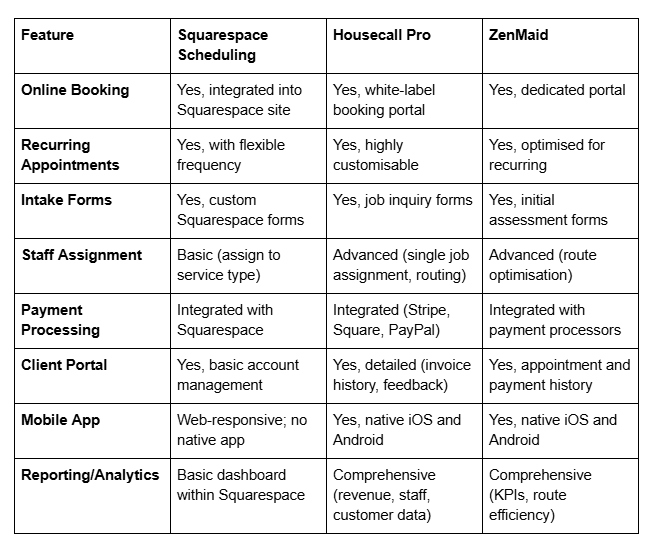
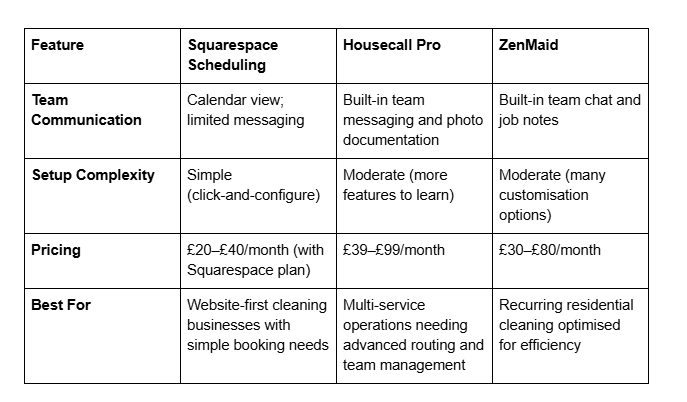
Squarespace Scheduling is ideal if your primary goal is a professional website with integrated booking. It's cost-effective, easy to set up, and tightly integrated with your site design. Use it if you manage scheduling manually and need to reduce client communication overhead.
Housecall Pro suits larger operations with multiple staff members, varied services, and advanced team routing needs. It's purpose-built for service businesses and includes team communication and photo documentation features. Choose it if you need sophisticated job management across your team.
ZenMaid specialises in recurring residential cleaning with route optimisation—it intelligently sequences appointments by geography to minimise travel time. If the majority of your business is recurring weekly/fortnightly cleaning and you want to optimise staff efficiency, ZenMaid's specialisation is valuable.
For most cleaning businesses starting out or operating at 1–3 staff members, Squarespace Scheduling provides sufficient functionality at minimal cost. Many grow with it for 1–2 years before upgrading to a dedicated platform as staff and service complexity increase.
FAQ
-
Squarespace Scheduling is integrated directly into Squarespace Business plans and above. Navigate to your Squarespace site settings, select "Scheduling," then add a service (e.g., "Residential Cleaning," "End-of-Tenancy," "Commercial Clean"). Configure the service duration, pricing, and availability, then customise the booking form to collect property details and special requests. Embed a booking button on your "Services" or "Book Now" page, and clients can book directly from your site.
-
Yes. When creating a service, enable "Recurring Appointments" and specify the frequency (weekly, fortnightly, monthly, etc.). Clients can select their preferred start date and frequency during booking. You can set maximum pausing periods and notice requirements for cancellation. Recurring appointments renew automatically and generate calendar entries for your team, reducing manual scheduling.
-
Absolutely. Squarespace Scheduling is designed for service businesses, including cleaning. It handles online bookings, recurring appointments, intake forms, staff assignment, payment collection, and automated reminders. Many UK cleaning companies use it successfully to automate booking workflows and reduce administrative overhead.
-
A booking form appears immediately after a client selects a service and is designed to confirm the appointment and collect essential information quickly (address, access details, preferences). A quote form is for clients requesting pricing information before committing—it's more detailed, captures comprehensive property information, and routes to your team for manual review and pricing. Use booking forms for services with fixed pricing; use quote forms for variable-scope work like end-of-tenancy or deep cleans.
-
Squarespace Scheduling automatically syncs with your calendar and prevents staff from being assigned to overlapping appointments. Set realistic service durations (including travel time between properties) and mark your team's working hours clearly. If a staff member is assigned to a 2-hour appointment from 10:00–12:00, they cannot be booked for another appointment until 12:00 (or later if you account for travel time).
-
Yes. Enable client portal access where customers can view their upcoming appointments, reschedule (within a defined window—for example, 5 business days in advance), or pause recurring appointments temporarily. Set cancellation notice periods (e.g., two weeks' notice required) to protect your schedule from last-minute changes.
-
Essential information includes property type and size (bedrooms/square footage), specific cleaning focus areas, access details (key location, gate codes, alarm codes), pet information, fragile items or restricted areas, and preferred appointment time window. Optional questions might include budget range (if offering multiple pricing tiers), previous cleaner feedback (to understand habits), and whether any family members have allergies or sensitivities.
-
Mark the staff member as unavailable during their leave dates. Before their absence, reassign their recurring clients to cover staff. Send clients advance notice email: "Your cleaner [Name] will be on leave [Dates]. [Cover Cleaner] will look after your appointment." After the staff member returns, reassign appointments back and notify clients of reinstatement.
Call to Action
Automating your cleaning business scheduling isn't just about convenience—it directly impacts profitability. By reducing administrative overhead, capturing accurate property information upfront, and making it easy for clients to manage recurring appointments, you create the operational foundation for sustainable growth.
Ready to transform your cleaning business booking workflow? Explore how Squarespace Scheduling can integrate with your website and operations. Visit Squareko to learn more about tailored website and scheduling solutions for cleaning service businesses.

Author Bio
I'm Walid Hasan, a Certified Squarespace Expert and Squarespace Circle Platinum Partner with over 12 years of hands-on experience designing and optimizing high-performing websites. Over the years, I've had the privilege of building more than 2,000 Squarespace websites for clients around the world, always focusing on clean design, strong user experience, and conversion-driven results.
