Squarespace Image Alt Text: Where Every Field Is, and the Two Traps
The short answer: in Squarespace 7.1 alt text is set in a different place for every image type, and for some image types there is no field at all. Image blocks have a proper Image alt text field on the Content tab. Gallery sections use the image description. Blog featured images have no alt-text field — Squarespace uses the post title. And where nothing is set, the file name becomes the alt text, which matters because filenames cannot be changed after upload.
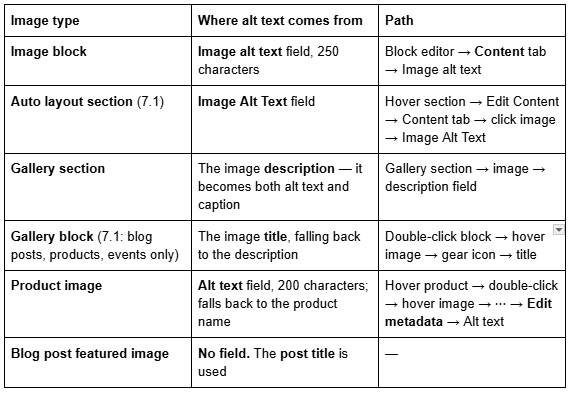
Here is the full matrix, then the two traps, then how to write the text itself.
Where the alt text field is, by image type
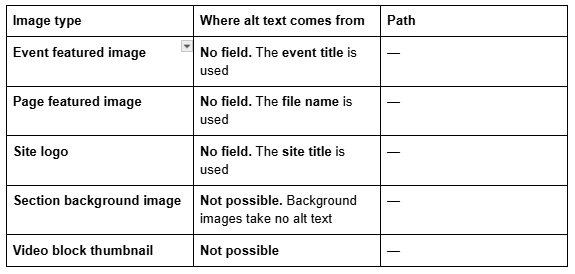
Two rows on that table are doing most of the work on a typical site, and they are the two with no field.
Trap 1 — Your blog post title is your alt text
Squarespace provides no alt-text field for a blog post's featured image. It uses the post title instead, automatically, everywhere the image appears.
We verified this on a live 7.1 blog listing page in August 2026. Every featured image on the listing carried an alt attribute identical to its post title:
<img alt="Why Squarespace Is the Best Platform for Professional Service Businesses in 2026" …>
<img alt="How Professional Services Firms Use Squarespace to Generate More Leads in 2026" …>
That is not a bug and it is not fixable. It has three practical consequences:
1. Your post title is doing double duty. It is the H1, it is the link text on the blog listing, it is the alt text on the featured image, and — via the %i variable in your title format — it is the basis of the SEO title. A title written purely for cleverness is now failing in four places at once.
2. Titles that describe the topic work; titles that describe the image do not. You cannot write alt text describing what is in the photo, because the field does not exist. Accept that the alt text will describe the article rather than the picture, and choose featured images that are topically relevant so the mismatch is small.
3. Very long titles produce very long alt text. There is no truncation. A 95-character title becomes a 95-character alt attribute on every listing page it appears on. Another reason to keep titles inside 60 characters.
Trap 2 — Filenames cannot be changed after upload
Squarespace does not let you rename an uploaded image. The file name is fixed at the moment of upload, it is baked into the CDN URL, and it appears in your sitemap's image:loc values forever.
This matters more than it sounds, because the file name is the last item in Squarespace's alt-text fallback chain. Where no alt text and no description is set — page featured images most obviously — the file name is what screen readers and search engines receive.
On the same live 7.1 site we read, one image on a listing page was serving this:
<img alt="Frame 700 (2).png" …>
That is a Figma export filename, published as alt text, unfixable without deleting and re-uploading the image everywhere it is used.
The rule that follows: rename image files on your computer before you upload them. northfield-physio-clinic-reception.jpg, not IMG_4471.jpg. Two or three descriptive words with hyphens is enough — this is not a keyword field
If you have inherited a site full of Screen+Shot+2024-03-02.png, your options are to re-upload the important ones with better names, or to set proper alt text or descriptions so the filename fallback never fires. The second is faster and achieves most of the benefit.
How to audit this in two minutes: open yourdomain.com/sitemap.xml and read the image:loc values. Every filename on the site is listed there.
The fallback chain, and the two places with no fallback
Squarespace resolves alt text in this order:
The explicit alt-text field, if that image type has one and it is filled in
The image description
The image title (gallery blocks)
The file name
Two exceptions matter: image blocks and auto layout sections have no fallback. Leave those fields blank and the image ships with an empty alt attribute — invisible to screen readers, and carrying no information to a search engine.
That is not always wrong. An empty alt is the correct markup for a purely decorative image, because it tells a screen reader to skip it rather than announcing a filename. The problem is that on most Squarespace sites the empty alts are accidental rather than deliberate, and they sit on images that carry real meaning.
On the live homepage we inspected, ten consecutive images carried alt="". Some of those were decorative background elements where empty is right. The site logo, correctly, carried alt="Squareko" — the site title fallback doing its job.
What alt text is actually for in 2026
Two audiences, in this order of importance.
Screen reader users. This is the primary purpose and the one with a legal dimension in most jurisdictions. Alt text is read aloud in place of the image. Written well, the page makes sense without seeing it; written badly — or as a keyword list — it makes the page worse than no alt text at all.
Search engines, mainly for image search. Google uses alt text to understand what an image depicts, which affects Google Images visibility and gives the surrounding page a small amount of additional context. It is not a ranking lever for the page's main query, and any guide implying that stuffing keywords into alt attributes moves rankings is describing 2011.
There is a third audience worth a sentence: alt text is served when an image fails to load, which on a slow connection is more common than people assume
How to write it
Describe the image, in a sentence, as if to someone on the phone.
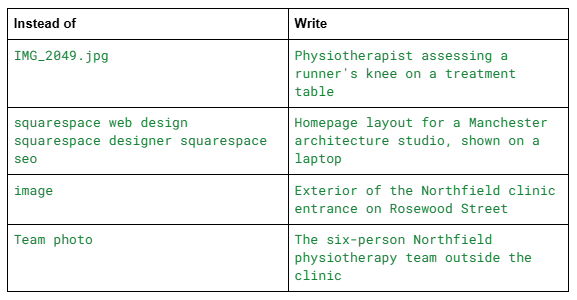
Practical rules:
Aim for 8–16 words. Image blocks cap at 250 characters and product images at 200, but nothing near those limits reads well aloud.
Do not start with "Image of" or "Picture of". Screen readers already announce it as an image.
Include a keyword only if it genuinely describes the picture. If the photo shows a physiotherapist in Manchester, "physiotherapist" and "Manchester" belong there naturally.
Leave decorative images empty deliberately — a divider, a texture, a background flourish. Empty is the correct value; a filename is not.
Text inside an image needs to be in the alt text, because otherwise that text does not exist for search engines or screen readers. Better still, do not put important text in images.
Caption, description, title, alt text: four fields people confuse
Squarespace uses these terms inconsistently across image types, which is most of why this topic is confusing.

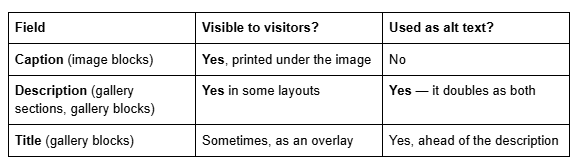
The consequence to hold on to: on a gallery section, the description you write is both the visible caption and the alt text. You cannot separate them. So a description written for visitors — "Summer 2026" — is also what a screen reader announces, and that is not a useful description of a photograph.
On an image block the two are properly separate: the caption is for readers, the alt text is for screen readers and search engines, and they should usually say different things. Writing the same sentence into both is a common and harmless mistake, but it wastes the caption.
The SEO panel's alt-text scanner, and what it misses
Squarespace 7.1's SEO/AI Visibility panel includes an SEO report with an SEO Completion Score that flags missing alt text and offers AI-generated suggestions you can edit or accept.
It is a genuinely useful first pass. Know its boundaries:
It scans image blocks, gallery sections and auto layout sections on regular and collection pages.
It does not scan images inside collection items — so the images inside your blog posts and product descriptions are invisible to it.
It cannot flag anything for image types that have no alt-text field, because there is nothing to fill in.
A 100% completion score therefore means the fields the scanner looks at are populated. It does not mean every image on the site has meaningful alt text, and it says nothing at all about your filenames.
How to check what your site is actually serving
Three checks, all logged out in a private window.
Inspect an image. Right-click → Inspect and read the alt attribute on the <img> tag. This is the only source of truth; the editor shows you fields, not output.
Scan a whole page. In DevTools' Console, document.querySelectorAll('img:not([alt]), img[alt=""]') lists every image with a missing or empty alt attribute. Decide which of them are genuinely decorative.
Audit filenames. Read the image:loc values in yourdomain.com/sitemap.xml.
Run the first check on a blog listing page and you will see the post-title alt text described above with your own eyes, which is usually the moment the implication lands.
One thing you do not need to worry about
Image format is handled for you. The Squarespace CDN serves WebP unconditionally, regardless of what you uploaded or what the browser's Accept header requests. Across 54 Squareko-built Squarespace sites measured in August 2026 — a Playwright/Chromium lab test, unthrottled, single run per site — a median of 86% of images were served as WebP, with 16 sites at 100%.
So the file-format optimisation advice that fills half the guides on this SERP is already done. Upload at 1500–2500px wide (2500px is the maximum Squarespace serves), give the file a sensible name, and spend the time you saved on the alt text instead.
Alt text on Squarespace is a twenty-minute job on a small site once you know which fields exist, and the two traps — post titles becoming alt text, filenames being permanent — are worth knowing before you upload your next hundred images rather than after.
Where it becomes a real project is an established site with a thousand images, no naming discipline, and an accessibility review coming. Working through that systematically is part of what our Squarespace SEO service does on an audit. For a forty-page site, the matrix at the top of this page is the whole job.
FAQ
-
For an image block, open the block editor and click the Content tab — the Image alt text field holds up to 250 characters and saves automatically. Auto layout sections have their own Image Alt Text field. Gallery sections use the image description instead, and product images use an Alt text field reached through Edit metadata.
-
You cannot. Blog post featured images have no alt-text field on Squarespace, and the platform uses the post title as the alt text automatically. The practical consequence is that your post title is your alt text, so write titles that describe the topic clearly and keep them reasonably short.
-
No. Filenames are fixed at upload, baked into the CDN URL and listed in your sitemap permanently. Because the filename is the last fallback in Squarespace's alt-text chain, a badly named file can end up as published alt text. Rename files on your computer before uploading.
-
Yes, as a last resort. The fallback order is the explicit alt-text field, then the image description, then the image title, then the file name. Image blocks and auto layout sections are the exception — they have no fallback, so leaving those blank produces an empty alt attribute.
-
Eight to sixteen words is the practical range. Squarespace allows 250 characters on image blocks and 200 on product images, but alt text is read aloud by screen readers and anything near those limits is unpleasant to listen to. Describe the image in one clear sentence and stop.
-
Modestly, and mostly for image search. Google uses alt text to understand what an image depicts, which affects Google Images visibility and adds a little context to the page. It is not a ranking lever for the page's main query, and keyword-stuffed alt attributes hurt accessibility without helping rankings.

Author Bio
I'm Walid Hasan, a Certified Squarespace Expert and Squarespace Circle Platinum Partner with over 12 years of hands-on experience designing and optimizing high-performing websites. Over the years, I've had the privilege of building more than 2,000 Squarespace websites for clients around the world, always focusing on clean design, strong user experience, and conversion-driven results.