
How to Showcase Property Listings on Squarespace for Real Estate Agents
Introduction
In an increasingly digital property market, your website is often the first impression potential clients will have of your agency. For estate agents using Squarespace, presenting properties effectively online isn't just about aesthetics—it's about creating an intuitive, professional platform that converts visitors into enquiries.
Squarespace offers several native solutions for property listing display, though many agents initially wonder whether the platform supports direct MLS or Rightmove integration. The answer is nuanced: Squarespace doesn't natively connect to these systems, but there are powerful workarounds and third-party solutions that let you build a compelling property showcase. This guide walks you through every option available, from using Squarespace's built-in Blog and Portfolio sections to integrating specialist property search tools.
Key Takeaways How to Showcase Property Listings on Squarespace for Real Estate Agents
Squarespace supports property listings through Blog posts, Portfolio projects, and custom Gallery sections—each suited to different presentation styles
Third-party tools like Estateblock, IDX providers, and custom property APIs allow you to display MLS and Rightmove-equivalent data without manual updates
High-quality property photography requires specific image dimensions and optimised display formats to maintain visual impact on Squarespace
Implementing structured data (How To and FAQ Schema) improves your listings' visibility and provides better user experience
Portfolio pages often generate more enquiries than blog-based listings because they allow richer media integration and detailed property showcases
Professional property showcases require careful consideration of layout, search functionality, and mobile responsiveness
Does Squarespace Support Native Property Listings?
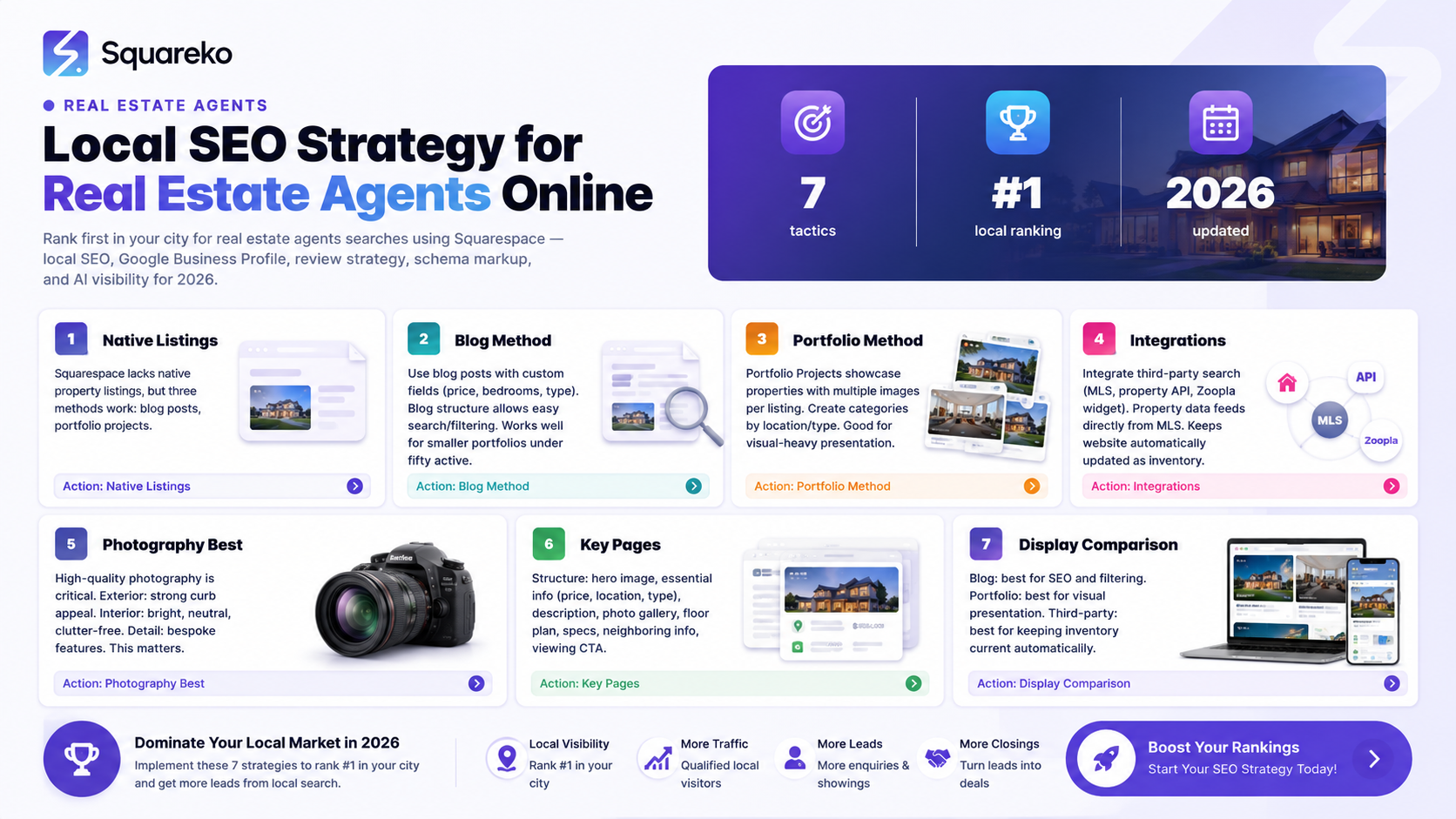
Squarespace doesn't offer a dedicated property listings feature like some purpose-built real estate platforms do. However, this isn't a limitation—it's an opportunity. The platform's flexibility means you can structure property information in ways that suit your specific business model.
Here's what Squarespace provides natively:
Blog section: Posts can display property details, high-resolution images, and descriptions. Each post functions as an individual listing page with comments enabled (helpful for client enquiries).
Portfolio section: Designed for showcasing work visually, Portfolio projects work exceptionally well for property display. They support multiple images per project, embedded media, and rich formatting.
Gallery blocks: Within pages, you can create custom gallery layouts using Squarespace's native Gallery blocks, allowing fine control over image presentation.
Custom sections: Advanced users can build entirely custom property showcase sections using CSS and Squarespace's developer tools.
The key consideration is that Squarespace listings are static—you or your team must manually create and update each property. This is perfect for smaller agencies managing 20–50 properties. For larger portfolios or those requiring real-time MLS synchronisation, integration with third-party tools becomes essential.
Using Squarespace Blog Posts for Property Listings
Blog posts offer a surprisingly effective method for property listing display. Each post becomes a dedicated landing page optimised for search engines, which benefits your SEO if you target location-based keywords.
Setting Up Blog-Based Property Listings
Create a dedicated Blog collection: In Squarespace, navigate to Collections and create a new Blog. Title it "Properties" or "Available Properties" to clarify the content's purpose.
Establish a consistent post structure:
Property title and location (H1)
Price and key specifications (beds, baths, sqft, tenure)
Hero image (1200–2000px wide, optimised for web)
Property description (150–300 words focusing on unique features)
Full image gallery (10–20 high-quality photos)
Location map (Squarespace's native map block)
Contact form for enquiries
Agent details and contact information
Optimise for search: Include location names and property types naturally in post titles and descriptions. A post titled "3-Bed Victorian Terraced House in Notting Hill, London" performs better for SEO than "Property #4521".
Implement categories and tags: Use categories for property type (Residential, Commercial, New Build) and tags for location, price range, and features. This helps visitors filter listings and improves internal linking.
Advantages of Blog-Based Listings
Built-in SEO features: automatic sitemaps, metadata control, internal linking
Comments section allows potential buyers to ask questions publicly (optional)
Blog archives help with long-tail keyword targeting
Simple to update and maintain
RSS feed can be used for syndication to property portals
Limitations
No advanced search filtering without third-party plugins
Limited ability to display live data from external sources
Each property requires manual creation
Leveraging Portfolio Projects for Property Showcases
For many estate agents, Portfolio projects deliver superior results compared to blog posts. This is because Portfolio sections in Squarespace are designed for rich visual presentation—exactly what property marketing requires.
Why Portfolio Projects Outperform Blog Posts
Portfolio projects support:
Multiple images per listing with customisable gallery layouts (grid, carousel, masonry)
Embedded video (YouTube, Vimeo) for property tours
Fuller-width image display, creating more impact
Custom project pages with flexible layout options
Better mobile rendering of image galleries
Cleaner, less "blog-like" aesthetic appropriate for property marketing
Setting Up a Property Portfolio
Create a Portfolio collection: Navigate to Collections > Add Collection > Portfolio. Name it "Property Portfolio" or "Available Listings".
Choose a portfolio layout: Squarespace offers multiple viewing modes:
Grid: Best for showing multiple properties simultaneously
Slideshow: Emphasises individual properties one at a time
List: Displays properties in a text-based format with thumbnails
For property display, grid or masonry layout typically generates the most enquiries.
Populate project pages:
Project title: Property address (e.g., "42 Eaton Square, Belgravia, London SW1X 8AS")
Featured image: Hero photo of the property exterior or most impressive room
Full image gallery: 15–30 professional photographs
Detailed description: Property overview, key features, local amenities, investment potential
Custom text blocks: Floor plan, energy rating, council tax band, ground rent (if applicable)
Video embed: 3D tour, drone footage, or agent commentary
Contact form: Enquiry submission specific to that property
Agent information: Who to contact for viewings
Customise metadata: Set project metadata (date, featured image, visibility) to control how listings appear in the portfolio grid.
Display Optimisation Tips
Use the "Featured" toggle to highlight premium or recently added properties
Implement project categories (e.g., "Residential", "Commercial", "Sold" for case studies)
Add related projects to encourage visitors to browse multiple listings
Use project tags for location, price range, property type, and features
Third-Party Property Search Integration
For agencies requiring live data synchronisation, real-time price updates, or integration with major property portals, third-party tools are necessary. Squarespace doesn't natively connect to MLS (in the UK context, Rightmove or Zoopla), but several specialist services bridge this gap.
IDX (Internet Data Exchange) Tools
IDX providers in the UK include:
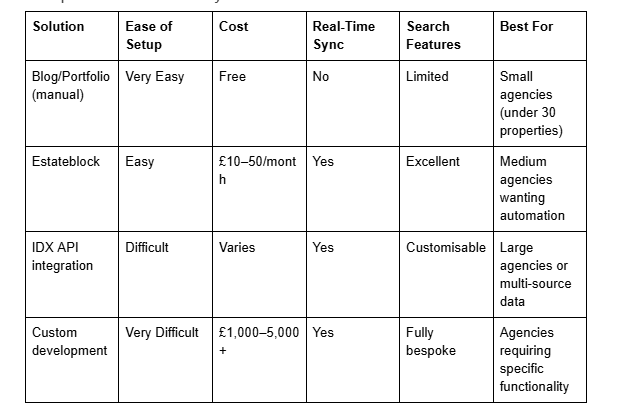
Zoopla API & Rightmove Feeds: Some agencies use RSS feeds from Rightmove or Zoopla to automatically populate Squarespace listings. However, neither platform officially supports this; it requires custom development.
Estateblock: A specialist UK platform designed for estate agents on Squarespace and other website builders. Estateblock syncs your live property data from various sources and displays a professional search interface on your Squarespace site. Properties update automatically, reducing manual work.
Custom Property APIs: Developers can build custom integrations connecting your property management system (if you use one) directly to Squarespace via APIs and webhooks. This requires technical expertise but provides maximum control.
Comparison of Third-Party Solutions
How to Implement Estateblock on Squarespace
Sign up for Estateblock and connect your property source (direct entry, CSV import, or API)
Configure the search interface and styling to match your Squarespace site
Estateblock generates an embed code
Add a new Page in Squarespace, insert a Code block, and paste the embed code
Test the functionality across desktop and mobile devices
Properties update automatically when you change them in Estateblock
This approach eliminates the need to manually update listings whilst maintaining a fully branded experience.
Property Photography Best Practices for Squarespace
The quality of property images directly impacts enquiry rates. Poor photography can damage even a well-designed Squarespace site; professional imagery elevates your entire brand.
Image Dimensions and File Sizes
Hero images (property main photo):
Recommended dimension: 1600 × 1000px (16:10 aspect ratio)
File size: 150–250KB (optimised for web)
Format: JPEG or WebP (avoid PNG unless transparency is needed)
Gallery images (additional property photos):
Dimension: 1200 × 800px (3:2 aspect ratio) or 1200 × 900px (4:3 ratio)
File size: 100–180KB each
Aspect ratio consistency improves visual coherence in gallery views
Thumbnail images (portfolio grid displays):
Squarespace auto-crops these; aim for images with clear focal points centred
A 1200 × 800px image works well and will be intelligently cropped for thumbnails
Optimisation Steps
Shoot in RAW: Professional photographers deliver RAW files; have an editor process these to ensure consistent colour, exposure, and sharpness.
Resize consistently: Use tools like Adobe Lightroom or free alternatives (IrfanView, ImageMagick) to batch-resize images to your chosen dimensions.
Compress for web: Tools like TinyJPG, ImageOptim (Mac), or Squoosh (free online) reduce file size without visible quality loss. Aim for under 200KB per image.
Use descriptive alt text: For each image, provide descriptive alt text: "Modern kitchen with granite worktops and integrated appliances" rather than "image123.jpg". This improves accessibility and SEO.
Order logically: In your gallery, order images by room importance: exterior, living areas, bedrooms, bathrooms, garden. This matches how potential buyers mentally tour a property.
Display Format Recommendations
For Portfolio projects: Use masonry or grid layout with a 3–4 column grid on desktop. This creates visual rhythm and allows 8–12 images to be visible at once.
For Blog posts: Embed images within the text narrative, breaking up descriptions with visuals every 100–150 words.
For Gallery blocks: Use carousel or slideshow format if displaying 15+ images per property; use grid if under 10 images.
Building High-Performing Property Pages That Drive Enquiries
Beyond technical setup, the structure and psychology of your property showcase pages determine enquiry conversion rates.
Essential Page Elements
Clear call-to-action above the fold: Visitors should see an "Enquire About This Property" button within the first screen, not buried after three scrolls. Use contrasting button colours (not the default grey) to increase click-through rates.
Key information immediately visible:
Price
Postcode/area
Number of bedrooms and bathrooms
Property type (terraced, detached, semi, flat, etc.)
Tenure (freehold, leasehold with ground rent details)
Detailed property description: 250–400 words highlighting unique selling points, recent renovations, location advantages, and investment potential. Avoid clichés; instead, be specific: "Victorian original fireplaces" beats "period features".
Location map with context: Beyond the standard Squarespace map block, add information about nearby transport links, schools, amenities. Use Squarespace's built-in Location block or embed a Google Map showing the postcode.
Agent credentials: A photo, name, and direct contact details of the agent handling the property. People buy from people; a professional headshot and personal touch increase enquiry likelihood.
Mobile responsiveness: Test every property page on iOS and Android. Ensure images scale properly, buttons are easy to tap, and text remains legible.
Structured Data Implementation
Adding How To schema and FAQ Schema markup helps search engines understand your content and can improve click-through rates from search results.
HowTo Schema Example for Property Listing:
{
  "@context": "https://schema.org",
  "@type": "HowTo",
  "name": "How to View This Property Listing",
  "step": [
    {
      "@type": "HowToStep",
      "name": "Review property details",
      "text": "Examine the photographs, floor plan, and description to understand the property layout and condition."
    },
    {
      "@type": "HowToStep",
      "name": "Check key information",
      "text": "Note the price, postcode, council tax band, and tenure to ensure it meets your requirements."
    },
    {
      "@type": "HowToStep",
      "name": "Schedule a viewing",
      "text": "Complete the enquiry form or contact the agent directly to arrange a viewing at a convenient time."
    }
  ]
}
FAQ Schema (detailed in the FAQ section below) signals to Google that your page answers common questions, potentially qualifying for FAQ rich snippets in search results.
To add schema to Squarespace, insert code blocks in the footer or use the site-wide code injection panel (Settings > Advanced > Code Injection).
Comparison: Blog vs Portfolio vs Gallery Display Methods
Choosing the right display method depends on your agency's size, technical comfort, and desired functionality. Here's a detailed breakdown.
Blog Posts
Best for: Educational content about properties, location guides, investment tips mixed with individual listings.
Strengths:
Strong SEO for location-based keywords
Built-in internal linking improves site structure
Comments section fosters engagement
Easy to categorise and archive listings
Straightforward publishing workflow
Weaknesses:
Limited image gallery customisation
Less visually impressive than Portfolio
Difficult to implement advanced search
Blog aesthetic doesn't suit all agencies
Enquiry conversion rate: Moderate (3–7% depending on CTA placement and design)
Portfolio Projects
Best for: Agencies wanting professional, visually-led property showcases.
Strengths:
Beautiful image gallery presentation
Supports video embeds natively
Professional aesthetic (not "blog-like")
Better mobile experience for image browsing
Flexible project page layouts
Higher perceived professionalism
Weaknesses:
Limited SEO optimisation options (no tags/categories)
Portfolio URLs are less descriptive for search
No comments/engagement section
Smaller search footprint for long-tail keywords
Enquiry conversion rate: High (6–12% due to visual impact and design)
Gallery Blocks (Custom Pages)
Best for: Building highly customised property showcases with unique layouts.
Strengths:
Maximum design control
Can be embedded within other content
Combine multiple galleries on one page
Flexible masonry/grid options
Weaknesses:
Requires manual page building
No automated filtering or search
More time-consuming to maintain
Limited metadata for SEO
Enquiry conversion rate: Variable (depends on overall page design and user experience)
Recommendation: For most UK estate agencies, Portfolio projects with third-party search integration offer the best balance of aesthetics, functionality, and enquiry generation. Blog posts work well for supplementary location content but should be secondary to visual property showcases.
-
Yes, absolutely. Squarespace supports property listings through Blog posts, Portfolio projects, and custom Gallery sections. You can manually create and manage listings, or integrate third-party tools like Estateblock for automated synchronisation. Squarespace doesn't natively connect to MLS-equivalent systems (Rightmove, Zoopla) in the UK, but third-party integrations bridge this gap effectively.
-
Squarespace has no official integration with UK property portals like Rightmove, Zoopla, or Rightmove's own MLS data. However, specialist tools and custom development can achieve similar results. Estateblock is the most popular UK solution, syncing property data and displaying it within your Squarespace site with automatic updates. For larger operations, custom API integrations can pull data directly from your property management system.
-
Use Portfolio projects with a masonry or grid gallery layout. Optimise images to 1200–800px at 100–180KB file size, order them logically (exterior → living areas → bedrooms → bathrooms), and include descriptive alt text for accessibility and SEO. Ensure each property page has a clear call-to-action above the fold, mobile responsiveness across devices, and at least 10–15 high-quality photographs per listing. Consider embedding 3D tours or drone video for premium properties.
-
Squarespace's native search functionality is limited; it searches page titles and body text but doesn't filter by custom fields like price, bedrooms, or location. For searchable listings, integrate a third-party tool:
Estateblock provides a dedicated search interface with price, bedroom, and location filters
Custom development using Squarespace APIs allows bespoke search functionality
Blog-based listings with categories and tags offer basic filtering through site navigation
-
Not directly without technical intervention. Rightmove and Zoopla don't provide public APIs for this purpose. Solutions include:
Manual updates: Update prices in your Squarespace listings when properties sell or prices change
Estateblock integration: Syncs your live property data (if you input/manage it separately)
Custom API integration: Connect your property management system to Squarespace via webhooks and APIs
RSS feed automation: Some agencies use private Rightmove/Zoopla feeds; this requires custom development and isn't officially supported
-
Recommended: 15–30 professional photographs per property. This provides comprehensive coverage:
1–2 exterior shots
3–4 entrance/hallway
3–4 lounge/living area
2–3 kitchen
2–3 per bedroom (if multiple)
2–3 bathroom
2–3 outdoor space (garden, terrace, parking)
2–3 additional (unique features, views, etc.)
Fewer than 10 images feels incomplete; more than 40 becomes overwhelming. Quality matters far more than quantity—ten stunning photographs outperform thirty mediocre ones.
-
Portfolio is superior for most agencies because it prioritises visual impact and provides better gallery experiences, resulting in higher enquiry rates. Blog posts are better if you're publishing supplementary location content (guides, market insights) alongside listings, or if you're heavily focused on SEO for location-based keywords. Many agencies use both: Portfolio for main property showcases, Blog for educational and location content.
-
Squarespace supports video embeds directly. Options include:
YouTube/Vimeo videos: Upload a property tour and embed the video URL in your Portfolio project or Blog post
Third-party 3D tour platforms: Matterport, iGuide, or VHT provide interactive 3D tours; generate an embed code and insert it into a Code block
Drone footage: Embed aerial property videos from YouTube to showcase gardens, location context, and overall appeal
Embedded videos improve engagement and reduce bounce rates significantly.
Conclusion
Squarespace may not be a purpose-built real estate platform, but its flexibility and design capabilities make it an excellent choice for estate agents wanting a professional online presence. Whether you choose Blog posts for SEO-focused content, Portfolio projects for visual impact, or a combination of both, the platform provides everything needed to showcase properties effectively.
The key to success lies in three areas: professional photography with optimised dimensions and file sizes, clear structuring of property information with prominent calls-to-action, and thoughtful choice of display method based on your agency size and technical resources.
For smaller agencies managing 20–50 properties, manual Blog or Portfolio listings work perfectly. As your portfolio grows or you require real-time data synchronisation with property portals, third-party integrations like Estateblock become invaluable, automating updates and providing powerful search functionality without abandoning your Squarespace site.
The property market is increasingly digital. Your Squarespace website is often the first impression potential buyers and tenants have of your agency. Investing time in a professional, well-organised property showcase directly translates to more enquiries, shorter time-on-market, and better client relationships.
Ready to Build Your Property Showcase?
At Squareko, we specialise in designing and building Squarespace websites for UK estate agencies. We understand the unique challenges of showcasing properties online—from image optimisation to integration with third-party tools and search functionality. Whether you're starting fresh or refining an existing site, our team can help you build a property showcase that generates results.
Get in touch for a consultation and discover how we can transform your property listings into a high-performing sales machine.

About the Author
I'm Walid Hasan, a Certified Squarespace Expert and Squarespace Circle Platinum Partner with over 12 years of hands-on experience designing and optimizing high-performing websites. Over the years, I've had the privilege of building more than 2,000 Squarespace websites for clients around the world, always focusing on clean design, strong user experience, and conversion-driven results.
