
How to Sell Online Fitness Programmes and Courses on Squarespace
Introduction
The fitness industry is shifting. Seven years ago, personal training meant in-person, one-to-one sessions in a studio or gym. Today, fitness professionals make money through multiple channels: one-to-one coaching, group classes, online programmes, digital courses, subscription memberships, and nutrition guidance. If you're still relying solely on selling your time in sessions, you're leaving revenue on the table.
Selling online fitness programmes on Squarespace lets you build scalable, passive income streams alongside your in-person business. A 12-week weight loss programme sold to 50 clients generates revenue independent of your time. A membership community with monthly access to workout videos, nutrition guides, and community support creates recurring revenue. A digital course teaching trainers how to build sustainable habits turns your expertise into a product.
This guide walks you through selling online fitness programmes on Squarespace — from programme design and pricing strategy to technical setup, marketing, and customer delivery. Whether you're creating your first digital product or expanding an established fitness business, you'll learn how to launch a profitable online programme.
Key Takeaways
Digital fitness products solve a real problem: Clients can't always access in-person training; online programmes make professional guidance affordable and flexible.
Squarespace Commerce handles all digital product sales: No third-party platforms needed. Sell directly on your website, keep customer data, and avoid marketplace fees.
Programme pricing strategy determines success: Price too low and you position as low-value; price too high and you won't sell volume. Find your sweet spot based on programme length, inclusion, and positioning.
Video + accountability = conversions: Clients buy workout videos, but they stay (and pay for renewals) because of accountability, community, and results.
Email funnel + product funnel = revenue: Build an email list, nurture with value, and convert subscribers to programme buyers.
Understanding Online Fitness Products
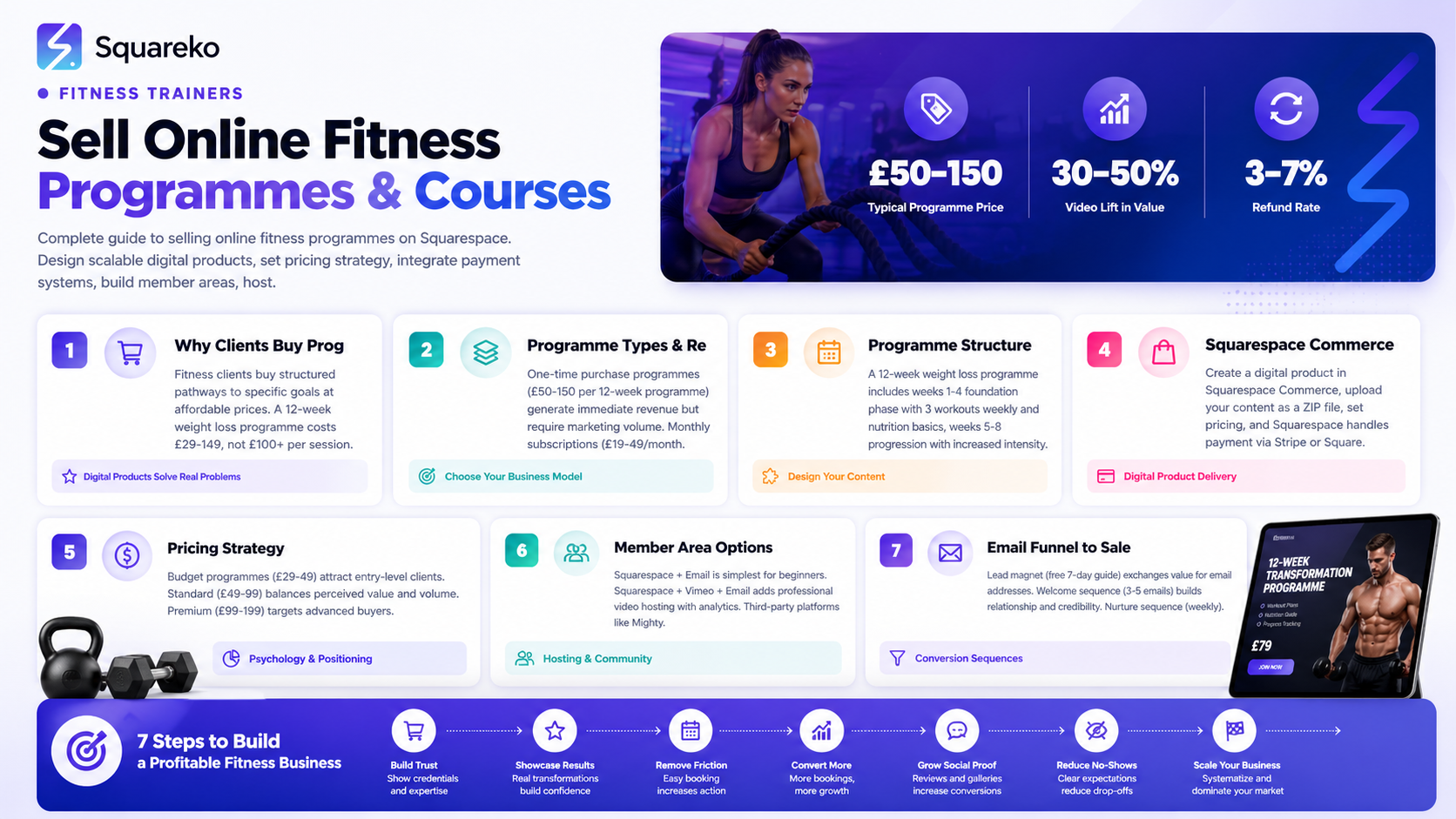
Before building, understand what you're selling and who buys it.
Why Clients Buy Online Fitness Programmes
Fitness clients aren't stupid about the difference between in-person training and online programmes. They understand that a £500 online course isn't the same as £500 of one-to-one coaching. So what do they actually buy when they purchase an online fitness programme?
Results: A structured pathway to a specific goal. A 12-week weight loss programme promises "lose weight in 12 weeks following this plan." That clarity is valuable.
Affordability: One-to-one training costs £50–150 per hour. An online programme costs £29–149. Not everyone can afford premium coaching, but many can afford a structured programme.
Flexibility: No scheduling trainer availability. Work out when it suits you, pause if needed, repeat the programme. Flexibility matters to busy clients.
Guidance: You provide expertise clients don't have. A weight loss programme includes workouts and nutrition guidance and habit-building. That combination is rare and valuable.
Community (optional): A group of people working toward the same goal. Some online programmes include a private community, accountability group, or support channel. This dramatically increases retention and results.
Who Buys Online Fitness Programmes
People too busy for in-person training: Working professionals, parents, shift workers — they want expert guidance but need flexibility.
Price-sensitive clients: Serious about fitness but can't afford £100+ per session one-to-one. Will pay £30–80 for a structured online programme.
People outside your geographic area: Clients in other cities or countries can access your expertise.
Your existing clients: Past clients, referrals, and people who follow you on Instagram might buy a lower-cost online programme after a paid one-to-one consultation.
People building toward one-to-one coaching: Many buy an online programme first, get results, then upgrade to personalised coaching.
Types of Online Fitness Programmes to Sell
Different business models generate different revenue:
One-Time Purchase: Structured Programme
A complete programme sold once, delivered once. Examples:
12-week weight loss programme: £50–150. Includes 3 workouts per week, nutrition guide, progress tracking, email support.
8-week muscle gain for women: £60–120. Includes strength workouts, meal timing guide, supplement guidance, form videos.
4-week home fitness challenge: £29–49. Minimal equipment, short workouts, community challenges, daily check-ins.
Revenue model: Each customer pays once. Repeat purchases happen when they run the programme again or buy another programme. No recurring income.
Best for: Trainers with a strong marketing engine or email list who can sell volume.
Monthly Subscription: Ongoing Access
Recurring monthly or annual charge for continuous access. Examples:
Unlimited workout library: £19–39/month. Clients get new workouts weekly, can follow 4-, 8-, or 12-week programmes, or mix and match.
Personalised programme + accountability: £49–99/month. One-to-one programme recommendations, monthly check-ins, community access.
Group fitness classes on demand: £9–29/month. Unlimited access to recorded classes (HIIT, strength, yoga, etc.).
Revenue model: Recurring. A 100 subscribers × £25/month = £2,500/month recurring revenue.
Best for: Trainers who want predictable monthly income and building a community.
Bundle Model: Multiple Products
Offer different products at different price points. Examples:
Programme library: £19/month for unlimited access to all programmes (beginner, intermediate, advanced).
Tiered membership: Basic (£9/month) = workout library. Plus (£29/month) = workouts + nutrition + community. Premium (£79/month) = workouts + nutrition + community + monthly one-to-one check-in.
Revenue model: Segment customers by willingness to pay. Some will buy premium; others will start with basic.
Creating Your First Online Fitness Programme
Start with one programme before building a library.
Step 1: Define Your Programme Goal
"Online fitness programme" is vague. Define it clearly:
Weight loss programme: Lose 10–15kg in 12 weeks
Strength programme: Build muscle and get strong for beginners
Postpartum fitness: Return to fitness safely after pregnancy in 8 weeks
Athletic performance: Build speed and power for runners
Clear goals help with positioning, marketing, and customer satisfaction.
Step 2: Design the Programme Structure
For a 12-week weight loss programme, you might include:
Weeks 1–4 (Foundation):
3 workouts per week (strength-based, 45 mins each)
Nutrition guide: protein targets, meal timing, hydration
Habit focus: build consistent training + food tracking
Weekly email with motivation and tips
Weeks 5–8 (Progression):
3–4 workouts per week, increased intensity
Nutrition adjustment based on progress
Mini-challenges (steps target, water intake, meal prep)
Weekly check-in form (report progress, ask questions)
Weeks 9–12 (Challenge):
4 workouts per week, peak intensity
Advanced nutrition strategies (calorie cycling, macro timing)
Community challenge (group transformation progress)
End-of-programme celebration and next steps
Step 3: Create Workout Videos
You don't need Hollywood production. Clients want clear, professional-looking workout videos showing:
Exercise demonstrations: Proper form, common mistakes, modifications
Your coaching energy: Encouragement, form cues, motivation
Timing: Cards showing rep counts, rest periods, exercise names
Equipment list: "You'll need dumbbells, a bench, and a mat" upfront
Video quality: 1080p minimum, stable camera (tripod or phone stand), good lighting, clear audio. You can shoot with a smartphone and edit with free software (CapCut, iMovie).
Production approach: Film all videos for week 1, then weeks 2–12. You'll develop a rhythm and improve as you film.
Step 4: Create Supplementary Content
Beyond workout videos, include:
Nutrition guide (PDF): Shopping list, meal examples, macro targets, meal prep tips
Progress tracking sheets: Template for logging workouts, weight, measurements
Habit guide: Building consistency, overcoming obstacles, staying motivated
FAQ document: Common questions answered (form checks, modifications, nutrition timing)
Email sequence: Weekly motivation, tips, answers to common challenges
Squarespace Commerce for Digital Products
Squarespace Commerce is built into every plan and handles digital product sales seamlessly.
Setting Up Squarespace Commerce
Go to Settings → Commerce.
Enable Inventory + Billing (free features on paid plans).
Add a product: Click "Add Product," select "Digital."
Upload your digital files: ZIP file containing all programme files (videos, PDFs, guides).
Set pricing: £49, £79, £149 — whatever your strategy dictates.
Write the product description: Sales copy, not feature list. See next section.
Add a product image: Eye-catching cover image representing the programme (e.g., before/after transformation, workout screenshot, motivational image).
Digital Product Delivery
After a customer purchases:
Instant email confirmation: Squarespace auto-sends order confirmation with purchase details.
Download link: Customer receives a download link (valid for 7 days; they can re-download if needed).
Optional: Customer account: Customer can log in to your Squarespace site and access purchases in their account. This is more professional than pure download links.
Limitations and Workarounds
Limitation 1: No gated member area built-in. Squarespace Commerce doesn't create a locked customer portal where members access content on-site.
Workaround: Deliver a ZIP file containing all content. For ongoing access and community, integrate Squarespace with a separate platform (see Member Area section below).
Limitation 2: Video hosting. Squarespace allows video uploads, but large files (workout videos) are better hosted on Vimeo or YouTube (private links).
Workaround: Upload a programme guide PDF with links to Vimeo videos. More reliable than hosting large files directly.
Setting Up Your Programme Sales Page
Your sales page is where prospects become customers. It must be persuasive, clear, and address objections.
Sales Page Structure
1. Headline (Above the fold):
"Lose 15kg in 12 Weeks (Without Obsession)"
Benefit-driven, specific outcome, removes objection
2. Subheadline:
"A step-by-step programme combining strength training + nutrition guidance so you finally understand how to lose weight sustainably"
Clarifies what they get and how it works
3. Hero image:
Client transformation, you training, or programme results visualisation
High-quality, professional
4. Social proof:
2–3 client testimonials: "I lost 12kg and finally understand how to eat for weight loss" — Sarah M.
Number of students/satisfied customers
5. "What's Included" section:
12 weeks of structured workouts (3 per week, 45 mins each, filmed demonstrations)
Nutrition guide (shopping lists, meal examples, macro targets)
Progress tracking templates and habit-building guide
Email support throughout the programme
30-day money-back guarantee (builds trust)
6. "Who This Is For" section:
You want to lose weight but don't know where to start
You're busy and need flexibility (work out from home, any time)
You're tired of diets and want sustainable weight loss
You want expert guidance without expensive one-to-one coaching
7. "Who This ISN'T For" section (builds credibility):
You expect results without effort
You want to lose 30kg in 4 weeks (unrealistic expectations)
You're looking for medical advice (this is fitness coaching, not medical treatment)
8. FAQ section:
Common objections answered (see FAQ section below)
9. Pricing:
"12-Week Weight Loss Programme: £79"
Optional: Payment plan ("or 2 × £49")
"30-day money-back guarantee — no questions asked"
"Buy now" button
10. Final testimonial:
Your strongest social proof at point-of-purchase
Sales Copy Best Practices
Lead with benefits, not features:
Feature: "Includes workout videos"
Benefit: "Watch from home, anytime that fits your schedule"
Address objections directly:
Objection: "I've tried everything and nothing works"
Answer: "If you've failed at dieting before, strength training + flexible nutrition changes the game. It's not about willpower; it's about the right approach."
Use specific numbers:
Vague: "Many clients see results"
Specific: "Average 10kg weight loss in 12 weeks, with clients reporting more energy, better sleep, and confidence"
Be honest about limitations:
"This is not a quick fix. Weight loss happens over 12 weeks, not 2 weeks. But it's sustainable, and you'll keep the weight off."
Pricing Your Online Fitness Programme
Pricing is psychology. Too low and you position as low-value; too high and you won't sell volume.
Pricing Benchmarks
Online fitness courses: £19–99 (depends on length and positioning)
£19–29: Short courses (4 weeks, basic level)
£49–79: Standard programmes (8–12 weeks, comprehensive)
£99–199: Premium programmes (advanced, includes community/support)
Subscription memberships: £9–99/month
£9–19: Basic (workout library, limited)
£29–49: Standard (workouts + nutrition + community)
£79–149: Premium (everything + personalised check-ins)
Pricing Factors
1. Programme length:
4 weeks: £29–49
8 weeks: £49–79
12 weeks: £59–99
2. Positioning (budget to premium):
Budget (entry-level, "everyone should be able to afford fitness"): £29–49
Standard (proven results, professional quality): £49–99
Premium (exclusive, advanced, high-touch): £99–199
3. Inclusions:
Videos only: Lower price (£29–49)
Videos + nutrition guide + community: Mid-price (£59–99)
Videos + nutrition + community + personalised check-ins: Premium (£99–199)
4. Your positioning:
If you're a known trainer with strong social proof and credentials, charge premium (£79–129).
If you're building your online presence, start mid-range (£49–79) to get traction.
Pricing Strategy Recommendation
Start with this model:
One-time purchase: 12-week programme at £79
At 10 customers/month = £790/month
At 20 customers/month = £1,580/month
50+ customers/month = £3,950/month recurring (from this one programme alone)
Then add tiered options:
Tier 1: 4-week intro programme (£39)
Tier 2: 12-week full programme (£79)
Tier 3: Ongoing membership (£29/month) for unlimited workouts + community
This strategy gives customers entry points at different price levels and allows upselling from intro programme → full programme → ongoing membership.
Member Area and Content Delivery
For ongoing programmes and memberships, you need a member area where customers access content repeatedly.
Option 1: Squarespace + Email Delivery
Setup:
Customer purchases via Squarespace Commerce
Squarespace sends welcome email with login credentials and links
Customer accesses content through password-protected Squarespace page or email links
Pros: Simple, no extra platforms, integrated. Cons: Not ideal for ongoing membership; less engaging than a dedicated member portal.
Option 2: Squarespace + Vimeo (Video) + Email
Setup:
Customer purchases via Squarespace
Welcome email delivers Vimeo links (private/password-protected)
Vimeo hosts all workout videos; customer accesses on Vimeo or embedded on your site
Follow-up emails deliver PDFs, nutrition guides, habit-tracking sheets
Pros: Professional video experience, Vimeo analytics, email convenience. Cons: Content scattered across multiple platforms; less community feel.
Option 3: Squarespace + Third-Party Member Platform
For deeper community, accountability, and engagement:
Platforms:
Mighty Networks: Community platform with chat, direct messages, events (£10–39/month)
Kajabi: All-in-one membership + courses + email (expensive: £99–399/month)
Teachable: Course platform with community features (free plan available)
Circle: Modern membership community (paid plans from $60–300/month)
Setup:
Customer purchases on Squarespace
Welcome email directs them to your member community platform
Customer logs in, accesses videos, PDFs, community, live group calls, etc.
Pros: Professional experience, community engagement, better retention. Cons: Additional cost, platform to manage.
Recommendation for Beginners
Start with Option 2 (Squarespace + Vimeo + Email) because
Low cost: Squarespace (you already have it) + Vimeo Basic (free, or Vimeo Plus £20/month)
Simple to implement: No new platform to learn
Professional delivery: Vimeo videos feel premium
Scalable: Easy to add more programmes without system overload
As you grow and build community demand, consider adding a community platform (Mighty Networks, Circle).
Video Hosting and Integration Options
Workout videos are the core of your online programme. Where and how you host them matters.
Squarespace Video
Pros:
Integrated directly into your site
Looks professional
No third-party login needed
Cons:
Large video files slow your website
Limited analytics (view counts, not engagement)
Not ideal for lots of videos
Best for: 1–5 videos max; e.g., short intro course.
Vimeo
Pros:
Professional video hosting
Excellent analytics (watch time, engagement, drop-off points)
Embed anywhere (your site, email, member platform)
Password protection for private videos
Beautiful player with customisation options
Reliable streaming quality
Cons:
Subscription fee (£0–20/month depending on plan)
Requires account setup
Best for: Multiple workout videos; dedicated fitness programmes.
Pricing:
Free: Limited uploads, basic features
Plus (£20/month): Unlimited uploads, advanced features, analytics
Premium (£75/month): Top-tier, team features
Recommendation: Start with Vimeo Plus (£20/month) for unlimited uploads and professional analytics.
YouTube (Private)
Pros:
Free
Unlimited uploads
Excellent video quality
Integrates with Gmail/Google ecosystem
Cons:
Less professional player (ads, recommendations)
Limited privacy controls (anyone with link can share)
YouTube's algorithm pushes for public content
Best for: Free intro content, lead generation (public videos driving traffic to your paid programmes).
Not recommended for paid programme delivery because privacy/exclusivity feels compromised.
Video Integration Workflow
Example: Delivering a 12-week programme:
Film and edit all workouts (on your phone or camera; edit with CapCut, Adobe Premiere, or iMovie)
Upload to Vimeo — create a folder for each programme (Week 1, Week 2, etc.)
Generate private links — Vimeo generates a unique link per video, password-protected
Bundle in welcome email: "Welcome to your 12-week programme! Here are your workout videos for Week 1. New videos unlock each week. Password: [your password]"
Optional: Embed on Squarespace — Embed Vimeo videos on a password-protected page for easier access
Send weekly emails — Each Monday, email the week's schedule, motivation, and links to week's videos
Building Your Email Funnel to Programme Sales
Email is the bridge from awareness to purchase.
Email Funnel Structure
1. Lead Magnet (free):
"5 Biggest Weight Loss Mistakes" PDF
"Free 7-Day Workout Starter Guide"
"Nutrition Cheat Sheet for Weight Loss"
Goal: Exchange lead magnet for email address.
2. Welcome sequence (3–5 emails):
Email 1: Deliver lead magnet, introduce yourself, explain your approach
Email 2: Story (why you became a trainer, your own transformation)
Email 3: Social proof (client results, testimonials)
Email 4: Objection handling (common weight loss myths debunked)
Email 5: Soft pitch (programme intro, not yet pushing for sale)
Goal: Build relationship, establish authority.
3. Nurture sequence (ongoing):
Weekly fitness tips, nutrition advice, habit-building insights
Testimonials and client stories
Behind-the-scenes content (training videos, life as a trainer)
Occasional soft promotions (new programme, seasonal offer)
Goal: Stay top-of-mind, provide value, build trust.
4. Sales sequence (triggered):
When subscribers haven't purchased, launch a 3–5 email promotional sequence
Email 1: "The biggest problem I see in weight loss" (reframe problem)
Email 2: "Here's how my programme solves that" (solution-focused)
Email 3: Social proof (client results, testimonials)
Email 4: Objection handling (price, time, past failures)
Email 5: Final call to action (offer expires soon, scarcity, last chance)
Goal: Convert subscribers to customers.
Email Service Integration
Squarespace built-in: Squarespace has basic email marketing (Squarespace Email Campaigns), but limited automation.
Better integration: Use Mailchimp (free), ConvertKit (£19+/month), or ActiveCampaign (£15+/month) for:
Automated sequences (welcome series, nurture, sales)
Segmentation (tag customers, segment by purchase, stage)
Analytics (open rates, click rates, conversion tracking)
Setup:
Choose email platform (Mailchimp or ConvertKit recommended)
Create lead magnet landing page (Squarespace or the email platform)
Build email sequences (lead magnet delivery, welcome, nurture, sales)
Promote lead magnet (Instagram, TikTok, Google Ads, organic search)
Watch conversions flow into your email list and then to programme sales
Legal Considerations for Fitness Products
You're selling fitness coaching, not medical advice. Protect yourself legally.
Disclaimer (Essential)
Add to your sales page, programme materials, and email:
"Disclaimer: This programme is for fitness coaching purposes only and does not constitute medical advice. Consult with a healthcare professional before starting any new exercise or nutrition programme. This programme is not designed for diagnosis, treatment, or prevention of disease. You assume full responsibility for your health and fitness decisions."
Terms of Service
You need ToS covering:
Programme licence (customer can use for personal use, not commercial)
No refunds after 30 days (or your refund policy)
Liability waiver
Copyright notice (content is your intellectual property)
Squarespace template: Squarespace provides a basic ToS template. Customise for your specific programmes and payment terms.
Privacy Policy
Cover how you collect and use customer data (email, purchase history, etc.). Squarespace includes a default privacy policy; ensure it complies with GDPR (UK/EU) or other local regulations if applicable.
Client Waiver/Acknowledgement
Before delivering the programme, have customers acknowledge:
They've consulted a doctor if needed
They understand this is fitness coaching, not medical treatment
They assume responsibility for their health
You can add this as a tick-box in your Squarespace checkout or welcome email.
Professional Insurance
Consider professional indemnity insurance covering fitness coaching and online programmes. This protects you if a customer claims injury or harm related to your programme. Cost: £100–300/year depending on coverage.
Launching and Marketing Your Fitness Programme
Build it, and they won't come. You have to market it.
Pre-Launch Strategy (4–6 Weeks Before)
1. Build anticipation:
Tease the programme on Instagram, TikTok, YouTube
Share your development process (filming workouts, writing guides)
Ask followers what they want in a programme (engagement + feedback)
2. Build your email list:
Launch a lead magnet (free guide related to your programme)
Offer early-bird discount (£49 instead of £79) to email subscribers
Target 100–200 emails before launch
3. Gather testimonials:
If you're repurposing an existing programme, use past client testimonials
If it's new, recruit a beta group (5–10 people) to test and provide testimonials in exchange for free/discounted access
4. Create sales materials:
Sales page live on your website
Email sequences ready to deploy
Graphics, videos, copy for social promotion
Launch Week
1. Email your list:
Send 3–4 emails over launch week (announcement, benefits, objection handling, final call)
Offer early-bird discount (24–48 hours)
2. Promote on social:
Post daily on Instagram Stories, TikTok, Reels
Share before/after transformations, testimonials, programme details
Use relevant hashtags (#personaltrainer, #fitnessprogram, #weightloss)
3. Ask for referrals:
Email existing clients: "I've launched a programme for people who can't afford one-to-one coaching. If you know anyone interested, here's a referral link. They get 10% off; you get £10 credit toward your next session."
4. Consider paid ads:
Facebook/Instagram ads targeting fitness interests, demographics matching your ideal customer
Budget: Start with £5–10/day, scale if it converts
Target: Break-even cost per customer (aim for £20 cost per £79 sale = 25% customer acquisition cost)
Ongoing Marketing
1. Monthly emails:
Nurture subscribers with fitness tips, nutrition advice, lifestyle content
Soft promotions (new programme, seasonal discount)
Testimonials and case studies
2. Social content:
Share workout tips, nutrition hacks, mindset advice
Showcase results from your programme
Behind-the-scenes of your business
3. Referral programme:
"Refer a friend, both get £20 credit toward any product"
Simple structure: Unique referral link per customer, automatic tracking via Squarespace or affiliate software (Refersion, Refil)
4. Seasonal promotions:
"New Year Challenge" (Jan): Discounted programmes, group energy
"Summer Body Special" (April–May): Time-sensitive offer
"Back to School / Back to Fitness" (Sept): Target busy professionals
Mid-Post CTA: Ready to Launch Your Online Fitness Programme?
Selling online fitness programmes is one of the highest-impact ways to scale your fitness business. Instead of trading hours for money in one-to-one sessions, you build programmes once and sell them hundreds of times. You've learned the strategy, technical setup, and marketing approach. Now it's time to build.
At Squareko, we help fitness professionals launch profitable online programmes on Squarespace. We'll help you design your programme, set up Squarespace Commerce, create professional sales pages that convert, integrate email marketing, and execute a launch strategy that generates real sales. Whether you're a personal trainer adding a digital product to your offering or an online coach building your entire business around programmes, we've helped dozens of fitness professionals go from "I want to sell a programme" to "I'm selling 20+ programmes per month."
Frequently Asked Questions
-
Yes. Squarespace Commerce supports digital product sales directly. You set up the product, upload your files (workout videos, PDFs, guides), set the price, and Squarespace handles all sales, payments, and file delivery. No third-party platforms needed, though you may choose to use Vimeo for video hosting and Mailchimp or ConvertKit for email marketing.
-
Most online fitness programmes price between £39–149 depending on length and positioning. A 12-week weight loss programme typically £59–99. A 4-week intro programme £29–49. A monthly subscription £9–49/month. Price based on: programme length (longer = higher), positioning (premium brand = higher), inclusions (community/support = higher), and your target market. Start mid-range (£49–79) to test demand, then adjust.
-
Video is strongly preferred. Clients want to see proper form, get coaching cues, and follow along. A PDF-only programme will sell, but adds video workouts increases perceived value and conversions by 30–50%. You don't need Hollywood production; smartphone video with clear form demonstration is sufficient. Use Vimeo to host videos professionally.
-
Digital products are hard to protect completely, but best practices minimise piracy: (1) Password-protect videos and PDFs (don't make them downloadable without login). (2) Brand your materials with your name/logo. (3) Use Vimeo or your own platform, not YouTube public links. (4) Include a disclaimer that content is for personal use only. (5) Embed watermarks on PDFs. (6) Monitor sharing on Reddit, fitness forums, etc. Most customers respect your work; some will share. Focus on the 90% who pay.
-
Yes. A 30-day money-back guarantee builds trust and reduces purchase hesitation. Most buyers who get results don't ask for refunds. Refund rate is typically 3–7% of sales. The increase in conversions (20–30% lift) outweighs refund costs. Frame it: "30-day results-based guarantee. If you don't see measurable progress, full refund, no questions asked."
-
Options: (1) Email check-ins (weekly form asking progress and questions). (2) Private Facebook Group (free to create, but requires management). (3) Mighty Networks or Circle (dedicated community platform, £10–100/month). (4) WhatsApp group (simple, but less professional). Start with email check-ins for simplicity. As you grow, add a community platform if customers demand it. Community dramatically increases retention and repeat purchases.
-
Yes. That's the whole point of online programmes — one-to-many sales. You create the programme once, sell it to 100 customers at £79 = £7,900 revenue. Unlike one-to-one coaching (one person, one time), online programmes scale infinitely. One customer or 1,000 customers get the same content.
-
Set expectations upfront: "Email support available Monday–Friday, 24-hour response time." Build a FAQ document answering common questions. Provide form check video tutorials for every exercise. Monitor your email and respond promptly. For larger communities, add a private community platform where customers ask questions and help each other. You don't need real-time support; asynchronous (non-real-time) support is fine.
Ready to Sell Your Online Fitness Programmes?
You've learned how to create programmes, price them, set up Squarespace Commerce, and market them to real customers. Now it's time to execute and start generating revenue from digital fitness products.
At Squareko, we help fitness professionals launch profitable online programmes on Squarespace. From programme design and pricing strategy to technical setup, professional sales pages, email marketing integration, and launch execution, we handle it all. You focus on creating great programmes; we ensure they sell.
Get in touch with Squareko for a free consultation about launching your online fitness programme. We'll discuss your programme ideas, recommend pricing strategy, help you choose the right Squarespace setup, and create a launch plan that generates real sales and recurring revenue.

From custom website design to SEO strategy, we help businesses launch a site that looks professional and performs better.

About the Author
Walid | squareko
I'm Walid Hasan, a Certified Squarespace Expert and Squarespace Circle Platinum Partner with over 12 years of hands-on experience designing and optimizing high-performing websites. Over the years, I've had the privilege of building more than 2,000 Squarespace websites for clients around the world, always focusing on clean design, strong user experience, and conversion-driven results.
